.

Concept, graphics, idea from Daniel S. Christian:
But free for your taking and implementing!

.

What:

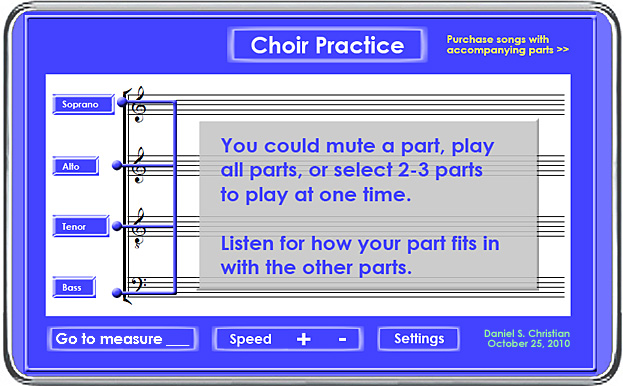
  • Choir Practice: A mobile-based method of practicing one’s part

Features

  • The ability for the choir member to go directly to measure ____
  • The ability for the choir member to highlight measures ____ through ____ (like highlighting text in Microsoft Word), then click on the play button to loop through those measures
  • One could speed up a song up or slow it down (without affecting pitch)
  • The application would allow for all of the vocal parts to begin playing upon downloading a pre-packaged song or the application could always start playing with a certain part (i.e. 1st or 2nd soprano, alto, tenor, or bass)
  • The musical notes could be the same color or one could choose to display the notes in different colors
  • Bonus features might include a video of a director directing this song

Why:

  • This type of thing would be a great cross-disciplinary assignment for your institution’s curriculum — Music and Computer Science come to mind for this application
  • Your institution could sell this application on Apple’s App Store to develop a new revenue stream
  • Your choirs could produce the packaged songs / tracks
  • Plus, such an app would help choir members learn their parts — 24x7x365 — in the car, on the road, in the gym, etc.
  • Enhances one’s ability to listen to other parts as well
  • Aids your marketing departments as you point to this as a solid deliverable from your programs
  • Creates “study aids” for your own school’s choirs/students as well as for choirs at smaller churches and institutions (worldwide)
  • Helps those choir members who don’t have access to a piano or don’t know how to play a piano

Have fun whomever takes this idea and runs with it! The choirs of the world will appreciate you — and so will their audiences!   🙂

Along these lines…another win-win here includes:

That students in the future (I hope) will be able to choose from a multitude of potential roles when presented with multi-disciplinary projects/assignments/courses:
  • Vocalists, pianists, and other type of musicians
  • Composers
  • Programmers
  • Graphic artists
  • Videographers / video editors
  • Audio specialists
  • Writers
  • Project Managers
  • Actresses/Actors
  • etc.
As such, students could:
  • Learn to appreciate other disciplines
  • Participate in/contribute to projects that could be published on the web
  • Exercise their creativity
  • Practice being innovative


Daniel Christian
Adobe Project Rome brings multimedia authoring to education — from The Journal by David Nagel

Adobe has launched a new multimedia authoring tool for education. Dubbed Project Rome, the hosted service (also available as a desktop AIR app) went into public preview Sunday morning. Adobe said it’s looking for schools to participate in pilot programs using the software, especially those schools that have adopted Google’s Apps for Education or the open source learning management system Moodle.

Project Rome for Education is designed to allow students and educators to create multimedia presentations that include text, video, audio, images, animation, and interactivity. Its layout engine, which resembles the one found in Adobe’s professional page layout tool, InDesign, provides a full range of typeface and formatting controls, as well as paragraph controls, text flow from one text box to another, and text wrap for automatically wrapping copy around images and other page elements.

It also offers drawing tools and a Flash-like timeline for animating elements based on various parameters, such as opacity, position, rotation, and other transformations.

Also see:

Project Rome for Educators

Project ROME for Education Frequently Asked Questions

What is Project ROME for Education?
Available as a pilot program for school districts, Project ROME for Education lets students and educators express, collaborate and communicate ideas using graphics, photos, text, video, audio and animation in a simple, unified content creation and publishing environment to enhance the learning experience. Project ROME for Education is designed specifically for students in classroom settings. For more information, visit http://rome.adobe.com/education.

The Future of Television and the Digital Living Room — from FastCompany.com by Mark Suster

Nobody can predict 100% what the future of television will be so I won’t pretend that I know the answers. But I do know that it will form a huge basis of the future of the Internet, how we consume media, how we communicate with friends, how we play games, and how we shop. Video will be inextricably linked to the future of the Internet and consumption between PCs, mobile devices, and TVs will merge. Note that I didn’t say there will be total “convergence”–but I believe the services will inter-operate.

The digital living room battle will take place over the next 5-10 years, not just the next 1-2. But with the introduction of Apple TV, Google TV, the Boxee Box, and other initiatives it’s clear that this battle will heat up in 2011. The following is not meant to be a deep dive but rather a framework for understanding the issues. This is where the digital media puck is going.

While we won’t get through all of this, here are some of the issues in the industry that I plan to bring up and ones I hope we’ll discuss tomorrow…

Top 100 Tools for Learning 2010: Final list, presentation and more — from Jane Knight

Yesterday I finalised the Top 100 Tools for Learning 2010 list.  Many thanks to the 545 people who shared their Top 10 Tools for Learning and contributed to the building of the list.   Although this list is available online, I also created this presentation which provides the information as a slideset – embedded below.

My Photo

Jane Hart, a Social Business Consultant, and founder
of the Centre for Learning & Performance Technologies.

Damaka extends enterprise video conferencing to major smartphones and tablet endpoints — from finance.yahoo.com
Mobile UCC solution offers industry-first interoperability with enterprise video conferencing endpoints, including Tandberg and Polycom

RICHARDSON, Texas, Oct. 18 /PRNewswire/ — Damaka®, a technology pioneer in Mobile Unified Communications and Collaboration (UCC), today unveiled Enterprise Mobile Video™, delivering enterprise video conferencing to smartphones and tablets.

Seven steps for using more rich media in learning — from eLearning Roadtrip by Ellen Wagner

Using VoiceThread in Moodle — Documentation — from Free Technology for Teachers by Richard Byrne

For users of Moodle, VoiceThread recently announced some useful new information. VoiceThread has  published documentation for integrating VoiceThread modules into Moodle 1.9. In this documentation you will find all you need to know to embed VoiceThreads into Moodle, creating VoiceThread assignments with Moodle, and authenticating with single sign-on. …

Tagged with: • • • • • •  

Digital Community, Digital Citizen -- a new book by Jason Ohler

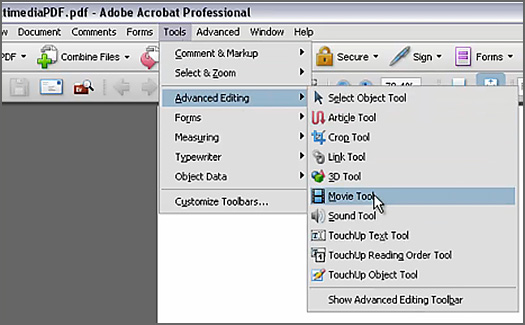
Using multimedia in a PDF — from jiscdigitalmedia.ac.uk

.

Using multimedia in a PDF file

Learning powered by technology — from ednetinsight.com
Karen Cator, Director, Office of Educational Technology, U.S. Department of Education

The vision and model of learning articulated in the National Education Technology Plan, Transforming American Education: Learning Powered by Technology, was informed by the ideas, case studies, research, and involvement of thousands of teachers, parents, students, researchers, professors, and policymakers. The model posits that in order to transform American education, we need to leverage modern technologies to create a massively customized, superpowered learning environment tuned for this generation of students.

We are seeing more and more examples of effective and compelling learning opportunities in and out of classrooms using digital resources and online collaborative environments to engage and inform teachers and students. There are countless articles published, stories told, and student work displayed showcasing global interactions, presentations of creative solutions to complex problems, and professional grade works done by students and worthy of a wide audience. We are observing teachers challenging students with interesting assignments that allow for exploration and practice using technologies to do their work.

We see increasing inclusion of social and participatory experiences coupled with online learning. And alongside this advent of social networking technologies comes the ability to access presentations, lectures, and interviews with experts; repositories of highly produced media; and a wealth of museum, national, state, and local park resources and library and reference materials previously available only in physical locations. All of this is “at our fingertips” and “on the go” in our increasingly mobile-enabled world. These existing and emerging technologies, resources, and interactions combine to create what should be the golden age of teaching and learning.

So as we manage this transition from a predominantly print-based classroom to a digital learning environment, we have been launching a number of initiatives. Here are a few worth mentioning…

© 2025 | Daniel Christian