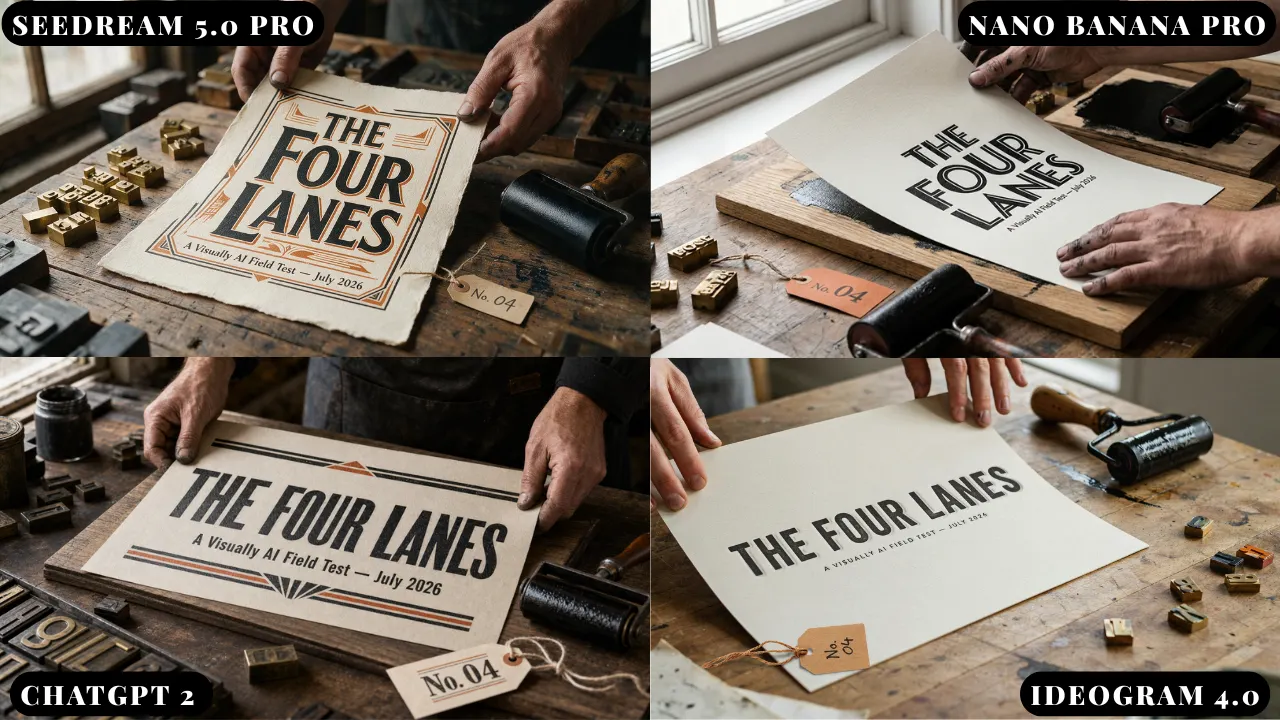
The image model race just split into four lanes –> find which model fits your work — from  heatherbcooper.substack.com by Heather B. Cooper

In today’s edition:

  • Stop asking which image model is “best” – the top 4
  • Seedream 5.0 Pro’s layer trick
  • Image & Video Prompts
 

NotebookLM’s 60-second videos turned my doomscrolling curse into something useful — from digitaltrends.com by Shimul Sood

Google has announced Short Video Overviews for NotebookLM, a feature that turns dense documents and complicated sources into 60-second vertical videos that explain key ideas. Instead of staring at pages of notes, you get a quick visual walkthrough of the concept you’re trying to understand.


Pinpoint, Explained — from wondertools.substack.com by Jeremy Caplan
A guide to Google’s free tool, now open to all


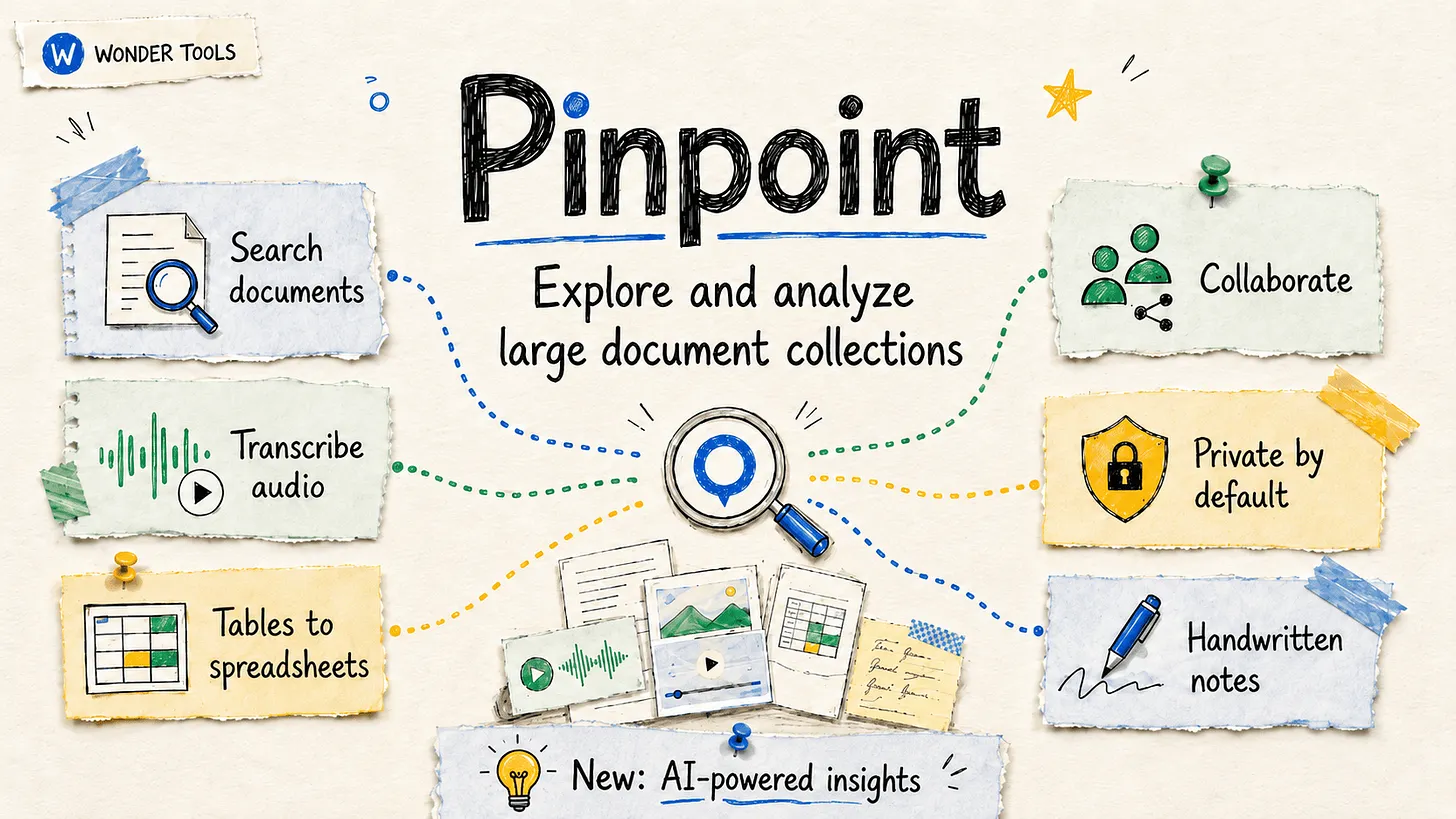
.Jeremy prompted ChatGPT to generate illustrations in his post.

.


Learn about Pinpoint— from support.google.com

Pinpoint is an AI-powered research platform designed to help journalists and academics analyze large collections of documents. With Pinpoint, you can:

  • Analyze massive collections: Easily search, filter, transcribe and organize thousands of documents, including PDFs, images, and audio files.
  • Leverage generative AI: Use Gemini’s capabilities to answer research questions together with supporting evidence found in your documents.
  • Foster collaborative research: share your work with colleagues and tackle large scale projects as a team. You can also publicly share – supporting community-driven research.

For assistance with Pinpoint, please consult our Community Forum or you can contact our support team.


Want Students to Build a Healthier Relationship With Technology? Start With The Arts — from techlearning.com by Adrianna Marshall
Arts classrooms demonstrate what technology integration at its best can look like

But at a moment defined by rapid AI adoption and ongoing debates about screen time, the argument for protecting and investing in arts education needs to take on a new tone. The arts continue to be one of the most effective places in school for students to build healthier, more intentional relationships with technology.

In short, in the age of AI, we need the arts more than ever.

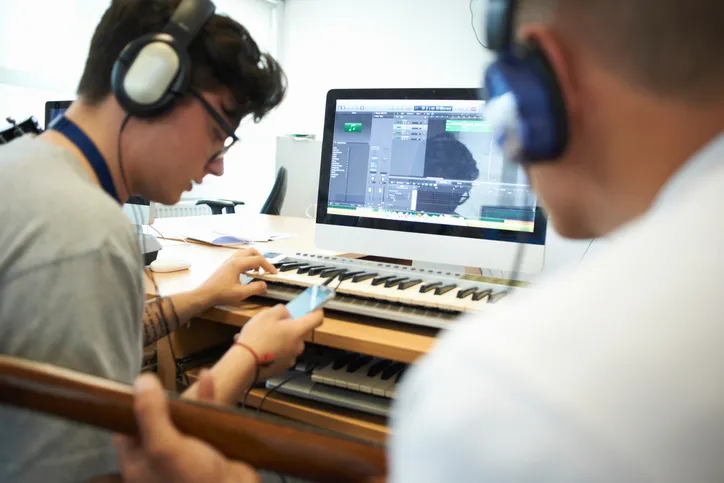
Digital composition software, notation tools, and recording platforms allow students to experiment, revise, and refine their ideas in ways that would have been far more time-consuming a decade ago. Students can layer tracks, hear immediate playback, annotate their own scores, and collaborate across devices. The same is true in other contexts besides music; in visual arts, for instance, a variety of digital drawing and painting platforms enable students to practice with new mediums, styles, and techniques without having to worry about supplies or messes. But in either case, the core intellectual work of looking and listening critically, understanding structure, and making aesthetic choices remains entirely human and part of the learning.


From DSC:
I agree. At one of my previous positions, I spent 10 years supervising a digital studio — helping professors and students use a variety of applications to create things. The applications were from Adobe, Apple, and a variety of smaller vendors. The deliverables could be graphics, edited soundtracks, music, videos, flyers, posters, collages, edited photographs, presentations, websites, and more. I longed for people to discover the power of multimedia to communicate their messages, tell stories, stir emotion, powerfully engage themselves (and others), and unleash their creativity.

There were several obstacles to our digital studio being more impactful at that institution. It was under the IT department, not the academic side of the house. It was in the basement of the library, where few students and faculty traveled. During those years, it was highly uncommon for faculty members to require multimedia-based assignments — so many students had to WANT to develop these skills on their own time. The majority of students didn’t see the value in developing the types of digital skills that we were trying to build…or they didn’t have the time.


Also relevant/see:


6 Reasons Universities Are Building Media Labs Now — from edtechmagazine.com by Brad Grimes
Digital production centers help institutions close the gap between academic training and professional practice.

Higher education is undergoing a significant transformation in how it prepares the next generation of media professionals. Across the country, universities are investing in state-of-the-art media labs — facilities built not around traditional classroom instruction, but around the tools, workflows and collaborative environments that define today’s professional production landscape. These spaces represent a fundamental rethinking of what it means to train students for careers in film, animation, gaming and digital storytelling.


Meta, YouTube found negligent in landmark social media addiction trial — from by Ian Duncan
A Los Angeles jury awarded $3 million in compensation to a young woman who alleged she had become addicted to the platforms as a child.

A Los Angeles jury found social media giant Meta and video platform YouTube negligent in a landmark trial, awarding $3 million in compensation to a young woman who alleged she had become addicted to the companies’ platforms as a child.

The verdict came at the end of a month-long trial that featured testimony by Facebook founder Mark Zuckerberg and a day after a jury in New Mexico ordered Meta to pay $375 million in penalties for endangering children. The twin verdicts are signs that legal protections which for decades made tech companies seem almost impervious are beginning to crack, as lawyers accuse the platforms of putting addictive or otherwise harmful features into their platforms.

With the armor of Silicon Valley companies fractured, they will now have to size up their appetite for future courtroom battles. There are thousands more lawsuits waiting to be heard, with young internet users, parents, school districts and state attorneys general all seeking to hold the industry accountable.


Kling 3.0 just launched. The best video model yet. — from heatherbcooper.substack.com by Heather Cooper
& workflows from Imagine Art 1.5 pro, Pixverse Real-Time Video & Genspark

In today’s edition:

  • Kling 3.0: Everyone a Director
  • Character consistency, native audio, 15-second generations & first results
  • Image & Video Prompts
  • Imagine Art 1.5 Pro, Genspark AI Workspace 2.0 & PixVerse Real-Time Video Workflows

Kling 3.0: Everyone a Director
Kling just dropped version 3.0, and it’s a legitimate leap forward for AI video production (Kling is the GOAT). After spending early access time testing the new capabilities, I can confirm this is the most significant update to video generation tools I’ve seen in months.

Key highlights:

  • Character & Element Consistency:
  • Flexible Video Production:
  • Native Audio with Dialogue & Singing:
  • Enhanced Image Generation:
  • Professional Output:
 

Which AI Video Tool Is Most Powerful for L&D Teams? — from by Dr. Philippa Hardman
Evaluating four popular AI video generation platforms through a learning-science lens

Happy new year! One of the biggest L&D stories of 2025 was the rise to fame among L&D teams of AI video generator tools. As we head into 2026, platforms like Colossyan, Synthesia, HeyGen, and NotebookLM’s video creation feature are firmly embedded in most L&D tech stacks. These tools promise rapid production and multi-language output at significantly reduced costs —and they deliver on a lot of that.

But something has been playing on my mind: we rarely evaluate these tools on what matters most for learning design—whether they enable us to build instructional content that actually enables learning.

So, I spent some time over the holiday digging into this question: do the AI video tools we use most in L&D create content that supports substantive learning?

To answer it, I took two decades of learning science research and translated it into a scoring rubric. Then I scored the four most popular AI video generation platforms among L&D professionals against the rubric.
.


For an AI-based tool or two — as they regard higher ed — see:

5 new tools worth trying — from wondertools.substack.com by Jeremy Kaplan

YouTube to NotebookLM: Import a Whole Playlist or Channel in One Click
YouTube to NotebookLM is a remarkably useful new Chrome extension that lets you bulk-add any YouTube playlists, channels, or search results into NotebookLM. for AI-powered analysis.

What to try

  • Find or create YouTube playlists on topics of interest. Then use this extension to ingest those playlists into NotebookLM. The videos are automatically indexed, and within minutes you can create reports, slides, and infographics to enhance your learning.
  • Summarize a playlist or channel with an audio or video overview. Or create quizzes, flash cards, data tables, or mind maps to explore a batch of YouTube videos. Or have a chat in NotebookLM with your favorite video channel. Check my recent post for some YouTube channels to try.
 

People Watched 700 Million Hours of YouTube Podcasts on TV in October — from bloomberg.com (this article is behind a paywall)

  • That’s up from 400 million hours a year ago as podcasts become the new late-night TV.
  • YouTube Wins Over TV Audience With Video Podcasts.
  • YouTube is dominating in the living room.
 

4 Simple & Easy Ways to Use AI to Differentiate Instruction — from mindfulaiedu.substack.com (Mindful AI for Education) by Dani Kachorsky, PhD
Designing for All Learners with AI and Universal Design Learning

So this year, I’ve been exploring new ways that AI can help support students with disabilities—students on IEPs, learning plans, or 504s—and, honestly, it’s changing the way I think about differentiation in general.

As a quick note, a lot of what I’m finding applies just as well to English language learners or really to any students. One of the big ideas behind Universal Design for Learning (UDL) is that accommodations and strategies designed for students with disabilities are often just good teaching practices. When we plan instruction that’s accessible to the widest possible range of learners, everyone benefits. For example, UDL encourages explaining things in multiple modes—written, visual, auditory, kinesthetic—because people access information differently. I hear students say they’re “visual learners,” but I think everyone is a visual learner, and an auditory learner, and a kinesthetic learner. The more ways we present information, the more likely it is to stick.

So, with that in mind, here are four ways I’ve been using AI to differentiate instruction for students with disabilities (and, really, everyone else too):


The Periodic Table of AI Tools In Education To Try Today — from ictevangelist.com by Mark Anderson

What I’ve tried to do is bring together genuinely useful AI tools that I know are already making a difference.

For colleagues wanting to explore further, I’m sharing the list exactly as it appears in the table, including website links, grouped by category below. Please do check it out, as along with links to all of the resources, I’ve also written a brief summary explaining what each of the different tools do and how they can help.


Seven Hard-Won Lessons from Building AI Learning Tools — from linkedin.com by Louise Worgan

Last week, I wrapped up Dr Philippa Hardman’s intensive bootcamp on AI in learning design. Four conversations, countless iterations, and more than a few humbling moments later – here’s what I am left thinking about.


Finally Catching Up to the New Models — from michellekassorla.substack.com by Michelle Kassorla
There are some amazing things happening out there!

An aside: Google is working on a new vision for textbooks that can be easily differentiated based on the beautiful success for NotebookLM. You can get on the waiting list for that tool by going to LearnYourWay.withgoogle.com.

Nano Banana Pro
Sticking with the Google tools for now, Nano Banana Pro (which you can use for free on Google’s AI Studio), is doing something that everyone has been waiting a long time for: it adds correct text to images.


Introducing AI assistants with memory — from perplexity.ai

The simple act of remembering is the crux of how we navigate the world: it shapes our experiences, informs our decisions, and helps us anticipate what comes next. For AI agents like Comet Assistant, that continuity leads to a more powerful, personalized experience.

Today we are announcing new personalization features to remember your preferences, interests, and conversations. Perplexity now synthesizes them automatically like memory, for valuable context on relevant tasks. Answers are smarter, faster, and more personalized, no matter how you work.

From DSC :
This should be important as we look at learning-related applications for AI.


For the last three days, my Substack has been in the top “Rising in Education” list. I realize this is based on a hugely flawed metric, but it still feels good. ?

– Michael G Wagner

Read on Substack


I’m a Professor. A.I. Has Changed My Classroom, but Not for the Worse. — from nytimes.com by Carlo Rotella [this should be a gifted article]
My students’ easy access to chatbots forced me to make humanities instruction even more human.


Adobe Reinvents its Entire Creative Suite with AI Co-Pilots, Custom Models, and a New Open Platform — from theneuron.ai by Grant Harvey
Adobe just put an AI co-pilot in every one of its apps, letting you chat with Photoshop, train models on your own style, and generate entire videos with a single subscription that now includes top models from Google, Runway, and Pika.

Adobe came to play, y’all.

At Adobe MAX 2025 in Los Angeles, the company dropped an entire creative AI ecosystem that touches every single part of the creative workflow. In our opinion, all these new features aren’t about replacing creators; it’s about empowering them with superpowers they can actually control.

Adobe’s new plan is to put an AI co-pilot in every single app.

  • For professionals, the game-changer is Firefly Custom Models. Start training one now to create a consistent, on-brand look for all your assets.
  • For everyday creators, the AI Assistants in Photoshop and Express will drastically speed up your workflow.
  • The best place to start is the Photoshop AI Assistant (currently in private beta), which offers a powerful glimpse into the future of creative software—a future where you’re less of a button-pusher and more of a creative director.

Adobe MAX Day 2: The Storyteller Is Still King, But AI Is Their New Superpower — from theneuron.ai by Grant Harvey
Adobe’s Day 2 keynote showcased a suite of AI-powered creative tools designed to accelerate workflows, but the real message from creators like Mark Rober and James Gunn was clear: technology serves the story, not the other way around.

On the second day of its annual MAX conference, Adobe drove home a message that has been echoing through the creative industry for the past year: AI is not a replacement, but a partner. The keynote stage featured a powerful trio of modern storytellers—YouTube creator Brandon Baum, science educator and viral video wizard Mark Rober, and Hollywood director James Gunn—who each offered a unique perspective on a shared theme: technology is a powerful tool, but human instinct, hard work, and the timeless art of storytelling remain paramount.

From DSC:
As Grant mentioned, the demos dealt with ideation, image generation, video generation, audio generation, and editing.


Adobe Max 2025: all the latest creative tools and AI announcements — from theverge.com by Jess Weatherbed

The creative software giant is launching new generative AI tools that make digital voiceovers and custom soundtracks for videos, and adding AI assistants to Express and Photoshop for web that edit entire projects using descriptive prompts. And that’s just the start, because Adobe is planning to eventually bring AI assistants to all of its design apps.


Also see Adobe Delivers New AI Innovations, Assistants and Models Across Creative Cloud to Empower Creative Professionals plus other items from the News section from Adobe


2. Concern and excitement about AI — from pewresearch.org by Jacob Poushter,Moira Faganand Manolo Corichi

Key findings

  • A median of 34% of adults across 25 countries are more concerned than excited about the increased use of artificial intelligence in daily life. A median of 42% are equally concerned and excited, and 16% are more excited than concerned.
  • Older adults, women, people with less education and those who use the internet less often are particularly likely to be more concerned than excited.

Also relevant here:


AI Video Wars include Veo 3.1, Sora 2, Ray3, Kling 2.5 + Wan 2.5 — from heatherbcooper.substack.com by Heather Cooper
House of David Season 2 is here!

In today’s edition:

  • Veo 3.1 brings richer audio and object-level editing to Google Flow
  • Sora 2 is here with Cameo self-insertion and collaborative Remix features
  • Ray3 brings world-first reasoning and HDR to video generation
  • Kling 2.5 Turbo delivers faster, cheaper, more consistent results
  • WAN 2.5 revolutionizes talking head creation with perfect audio sync
  • House of David Season 2 Trailer
  • HeyGen Agent, Hailuo Agent, Topaz Astra, and Lovable Cloud updates
  • Image & Video Prompts

From DSC:
By the way, the House of David (which Heather referred to) is very well done! I enjoyed watching Season 1. Like The Chosen, it brings the Bible to life in excellent, impactful ways! Both series convey the context and cultural tensions at the time. Both series are an answer to prayer for me and many others — as they are professionally-done. Both series match anything that comes out of Hollywood in terms of the acting, script writing, music, the sets, etc.  Both are very well done.
.


An item re: Sora:


Other items re: Open AI’s new Atlas browser:

Introducing ChatGPT Atlas — from openai.com
The browser with ChatGPT built in.

[On 10/21/25] we’re introducing ChatGPT Atlas, a new web browser built with ChatGPT at its core.

AI gives us a rare moment to rethink what it means to use the web. Last year, we added search in ChatGPT so you could instantly find timely information from across the internet—and it quickly became one of our most-used features. But your browser is where all of your work, tools, and context come together. A browser built with ChatGPT takes us closer to a true super-assistant that understands your world and helps you achieve your goals.

With Atlas, ChatGPT can come with you anywhere across the web—helping you in the window right where you are, understanding what you’re trying to do, and completing tasks for you, all without copying and pasting or leaving the page. Your ChatGPT memory is built in, so conversations can draw on past chats and details to help you get new things done.

ChatGPT Atlas: the AI browser test — from getsuperintel.com by Kim “Chubby” Isenberg
Chat GPT Atlas aims to transform web browsing into a conversational, AI-native experience, but early reviews are mixed

OpenAI’s new ChatGPT Atlas promises to merge web browsing, search, and automation into a single interface — an “AI-native browser” meant to make the web conversational. After testing it myself, though, I’m still trying to see the real breakthrough. It feels familiar: summaries, follow-ups, and even the Agent’s task handling all mirror what I already do inside ChatGPT.

OpenAI’s new Atlas browser remembers everything — from theneurondaily.com by Grant Harvey
PLUS: Our AIs are getting brain rot?!

Here’s how it works: Atlas can see what you’re looking at on any webpage and instantly help without you needing to copy/paste or switch tabs. Researching hotels? Ask ChatGPT to compare prices right there. Reading a dense article? Get a summary on the spot. The AI lives in the browser itself.

OpenAI’s new product — from bensbites.com

The latest entry in AI browsers is Atlas – A new browser from OpenAI. Atlas would feel similar to Dia or Comet if you’ve used them. It has an “Ask ChatGPT” sidebar that has the context of your page, and choose “Agent” to work on that tab. Right now, Agent is limited to a single tab, and it is way too slow to delegate anything for real to it. Click accuracy for Agent is alright on normal web pages, but it will definitely trip up if you ask it to use something like Google Sheets.

One ambient feature that I think many people will like is “select to rewrite” – You can select any text in Atlas, hover/click on the blue dot in the top right corner to rewrite it using AI.


Your AI Resume Hacks Probably Won’t Fool Hiring Algorithms — from builtin.com by Jeff Rumage
Recruiters say those viral hidden prompt for resumes don’t work — and might cost you interviews.

Summary: Job seekers are using “prompt hacking” — embedding hidden AI commands in white font on resumes — to try to trick applicant tracking systems. While some report success, recruiters warn the tactic could backfire and eliminate the candidate from consideration.


The Job Market Might Be a Mess, But Don’t Blame AI Just Yet — from builtin.com by Matthew Urwin
A new study by Yale University and the Brookings Institution says the panic around artificial intelligence stealing jobs is overblown. But that might not be the case for long.

Summary: A Yale and Brookings study finds generative AI has had little impact on U.S. jobs so far, with tariffs, immigration policies and the number of college grads potentially playing a larger role. Still, AI could disrupt the workforce in the not-so-distant future.


“A new L&D operating system for the AI Era?” [Hardman] + other items re: AI in our learning ecosystems

From 70/20/10 to 90/10 — from drphilippahardman.substack.com by Dr Philippa Hardman
A new L&D operating system for the AI Era?

This week I want to share a hypothesis I’m increasingly convinced of: that we are entering an age of the 90/10 model of L&D.

90/10 is a model where roughly 90% of “training” is delivered by AI coaches as daily performance support, and 10% of training is dedicated to developing complex and critical skills via high-touch, human-led learning experiences.

Proponents of 90/10 argue that the model isn’t about learning less, but about learning smarter by defining all jobs to be done as one of the following:

  • Delegate (the dead skills): Tasks that can be offloaded to AI.
  • Co-Create (the 90%): Tasks which well-defined AI agents can augment and help humans to perform optimally.
  • Facilitate (the 10%): Tasks which require high-touch, human-led learning to develop.

So if AI at work is now both real and material, the natural question for L&D is: how do we design for it? The short answer is to stop treating learning as an event and start treating it as a system.


My daughter’s generation expects to learn with AI, not pretend it doesn’t exist, because they know employers expect AI fluency and because AI will be ever-present in their adult lives.

— Jenny Maxell

The above quote was taken from this posting.


Unlocking Young Minds: How Gamified AI Learning Tools Inspire Fun, Personalized, and Powerful Education for Children in 2025 — from techgenyz.com by Sreyashi Bhattacharya

Table of Contents

Highlight

  • Gamified AI Learning Tools personalize education by adapting the difficulty and content to each child’s pace, fostering confidence and mastery.
  • Engaging & Fun: Gamified elements like quests, badges, and stories keep children motivated and enthusiastic.
  • Safe & Inclusive: Attention to equity, privacy, and cultural context ensures responsible and accessible learning.

How to test GenAI’s impact on learning — from timeshighereducation.com by Thibault Schrepel
Rather than speculate on GenAI’s promise or peril, Thibault Schrepel suggests simple teaching experiments to uncover its actual effects

Generative AI in higher education is a source of both fear and hype. Some predict the end of memory, others a revolution in personalised learning. My two-year classroom experiment points to a more modest reality: Artificial intelligence (AI) changes some skills, leaves others untouched and forces us to rethink the balance.

This indicates that the way forward is to test, not speculate. My results may not match yours, and that is precisely the point. Here are simple activities any teacher can use to see what AI really does in their own classroom.

4. Turn AI into a Socratic partner
Instead of being the sole interrogator, let AI play the role of tutor, client or judge. Have students use AI to question them, simulate cross-examination or push back on weak arguments. New “study modes” now built into several foundation models make this kind of tutoring easy to set up. Professors with more technical skills can go further, design their own GPTs or fine-tuned models trained on course content and let students interact directly with them. The point is the practice it creates. Students learn that questioning a machine is part of learning to think like a professional.


Assessment tasks that support human skills — from timeshighereducation.com by Amir Ghapanchi and Afrooz Purarjomandlangrudi
Assignments that focus on exploration, analysis and authenticity offer a road map for university assessment that incorporates AI while retaining its rigour and human elements

Rethinking traditional formats

1. From essay to exploration 
When ChatGPT can generate competent academic essays in seconds, the traditional format’s dominance looks less secure as an assessment task. The future lies in moving from essays as knowledge reproduction to assessments that emphasise exploration and curation. Instead of asking students to write about a topic, challenge them to use artificial intelligence to explore multiple perspectives, compare outputs and critically evaluate what emerges.

Example: A management student asks an AI tool to generate several risk plans, then critiques the AI’s assumptions and identifies missing risks.


What your students are thinking about artificial intelligence — from timeshighereducation.com by Florencia Moore and Agostina Arbia
GenAI has been quickly adopted by students, but the consequences of using it as a shortcut could be grave. A study into how students think about and use GenAI offers insights into how teaching might adapt

However, when asked how AI negatively impacts their academic development, 29 per cent noted a “weakening or deterioration of intellectual abilities due to AI overuse”. The main concern cited was the loss of “mental exercise” and soft skills such as writing, creativity and reasoning.

The boundary between the human and the artificial does not seem so easy to draw, but as the poet Antonio Machado once said: “Traveller, there is no path; the path is made by walking.”


Jelly Beans for Grapes: How AI Can Erode Students’ Creativity — from edsurge.com by Thomas David Moore

There is nothing new about students trying to get one over on their teachers — there are probably cuneiform tablets about it — but when students use AI to generate what Shannon Vallor, philosopher of technology at the University of Edinburgh, calls a “truth-shaped word collage,” they are not only gaslighting the people trying to teach them, they are gaslighting themselves. In the words of Tulane professor Stan Oklobdzija, asking a computer to write an essay for you is the equivalent of “going to the gym and having robots lift the weights for you.”


Deloitte will make Claude available to 470,000 people across its global network — from anthropic.com

As part of the collaboration, Deloitte will establish a Claude Center of Excellence with trained specialists who will develop implementation frameworks, share leading practices across deployments, and provide ongoing technical support to create the systems needed to move AI pilots to production at scale. The collaboration represents Anthropic’s largest enterprise AI deployment to date, available to more than 470,000 Deloitte people.

Deloitte and Anthropic are co-creating a formal certification program to train and certify 15,000 of its professionals on Claude. These practitioners will help support Claude implementations across Deloitte’s network and Deloitte’s internal AI transformation efforts.


How AI Agents are finally delivering on the promise of Everboarding: driving retention when it counts most — from premierconstructionnews.com

Everboarding flips this model. Rather than ending after orientation, everboarding provides ongoing, role-specific training and support throughout the employee journey. It adapts to evolving responsibilities, reinforces standards, and helps workers grow into new roles. For high-turnover, high-pressure environments like retail, it’s a practical solution to a persistent challenge.

AI agents will be instrumental in the success of everboarding initiatives; they can provide a much more tailored training and development process for each individual employee, keeping track of which training modules may need to be completed, or where staff members need or want to develop further. This personalisation helps staff to feel not only more satisfied with their current role, but also guides them on the right path to progress in their individual careers.

Digital frontline apps are also ideal for everboarding. They offer bite-sized training that staff can complete anytime, whether during quiet moments on shift or in real time on the job, all accessible from their mobile devices.


TeachLM: insights from a new LLM fine-tuned for teaching & learning — from drphilippahardman.substack.com by Dr Philippa Hardman
Six key takeaways, including what the research tells us about how well AI performs as an instructional designer

As I and many others have pointed out in recent months, LLMs are great assistants but very ineffective teachers. Despite the rise of “educational LLMs” with specialised modes (e.g. Anthropic’s Learning Mode, OpenAI’s Study Mode, Google’s Guided Learning) AI typically eliminates the productive struggle, open exploration and natural dialogue that are fundamental to learning.

This week, Polygence, in collaboration with Stanford University researcher Prof Dora Demszky. published a first-of-its-kind research on a new model — TeachLM — built to address this gap.

In this week’s blog post, I deep dive what the research found and share the six key findings — including reflections on how well TeachLM performs on instructional design.


The Dangers of using AI to Grade — from marcwatkins.substack.com by Marc Watkins
Nobody Learns, Nobody Gains

AI as an assessment tool represents an existential threat to education because no matter how you try and establish guardrails or best practices around how it is employed, using the technology in place of an educator ultimately cedes human judgment to a machine-based process. It also devalues the entire enterprise of education and creates a situation where the only way universities can add value to education is by further eliminating costly human labor.

For me, the purpose of higher education is about human development, critical thinking, and the transformative experience of having your ideas taken seriously by another human being. That’s not something we should be in a rush to outsource to a machine.


Sam Altman kicks off DevDay 2025 with a keynote to explore ideas that will challenge how you think about building. Join us for announcements, live demos, and a vision of how developers are reshaping the future with AI.

Commentary from The Rundown AI:

Why it matters: OpenAI is turning ChatGPT into a do-it-all platform that might eventually act like a browser in itself, with users simply calling on the website/app they need and interacting directly within a conversation instead of navigating manually. The AgentKit will also compete and disrupt competitors like Zapier, n8n, Lindy, and others.


AMD and OpenAI announce strategic partnership to deploy 6 gigawatts of AMD GPUs — from openai.com

  • OpenAI to deploy 6 gigawatts of AMD GPUs based on a multi-year, multi-generation agreement
  • Initial 1 gigawatt OpenAI deployment of AMD Instinct™ MI450 Series GPUs starting in 2H 2026

Thoughts from OpenAI DevDay — from bensbites.com by Ben Tossell
When everyone becomes a developer

The event itself was phenomenal, great organisation. In terms of releases, there were two big themes:

  1. Add your apps to ChatGPT
  2. Add ChatGPT to your apps

Everything OpenAI announced at DevDay 2025 — from theaivalley.com by Barsee
PLUS: OpenAI has signed $1T in compute deals

Today’s climb through the Valley reveals:

  • Everything OpenAI announced at DevDay 2025
  • OpenAI has signed $1T in compute deals
  • Plus trending AI tools, posts, and resources

Also relevant/see:


AI agents: Where are they now? From proof of concept to success stories — from hrexecutive.com by Jill Barth

The 4 Rs framework
Salesforce has developed what Holt Ware calls the “4 Rs for AI agent success.” They are:

  1. Redesign by combining AI and human capabilities. This requires treating agents like new hires that need proper onboarding and management.
  2. Reskilling should focus on learning future skills. “We think we know what they are,” Holt Ware notes, “but they will continue to change.”
  3. Redeploy highly skilled people to determine how roles will change. When Salesforce launched an AI coding assistant, Holt Ware recalls, “We woke up the next day and said, ‘What do we do with these people now that they have more capacity?’ ” Their answer was to create an entirely new role: Forward-Deployed Engineers. This role has since played a growing part in driving customer success.
  4. Rebalance workforce planning. Holt Ware references a CHRO who “famously said that this will be the last year we ever do workforce planning and it’s only people; next year, every team will be supplemented with agents.”

Synthetic Reality Unleashed: AI’s powerful Impact on the Future of Journalism — from techgenyz.com by Sreyashi Bhattacharya

Table of Contents

  • Highlights
  • What is “synthetic news”?
  • Examples in action
  • Why are newsrooms experimenting with synthetic tools
  • Challenges and Risks
  • What does the research say
    • Transparency seems to matter. —What is next: trends & future
  • Conclusion

The latest video generation tool from OpenAI –> Sora 2

Sora 2 is here — from openai.com

Our latest video generation model is more physically accurate, realistic, and more controllable than prior systems. It also features synchronized dialogue and sound effects. Create with it in the new Sora app.

And a video on this out at YouTube:

Per The Rundown AI:

The Rundown: OpenAI just released Sora 2, its latest video model that now includes synchronized audio and dialogue, alongside a new social app where users can create, remix, and insert themselves into AI videos through a “Cameos” feature.

Why it matters: Model-wise, Sora 2 looks incredible — pushing us even further into the uncanny valley and creating tons of new storytelling capabilities. Cameos feels like a new viral memetic tool, but time will tell whether the AI social app can overcome the slop-factor and have staying power past the initial novelty.


OpenAI Just Dropped Sora 2 (And a Whole New Social App) — from heneuron.ai by Grant Harvey
OpenAI launched Sora 2 with a new iOS app that lets you insert yourself into AI-generated videos with realistic physics and sound, betting that giving users algorithm control and turning everyone into active creators will build a better social network than today’s addictive scroll machines.

What Sora 2 can do

  • Generate Olympic-level gymnastics routines, backflips on paddleboards (with accurate buoyancy!), and triple axels.
  • Follow intricate multi-shot instructions while maintaining world state across scenes.
  • Create realistic background soundscapes, dialogue, and sound effects automatically.
  • Insert YOU into any video after a quick one-time recording (they call this “cameos”).

The best video to show what it can do is probably this one, from OpenAI researcher Gabriel Peters, that depicts the behind the scenes of Sora 2 launch day…


Sora 2: AI Video Goes Social — from getsuperintel.com by Kim “Chubby” Isenberg
OpenAI’s latest AI video model is now an iOS app, letting users generate, remix, and even insert themselves into cinematic clips

Technically, Sora 2 is a major leap. It syncs audio with visuals, respects physics (a basketball bounces instead of teleporting), and follows multi-shot instructions with consistency. That makes outputs both more controllable and more believable. But the app format changes the game: it transforms world simulation from a research milestone into a social, co-creative experience where entertainment, creativity, and community intersect.


Also along the lines of creating digital video, see:

What used to take hours in After Effects now takes just one text prompt. Tools like Google’s Nano Banana, Seedream 4, Runway’s Aleph, and others are pioneering instruction-based editing, a breakthrough that collapses complex, multi-step VFX workflows into a single, implicit direction.

The history of VFX is filled with innovations that removed friction, but collapsing an entire multi-step workflow into a single prompt represents a new kind of leap.

For creators, this means the skill ceiling is no longer defined by technical know-how, it’s defined by imagination. If you can describe it, you can create it. For the industry, it points toward a near future where small teams and solo creators compete with the scale and polish of large studios.

Bilawal Sidhu


OpenAI DevDay 2025: everything you need to know — from getsuperintel.com by Kim “Chubby” Isenberg
Apps Inside ChatGPT, a New Era Unfolds

Something big shifted this week. OpenAI just turned ChatGPT into a platform – not just a product. With apps now running inside ChatGPT and a no-code Agent Builder for creating full AI workflows, the line between “using AI” and “building with AI” is fading fast. Developers suddenly have a new playground, and for the first time, anyone can assemble their own intelligent system without touching code. The question isn’t what AI can do anymore – it’s what you’ll make it do.

 
© 2025 | Daniel Christian