From DSC: I used to be able to bring up Firefly on the web and use it “free” of charge — I didn’t have to go purchase tokens or credits. (I was actually paying for the Adobe Creative Cloud Pro suite of tools…so it wasn’t really free.)
But the other day I was trying to figure out what the latest pricing is at Adobe with that suite of tools and the use of credits for AI-based features. They say Adobe Creative Cloud Pro users get 4000 credits a month. Well, I have that suite and I’m still getting prompted to purchase credits. Firefly for individuals runs from $9.99 (2,000 credits/month) to $139.91 per month (50,000 credits per month). Not inexpensive, right? Below are other items along these lines.
The Era of Affordable AI Is Over. What Comes Next? — from builtin.com by Ameya Kanitkar AI providers are shifting to usage-based billing for their services. AI fluency is more important now than ever to make the most of your tools to avoid unnecessary spending.
Summary: The era of cheap, flat-rate AI is ending as providers shift to usage-based billing. Every prompt now carries a direct cost, turning casual use into major budget risks, as seen when Uber depleted its 2026 AI budget in four months. Leaders must now track real-time value and token efficiency.
For a brief window, companies had access to the most transformative technology in a generation at the cost of a streaming subscription. Tools like ChatGPT put AI within reach of anyone with a browser and time for experimentation, while GitHub Copilot came in at just $10 a month, with token costs remaining relatively low. In the beginning, experimentation felt cost-effective, easy and relatively low-risk.
But that era is ending, and the bill is coming due faster than a lot of enterprise leaders anticipated.
Tokenomics will be a hot topic of discussion on university campuses because, as Marc Watkins notes in this article, there is no realistic path forward to providing all students with access to advanced AI.
And now there is a third layer emerging. Institutions are waking up to a systems-level question they are likely not remotely prepared for. Who pays for AI? How are budgets managed when there are unclear token consumption pricing models? How is AI procured? Who decides what tools get used and by whom and who gets access and at what level?
But at a moment defined by rapid AI adoption and ongoing debates about screen time, the argument for protecting and investing in arts education needs to take on a new tone. The arts continue to be one of the most effective places in school for students to build healthier, more intentional relationships with technology.
In short, in the age of AI, we need the arts more than ever.
…
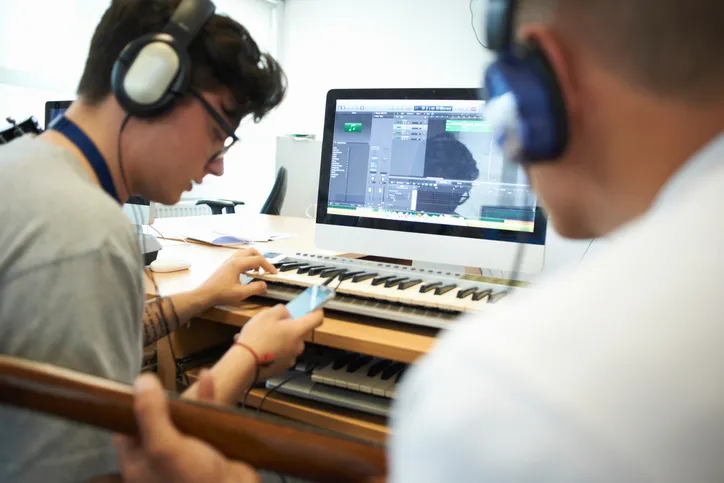
Digital composition software, notation tools, and recording platforms allow students to experiment, revise, and refine their ideas in ways that would have been far more time-consuming a decade ago. Students can layer tracks, hear immediate playback, annotate their own scores, and collaborate across devices. The same is true in other contexts besides music; in visual arts, for instance, a variety of digital drawing and painting platforms enable students to practice with new mediums, styles, and techniques without having to worry about supplies or messes. But in either case, the core intellectual work of looking and listening critically, understanding structure, and making aesthetic choices remains entirely human and part of the learning.
From DSC: I agree. At one of my previous positions, I spent 10 years supervising a digital studio — helping professors and students use a variety of applications to create things. The applications were from Adobe, Apple, and a variety of smaller vendors. The deliverables could be graphics, edited soundtracks, music, videos, flyers, posters, collages, edited photographs, presentations, websites, and more. I longed for people to discover the power of multimedia to communicate their messages, tell stories, stir emotion, powerfully engage themselves (and others), and unleash their creativity.
There were several obstacles to our digital studio being more impactful at that institution. It was under the IT department, not the academic side of the house. It was in the basement of the library, where few students and faculty traveled. During those years, it was highly uncommon for faculty members to require multimedia-based assignments — so many students had to WANT to develop these skills on their own time. The majority of students didn’t see the value in developing the types of digital skills that we were trying to build…or they didn’t have the time.
At Adobe MAX 2025 in Los Angeles, the company dropped an entire creative AI ecosystem that touches every single part of the creative workflow. In our opinion, all these new features aren’t about replacing creators; it’s about empowering them with superpowers they can actually control.
Adobe’s new plan is to put an AI co-pilot in every single app.
For professionals, the game-changer is Firefly Custom Models. Start training one now to create a consistent, on-brand look for all your assets.
For everyday creators, the AI Assistants in Photoshop and Express will drastically speed up your workflow.
The best place to start is the Photoshop AI Assistant (currently in private beta), which offers a powerful glimpse into the future of creative software—a future where you’re less of a button-pusher and more of a creative director.
Adobe MAX Day 2: The Storyteller Is Still King, But AI Is Their New Superpower — from theneuron.ai by Grant Harvey Adobe’s Day 2 keynote showcased a suite of AI-powered creative tools designed to accelerate workflows, but the real message from creators like Mark Rober and James Gunn was clear: technology serves the story, not the other way around.
On the second day of its annual MAX conference, Adobe drove home a message that has been echoing through the creative industry for the past year: AI is not a replacement, but a partner. The keynote stage featured a powerful trio of modern storytellers—YouTube creator Brandon Baum, science educator and viral video wizard Mark Rober, and Hollywood director James Gunn—who each offered a unique perspective on a shared theme: technology is a powerful tool, but human instinct, hard work, and the timeless art of storytelling remain paramount.
From DSC: As Grant mentioned, the demos dealt with ideation, image generation, video generation, audio generation, and editing.
The creative software giant is launching new generative AI tools that make digital voiceovers and custom soundtracks for videos, and adding AI assistants to Express and Photoshop for web that edit entire projects using descriptive prompts. And that’s just the start, because Adobe is planning to eventually bring AI assistants to all of its design apps.
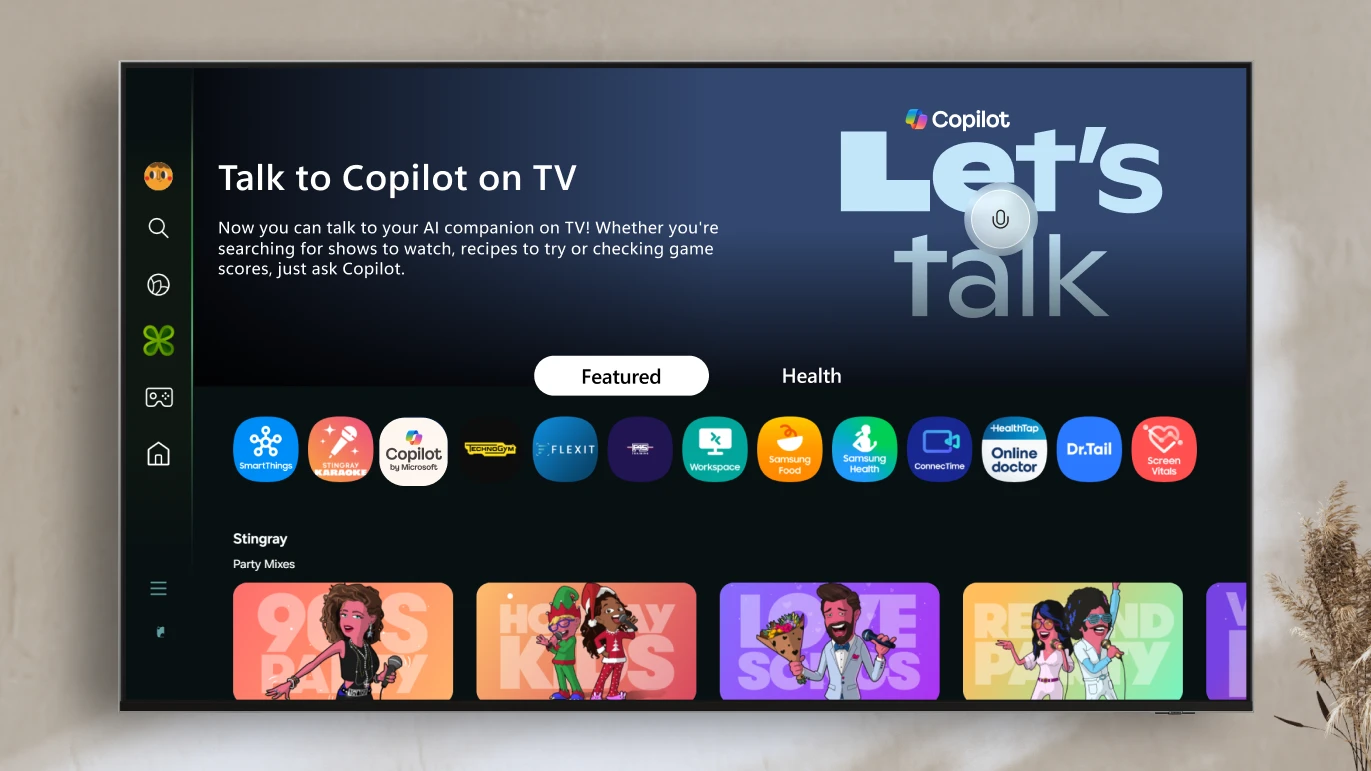
Voice-powered AI meets a visual companion for entertainment, everyday help, and everything in between.
Redmond, Wash., August 27—Today, we’re announcing the launch ofCopilot on select Samsung TVs and monitors, transforming the biggest screen in your home into your most personal and helpful companion—and it’s free to use.
Copilot makes your TV easier and more fun to use with its voice-powered interface, friendly on-screen character, and simple visual cards. Now you can quickly find what you’re looking for and discover new favorites right from your living room.
Because it lives on the biggest screen in the home, Copilot is a social experience—something you can use together with family and friends to spark conversations, help groups decide what to watch, and turn the TV into a shared space for curiosity and connection.
Today, we’re introducing powerful enhancements to our Firefly Video Model, including improved motion fidelity and advanced video controls that will accelerate your workflows and provide the precision and style you need to elevate your storytelling. We are also adding new generative AI partner models within Generate Video on Firefly, giving you the power to choose which model works best for your creative needs across image, video and sound.
Plus, our new workflow tools put you in control of your video’s composition and style. You can now layer in custom-generated sound effects right inside the Firefly web app — and start experimenting with AI-powered avatar-led videos.
… Generate Sound Effects (beta)
Sound is a powerful storytelling tool that adds emotion and depth to your videos. Generate Sound Effects (beta) makes it easy to create custom sounds, like a lion’s roar or ambient nature sounds, that enhance your visuals. And like our other Firefly generative AI models, Generate Sound Effects (beta) is commercially safe, so you can create with confidence.
Just type a simple text prompt to generate the sound effect you need. Want even more control? Use your voice to guide the timing and intensity of the sound. Firefly listens to the energy and rhythm of your voice to place sound effects precisely where they belong — matching the action in your video with cinematic timing.
Here are some incredibly powerful numbers from Mary Meeker’s AI Trends report, which showcase how artificial intelligence as a tech is unlike any other the world has ever seen.
AI took only three years to reach 50% user adoption in the US; mobile internet took six years, desktop internet took 12 years, while PCs took 20 years.
ChatGPT reached 800 million users in 17 months and 100 million in only two months, vis-à-vis Netflix’s 100 million (10 years), Instagram (2.5 years) and TikTok (nine months).
ChatGPT hit 365 billion annual searches in two years (2024) vs. Google’s 11 years (2009)—ChatGPT 5.5x faster than Google.
Above via Mary Meeker’s AI Trend-Analysis — from getsuperintel.com by Kim “Chubby” Isenberg How AI’s rapid rise, efficiency race, and talent shifts are reshaping the future.
The TLDR
Mary Meeker’s new AI trends report highlights an explosive rise in global AI usage, surging model efficiency, and mounting pressure on infrastructure and talent. The shift is clear: AI is no longer experimental—it’s becoming foundational, and those who optimize for speed, scale, and specialization will lead the next wave of innovation.
The Rundown: Meta aims to release tools that eliminate humans from the advertising process by 2026, according to a report from the WSJ — developing an AI that can create ads for Facebook and Instagram using just a product image and budget.
The details:
Companies would submit product images and budgets, letting AI craft the text and visuals, select target audiences, and manage campaign placement.
The system will be able to create personalized ads that can adapt in real-time, like a car spot featuring mountains vs. an urban street based on user location.
The push would target smaller companies lacking dedicated marketing staff, promising professional-grade advertising without agency fees or skillset.
Advertising is a core part of Mark Zuckerberg’s AI strategy and already accounts for 97% of Meta’s annual revenue.
Why it matters: We’re already seeing AI transform advertising through image, video, and text, but Zuck’s vision takes the process entirely out of human hands. With so much marketing flowing through FB and IG, a successful system would be a major disruptor — particularly for small brands that just want results without the hassle.
In the latest research paper from Anthropic’s Societal Impacts team, we describe a practical way we’ve developed to observe Claude’s values—and provide the first large-scale results on how Claude expresses those values during real-world conversations. We also provide an open dataset for researchers to run further analysis of the values and how often they arise in conversations.
Per the Rundown AI
Why it matters: AI is increasingly shaping real-world decisions and relationships, making understanding their actual values more crucial than ever. This study also moves the alignment discussion toward more concrete observations, revealing that AI’s morals and values may be more contextual and situational than a static point of view.
In just under two years, Adobe Firefly has revolutionized the creative industry and generated more than 22 billion assets worldwide. Today at Adobe MAX London, we’re unveiling the latest release of Firefly, which unifies AI-powered tools for image, video, audio, and vector generation into a single, cohesive platform and introduces many new capabilities.
The new Firefly features enhanced models, improved ideation capabilities, expanded creative options, and unprecedented control. This update builds on earlier momentum when we introduced the Firefly web app and expanded into video and audio with Generate Video, Translate Video, and Translate Audio features.
Why it matters: OpenAI’s recent image generator and other rivals have shaken up creative workflows, but Adobe’s IP-safe focus and the addition of competing models into Firefly allow professionals to remain in their established suite of tools — keeping users in the ecosystem while still having flexibility for other model strengths.
The following AI capabilities will start rolling out to Google Workspace Business customers today and to Enterprise customers later this month:
Get AI assistance in Gmail, Docs, Sheets, Meet, Chat, Vids, and more: Do your best work faster with AI embedded in the tools you use every day.Gemini streamlines your communications by helping you summarize, draft, and find information in your emails, chats, and files. It can be a thought partner and source of inspiration, helping you create professional documents, slides, spreadsheets, and videos from scratch. Gemini can even improve your meetings by taking notes, enhancing your audio and video, and catching you up on the conversation if you join late.
Chat with Gemini Advanced, Google’s next-gen AI: Kickstart learning, brainstorming, and planning with the Gemini app on your laptop or mobile device. Gemini Advanced can help you tackle complex projects including coding, research, and data analysis and lets you build Gems, your team of AI experts to help with repeatable or specialized tasks.
Unlock the power of NotebookLM Plus: We’re bringing the revolutionary AI research assistant to every employee, to help them make sense of complex topics. Upload sources to get instant insights and Audio Overviews, then share customized notebooks with the team to accelerate their learning and onboarding.
Google’s Gemini AI is stepping up its game in Google Workspace, bringing powerful new capabilities to your favorite tools like Gmail, Docs, and Sheets:
AI-Powered Summaries: Get concise, AI-generated summaries of long emails and documents so you can focus on what matters most.
Smart Reply: Gemini now offers context-aware email replies that feel more natural and tailored to your style.
Slides and images generation: Gemini in Slides can help you generate new images, summarize your slides, write and rewrite content, and refer to existing Drive files and/or emails.
Automated Data Insights: In Google Sheets, Gemini helps create a task tracker, conference agenda, spot trends, suggest formulas, and even build charts with simple prompts.
Intelligent Drafting: Google Docs now gets a creativity boost, helping you draft reports, proposals, or blog posts with AI suggestions and outlines.
Meeting Assistance: Say goodbye to the awkward AI attendees to help you take notes, now Gemini can natively do that for you – no interruption, no avatar, and no extra attendee. Meet can now also automatically generate captions to lower the language barrier.
Eveyln (from FlexOS) also mentions that CoPilot is getting enhancements too:
It’s exactly what we predicted: stand-alone AI apps like note-takers and image generators have had their moment, but as the tech giants step in, they’re bringing these features directly into their ecosystems, making them harder to ignore.
The Stargate Project is a new company which intends to invest $500 billion over the next four years building new AI infrastructure for OpenAI in the United States. We will begin deploying $100 billion immediately. This infrastructure will secure American leadership in AI, create hundreds of thousands of American jobs, and generate massive economic benefit for the entire world. This project will not only support the re-industrialization of the United States but also provide a strategic capability to protect the national security of America and its allies.
The initial equity funders in Stargate are SoftBank, OpenAI, Oracle, and MGX. SoftBank and OpenAI are the lead partners for Stargate, with SoftBank having financial responsibility and OpenAI having operational responsibility. Masayoshi Son will be the chairman.
Arm, Microsoft, NVIDIA, Oracle, and OpenAI are the key initial technology partners. The buildout is currently underway, starting in Texas, and we are evaluating potential sites across the country for more campuses as we finalize definitive agreements.
Adobe is launching new generative AI tools that can automate labor-intensive production tasks like editing large batches of images and translating video presentations. The most notable is “Firefly Bulk Create,” an app that allows users to quickly resize up to 10,000 images or replace all of their backgrounds in a single click instead of tediously editing each picture individually.
Picture your enterprise as a living ecosystem,where surging market demand instantly informs staffing decisions, where a new vendor’s onboarding optimizes your emissions metrics, where rising customer engagement reveals product opportunities. Now imagine if your systems could see these connections too! This is the promise of AI agents — an intelligent network that thinks, learns, and works across your entire enterprise.
Today, organizations operate in artificial silos. Tomorrow, they could be fluid and responsive. The transformation has already begun. The question is: will your company lead it?
The journey to agent-enabled operations starts with clarity on business objectives. Leaders should begin by mapping their business’s critical processes. The most pressing opportunities often lie where cross-functional handoffs create friction or where high-value activities are slowed by system fragmentation. These pain points become the natural starting points for your agent deployment strategy.
Artificial intelligence has already proved that it can sound like a human, impersonate individuals and even produce recordings of someone speaking different languages. Now, a new feature from Microsoft will allow video meeting attendees to hear speakers “talk” in a different language with help from AI.
What Is Agentic AI? — from blogs.nvidia.com by Erik Pounds Agentic AI uses sophisticated reasoning and iterative planning to autonomously solve complex, multi-step problems.
The next frontier of artificial intelligence is agentic AI, which uses sophisticated reasoning and iterative planning to autonomously solve complex, multi-step problems. And it’s set to enhance productivity and operations across industries.
Agentic AI systems ingest vast amounts of data from multiple sources to independently analyze challenges, develop strategies and execute tasks like supply chain optimization, cybersecurity vulnerability analysis and helping doctors with time-consuming tasks.
The Adobe Firefly Video Model (beta) expands Adobe’s family of creative generative AI models and is the first publicly available video model designed to be safe for commercial use
Enhancements to Firefly models include 4x faster image generation and new capabilities integrated into Photoshop, Illustrator, Adobe Express and now Premiere Pro
Firefly has been used to generate 13 billion images since March 2023 and is seeing rapid adoption by leading brands and enterprises
Add sound to your video via text — Project Super Sonic:
New Dream Weaver — from aisecret.us Explore Adobe’s New Firefly Video Generative Model
Cybercriminals exploit voice cloning to impersonate individuals, including celebrities and authority figures, to commit fraud. They create urgency and trust to solicit money through deceptive means, often utilizing social media platforms for audio samples.
Today, I’m excited to share with you all the fruit of our effort at @OpenAI to create AI models capable of truly general reasoning: OpenAI’s new o1 model series! (aka ?) Let me explain ? 1/ pic.twitter.com/aVGAkb9kxV
We’ve developed a new series of AI models designed to spend more time thinking before they respond. Here is the latest news on o1 research, product and other updates.
The wait is over. OpenAI has just released GPT-5, now called OpenAI o1.
It brings advanced reasoning capabilities and can generate entire video games from a single prompt.
Think of it as ChatGPT evolving from fast, intuitive thinking (System-1) to deeper, more deliberate… pic.twitter.com/uAMihaUjol
OpenAI Strawberry (o1) is out! We are finally seeing the paradigm of inference-time scaling popularized and deployed in production. As Sutton said in the Bitter Lesson, there’re only 2 techniques that scale indefinitely with compute: learning & search. It’s time to shift focus to… pic.twitter.com/jTViQucwxr
The new AI model, called o1-preview (why are the AI companies so bad at names?), lets the AI “think through” a problem before solving it. This lets it address very hard problems that require planning and iteration, like novel math or science questions. In fact, it can now beat human PhD experts in solving extremely hard physics problems.
To be clear, o1-preview doesn’t do everything better. It is not a better writer than GPT-4o, for example. But for tasks that require planning, the changes are quite large.
What is the point of Super Realistic AI? — from Heather Cooper who runs Visually AI on Substack
The arrival of super realistic AI image generation, powered by models like Midjourney, FLUX.1, and Ideogram, is transforming the way we create and use visual content.
Recently, many creators (myself included) have been exploring super realistic AI more and more.
But where can this actually be used?
Super realistic AI image generation will have far-reaching implications across various industries and creative fields. Its importance stems from its ability to bridge the gap between imagination and visual representation, offering multiple opportunities for innovation and efficiency.
Today, we’re introducing Audio Overview, a new way to turn your documents into engaging audio discussions. With one click, two AI hosts start up a lively “deep dive” discussion based on your sources. They summarize your material, make connections between topics, and banter back and forth. You can even download the conversation and take it on the go.
Over the past several months, we’ve worked closely with the video editing community to advance the Firefly Video Model. Guided by their feedback and built with creators’ rights in mind, we’re developing new workflows leveraging the model to help editors ideate and explore their creative vision, fill gaps in their timeline and add new elements to existing footage.
Just like our other Firefly generative AI models, editors can create with confidence knowing the Adobe Firefly Video Model is designed to be commercially safe and is only trained on content we have permission to use — never on Adobe users’ content.
We’re excited to share some of the incredible progress with you today — all of which is designed to be commercially safe and available in beta later this year. To be the first to hear the latest updates and get access, sign up for the waitlist here.
From DSC: Anyone who is involved in putting on conferences should at least be aware that this kind of thing is now possible!!! Check out the following posting from Adobe (with help from Tata Consultancy Services (TCS).
This year, the organizers — innovative industry event company Beyond Ordinary Events — turned to Tata Consultancy Services (TCS) to make the impossible “possible.” Leveraging Adobe generative AI technology across products like Adobe Premiere Pro and Acrobat, they distilled hours of video content in minutes, delivering timely dispatches to thousands of attendees throughout the conference.
…
For POSSIBLE ’24, Muche had an idea for a daily dispatch summarizing each day’s sessions so attendees wouldn’t miss a single insight. But timing would be critical. The dispatch needed to reach attendees shortly after sessions ended to fuel discussions over dinner and carry the excitement over to the next day.
The workflow started in Adobe Premiere Pro, with the writer opening a recording of each session and using the Speech to Text feature to automatically generate a transcript. They saved the transcript as a PDF file and opened it in Adobe Acrobat Pro. Then, using Adobe Acrobat AI Assistant, the writer asked for a session summary.
It was that fast and easy. In less than four minutes, one person turned a 30-minute session into an accurate, useful summary ready for review and publication.
By taking advantage of templates, the designer then added each AI-enabled summary to the newsletter in minutes. With just two people and generative AI technology, TCS accomplished the impossible — for the first time delivering an informative, polished newsletter to all 3,500 conference attendees just hours after the last session of the day.
RECLAIM: Use generative AI to speed up your daily tasks. Be ruthless. Anything that can be automated, should be.
PROTECT: This is the crucial step. That time you’ve saved? Protect it like it’s the last slice of pizza. Block it off in your calendar. Tell your team it’s sacred.
ELEVATE: Use this protected time for high-level thinking. Strategy. Innovation. The big, meaty problems you never have time for.
AMPLIFY: Here’s where it gets cool. Use generative AI to amp up your strategic thinking. Need to brainstorm solutions to a complex problem? Want to analyze market trends? Generative AI is your new thinking partner.
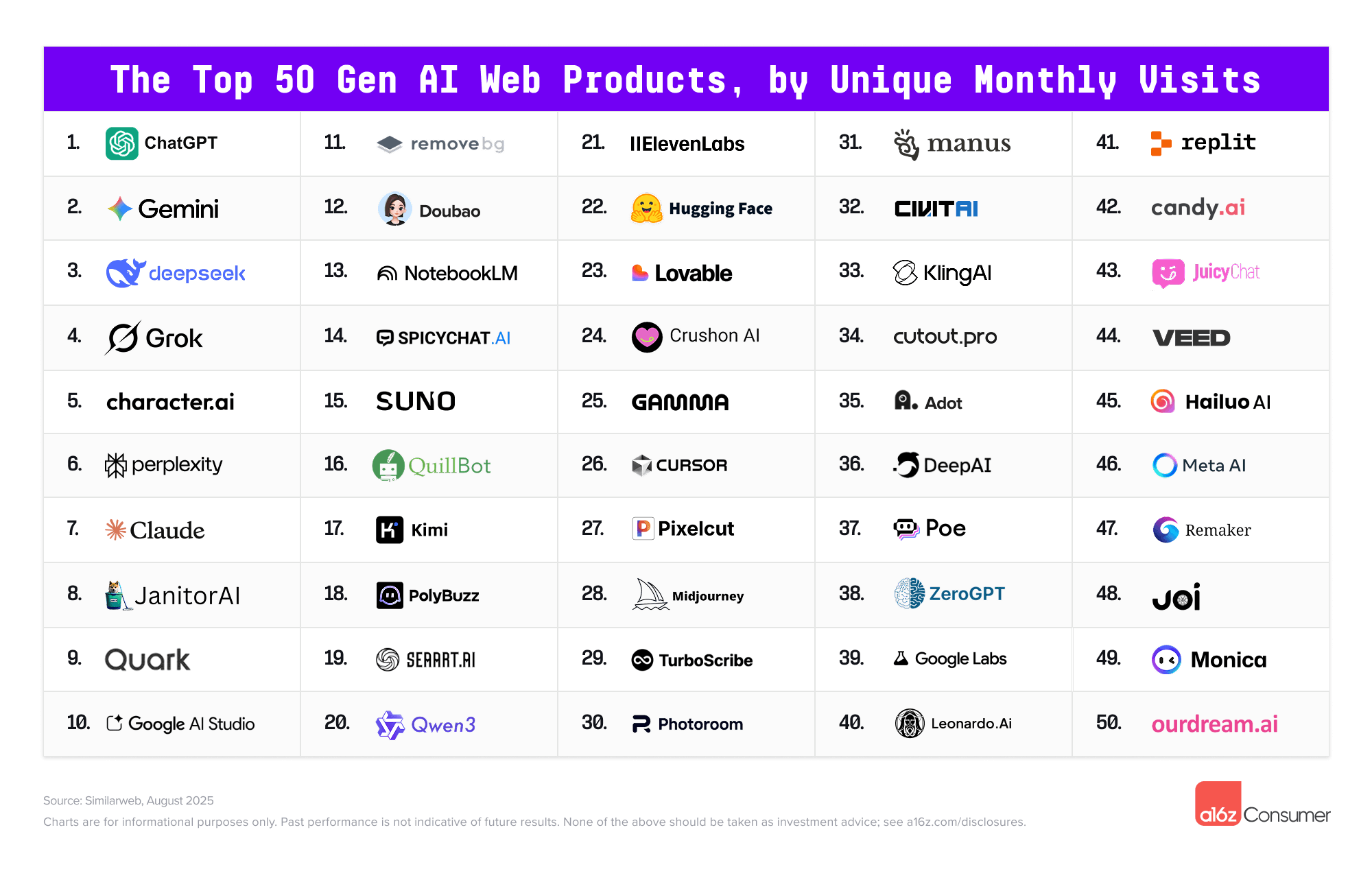
But amid the relentless onslaught of product launches, investment announcements, and hyped-up features, it’s worth asking: Which of these gen AI apps are people actually using? Which behaviors and categories are gaining traction among consumers? And which AI apps are people returning to, versus dabbling and dropping?
Welcome to the third installment of the Top 100 Gen AI Consumer Apps. .
Gen AI’s next inflection point: From employee experimentation to organizational transformation — from mckinsey.com by Charlotte Relyea, Dana Maor, and Sandra Durth with Jan Bouly As many employees adopt generative AI at work, companies struggle to follow suit. To capture value from current momentum, businesses must transform their processes, structures, and approach to talent.
To harness employees’ enthusiasm and stay ahead, companies need a holistic approach to transforming how the whole organization works with gen AI; the technology alone won’t create value.
Our research shows that early adopters prioritize talent and the human side of gen AI more than other companies (Exhibit 3). Our survey shows that nearly two-thirds of them have a clear view of their talent gaps and a strategy to close them, compared with just 25 percent of the experimenters. Early adopters focus heavily on upskilling and reskilling as a critical part of their talent strategies, as hiring alone isn’t enough to close gaps and outsourcing can hinder strategic-skills development. Finally, 40 percent of early-adopter respondents say their organizations provide extensive support to encourage employee adoption, versus 9 percent of experimenter respondents.
Adobe researchers have revealed an AI model that promises to transform photo editing by harnessing the power of video data. Dubbed “Magic Fixup,” this new technology automates complex image adjustments while preserving artistic intent, potentially reshaping workflows across multiple industries.
Magic Fixup’s core innovation lies in its unique approach to training data. Unlike previous models that relied solely on static images, Adobe’s system learns from millions of video frame pairs. This novel method allows the AI to understand the nuanced ways objects and scenes change under varying conditions of light, perspective, and motion.
Top AI tools people actually use — from heatherbcooper.substack.com by Heather Cooper How generative AI tools are changing the creative landscape
The shift toward creative tools Creative tools made up 52% of the top generative AI apps on the list. This seems to reflect a growing consumer demand for accessible creativity through AI with tools for image, music, speech, video, and editing.
Why it matters: Creative apps are gaining traction because they empower digital artists and content creators with AI-driven tools that simplify and enhance the creative process, making professional-level work more accessible than ever.
“Who to follow in AI” in 2024? [Part I] — from ai-supremacy.com by Michael Spencer [some of posting is behind a paywall] #1-20 [of 150] – I combed the internet, I found the best sources of AI insights, education and articles. LinkedIn | Newsletters | X | YouTube | Substack | Threads | Podcasts
AI In Medicine: 3 Future Scenarios From Utopia To Dystopia — from medicalfuturist.com by Andrea Koncz There’s a vast difference between baseless fantasizing and realistic forward planning. Structured methodologies help us learn how to “dream well”.
Key Takeaways
We’re often told that daydreaming and envisioning the future is a waste of time. But this notion is misguided.
We all instinctively plan for the future in small ways, like organizing a trip or preparing for a dinner party. This same principle can be applied to larger-scale issues, and smart planning does bring better results.
We show you a method that allows us to think “well” about the future on a larger scale so that it better meets our needs.
Latest Illustrator and Photoshop releases accelerate creative workflows, save pros time and empower designers to realize their visions faster
New Firefly-enabled features like Generative Shape Fill in Illustrator along with the Dimension Tool, Mockup, Text to Pattern, the Contextual Taskbar and performance enhancement tools accelerate productivity and free up time so creative pros can dive deeper into the parts of their work they love
Photoshop introduces all-new Selection Brush Tool and the general availability of Generate Image, Adjustment Brush Tool and other workflow enhancements empowering creators to make complex edits and unique designs .
Zoom in: Nike used genAI for ideation, including using a variety of prompts to produce images with different textures, materials and color to kick off the design process.
What they’re saying: “It’s a new way for us to work,” Nike lead footwear designer Juliana Sagat told Axios during a media tour of the showcase on Tuesday. .
Major companies are moving at high speed to capture the promises of artificial intelligence in healthcare while doctors and experts attempt to integrate the technology safely into patient care.
“Healthcare is probably the most impactful utility of generative AI that there will be,” Kimberly Powell, vice president of healthcare at AI hardware giant Nvidia (NVDA), which has partnered with Roche’s Genentech (RHHBY) to enhance drug discovery in the pharmaceutical industry, among other investments in healthcare companies, declared at the company’s AI Summit in June.
Mistral reignites this week’s LLM rivalry with Large 2 (source) — from superhuman.ai
Today, we are announcing Mistral Large 2, the new generation of our flagship model. Compared to its predecessor, Mistral Large 2 is significantly more capable in code generation, mathematics, and reasoning. It also provides a much stronger multilingual support, and advanced function calling capabilities.
Meta releases the biggest and best open-source AI model yet — from theverge.com by Alex Heath Llama 3.1 outperforms OpenAI and other rivals on certain benchmarks. Now, Mark Zuckerberg expects Meta’s AI assistant to surpass ChatGPT’s usage in the coming months.
Back in April, Meta teased that it was working on a first for the AI industry: an open-source model with performance that matched the best private models from companies like OpenAI.
Today, that model has arrived. Meta is releasing Llama 3.1, the largest-ever open-source AI model, which the company claims outperforms GPT-4o and Anthropic’s Claude 3.5 Sonnet on several benchmarks. It’s also making the Llama-based Meta AI assistant available in more countries and languages while adding a feature that can generate images based on someone’s specific likeness. CEO Mark Zuckerberg now predicts that Meta AI will be the most widely used assistant by the end of this year, surpassing ChatGPT.
4 ways to boost ChatGPT — from wondertools.substack.com by Jeremy Caplan & The PyCoach Simple tactics for getting useful responses
To help you make the most of ChatGPT, I’ve invited & edited today’s guest post from the author of a smart AI newsletter called The Artificial Corner. I appreciate how Frank Andrade pushes ChatGPT to produce better results with four simple, clever tactics. He offers practical examples to help us all use AI more effectively.
… Frank Andrade: Most of us fail to make the most of ChatGPT.
We omit examples in our prompts.
We fail to assign roles to ChatGPT to guide its behavior.
We let ChatGPT guess instead of providing it with clear guidance.
If you rely on vague prompts, learning how to create high-quality instructions will get you better results. It’s a skill often referred to as prompt engineering. Here are several techniques to get you to the next level.