My take is this: in all of the anxiety lies a crucial and long-overdue opportunity to deliver better learning experiences. Precisely because Atlas perceives the same context in the same moment as you, it can transform learning into a process aligned with core neuro-scientific principles—including active retrieval, guided attention, adaptive feedback and context-dependent memory formation.
Perhaps in Atlas we have a browser that for the first time isn’t just a portal to information, but one which can become a co-participant in active cognitive engagement—enabling iterative practice, reflective thinking, and real-time scaffolding as you move through challenges and ideas online.
With this in mind, I put together 10 use cases for Atlas for you to try for yourself.
…
6. Retrieval Practice
What: Pulling information from memory drives retention better than re-reading. Why: Practice testing delivers medium-to-large effects (Adesope et al., 2017). Try: Open a document with your previous notes. Ask Atlas for a mixed activity set: “Quiz me on the Krebs cycle—give me a near-miss, high-stretch MCQ, then a fill-in-the-blank, then ask me to explain it to a teen.” Atlas uses its browser memory to generate targeted questions from your actual study materials, supporting spaced, varied retrieval.
From DSC: A quick comment. I appreciate these ideas and approaches from Katarzyna and Rita. I do think that someone is going to want to be sure that the AI models/platforms/tools are given up-to-date information and updated instructions — i.e., any new procedures, steps to take, etc. Perhaps I’m missing the boat here, but an internal AI platform is going to need to have access to up-to-date information and instructions.
While over 80% of respondents in the 2025 AI in Education Report have already used AI for school, we believe there are significant opportunities to design AI that can better serve each of their needs and broaden access to the latest innovation.1
That’s why today [10/15/25], we’re announcing AI-powered experiences built for teaching and learning at no additional cost, new integrations in Microsoft 365 apps and Learning Management Systems, and an academic offering for Microsoft 365 Copilot.
Introducing AI-powered teaching and learning Empowering educators with Teach
We’re introducing Teach to help streamline class prep and adapt AI to support educators’ teaching expertise with intuitive and customizable features. In one place, educators can easily access AI-powered teaching tools to create lesson plans, draft materials like quizzes and rubrics, and quickly make modifications to language, reading level, length, difficulty, alignment to relevant standards, and more.
Cost is too high. Pathways are unclear. Options feel limited. For many prospective, current, or former students, these barriers define their relationship with higher education. As colleges and universities face the long-anticipated enrollment cliff, the question isn’t just how to recruit—it’s how to reimagine value, access, and engagement across the entire student journey.
Ellucian’s 2025 Student Voice Report offers one of the most comprehensive views into that journey to date. With responses from over 1,500 learners across the U.S.—including high school students, current undergrads, college grads, stop-outs, and opt-outs—the findings surface one clear mandate for institutions: meet students where they are, or risk losing them entirely.
What Are Learners Asking For? Across demographics, four priorities rose to the top: Affordability. Flexibility. Relevance. Clarity.
Students aren’t rejecting education—they’re rejecting systems that don’t clearly show how their investment leads to real outcomes.
Strategic partnership enables OpenAI to build and deploy at least 10 gigawatts of AI datacenters with NVIDIA systems representing millions of GPUs for OpenAI’s next-generation AI infrastructure.
To support the partnership, NVIDIA intends to invest up to $100 billion in OpenAI progressively as each gigawatt is deployed.
The first gigawatt of NVIDIA systems will be deployed in the second half of 2026 on NVIDIA’s Vera Rubin platform.
Why this matters: The partnership kicks off in the second half of 2026 with NVIDIA’s new Vera Rubin platform. OpenAI will use this massive compute power to train models beyond what we’ve seen with GPT-5 and likely also power what’s called inference (when you ask a question to chatGPT, and it gives you an answer). And NVIDIA gets a guaranteed customer for their most advanced chips. Infinite money glitch go brrr am I right? Though to be fair, this kinda deal is as old as the AI industry itself.
This isn’t just about bigger models, mind you: it’s about infrastructure for what both companies see as the future economy. As Sam Altman put it, “Compute infrastructure will be the basis for the economy of the future.”
… Our take: We think this news is actually super interesting when you pair it with the other big headline from today: Commonwealth Fusion Systems signed a commercial deal worth more than $1B with Italian energy company Eni to purchase fusion power from their 400 MW ARC plant in Virginia. Here’s what that means for AI…
AI filmmaker Dinda Prasetyo just released “Skyland,” a fantasy short film about a guy named Aeryn and his “loyal flying fish”, and honestly, the action sequences look like they belong in an actual film…
SKYLAND | AI Short Film Fantasy
Skyland is an AI-powered fantasy short film that takes you on a breathtaking journey with Aeryn Solveth and his loyal flying fish. From soaring above the futuristic city of Cybryne to returning to his homeland of Eryndor, Aeryn’s adventure is… https://t.co/Lz6UUxQvExpic.twitter.com/cYXs9nwTX3
What’s wild is that Dinda used a cocktail of AI tools (Adobe Firefly, MidJourney, the newly launched Luma Ray 3, and ElevenLabs) to create something that would’ve required a full production crew just two years ago.
The Era of Prompts Is Over. Here’s What Comes Next. — from builtin.com by Ankush Rastogi If you’re still prompting your AI, you’re behind the curve. Here’s how to prepare for the coming wave of AI agents.
Summary: Autonomous AI agents are emerging as systems that handle goals, break down tasks and integrate with tools without constant prompting. Early uses include call centers, healthcare, fraud detection and research, but concerns remain over errors, compliance risks and unchecked decisions.
The next shift is already peeking around the corner, and it’s going to make prompts look primitive. Before long, we won’t be typing carefully crafted requests at all. We’ll be leaning on autonomous AI agents, systems that don’t just spit out answers but actually chase goals, make choices and do the boring middle steps without us guiding them. And honestly, this jump might end up dwarfing the so-called “prompt revolution.”
A new way to get things done with your AI browsing assistant Imagine you’re a student researching a topic for a paper, and you have dozens of tabs open. Instead of spending hours jumping between sources and trying to connect the dots, your new AI browsing assistant — Gemini in Chrome1 — can do it for you. Gemini can answer questions about articles, find references within YouTube videos, and will soon be able to help you find pages you’ve visited so you can pick up exactly where you left off.
Rolling out to Mac and Windows users in the U.S. with their language set to English, Gemini in Chrome can understand the context of what you’re doing across multiple tabs, answer questions and integrate with other popular Google services, like Google Docs and Calendar. And it’ll be available on both Android and iOS soon, letting you ask questions and summarize pages while you’re on the go.
We’re also developing more advanced agentic capabilities for Gemini in Chrome that can perform multi-step tasks for you from start to finish, like ordering groceries. You’ll remain in control as Chrome handles the tedious work, turning 30-minute chores into 3-click user journeys.
A day in the life: The next 25 years A learner wakes up. Their AI-powered learning coach welcomes them, drawing their attention to their progress and helping them structure their approach to the day. A notification reminds them of an upcoming interview and suggests reflections to add to their learning portfolio.
Rather than a static gradebook, their portfolio is a dynamic, living record, curated by the student, validated by mentors in both industry and education, and enriched through co-creation with maturing modes of AI. It tells a story through essays, code, music, prototypes, journal reflections, and team collaborations. These artifacts are not “submitted”, they are published, shared, and linked to verifiable learning outcomes.
And when it’s time to move, to a new institution, a new job, or a new goal, their data goes with them, immutable, portable, verifiable, and meaningful.
From DSC: And I would add to that last solid sentence that the learner/student/employee will be able to control who can access this information. Anyway, some solid reflections here from Lev.
I know a lot of readers will disagree with this, and the timeline feels aggressive (the future always arrives more slowly than pundits expect) but I think the overall premise is sound: “The concept of a tipping point in education – where AI surpasses traditional schools as the dominant learning medium – is increasingly plausible based on current trends, technological advancements, and expert analyses.”
The Rundown: In this tutorial, you will learn how to combine NotebookLM with ChatGPT to master any subject faster, turning dense PDFs into interactive study materials with summaries, quizzes, and video explanations.
Step-by-step:
Go to notebooklm.google.com, click the “+” button, and upload your PDF study material (works best with textbooks or technical documents)
Choose your output mode: Summary for a quick overview, Mind Map for visual connections, or Video Overview for a podcast-style explainer with visuals
Generate a Study Guide under Reports — get Q&A sets, short-answer questions, essay prompts, and glossaries of key terms automatically
Take your PDF to ChatGPT and prompt: “Read this chapter by chapter and highlight confusing parts” or “Quiz me on the most important concepts”
Combine both tools: Use NotebookLM for quick context and interactive guides, then ChatGPT to clarify tricky parts and go deeperPro Tip: If your source is in EPUB or audiobook, convert it to PDF before uploading. Both NotebookLM and ChatGPT handle PDFs best.
Claude can now create and edit Excel spreadsheets, documents, PowerPoint slide decks, and PDFs directly in Claude.ai and the desktop app. This transforms how you work with Claude—instead of only receiving text responses or in-app artifacts, you can describe what you need, upload relevant data, and get ready-to-use files in return.
Also see:
Microsoft to lessen reliance on OpenAI by buying AI from rival Anthropic — from techcrunch.com byRebecca Bellan
Microsoft will pay to use Anthropic’s AI in Office 365 apps, The Information reports, citing two sources. The move means that Anthropic’s tech will help power new features in Word, Excel, Outlook, and PowerPoint alongside OpenAI’s, marking the end of Microsoft’s previous reliance solely on the ChatGPT maker for its productivity suite. Microsoft’s move to diversify its AI partnerships comes amid a growing rift with OpenAI, which has pursued its own infrastructure projects as well as a potential LinkedIn competitor.
In this episode of Unfixed, we talk with Ray Schroeder—Senior Fellow at UPCEA and Professor Emeritus at the University of Illinois Springfield—about Artificial General Intelligence (AGI) and what it means for the future of higher education. While most of academia is still grappling with ChatGPT and basic AI tools, Schroeder is thinking ahead to AI agents, human displacement, and AGI’s existential implications for teaching, learning, and the university itself. We explore why AGI is so controversial, what institutions should be doing now to prepare, and how we can respond responsibly—even while we’re already overwhelmed.
Data from the State of AI and Instructional Design Report revealed that 95.3% of the instructional designers interviewed use AI in their daily work [1]. And over 85% of this AI use occurs during the design and development process.
These figures showcase the immense impact AI is already having on the instructional design world.
If you’re an L&D professional still on the fence about adding AI to your workflow or an AI convert looking for the next best tools, keep reading.
This guide breaks down 5 of the top AI tools for instructional designers in 2025, so you can streamline your development processes and build better training faster.
But before we dive into the tools of the trade, let’s address the elephant in the room:
Miro and GenAI as drivers of online student engagement — from timeshighereducation.com by Jaime Eduardo Moncada Garibay A set of practical strategies for transforming passive online student participation into visible, measurable and purposeful engagement through the use of Miro, enhanced by GenAI
To address this challenge, I shifted my focus from requesting participation to designing it. This strategic change led me to integrate Miro, a visual digital workspace, into my classes. Miro enables real-time visualisation and co-creation of ideas, whether individually or in teams.
…
The transition from passive attendance to active engagement in online classes requires deliberate instructional design. Tools such as Miro, enhanced by GenAI, enable educators to create structured, visually rich learning environments in which participation is both expected and documented.
While technology provides templates, frames, timers and voting features, its real pedagogical value emerges through intentional facilitation, where the educator’s role shifts from delivering content to orchestrating collaborative, purposeful learning experiences.
In the past, it was typical for faculty to teach online courses as an “overload” of some kind, but BOnES data show that 92% of online programs feature courses taught as part of faculty member’s standard teaching responsibilities. Online teaching has become one of multiple modalities in which faculty teach regularly.
Three-quarters of chief online officers surveyed said they plan to have a great market share of online enrollments in the future, but only 23% said their current marketing is better than their competitors. The rising tide of online enrollments won’t lift all boats–some institutions will fare better than others.
Staffing at online education units is growing, with the median staff size increasing from 15 last year to 20 this year. Julie pointed out that successful online education requires investment of resources. You might need as many buildings as onsite education does, but you need people and you need technology.
Description: At Crash Course, we believe that high-quality educational videos should be available to everyone for free! Subscribe for weekly videos from our current courses! The Crash Course team has produced more than 50 courses on a wide variety of subjects, ranging from the humanities to sciences and so much more! We also recently teamed up with Arizona State University to bring you more courses on the Study Hall channel.
Another major AI lab just launched “education mode.”
Google introduced Guided Learningin Gemini, transforming it into a personalized learning companion designed to help you move from quick answers to real understanding.
Instead of immediately spitting out solutions, it:
Asks probing, open-ended questions
Walks learners through step-by-step reasoning
Adapts explanations to the learner’s level
Uses visuals, videos, diagrams, and quizzes to reinforce concepts
I’m not too naive to understand that, no matter how we present it, some students will always be tempted by “the dark side” of AI. What I also believe is that the future of AI in education is not decided. It will be decided by how we, as educators, embrace or demonize it in our classrooms.
My argument is that setting guidelines and talking to our students honestly about the pitfalls and amazing benefits that AI offers us as researchers and learners will define it for the coming generations.
Can AI be the next calculator? Something that, yes, changes the way we teach and learn, but not necessarily for the worse? If we want it to be, yes.
How it is used, and more importantly, how AI is perceived by our students, can be influenced by educators. We have to first learn how AI can be used as a force for good. If we continue to let the dominant voice be that AI is the Terminator of education and critical thinking, then that will be the fate we have made for ourselves.
AI Tools for Strategy and Research – GT #32 — from goodtools.substack.com by Robin Good Getting expert advice, how to do deep research with AI, prompt strategy, comparing different AIs side-by-side, creating mini-apps and an AI Agent that can critically analyze any social media channel
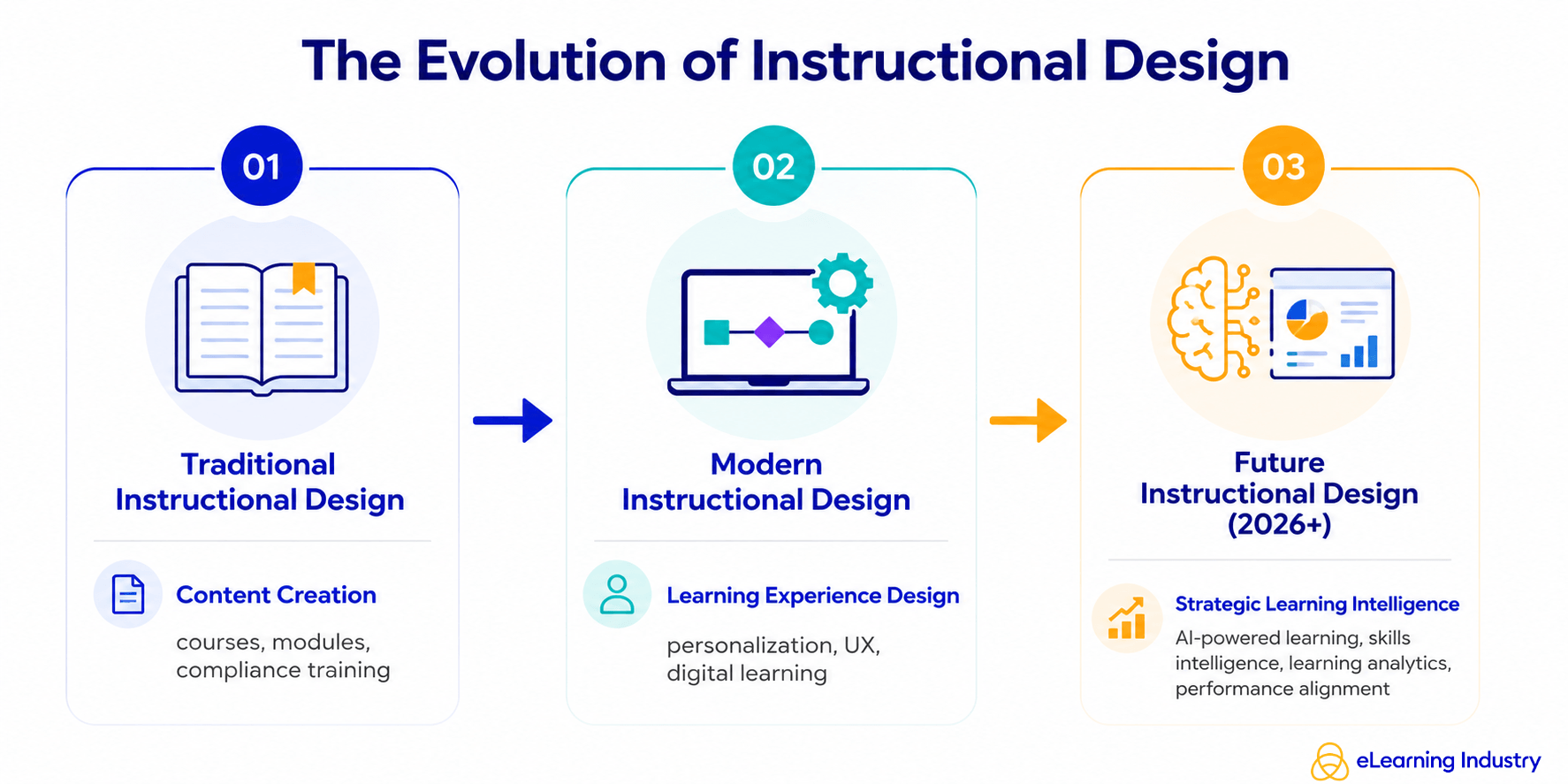
In this week’s blog post, I’ll share my take on how the instructional design role is evolving and discuss what this means for our day-to-day work and the key skills it requires.
…
With this in mind, I’ve been keeping a close eye on open instructional design roles and, in the last 3 months, have noticed the emergence of a new flavour of instructional designer: the so-called “Generative AI Instructional Designer.”
Let’s deep dive into three explicitly AI-focused instructional design positions that have popped up in the last quarter. Each one illuminates a different aspect of how the role is changing—and together, they paint a picture of where our profession is likely heading.
Designers who evolve into prompt engineers, agent builders, and strategic AI advisors will capture the new premium. Those who cling to traditional tool-centric roles may find themselves increasingly sidelined—or automated out of relevance.
Google’s parent company announced Wednesday (8/6/25) that it’s planning to spend $1 billion over the next three years to help colleges teach and train students about artificial intelligence.
Google is joining other AI companies, including OpenAI and Anthropic, in investing in AI training in higher education. All three companies have rolled out new tools aimed at supporting “deeper learning” among students and made their AI platforms available to certain students for free.
Based on current technology capabilities, adoption patterns, and the mission of community colleges, here are five well-supported predictions for AI’s impact in the coming years.
“Where generative AI creates, agentic AI acts.” That’s how my trusted assistant, Gemini 2.5 Pro deep research, describes the difference.
…
Agents, unlike generative tools, create and perform multistep goals with minimal human supervision. The essential difference is found in its proactive nature. Rather than waiting for a specific, step-by-step command, agentic systems take a high-level objective and independently create and execute a plan to achieve that goal. This triggers a continuous, iterative workflow that is much like a cognitive loop. The typical agentic process involves six key steps, as described by Nvidia:
Our 2025 national survey of over 650 respondents across 49 states and Puerto Rico reveals both encouraging trends and important challenges. While AI adoption and optimism are growing, concerns about cheating, privacy, and the need for training persist.
Despite these challenges, I’m inspired by the resilience and adaptability of educators. You are the true game-changers in your students’ growth, and we’re honored to support this vital work.
This report reflects both where we are today and where we’re headed with AI. More importantly, it reflects your experiences, insights, and leadership in shaping the future of education.
This groundbreaking collaboration represents a transformative step forward in education technology and will begin with, but is not limited to, an effort between Instructure and OpenAI to enhance the Canvas experience by embedding OpenAI’s next-generation AI technology into the platform.
IgniteAI announced earlier today, establishes Instructure’s future-ready, open ecosystem with agentic support as the AI landscape continues to evolve. This partnership with OpenAI exemplifies this bold vision for AI in education. Instructure’s strategic approach to AI emphasizes the enhancement of connections within an educational ecosystem comprising over 1,100 edtech partners and leading LLM providers.
“We’re committed to delivering next-generation LMS technologies designed with an open ecosystem that empowers educators and learners to adapt and thrive in a rapidly changing world,” said Steve Daly, CEO of Instructure. “This collaboration with OpenAI showcases our ambitious vision: creating a future-ready ecosystem that fosters meaningful learning and achievement at every stage of education. This is a significant step forward for the education community as we continuously amplify the learning experience and improve student outcomes.”
Faculty Latest Targets of Big Tech’s AI-ification of Higher Ed— from insidehighered.com by Kathryn Palmer A new partnership between OpenAI and Instructure will embed generative AI in Canvas. It may make grading easier, but faculty are skeptical it will enhance teaching and learning.
The two companies, which have not disclosed the value of the deal, are also working together to embed large language models into Canvas through a feature called IgniteAI. It will work with an institution’s existing enterprise subscription to LLMs such as Anthropic’s Claude or OpenAI’s ChatGPT, allowing instructors to create custom LLM-enabled assignments. They’ll be able to tell the model how to interact with students—and even evaluate those interactions—and what it should look for to assess student learning. According to Instructure, any student information submitted through Canvas will remain private and won’t be shared with OpenAI.
… Faculty Unsurprised, Skeptical
Few faculty were surprised by the Canvas-OpenAI partnership announcement, though many are reserving judgment until they see how the first year of using it works in practice.
A new study measuring the use of generative artificial intelligence in different professions has just gone public, and its main message to people working in some fields is harsh. It suggests translators, historians, text writers, sales representatives, and customer service agents might want to consider new careers as pile driver or dredge operators, railroad track layers, hardwood floor sanders, or maids — if, that is, they want to lower the threat of AI apps pushing them out of their current jobs.
From DSC: Unfortunately, this is where the hyperscalers are going to get their ROI from all of the capital expenditures that they are making. Companies are going to use their services in order to reduce headcount at their organizations. CEOs are even beginning to brag about the savings that are realized by the use of AI-based technologies: (or so they claim.)
“As a CEO myself, I can tell you, I’m extremely excited about it. I’ve laid off employees myself because of AI. AI doesn’t go on strike. It doesn’t ask for a pay raise. These things that you don’t have to deal with as a CEO.”
My first position out of college was being a Customer Service Representative at Baxter Healthcare. It was my most impactful job, as it taught me the value of a customer. From then on, whoever I was trying to assist was my customer — whether they were internal or external to the organization that I was working for. Those kinds of jobs are so important. If they evaporate, what then? How will young people/graduates get their start?
Alex’s take: We’re seeing browsers fundamentally transition from search engines ? answer engines ? action engines. Gone are the days of having to trawl through pages of search results. Commands are the future. They are the direct input to arrive at the outcomes we sought in the first place, such as booking a hotel or ordering food. I’m interested in watching Microsoft’s bet develop as browsers become collaborative (and proactive) assistants.
Amazon just invested in an AI that can create full TV episodes—and it wants you to star in them.
Remember when everyone lost their minds over AI generating a few seconds of video? Well, Amazon just invested in a company called Fable Studio whose system called Showrunner can generates entire 22-minute TV episodes.
… Where does this go from here? Imagine asking AI to rewrite the ending of Game of Thrones, or creating a sitcom where you and your friends are the main characters. This type of tech could create personalized entertainment experiences just like that.
Our take: Without question, we’re moving toward a world where every piece of media can be customized to you personally. Your Netflix could soon generate episodes where you’re the protagonist, with storylines tailored to your interests and sense of humor.
And if this technology scales, the entire entertainment industry could flip upside down. The pitch goes: why watch someone else’s story when you can generate your own?
The End of Work as We Know It — from gizmodo.com by Luc Olinga CEOs call it a revolution in efficiency. The workers powering it call it a “new era in forced labor.” I spoke to the people on the front lines of the AI takeover.
Yet, even in this vision of a more pleasant workplace, the specter of displacement looms large. Miscovich acknowledges that companies are planning for a future where headcount could be “reduced by 40%.” And Clark is even more direct. “A lot of CEOs are saying that, knowing that they’re going to come up in the next six months to a year and start laying people off,” he says. “They’re looking for ways to save money at every single company that exists.”
But we do not have much time. As Clark told me bluntly: “I am hired by CEOs to figure out how to use AI to cut jobs. Not in ten years. Right now.”
Faced with mounting backlash, OpenAI removed a controversial ChatGPT feature that caused some users to unintentionally allow their private—and highly personal—chats to appear in search results.
Fast Company exposed the privacy issue on Wednesday, reporting that thousands of ChatGPT conversations were found in Google search results and likely only represented a sample of chats “visible to millions.” While the indexing did not include identifying information about the ChatGPT users, some of their chats did share personal details—like highly specific descriptions of interpersonal relationships with friends and family members—perhaps making it possible to identify them, Fast Company found.
Today, we’re dropping the world’s first AI-native social feed.
Feed from Character.AI is a dynamic, scrollable content platform that connects users with the latest Characters, Scenes, Streams, and creator-driven videos in one place.
This is a milestone in the evolution of online entertainment.
For the last 10 years, social platforms have been all about passive consumption. The Character.AI Feed breaks that paradigm and turns content into a creative playground. Every post is an invitation to interact, remix, and build on what others have made. Want to rewrite a storyline? Make yourself the main character? Take a Character you just met in someone else’s Scene and pop it into a roast battle or a debate? Now it’s easy. Every story can have a billion endings, and every piece of content can change and evolve with one tap.
What is Study Mode?
Study Mode is OpenAI’s take on a smarter study partner – a version of the ChatGPT experience designed to guide users through problems with Socratic prompts, scaffolded reasoning, and adaptive feedback (instead of just handing over the answer).
Built with input from learning scientists, pedagogy experts, and educators, it was also shaped by direct feedback from college students. While Study Mode is designed with college students in mind, it’s meant for anyone who wants a more learning-focused, hands-on experience across a wide range of subjects and skill levels.
Who can access it? And how?
Starting July 29, Study Mode is available to users on Free, Plus, Pro, and Team plans. It will roll out to ChatGPT Edu users in the coming weeks.
ChatGPT became your tutor— from theneurondaily.com by Grant Harvey PLUS: NotebookLM has video now & GPT 4o-level AI runs on laptop
Here’s how it works: instead of asking “What’s 2+2?” and getting “4,” study mode asks questions like “What do you think happens when you add these numbers?” and “Can you walk me through your thinking?” It’s like having a patient tutor who won’t let you off the hook that easily.
The key features include:
Socratic questioning: It guides you with hints and follow-up questions rather than direct answers.
Scaffolded responses: Information broken into digestible chunks that build on each other.
Personalized support: Adjusts difficulty based on your skill level and previous conversations.
Knowledge checks: Built-in quizzes and feedback to make sure concepts actually stick.
Toggle flexibility: Switch study mode on and off mid-conversation depending on your goals.
Try study mode yourself by selecting “Study and learn” from tools in ChatGPT and asking a question.
Introducing study mode— from openai.com A new way to learn in ChatGPT that offers step by step guidance instead of quick answers.
[On 7/29/25, we introduced] study mode in ChatGPT—a learning experience that helps you work through problems step by step instead of just getting an answer. Starting today, it’s available to logged in users on Free, Plus, Pro, Team, with availability in ChatGPT Edu coming in the next few weeks.
ChatGPT is becoming one of the most widely used learning tools in the world. Students turn to it to work through challenging homework problems, prepare for exams, and explore new concepts. But its use in education has also raised an important question: how do we ensure it is used to support real learning, and doesn’t just offer solutions without helping students make sense of them?
We’ve built study mode to help answer this question. When students engage with study mode, they’re met with guiding questions that calibrate responses to their objective and skill level to help them build deeper understanding. Study mode is designed to be engaging and interactive, and to help students learn something—not just finish something.
Intellectual rigor comes from the journey: the dead ends, the uncertainty, and the internal debate. Skip that, and you might still get the insight–but you’ll have lost the infrastructure for meaningful understanding. Learning by reading LLM output is cheap. Real exercise for your mind comes from building the output yourself.
The irony is that I now know more than I ever would have before AI. But I feel slightly dumber. A bit more dull. LLMs give me finished thoughts, polished and convincing, but none of the intellectual growth that comes from developing them myself.
Every few months I put together a guide on which AI system to use. Since I last wrote my guide, however, there has been a subtle but important shift in how the major AI products work. Increasingly, it isn’t about the best model, it is about the best overall system for most people. The good news is that picking an AI is easier than ever and you have three excellent choices. The challenge is that these systems are getting really complex to understand. I am going to try and help a bit with both.
First, the easy stuff.
Which AI to Use For most people who want to use AI seriously, you should pick one of three systems: Claude from Anthropic, Google’s Gemini, and OpenAI’s ChatGPT.
This summer, I tried something new in my fully online, asynchronous college writing course. These classes have no Zoom sessions. No in-person check-ins. Just students, Canvas, and a lot of thoughtful design behind the scenes.
One activity I created was called QuoteWeaver—a PlayLab bot that helps students do more than just insert a quote into their writing.
It’s a structured, reflective activity that mimics something closer to an in-person 1:1 conference or a small group quote workshop—but in an asynchronous format, available anytime. In other words, it’s using AI not to speed students up, but to slow them down.
…
The bot begins with a single quote that the student has found through their own research. From there, it acts like a patient writing coach, asking open-ended, Socratic questions such as:
What made this quote stand out to you?
How would you explain it in your own words?
What assumptions or values does the author seem to hold?
How does this quote deepen your understanding of your topic?
It doesn’t move on too quickly. In fact, it often rephrases and repeats, nudging the student to go a layer deeper.
On [6/13/25], UNESCO published a piece I co-authored with Victoria Livingstone at Johns Hopkins University Press. It’s called The Disappearance of the Unclear Question, and it’s part of the ongoing UNESCO Education Futures series – an initiative I appreciate for its thoughtfulness and depth on questions of generative AI and the future of learning.
Our piece raises a small but important red flag. Generative AI is changing how students approach academic questions, and one unexpected side effect is that unclear questions – for centuries a trademark of deep thinking – may be beginning to disappear. Not because they lack value, but because they don’t always work well with generative AI. Quietly and unintentionally, students (and teachers) may find themselves gradually avoiding them altogether.
Of course, that would be a mistake.
We’re not arguing against using generative AI in education. Quite the opposite. But we do propose that higher education needs a two-phase mindset when working with this technology: one that recognizes what AI is good at, and one that insists on preserving the ambiguity and friction that learning actually requires to be successful.
By leveraging generative artificial intelligence to convert lengthy instructional videos into micro-lectures, educators can enhance efficiency while delivering more engaging and personalized learning experiences.
Researchers at Massachusetts Institute of Technology (MIT) have now devised a way for LLMs to keep improving by tweaking their own parameters in response to useful new information.
The work is a step toward building artificial intelligence models that learn continually—a long-standing goal of the field and something that will be crucial if machines are to ever more faithfully mimic human intelligence. In the meantime, it could give us chatbots and other AI tools that are better able to incorporate new information including a user’s interests and preferences.
The MIT scheme, called Self Adapting Language Models (SEAL), involves having an LLM learn to generate its own synthetic training data and update procedure based on the input it receives.
Edu-Snippets — from scienceoflearning.substack.com by Nidhi Sachdeva and Jim Hewitt Why knowledge matters in the age of AI; What happens to learners’ neural activity with prolonged use of LLMs for writing
Highlights:
Offloading knowledge to Artificial Intelligence (AI) weakens memory, disrupts memory formation, and erodes the deep thinking our brains need to learn.
Prolonged use of ChatGPT in writing lowers neural engagement, impairs memory recall, and accumulates cognitive debt that isn’t easily reversed.
Five Essential Skills Kids Need (More than Coding)
I’m not saying we shouldn’t teach kids to code. It’s a useful skill. But these are the five true foundations that will serve them regardless of how technology evolves.
Day of AI Australia hosted a panel discussion on 20 May, 2025. Hosted by Dr Sebastian Sequoiah-Grayson (Senior Lecturer in the School of Computer Science and Engineering, UNSW Sydney) with panel members Katie Ford (Industry Executive – Higher Education at Microsoft), Tamara Templeton (Primary School Teacher, Townsville), Sarina Wilson (Teaching and Learning Coordinator – Emerging Technology at NSW Department of Education) and Professor Didar Zowghi (Senior Principal Research Scientist at CSIRO’s Data61).
As many students face criticism and punishment for using artificial intelligence tools like ChatGPT for assignments, new reporting shows that many instructors are increasingly using those same programs.
Our next challenge is to self-analyze and develop meaningful benchmarks for AI use across contexts. This research exhibit aims to take the first major step in that direction.
With the right approach, a transcript becomes something else:
A window into student decision-making
A record of how understanding evolves
A conversation that can be interpreted and assessed
An opportunity to evaluate content understanding
This week, I’m excited to share something that brings that idea into practice.
Over time, I imagine a future where annotated transcripts are collected and curated. Schools and universities could draw from a shared library of real examples—not polished templates, but genuine conversations that show process, reflection, and revision. These transcripts would live not as static samples but as evolving benchmarks.
This Field Guide is the first move in that direction.