3 Habits Students Can Develop to Find Credible Online Resources — from edutopia.org by Michael Yell
As students become more acquainted with social media and AI, these habits can help them distinguish credible sources from misinformation.

1. Teaching Students to Ask, ‘Who’s Behind the Information?’
2. Teaching Students to Read Laterally on the Web, Not Vertically
3. Teaching Habits of Mind, Not Checklists
.


Also related/see:

Check out several resources from my sister, Sue Ellen Christian, a Professor of Communication at Western Michigan University:

  • Wonder Media: Ask the Questions
    This website is dedicated to helping you learn more about how to use the media for your purposes, and not to be used by media. The contents of the site are divided to facilitate selection of activities. For games, videos, quizzes, music and more focused on general media use, select from the Media Literacy Toolkit. For activities focused on information and news use, see the News Literacy Toolkit.
    .


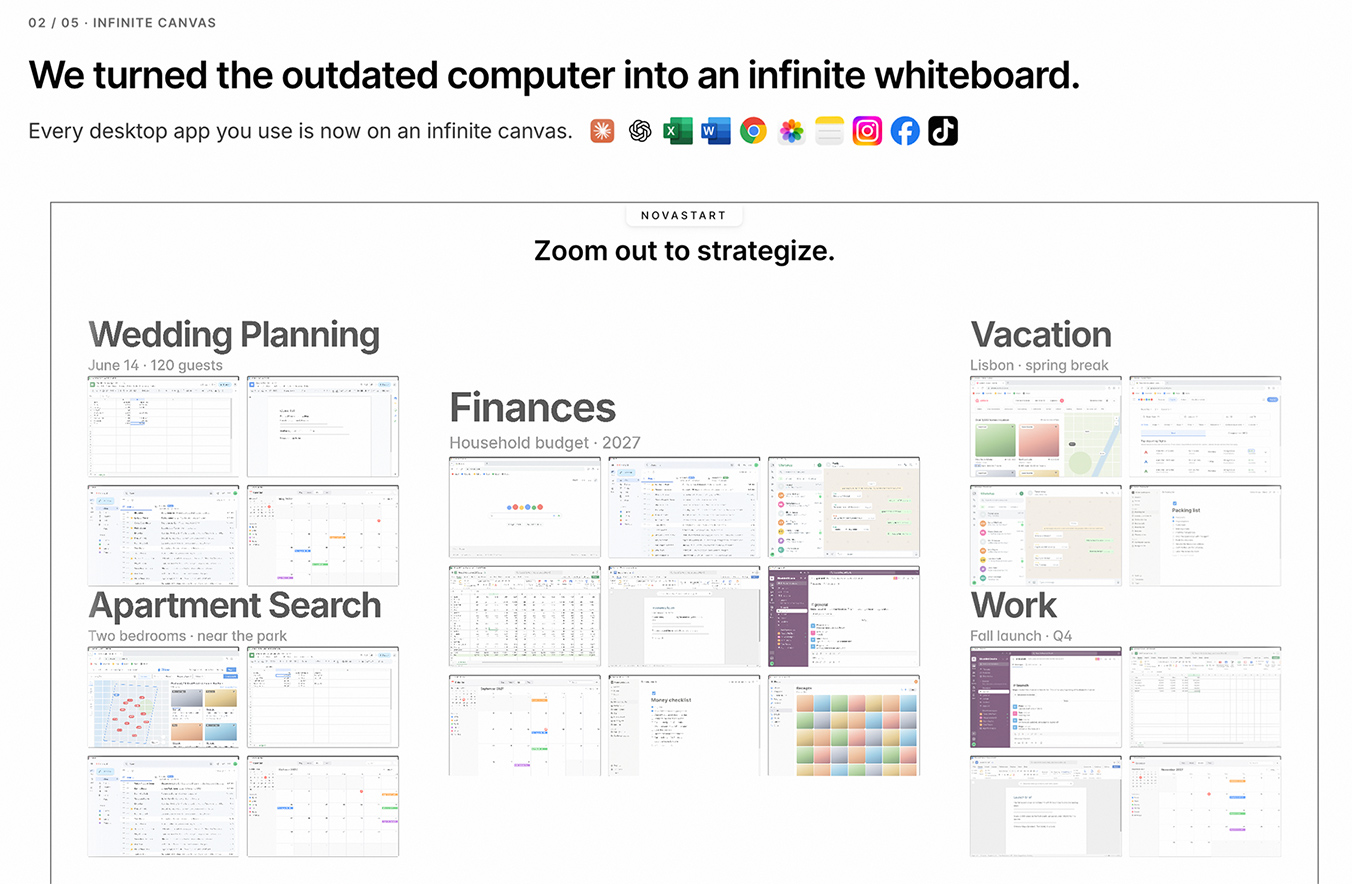
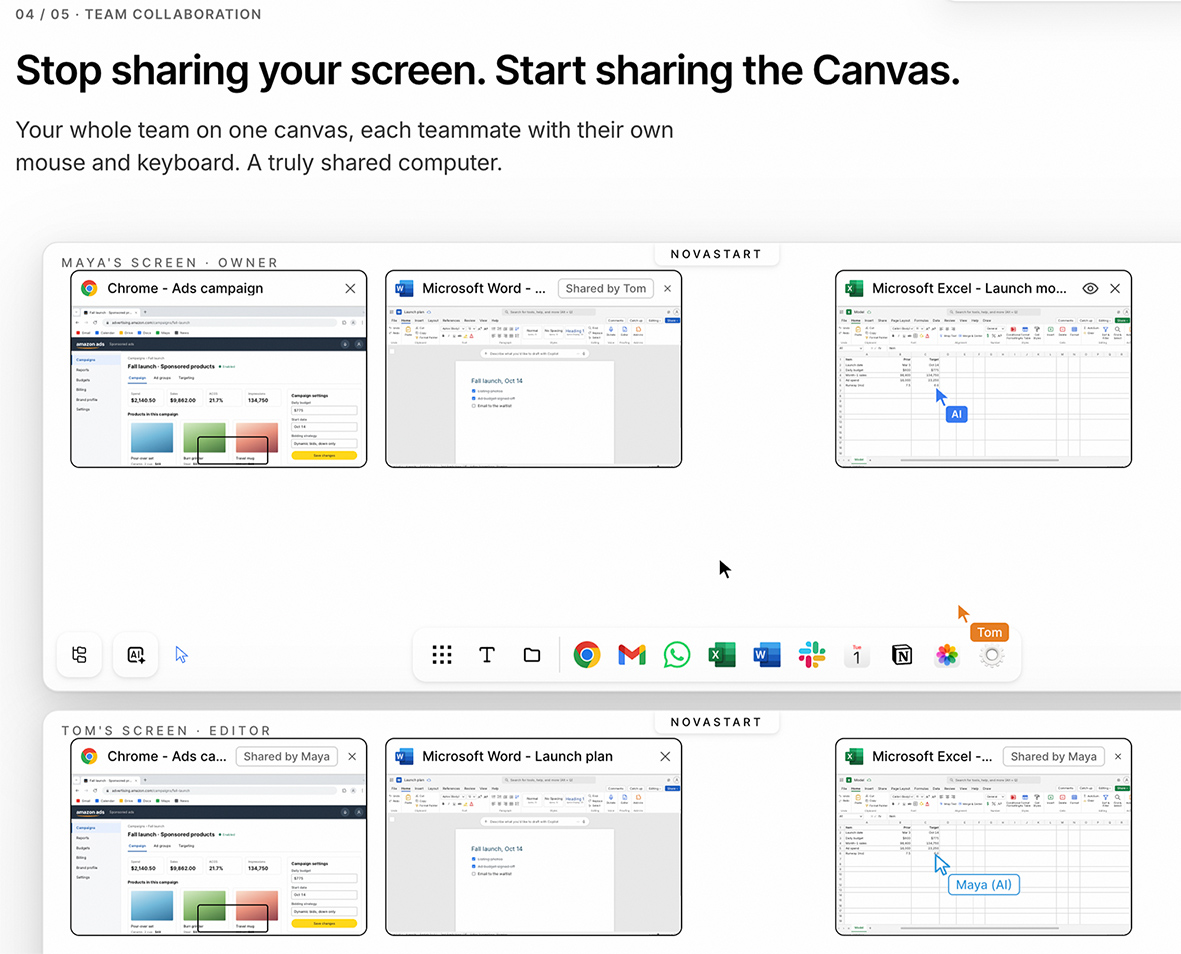
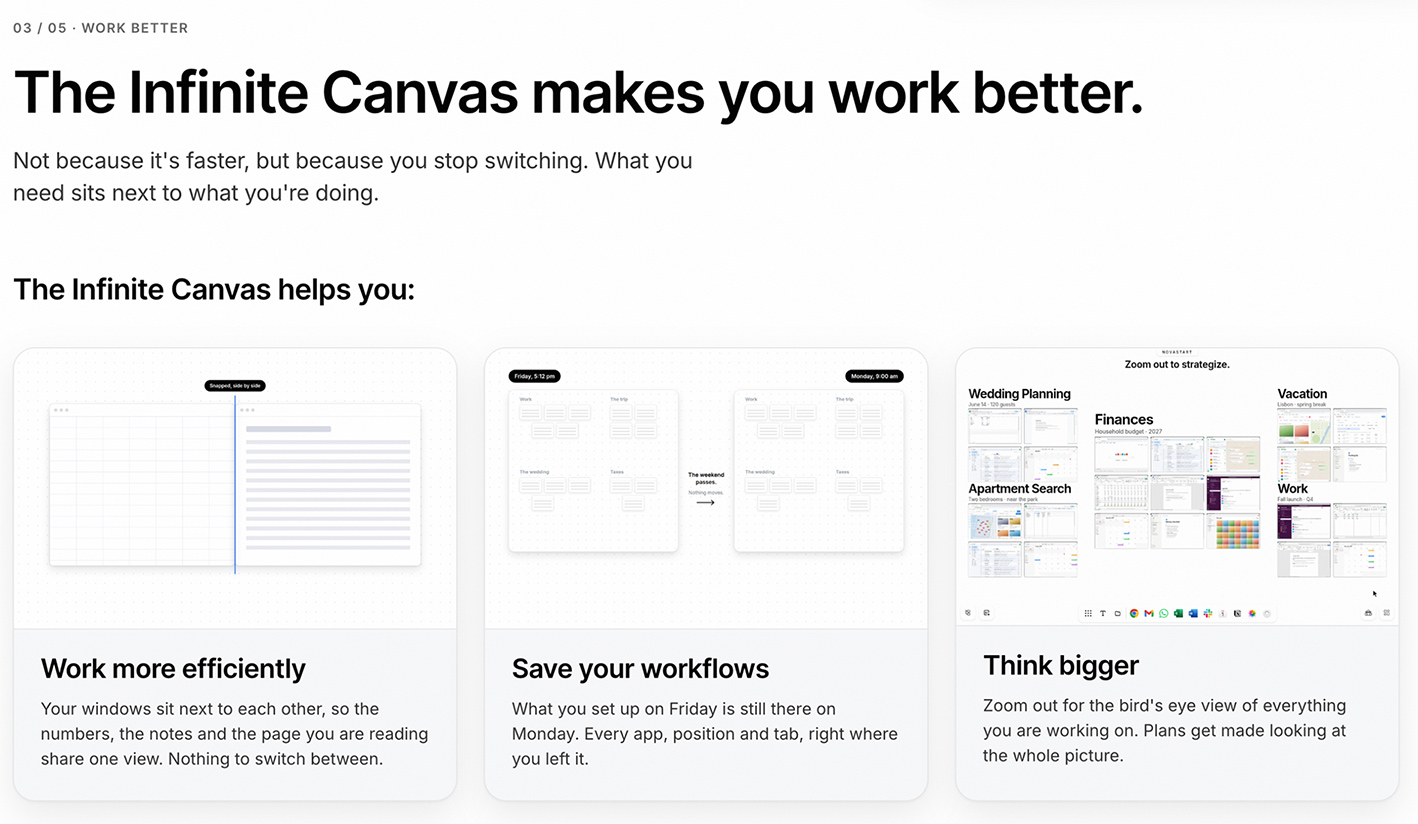
With thanks to Thomas Fraher, the Co-founder & CTO of Novastart, I’d like to pass along some screenshots about one of Novastart’s products below.

Per Thomas:

It’s an infinite canvas whiteboard where your apps open as real windows. A whole team can share one canvas, each person with their own cursor, and everything stays where you left it. You can also work alongside AI agents on the canvas.


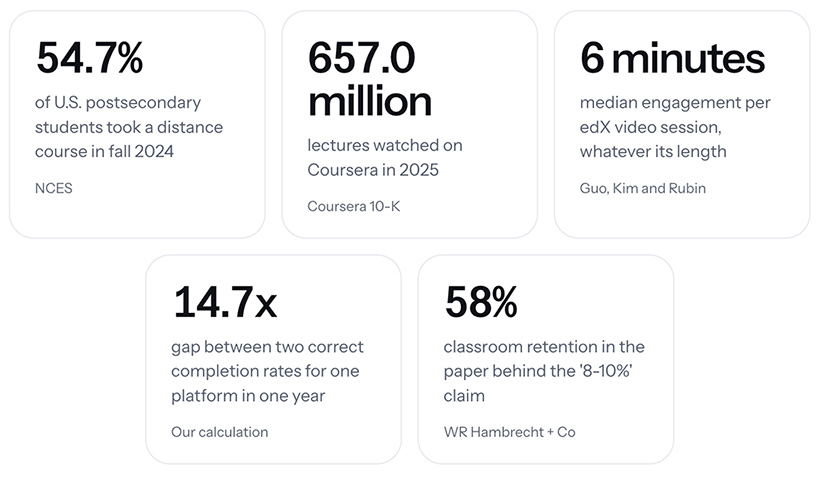
Online Course Video Statistics — from markstudios.com by Mark Santos

“Every figure on this page links to the organization that produced it, and each was re-checked against that source before publishing. How many people take online courses, how big the platforms are, how long course videos actually hold attention, how many learners finish, what the money looks like, and which popular online course statistics do not survive being traced to their origin.”
.


How a studio-based format transforms online teaching — from timeshighereducation.com by multiple authors from Cranfield University in England
Online teaching works best when teaching, facilitation and technical delivery are treated as complementary professional roles. Read guidance on studio-based delivery

Our experience of studio-based delivery suggests the need for a different approach. In this model, teaching is delivered as a live, facilitated learning experience in which academics focus on teaching and interaction, while facilitators and production staff manage interaction, session flow and technology.

Responsibilities are intentionally divided to enable more effective online pedagogy: academics concentrate on explaining concepts, facilitating discussion and responding to students while production staff manage the technical environment, transition between activities, recordings, multimedia integration, chat moderation, breakout rooms and troubleshooting, enabling a more engaging and authentic learning experience.

The most transferable lesson is that online teaching works best when teaching, facilitation and technical delivery are treated as complementary professional roles and when it is underpinned by pedagogical design. 


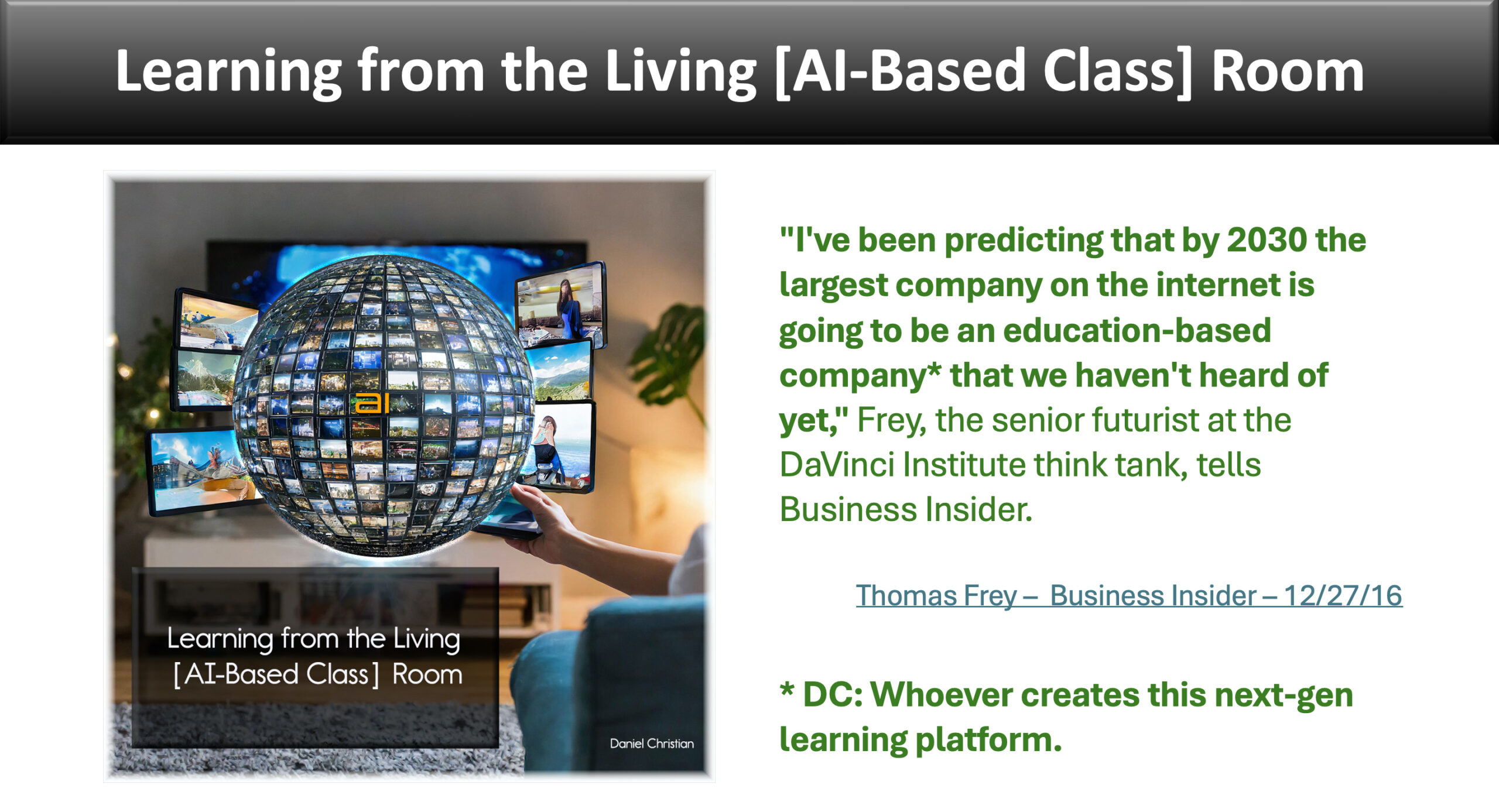
Will this new company be the largest company on the Internet by 2030? [Christian]

From DSC:
The vision that I’ve been tracking for well over a decade begins with this graphic:
.


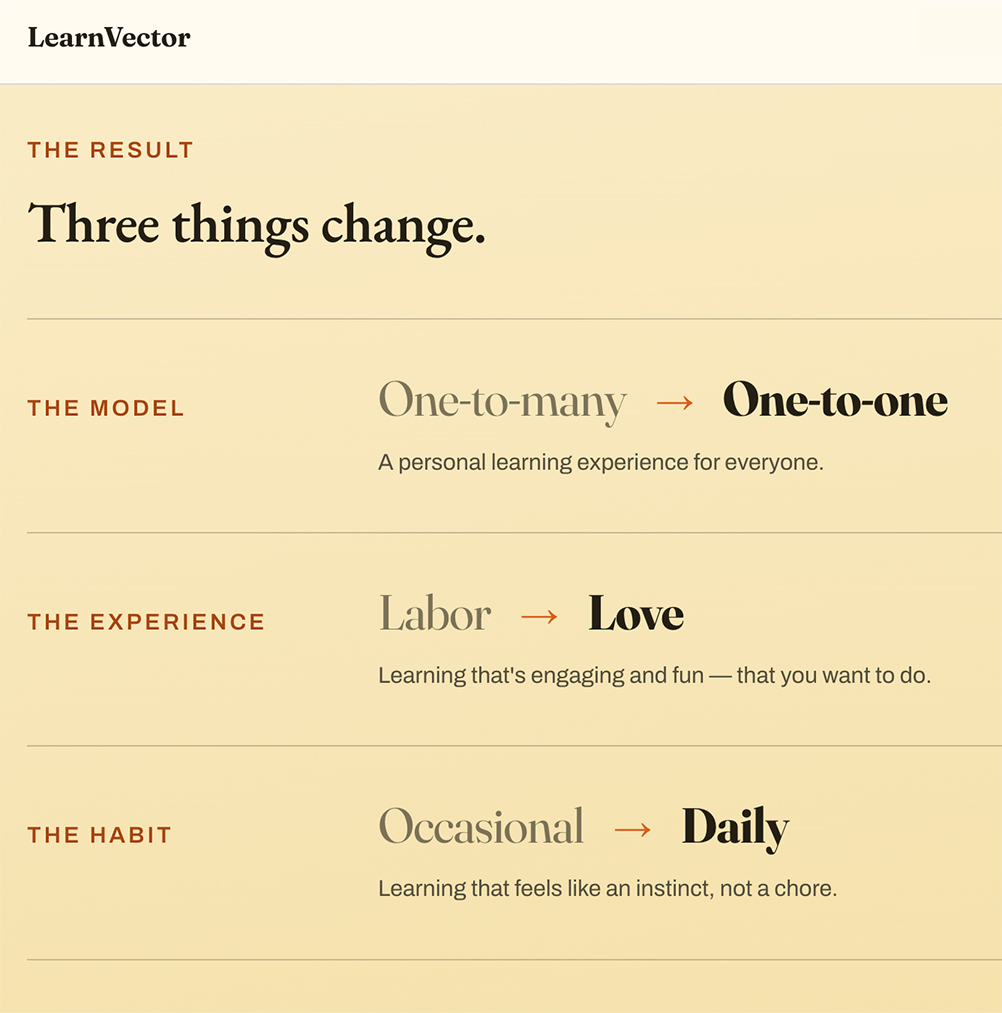
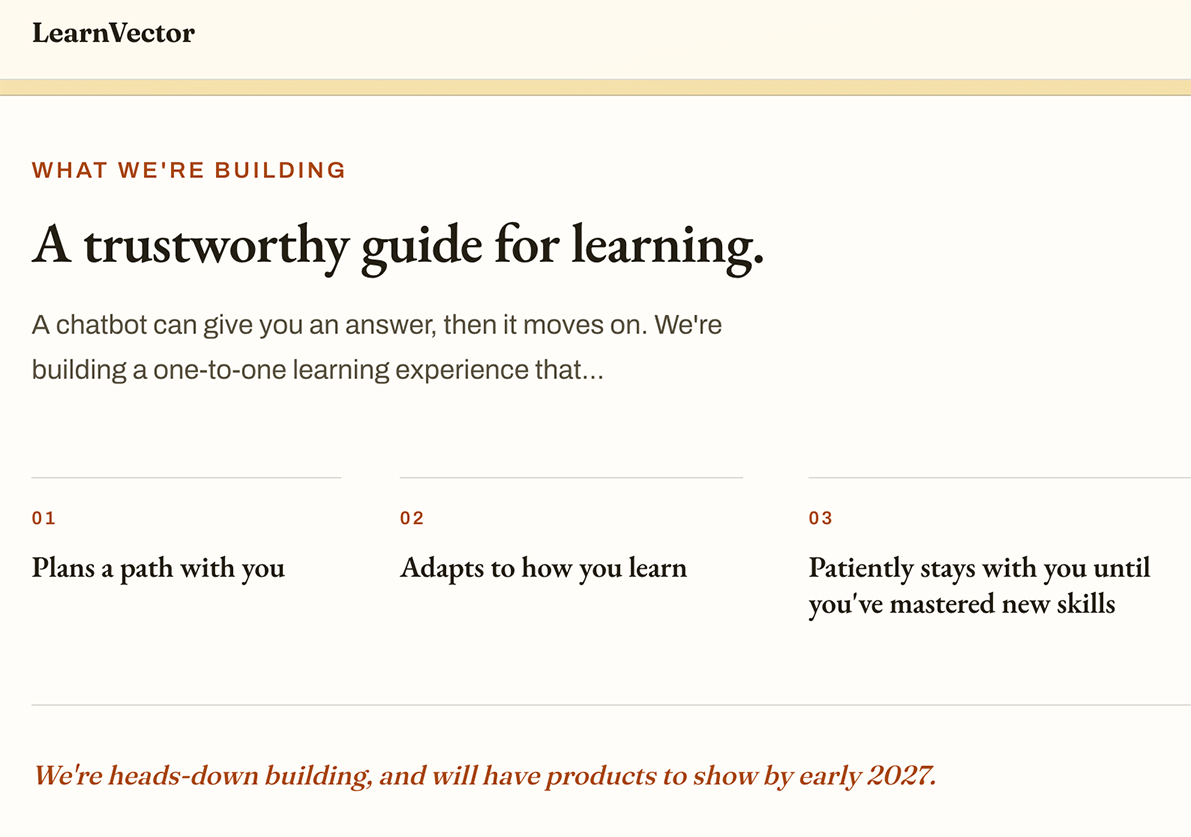
Could LearnVector be this next-generation company/platform? Perhaps. Time will tell.


Per Matt Tower via The EdSheet Vol. 38 dated 7/31/26:

  • Coursera bets $100M on its own co-founder: Andrew Ng’s new venture LearnVector lands one of the largest single checks in edtech this year — from Coursera, the company he founded 14 years ago.
    .


LearnVector.ai


A Comprehensive Report on Teens, Tweens, and AI — from commonsensemedia.org

To find out what that actually looks like day-to-day, we surveyed more than a thousand 9- to 17-year-olds across the country. We asked them how they use AI, how often, and for what.

The Common Sense Media Census: AI Use by Tweens and Teens (2026) is the first in a series we’ll repeat every year to learn how this generation’s relationship with AI evolves over time.

A few things stood out:

  • Kids are using AI for many things. It’s not just a homework helper anymore. For some kids, AI has become a confidant, even though our research is clear that AI companionship is not safe for anyone under 18.
  • Guardrails are thin to nonexistent. Schools are talking about rules more than safety. Three-quarters of kids say their school has discussed what they can and cannot use AI for, but just over half have been taught how to use AI safely.
  • Just like we saw with smartphones and social media, the conversation is once again lagging behind the technology. Nearly half of kids have never had a conversation with their parents about AI safety.
 

From DSC:
Could this be a part of our future learning ecosystems? Education as a personalized content feed.


Coursera wants users to learn through shorter, faster content  — from digitaltrends.com by Moinak Pal
Coursera wants online learning to feel more like TikTok
.

Online learning platform Coursera is taking a page straight out of TikTok’s playbook. The company has launched a new AI-powered feed designed to serve short-form educational content in a scrollable, personalized format, signaling a major shift in how digital learning platforms may try to keep users engaged.

The feature introduces bite-sized video lessons, clips, and explainers curated through artificial intelligence based on a user’s interests, learning habits, career goals, and previous course activity. Instead of committing to hour-long lectures or full certification programs upfront, users can now discover short educational snippets designed to make learning feel more casual, accessible, and addictive.

Users scroll through a feed of short educational videos and AI-curated learning moments covering topics ranging from coding and business to AI, productivity, data science, and personal development.


Want Students to Build a Healthier Relationship With Technology? Start With The Arts — from techlearning.com by Adrianna Marshall
Arts classrooms demonstrate what technology integration at its best can look like

But at a moment defined by rapid AI adoption and ongoing debates about screen time, the argument for protecting and investing in arts education needs to take on a new tone. The arts continue to be one of the most effective places in school for students to build healthier, more intentional relationships with technology.

In short, in the age of AI, we need the arts more than ever.
…
Digital composition software, notation tools, and recording platforms allow students to experiment, revise, and refine their ideas in ways that would have been far more time-consuming a decade ago. Students can layer tracks, hear immediate playback, annotate their own scores, and collaborate across devices. The same is true in other contexts besides music; in visual arts, for instance, a variety of digital drawing and painting platforms enable students to practice with new mediums, styles, and techniques without having to worry about supplies or messes. But in either case, the core intellectual work of looking and listening critically, understanding structure, and making aesthetic choices remains entirely human and part of the learning.


From DSC:
I agree. At one of my previous positions, I spent 10 years supervising a digital studio — helping professors and students use a variety of applications to create things. The applications were from Adobe, Apple, and a variety of smaller vendors. The deliverables could be graphics, edited soundtracks, music, videos, flyers, posters, collages, edited photographs, presentations, websites, and more. I longed for people to discover the power of multimedia to communicate their messages, tell stories, stir emotion, powerfully engage themselves (and others), and unleash their creativity.

There were several obstacles to our digital studio being more impactful at that institution. It was under the IT department, not the academic side of the house. It was in the basement of the library, where few students and faculty traveled. During those years, it was highly uncommon for faculty members to require multimedia-based assignments — so many students had to WANT to develop these skills on their own time. The majority of students didn’t see the value in developing the types of digital skills that we were trying to build…or they didn’t have the time.


Also relevant/see:


Make learning accessible to all in higher education — from The Times Higher Education

When accessibility is placed at the heart of teaching and learning, rather than treated as a bolt-on, every student benefits. This week’s spotlight guide offers advice on designing universally accessible learning, in-person and online. Find out how to ease the burden of disability disclosure with universal design for learning, better support neurodivergent students and students with hearing or vision issues, design more accessible assessments and ensure digital tools work for all.


Coursera to Combine with Udemy to Empower the Global Workforce with Skills for the AI Era — from investor.coursera.com

Highly Complementary Capabilities Will Create a Leading Technology Platform, Redefining Skills Discovery, Development, and Mastery for Learners and Organizations at Scale

Unites Udemy’s Dynamic AI-Powered Skills Development Marketplace with World-Class University and Industry Brands Under the Coursera Ecosystem, Expanding Value, Impact, and Choice Globally

Strengthens Combined Company’s Financial Profile with Pro Forma Annual Revenue of More Than $1.5 Billion and Anticipated Annual Run-Rate Cost Synergies of $115 Million Within 24 Months

“We’re at a pivotal moment in which AI is rapidly redefining the skills required for every job across every industry. Organizations and individuals around the world need a platform that is as agile as the new and emerging skills learners must master,” said Greg Hart, CEO of Coursera. “By combining the highly complementary strengths of Coursera and Udemy, we will be in an even stronger position to address the global talent transformation opportunity, unlock a faster pace of innovation, and deliver valuable experiences and outcomes for our learners and customers. Together, we will ensure our millions of learners, thousands of enterprise, university, and government customers, and expert instructors have a platform to keep pace with technology acceleration.”


AI working competency is now a graduation requirement at Purdue [Pacton] + other items re: AI in our learning ecosystems


AI Has Landed in Education: Now What? — from learningfuturesdigest.substack.com by Dr. Philippa Hardman

Here’s what’s shaped the AI-education landscape in the last month:

  • The AI Speed Trap is [still] here: AI adoption in L&D is basically won (87%)—but it’s being used to ship faster, not learn better (84% prioritising speed), scaling “more of the same” at pace.
  • AI tutors risk a “pedagogy of passivity”: emerging evidence suggests tutoring bots can reduce cognitive friction and pull learners down the ICAP spectrum—away from interactive/constructive learning toward efficient consumption.
  • Singapore + India are building what the West lacks: they’re treating AI as national learning infrastructure—for resilience (Singapore) and access + language inclusion (India)—while Western systems remain fragmented and reactive.
  • Agentic AI is the next pivot: early signs show a shift from AI as a content engine to AI as a learning partner—with UConn using agents to remove barriers so learners can participate more fully in shared learning.
  • Moodle’s AI stance sends two big signals: the traditional learning ecosystem in fragmenting, and the concept of “user sovereignty” over by AI is emerging.

Four strategies for implementing custom AIs that help students learn, not outsource — from educational-innovation.sydney.edu.au by Kria Coleman, Matthew Clemson, Laura Crocco and Samantha Clarke; via Derek Bruff

For Cogniti to be taken seriously, it needs to be woven into the structure of your unit and its delivery, both in class and on Canvas, rather than left on the side. This article shares practical strategies for implementing Cogniti in your teaching so that students:

  • understand the context and purpose of the agent,
  • know how to interact with it effectively,
  • perceive its value as a learning tool over any other available AI chatbots, and
  • engage in reflection and feedback.

In this post, we discuss how to introduce and integrate Cogniti agents into the learning environment so students understand their context, interact effectively, and see their value as customised learning companions.

In this post, we share four strategies to help introduce and integrate Cogniti in your teaching so that students understand their context, interact effectively, and see their value as customised learning companions.


Collection: Teaching with Custom AI Chatbots — from teaching.virginia.edu; via Derek Bruff
The default behaviors of popular AI chatbots don’t always align with our teaching goals. This collection explores approaches to designing AI chatbots for particular pedagogical purposes.

Example/excerpt:


Adobe Reinvents its Entire Creative Suite with AI Co-Pilots, Custom Models, and a New Open Platform — from theneuron.ai by Grant Harvey
Adobe just put an AI co-pilot in every one of its apps, letting you chat with Photoshop, train models on your own style, and generate entire videos with a single subscription that now includes top models from Google, Runway, and Pika.

Adobe came to play, y’all.

At Adobe MAX 2025 in Los Angeles, the company dropped an entire creative AI ecosystem that touches every single part of the creative workflow. In our opinion, all these new features aren’t about replacing creators; it’s about empowering them with superpowers they can actually control.

Adobe’s new plan is to put an AI co-pilot in every single app.

  • For professionals, the game-changer is Firefly Custom Models. Start training one now to create a consistent, on-brand look for all your assets.
  • For everyday creators, the AI Assistants in Photoshop and Express will drastically speed up your workflow.
  • The best place to start is the Photoshop AI Assistant (currently in private beta), which offers a powerful glimpse into the future of creative software—a future where you’re less of a button-pusher and more of a creative director.

Adobe MAX Day 2: The Storyteller Is Still King, But AI Is Their New Superpower — from theneuron.ai by Grant Harvey
Adobe’s Day 2 keynote showcased a suite of AI-powered creative tools designed to accelerate workflows, but the real message from creators like Mark Rober and James Gunn was clear: technology serves the story, not the other way around.

On the second day of its annual MAX conference, Adobe drove home a message that has been echoing through the creative industry for the past year: AI is not a replacement, but a partner. The keynote stage featured a powerful trio of modern storytellers—YouTube creator Brandon Baum, science educator and viral video wizard Mark Rober, and Hollywood director James Gunn—who each offered a unique perspective on a shared theme: technology is a powerful tool, but human instinct, hard work, and the timeless art of storytelling remain paramount.

From DSC:
As Grant mentioned, the demos dealt with ideation, image generation, video generation, audio generation, and editing.


Adobe Max 2025: all the latest creative tools and AI announcements — from theverge.com by Jess Weatherbed

The creative software giant is launching new generative AI tools that make digital voiceovers and custom soundtracks for videos, and adding AI assistants to Express and Photoshop for web that edit entire projects using descriptive prompts. And that’s just the start, because Adobe is planning to eventually bring AI assistants to all of its design apps.


Also see Adobe Delivers New AI Innovations, Assistants and Models Across Creative Cloud to Empower Creative Professionals plus other items from the News section from Adobe


“OpenAI’s Atlas: the End of Online Learning—or Just the Beginning?” [Hardman] + other items re: AI in our LE’s

OpenAI’s Atlas: the End of Online Learning—or Just the Beginning? — from drphilippahardman.substack.com by Dr. Philippa Hardman

My take is this: in all of the anxiety lies a crucial and long-overdue opportunity to deliver better learning experiences. Precisely because Atlas perceives the same context in the same moment as you, it can transform learning into a process aligned with core neuro-scientific principles—including active retrieval, guided attention, adaptive feedback and context-dependent memory formation.

Perhaps in Atlas we have a browser that for the first time isn’t just a portal to information, but one which can become a co-participant in active cognitive engagement—enabling iterative practice, reflective thinking, and real-time scaffolding as you move through challenges and ideas online.

With this in mind, I put together 10 use cases for Atlas for you to try for yourself.
…

6. Retrieval Practice
What:
Pulling information from memory drives retention better than re-reading.
Why: Practice testing delivers medium-to-large effects (Adesope et al., 2017).
Try: Open a document with your previous notes. Ask Atlas for a mixed activity set: “Quiz me on the Krebs cycle—give me a near-miss, high-stretch MCQ, then a fill-in-the-blank, then ask me to explain it to a teen.”
Atlas uses its browser memory to generate targeted questions from your actual study materials, supporting spaced, varied retrieval.


From DSC:
A quick comment. I appreciate these ideas and approaches from Katarzyna and Rita. I do think that someone is going to want to be sure that the AI models/platforms/tools are given up-to-date information and updated instructions — i.e., any new procedures, steps to take, etc. Perhaps I’m missing the boat here, but an internal AI platform is going to need to have access to up-to-date information and instructions.


Agentic AI and the New Era of Corporate Learning for 2026 — from hrmorning.com by Carol Warner

That gap creates compliance risk and wasted investment. It leaves HR leaders with a critical question: How do you measure and validate real learning when AI is doing the work for employees?

Designing Training That AI Can’t Fake
Employees often find static slide decks and multiple-choice quizzes tedious, while AI can breeze through them. If employees would rather let AI take training for them, it’s a red flag about the content itself.

One of the biggest risks with agentic AI is disengagement. When AI can complete a task for employees, their incentive to engage disappears unless they understand why the skill matters, Rashid explains. Personalization and context are critical. Training should clearly connect to what employees value most – career mobility, advancement, and staying relevant in a fast-changing market.

Nearly half of executives believe today’s skills will expire within two years, making continuous learning essential for job security and growth. To make training engaging, Rashid recommends:

  • Delivering content in formats employees already consume – short videos, mobile-first modules, interactive simulations, or micro-podcasts that fit naturally into workflows. For frontline workers, this might mean replacing traditional desktop training with mobile content that integrates into their workday.
  • Aligning learning with tangible outcomes, like career opportunities or new responsibilities.
  • Layering in recognition, such as digital badges, leaderboards, or team shout-outs, to reinforce motivation and progress

Microsoft 365 Copilot AI agents reach a new milestone — is teamwork about to change? — from windowscentral.comby Adam Hales
Microsoft expands Copilot with collaborative agents in Teams, SharePoint and more to boost productivity and reshape teamwork.

Microsoft is pitching a recent shift of AI agents in Microsoft Teams as more than just smarter assistance. Instead, these agents are built to behave like human teammates inside familiar apps such as Teams, SharePoint, and Viva Engage. They can set up meeting agendas, keep files in order, and even step in to guide community discussions when things drift off track.
…
Unlike tools such as ChatGPT or Claude, which mostly wait for prompts, Microsoft’s agents are designed to take initiative. They can chase up unfinished work, highlight items that still need decisions, and keep projects moving forward. By drawing on Microsoft Graph, they also bring in the right files, past decisions, and context to make their suggestions more useful.


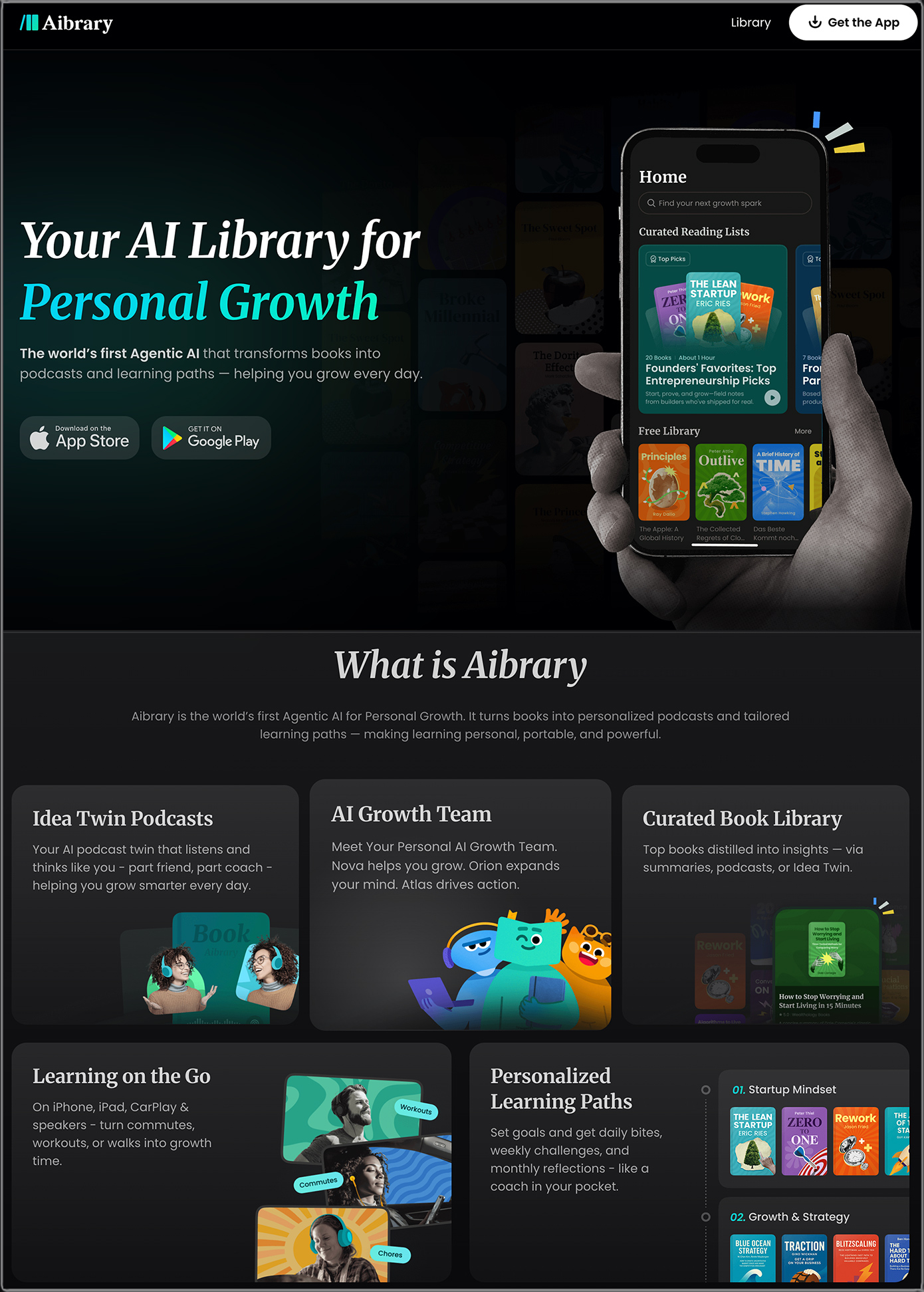
Chris Dede’s comments on LinkedIn re: Aibrary

As an advisor to Aibrary, I am impressed with their educational philosophy, which is based both on theory and on empirical research findings. Aibrary is an innovative approach to self-directed learning that complements academic resources. Expanding our historic conceptions of books, libraries, and lifelong learning to new models enabled by emerging technologies is central to empowering all of us to shape our future.
.

Also see:

Aibrary.ai

Why AI literacy must come before policy — from timeshighereducation.com by Kathryn MacCallum and David Parsons
When developing rules and guidelines around the uses of artificial intelligence, the first question to ask is whether the university policymakers and staff responsible for implementing them truly understand how learners can meet the expectations they set

Literacy first, guidelines second, policy third
For students to respond appropriately to policies, they need to be given supportive guidelines that enact these policies. Further, to apply these guidelines, they need a level of AI literacy that gives them the knowledge, skills and understanding required to support responsible use of AI. Therefore, if we want AI to enhance education rather than undermine it, we must build literacy first, then create supportive guidelines. Good policy can then follow.


AI training becomes mandatory at more US law schools — from reuters.com by Karen Sloan and Sara Merken

Sept 22 (Reuters) – At orientation last month, 375 new Fordham Law students were handed two summaries of rapper Drake’s defamation lawsuit against his rival Kendrick Lamar’s record label — one written by a law professor, the other by ChatGPT.

The students guessed which was which, then dissected the artificial intelligence chatbot’s version for accuracy and nuance, finding that it included some irrelevant facts.

The exercise was part of the first-ever AI session for incoming students at the Manhattan law school, one of at least eight law schools now incorporating AI training for first-year students in orientation, legal research and writing courses, or through mandatory standalone classes.


Digital Accessibility with Amy Lomellini — from intentionalteaching.buzzsprout.com by Derek Bruff

In this episode, we explore why digital accessibility can be so important to the student experience. My guest is Amy Lomellini, director of accessibility at Anthology, the company that makes the learning management system Blackboard. Amy teaches educational technology as an adjunct at Boise State University, and she facilitates courses on digital accessibility for the Online Learning Consortium. In our conversation, we talk about the importance of digital accessibility to students, moving away from the traditional disclosure-accommodation paradigm, AI as an assistive technology, and lots more.

 
© 2025 | Daniel Christian