The power and potential of mobile learning [Christian]

The power and possibility of mobile learningas cross posted from evoLLLution.com (for LifeLong Learning)
Daniel S. Christian | October 2012

As I sat down to write about mobile learning, I struggled with narrowing down the scope of what I was going to attempt to address.  Which angle(s) should I take?

And then I reflected on my morning so far. I helped my daughter wake up to the sounds of a song coming from my iPhone.  She opened one eye, then the other, and soon, she was dancing around the room.  Success!

I then proceeded to listen to my iPhone as I drove my car into work – it gave me the energy I needed to start my internal engines.  (By the way, the idea of automobile-based technologies continues to grow, opening up further possibilities; but that’s a topic for another day.)

Then I caught up with a friend for coffee and he reached for his iPad.  He showed me an app for the local Art Prize competition that’s currently going on in our area.  He mentioned that if a person wasn’t in the immediately vicinity of the Art Prize event, that person could not vote on any of the pieces.  However, if the GPS-based coordinates were within the approved range, a person could use that app to:

  • Vote on which pieces of artwork that they liked
  • Find out where the artwork was located (at numerous locations on a map)
  • Learn more about the pieces themselves – what the pieces were made of, hear the artists’ thoughts on why they created what they created, etc.

So by the time I pulled up to my PC at 9:00am, I had already been positively impacted by mobile technology in several ways.  The common words and phrases that are often used to describe mobile learning and mobile technologies rang true and popped back into my mind: ubiquitous, always on, always connected, 24x7x365, convenient, etc.

As I enjoy peering into the future as well as pulse checking a variety of items, I would like to ask the following questions concerning the potential power and possibility of mobile learning as well as the relevant, emerging set of technologies that enable it:

  • Q:  What happens when the technologies behind IBM’s Watson and Apple’s Siri get perfected and integrated into learning-based products and services? What types of devices will be able to tap into those products and services?
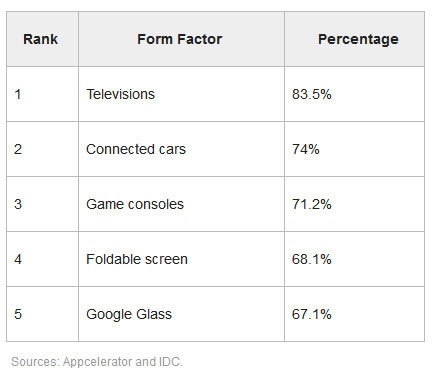
    A:  IBM’s Watson beat the best human players in a game of Jeopardy and is now being used as a data analytics engine for the medical community, wading through terabytes of patient healthcare information and research data in order to determine how best to treat illnesses.  So, such technologies hold some serious promise in terms of at least addressing the lower to mid-levels of Bloom’s Taxonomy. For 2012, tablets, smart phones, laptops, notebooks would be likely candidates of accessing these types of products/services. But we are just at the embryonic stages of the Smart/Connected TV, and I have it that such a device will become an important and commonly-used mechanism for accessing such cloud-based applications and services in the future.
    .
  • Q: Will students of all ages have access to their own virtual tutors so to speak? From any device at any time?
    A: Yes; this is highly likely, especially given the current (and increasing) levels of investments being made in educational technology related areas.  It’s very feasible to think that Apple, IBM, Google, Microsoft, McGraw-Hill, Pearson, or some other organization with deep pockets will develop such virtual tutoring products and services.
    .
  • Q:  What will happen when a virtual tutor is unable to resolve or address the student’s issue to the student’s satisfaction?  Will the student be able to instantly access a human tutor – with the option of keeping the existing work/issue/problem visible to the human tutor?
    A:  Yes, again…highly likely. This will open up new opportunities for faculty members, teachers, instructors, trainers, and tutors.  Getting experience in teaching online is a solid career move at this point in history.  (Also relevant will be those people creating applications and technically supporting them. An understanding of web-based videoconferencing and collaboration tools will be helpful here.)
    .
  • Q:  How will the convergence of the television, the computer, and the telephone impact what can be done with learning-based applications and experiences?
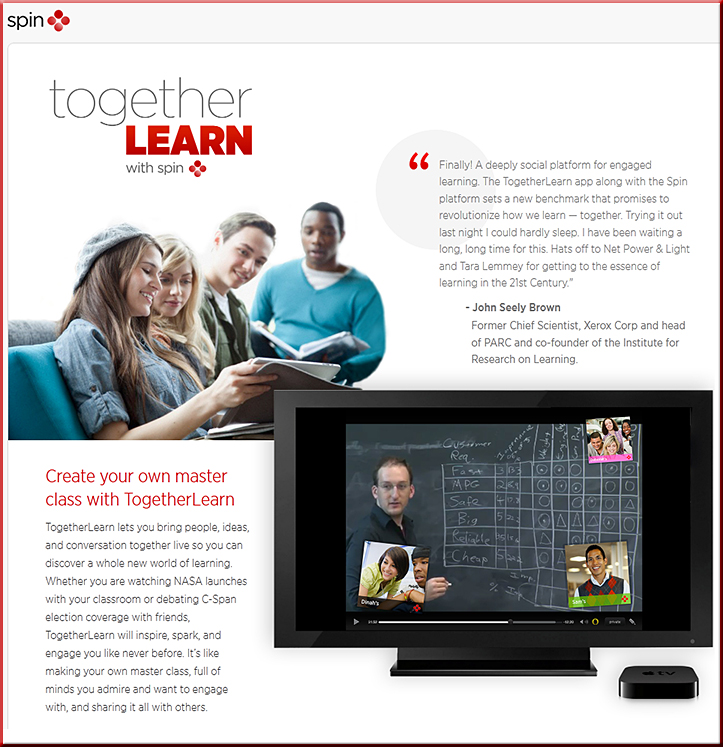
    A:  We are just beginning to see the ecosystems changing and adapting to deal with the convergence of the television, the computer, and the telephone.  The Smart/Connected TV – along with “second screen” based applications – is being driven by innovations involving the entertainment, marketing, and advertising industries.  But it’s not a stretch to think that educationally-related content will be right behind such innovative solutions.
    .
  • Q:  How will the multiple screens phenomenon affect how content can be consumed and discussed?
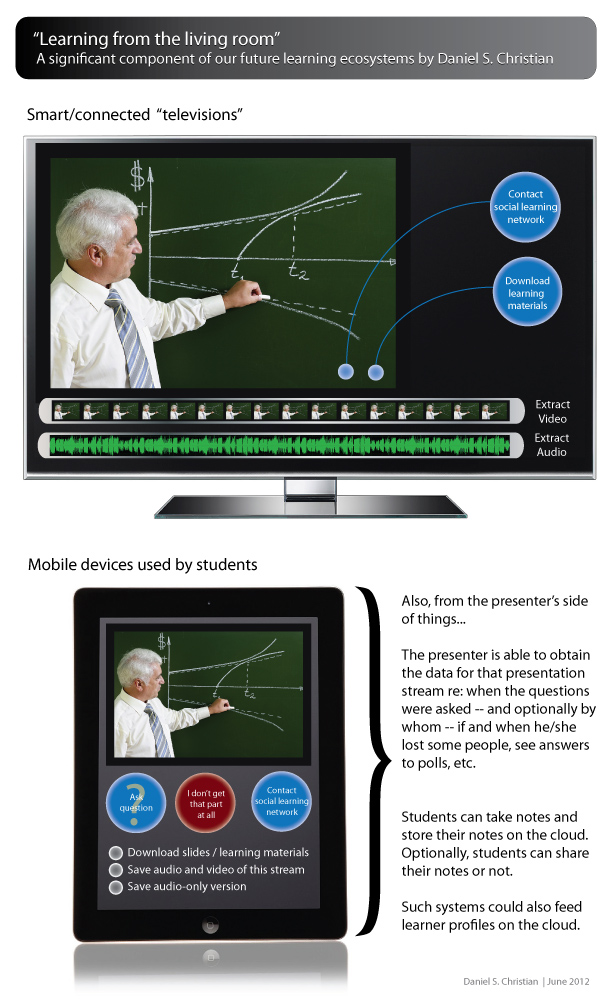
    A:   I created a couple of graphics along these lines that attempt to capture a potential vision here. I call it “Learning from the Living [Class] Room,” and it continues to develop in front of our eyes. We could be watching a “lecture” on a big screen and simultaneously interacting with people throughout the world on our smaller screens.

The Living [Class] Room -- by Daniel Christian -- July 2012 -- a second device used in conjunction with a Smart/Connected TV


.

Learning from the living room -- a component of our future learning ecosystems -- by Daniel S. Christian, June 2012

  • Q:  How will mobile conferencing affect what can be achieved?
    A:  Mobile-based conferencing will provide 24x7x365 opportunities for learning – and communications – to occur.  Such technologies have applications even in more traditional face-to-face classroom settings.  For a few possibilities here, see how mobile technologies are used in this vision by Intel  as well as in this vision by Corning.


Great vision from Intel!

.

Great vision from Corning!

.

  • Q:  What sort of creative doors are opened when a story can be told across a variety of “channels” and means?  And what sorts of skill sets do we need to start building – or continue to build – in order to help students find work in these emerging fields?
    A:  Create a Google Alert on transmedia and/or transmedia-based storytelling and you will get a sense of what’s happening in this arena.  There will be huge opportunity for creative, innovative folks out there!  Being versed in new media would be a solid idea if one hopes to pursue careers in these burgeoning fields. That is, building at least a rudimentary skill set of how to creatively use text, graphics, animations, digital audio, digital video, and interactive programming to deliver and obtain information would be very beneficial here.
    .
  • Q:  What types of analytics will be tracked and fed into one’s cloud-based learner profile?
    A:  It will depend upon where we want such technologies to take us.  However, think about the applications and implications of this approach if a web-based profile were used to:

    • Feed a workplace-based exchange – matching buyers and sellers of services
    • Inform a learning agent on which topics/disciplines that person wants to learn more about – helping that person obtain a highly-personalized, customized, relevant, engaging, productive learning experience with a solid ROI
    • Inform a cloud-based app on what prior knowledge one has and where to begin the “next lesson”
      .
  • Q:  Will courses become apps?  Will what we know of TV programs become apps and, if so, how will that affect what each of us can contribute to our own communities of practice?
    A:  Just as the web has enabled individuals to deliver their own podcasts, information, etc. – essentially becoming their own radio stations to a degree – the ecosystems being built up around the Smart/Connected TVs could help each of us become our own TV station. The potential is huge in terms of further developing and sharing knowledge within communities of practice.
    .
  • Q:  Will educational gaming dove-tail nicely with mobile learning and emerging technologies such as augmented reality, 3D, and connected television?
    Yes, the synergies and foundational pieces are already coming into place.
    .
  • Q:  How will the bring-your-own-device (BYOD) situation affect what can occur in the face-to-face classroom?
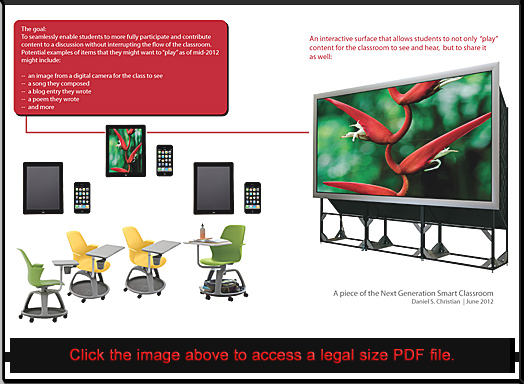
    A:  Students will be able to seamlessly and efficiently contribute content to the discussions in a face-to-face classroom without breaking the flow of the classroom.  An example graphic can be found here.


A piece of the Next Generation Smart Classroom -- Daniel Christian -- June 2012


The topics and potential routes that additional articles could take are almost endless.  But I think it’s safe to say that mobile, lifelong learning is here to stay.

Listed below are some recent articles and resources if you are interested in pursuing the topic of mobile learning.  I also have a section on my Learning Ecosystems blog dedicated to mobile learning.

If you are interested in what I’m calling Learning from the Living [Class] Room, you might be interested in these postings.


Some recent articles/resources regarding mobile learning:


Addendum:


Tagged with:  

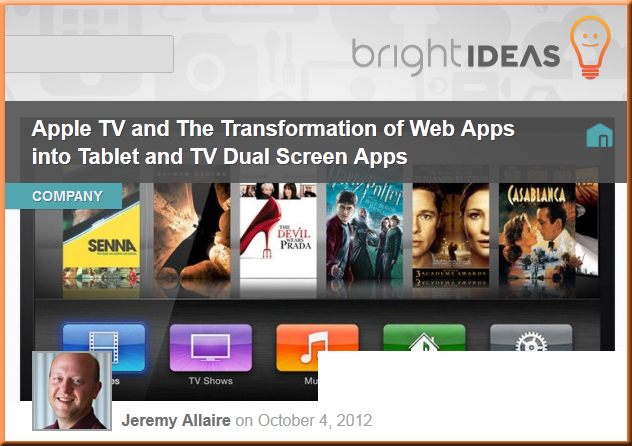
Apple TV and the transformation of web apps into tablet and TV dual screen apps — from brightcove.com by Jeremy Allaire

.


Excerpts:

Importantly, designers and developers need to shed the concept that “TVs” are for rendering video, and instead think about “TVs” as large monitors on which they can render applications, content and interactivity that is supported by a touch-based tablet application.

The key concept here is that this pervasive adoption of TV monitors is the tip of the spear in creating a social computing surface in the real world.

Specifically, Apple has provided the backbone for dual screen apps, enabling:

  • Any iOS device (and OSX Mountain Lion-enabled PCs) to broadcast its screen onto a TV. Think of this as essentially a wireless HDMI output to a TV. If you haven’t played with AirPlay mirroring features in iOS and Apple TV, give it a spin, it’s a really exciting development.
  • A set of APIs and an event model for enabling applications to become “dual screen aware” (e.g. to know when a device has a TV screen it can connect to, and to handle rendering information, data and content onto both the touch screen and the TV screen).


[Jeremy listed several applications for these concepts:  Buying a house, buying a car, doctor’s office, kids edutainment, the classroom, retail electronics store, consuming news, consuming video, sales reporting, board games.]

.

Also see:

 
From DSC:
Graphically speaking — and approaching this from an educational/learning ecosystems standpoint — I call this, “Learning from the Living [Class] Room.

.

The Living [Class] Room -- by Daniel Christian -- July 2012 -- a second device used in conjunction with a Smart/Connected TV


Learning from the living room -- a component of our future learning ecosystems -- by Daniel S. Christian, June 2012


Related item:

8 things to know about the new Microsoft Office  — from inc.com by Christina DesMarais

Microsoft starts integrating Skype into Office — from techcrunch.com by Frederic Lardinois

Next version of Microsoft Office puts emphasis on subscriptions with Office 365 — from techcrunch.com by Frederic Lardinois

Licensing is the Achilles Heel for the new Microsoft Office — from techcrunch.com by Alex Williams

Microsoft’s new Office: The cloud finally takes center stage — from cnet.com by Mary Jo Foley
A public preview of Microsoft’s coming Office 2013 client is out today. But Office 365 and SkyDrive are the real stars of the new Office show.

New Microsoft Office taps into the cloud — from cnet.com by Lance Whitney
Like Windows 8, the new version of Office will let you sign in with an online account, providing you with the same settings across different devices.

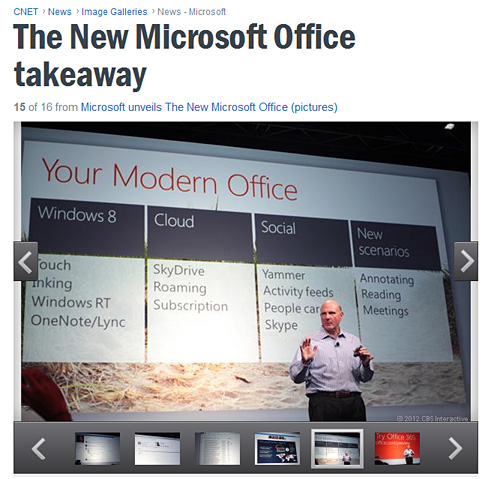
The new Microsoft Office — in pictures – from cnet.com

.

http://news.cnet.com/2300-10805_3-10012965-15.html


.

New Microsoft Office to embrace Windows 8 touch-screen tablets — from cnet.com by Lance Whitney
Demoing the applications in the new Office suite today, Microsoft emphasized the ability to integrate with Windows 8 using taps and other touch-based gestures.

Microsoft Office Home and Student 2013 to be bundled on all Windows RT tablets

Hands On: Microsoft Office 2013 and Office 365 — from PCMag.com by Jill Duffy

New Microsoft Office ropes in Skype, Yammer, SkyDrive — from gigaom.com by Barb Darrow

What the new Microsoft Office gets wrong — from fastcodesign.com by Austin Carr
Microsoft unveiled a preview of its latest version of Office, and the design is a schizophrenic mess. Here’s why.

Office 15: Microsoft’s Best Bet For Beating Dropbox, iCloud, Google Drive — from FastCompany.com by Austin Carr
With one billion Office users worldwide, the newest upgrade to Microsoft’s productivity suite could give the company a significant hold on the cloud, which Gartner estimates will become a $149 billion industry by 2015.


“Learning from the living room” — Part I [Christian]

Learning from the living room -- a component of our future learning ecosystems -- by Daniel S. Christian, June 2012


Legal size PDF here


Addendum on 7/3/12 from an article I wrote for EvoLLLution.com (for LifeLong Learning):
Establishing better collaboration between the corporate world and higher education [Christian]

In the near future, perhaps we could have second screen-based activities whereby corporate leaders are giving TED-like presentations or expressing the current issues in their worlds via a program on Smart TVs, and the students are communicating and collaborating about these presentations via tablets or smart phones.  Perhaps there will be electronic means whereby students could submit their ideas and feedback to the presenting companies (and whereby selected ideas could be rewarded in terms of free products or services that the company produces).


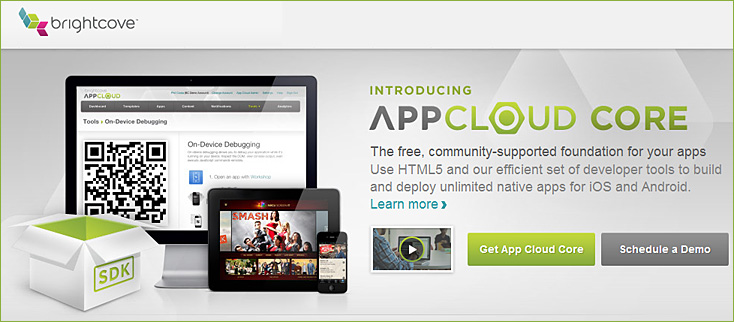
Introducing App Cloud Core – Build and Deploy Mobile Apps for Free

.

brightcove.com/en/content-app-platform

.

Also see:


Also see:

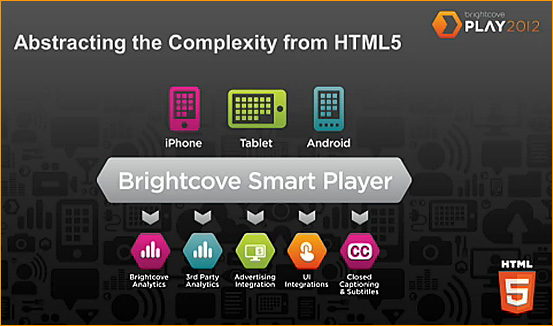
  • Brightcove PLAY is a global gathering of Brightcove customers, partners and industry leaders at the forefront of the digital media revolution. On June 25-27, hundreds of media companies, marketers and developers from around the world will convene in Boston for three action-packed days of hands-on learning, in-depth strategy sessions, next-generation product demos, all-star keynotes, and networking.

Blackboard launches mobile beta program for Blackboard Collaborate — from Blackboard.com
Company plans to bring live classes and collaboration to mobile devices

Excerpt:

WASHINGTON, June 18, 2012 /PRNewswire/ — Blackboard Inc. today announced the launch of a Beta program for an interactive mobile application for Blackboard Collaborate, the leading Web conferencing platform built for education. The new app would let learners participate in live Web conferencing sessions from smartphone and tablet devices, significantly expanding access to sessions delivered through the platform.

The app, Blackboard Collaborate Mobile, would let users join a live Web conference through a learning management system (LMS) link, email link or calendar invite. After the session launches automatically, users would access a range of interactive tools enabling them to view content, communicate through chat and audio, respond to surveys, raise a hand, see the status of other participants, join breakout rooms and more.

Aerohive demos Bonjour Gateway and BYOD on stage at Apple’s WWDC 2012 Conference — from community.spiceworks.com

Excerpt:

What’s the next best thing to being among the anointed few who get to attend Apple’s WWDC 2012? Being on the WWDC stage with Apple, of course!

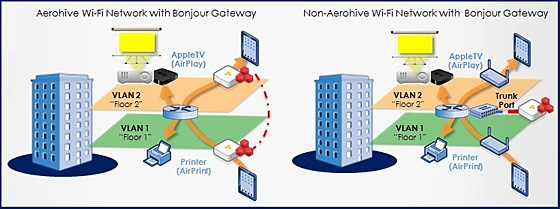
Aerohive took the stage at WWDC 2012 just moments ago [on 6/12/12) when our very own Vice President of Business Development Bill Hoppin stood alongside Apple’s Stuart Cheshire (father of the Bonjour protocol) and demonstrated our slick new product – Bonjour Gateway.

In a session called Simplify Networking with Bonjour […tying into Aerohive’s theme of Simpli-Fi Enterprise Networking ], Bill showed attendees how Aerohive is offering (bring your own device) BYOD management to help with the explosion of iPhones, iPads and other mobile devices in the workplace.

Here’s how the demo went down…

Also see:

.


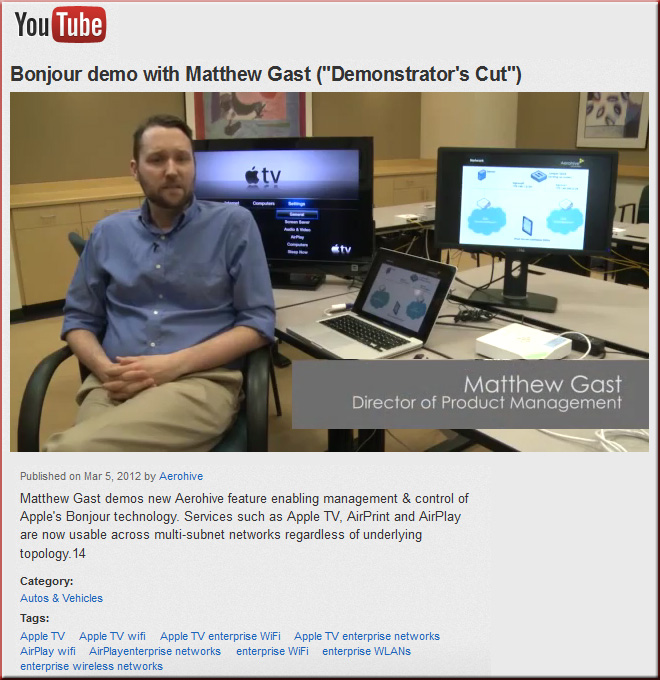
Matt Gast demos Bonjour Gateway -- for handling the BYOD situation

Tagged with:  

The following is a guest post from Lindsey Harper Mac*


How Smartphones make us Smarter: The Changing Face of Education

Considering how many opportunities online institutions have offered to non-traditional students, it’s no surprise that the technological advancement of mobile learning is also transforming higher education as we know it. Mobile education is an excellent tool for learners of all different backgrounds, schedules, and ages because it makes learning more accessible and engaging for those who may not flourish as much in a traditional classroom setting. Whether you’re a non-traditional or a traditional student, attending an industry-current degree program with a focus on mobile learning can enhance your overall experience while accommodating your busy schedule.

How Mobile Learning Devices are Improving Education
According to a report by Blackboard and Project Tomorrow, 98 percent of students in U.S. high schools have access to some kind of smartphone. With older students, empirical evidence shows that this statistic is probably even higher. For instructors who may lament the growing popularity of smartphones, it should be noted that these devices are beneficial for more than just playing Angry Birds.

Abilene Christian University (ACU) recently provided students with iPods, iPhones, and even iPads to improve the learning experience from multiple angles. One example of how this institution has enhanced learning through mobile devices is through the theater department at the university, which recently used these devices to present an interactive performance of the play Othello. The student newspaper also launched an iPad version of each publication, while instructors throughout the school have used mobile phones to facilitate more enriching discussions on controversial subjects.

Mobile Devices and Smart TV
Smart televisions are another notable advancement in the tech industry that improve accessibility to the web and education-improving apps. With these new smart TVs, you can more effectively connect multiple devices to one another for a more holistic user experience. For example, say you wanted to watch a TED talk on the political climate in Afghanistan by accessing it through your TED mobile application. With a smart TV, you can stream these educational videos right onto your television screen for a more engaging and all-encompassing viewing experience.

Students can even access the Internet from their smart TVs, so they can always keep up with communication from their instructors and be alerted of any updates regarding upcoming assignments. Since online programs often require a great deal of self-discipline and a constant flow of communication, smart TVs can provide an excellent solution for students trying to balance school life with personal life.

We live in an exciting time where everything comes with a portable alternative. The mobility of education in particular has enabled many non-traditional students to better themselves and achieve higher degrees through alternative media. With the proliferation of mobile devices among students and professionals alike, opportunities for enhancing learning have also been discovered through these tools. As more and more devices get “smarter,” so do we.


*Author Bio:
Lindsey Harper Mac (@HarperMac11) is a professional writer living in the Indianapolis area. She specializes in writing guest posts covering social media and education. Currently, Lindsey is completing work on her master’s degree.


Announcements from Apple's WWDC -- on 6-11-12


Sample articles include:

WWDC 2012: Live Coverage Of Apple’s Keynote


Addendums on 6/12 – 6/13/12:


10 colleges most creatively using mobile technology — onlineuniversities.com

Excerpt:

Seeing as how mobile devices and related technologies have completely overtaken a good chunk of society already, naturally the education sector has followed suit. Oddly enough, though, smartphones, social media, tablet computers, and other hallmarks of the mobile technology revolution still have yet to fully creep onto campus, with many schools somewhat puzzled over exactly what to do with the exciting new toys the kids are into these days. Others, however, saw innovation as opportunity, and went about drawing up innovative strategies for letting these digital developments enhance lessons, streamline college life, open up new possibilities, or some combination thereof. Get inspired by some of the seriously cool, creative ways the following schools have harnessed mobile media for current and future students.

Tagged with:  

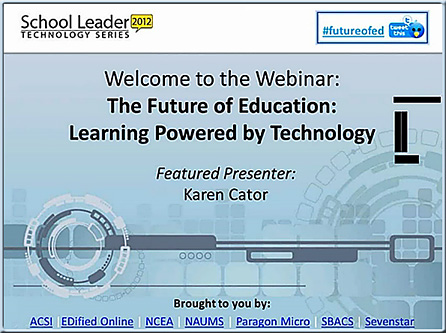
The Future of Education - Learning Powered by Techonology -- Karen Cator -- May 2012

.

Featured presenters:

  • Karen Cator, Dir. Office of Education Technology, U.S. Department of Education
  • Dr. Barrett Mosbacker, Superintendent, Briarwood Christian School

Excerpts re: trends:

  • Mobility — 24/7 access
  • Social interactions for learning
  • Digital content
  • Big data


2012 Congressional Briefing National Release of Speak Up 2011 K-12 Teachers, Librarians and Administratorsfrom Project Tomorrow

“Districts are looking into BYOD approaches not only because so many students
have their own mobile devices and because parents of all income levels are
willing to purchase the devices, but because administrators are dealing with the
reality of shrinking budgets and the need to incorporate more technology in learning.”

— Julie Evans, CEO of Project Tomorrow

Excerpt:

Personalizing the Classroom Experience – Teachers, Librarians and Administrators Connect the Dots with Digital Learning
On May 23rd, 2012 Project Tomorrow released the report “Personalizing the Classroom Experience – Teachers, Librarians and Administrators Connect the Dots with Digital Learning” at a Congressional Briefing held in Washington, DC. Julie Evans, Project Tomorrow CEO, discussed selected Educator national findings from the Speak Up 2011 report and moderated a panel discussion with educators who shared their insights and experiences.

Mobile megatrends 2012 — from VisionMobile
The latest in VisionMobile’s Megatrends report series – Mobile Megatrends 2012 focuses on 9 major trends, showing how the software world is impacting the mobile business. Researched and compiled by VisionMobile.

Example trends:


Mobile megatrends 2012 -- from VisionMobile

.


.


© 2025 | Daniel Christian