


15 Classroom Newsletter Ideas to Try This School Year — from classtechtips.com by Dr. Monica Burns
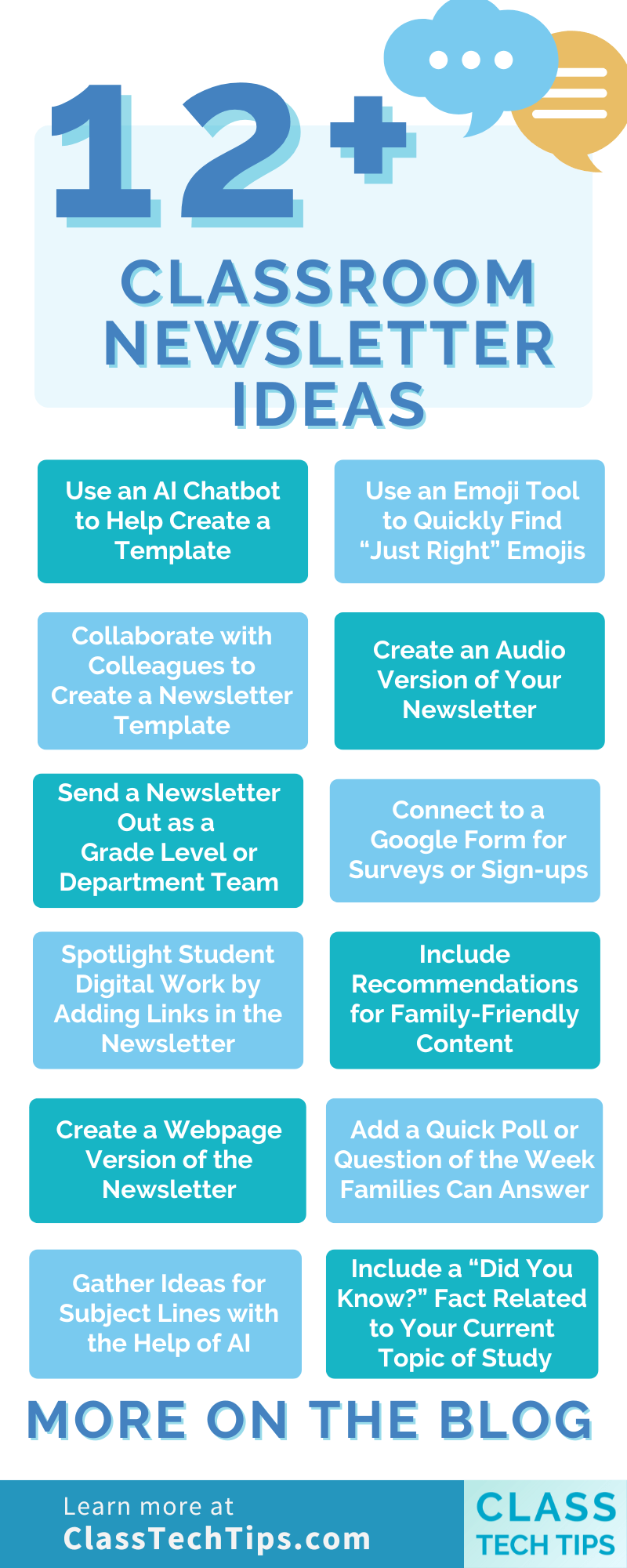
15 Classroom Newsletter Ideas to Try This School Year — from classtechtips.com by Dr. Monica Burns
Workday Acquires Sana To Transform Its Learning Platform And Much More— from joshbersin.com by J
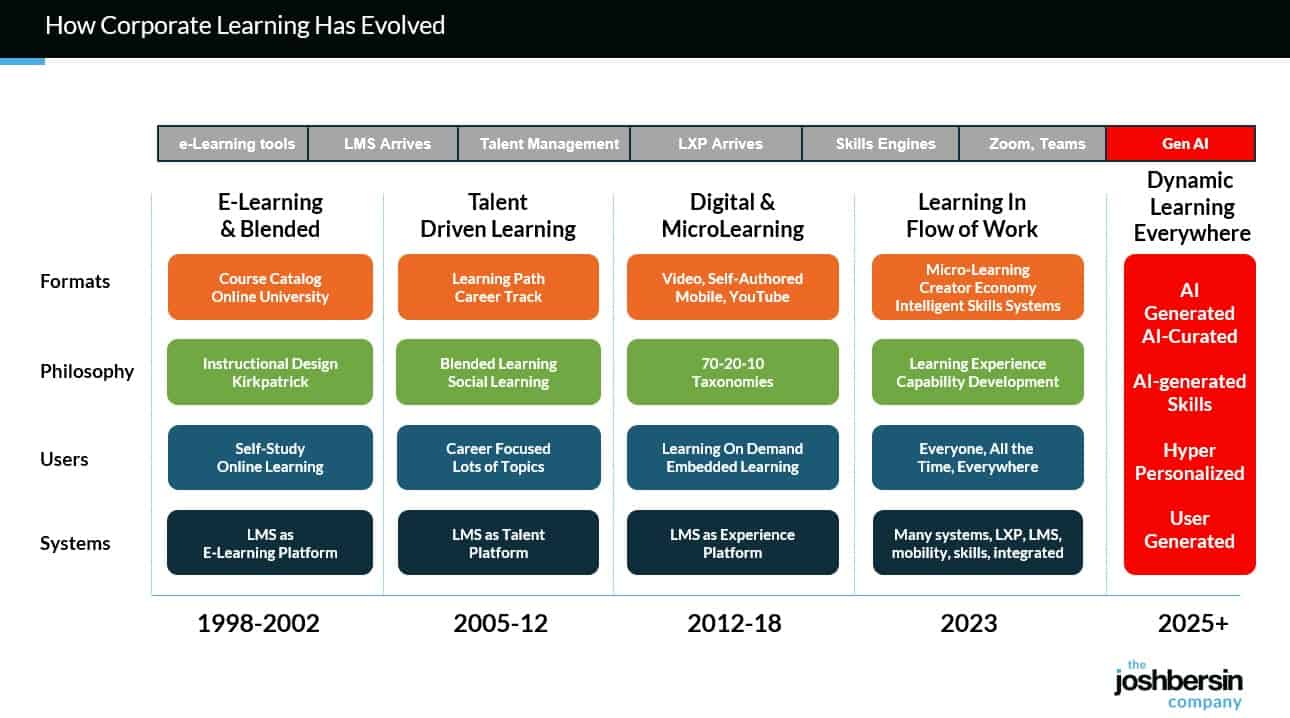
Well now, as the corporate learning market shifts to AI, (read the details in our study “The Revolution in Corporate Learning” ), Workday can jump ahead. This is because the $400 billion corporate training market is moving quickly to an AI-Native dynamic content approach (witness OpenAI’s launch of in-line learning in its chatbot). We’re just finishing a year-long study of this space and our detailed report and maturity model will be out in Q4.
.
.
With Sana, and a few other AI-native vendors (Uplimit, Arist, Disperz, Docebo), companies can upload audios, videos, documents, and even interviews with experts and the system build learning programs in minutes. We use Sana for Galileo Learn (our AI-powered learning academy for Leadership and HR), and we now have 750+ courses and can build new programs in days instead of months.
And there’s more; this type of system gives every employee a personalized, chat-based experience to learn.
From EdTech to TechEd: The next chapter in learning’s evolution — from linkedin.com by Lev Gonick
A day in the life: The next 25 years
A learner wakes up. Their AI-powered learning coach welcomes them, drawing their attention to their progress and helping them structure their approach to the day. A notification reminds them of an upcoming interview and suggests reflections to add to their learning portfolio.
Rather than a static gradebook, their portfolio is a dynamic, living record, curated by the student, validated by mentors in both industry and education, and enriched through co-creation with maturing modes of AI. It tells a story through essays, code, music, prototypes, journal reflections, and team collaborations. These artifacts are not “submitted”, they are published, shared, and linked to verifiable learning outcomes.
And when it’s time to move, to a new institution, a new job, or a new goal, their data goes with them, immutable, portable, verifiable, and meaningful.
From DSC:
And I would add to that last solid sentence that the learner/student/employee will be able to control who can access this information. Anyway, some solid reflections here from Lev.
AI Could Surpass Schools for Academic Learning in 5-10 Years — from downes.ca with commentary from Stephen Downes
I know a lot of readers will disagree with this, and the timeline feels aggressive (the future always arrives more slowly than pundits expect) but I think the overall premise is sound: “The concept of a tipping point in education – where AI surpasses traditional schools as the dominant learning medium – is increasingly plausible based on current trends, technological advancements, and expert analyses.”
The world’s first AI cabinet member — from therundown.ai by Zach Mink, Rowan Cheung, Shubham Sharma, Joey Liu & Jennifer Mossalgue
The Rundown: In this tutorial, you will learn how to combine NotebookLM with ChatGPT to master any subject faster, turning dense PDFs into interactive study materials with summaries, quizzes, and video explanations.
Step-by-step:
Claude can now create and edit files — from anthropic.com
Claude can now create and edit Excel spreadsheets, documents, PowerPoint slide decks, and PDFs directly in Claude.ai and the desktop app. This transforms how you work with Claude—instead of only receiving text responses or in-app artifacts, you can describe what you need, upload relevant data, and get ready-to-use files in return.
Also see:
Ep. 11 AGI and the Future of Higher Ed: Talking with Ray Schroeder
In this episode of Unfixed, we talk with Ray Schroeder—Senior Fellow at UPCEA and Professor Emeritus at the University of Illinois Springfield—about Artificial General Intelligence (AGI) and what it means for the future of higher education. While most of academia is still grappling with ChatGPT and basic AI tools, Schroeder is thinking ahead to AI agents, human displacement, and AGI’s existential implications for teaching, learning, and the university itself. We explore why AGI is so controversial, what institutions should be doing now to prepare, and how we can respond responsibly—even while we’re already overwhelmed.
Best AI Tools for Instructional Designers — from blog.cathy-moore.com by Cathy Moore
Data from the State of AI and Instructional Design Report revealed that 95.3% of the instructional designers interviewed use AI in their daily work [1]. And over 85% of this AI use occurs during the design and development process.
These figures showcase the immense impact AI is already having on the instructional design world.
If you’re an L&D professional still on the fence about adding AI to your workflow or an AI convert looking for the next best tools, keep reading.
This guide breaks down 5 of the top AI tools for instructional designers in 2025, so you can streamline your development processes and build better training faster.
But before we dive into the tools of the trade, let’s address the elephant in the room:
3 Human Skills That Make You Irreplaceable in an AI World — from gettingsmart.com/ by Tom Vander Ark and Mason Pashia
Key Points
Introducing Gemini 2.5 Flash Image, our state-of-the-art image model — from developers.googleblog.com

Today [8/26/25], we’re excited to introduce Gemini 2.5 Flash Image (aka nano-banana), our state-of-the-art image generation and editing model. This update enables you to blend multiple images into a single image, maintain character consistency for rich storytelling, make targeted transformations using natural language, and use Gemini’s world knowledge to generate and edit images.
When we first launched native image generation in Gemini 2.0 Flash earlier this year, you told us you loved its low latency, cost-effectiveness, and ease of use. But you also gave us feedback that you needed higher-quality images and more powerful creative control.
Google’s new image model is BANANAS… — from theneurondaily.com by Grant Harvey
Here’s what makes nano-banana special:
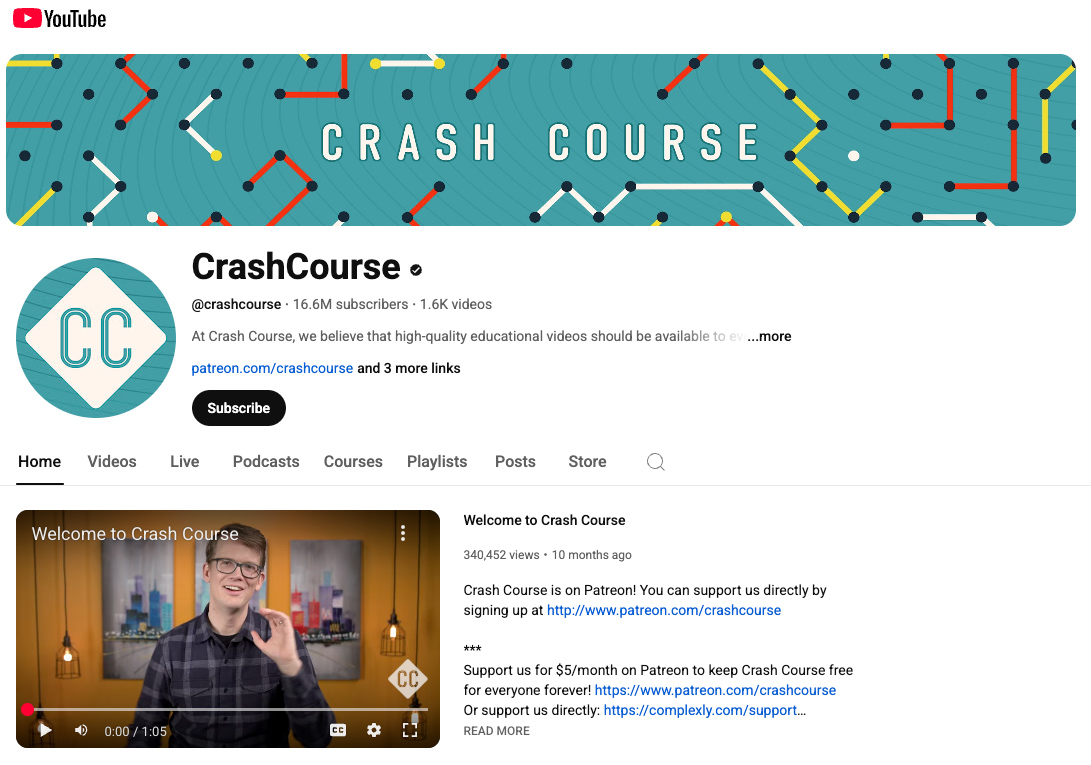
CrashCourse on YouTube — via Matt Tower’s The EdSheet Vol. 18
Description:
At Crash Course, we believe that high-quality educational videos should be available to everyone for free! Subscribe for weekly videos from our current courses! The Crash Course team has produced more than 50 courses on a wide variety of subjects, ranging from the humanities to sciences and so much more! We also recently teamed up with Arizona State University to bring you more courses on the Study Hall channel.
And as Matt stated:
From DSC:
I wasn’t familiar with this “channel” — but I like their mission to help people learn…very inexpensively! Along these lines, I, too, pray for the world’s learning ecosystems — especially those belonging to children.

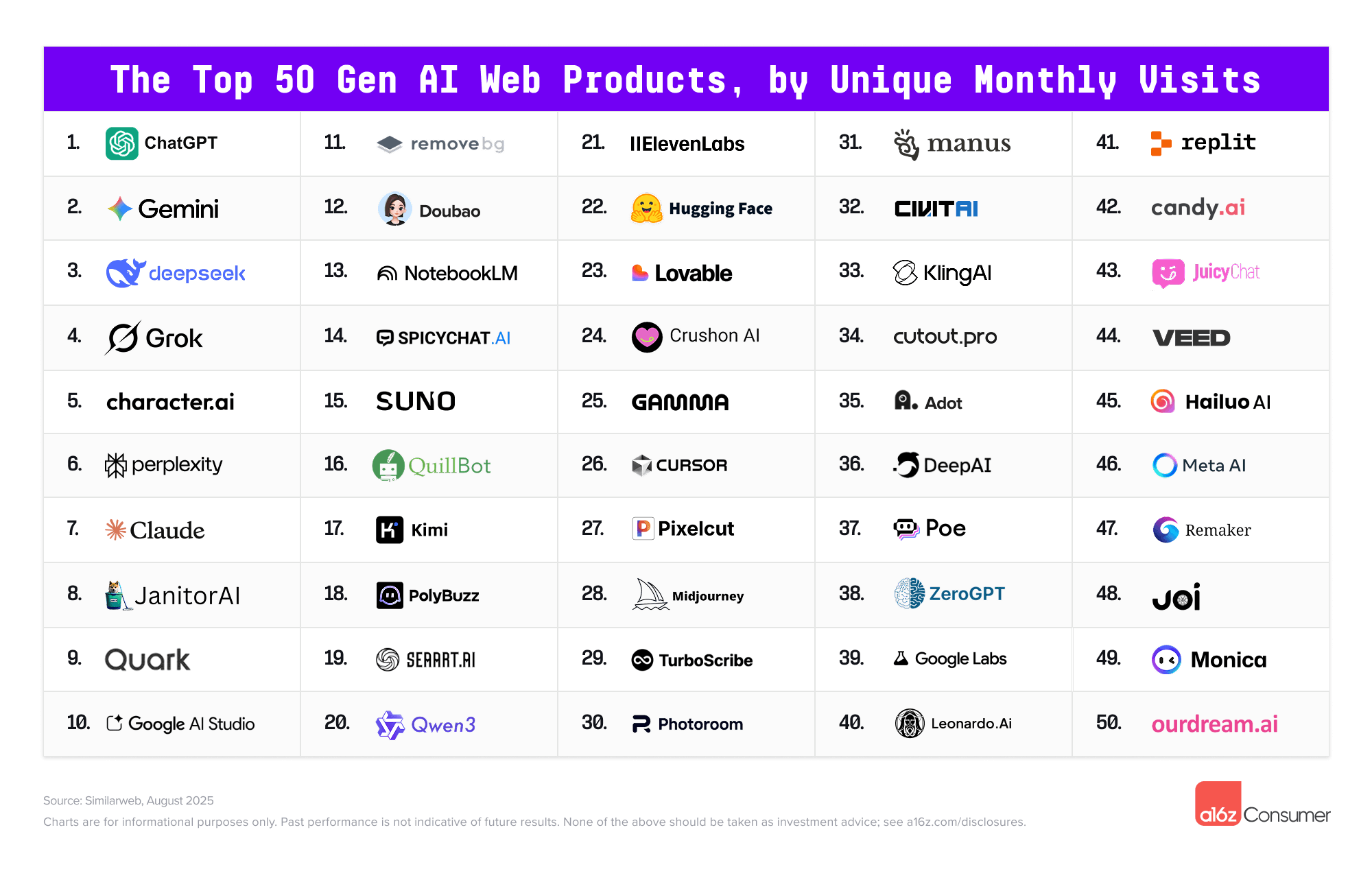
The Top 100 [Gen AI] Consumer Apps 5th edition — from a16z.com
And in an interesting move by Microsoft and Samsung:
A smarter way to talk to your TV: Microsoft Copilot launches on Samsung TVs and monitors — from microsoft.com
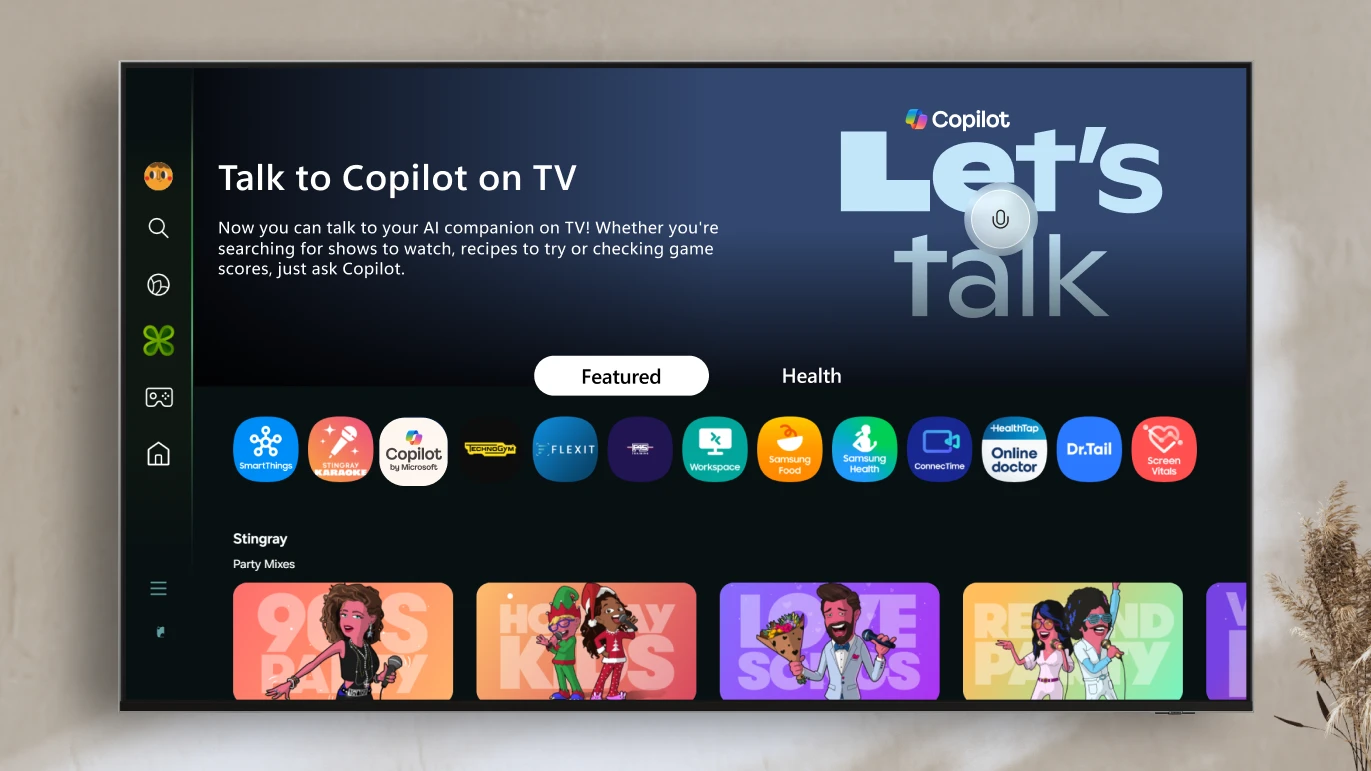
Voice-powered AI meets a visual companion for entertainment, everyday help, and everything in between.
Redmond, Wash., August 27—Today, we’re announcing the launch of Copilot on select Samsung TVs and monitors, transforming the biggest screen in your home into your most personal and helpful companion—and it’s free to use.
Copilot makes your TV easier and more fun to use with its voice-powered interface, friendly on-screen character, and simple visual cards. Now you can quickly find what you’re looking for and discover new favorites right from your living room.
Because it lives on the biggest screen in the home, Copilot is a social experience—something you can use together with family and friends to spark conversations, help groups decide what to watch, and turn the TV into a shared space for curiosity and connection.
One-size-fits-all learning is about to become completely obsolete. — from linkedin.com by Allie Miller
AI in the University: From Generative Assistant to Autonomous Agent This Fall — from insidehighered.com by
This fall we are moving into the agentic generation of artificial intelligence.
“Where generative AI creates, agentic AI acts.” That’s how my trusted assistant, Gemini 2.5 Pro deep research, describes the difference.
…
Agents, unlike generative tools, create and perform multistep goals with minimal human supervision. The essential difference is found in its proactive nature. Rather than waiting for a specific, step-by-step command, agentic systems take a high-level objective and independently create and execute a plan to achieve that goal. This triggers a continuous, iterative workflow that is much like a cognitive loop. The typical agentic process involves six key steps, as described by Nvidia:
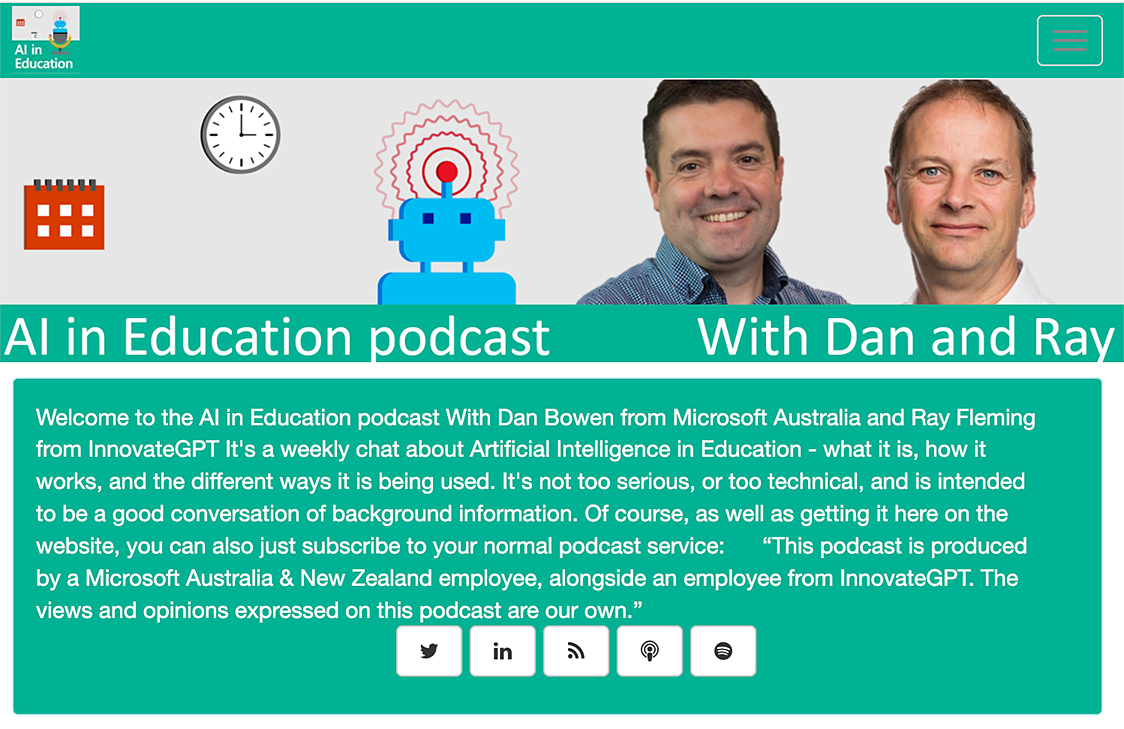
AI in Education Podcast — from aipodcast.education by Dan Bowen and Ray Fleming
The State of AI in Education 2025 Key Findings from a National Survey — from Carnegie Learning
Our 2025 national survey of over 650 respondents across 49 states and Puerto Rico reveals both encouraging trends and important challenges. While AI adoption and optimism are growing, concerns about cheating, privacy, and the need for training persist.
Despite these challenges, I’m inspired by the resilience and adaptability of educators. You are the true game-changers in your students’ growth, and we’re honored to support this vital work.
This report reflects both where we are today and where we’re headed with AI. More importantly, it reflects your experiences, insights, and leadership in shaping the future of education.
Instructure and OpenAI Announce Global Partnership to Embed AI Learning Experiences within Canvas — from instructure.com
This groundbreaking collaboration represents a transformative step forward in education technology and will begin with, but is not limited to, an effort between Instructure and OpenAI to enhance the Canvas experience by embedding OpenAI’s next-generation AI technology into the platform.
IgniteAI announced earlier today, establishes Instructure’s future-ready, open ecosystem with agentic support as the AI landscape continues to evolve. This partnership with OpenAI exemplifies this bold vision for AI in education. Instructure’s strategic approach to AI emphasizes the enhancement of connections within an educational ecosystem comprising over 1,100 edtech partners and leading LLM providers.
“We’re committed to delivering next-generation LMS technologies designed with an open ecosystem that empowers educators and learners to adapt and thrive in a rapidly changing world,” said Steve Daly, CEO of Instructure. “This collaboration with OpenAI showcases our ambitious vision: creating a future-ready ecosystem that fosters meaningful learning and achievement at every stage of education. This is a significant step forward for the education community as we continuously amplify the learning experience and improve student outcomes.”
Faculty Latest Targets of Big Tech’s AI-ification of Higher Ed — from insidehighered.com by Kathryn Palmer
A new partnership between OpenAI and Instructure will embed generative AI in Canvas. It may make grading easier, but faculty are skeptical it will enhance teaching and learning.
The two companies, which have not disclosed the value of the deal, are also working together to embed large language models into Canvas through a feature called IgniteAI. It will work with an institution’s existing enterprise subscription to LLMs such as Anthropic’s Claude or OpenAI’s ChatGPT, allowing instructors to create custom LLM-enabled assignments. They’ll be able to tell the model how to interact with students—and even evaluate those interactions—and what it should look for to assess student learning. According to Instructure, any student information submitted through Canvas will remain private and won’t be shared with OpenAI.
…
Faculty Unsurprised, Skeptical
Few faculty were surprised by the Canvas-OpenAI partnership announcement, though many are reserving judgment until they see how the first year of using it works in practice.
Aeneas transforms how historians connect the past — from deepmind.google
Introducing the first model for contextualizing ancient inscriptions, designed to help historians better interpret, attribute and restore fragmentary texts.
Today, we’re publishing a paper in Nature introducing Aeneas, the first artificial intelligence (AI) model for contextualizing ancient inscriptions.
When working with ancient inscriptions, historians traditionally rely on their expertise and specialized resources to identify “parallels” — which are texts that share similarities in wording, syntax, standardized formulas or provenance.
Aeneas greatly accelerates this complex and time-consuming work. It reasons across thousands of Latin inscriptions, retrieving textual and contextual parallels in seconds that allow historians to interpret and build upon the model’s findings.

