World of active learning in higher ed — from universitybusiness.com by Sherrie Negrea
Formal and informal learning spaces transforming campuses internationally

Excerpts:

Active learning spaces are cropping up at campuses on nearly every continent as schools transform lecture halls, classrooms and informal study areas into collaborative technology hubs. While many international campuses have just started to create active learning spaces, others have been developing them for more than a decade.

As the trend in active learning classrooms has accelerated internationally, colleges in the U.S. can learn from the cutting-edge classroom design and technology that countries such as Australia and Hong Kong have built.

“There are good examples that are coming out from all over the world using different kinds of space design and different types of teaching,” says D. Christopher Brooks, director of research at Educause, who has conducted research on active learning spaces in the United States and China.


“If the students are engaged and motivated and enjoying their learning, they’re more likely to have improved learning outcomes,” says Neil Morris, director of digital learning at the University of Leeds. “And the evidence suggests that these spaces improve their engagement, motivation and enjoyment.”


Grand Rapids Community College offers free laptop vending machine — from mlive.com by Monica Scott

Excerpt:

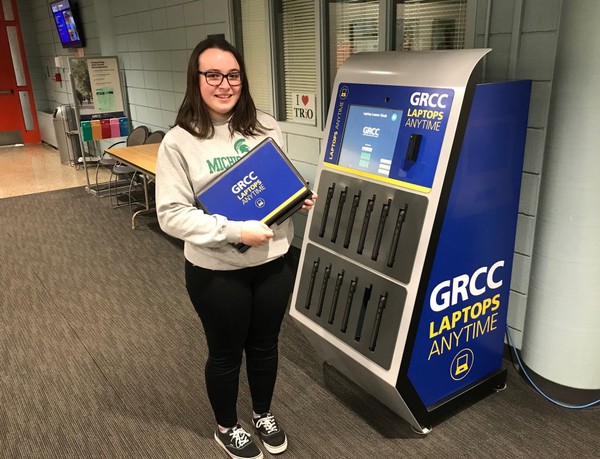
GRAND RAPIDS, MI – Grand Rapids Community College (GRCC) is among higher education institutions providing free laptop vending machines to give students greater access to technology and more flexibility.

Retrieving a laptop from the machine is as quick and easy as grabbing chips from a vending machine. A student punches in their last name on the touchscreen, swipes their student ID, and out pops one of the 12 Dell laptops.

The fully charged computers are available for four hours. Students simply return them back to the machine when done. The machine automatically wipes it clean of their work and recharges it for the next person.


FLGI Publishes the Top 100 Educators Leading Flipped Learning in 2018
The Flipped Learning Global Initiative identifies the movement’s leading educators, administrators, and technologists worldwide

CHICAGO, April 16, 2018 /PRNewswire/ — Today, the Flipped Learning Global Initiative (FLGI), a worldwide coalition of educators, researchers, technologists, professional development providers and education leaders, announced the publication of the FLGI 100. The annual list identifies the top 100 K-12 educators who are driving the adoption of the flipped classroom around the world.  The list is compiled by the FLGI executive committee – led by Jon Bergmann, Chief Academic Officer and one of the pioneers of the flipped classroom movement. Educators from around the globe are represented, including Flipped Learning practitioners from Brazil, Australia, New Zealand, Italy, China, Taiwan, Spain, the United Kingdom, Turkey, Italy, Korea, Argentina, Iceland, Sweden, India and the United States. FLGI also identified the top 50 Flipped Learning leaders in higher education and the top 50 Flipped Learning administrators and tech coaches worldwide.

“The global Flipped Learning community continues to grow, introducing us to fresh ideas, new innovations, and emerging leaders. The 2018 FLGI Flipped Learning leaders lists include veterans from prior years, and many new names and faces. The FLGI 100 list, along with the two FLGI 50 lists, represent the practitioners who are showing us the connection between Flipped Learning, active learning, and world-class learners,” said Jon Bergmann.

The FLGI Flipped Learning leaders lists are updated annually, and all three lists are published in the April issue of Flipped Learning Review (FLR): the Flipped Learning 3.0 magazine. FLR is the first digital magazine dedicated to covering the ideas and people driving the global Flipped Learning movement. The issue features an insightful interview with one of the leading voices in the Flipped Learning community: Dr. Eric Mazur at Harvard University. Bergmann and Mazur discuss how Flipped Learning has evolved over the last decade and why group space mastery is the next frontier for this instructional model.  The April issue also includes the full list of global delegates participating in the project to establish international standards for Flipped Learning. The 2018 FLGI 100 list, the Bergmann/Mazur interview, and the global delegates lists are accessible at http://flr.flglobal.org/

About the Flipped Learning Global Initiative
The Flipped Learning Global Initiative, (FLGI), was created to support the rapidly expanding adoption of Flipped Learning all over the world in countries including China, Taiwan, Spain, UAE, the United Kingdom, Turkey, Italy, Korea, Argentina, Iceland, Sweden, India and the United States. FLGI aims to fill the growing global need for collaboration across borders in three domains: evolving best practices in Flipped Learning, research curation and distribution, and technology selection and implementation.

FLGI serves as a global hub for coordinating, orchestrating and scaling the key elements required to expand Flipped Learning successfully around the world.  FLGI is home to the Flipped Learning International Faculty, the Flipped Learning Innovation Center, the Flipped Learning Global Standards project, and Flipped Learning Review (FLR).

For more information, contact: Errol St.Clair Smith, Director of Global Development at 949-677-7381, 193454@email4pr.com or go to www.flglobal.org.


Also see this page, which states:

On Monday, April 16, 2018 The Flipped Learning Global Initiative (FLGI) will publish the 2018 FLGI 100. The annual list identifies the top 100 K-12 educators who are driving the adoption of Flipped Learning around the world.  The list is compiled by the FLGI executive committee, led by Jon Bergmann, Chief Academic Officer. Educators from around the globe are represented, including Flipped Learning practitioners from Italy, China, Taiwan, Spain, UAE, the United Kingdom, Turkey, Italy, Korea, Argentina, Iceland, Sweden, India, and the United States. The initiative also identified the top 50 Flipped Learning leaders in higher education and the top 50 Flipped Learning administrators and tech coaches.


The 50 Best Augmented Reality Apps for iPhone, iPad & Android Devices — from next.reality.news by Tommy Palladino

Excerpt:

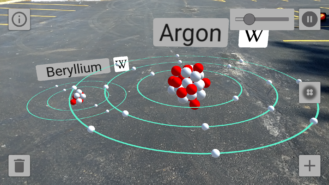
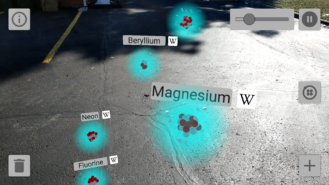
Complete Anatomy 2018 +Courses (iOS): Give your preschoolers a head start on their education! Okay, clearly this app is meant for more advanced learners. Compared to the average app, you’ll end up paying through the nose with in-app purchases, but it’s really a drop in the bucket compared to the student loans students will accumulate in college. Price: Free with in-app purchases ranging from $0.99 to $44.99.

SkyView (iOS & Android): If I can wax nostalgic for a bit, I recall one of the first mobile apps that wowed me being Google’s original SkyView app. Now you can bring back that feeling with some augmented reality. With SkyView, you can point your phone to the sky and the app will tell you what constellations or other celestial bodies you are looking at. Price: $1.99, but there’s a free version for iOS and Android.

JigSpace (iOS): JigSpace is an app dedicated to showing users how things work (the human body, mechanical objects, etc.). And the app recently added how-to info for those who WonderHowTo do other things as well. JigSpace can now display its content in augmented reality as well, which is a brilliant application of immersive content to education. Price: Free.

NY Times (iOS & Android): The New York Times only recently adopted augmented reality as a means for covering the news, but already we’ve had the chance to see Olympic athletes and David Bowie’s freaky costumes up close. That’s a pretty good start! Price: Free with in-app purchases ranging from $9.99 to $129.99 for subscriptions.

BBC Civilisations (iOS & Android): Developed as a companion to the show of the same name, this app ends up holding its own as an AR app experience. Users can explore digital scans of ancient artifacts, learn more about their significance, and even interact with them. Sure, Indiana Jones would say this stuff belongs in a museum, but augmented reality lets you view them in your home as well. Price: Free.

SketchAR (iOS, Android, & Windows): A rare app that works on the dominant mobile platforms and HoloLens, Sketch AR helps users learn how to draw. Sketch AR scans your environment for your drawing surface and anchors the content there as you draw around it. As you can imagine, the app works best on HoloLens since it keeps users’ hands free to draw. Price: Free.


Sun Seeker (iOS & Android): This app displays the solar path, hour intervals, and more in augmented reality. While this becomes a unique way to teach students about the Earth’s orbit around the sun (and help refute silly flat-earthers), it can also be a useful tool for professionals. For instance, it can help photographers plan a photoshoot and see where sunlight will shine at certain times of the day. Price: $9.99.

Froggipedia (iOS): Dissecting a frog is basically a rite of passage for anyone who has graduated from primary school in the US within the past 50 years or so. Thanks to augmented reality, we can now save precious frog lives while still learning about their anatomy. The app enables users to dissect virtual frogs as if they are on the table in front of them, and without the stench of formaldehyde. Price: $3.99.

GeoGebra Augmented Reality (iOS): Who needs a graphing calculator when you can visualize equations in augmented reality. That’s what GeoGebra does. The app is invaluable for visualizing graphs. Price: Free.


Addendum:


A Sneak Peek into Augmented Reality’s Influence on SEO — from semrush.com by Pradeep Chopra

Excerpt:

AR is here to influence how businesses are going to promote their products/services and also how they optimize for search rankings. It is important to note, AR will impact Search Engine Optimization.

Local SEO Becomes More Critical
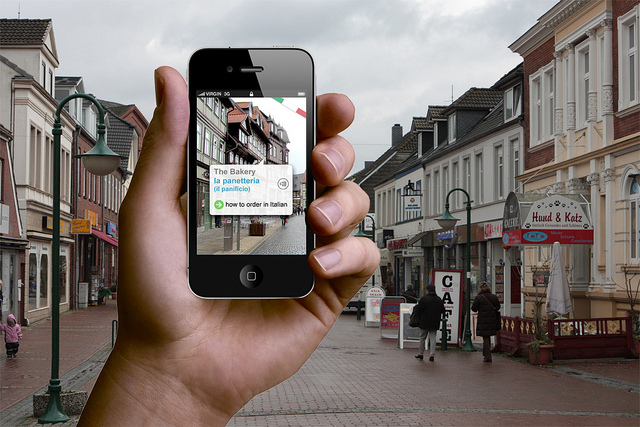
Augmented reality makes it possible for users to scan their mobile devices and get information on the businesses in their area. The data includes everything from images to ratings to reviews. AR apps have the capability to provide users with location-specific offers and deals – all in a theatrical AR format.

Apps like Yelp and Wikitude are already providing geo-location based AR experiences.

So, if you were to scan a location with your camera, you would be able to see the details of that business along with its latest reviews, ratings, and offers. This will simplify the experience for those searching from a specific geo-location. You must, therefore, ensure and maintain the quality and freshness of your local listings.

Here are some key aspects that you must take care of…


A new JPEG format for virtual reality, drones and self-driving cars — from actu.epfl.ch
The Joint Photographic Experts Group (JPEG), an international committee headed by an EPFL professor, has just unveiled JPEG XS. With this new format, the image-compression process uses less energy, and higher-quality images can be sent with low latency over broadband networks like 5G. JPEG XS will have applications in areas such as virtual reality, augmented reality, space imagery, self-driving cars and professional movie editing.

Excerpt:

Why do virtual reality headsets make users nauseous? One reason is latency, or the almost imperceptible amount of time it takes for a display image to change in response to a user’s head movement. However, the Joint Photographic Experts Group (JPEG) has just introduced a new image compression standard that could resolve this problem. This working group is headed by Touradj Ebrahimi, a professor in EPFL’s School of Engineering (STI).

With JPEG XS, images and videos maintain an extremely high level of quality thanks to a compression process that is simpler and faster – and thus more energy efficient. The compressed files end up being larger, but that’s not a problem thanks to broadband networks such as Wi-Fi and 5G: the aim is to stream the files instead of storing them in smartphones or other devices with limited memory.

This means that you could use your smartphone, tablet or computer to project a high-definition movie or a video game onto a large-screen display almost instantaneously. No cables would be required, and the image quality would be extremely high.


JPEG XS is a new VR video streaming format optimized for 5G and Wi-Fi — from venturebeat.com by Jeremy Horwitz

Excerpt:

Best known for its eponymous and ubiquitous photo standard, the Joint Photographic Experts Group (JPEG) has announced JPEG XS, a new video compression standard designed to stream lossless videos, VR content, and games over wireless networks. Intriguingly, JPEG XS is said to work on current computers with only software updates, while smaller devices will require “next generation” hardware.

Unlike rival video standards, JPEG XS doesn’t attempt maximum compression by using extra processing power or time. It instead presumes that the device will be used on a high-bandwidth 5G cellular or Wi-Fi network and focuses on delivering ultra low latency and superior energy efficiency.


Apple’s In-Depth Work on a Next-Gen Mixed Reality Headset is Simply Mind Boggling in Scope — from patentlyapple.com

Excerpt:

In April 2017 Patently Apple posted a report titled “NASA’s Mission Operations Innovation Lead is now a Senior Manager on Apple’s AR Glasses Team.” A year ago we also posted a report titled “Apple’s Augmented Reality Team is bringing in more Specialists to work on their Future Platform.” Apple has certainly gathered a world class team of experts to develop a whole range of next-gen AR/VR and Mixed Reality headsets, smartglasses and more. Earlier today we posted a report titled “Apple Advances their Head Mounted Display Project by adding a new GUI, an External Camera, Gaming & more.” While Apple has been updating some of the features of this headset, we’re still stuck with a 2008 patent image a headset concept that is somewhat outdated.


Augmented Reality Kit: Quick Start Guide — from cgcookie.com by Jonathan Gonzalez

Excerpt:

Augmented Reality is an exciting new way to develop games and apps that support the use of 3d objects in real world space. If you’ve ever played Pokemon Go then you’re familiar with what Augmented Reality (AR) is. Other popular apps have been sprouting up to take use of AR capabilities for more practical purposes such as Ikea’s catalog, pick your furniture and see how it looks in your place. Regardless of how you use AR for development there are three main resources we can use to develop for various AR capable hardware.


Travel to Mars and learn about the Curiosity Rover in VR  — from unimersiv.com


The Law Firm Disrupted: Walmart Won’t Pay You to Cut and Paste — from law.com by Roy Strom
The world’s largest retailer, locked in a battle over the future of its business, has developed a tool to help make its many outside lawyers more efficient.

Excerpt (emphasis DSC):

Earlier this week, Walmart Inc. announced it would be rolling out 500 more giant vending machines in its stores to deliver online orders in seconds. The tool is designed to compete with online delivery services from Amazon.com Inc.

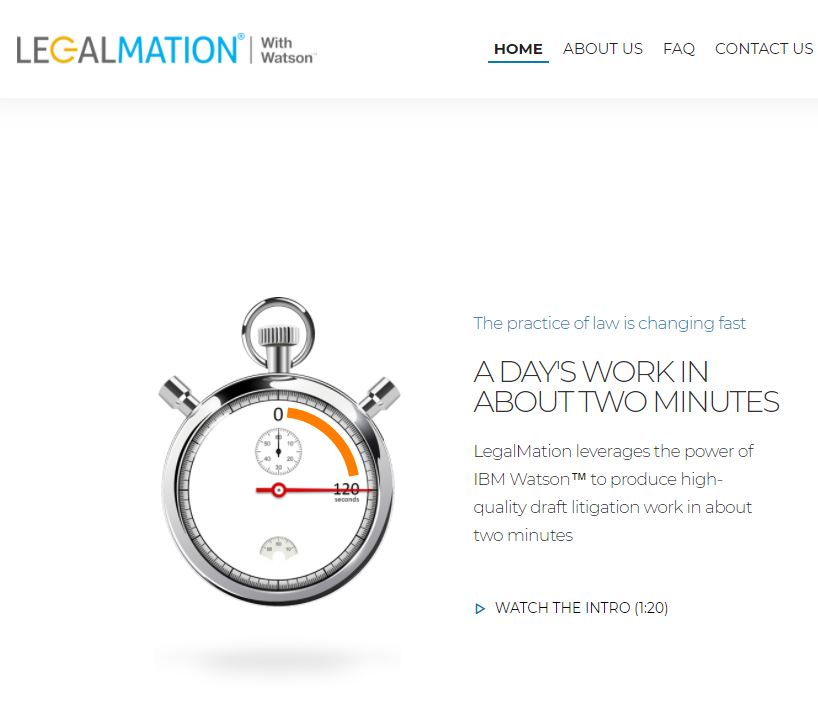
The world’s largest retailer also announced this week a tool that will compete (in some sense) with its outside counsel. Walmart has licensed a product from LegalMation that automatically drafts responses and initial discovery requests for employment and slip-and-fall suits filed in California. By this fall, the product should cover those cases in all 50 states.

LegalMation says it takes under two minutes to drag and drop a PDF of a suit into its product and receive a response to that case, in addition to a set of targeted requests for documents, form interrogatories and special interrogatories. That work has traditionally been handled by junior lawyers at Walmart’s outside firms, and LegalMation claims it can take them up to 10 hours to do. The savings on preparing an answer to these complaints is as much as 80 percent, LegalMation said.

“You’re still reviewing the outcome and reviewing the affirmative defenses,” said LegalMation co-founder Thomas Suh, a longtime legal technology advocate. “You’re eliminating the brainless cutting and pasting.”


About six months after the Harvard program, Lee and Suh had drilled down on where to apply AI, and they teamed up with IBM’s Watson to build their product. They also had to develop their own neural network that they said is the “secret sauce” to LegalMation’s ability to parse legalese.  “We would not be able to do this without an AI engine like Watson, and likewise I don’t think a product like this would be doable without our neural network,” Lee said.


Also see:


Also see:

Automation in the Legal Industry: How Will It Affect Recent Law School Grads? — from nationaljurist.com by Martin Pritikin

Excerpt:

A 2017 study by McKinsey Global Institute found that roughly half of all work activities globally have the potential to be automated by technology. A follow-on study (also from McKinsey in 2017) concluded that up to one-third of work activities could be displaced by 2030. What, if any, impacts do these eye-popping findings have on the future on the legal profession, especially for recent law school graduates embarking on their careers?

Recently, it was announced that ROSS, a legal research artificial intelligence platform powered in part by IBM’s Watson technology, was unveiling a new product, EVA, which will not only find applicable cases, but quality check case citations and history. As usual, this latest development has gotten people worried that human lawyers—and, in particular, recent law grads who have traditionally been tasked with legal research—may be on a path to extinction.

Obviously, no one can predict the future with certainty. But if history is any guide, these new technological developments will shift the type of work new lawyers are expected to do, but won’t necessarily eliminate it.

We may not be facing a future without lawyers. But it is going to be a future that requires lawyers to learn how to utilize technology effectively to serve their clients—something we should all welcome, not fear.


College of Law Announces the Launch of the Nation’s First Live Online J.D. Program — from law.syr.edu

Excerpt:

The American Bar Association has granted the Syracuse University College of Law a variance to offer a fully interactive online juris doctor program. The online J.D. program will be the first in the nation to combine real-time and self-paced online classes, on-campus residential classes, and experiential learning opportunities.


The online J.D. was subject to intense scrutiny and review by legal education experts before the College was granted the variance. Students in the online program will be taught by College of Law faculty, will be held to the same high admission and academic standards as students in the College’s residential program, and will take all courses required by its residential J.D. program.


Also see:


VR Lab! — from thejournal.com by Joshua Bolkan

Excerpts (emphasis DSC):

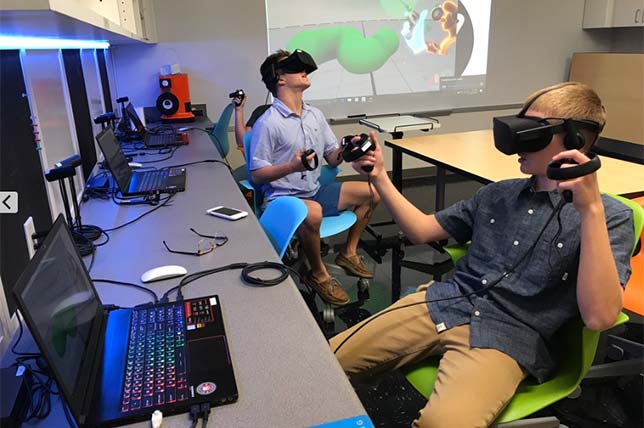
When Tampa Preparatory School launched decided to turn a closet into a virtual reality lab, they had no idea how far their students would run with the tools, but that’s exactly what they did, sitting down to build their own educational apps to help visualize concepts in astronomy, chemistry and physics. In addition to the educational apps, built by students on their own initiative, the VR lab is also used for art classes and more.

Chad Lewis, director of technology at Tampa Prep, recently sat down with THE Journal to talk about the school’s experience with VR as an educational tool.

Tell me a little about having students design their own VR apps. Are there any benefits to it that surprised you?

Chad Lewis: Some surprising benefits included branching out beyond computer science into areas like chemistry and physics. This is an example of the amazing things students can do if given the opportunity to pursue their passions. They need time, space and resources as well as support and encouragement. 


The main thing is that they’re learning coding, 3D modeling, game development, collaboration, design thinking, etc.


In the process, one of our computer science students came up to me and said, “Mr. Lewis do you mind if I try to create some virtual reality apps using Unity?” and it really took off from there. The lab was a student-driven initiative.


From DSC:
This application looks to be very well done and thought out! Wow!

Check out the video entitled “Interactive Ink – Enables digital handwriting — and you may also wonder whether this could be a great medium/method of having to “write things down” for better information processing in our minds, while also producing digital work for easier distribution and sharing!

Wow!  Talk about solid user experience design and interface design! Nicely done.


Below is an excerpt of the information from Bella Pietsch from anthonyBarnum Public Relations

Imagine a world where users interact with their digital devices seamlessly, and don’t suffer from lag and delayed response time. I work with MyScript, a company whose Interactive Ink tech creates that world of seamless handwritten interactivity by combining the flexibility of pen and paper with the power and productivity of digital processing.

According to a recent forecast, the global handwriting recognition market is valued at a trillion-plus dollars and is expected to grow at an almost 16 percent compound annual growth rate by 2025. To add additional context, the new affordable iPad with stylus support was just released, allowing users to work with the $99 Apple Pencil, which was previously only supported by the iPad Pro.

Check out the demo of Interactive Ink using an Apple Pencil, Microsoft Surface Pen, Samsung S Pen or Google Pixelbook Pen here.

Interactive Ink’s proficiencies are the future of writing and equating. Developed by MyScript Labs, Interactive Ink is a form of digital ink technology which allows ink editing via simple gestures and providing device reflow flexibility. Interactive Ink relies on real-time predictive handwriting recognition, driven by artificial intelligence and neural network architectures.


Pros and Cons of Virtual Reality in the Classroom — from chronicle.com by Adam Evans

Excerpt:

Armed with a lifelong affinity for video games and a $6,000 faculty teaching grant, I have spent the past 15 months working on a pilot project to illustrate the value of using virtual reality in the classroom. My goal is to convince fellow faculty members and administrators at Transylvania University, where I teach business administration, that VR can offer today’s tech-savvy students exciting opportunities to solve problems in new ways.

When I set up in-office demos for peers and students, they said they could not believe how immersive the technology felt. Expecting just another digital video game, they stepped into a dress rehearsal of the original Broadway cast of Hamilton or found themselves competing in the Winter Olympics in Pyeongchang.

There are major differences between virtual and augmented reality. The latter, which is less expensive to produce and already more prolific, is created by adding a digital element to the real world, such as a hologram one can view through a smartphone. Popular examples of this would be the Pokémon Go or the new Jurassic World Alive apps, which allow smartphone users to to find virtual characters that appear in physical locations. Users are still aware of the real space around them.

In contrast, virtual reality places the user inside a digitized world for a fully immersive experience. It generally costs more to design and typically requires more-expensive equipment, such as a full headset.


10 very cool augmented reality apps (that aren’t design or shopping tools) — from androidpolice.com by Taylor Kerns

Excerpt:

Augmented reality is having a moment on Android. Thanks to ARCore, which now works on more than a dozen device models—Google says that’s more than 100 million individual devices—we’ve seen a ton of new applications that insert virtual objects into our real surroundings. A lot of them are shopping and interior design apps, which makes sense—AR’s ability to make items appear in your home is a great way to see what a couch looks like in your living room without actually lugging it in there. But AR can do so much more. Here are 10 augmented reality apps that are useful, fascinating, or just plain cool.


The Wild and Amazing World of Augmented Reality — from askatechteacher.com by Jacqui Murray

Excerpt:

10 Ways to Use AR in the Classroom
I collected the best ways to use AR in the classroom from colleagues and edtech websites (like Edutopia) to provide a good overview of the depth and breadth of education now being addressed with AR-infused projects:

  • Book Reviews: Students record themselves giving a brief review of a novel that they just finished, and then attach digital information to a book. Afterward, anyone can scan the cover of the book and instantly access the review.
  • Classroom tour: Make a class picture image trigger a virtual tour of a classroom augmented reality
  • Faculty Photos: Display faculty photos where visitors can scan the image of an instructor and see it come to life with their background
  • Homework Mini-Lessons: Students scan homework to reveal information to help them solve a problem
  • Lab Safety: Put triggers around a science laboratory that students can scan to learn safety procedures
  • Parent Involvement: Record parents encouraging their child and attach a trigger image to the child’s desk
  • Requests: Trigger to a Google Form to request time with the teacher, librarian, or another professional
  • Sign Language Flashcards: Create flashcards that contain a video overlay showing how to sign a word or phrase
  • Word Walls: Students record themselves defining vocabulary words. Classmates scan them to get definitions and sentences using the word
  • Yearbooks: So many ways, just know AR will energize any yearbook

AR is the next great disruptive force in education. If your goal is to create lifelong learners inspired by knowledge, AR, in its infancy, holds the seeds for meeting that goal.


YouAR Out Of Stealth With AR Cloud Breakthrough — from forbes.com by Charlie Fink

Excerpt:

YouAR, of Portland, OR, is coming out of stealth with a product that addresses some of the most vexing problems in AR, including convergent cross-platform computer vision (real-time interaction between ARKit and ARCore devices), interactivity of multiple AR apps in the same location across devices, real-time scene mapping, geometric occlusion of digital objects, localization of devices beyond GPS (the AR Cloud), and the bundle drop of digital assets into remote locations. Together, this represents a heretofore unheard of stack of AR and computer vision features we have yet to see in AR, and could revolutionize the development of new apps.


12 Good Augmented Reality Apps to Use in Your Instruction — from educatorstechnology.com

Excerpt:

Augmented reality technologies are transforming the way we live, learn and interact with each other. They are creating limitless learning possibilities and are empowering learners with  the required know-how to get immersed in meaningful learning experiences. We have already reviewed several educational AR tools and apps and have also shared this collection of excellent TED talks on the educational potential of AR technologies. Drawing on these resources together with EdSurge list, we have prepared for you this updated collection of some of the best AR apps to use in your instruction. You may want to go through them and see which ones work  for you.


eXtended Reality (XR): How AR, VR, and MR are Extending Learning Opportunities | Resource list from educause


Design Thinking: A Quick Overview — from interaction-design.org by Rikke Dam and Teo Siang

Excerpt:

To begin, let’s have a quick overview of the fundamental principles behind Design Thinking:

  • Design Thinking starts with empathy, a deep human focus, in order to gain insights which may reveal new and unexplored ways of seeing, and courses of action to follow in bringing about preferred situations for business and society.
  • It involves reframing the perceived problem or challenge at hand, and gaining perspectives, which allow a more holistic look at the path towards these preferred situations.
  • It encourages collaborative, multi-disciplinary teamwork to leverage the skills, personalities and thinking styles of many in order to solve multifaceted problems.
  • It initially employs divergent styles of thinking to explore as many possibilities, deferring judgment and creating an open ideations space to allow for the maximum number of ideas and points of view to surface.
  • It later employs convergent styles of thinking to isolate potential solution streams, combining and refining insights and more mature ideas, which pave a path forward.
  • It engages in early exploration of selected ideas, rapidly modelling potential solutions to encourage learning while doing, and allow for gaining additional insight into the viability of solutions before too much time or money has been spent
  • Tests the prototypes which survive the processes further to remove any potential issues.
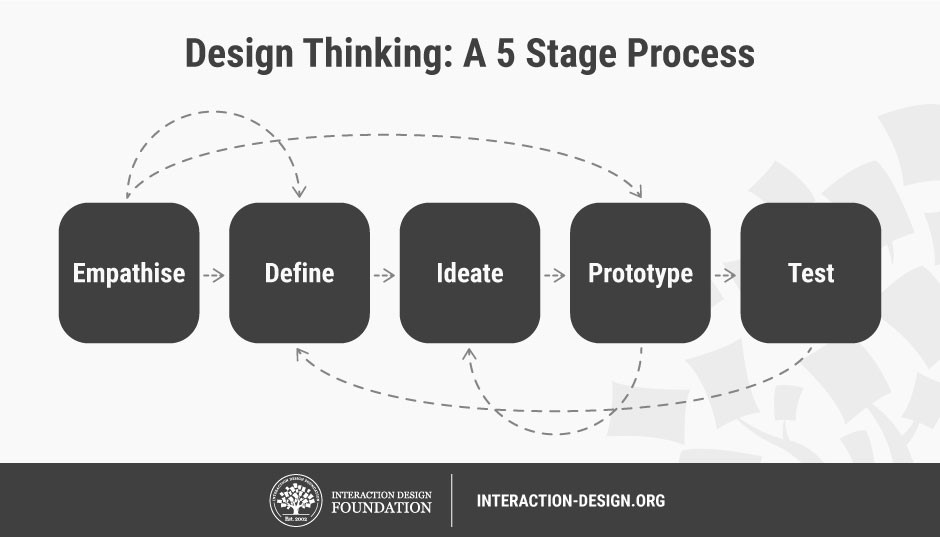
  • Iterates through the various stages, revisiting empathetic frames of mind and then redefining the challenge as new knowledge and insight is gained along the way.
  • It starts off chaotic and cloudy steamrolling towards points of clarity until a desirable, feasible and viable solution emerges.


From DSC:
This post includes information about popular design thinking frameworks. I think it’s a helpful posting for those who have heard about design thinking but want to know more about it.


What is Design Thinking?
Design thinking is an iterative process in which we seek to understand the user, challenge assumptions we might have, and redefine problems in an attempt to identify alternative strategies and solutions that might not be instantly apparent with our initial level of understanding. As such, design thinking is most useful in tackling problems that are ill-defined or unknown.

Design thinking is extremely useful in tackling ill-defined or unknown problems—it reframes the problem in human-centric ways, allows the creation of many ideas in brainstorming sessions, and lets us adopt a hands-on approach in prototyping and testing. Design thinking also involves on-going experimentation: sketching, prototyping, testing, and trying out concepts and ideas. It involves five phases: Empathize, Define, Ideate, Prototype, and Test. The phases allow us to gain a deep understanding of users, critically examine the assumptions about the problem and define a concrete problem statement, generate ideas for tackling the problem, and then create prototypes for the ideas in order to test their effectiveness.

Design thinking is not about graphic design but rather about solving problems through the use of design. It is a critical skill for allprofessionals, not only designers. Understanding how to approach problems and apply design thinking enables everyone to maximize our contributions in the work environment and create incredible, memorable products for users.


Predictions 2018: Technology, Media, and Telecommunications –from deloitte.com

The technology, media and entertainment, and telecommunications ecosystem remains as fascinating as ever in 2018. Will augmented reality become mainstream? How will machine learning affect the enterprise? What’s the future of the smartphone? Deloitte Global invites you to read the latest Predictions report, designed to provide insight into transformation and growth opportunities over the next one to five years.


Augmented & Virtual Reality in Education
May 17th, 2018
In partnership with Oral Roberts University
Tulsa, OK


Description:

Over the past 12 months, Augmented and Virtual Reality technology has advanced in all sectors – with applications revolutionizing the interactions between human and machine, and humans and virtual reality.  In education in particular, AR and VR applications are rapidly changing the way we are learning, providing experiential learning by simulating real-world environments. AR and VR increases student engagement levels, and provides insights into what they will experience in various environments when they enter the workforce. The technology is particularly interesting for visual learners and students with learning challenges – providing alternatives to more traditional teaching methods.

A recent study shows that “93 percent of teachers say their students would be excited to use virtual reality and 83 percent say that virtual reality might help improve learning outcomes.”

Oral Roberts University and the Education Conference Network are pleased to partner on this exciting event – held at Oral Roberts University’s Global Learning Center, which is a world innovator and leader in AR/VR learning. The conference will provide delegates with a great opportunity to interact with the latest technologies, and see how they can be integrated within curriculum.


Also see:

Blockchain Essentials in Education
May 16th, 2018
In partnership with Oral Roberts University
Tulsa, OK

Description:

The Blockchain in Education Conference will enable education professionals to understand how blockchain technology such as cryptocurrency, smart contracts, distributed databases, and public ledgers are, and will continue to transform their sector. We are now seeing start-ups focusing on blockchain – whilst existing technology businesses are integrating blockchain technology into their overall offerings – building pilots and working with customers to develop roadmaps forward. The first blockchain was theorized by Satoshi Nakamoto in 2008 and applied the following year as a key component of the digital currency bitcoin, but that was just the tip of the iceberg. A secure public ledger concept can be applied to almost all aspects of doing business whilst removing slow and outdated workflows. Using a peer-to-peer network and a distributed timestamping server, a blockchain database can be managed autonomously. Blockchain is the future business model of supply chain and can be applied to the entire education value chain. Are you ready to harness the capabilities of blockchain technology in education?


Apple Special Event. March 27, 2018.
From Lane Tech College Prep High School, Chicago.


From DSC:
While it was great to see more Augmented Reality (AR) apps in education and to see Apple putting more emphasis again on educational-related endeavors, I’m doubtful that the iPad is going to be able to dethrone the Chromebooks. Apple might have better results with a system that can be both a tablet device and a laptop and let students decide which device to use and when. 


Also see:


Here are the biggest announcements from Apple’s education event — from engadget.com by Chris Velazco
The new iPad was only the beginning.


Apple’s Education-Focused iPad Event Pushes Augmented Reality Further into the Classroom — from next.reality.news by Tommy Palladino

Excerpt:

At Apple’s education event in Chicago on Tuesday, augmented reality stood at the head of the class among the tech giant’s new offerings for the classroom.

The company showcased a number of ARKit-enabled apps that promise to make learning more immersive. For example, the AR mode for Froggipedia, expected to launch on March 30 for $3.99 on the App Store, will allow students to view and dissect a virtual frog’s anatomy. And a new update to the GeoGebra app brings ARKit support to math lessons.

Meanwhile, the Free Rivers app from the World Wildlife Federation enables students to explore miniature landscapes and learn about various ecosystems around the world.

In addition, as part of its Everyone Can Code program, Apple has also updated its Swift Playgrounds coding app with ARKit support, enabling students to begin learning to code via an ARKit module, according to a report from The Verge.


Apple’s Education Page…which covers what was announced (at least as of 3/30/18)


Comparing Apple, Google and Microsoft’s education plays — from techcrunch.com by Brian Heater

Excerpt:

[The 3/27/18] Apple event in Chicago was about more than just showing off new hardware and software in the classroom — the company was reasserting itself as a major player in education. The category has long been a lynchpin in Apple’s strategy — something that Steve Jobs held near and dear.

Any ’80s kid will tell you that Apple was a force to be reckoned with — Apple computers were mainstays in computer labs across the country. It’s always been a good fit for a company focused on serving creators, bringing that extra bit of pizzazz to the classroom. In recent years, however, there’s been a major shift. The Chromebook has become the king of the classroom, thanks in no small part to the inexpensive hardware and limited spec requirements.

Based on Google’s early positioning of the category, it appears that the Chromebook’s classroom success even managed to catch its creators off-guard. The company has since happily embraced that success — while Microsoft appears to have shifted its own approach in response to Chrome OS’s success.

Apple’s own responses have been less direct, and today’s event was a reconfirmation of the company’s commitment to the iPad as the centerpiece of its educational play. If Apple can be seen as reacting, it’s in the price of the product. Gone are the days that schools’ entire digital strategy revolved around a bunch of stationary desktops in a dusty old computer lab.


Apple Should Have Cut iPad Price Further For Schools, Say Analysts
Apple announced another affordable iPad and some cool new educational software today, but it might be too pricey to unseat Chromebooks in many classrooms.


Apple’s New Low-End iPad For Students Looks To Thwart Google, Microsoft


What educators think about Apple’s new iPad
Can a bunch of new apps make up for the high price?


Apple needs more than apps to win over educators
Apple used to be in a lot of classrooms, but are new iPads enough to woo educators?


Blockchain: Is it Good for Education? — from virtuallyinspired.org

Excerpt:

What is Blockchain?

Blockchain is a public ledger type database made up of records called blocks that are linked together like a chain.  It is a shared unchallengeable ledger for recording the history of transactions. Here, the ledger records the history of academic accomplishments. An education ledger (blockchain) could store academic information such as degrees, diplomas, tests etc. It could be kind of digital transcript.

A Few Potential Applications of Blockchain

  • Learning Credentials Repository – A blockchain database of credentials and achievements can be a secure online repository. Digitized records/blocks replace paper copies for sharing proof of learning and can be easily accessible and tracked. Blockchain can make it easy to access all of your academic accomplishments in a digitized and ultra-secure way. Each record is a block. Your records would be chained together and new credentials will be added as you go throughout your lifetime of learning.
  • Lifelong Learning Building Blocks – Informal learning activities could be captured, validated and stored in addition to formal learning accomplishments. This can be as simple as noting a watched video or completed online lesson. We’re already seeing some universities using blockchain with badges, credits, and qualifications.
  • Authenticating Credentials – Institutions, recruiting firms or employers can easily access and verify credentials. No more gathering of papers or trying to digitize to share. Blocks are digital “learning” records and come in multilingual format eliminating the painstaking task of translation.

What’s more, with diploma mills and fake credentials causing havoc for institutions and employers, blockchain solves the issue by providing protection from fraud. It has two-step authentication and spreads blocks across numerous computer nodes. It would take hitting over 51% of computers to falsify a block.

Sony and IBM have partnered and filed patents to develop a blockchain educational platform that can house student data, their performance reports and other information related to their academic records. Some universities have created their own platforms.


Also see:

Blockchain in Education — from by Alexander Grech and Anthony F. Camilleri

Context
Blockchain technology is forecast to disrupt any field of activity that is founded on timestamped record-keeping of titles of ownership. Within education, activities likely to be disrupted by blockchain technology include the award of qualifications, licensing and accreditation, management of student records, intellectual property management and payments.

Key Advantages of Blockchain Technology
From a social perspective, blockchain technology offers significant possibilities beyond those currently available. In particular, moving records to the blockchain can allow for:

  • Self-sovereignty, i.e. for users to identify themselves while at the same time maintaining control over the storage and management of their personal data;
  • Trust, i.e. for a technical infrastructure that gives people enough confidence in its operations to carry through with transactions such as payments or the issue of certificates;
  • Transparency & Provenance, i.e. for users to conduct transactions in knowledge that each party has the capacity to enter into that transaction;
  • Immutability, i.e. for records to be written and stored permanently, without thepossibility of modification;
  • Disintermediation, i.e. the removal of the need for a central controlling authority to manage transactions or keep records;
  • Collaboration, i.e. the ability of parties to transact directly with each other without the need for mediating third parties.


Sony wants to digitize education records using the blockchain


© 2025 | Daniel Christian