Introducing Coursera for Apple TV: Bringing Online Learning to Your Living Room — from blog.coursera.org


Apple TV


Excerpt (emphasis DSC):

We’re thrilled to announce that Coursera content will now be available on Apple TV.

Since our beginning, one of our primary goals has been to make learning more accessible for everyone. Our mobile platform brought an on-demand learning experience to people’s busy, on-the-go lifestyles, and now, we’re extending availability to your home. Regardless of where in the world you are located, you’ll now be able to learn from top university professors and renowned experts without the expense of travel or tuition.

TV availability isn’t only a first for Coursera—it marks Apple TV’s first ever introduction of online learning to its platform. Everything you can do online at Coursera, you’ll now be able to do from the comfort of your own living room: browse our entire catalogue of courses, peruse new topics, and watch videos from some of the top academic and industry experts.


From DSC:
Coursera takes us one step closed to a very powerful learning platform — one that in the future will provide a great deal of intelligence behind the scenes.  It’s likely that we will be using personalized, adaptable, digital learning playlists while enjoying some serious levels of interactivity…while also making use of web-based learner profiles (the data from which will either be hosted at places like LinkedIn.com or will be fed into employers’ and universities’ competency-based databases).  The application development for tvOS should pick up greatly, especially if the collaboration capabilities are there.

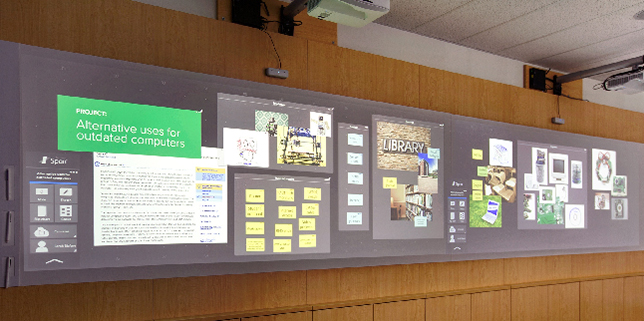
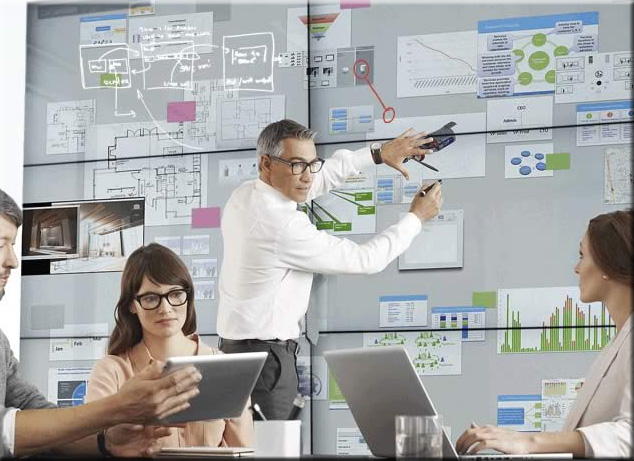
For example, can you imagine marrying the functionalities that Bluescape provides with the reach, flexibility, convenience, and affordances that are unfolding with the new Apple TV?

Truly, some mind-blowing possibilities are developing.  In the not too distant future, lifelong learning won’t ever be the same again (not to mention project-related work).

This is why I’m big on the development and use of
team of specialists — as an organization may have
a harder time competing in the future without one.


BlueScape-2015


The Living [Class] Room -- by Daniel Christian -- July 2012 -- a second device used in conjunction with a Smart/Connected TV


How to Publish an E-Book: Resources for Authors — by Jane Friedman

Excerpt:

About the only thing that remains constant in e-book publishing is that it changes—everything from the services to marketing strategies. Here, I’ve attempted to round-up all the good resources I know of related to (1) learning to publish an e-book, (2) finding the right e-publishing services, and (3) staying on top of changes in the industry.

Topics/areas that Jane provides resources for include:
Excellent Book-Length Guides
Getting Started & Principles
Producing a Solid Product
Sales, Marketing, and Promotion
Getting Reviews
Tools for Creating & Formatting E-Books
Tools for Creating Enhanced, Multimedia, or Full-Color E-Books
Major E-Book Retailers
Major E-Book Distributors & Services
To Find Freelance Help
Authors Who Blog About E-Book Publishing
News & Trends About E-Book Publishing


FutureOfTV-Apple-Oct2015


The New Apple TV Invigorates the Set-Top Box — from nytimes.com by Brian Chen

Excerpt:

I NEVER imagined I would get hooked on reading comic books on a TV screen. That changed last week after I picked up a new Apple TV.

The new device, which is similar to a set-top box and brings video and music from the Internet to a television, now has an app store. So I downloaded Madefire, one of the first apps available for the new device. Madefire adds a twist to digital comics with sound effects, music and motion, bringing the panels to life on the big screen. Within minutes, I was bingeing on a series about Superman turning into a corrupt dictator.

Playing with apps is just one new feature of the revamped Apple TV, which will ship this week. It’s that plethora of innovations and apps that leads me to conclude that the upgraded $149 box is now the best TV streaming device you can get for your money.


Apple TV challenges developers to take apps to the big screen — from http://finance.yahoo.com by Julia Love

Excerpt:

(Reuters) – Apple’s loyal army of software developers is joining the tech giant in its bid to conquer the living room with a new version of Apple TV, creating apps for the big screen that they hope will attract users and unlock a rich source of revenue.

A long-awaited update to Apple TV, which launched in 2007, will start shipping in 80 countries on Friday.

Apple views apps as the future of television. An App Store is the centerpiece of the new device, and hundreds of apps will be ready at launch, including gaming, shopping and photography.

Although developers have already been able to make apps for smart TV rivals, Apple’s vast base of developers will set the device apart, analysts say. And developers say they relish the opportunity to reach users in a more intimate setting.


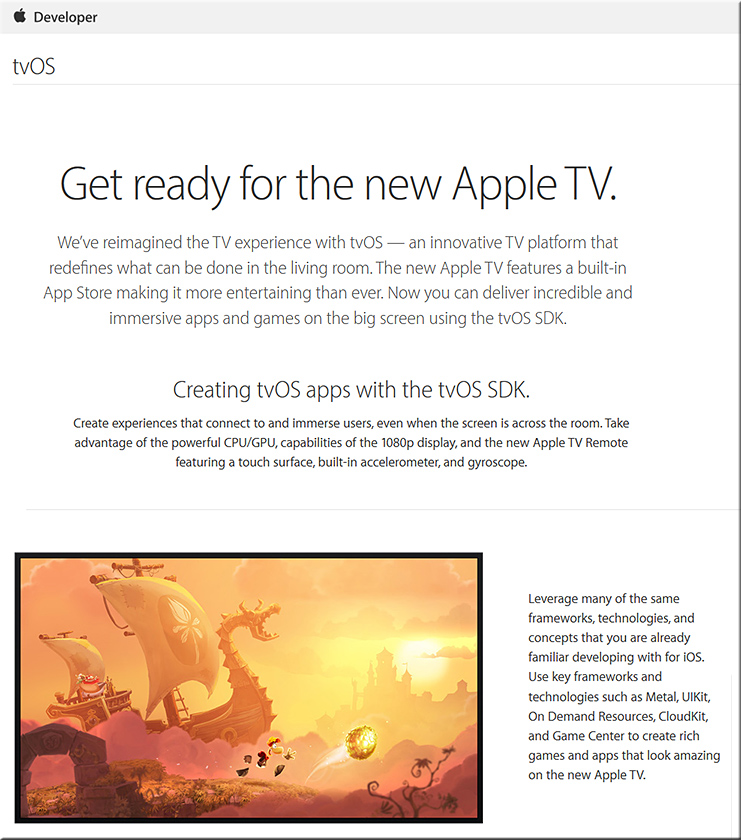
tvOS > Developer information


AppleTV-tvOS-Oct2015


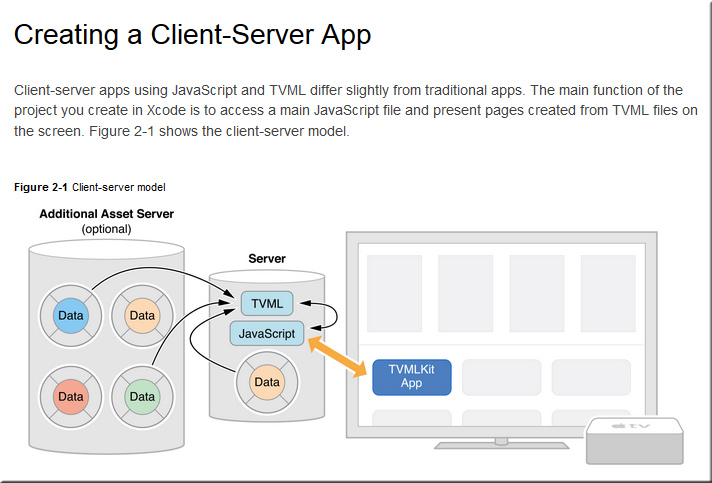
Building Apple TV Apps > Creating a Client-Server App


ClientServerApp-tvOS-Oct2015


Which Apple TV Should You Buy? — from wired.com

Excerpt:

Pre-orders for the new Apple TV have begun. Well, technically, the new Apple TVs; the latest model comes in two sizes. Oh, and the previous version remains available too. For the first time in Apple TV history, you’ve got options. Now it’s time to figure out which one’s right for you.


‘Aerial’ brings beautiful Apple TV video screensavers to your Mac — from 9to5mac.com


screensavers-oct2015


Addendum:


Next Generation K-12: 10 Implications for HigherEd — from gettingsmart.com by Tom Vander Ark and Guest Author

Excerpt (emphasis DSC):

There are a growing number of next generation models in K-12 as a result of new thinking about learning design and deeper understandings of college and career readiness, enabled by cheap devices, better tools, and foundation support. They personalize learning in blended and competency-based environments. These models revolve around students and learning, rather than teachers and direct instruction as the primary pedagogy.

We’ve chronicled the development of next-gen schools (here and here) and see hundreds of districts and networks adopting next-gen strategies. We’re optimistic that broader adoption of these strategies will produce better student outcomes. Following are 10 examples of next-gen learning in K-12.

These examples are not single course innovations, they are engineered solutions. The first half are districts or networks; the other half are schoolwide models. There are hundreds of examples and they have big implications for HigherEd.

We see 10 implications for HigherEd; some directly as a result of next-gen models, some resulting from next-gen policies, some from EdTech and consumer variables impacting both K-12 and HigherEd.


From DSC:
I post this valuable item from Tom Vander Ark because I’m constantly shouting “Heads up!”  “Heads-up!”  I shout it to those of us working within higher education, and I shout it to those working within the corporate world. 

Why?

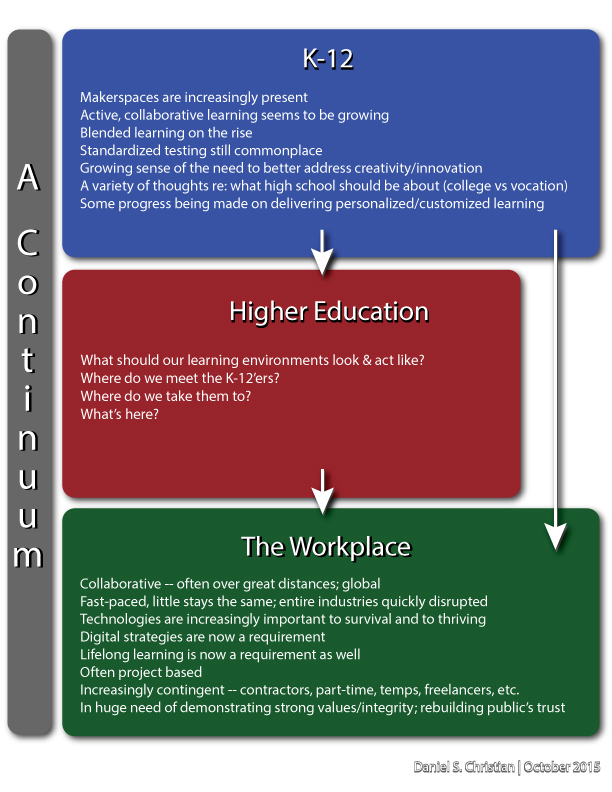
Because those of us working within higher education operate in a continuum — and so do you working within the corporate world (especially those of you working within corporate training and corporate universities, as well as those of you producing elearning-based materials).

What happens in the prior stages of a student’s/employee’s life directly impacts us/you.  Expectations are at play here; which impacts engagement; which impacts learning.
 

DanielChristian-what-should-our-learning-environments-look-and-act-like


Why there isn’t greater collaboration between these spheres is troublesome to me.  So I want to lift up those people — like Tom Vander Ark — who are trying to do something about it.


————

Addendum on 11/5/15 that nicely illustrates my point:

2 things you should know about Google ed evangelist’s vision [Educause 2015] — from educationdive.com by Roger Riddell
Jaime Casap says schools aren’t broken, but they do need to adapt

Excerpt:

While that topic was certainly touched on during Casap’s keynote at Educause, the issue at hand on Thursday was a much more generational one. The discussion was, after all, titled “The Digitally Native Generation Z Is Going to College: Are You Ready?”

“There’s a generation of students coming to college that are a little bit different from the ones that they’re used to, and they’re learning in a different way,” Casap said, adding that a lot of the innovation in education is occurring in K-12 and will likely have some impact on higher ed. 


U.S. Department of Education Launches Campaign to Encourage Schools to #GoOpen with Educational Resources — from ed.gov, with thanks to Sheila Soule for this resource
Department proposes rule requiring educational materials created with federal grants to be openly licensed so that any school has access

Excerpt:

The U.S. Department of Education announced [on 10/29/15] the launch of #GoOpen, a campaign to encourage states, school districts and educators to use openly licensed educational materials. As part of the campaign, the Department is proposing a new regulation that would require all copyrightable intellectual property created with Department grant funds to have an open license.

“In order to ensure that all students – no matter their zip code – have access to high-quality learning resources, we are encouraging districts and states to move away from traditional textbooks and toward freely accessible, openly-licensed materials,” U.S. Education Secretary Arne Duncan said. “Districts across the country are transforming learning by using materials that can be constantly updated and adjusted to meet students’ needs.”


tvOS: The days of developing for a “TV”-based OS are now upon us.

Apple puts out call for Apple TV apps — from bizjournals.com by Gina Hall

Excerpt:

The company put out the call for app submissions on Wednesday for tvOS. The Apple TV App Store will debut as Apple TV units are shipped out next week.

The main attraction of Apple TV is a remote with a glass touch surface and a Siri button that allows users to search by voice. Apple tvOS is capable of running apps ranging from Airbnb to Zillow and games like Crossy Road. Another major perk of Apple TV will be universal search, which allows users to scan for movies and television shows and see results from multiple sources, instead of having to conduct the same search within multiple apps.

Apple CEO Tim Cook hopes the device will simplify how viewers consume content.


From DSC:
The days of developing for a “TV”-based OS are now upon us:  tvOS is here.  I put “TV” in quotes because what we know of the television in the year 2015 may look entirely different 5-10 years from now.

Once developed, things like lifelong learning, web-based learner profiles, badges and/or certifications, communities of practice, learning hubs, smart classrooms, virtual tutoring, virtual field trips, AI-based digital learning playlists, and more will never be the same again.


The Living [Class] Room -- by Daniel Christian -- July 2012 -- a second device used in conjunction with a Smart/Connected TV


MoreChoiceMoreControl-DSC


Also see:


Addendum on 10/26/15:
The article below discusses one piece of the bundle of technologies that I’m trying to get at via my Learning from the Living [Class] Room Vision:

  • No More Pencils, No More Books — from by Will Oremus
    Artificially intelligent software is replacing the textbook—and reshaping American education.
    Excerpt:
    ALEKS starts everyone at the same point. But from the moment students begin to answer the practice questions that it automatically generates for them, ALEKS’ machine-learning algorithms are analyzing their responses to figure out which concepts they understand and which they don’t. A few wrong answers to a given type of question, and the program may prompt them to read some background materials, watch a short video lecture, or view some hints on what they might be doing wrong. But if they’re breezing through a set of questions on, say, linear inequalities, it may whisk them on to polynomials and factoring. Master that, and ALEKS will ask if they’re ready to take a test. Pass, and they’re on to exponents—unless they’d prefer to take a detour into a different topic, like data analysis and probability. So long as they’ve mastered the prerequisites, which topic comes next is up to them.
 

Creating Movies With Students — from ipadsammy.com by Jon Samuelson

Excerpt:

“Here’s looking at you, Kid” – Presentation From BSD Future Ready Summit

Getting students started creating videos can seem like a daunting task. There isn’t enough time in the day to get your regular subjects done, how are you supposed to give students time to create videos? I am here to tell you it can be done. I hope that this post/presentation will provide what you need to get started.

Students can create videos on a variety within the context of what they are learning right now. Video story problem for math, a how to science experiment, or a book trailer that covers important story traits are all good ideas. Here is a list of apps, PDF Templates, and equipment that can be helpful when creating movies.


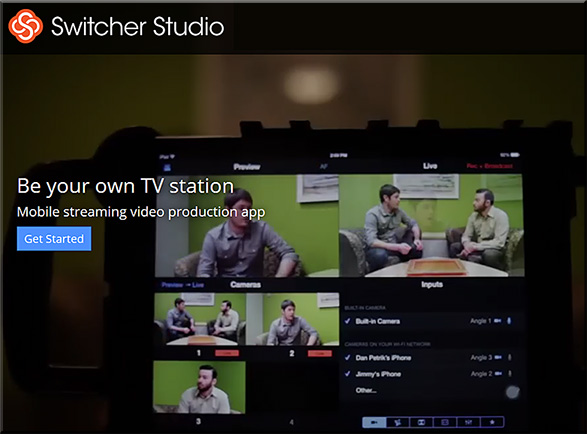
Switcher Studio: Be your own TV station — from switcherstudio.com with thanks to Mr. Doug Cuddihy for letting me know about this resource
Mobile streaming video production app

Excerpt:

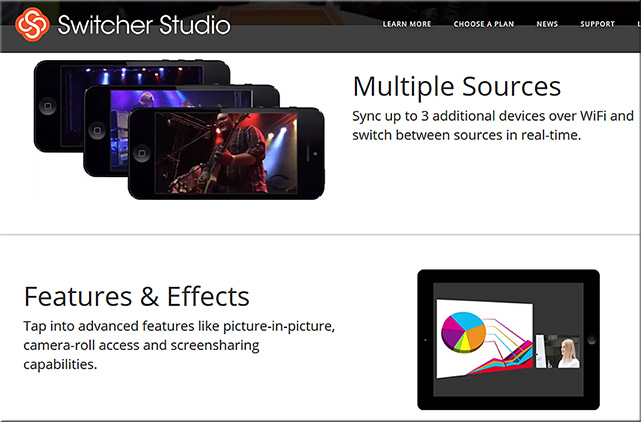
Switcher Studio is a mobile video app that lets you sync up to four iPhones and iPads to record and stream LIVE video to services like YouTube and Ustream. Insert photos and graphic overlays, manage multi-view effects, and more.


switcherstudio-oct2015


switcherstudio2-oct2015


From DSC:
Now let’s take this one step further. 

If REMOTE learners could switch between cameras at any point, NOW we’re talking! That is, it would be great if we could set up 3-4 cameras in a face-to-face classroom, and let the remote learners switch between whichever viewing angle/feed that they want to see at any given point in time (i.e., the professor, the whiteboard, the computer, other).


Addendum on 10/15/15: also see:

  • Touchcast Studio in a Box:
    Excerpt:
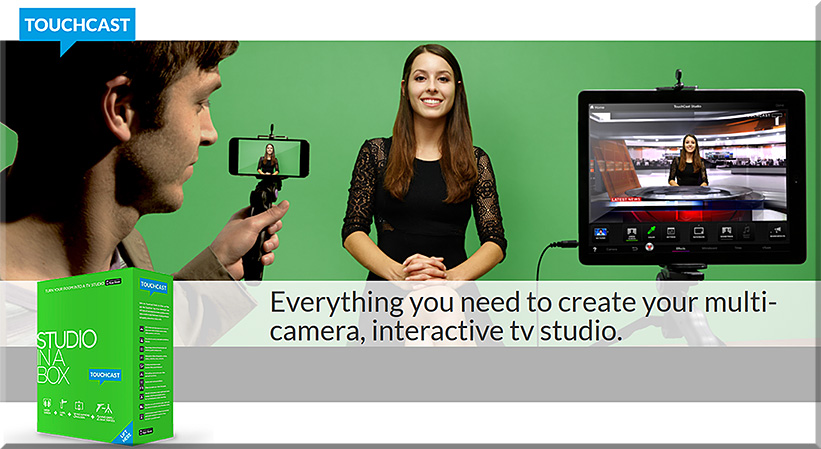
    TouchCast Studio in a Box allows you to transform your iPad into a full, interactive video studio. The TouchCast Studio includes a green screen, lapel mic, mini-tripods, iPad and iPhone holders. Paired with the TouchCast App, you will be able to use the green screen to transport yourself.

    And don’t forget to add video apps (vApps) to make your video interactive. Your audience can tap these to dive deeper into other videos, web pages and more.

touchcast-studio-in-a-box-oct-2015


Partial Credit: The 2015 Survey of Faculty Attitudes on Technology — from insidehighered.com

Excerpt:

Colleges and universities have spent hundreds of millions of dollars on technology they believe will improve student outcomes and simplify administrative tasks. Educational technology companies continue to demolish investment records on a quarterly basis. With all this money raised and spent under the guise of improving postsecondary education, the 2015 Inside Higher Ed Survey of Faculty Attitudes on Technology suggests that many instructors believe the gains in student learning justify the costs — even if the results are perhaps less significant than desired.

Inside Higher Ed partnered with Gallup to ask faculty members and academic technology administrators to share their thoughts on this and other ed-tech issues in the news. A copy of the survey results, based on responses from 2,175 faculty members and 105 administrators, can be downloaded here.


Enhancing the student digital experience: a strategic approach — from jisc.ac.uk
Supporting institutions to develop digital environments which meet students’ expectations and help them to progress to higher study and employment


jisc-2015


Excerpts:

  • How are you responding to the changing digital needs and expectations of your students and staff?
  • Do the experiences and the digital environment you offer to your students adequately prepare them to flourish in a society that relies heavily on digital technologies?
  • What are you doing to engage students in dialogue about digital issues and to work collaboratively with them to enhance their digital learning experience?
  • How well is the digital vision for your establishment embedded in institutional policies and strategies?


Contents

Context

Deliver a relevant digital curriculum

Deliver a relevant digital curriculum: make a difference in your organisation
Further resources for delivering a relevant digital curriculum

Deliver an inclusive digital student experience

Inclusive digital experience: make a difference in your organisation
Further resources for inclusive digital experience delivery

Deliver a robust, flexible, digital environment

Robust digital environment: make a difference in your organisation
Further resources for delivering a robust digital environment

Engage in dialogue with students about their digital experience and empower them to develop their digital environment

Students’ digital environment development: make a difference in your organisation
Further resources for students’ digital environment development

Develop coherent ‘bring your own’ policies

‘Bring your own’ policies: make a difference in your organisation
Further resources for ‘bring your own’ policies development

Support students and staff to work successfully with digital technologies

Digital technologies support: make a difference in your organisation
Further resources for supporting staff and students with digital technologies

Take a strategic approach to developing the student digital experience

A strategic approach to student digital experience: make a difference in your organisation
Further resources for taking a strategic approach to student digital experience development

Summary


With so many competing pressures educational leaders do not always recognise the strategic and operational importance of digital technology or realise the potential transformative effect this could have on their institutions, the wider sector, employers and society.


Campus Technology 2015 Readers’ Choice Awards

CampusTechReadersChoiceAwardsSept2015

Excerpt:

In this first-ever higher education “gear of the year” guide, Campus Technology has turned to hundreds of education professionals to tell us which products in 29 categories are truly the best. We cover the gamut of technology from 3D printers to wireless access points. In almost every category you’ll find the Platinum, Gold and Silver picks to help you short-list your shopping, fuel your decision-making or perhaps start a friendly debate on campus.

  1. Learning Management and E-learning
  2. E-Portfolios
  3. Other Instructional Tools
  4. Student Information Systems and Data Management
  5. Enterprise Resource Planning (ERP)
  6. Constituent Relationship Management (CRM)
  7. Student Success/Retention
  8. Student Response Systems and Classroom Clickers
  9. Lecture Capture
  10. Document Cameras
  11. Projectors
  12. Interactive Whiteboards
  13. Videoconferencing and Web Conferencing
  14. Virtual Classroom and Meeting
  15. Classroom Audio Distribution/Sound Enhancement
  16. Captioning
  17. Office/Productivity Suites
  18. Classroom Presentation
  19. Multimedia Authoring Suites and Creative Software
  20. E-Learning Authoring
  21. Media Tablets
  22. Chromebook
  23. Windows Tablet
  24. Convertible and 2-in-1 Notebooks
  25. Notebooks
  26. Virtual Desktops and Thin Clients
  27. Wireless Access Points and Hotspots
  28. 3D Printers
  29. Emergency Notifications


Imagine what learning could look like w/ the same concepts found in Skreens!


From DSC:
Imagine what learning could look like w/ the same concepts found in the
Skreens kickstarter campaign?  Where you can use your mobile device to direct what you are seeing and interacting with on the larger screen?  Hmmm… very interesting indeed! With applications not only in the home (and on the road), but also in the active classroom, the boardroom, and the training room.


See
Skreens.com
&
Learning from the Living [Class] Room


DanielChristian-AVariationOnTheSkreensTheme-9-29-15


Skreens-Sept2015Kickstarter


Skreens2-Sept2015Kickstarter


The Living [Class] Room -- by Daniel Christian -- July 2012 -- a second device used in conjunction with a Smart/Connected TV

From DSC:
Some of the phrases and concepts that come to my mind:

  • tvOS-based apps
  • Virtual field trips while chatting or videoconferencing with fellow learners about that experience
  • Virtual tutoring
  • Global learning for K-12, higher ed, the corporate world
  • Web-based collaborations and communications
  • Ubiquitous learning
  • Transmedia
  • Analytics / data mining / web-based learner profiles
  • Communities of practice
  • Lifelong learning
  • 24×7 access
  • Reinvent
  • Staying relevant
  • More choice. More control.
  • Participation.
  • MOOCs — or what they will continue to morph into
  • Second screens
  • Mobile learning — and the ability to quickly tie into your learning networks
  • Ability to contact teachers, professors, trainers, specialists, librarians, tutors and more
  • Language translation
  • Informal and formal learning, blended learning, active learning, self-directed learning
  • The continued convergence of the telephone, the television, and the computer
  • Cloud-based apps for learning
  • Flipping the classroom
  • Homeschooling
  • Streams of content
  • …and more!


Addendum:

Check out this picture from Meet the winners of #RobotLaunch2015

Packed house at WilmerHale for the Robot Launch 2015 judging – although 2/3rds of the participants were attending and pitching remotely via video and web conferencing.


Empowering Students Through Multimedia Storytelling — from edutopia.org by Michael Hernandez


Excerpt:

Recent studies have proven that stories can change perceptions and even make people more tolerant. Rather than wait to be defined by others, it’s important that students learn to create understanding by sharing their story, their worldview, their concerns, and their triumphs with others.

Groups like Youth Radio and Cause Beautiful are empowering teens in poor and minority-majority neighborhoods to become multimedia journalists. Kids in these programs learn how to tell and share their own stories with a local or national audience.

No matter your class demographics or grade level, ELA and social studies teachers should integrate similar projects in their own classrooms, because every student will benefit from learning to craft a compelling visual story backed by persuasive facts and ideas.

What Is Multimedia Storytelling?
Students use video, audio, photography, web, and social media to craft documentaries and nonfiction stories about the world around them. These interdisciplinary projects allow students to focus on creating an authentic product that many people outside the classroom and their neighborhoods will see.


From DSC:
I am passionate about multimedia because the components of it — digital audio, digital video, text, graphics, animations, digital photography, and more — can create hugely powerful pieces of communication. Students need to be able to communicate — online. But it’s not just students. Each one of us needs to have an online-based footprint now in order to remain marketable.  Multimedia can help relay our stories, our work, our dreams.  It unleashes enormous amounts of energy and creativity inside of us.

I wish that more teachers and faculty members would seek to integrate multimedia-based assignments into their courses — or at least encourage the idea that this can be one of the acceptable ways that assignments can be turned in. At the same time, it can be one of the more interesting ways to assess learning and comprehension. Online-based resources like Lynda.com can help get students, teachers, and professors up the learning curves.


From DSC:
I don’t care for the title here, but there are some valuable items that can be found by digging around in this article entitled, “Silicon Valley billionaires are appalled by normal schools — so they’ve created this new one” — from businessinsider.com by Melia Robinson

Excerpts:

A typical day at Altschool, the Bay Area-based school system that raised $100 million in venture capital in May, is anything but typical.

Kids take attendance on an iPad, complete a “playlist” of activities, and learn 3D modeling software to design a playhouse for the class pet.

Founder and CEO Max Ventilla previously helmed the personalization team at Google, where he helped build Google+ and other products that make the internet feel more personal.

His latest venture aims to transform the outdated, early-1900s model of elementary education for the digital age.

In May, we spent the day at AltSchool‘s Fort Mason location in San Francisco to see its revolutionary teaching style in action.


From DSC:
Is there anything here that public schools would find attractive and/or could implement?

  • AltSchool divides students between the ages of 4 and 14 into three groups: lower elementary, upper elementary, and middle school. There are no traditional grade levels.
  • A typical day at AltSchool begins with attendance. As kids arrive, they sign in to the school’s attendance app on a dedicated iPad.
  • The attendance app is one of a dozen or so tech tools developed by the school’s 50-person product team, which includes former employees of Apple, Uber, Zynga, and Ventilla’s alma mater, Google.
  • The PLP is the foundation of the AltSchool experience. Teachers collaborate with families and students to design a set of goals for the learner based on the student’s interests, passions, strengths, and weaknesses.
  • Each child receives a weekly “playlist” of individual and group activities that are aimed at achieving those goals. This student is writing an entry for his blog on coin collecting.
  • Teachers pick activities for their students by creating items in their playlists or searching the My.AltSchool library to find items that other teachers have made.
  • This 8-year-old demonstrates a game of Pac-Man using MaKey MaKey — a simple circuit board that transforms everyday objects into touchable user interfaces …he attaches alligator clips to four mounds of clay and tapes one clip to himself. When he taps the clay and completes the circuit, the computer interprets the input as arrow key actions.
  • This streamlined instruction time frees up the teacher to walk around the classroom and interact face-to-face with students.
  • The lower elementary students spend the morning knocking a shared item off their playlists: “writing the news.” These guys are chronicling a recent trip to the park.


trip-to-the-park


  • Many of the younger kids wear headphones during playlist time to drown out distractions.
  • Technology isn’t necessary to complete all activities, but it is used to document students’ work. This student takes a picture of her news clipping using an iPad and uploads the image to her playlist.
  • The classroom, like the tech, fosters AltSchool’s individualized learning approach. Students sprawl across the room on carpets, beanbags, and even lofts of their own construction.


own-construction


  • Classrooms are treated like stations, rather than designated areas for particular grade levels, and students move from room to room throughout the day. It’s especially important for micro-schools to maximize space so that a four-room schoolhouse doesn’t feel cramped
  • Craft and cleaning supplies are stored where the smaller kids can reach them, giving them a sense of agency.
  • After lunch and PE in the nearby park, students put aside their playlists and work on more integrated group projects.
  • The middle-school students were tasked with a classroom redesign. This 11-year-old, who was wearing an Iron Man T-shirt, built a parkour course. He’s writing a parent permission slip on his Google Chromebook now.
  • His classmate learned from online tutorials how to use the 3D-modeling software SketchUp, and she designed an urban-garden-inspired seating area for the unused deck on the second floor. There’s an obstacle course inside the benches for a class rabbit to tunnel through.
  • Another student, who wants to be a veterinarian, lawyer, writer, and manga comic-book writer, grew an indoor tea garden. She says she loves how the assignments “bend to your ability.”
  • If Silicon Valley’s favorite elementary school has its way, personalization will remain king.


The multi-device world is evolving! — from upsidelearning.com by Amit Garg

Excerpt:

The multi-device world is certainly evolving. Existing devices are evolving in size while new devices are being added to the mix. All of this is resulting in evolving behavior patterns.

The smart thing to do is to get started with multi-device learning without waiting for the world to settle down. You might make a few mistakes, but will learn along the way and would still be better off as compared to those who never got started.


.

Smartphone Screen Size


“…the boundaries between tablets and smartphones are blurring…”

 
© 2025 | Daniel Christian