4 Online Tactics to Improve Blended Learning — from campustechnology.com by Megan Burke, CPA, Ph.D.
An accounting professor shares how best practices from online pedagogy have helped her create a blended learning environment that supports student success.

Excerpts:

Now that students are back in the classroom, I have been combining these tactics with in-person instruction to create a blended learning environment that gives my students the best of both worlds.

The right activities, on the other hand, can make a significant difference. For example:

  • Breakout rooms (for think/pair/share);
  • Polls and quizzes that are low-stakes and anonymous to encourage full engagement;
  • Using the whiteboard option; and
  • Having reviews of material at the end of class.

I also encourage faculty (and myself!) to get out and meet with employers and ask what we can do to better prepare students, so that we can get a better feel for what first-year staff really need to know — and ensure that we present that knowledge and information in the classroom.


A Rubric for Selecting Active Learning Technologies — from er.educause.edu by Katie Bush, Monica Cormier, and Graham Anthony
A rubric can be an invaluable aid in evaluating how well technologies support active learning.

Excerpt:

Because the use of active learning is characterized by a broad range of activities in the classroom, comparing technology and determining which option provides more benefit to an active learning classroom can be difficult. The Rubric for Active Learning Technology Evaluation can provide some differentiation when comparing technology offerings. It has been designed to reveal subtle but impactful differences between technology in the context of active learning. The rubric was designed to be a tool for comparative technology evaluation and as such should be quick to use when comparing similar technologies. It is freely available to use and adapt under a Creative Commons license.


How to integrate storytelling as design thinking in your classroom — from bookcreator.com by Michael Hernandez

Excerpt:

I’ve been thinking a lot about the need to prepare my students for their future and how I can help develop the skills and mindset they’ll need to solve some pretty big global challenges we now face.

While I see my STEM and science colleagues integrating skills like creativity, problem-solving and ideation, technology use and innovation, I often wondered how I could integrate these skills into my journalism, film and photography classes.

Until I realized that I already do.

Often thought of as either a frivolous hobby during our downtime, or a one-way fire hydrant of information from textbooks in school, working with student storytellers over the past 23 years has illuminated the idea that, if done right, student-made digital stories can be a powerful learning experience and creative problem solving exercise.


Entrepreneur Education Platform GeniusU Raises $1.5M Seed Funding at $250M Valuation — from edtechreview.in ed by Stephen Soulunii

Excerpt (emphasis DSC):

Genius Group has recently announced that its EdTech arm, GeniusU Ltd, has raised $1.5 million in a seed round to support the development of its Genius Metaversity virtual learning plans.
…
With the fresh funding, GeniusU plans to extend its courses and programs to interactive learning environments in the metaverse, with students and faculty connecting and learning in global classrooms and virtual 3D environments. It also plans to integrate each student’s AI-based virtual assistant ‘Genie’ into the metaverse as 3D virtual assistants that accompany each student on their personalized journey and integrate its GEMs (Genius Education Merits) student credits into the metaverse. GEMs are earned by students as they learn and can be spent on products and services within GeniusU and counting towards their certifications.


From DSC:
Wow…I hadn’t heard of voice banking before. This was an interesting item from multiple perspectives.

Providing a creative way for people with Motor Neurone Disease to bank their voices, I Will Always Be Me is a dynamic and heartfelt publication — from itsnicethat.com by Olivia Hingley
Speaking to the project’s illustrator and creative director, we discover how the book aims to be a tool for family and loved ones to discuss and come to terms with the diagnosis.

Excerpt:

Whilst voice banking technology is widely available to those suffering from MND, Tal says that the primary problem is “that not enough people are banking their voice because the process is long, boring and solitary. People with MND don’t want to sit in a lonely room to record random phrases and sentences; they already have a lot to deal with.” Therefore, many people only realise or interact with the importance of voice banking when their voice has already deteriorated. “So,” Tal expands, “the brief we got was: turn voice banking into something that people will want to do as soon as they’re diagnosed.”


The Great Resignation: The toll taken on the legal field and what comes next — from abajournal.com by Thomas MacDonald

Excerpt:

The pandemic has reshaped thinking around the value of work. The Thomson Reuters Stellar Performance: Skills and Progression Mid-Year Survey uncovered three specific priorities legal professionals are factoring into their career decisions.

  • Balance: Young professionals are more in tune with work-life balance and place a higher value on mental well-being, leisure and other activities outside of work than previous generations.
  • Family: A higher percentage of the professional workforce are mothers. Likewise, men are taking a more active role in child-rearing than previous generations, as younger professionals juggle more domestic responsibilities across the board.
  • The Long Game: Many Generation X and millennial employees have long since conceded that their retirement will likely come much later in life than their elder counterparts. The prospect of working for an extra decade—or more—has tempered the enthusiasm for grinding away during their formative years.

Also relevant/see the following articles:

8 Legal Experts on the Future of the Billable Hour — from artificiallawyer.com

Excerpt:

Are you still billing by the hour? The reality is that most lawyers are and plenty will still be using it in the year 2032. However, many legal experts agree: the billable hour is under pressure, forcing lawyers to investigate other billing methods as well.

Laura Rosseel, Senior Associate at Cambrian, explains clearly why the billable hour is a topic for discussion: ‘There are countless arguments against working with billable hours. Invoicing based on billable hours puts the risk of both unpredictability in the scope of work as well as potential inefficiency on the client, instead of the law firm that is providing the service.

‘It does not differentiate based on the value of the task at hand, the urgency, or the time of day (or night), with which the task is carried out. Additionally, it is a performance metric for lawyers that favours working more over working better, and the relentless pressure is causing junior and mid-level lawyers to leave their firms.’

Digital exhaustion: Redefining work-life balance — from enterprisersproject.com by Irvin Bishop Jr.
Is your team suffering from the digital exhaustion that so often comes with remote and hybrid work? Consider these strategies to ease the stress

As workers continue to create and collaborate in digital spaces, one of the best things we can do as leaders is to let go. Let go of preconceived schedules, of always knowing what someone is working on, of dictating when and how a project should be accomplished – in effect, let go of micromanagement. Instead, focus on hiring productive, competent workers and trust them to do their jobs. Don’t manage tasks – gauge results. Use benchmarks and deadlines to assess effectiveness and success.

What did we learn at the CLOC Conference? — from zachabramowitz.substack.com by Zach Abramowitz
QR Codes, Outside Counsel Startups Make Great Shirts and Standing Out in a Sea of CLM

Some of the tools/products/vendors Zach mentioned were:


All the Software Google Announced at I/O 2022 — from wired.com
From Android to translation to visual web search, here are all the enhancements coming to your phone, tablet, and desktop this year. 

Excerpt:

Last month, Google rolled out a feature called Multisearch. It lets you combine elements in a single search query, like using a photo and text at the same time. Soon, Multisearch will get a new tweak. Called Near Me, the feature lets you factor in your location while Multisearching, helping to sniff out local restaurants or shops based on photos and text. Multisearch Near Me will be available globally later this year, though it only works with English input for now.

Another interesting item from wired:


Five steps to getting higher ROI on your learning content — from chieflearningofficer.com by Anindita Gupta

Excerpt:

Both scenarios point toward the fact that organizations are investing a disproportionate amount of time and money on their star content while the supporting content assets are left languishing.  In the long run, this skewed handling makes it extremely difficult for L&D teams to manage and maintain not just their content but also their budget. They could do better, be leaner, get more out of their investments, and experience smarter if they did just one thing differently.
.

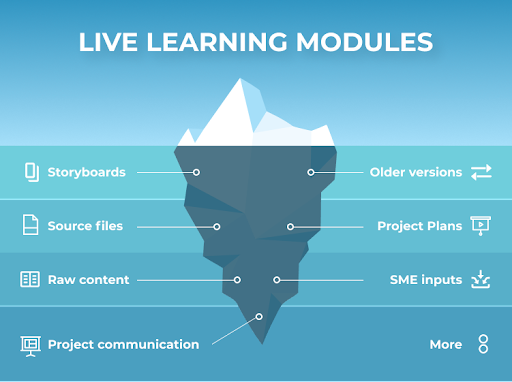
Live learning modules are only the tip of the iceberg of what is involved in creating them


Also relevant/see:

Addendum on 5/16/22:


From DSC:
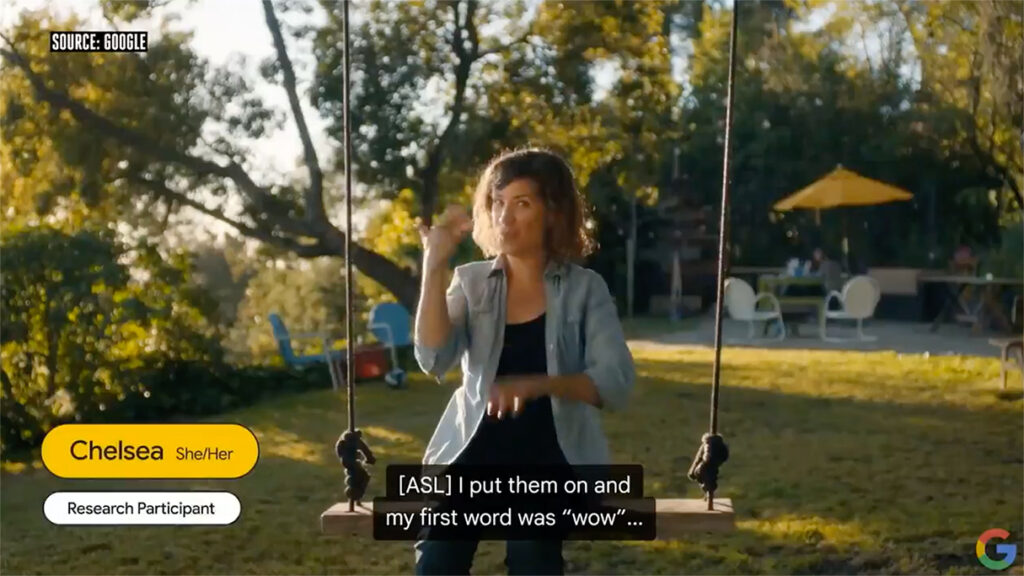
I love the parts about seeing instant language translations — including sign language! Very cool indeed!
(With thanks to Ori Inbar out on Twitter for this resource.)

Realtime American Sign Language translation via potential set of AR glasses from Google

Also see:


Inside Microsoft’s new Inclusive Tech Lab — from engadget.com by C. Low; with thanks to Nick Floro on Twitter for some of these resources
“An embassy for people with disabilities.”

Increasing our Focus on Inclusive Technology — from mblogs.microsoft.com by Dave Dame

Excerpt:

In recent years, tied to Microsoft’s mission of empowering every person and organization on the planet to achieve more, teams from across Microsoft have launched several products and features to make technology more inclusive and accessible. [On May 10, 2022], as part of the 12th annual Microsoft Ability Summit, we celebrate a new and expanded Inclusive Tech Lab, powerful new software features, and are unveiling Microsoft adaptive accessories designed to give people with disabilities greater access to technology.

Microsoft’s Latest Hardware Is More Accessible and Customizable — from wired.com by Brenda Stolyar
The wireless system—a mouse, a button, and a hub—is designed to increase productivity for those with limited mobility.

Excerpt:

Microsoft if expanding its lineup of accessibility hardware. During its annual Ability Summit—an event dedicated to disability inclusion and accessibility—the company showed attendees some new PC hardware it has developed for users with limited mobility. Available later this year, the wireless system will consist of an adaptive mouse, a programmable button, and a hub to handle the connection to a Windows PC. Users set up the devices to trigger various keystrokes, shortcuts, and sequences. These new input devices can be used with existing accessories, and they can be further customized with 3D-printed add-ons. There are no price details yet.

Along these lines, also see:

  • 14 Equity Considerations for Ed Tech — from campustechnology.com by Reed Dickson
    Is the education technology in your online course equitable and inclusive of all learners? Here are key equity questions to ask when considering the pedagogical experience of an e-learning tool.
 

Digital Classroom Newsletters: Tips for Engaging Students and Their Grownups — from blog.edmentum.com by Troy Minton

Excerpt:

Newsletters can be a very effective tool for getting quick and engaging information to students and their families, whether you teach online or in the physical classroom. Class newsletters can also be a quick and visually pleasing way for parents and guardians to stay informed on class activities and keep student supporters in the loop about grade level expectations, all the while building the essential communication lines. It allows supporters to ask specific questions about events happening in their child’s classroom more so than a simple question like “how was class?” would.

There are several free tools or versions that are available to educators that provide me a quick and effective method of getting information to students in an engaging and visually pleasing format. Let’s take a look at why a digital newsletter can be handy, and a few ways you can make sure to get the most out of yours.


Technology for HyFlex Classrooms: Major Considerations — from hyflexlearning.org by Brian Beatty

Excerpts:

This post describes four aspects of classroom technology that are very important to address when developing a HyFlex approach that can be effective at scale.
…

The classroom technology needs can be organized into four areas:

  1. two-way audio stream (connection),
  2. incoming video presentation of remote learners
  3. outgoing video presentation of classroom and learners
  4. interactive technology to support interaction, engagement, and formative assessment

Also re: hyflex teaching — where some students are physically present and some are coming into the class remotely– see:

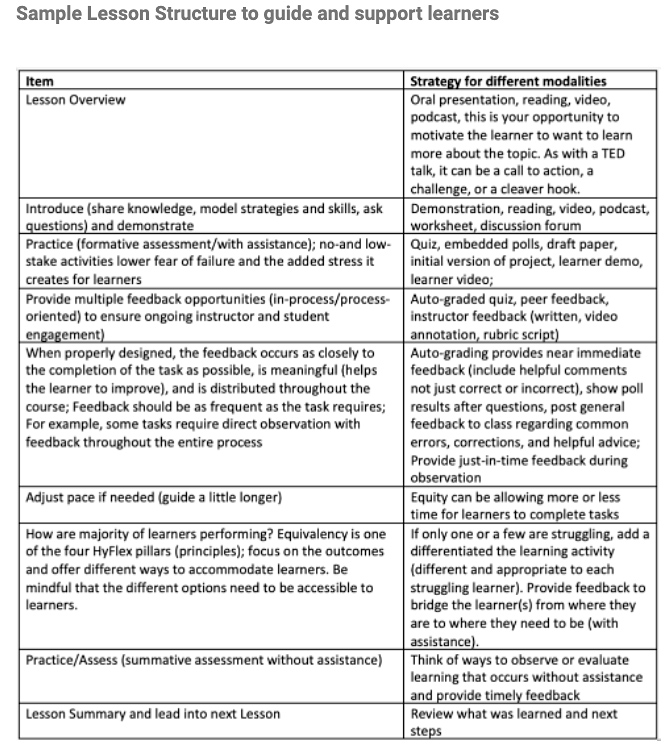
Part I – Motivating Learners by Building Efficacy (Confidence) through Scaffolding and Support— from hyflexlearning.org by Jeanne Samuel

Excerpts:

HyFlex delivery may be new to many learners. Therefore, it is important to provide them with the supports they need to be successful. Regardless of the delivery mode, learners are motivated by success and by instructor presence. In part one of this topic post, we will write about how instructor support and feedback (a form of guidance) can motivate learners and build learner confidence.

PART II- Feedback for Improving Student Success and Satisfaction — from hyflexlearning.org by Jeanne Samuel

Excerpt:

In part 1 of this post, we focused on how feedback and support promote learner confidence. Learner confidence can lead to improved learner retention, progression, and success regardless of the class delivery mode. In part 2, we focus on feedback strategies.


From DSC:
For the last few years, I’ve been thinking that we need to make learning science-related information more accessible to students, teachers, professors, trainers, and employees — no matter what level they are at.

One idea on how to do this — besides putting posters up in the hallways, libraries, classrooms, conference rooms, cafeterias, etc. — is that we could put a How best to study/learn link in all of the global navigation bars and/or course navigation bars out there in organizations’ course management systems and learning management systems. Learners of all ages could have 24 x 7 x 365, easy, instant access as to how to be more productive as they study and learn about new things.

For example, they could select that link in their CMS/LMS to access information on:

  • Retrieval practice
  • Spacing
  • Interleaving
  • Metacognition
  • Elaboration
  • The Growth Mindset
  • Accessibility-related tools / assistive technologies
  • Links to further resources re: learning science and learning theories

What do you think? If we started this in K12, kept it up in higher ed and vocational programs, and took the idea into the corporate world, valuable information could be relayed and absorbed. This is the kind of information that is highly beneficial these days — as all of us need to be lifelong learners now.


A Podcast Listening Strategy for Learning — from learntrepreneurs.com by Eva Keiffenheim
Three steps to make the most of your podcast time

Excerpt (emphasis DSC):

Use apps that help you remember more
You won’t remember much from a podcast if you only listen to it. Your brain needs repetition and elaboration to make new knowledge stick.

Unlike books, you can’t highlight audio?—?or can you?

I listen to my podcasts while biking or walking. Hence, an extremely uncomfortable situation to open a notepad or Roam Research whenever I hear an interesting idea.

But two applications have transformed how I listen to podcasts: Snipd and Airr. Both are audio highlighting tools.


The Key Idea All Great Books on Learning Have in Common — from learntrepreneurs.com by Eva Keiffenheim
And how you can implement the powerful way to learn.
.

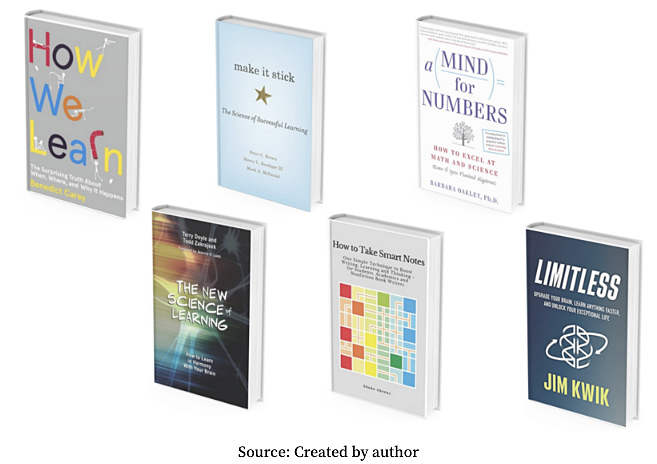
teaching in public is the principle all great books on learning agree on

 
© 2025 | Daniel Christian