Add another dimension to your photos — from creativebloq.com


Also see:

– 40 beautifully crafted Stripes
– 120 Stripe presets, or “Styles”, to quickly select the right Stripe for any photo
– 62 stunning colors and 9 different shadings and blends for every Stripe
– Completely customize any Stripe by rotating, scaling, and moving them in 3D for an infinite number of possibilities
– Make every Stripe live perfectly in your photo by weaving the Stripes between different elements using the Masking feature
– Layer your Stripes using the ReStripe feature
– Share on Instagram, Facebook, and Twitter
– Browse amazing LoryStripes creations by artists like you in the Inspirations section, updated continuously


Light Painting Evolved: Introducing the Pixelstick— from thisiscolossal.com; in KickStarter mode at this point in time


Light Painting Evolved: Introducing the Pixelstick light painting light


Also see:


Mapping the Bible in Google Earth — from freetech4teachers.com by Richard Byrne

Excerpt (emphasis DSC):

A few years ago I shared a small collection of interactive maps based on Biblical stories. Recently, through the Google Earth Blog, I learned about a collection of Google Earth files that map Biblical stories. The blog Biblical Studies and Technological Tools put together a collection of seven Google Earth files. A couple of the files that I downloaded from the collection were a Complete list of Bible Place KMZ and Biblical Rivers and Bodies of Water (both links trigger KMZ/ KML file downloads).


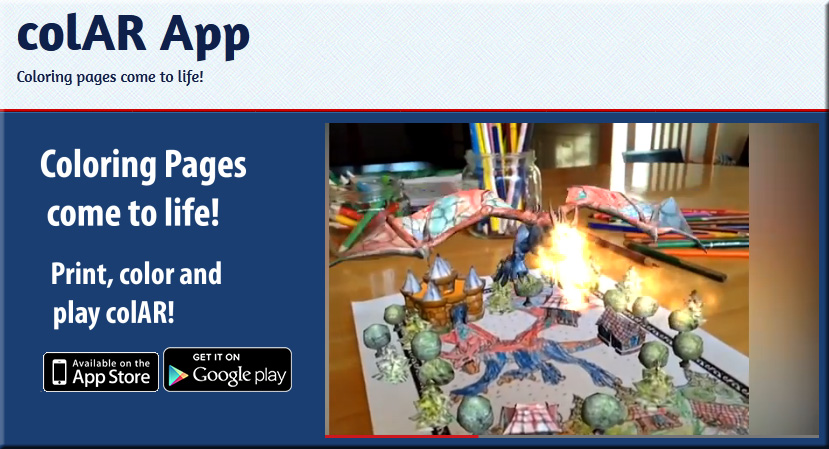
colAR-app-Oct2013


From DSC:
I’m sure it’s possible, but the really fun thing here would be if students could create these things from scratch — to foster their creativity, innovation, digital storytelling skills, and their new media literacies!


Also, somewhat related:


Lessons Learned from Apple EdTech Deployments: Part 1 — from avnetwork.com by Tim Kridel

Excerpt:

School districts have purchased more than 10 million iPads so far, and colleges such as Abilene Christian University have been using iOS devices for five years or more. All of those deployments add up to plenty of opportunities for schools that haven’t deployed Apple gear to learn what to expect.

This multi-part series looks at some of the lessons learned in terms of security, support, costs and bandwidth. It’s based on interviews with education technology managers who have spent years not only implementing and supporting Apple products, but also often mentoring their peers at other schools.

The first set of questions: What advice would you give to a peer at a school that’s about to add iOS devices? For example, what should they expect in terms of additional burden on the wireless LAN and the IT staff?


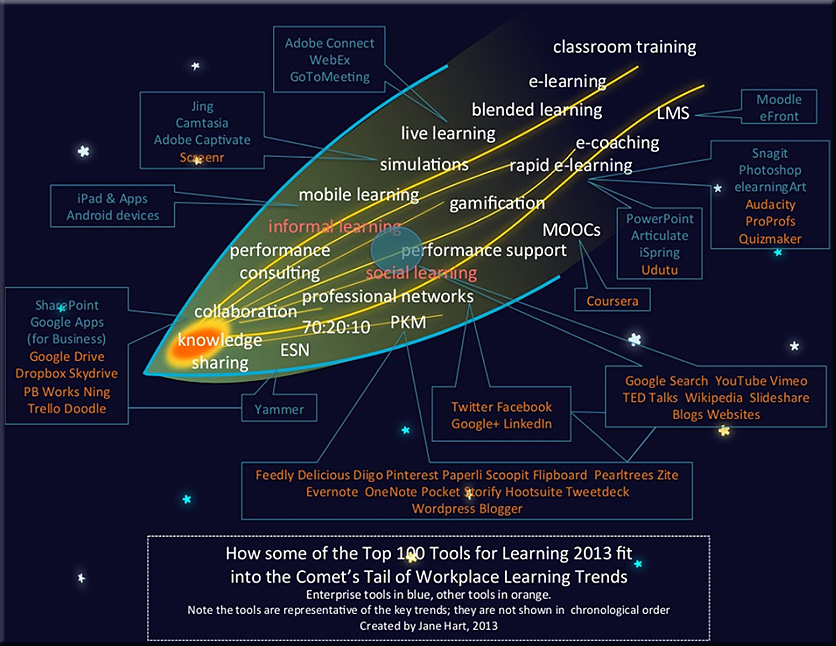
Here it is: The Top 100 Tools for Learning 2013 — from c4lpt.co.uk by Jane Hart

Excerpt:

The Top 100 Tools for Learning 2013 list (released today, 30 September 2013) was compiled from the votes of over 500 learning professionals (from education and workplace learning) from 48 countries. Here are some of the highlights from this year’s list. For a fuller analyis, visit Analysis 2013

  • Twitter retains its no 1 position for the 5th year running
  • Google Drive/Docs moves up to #2.
  • PowerPoint moves up to #5.
  • Evernote moves into the top 10 at #6.
  • Google +/Hangouts moves into the top 10 at #10.
  • There are 10 new tools on the list topped by Feedly (an RSS reader/aggregator) at #19 and Coursera (a MOOC platform) at #38, and 3 returning tools to the list, including Storify at #58.
  • The highest movers within the list are Skydrive (Windows file storage area) at #43 up 55 places since last year, and Keynote and iMovie up 40 and 32 places respectively (showing the increase in popularity of Apple software).
  • A significant descent down the list for some tools including Google Sites (down 60 places) and Wikispaces (down 50 places).
  • Tools moving off the list include Google Reader (now retired by Google), Bing and Scribd.
  • Although the list is still dominated by free online social tools, a number of e-learning authoring tools have had a good showing this year.
  • As for trends over the last 5 years, it is interesting to note that Firefox (#1 in 2007) is now at #97 on the list, and Delicious (#1 in 2008) is now at #60.  What will topple Twitter from the top of the list?
 

Circle Twelve introduces new video conferencing and immersive multi-user collaboration system — from businesswire.com


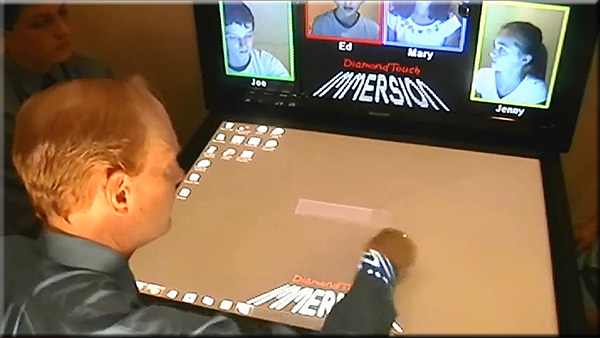
DiamondTouchImmersion-Sept2013

DiamondTouch Immersion is a new video conferencing system from Circle Twelve designed for connecting two remotely located teams. It combines a the multi-user DiamondTouch table with a second display for video conferencing. It features several patented technologies, including the multi-user DiamondTouch table hardware used for interacting with shared content and collaborative whiteboarding, a method for indicating which remote user is interacting (check out the virtual arms at 3:45), and a multi-camera system so you can see all the people at the remote table. More information at http://www.circletwelve.com/products/…


From DSC:
Can you imaging this type of web-based collaboration in blended learning environments?!!


Also see:


symbaloo-KaraSevensma-Aug272013


Per Kara Sevensma, Assistant Professor of Education at Calvin College:

This Symbaloo includes links to iPad apps that are essential for any educator. It also provides links to recommended educational technology resources and standards/guidelines.


Google Alerts essentials: Complete guide to using Google Alerts to monitor almost anything! — from digital.cjrooney.com by Chris Rooney


googlealertsradar


From DSC:
Google Alerts is a great tool that folks can use to pulse-check a topic — to keep something on your radar.  It’s a nice example of a tool that can help you tap into the streams of content that are always flowing by.


streams-of-content-blue-overlay


Turning Technologies acquires eInstruction— from turningtechnologies.com

Excerpt:

YOUNGSTOWN, OH – August 7, 2013 – Turning Technologies and eInstruction announced today that the companies have completed a process where Turning Technologies has acquired eInstruction.  eInstruction develops educational technology, including classroom instruction systems, student response systems, interactive whiteboards and assessment software that complement Turning’s existing product portfolio which enhances learning and presentation environments.  The acquisition will further Turning Technologies’ leading market position in the response system industry, providing a greater depth of products and technologies to more market segments.


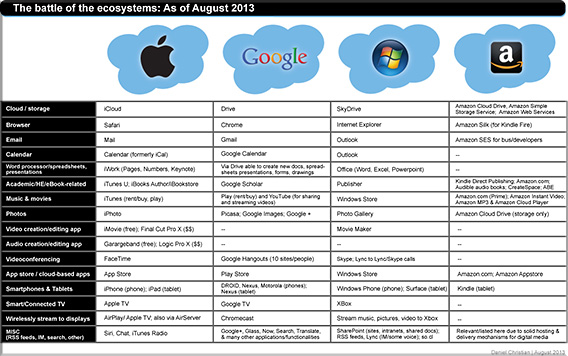
The battle of the ecosystems: Apple, Google, Microsoft, & Amazon.com — by Daniel Christian with thanks to Krista Spahr, Michael Mandeville, Bill Vriesema, and Adam Tozer from Calvin College for their feedback/inputs on this.


BattleOfTheEcosystems-DanielChristian-August2013

PDF version here [1.35MB]


Also see:


Ecosystem value metrics


Ecosystem value metrics - developer perspective


Addendums on 8/13/13:


Exploring curation as a core competency in digital and media literacy education — from the Journal of Interactive Media in Education (jime.open.ac.uk); with thanks to Robin Good for the Scoop

Paul Mihailidis
Department of Marketing Communication, Emerson College, United States

James N Cohen
School of Communication, Hofstra University, United States

Abstract:

In today’s hypermedia landscape, youth and young adults are increasingly using social media platforms, online aggregators and mobile applications for daily information use. Communication educators, armed with a host of free, easy-to-use online tools, have the ability to create dynamic approaches to teaching and learning about information and communication flow online. In this paper we explore the concept of curation as a student- and creation-driven pedagogical tool to enhance digital and media literacy education. We present a theoretical justification for curation and present six key ways that curation can be used to teach about critical thinking, analysis and expression online. We utilize a case study of the digital curation platform Storify to explore how curation works in the classroom, and present a framework that integrates curation pedagogy into core media literacy education learning outcomes.

Introducing TouchCast: Video with the second screen built in — from forbes.com by  Jeff Bercovici

Excerpt:

Say you’re watching a news segment about Microsoft MSFT +0.74% with an embedded stock chart, and you’re wondering how its shares have been performing versus Apple AAPL -1.05%‘s. You can look it up while the segment plays on in the background.

The app enables users — including FORBES — to create their own interactive TouchCasts with the help of 16 different types of video apps, or vApps. In addition to the types mentioned above, these include apps for comments, photos, headlines and YouTube videos.

From the TouchCast iTunes Preview:

Video and the web are coming together. Experience both like never before with TouchCast: a new medium that looks like video, but feels more like the web.

Here are the early returns from media reviews:

“TouchCast lets people create and watch videos that are layered with live Web pages, YouTube clips, Twitter streams and other digital touchpoints that viewers can expand, manipulate and turn on and off with their fingers.”
—AllThingsD

“The idea is to offer a powerful video creation tool that doesn’t require all the work that video editing normally does”
—TechCrunch

“As a video creator, you can create pretty rich, professional-grade broadcasts directly from your tablet in seconds”
—The Next Web

“Compared to a typical webpage, with its dozens of clickable links and widgets, the average video might as well be trapped behind Plexiglass. That’s the problem that . . . TouchCast set out to solve”
—Forbes

“TouchCast only wants to completely reinvent the look and feel of the Internet.”
—AdWeek

TouchCasts are completely clickable. A TouchCast is a video that is fully browsable, responsive, and alive. Webpages, images, and an assembly of video Apps (vApps) can be tapped for a two-way video experience.

It’s a TV studio in your hands. Create broadcast-quality videos with a built-in teleprompter, green screen, visual filters, sound effects, and titles. Watch TouchCasts from the app or online at TouchCast.com.

Our Mission is to bring the wonder of the web to video and usher in a new age of expression. Anyone can easily create professional-quality videos that finally behave like the rest of the web.

Explore videos, express yourself and engage viewers in a whole new way.  We invite you to try TouchCast and help define this new medium.

.

From DSC:
To all of the e-learning developers, journalists, instructional designers, teachers, professors, PR and communications folks, videographers, transmedia storytellers, and many other folks out there:  Check out TouchCast on either Chrome or Safari (you can toggle the main content of your window from a video discussing a particular article on the web and back again). Very sharp.  Innovative.

From Forbes.com:
To give you a better idea of how it works, we TouchCasted  this video of our editor in chief, Randall Lane, talking about the new edition of the FORBES Celebrity 100. View it on an iPad to get the full experience. (Use Chrome or Safari.)


 Addendum on 7/1/13:

 
© 2025 | Daniel Christian