AI Is Quietly Rewiring the ADDIE Model (In a Good Way) — from drphilippahardman.substack.com by Dr. Philippa Hardman
The traditional ADDIE workflow isn’t dead, but it is evolving

The real story isn’t what AI can produce — it’s how it changes the decisions we make at every stage of instructional design.

After working with thousands of instructional designers on my bootcamp, I’ve learned something counterintuitive: the best teams aren’t the ones with the fanciest AI tools — they’re the ones who know when to use which mode—and when to use none at all.

Once you recognise that, you start to see instructional design differently — not as a linear process, but as a series of decision loops where AI plays distinct roles.

In this post, I show you the 3 modes of AI that actually matter in instructional design — and map them across every phase of ADDIE so you know exactly when to let AI run, and when to slow down and think.


Also see:

Generative AI for Course Design: Writing Effective Prompts for Multiple Choice Question Development — from onlineteaching.umich.edu by Hedieh Najafi

In higher education, developing strong multiple-choice questions can be a time-intensive part of the course design process. Developing such items requires subject-matter expertise and assessment literacy, and for faculty and designers who are creating and producing online courses, it can be difficult to find the capacity to craft quality multiple-choice questions.

At the University of Michigan Center for Academic Innovation, learning experience designers are using generative artificial intelligence to streamline the multiple-choice question development process and help ameliorate this issue. In this article, I summarize one of our projects that explored effective prompting strategies to develop multiple-choice questions with ChatGPT for our open course portfolio. We examined how structured prompting can improve the quality of AI-generated assessments, producing relevant comprehension and recall items and options that include plausible distractors.

Achieving this goal enables us to develop several ungraded practice opportunities, preparing learners for their graded assessments while also freeing up more time for course instructors and designers.


Which AI Video Tool Is Most Powerful for L&D Teams? — from by Dr. Philippa Hardman
Evaluating four popular AI video generation platforms through a learning-science lens

Happy new year! One of the biggest L&D stories of 2025 was the rise to fame among L&D teams of AI video generator tools. As we head into 2026, platforms like Colossyan, Synthesia, HeyGen, and NotebookLM’s video creation feature are firmly embedded in most L&D tech stacks. These tools promise rapid production and multi-language output at significantly reduced costs —and they deliver on a lot of that.

But something has been playing on my mind: we rarely evaluate these tools on what matters most for learning design—whether they enable us to build instructional content that actually enables learning.

So, I spent some time over the holiday digging into this question: do the AI video tools we use most in L&D create content that supports substantive learning?

To answer it, I took two decades of learning science research and translated it into a scoring rubric. Then I scored the four most popular AI video generation platforms among L&D professionals against the rubric.
.


For an AI-based tool or two — as they regard higher ed — see:

5 new tools worth trying — from wondertools.substack.com by Jeremy Kaplan

YouTube to NotebookLM: Import a Whole Playlist or Channel in One Click
YouTube to NotebookLM is a remarkably useful new Chrome extension that lets you bulk-add any YouTube playlists, channels, or search results into NotebookLM. for AI-powered analysis.

What to try

  • Find or create YouTube playlists on topics of interest. Then use this extension to ingest those playlists into NotebookLM. The videos are automatically indexed, and within minutes you can create reports, slides, and infographics to enhance your learning.
  • Summarize a playlist or channel with an audio or video overview. Or create quizzes, flash cards, data tables, or mind maps to explore a batch of YouTube videos. Or have a chat in NotebookLM with your favorite video channel. Check my recent post for some YouTube channels to try.
 

6 Ed Tech Tools to Try in 2026 — from cultofpedagogy.com by Jennifer Gonzalez

It’s that time again ~ the annual round-up of tech tools we think are worth a look this year. This year I really feel like there’s something for everyone: history teachers, math and science teachers, people who run makerspaces, teachers interested in music or podcasting, writing teachers, special ed teachers, and anyone whose course content could be made clearer through graphic organizers.


Also somewhat relevant here, see:


How Your Learners *Actually* Learn with AI — from drphilippahardman.substack.com by Dr. Philippa Hardman
What 37.5 million AI chats show us about how learners use AI at the end of 2025 — and what this means for how we design & deliver learning experiences in 2026

Last week, Microsoft released a similar analysis of a whopping 37.5 million Copilot conversations. These conversation took place on the platform from January to September 2025, providing us with a window into if and how AI use in general — and AI use among learners specifically – has evolved in 2025.

Microsoft’s mass behavioural data gives us a detailed, global glimpse into what learners are actually doing across devices, times of day and contexts. The picture that emerges is pretty clear and largely consistent with what OpenAI’s told us back in the summer:

AI isn’t functioning primarily as an “answers machine”: the majority of us use AI as a tool to personalise and differentiate generic learning experiences and – ultimately – to augment human learning.

Let’s dive in!

Learners don’t “decide” to use AI anymore. They assume it’s there, like search, like spellcheck, like calculators. The question has shifted from “should I use this?” to “how do I use this effectively?”


8 AI Agents Every HR Leader Needs To Know In 2026 — from forbes.com by Bernard Marr

So where do you start? There are many agentic tools and platforms for AI tasks on the market, and the most effective approach is to focus on practical, high-impact workflows. So here, I’ll look at some of the most compelling use cases, as well as provide an overview of the tools that can help you quickly deliver tangible wins.

Some of the strongest opportunities in HR include:

  • Workforce management, administering job satisfaction surveys, monitoring and tracking performance targets, scheduling interventions, and managing staff benefits, medical leave, and holiday entitlement.
  • Recruitment screening, automatically generating and posting job descriptions, filtering candidates, ranking applicants against defined criteria, identifying the strongest matches, and scheduling interviews.
  • Employee onboarding, issuing new hires with contracts and paperwork, guiding them to onboarding and training resources, tracking compliance and completion rates, answering routine enquiries, and escalating complex cases to human HR specialists.
  • Training and development, identifying skills gaps, providing self-service access to upskilling and reskilling opportunities, creating personalized learning pathways aligned with roles and career goals, and tracking progress toward completion.


AI working competency is now a graduation requirement at Purdue [Pacton] + other items re: AI in our learning ecosystems


AI Has Landed in Education: Now What? — from learningfuturesdigest.substack.com by Dr. Philippa Hardman

Here’s what’s shaped the AI-education landscape in the last month:

  • The AI Speed Trap is [still] here: AI adoption in L&D is basically won (87%)—but it’s being used to ship faster, not learn better (84% prioritising speed), scaling “more of the same” at pace.
  • AI tutors risk a “pedagogy of passivity”: emerging evidence suggests tutoring bots can reduce cognitive friction and pull learners down the ICAP spectrum—away from interactive/constructive learning toward efficient consumption.
  • Singapore + India are building what the West lacks: they’re treating AI as national learning infrastructure—for resilience (Singapore) and access + language inclusion (India)—while Western systems remain fragmented and reactive.
  • Agentic AI is the next pivot: early signs show a shift from AI as a content engine to AI as a learning partner—with UConn using agents to remove barriers so learners can participate more fully in shared learning.
  • Moodle’s AI stance sends two big signals: the traditional learning ecosystem in fragmenting, and the concept of “user sovereignty” over by AI is emerging.

Four strategies for implementing custom AIs that help students learn, not outsource — from educational-innovation.sydney.edu.au by Kria Coleman, Matthew Clemson, Laura Crocco and Samantha Clarke; via Derek Bruff

For Cogniti to be taken seriously, it needs to be woven into the structure of your unit and its delivery, both in class and on Canvas, rather than left on the side. This article shares practical strategies for implementing Cogniti in your teaching so that students:

  • understand the context and purpose of the agent,
  • know how to interact with it effectively,
  • perceive its value as a learning tool over any other available AI chatbots, and
  • engage in reflection and feedback.

In this post, we discuss how to introduce and integrate Cogniti agents into the learning environment so students understand their context, interact effectively, and see their value as customised learning companions.

In this post, we share four strategies to help introduce and integrate Cogniti in your teaching so that students understand their context, interact effectively, and see their value as customised learning companions.


Collection: Teaching with Custom AI Chatbots — from teaching.virginia.edu; via Derek Bruff
The default behaviors of popular AI chatbots don’t always align with our teaching goals. This collection explores approaches to designing AI chatbots for particular pedagogical purposes.

Example/excerpt:


Beyond Infographics: How to Use Nano Banana to *Actually* Support Learning — from drphilippahardman.substack.com by Dr Philippa Hardman
Six evidence-based use cases to try in Google’s latest image-generating AI tool

While it’s true that Nano Banana generates better infographics than other AI models, the conversation has so far massively under-sold what’s actually different and valuable about this tool for those of us who design learning experiences.

What this means for our workflow:

Instead of the traditional “commission ? wait ? tweak ? approve ? repeat” cycle, Nano Banana enables an iterative, rapid-cycle design process where you can:

  • Sketch an idea and see it refined in minutes.
  • Test multiple visual metaphors for the same concept without re-briefing a designer.
  • Build 10-image storyboards with perfect consistency by specifying the constraints once, not manually editing each frame.
  • Implement evidence-based strategies (contrasting cases, worked examples, observational learning) that are usually too labour-intensive to produce at scale.

This shift—from “image generation as decoration” to “image generation as instructional scaffolding”—is what makes Nano Banana uniquely useful for the 10 evidence-based strategies below.


4 Simple & Easy Ways to Use AI to Differentiate Instruction — from mindfulaiedu.substack.com (Mindful AI for Education) by Dani Kachorsky, PhD
Designing for All Learners with AI and Universal Design Learning

So this year, I’ve been exploring new ways that AI can help support students with disabilities—students on IEPs, learning plans, or 504s—and, honestly, it’s changing the way I think about differentiation in general.

As a quick note, a lot of what I’m finding applies just as well to English language learners or really to any students. One of the big ideas behind Universal Design for Learning (UDL) is that accommodations and strategies designed for students with disabilities are often just good teaching practices. When we plan instruction that’s accessible to the widest possible range of learners, everyone benefits. For example, UDL encourages explaining things in multiple modes—written, visual, auditory, kinesthetic—because people access information differently. I hear students say they’re “visual learners,” but I think everyone is a visual learner, and an auditory learner, and a kinesthetic learner. The more ways we present information, the more likely it is to stick.

So, with that in mind, here are four ways I’ve been using AI to differentiate instruction for students with disabilities (and, really, everyone else too):


The Periodic Table of AI Tools In Education To Try Today — from ictevangelist.com by Mark Anderson

What I’ve tried to do is bring together genuinely useful AI tools that I know are already making a difference.

For colleagues wanting to explore further, I’m sharing the list exactly as it appears in the table, including website links, grouped by category below. Please do check it out, as along with links to all of the resources, I’ve also written a brief summary explaining what each of the different tools do and how they can help.


Seven Hard-Won Lessons from Building AI Learning Tools — from linkedin.com by Louise Worgan

Last week, I wrapped up Dr Philippa Hardman’s intensive bootcamp on AI in learning design. Four conversations, countless iterations, and more than a few humbling moments later – here’s what I am left thinking about.


Finally Catching Up to the New Models — from michellekassorla.substack.com by Michelle Kassorla
There are some amazing things happening out there!

An aside: Google is working on a new vision for textbooks that can be easily differentiated based on the beautiful success for NotebookLM. You can get on the waiting list for that tool by going to LearnYourWay.withgoogle.com.

Nano Banana Pro
Sticking with the Google tools for now, Nano Banana Pro (which you can use for free on Google’s AI Studio), is doing something that everyone has been waiting a long time for: it adds correct text to images.


Introducing AI assistants with memory — from perplexity.ai

The simple act of remembering is the crux of how we navigate the world: it shapes our experiences, informs our decisions, and helps us anticipate what comes next. For AI agents like Comet Assistant, that continuity leads to a more powerful, personalized experience.

Today we are announcing new personalization features to remember your preferences, interests, and conversations. Perplexity now synthesizes them automatically like memory, for valuable context on relevant tasks. Answers are smarter, faster, and more personalized, no matter how you work.

From DSC :
This should be important as we look at learning-related applications for AI.


For the last three days, my Substack has been in the top “Rising in Education” list. I realize this is based on a hugely flawed metric, but it still feels good. ?

– Michael G Wagner

Read on Substack


I’m a Professor. A.I. Has Changed My Classroom, but Not for the Worse. — from nytimes.com by Carlo Rotella [this should be a gifted article]
My students’ easy access to chatbots forced me to make humanities instruction even more human.


Three Years from GPT-3 to Gemini 3 — from oneusefulthing.org by Ethan Mollick
From chatbots to agents

Three years ago, we were impressed that a machine could write a poem about otters. Less than 1,000 days later, I am debating statistical methodology with an agent that built its own research environment. The era of the chatbot is turning into the era of the digital coworker. To be very clear, Gemini 3 isn’t perfect, and it still needs a manager who can guide and check it. But it suggests that “human in the loop” is evolving from “human who fixes AI mistakes” to “human who directs AI work.” And that may be the biggest change since the release of ChatGPT.


Results May Vary — from aiedusimplified.substack.com by Lance Eaton, PhD
On Custom Instructions with GenAI Tools….

I’m sharing today about custom instructions and my use of them across several AI tools (paid versions of ChatGPT, Gemini, and Claude). I want to highlight what I’m doing, how it’s going, and solicit from readers to share in the comments some of their custom instructions that they find helpful.

I’ve been in a few conversations lately that remind me that not everyone knows about them, even some of the seasoned folks around GenAI and how you might set them up to better support your work. And, of course, they are, like all things GenAI, highly imperfect!

I’ll include and discuss each one below, but if you want to keep abreast of my custom instructions, I’ll be placing them here as I adjust and update them so folks can see the changes over time.


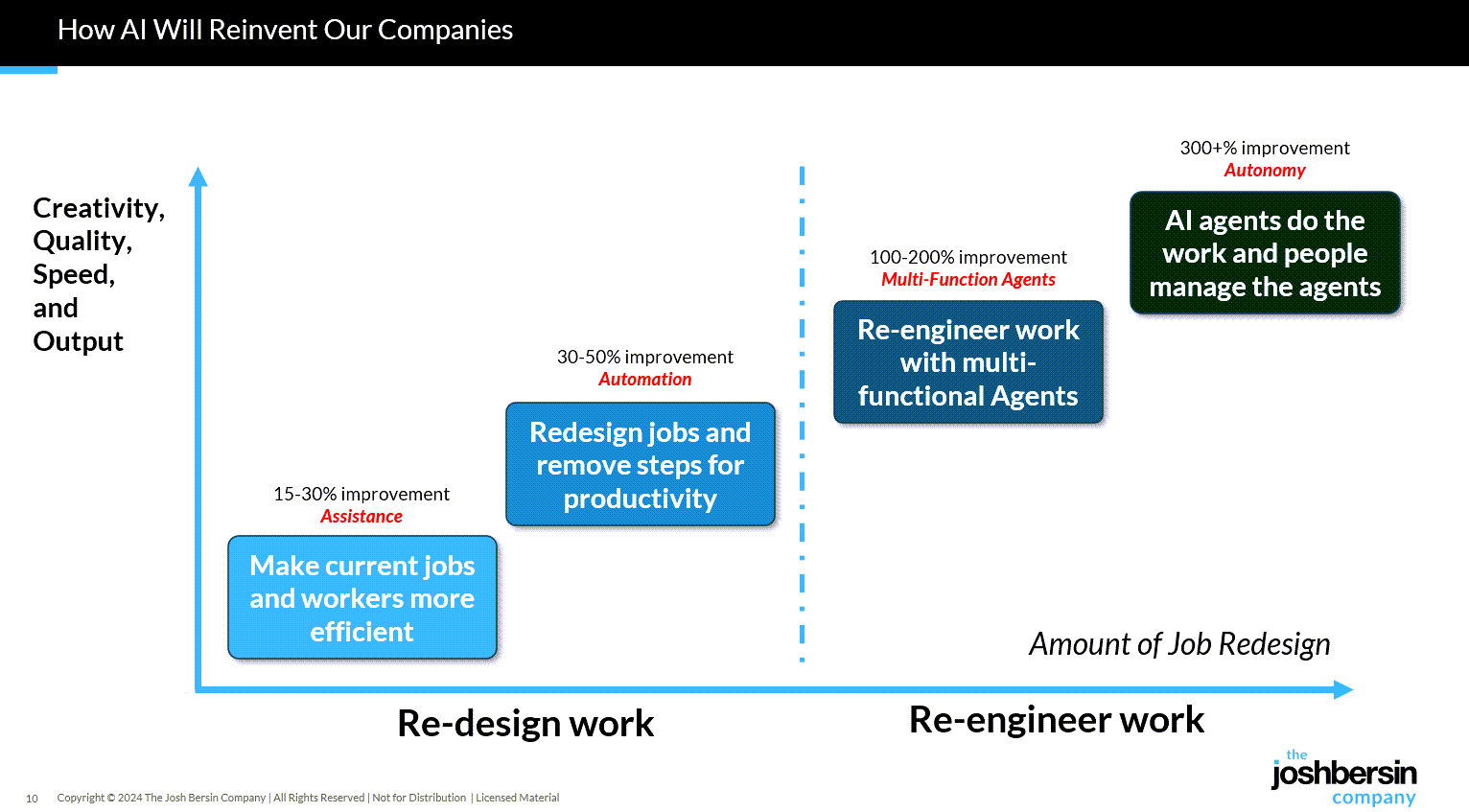
Gen AI Is Going Mainstream: Here’s What’s Coming Next — from joshbersin.com by Josh Bersin

I just completed nearly 60,000 miles of travel across Europe, Asia, and the Middle East meeting with hundred of companies to discuss their AI strategies. While every company’s maturity is different, one thing is clear: AI as a business tool has arrived: it’s real and the use-cases are growing.

A new survey by Wharton shows that 46% of business leaders use Gen AI daily and 80% use it weekly. And among these users, 72% are measuring ROI and 74% report a positive return. HR, by the way, is the #3 department in use cases, only slightly behind IT and Finance.

What are companies getting out of all this? Productivity. The #1 use case, by far, is what we call “stage 1” usage – individual productivity. 

.


From DSC:
Josh writes: “Many of our large clients are now implementing AI-native learning systems and seeing 30-40% reduction in staff with vast improvements in workforce enablement.

While I get the appeal (and ROI) from management’s and shareholders’ perspective, this represents a growing concern for employment and people’s ability to earn a living. 

And while I highly respect Josh and his work through the years, I disagree that we’re over the problems with AI and how people are using it: 

Two years ago the NYT was trying to frighten us with stories of AI acting as a romance partner. Well those stories are over, and thanks to a $Trillion (literally) of capital investment in infrastructure, engineering, and power plants, this stuff is reasonably safe.

Those stories are just beginning…they’re not close to being over. 


“… imagine a world where there’s no separation between learning and assessment…” — from aiedusimplified.substack.com by Lance Eaton, Ph.D. and Tawnya Means
An interview with Tawnya Means

So let’s imagine a world where there’s no separation between learning and assessment: it’s ongoing. There’s always assessment, always learning, and they’re tied together. Then we can ask: what is the role of the human in that world? What is it that AI can’t do?

Imagine something like that in higher ed. There could be tutoring or skill-based work happening outside of class, and then relationship-based work happening inside of class, whether online, in person, or some hybrid mix.

The aspects of learning that don’t require relational context could be handled by AI, while the human parts remain intact. For example, I teach strategy and strategic management. I teach people how to talk with one another about the operation and function of a business. I can help students learn to be open to new ideas, recognize when someone pushes back out of fear of losing power, or draw from my own experience in leading a business and making future-oriented decisions.

But the technical parts such as the frameworks like SWOT analysis, the mechanics of comparing alternative viewpoints in a boardroom—those could be managed through simulations or reports that receive immediate feedback from AI. The relational aspects, the human mentoring, would still happen with me as their instructor.

Part 2 of their interview is here:


The Other Regulatory Time Bomb — from onedtech.philhillaa.com by Phil Hill
Higher ed in the US is not prepared for what’s about to hit in April for new accessibility rules

Most higher-ed leaders have at least heard that new federal accessibility rules are coming in 2026 under Title II of the ADA, but it is apparent from conversations at the WCET and Educause annual conferences that very few understand what that actually means for digital learning and broad institutional risk. The rule isn’t some abstract compliance update: it requires every public institution to ensure that all web and media content meets WCAG 2.1 AA, including the use of audio descriptions for prerecorded video. Accessible PDF documents and video captions alone will no longer be enough. Yet on most campuses, the conversation has been understood only as a buzzword, delegated to accessibility coordinators and media specialists who lack the budget or authority to make systemic changes.

And no, relying on faculty to add audio descriptions en masse is not going to happen.

The result is a looming institutional risk that few presidents, CFOs, or CIOs have even quantified.


…the above posting links to:

Higher Ed Is Sleepwalking Toward Obsolescence— And AI Won’t Be the Cause, Just the Accelerant — from substack.com by Steven Mintz
AI Has Exposed Higher Ed’s Hollow Core — The University Must Reinvent Itself or Fade

It begins with a basic reversal of mindset: Stop treating AI as a threat to be policed. Start treating it as the accelerant that finally forces us to build the education we should have created decades ago.

A serious institutional response would demand — at minimum — six structural commitments:

  • Make high-intensity human learning the norm.  …
  • Put active learning at the center, not the margins.  …
  • Replace content transmission with a focus on process.  …
  • Mainstream high-impact practices — stop hoarding them for honors students.  …
  • Redesign assessment to make learning undeniable.  …

And above all: Instructional design can no longer be a private hobby.


Teaching with AI: From Prohibition to Partnership for Critical Thinking — from facultyfocus.com by Michael Kiener, PhD, CRC

How to Integrate AI Developmentally into Your Courses

  • Lower-Level Courses: Focus on building foundational skills, which includes guided instruction on how to use AI responsibly. This moves the strategy beyond mere prohibition.
  • Mid-Level Courses: Use AI as a scaffold where faculty provide specific guidelines on when and how to use the tool, preparing students for greater independence.
  • Upper-Level/Graduate Courses: Empower students to evaluate AI’s role in their learning. This enables them to become self-regulated learners who make informed decisions about their tools.
  • Balanced Approach: Make decisions about AI use based on the content being learned and students’ developmental needs.

Now that you have a framework for how to conceptualize including AI into your courses here are a few ideas on scaffolding AI to allow students to practice using technology and develop cognitive skills.


80 per cent of young people in the UK are using AI for their schoolwork — from aipioneers.org by Graham Attwell

What was encouraging, though, is that students aren’t just passively accepting this new reality. They are actively asking for help. Almost half want their teachers to help them figure out what AI-generated content is trustworthy, and over half want clearer guidelines on when it’s appropriate to use AI in their work. This isn’t a story about students trying to cheat the system; it’s a story about a generation grappling with a powerful new technology and looking to their educators for guidance. It echoes a sentiment I heard at the recent AI Pioneers’ Conference – the issue of AI in education is fundamentally pedagogical and ethical, not just technological.


Custom AI Development: Evolving from Static AI Systems to Dynamic Learning Agents in 2025 — community.nasscom.in

This blog explores how custom AI development accelerates the evolution from static AI to dynamic learning agents and why this transformation is critical for driving innovation, efficiency, and competitive advantage.

Dynamic Learning Agents: The Next Generation
Dynamic learning agents, sometimes referred to as adaptive or agentic AI, represent a leap forward. They combine continuous learningautonomous action, and context-aware adaptability.

Custom AI development plays a crucial role here: it ensures that these agents are designed specifically for an enterprise’s unique needs rather than relying on generic, one-size-fits-all AI platforms. Tailored dynamic agents can:

  • Continuously learn from incoming data streams
  • Make autonomous, goal-directed decisions aligned with business objectives
  • Adapt behavior in real time based on context and feedback
  • Collaborate with other AI agents and human teams to solve complex challenges

The result is an AI ecosystem that evolves with the business, providing sustained competitive advantage.

Also from community.nasscom.in, see:

Building AI Agents with Multimodal Models: From Perception to Action

Perception: The Foundation of Intelligent Agents
Perception is the first step in building AI agents. It involves capturing and interpreting data from multiple modalities, including text, images, audio, and structured inputs. A multimodal AI agent relies on this comprehensive understanding to make informed decisions.

For example, in healthcare, an AI agent may process electronic health records (text), MRI scans (vision), and patient audio consultations (speech) to build a complete understanding of a patient’s condition. Similarly, in retail, AI agents can analyze purchase histories (structured data), product images (vision), and customer reviews (text) to inform recommendations and marketing strategies.

Effective perception ensures that AI agents have contextual awareness, which is essential for accurate reasoning and appropriate action.


From 70-20-10 to 90-10: a new operating system for L&D in the age of AI? — from linkedin.com by Dr. Philippa Hardman

Also from Philippa, see:


Your New ChatGPT Guide — from wondertools.substack.com by Jeremy Caplan and The PyCoach
25 AI Tips & Tricks from a guest expert

  • ChatGPT can make you more productive or dumber. An MIT study found that while AI can significantly boost productivity, it may also weaken your critical thinking. Use it as an assistant, not a substitute for your brain.
  • If you’re a student, use study mode in ChatGPT, Gemini, or Claude. When this feature is enabled, the chatbots will guide you through problems rather than just giving full answers, so you’ll be doing the critical thinking.
  • ChatGPT and other chatbots can confidently make stuff up (aka AI hallucinations). If you suspect something isn’t right, double-check its answers.
  • NotebookLM hallucinates less than most AI tools, but it requires you to upload sources (PDFs, audio, video) and won’t answer questions beyond those materials. That said, it’s great for students and anyone with materials to upload.
  • Probably the most underrated AI feature is deep research. It automates web searching for you and returns a fully cited report with minimal hallucinations in five to 30 minutes. It’s available in ChatGPT, Perplexity, and Gemini, so give it a try.


“OpenAI’s Atlas: the End of Online Learning—or Just the Beginning?” [Hardman] + other items re: AI in our LE’s

OpenAI’s Atlas: the End of Online Learning—or Just the Beginning? — from drphilippahardman.substack.com by Dr. Philippa Hardman

My take is this: in all of the anxiety lies a crucial and long-overdue opportunity to deliver better learning experiences. Precisely because Atlas perceives the same context in the same moment as you, it can transform learning into a process aligned with core neuro-scientific principles—including active retrieval, guided attention, adaptive feedback and context-dependent memory formation.

Perhaps in Atlas we have a browser that for the first time isn’t just a portal to information, but one which can become a co-participant in active cognitive engagement—enabling iterative practice, reflective thinking, and real-time scaffolding as you move through challenges and ideas online.

With this in mind, I put together 10 use cases for Atlas for you to try for yourself.

6. Retrieval Practice
What:
Pulling information from memory drives retention better than re-reading.
Why: Practice testing delivers medium-to-large effects (Adesope et al., 2017).
Try: Open a document with your previous notes. Ask Atlas for a mixed activity set: “Quiz me on the Krebs cycle—give me a near-miss, high-stretch MCQ, then a fill-in-the-blank, then ask me to explain it to a teen.”
Atlas uses its browser memory to generate targeted questions from your actual study materials, supporting spaced, varied retrieval.


From DSC:
A quick comment. I appreciate these ideas and approaches from Katarzyna and Rita. I do think that someone is going to want to be sure that the AI models/platforms/tools are given up-to-date information and updated instructions — i.e., any new procedures, steps to take, etc. Perhaps I’m missing the boat here, but an internal AI platform is going to need to have access to up-to-date information and instructions.


© 2025 | Daniel Christian