How Your Learners *Actually* Learn with AI — from drphilippahardman.substack.com by Dr. Philippa Hardman
What 37.5 million AI chats show us about how learners use AI at the end of 2025 — and what this means for how we design & deliver learning experiences in 2026

Last week, Microsoft released a similar analysis of a whopping 37.5 million Copilot conversations. These conversation took place on the platform from January to September 2025, providing us with a window into if and how AI use in general — and AI use among learners specifically – has evolved in 2025.

Microsoft’s mass behavioural data gives us a detailed, global glimpse into what learners are actually doing across devices, times of day and contexts. The picture that emerges is pretty clear and largely consistent with what OpenAI’s told us back in the summer:

AI isn’t functioning primarily as an “answers machine”: the majority of us use AI as a tool to personalise and differentiate generic learning experiences and – ultimately – to augment human learning.

Let’s dive in!

Learners don’t “decide” to use AI anymore. They assume it’s there, like search, like spellcheck, like calculators. The question has shifted from “should I use this?” to “how do I use this effectively?”


8 AI Agents Every HR Leader Needs To Know In 2026 — from forbes.com by Bernard Marr

So where do you start? There are many agentic tools and platforms for AI tasks on the market, and the most effective approach is to focus on practical, high-impact workflows. So here, I’ll look at some of the most compelling use cases, as well as provide an overview of the tools that can help you quickly deliver tangible wins.

Some of the strongest opportunities in HR include:

  • Workforce management, administering job satisfaction surveys, monitoring and tracking performance targets, scheduling interventions, and managing staff benefits, medical leave, and holiday entitlement.
  • Recruitment screening, automatically generating and posting job descriptions, filtering candidates, ranking applicants against defined criteria, identifying the strongest matches, and scheduling interviews.
  • Employee onboarding, issuing new hires with contracts and paperwork, guiding them to onboarding and training resources, tracking compliance and completion rates, answering routine enquiries, and escalating complex cases to human HR specialists.
  • Training and development, identifying skills gaps, providing self-service access to upskilling and reskilling opportunities, creating personalized learning pathways aligned with roles and career goals, and tracking progress toward completion.


AI working competency is now a graduation requirement at Purdue [Pacton] + other items re: AI in our learning ecosystems


AI Has Landed in Education: Now What? — from learningfuturesdigest.substack.com by Dr. Philippa Hardman

Here’s what’s shaped the AI-education landscape in the last month:

  • The AI Speed Trap is [still] here: AI adoption in L&D is basically won (87%)—but it’s being used to ship faster, not learn better (84% prioritising speed), scaling “more of the same” at pace.
  • AI tutors risk a “pedagogy of passivity”: emerging evidence suggests tutoring bots can reduce cognitive friction and pull learners down the ICAP spectrum—away from interactive/constructive learning toward efficient consumption.
  • Singapore + India are building what the West lacks: they’re treating AI as national learning infrastructure—for resilience (Singapore) and access + language inclusion (India)—while Western systems remain fragmented and reactive.
  • Agentic AI is the next pivot: early signs show a shift from AI as a content engine to AI as a learning partner—with UConn using agents to remove barriers so learners can participate more fully in shared learning.
  • Moodle’s AI stance sends two big signals: the traditional learning ecosystem in fragmenting, and the concept of “user sovereignty” over by AI is emerging.

Four strategies for implementing custom AIs that help students learn, not outsource — from educational-innovation.sydney.edu.au by Kria Coleman, Matthew Clemson, Laura Crocco and Samantha Clarke; via Derek Bruff

For Cogniti to be taken seriously, it needs to be woven into the structure of your unit and its delivery, both in class and on Canvas, rather than left on the side. This article shares practical strategies for implementing Cogniti in your teaching so that students:

  • understand the context and purpose of the agent,
  • know how to interact with it effectively,
  • perceive its value as a learning tool over any other available AI chatbots, and
  • engage in reflection and feedback.

In this post, we discuss how to introduce and integrate Cogniti agents into the learning environment so students understand their context, interact effectively, and see their value as customised learning companions.

In this post, we share four strategies to help introduce and integrate Cogniti in your teaching so that students understand their context, interact effectively, and see their value as customised learning companions.


Collection: Teaching with Custom AI Chatbots — from teaching.virginia.edu; via Derek Bruff
The default behaviors of popular AI chatbots don’t always align with our teaching goals. This collection explores approaches to designing AI chatbots for particular pedagogical purposes.

Example/excerpt:


7 Legal Tech Trends That Will Reshape Every Business In 2026 — from forbes.com by Bernard Marr

Here are the trends that will matter most.

  1. AI Agents As Legal Assistants
  2. AI As A Driver Of Business Strategy
  3. Automation In Judicial Administration
  4. Always-On Compliance Monitoring
  5. Cybersecurity As An Essential Survival Tool
  6. Predictive Litigation
  7. Compliance As Part Of The Everyday Automation Fabric

According to the Thomson Reuters Future Of Professionals report, most experts already expect AI to transform their work within five years, with many viewing it as a positive force. The challenge now is clear: legal and compliance leaders must understand the tools reshaping their field and prepare their teams for a very different way of working in 2026.


Addendum on 12/17/25:


Beyond Infographics: How to Use Nano Banana to *Actually* Support Learning — from drphilippahardman.substack.com by Dr Philippa Hardman
Six evidence-based use cases to try in Google’s latest image-generating AI tool

While it’s true that Nano Banana generates better infographics than other AI models, the conversation has so far massively under-sold what’s actually different and valuable about this tool for those of us who design learning experiences.

What this means for our workflow:

Instead of the traditional “commission ? wait ? tweak ? approve ? repeat” cycle, Nano Banana enables an iterative, rapid-cycle design process where you can:

  • Sketch an idea and see it refined in minutes.
  • Test multiple visual metaphors for the same concept without re-briefing a designer.
  • Build 10-image storyboards with perfect consistency by specifying the constraints once, not manually editing each frame.
  • Implement evidence-based strategies (contrasting cases, worked examples, observational learning) that are usually too labour-intensive to produce at scale.

This shift—from “image generation as decoration” to “image generation as instructional scaffolding”—is what makes Nano Banana uniquely useful for the 10 evidence-based strategies below.


AI’s Role in Online Learning > Take It or Leave It with Michelle Beavers, Leo Lo, and Sara McClellan — from intentionalteaching.buzzsprout.com by Derek Bruff

You’ll hear me briefly describe five recent op-eds on teaching and learning in higher ed. For each op-ed, I’ll ask each of our panelists if they “take it,” that is, generally agree with the main thesis of the essay, or “leave it.” This is an artificial binary that I’ve found to generate rich discussion of the issues at hand.


Could Your Next Side Hustle Be Training AI? — from builtin.com by Jeff Rumage
As automation continues to reshape the labor market, some white-collar professionals are cashing in by teaching AI models to do their jobs.

Summary: Artificial intelligence may be replacing jobs, but it’s also creating some new ones. Professionals in fields like medicine, law and engineering can earn big money training AI models, teaching them human skills and expertise that may one day make those same jobs obsolete.


DEEP DIVE: The AI user interface of the future = Voice — from theneurondaily.com by Grant Harvey
PLUS: Gemini 3.0 and Microsoft’s new voice features

Here’s the thing: voice is finally good enough to replace typing now. And I mean actually good enough, not “Siri, play Despacito” good enough.

To Paraphrase Andrej Karpathy’s famous quote, “the hottest new programming language is English”, in this case, the hottest new user interface is talking.

The Great Convergence: Why Voice Is Having Its Moment
Three massive shifts just collided to make voice interfaces inevitable.

    1. First, speech recognition stopped being terrible. …
    2. Second, our devices got ears everywhere. …
    3. Third, and most importantly: LLMs made voice assistants smart enough to be worth talking to. …

Introducing group chats in ChatGPT — from openai.com
Collaborate with others, and ChatGPT, in the same conversation.

Update on November 20, 2025: Early feedback from the pilot has been positive, so we’re expanding group chats to all logged-in users on ChatGPT Free, Go, Plus and Pro plans globally over the coming days. We will continue refining the experience as more people start using it.

Today, we’re beginning to pilot a new experience in a few regions that makes it easy for people to collaborate with each other—and with ChatGPT—in the same conversation. With group chats, you can bring friends, family, or coworkers into a shared space to plan, make decisions, or work through ideas together.

Whether you’re organizing a group dinner or drafting an outline with coworkers, ChatGPT can help. Group chats are separate from your private conversations, and your personal ChatGPT memory is never shared with anyone in the chat.


Gen AI Is Going Mainstream: Here’s What’s Coming Next — from joshbersin.com by Josh Bersin

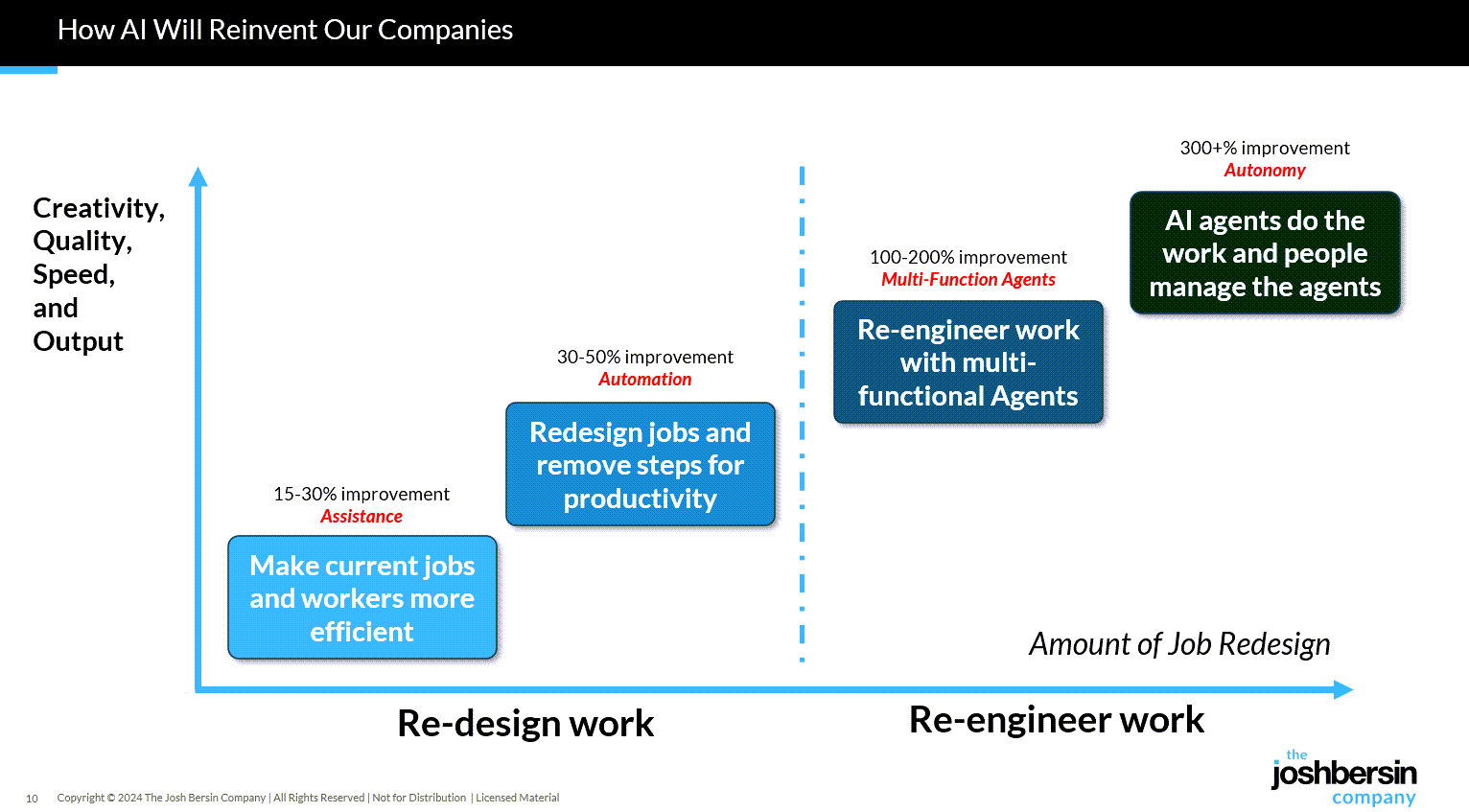
I just completed nearly 60,000 miles of travel across Europe, Asia, and the Middle East meeting with hundred of companies to discuss their AI strategies. While every company’s maturity is different, one thing is clear: AI as a business tool has arrived: it’s real and the use-cases are growing.

A new survey by Wharton shows that 46% of business leaders use Gen AI daily and 80% use it weekly. And among these users, 72% are measuring ROI and 74% report a positive return. HR, by the way, is the #3 department in use cases, only slightly behind IT and Finance.

What are companies getting out of all this? Productivity. The #1 use case, by far, is what we call “stage 1” usage – individual productivity. 

.


From DSC:
Josh writes: “Many of our large clients are now implementing AI-native learning systems and seeing 30-40% reduction in staff with vast improvements in workforce enablement.

While I get the appeal (and ROI) from management’s and shareholders’ perspective, this represents a growing concern for employment and people’s ability to earn a living. 

And while I highly respect Josh and his work through the years, I disagree that we’re over the problems with AI and how people are using it: 

Two years ago the NYT was trying to frighten us with stories of AI acting as a romance partner. Well those stories are over, and thanks to a $Trillion (literally) of capital investment in infrastructure, engineering, and power plants, this stuff is reasonably safe.

Those stories are just beginning…they’re not close to being over. 


“… imagine a world where there’s no separation between learning and assessment…” — from aiedusimplified.substack.com by Lance Eaton, Ph.D. and Tawnya Means
An interview with Tawnya Means

So let’s imagine a world where there’s no separation between learning and assessment: it’s ongoing. There’s always assessment, always learning, and they’re tied together. Then we can ask: what is the role of the human in that world? What is it that AI can’t do?

Imagine something like that in higher ed. There could be tutoring or skill-based work happening outside of class, and then relationship-based work happening inside of class, whether online, in person, or some hybrid mix.

The aspects of learning that don’t require relational context could be handled by AI, while the human parts remain intact. For example, I teach strategy and strategic management. I teach people how to talk with one another about the operation and function of a business. I can help students learn to be open to new ideas, recognize when someone pushes back out of fear of losing power, or draw from my own experience in leading a business and making future-oriented decisions.

But the technical parts such as the frameworks like SWOT analysis, the mechanics of comparing alternative viewpoints in a boardroom—those could be managed through simulations or reports that receive immediate feedback from AI. The relational aspects, the human mentoring, would still happen with me as their instructor.

Part 2 of their interview is here:


Six Transformative Technology Trends Impacting the Legal Profession — from americanbar.org

Summary

  • Law firm leaders should evaluate their legal technology and decide if they are truly helping legal work or causing a disconnect between human and AI contributions.
  • 75% of firms now rely on cloud platforms for everything from document storage to client collaboration.
  • The rise of virtual law firms and remote work is reshaping the profession’s culture. Hybrid and remote-first models, supported by cloud and collaboration tools, are growing.

Are we truly innovating, or just rearranging the furniture? That’s the question every law firm leader should be asking as the legal technology landscape shifts beneath our feet. There are many different thoughts and opinions on how the legal technology landscape will evolve in the coming years, particularly regarding the pace of generative AI-driven changes and the magnitude of these changes.

To try to answer the question posed above, we looked at six recently published technology trends reports from influential entities in the legal technology arena: the American Bar Association, Clio, Wolters Kluwer, Lexis Nexis, Thomson Reuters, and NetDocuments.

When we compared these reports, we found them to be remarkably consistent. While the level of detail on some topics varied across the reports, they identified six trends that are reshaping the very core of legal practice. These trends are summarized in the following paragraphs.

  1. Generative AI and AI-Assisted Drafting …
  2. Cloud-Based Practice Management…
  3. Cybersecurity and Data Privacy…
  4. Flat Fee and Alternative Billing Models…
  5. Legal Analytics and Data-Driven Decision Making…
  6. Virtual Law Firms and Remote Work…
 

At the most recent NVIDIA GTC conference, held in Washington, D.C. in October 2025, CEO Jensen Huang announced major developments emphasizing the use of AI to “reindustrialize America”. This included new partnerships, expansion of the Blackwell architecture, and advancements in AI factories for robotics and science. The spring 2024 GTC conference, meanwhile, was headlined by the launch of the Blackwell GPU and significant updates to the Omniverse and robotics platforms.

During the keynote in D.C., Jensen Huang focused on American AI leadership and announced several key initiatives.

  • Massive Blackwell GPU deployments: The company announced an expansion of its Blackwell GPU architecture, which first launched in March 2024. Reportedly, the company has already shipped 6 million Blackwell chips, with orders for 14 million more by the end of 2025.
  • AI supercomputers for science: In partnership with the Department of Energy and Oracle, NVIDIA is building new AI supercomputers at Argonne National Laboratory. The largest, named “Solstice,” will deploy 100,000 Blackwell GPUs.
  • 6G infrastructure: NVIDIA announced a partnership with Nokia to develop a U.S.-based, AI-native 6G technology stack.
  • AI factories for robotics: A new AI Factory Research Center in Virginia will use NVIDIA’s technology for building massive-scale data centers for AI.
  • Autonomous robotaxis: The company’s self-driving technology, already adopted by several carmakers, will be used by Uber for an autonomous fleet of 100,000 robotaxis starting in 2027.


Nvidia and Uber team up to develop network of self-driving cars — from finance.yahoo.com by Daniel Howley

Nvidia (NVDA) and Uber (UBER) on Tuesday revealed that they’re working to put together what they say will be the world’s largest network of Level 4-ready autonomous cars.

The duo will build out 100,000 vehicles beginning in 2027 using Nvidia’s Drive AGX Hyperion 10 platform and Drive AV software.


Nvidia stock hits all-time high, nears $5 trillion market cap after slew of updates at GTC event — from finance.yahoo.com by Daniel Howley

Nvidia (NVDA) stock on Tuesday rose 5% to close at a record high after the company announced a slew of product updates, partnerships, and investment initiatives at its GTC event in Washington, D.C., putting it on the doorstep of becoming the first company in history with a market value above $5 trillion.

The AI chip giant is approaching the threshold — settling at a market cap of $4.89 trillion on Tuesday — just months after becoming the first to close above $4 trillion in July.


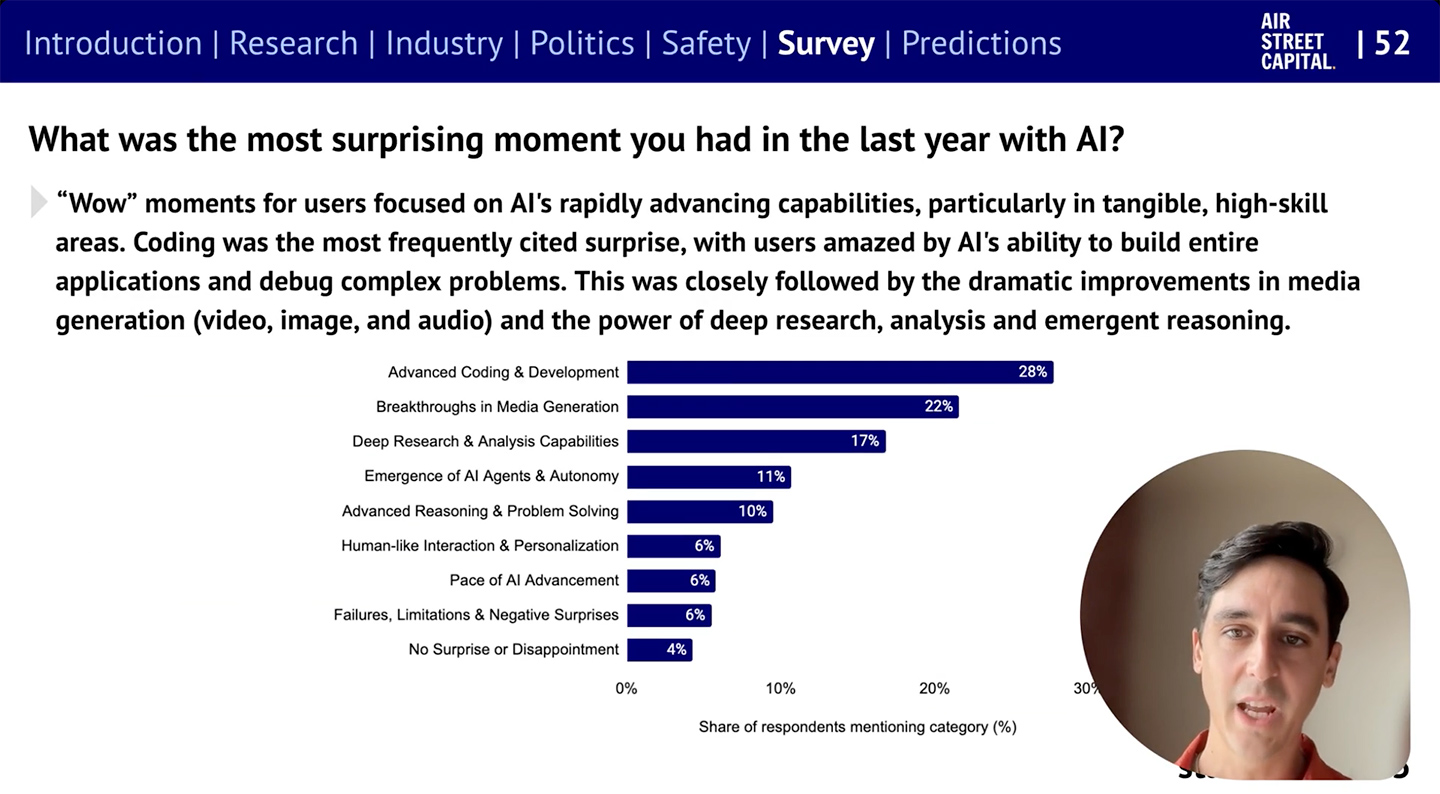
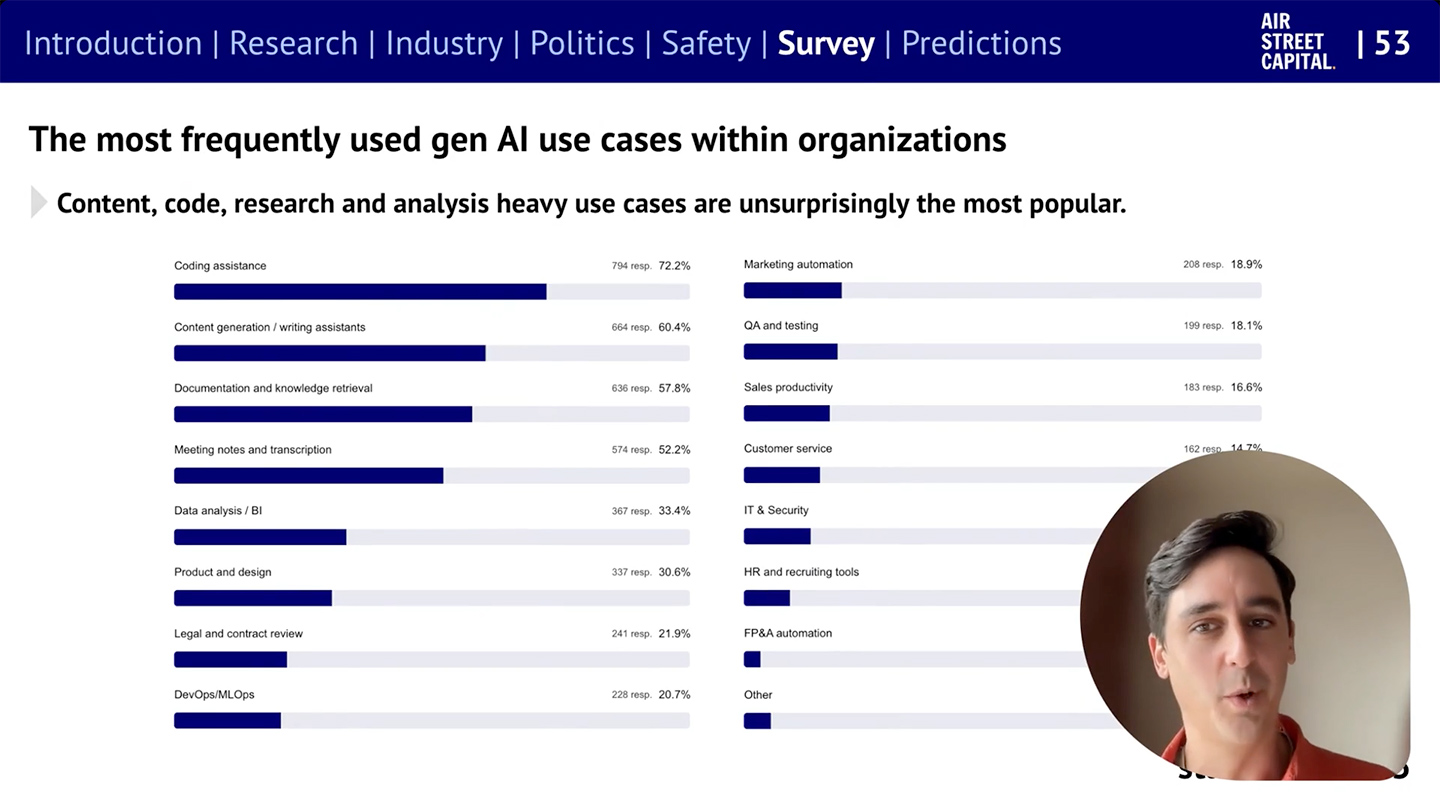
The State of AI Report 2025 — from nathanbenaich.substack.com by Nathan Benaich

In short, it’s been a monumental 12 months for AI. Our eighth annual report is the most comprehensive it’s ever been, covering what you need to know about research, industry, politics, and safety – along with our first State of AI Usage Survey of 1,200 practitioners.

stateof.ai
.


Sam Altman kicks off DevDay 2025 with a keynote to explore ideas that will challenge how you think about building. Join us for announcements, live demos, and a vision of how developers are reshaping the future with AI.

Commentary from The Rundown AI:

Why it matters: OpenAI is turning ChatGPT into a do-it-all platform that might eventually act like a browser in itself, with users simply calling on the website/app they need and interacting directly within a conversation instead of navigating manually. The AgentKit will also compete and disrupt competitors like Zapier, n8n, Lindy, and others.


AMD and OpenAI announce strategic partnership to deploy 6 gigawatts of AMD GPUs — from openai.com

  • OpenAI to deploy 6 gigawatts of AMD GPUs based on a multi-year, multi-generation agreement
  • Initial 1 gigawatt OpenAI deployment of AMD Instinct™ MI450 Series GPUs starting in 2H 2026

Thoughts from OpenAI DevDay — from bensbites.com by Ben Tossell
When everyone becomes a developer

The event itself was phenomenal, great organisation. In terms of releases, there were two big themes:

  1. Add your apps to ChatGPT
  2. Add ChatGPT to your apps

Everything OpenAI announced at DevDay 2025 — from theaivalley.com by Barsee
PLUS: OpenAI has signed $1T in compute deals

Today’s climb through the Valley reveals:

  • Everything OpenAI announced at DevDay 2025
  • OpenAI has signed $1T in compute deals
  • Plus trending AI tools, posts, and resources

Also relevant/see:


AI agents: Where are they now? From proof of concept to success stories — from hrexecutive.com by Jill Barth

The 4 Rs framework
Salesforce has developed what Holt Ware calls the “4 Rs for AI agent success.” They are:

  1. Redesign by combining AI and human capabilities. This requires treating agents like new hires that need proper onboarding and management.
  2. Reskilling should focus on learning future skills. “We think we know what they are,” Holt Ware notes, “but they will continue to change.”
  3. Redeploy highly skilled people to determine how roles will change. When Salesforce launched an AI coding assistant, Holt Ware recalls, “We woke up the next day and said, ‘What do we do with these people now that they have more capacity?’ ” Their answer was to create an entirely new role: Forward-Deployed Engineers. This role has since played a growing part in driving customer success.
  4. Rebalance workforce planning. Holt Ware references a CHRO who “famously said that this will be the last year we ever do workforce planning and it’s only people; next year, every team will be supplemented with agents.”

Synthetic Reality Unleashed: AI’s powerful Impact on the Future of Journalism — from techgenyz.com by Sreyashi Bhattacharya

Table of Contents

  • Highlights
  • What is “synthetic news”?
  • Examples in action
  • Why are newsrooms experimenting with synthetic tools
  • Challenges and Risks
  • What does the research say
    • Transparency seems to matter. —What is next: trends & future
  • Conclusion

The latest video generation tool from OpenAI –> Sora 2

Sora 2 is here — from openai.com

Our latest video generation model is more physically accurate, realistic, and more controllable than prior systems. It also features synchronized dialogue and sound effects. Create with it in the new Sora app.

And a video on this out at YouTube:

Per The Rundown AI:

The Rundown: OpenAI just released Sora 2, its latest video model that now includes synchronized audio and dialogue, alongside a new social app where users can create, remix, and insert themselves into AI videos through a “Cameos” feature.

Why it matters: Model-wise, Sora 2 looks incredible — pushing us even further into the uncanny valley and creating tons of new storytelling capabilities. Cameos feels like a new viral memetic tool, but time will tell whether the AI social app can overcome the slop-factor and have staying power past the initial novelty.


OpenAI Just Dropped Sora 2 (And a Whole New Social App) — from heneuron.ai by Grant Harvey
OpenAI launched Sora 2 with a new iOS app that lets you insert yourself into AI-generated videos with realistic physics and sound, betting that giving users algorithm control and turning everyone into active creators will build a better social network than today’s addictive scroll machines.

What Sora 2 can do

  • Generate Olympic-level gymnastics routines, backflips on paddleboards (with accurate buoyancy!), and triple axels.
  • Follow intricate multi-shot instructions while maintaining world state across scenes.
  • Create realistic background soundscapes, dialogue, and sound effects automatically.
  • Insert YOU into any video after a quick one-time recording (they call this “cameos”).

The best video to show what it can do is probably this one, from OpenAI researcher Gabriel Peters, that depicts the behind the scenes of Sora 2 launch day…


Sora 2: AI Video Goes Social — from getsuperintel.com by Kim “Chubby” Isenberg
OpenAI’s latest AI video model is now an iOS app, letting users generate, remix, and even insert themselves into cinematic clips

Technically, Sora 2 is a major leap. It syncs audio with visuals, respects physics (a basketball bounces instead of teleporting), and follows multi-shot instructions with consistency. That makes outputs both more controllable and more believable. But the app format changes the game: it transforms world simulation from a research milestone into a social, co-creative experience where entertainment, creativity, and community intersect.


Also along the lines of creating digital video, see:

What used to take hours in After Effects now takes just one text prompt. Tools like Google’s Nano Banana, Seedream 4, Runway’s Aleph, and others are pioneering instruction-based editing, a breakthrough that collapses complex, multi-step VFX workflows into a single, implicit direction.

The history of VFX is filled with innovations that removed friction, but collapsing an entire multi-step workflow into a single prompt represents a new kind of leap.

For creators, this means the skill ceiling is no longer defined by technical know-how, it’s defined by imagination. If you can describe it, you can create it. For the industry, it points toward a near future where small teams and solo creators compete with the scale and polish of large studios.

Bilawal Sidhu


OpenAI DevDay 2025: everything you need to know — from getsuperintel.com by Kim “Chubby” Isenberg
Apps Inside ChatGPT, a New Era Unfolds

Something big shifted this week. OpenAI just turned ChatGPT into a platform – not just a product. With apps now running inside ChatGPT and a no-code Agent Builder for creating full AI workflows, the line between “using AI” and “building with AI” is fading fast. Developers suddenly have a new playground, and for the first time, anyone can assemble their own intelligent system without touching code. The question isn’t what AI can do anymore – it’s what you’ll make it do.


Workday Acquires Sana To Transform Its Learning Platform And Much More— from joshbersin.com by Josh Bersin

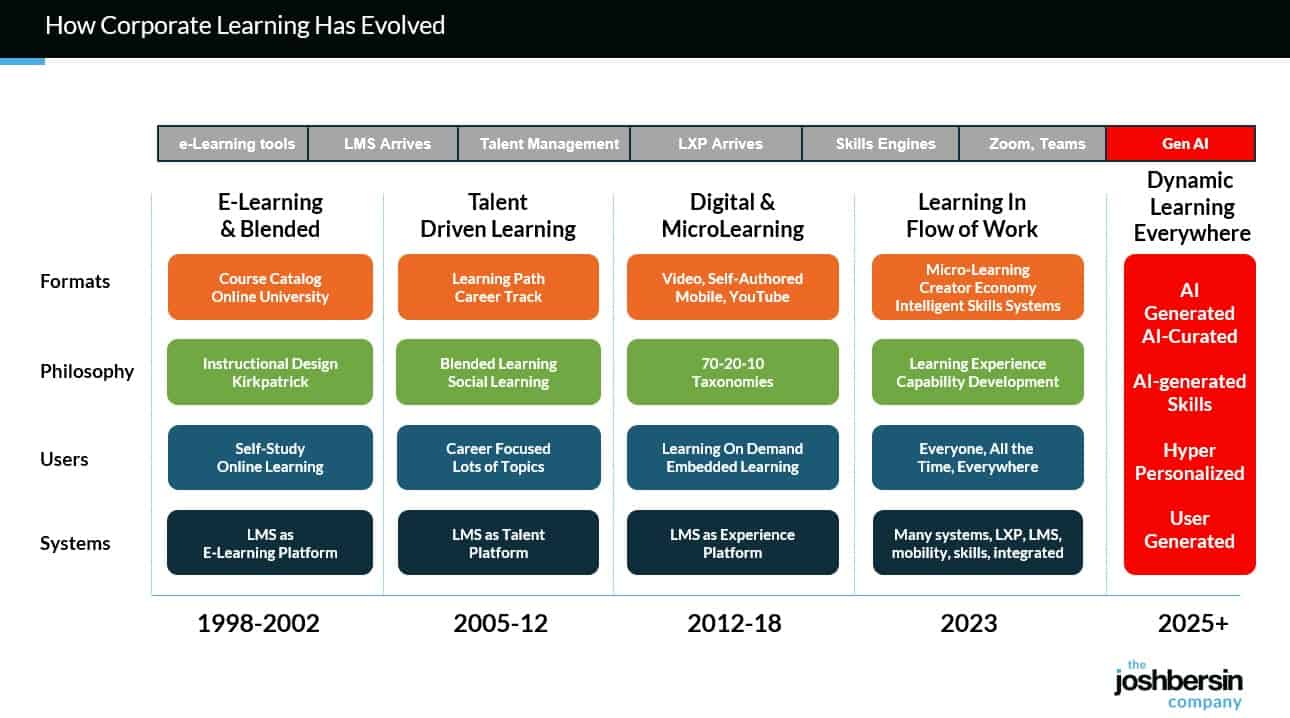
Well now, as the corporate learning market shifts to AI, (read the details in our study “The Revolution in Corporate Learning” ), Workday can jump ahead. This is because the $400 billion corporate training market is moving quickly to an AI-Native dynamic content approach (witness OpenAI’s launch of in-line learning in its chatbot). We’re just finishing a year-long study of this space and our detailed report and maturity model will be out in Q4.
.

.
With Sana, and a few other AI-native vendors (Uplimit, Arist, Disperz, Docebo), companies can upload audios, videos, documents, and even interviews with experts and the system build learning programs in minutes. We use Sana for Galileo Learn (our AI-powered learning academy for Leadership and HR), and we now have 750+ courses and can build new programs in days instead of months.

And there’s more; this type of system gives every employee a personalized, chat-based experience to learn. 


ChatGPT: the world’s most influential teacher — from drphilippahardman.substack.com by Dr. Philippa Hardman; emphasis DSC
New research shows that millions of us are “learning with AI” every week: what does this mean for how (and how well) humans learn?

This week, an important piece of research landed that confirms the gravity of AI’s role in the learning process. The TLDR is that learning is now a mainstream use case for ChatGPT; around 10.2% of all ChatGPT messages (that’s ~2BN messages sent by over 7 million users per week) are requests for help with learning.

The research shows that about 10.2% of all messages are tutoring/teaching, and within the “Practical Guidance” category, tutoring is 36%. “Asking” interactions are growing faster than “Doing” and are rated higher quality by users. Younger people contribute a huge share of messages, and growth is fastest in low- and middle-income countries (How People Use ChatGPT, 2025).

If AI is already acting as a global tutor, the question isn’t “will people learn with AI?”—they already are. The real question we need to ask is: what does great learning actually look like, and how should AI evolve to support it? That’s where decades of learning science help us separate “feels like learning” from “actually gaining new knowledge and skills”.

Let’s dive in.


From EdTech to TechEd: The next chapter in learning’s evolution — from linkedin.com by Lev Gonick

A day in the life: The next 25 years
A learner wakes up. Their AI-powered learning coach welcomes them, drawing their attention to their progress and helping them structure their approach to the day.  A notification reminds them of an upcoming interview and suggests reflections to add to their learning portfolio.

Rather than a static gradebook, their portfolio is a dynamic, living record, curated by the student, validated by mentors in both industry and education, and enriched through co-creation with maturing modes of AI. It tells a story through essays, code, music, prototypes, journal reflections, and team collaborations. These artifacts are not “submitted”, they are published, shared, and linked to verifiable learning outcomes.

And when it’s time to move, to a new institution, a new job, or a new goal, their data goes with them, immutable, portable, verifiable, and meaningful.

From DSC:
And I would add to that last solid sentence that the learner/student/employee will be able to control who can access this information. Anyway, some solid reflections here from Lev.


AI Could Surpass Schools for Academic Learning in 5-10 Years — from downes.ca with commentary from Stephen Downes

I know a lot of readers will disagree with this, and the timeline feels aggressive (the future always arrives more slowly than pundits expect) but I think the overall premise is sound: “The concept of a tipping point in education – where AI surpasses traditional schools as the dominant learning medium – is increasingly plausible based on current trends, technological advancements, and expert analyses.”


The world’s first AI cabinet member — from therundown.ai by Zach Mink, Rowan Cheung, Shubham Sharma, Joey Liu & Jennifer Mossalgue

The Rundown: In this tutorial, you will learn how to combine NotebookLM with ChatGPT to master any subject faster, turning dense PDFs into interactive study materials with summaries, quizzes, and video explanations.

Step-by-step:

  1. Go to notebooklm.google.com, click the “+” button, and upload your PDF study material (works best with textbooks or technical documents)
  2. Choose your output mode: Summary for a quick overview, Mind Map for visual connections, or Video Overview for a podcast-style explainer with visuals
  3. Generate a Study Guide under Reports — get Q&A sets, short-answer questions, essay prompts, and glossaries of key terms automatically
  4. Take your PDF to ChatGPT and prompt: “Read this chapter by chapter and highlight confusing parts” or “Quiz me on the most important concepts”
  5. Combine both tools: Use NotebookLM for quick context and interactive guides, then ChatGPT to clarify tricky parts and go deeperPro Tip: If your source is in EPUB or audiobook, convert it to PDF before uploading. Both NotebookLM and ChatGPT handle PDFs best.

Claude can now create and edit files — from anthropic.com

Claude can now create and edit Excel spreadsheets, documents, PowerPoint slide decks, and PDFs directly in Claude.ai and the desktop app. This transforms how you work with Claude—instead of only receiving text responses or in-app artifacts, you can describe what you need, upload relevant data, and get ready-to-use files in return.

Also see:

  • Microsoft to lessen reliance on OpenAI by buying AI from rival Anthropic — from techcrunch.com byRebecca Bellan
    Microsoft will pay to use Anthropic’s AI in Office 365 apps, The Information reports, citing two sources. The move means that Anthropic’s tech will help power new features in Word, Excel, Outlook, and PowerPoint alongside OpenAI’s, marking the end of Microsoft’s previous reliance solely on the ChatGPT maker for its productivity suite. Microsoft’s move to diversify its AI partnerships comes amid a growing rift with OpenAI, which has pursued its own infrastructure projects as well as a potential LinkedIn competitor.

Ep. 11 AGI and the Future of Higher Ed: Talking with Ray Schroeder

In this episode of Unfixed, we talk with Ray Schroeder—Senior Fellow at UPCEA and Professor Emeritus at the University of Illinois Springfield—about Artificial General Intelligence (AGI) and what it means for the future of higher education. While most of academia is still grappling with ChatGPT and basic AI tools, Schroeder is thinking ahead to AI agents, human displacement, and AGI’s existential implications for teaching, learning, and the university itself. We explore why AGI is so controversial, what institutions should be doing now to prepare, and how we can respond responsibly—even while we’re already overwhelmed.


Best AI Tools for Instructional Designers — from blog.cathy-moore.com by Cathy Moore

Data from the State of AI and Instructional Design Report revealed that 95.3% of the instructional designers interviewed use AI in their daily work [1]. And over 85% of this AI use occurs during the design and development process.

These figures showcase the immense impact AI is already having on the instructional design world.

If you’re an L&D professional still on the fence about adding AI to your workflow or an AI convert looking for the next best tools, keep reading.

This guide breaks down 5 of the top AI tools for instructional designers in 2025, so you can streamline your development processes and build better training faster.

But before we dive into the tools of the trade, let’s address the elephant in the room:


3 Human Skills That Make You Irreplaceable in an AI World — from gettingsmart.com/ by Tom Vander Ark and Mason Pashia

Key Points

  • Update learner profiles to emphasize curiosity, curation, and connectivity, ensuring students develop irreplaceable human skills.
  • Integrate real-world learning experiences and mastery-based assessments to foster agency, purpose, and motivation in students.
 
© 2025 | Daniel Christian