The Future of Teaching and Learning
Artificial intelligence (AI) has taken the world by storm, with new AI-powered tools such as ChatGPT opening up new opportunities in higher education for content creation, communication, and learning, while also raising new concerns about the misuses and overreach of technology. Our shared humanity has also become a key focal point within higher education, as faculty and leaders continue to wrestle with understanding and meeting the diverse needs of students and to find ways of cultivating institutional communities that support student well-being and belonging.
For this year’s teaching and learning Horizon Report, then, our panelists’ discussions oscillated between these seemingly polar ideas: the supplanting of human activity with powerful new technological capabilities, and the need for more humanity at the center of everything we do. This report summarizes the results of those discussions and serves as one vantage point on where our future may be headed.
In this episode, I share ChatGPT prompts for teachers you can use to save time and make the most of this free artificial intelligence tool. You’ll also hear tips for generating and refining prompts to optimize your workflow this school year, along with 10 prompts to try in ChatGPT that may surprise you!
Tips for Prompts to Try in ChatGPT
Think about your time-consuming tasks.
Keep in mind tone, context, and specificity.
Use prompts to generate activity ideas and classroom resources.
Large language models continue to colonize the technology landscape. They’ve broken out of the AI category, and now are showing up in security, programming, and even the web. That’s a natural progression, and not something we should be afraid of: they’re not coming for our jobs. But they are remaking the technology industry.
One part of this remaking is the proliferation of “small” large language models. We’ve noted the appearance of llama.cpp, Alpaca, Vicuna, Dolly 2.0, Koala, and a few others. But that’s just the tip of the iceberg. Small LLMs are appearing every day, and some will even run in a web browser. This trend promises to be even more important than the rise of the “large” LLMs, like GPT-4. Only a few organizations can build, train, and run the large LLMs. But almost anyone can train a small LLM that will run on a well-equipped laptop or desktop.
So today, I wanted to share something that I’m also personally proud of – an elaborate resources page for student podcasting that our team published earlier this year. My big boss Steve Drummond named it “Sound Advice: The NPR guide to student podcasting.” And, again, this isn’t just for Student Podcast Challenge participants. We have guides from NPR and more for anyone interested in starting a podcast!
Here’s a sampler of some of my favorite resources:
Using sound: Teachers, here’s a lovely video you can play for your class! Or for any visual learners, this is a fun watch! In this video, veteran NPR correspondent Don Gonyea walks you through how to build your own recording studio – a pillow fort! (And yes, this is an actual trick we use at NPR!)
Voice coaching: Speaking into a microphone is hard, even for our radio veterans. In this video, NPR voice coach Jessica Hansen and our training team share a few vocal exercises that will help you sound more natural in front of a mic! I personally watched this video before recording my first radio story, so I’d highly recommend it for everyone!
Life Kit episode on podcasting:In this episode from NPR’s Life Kit, Lauren Migaki, our very own NPR Ed senior producer, brings us tips from podcast producers across NPR, working on all your favorite shows, including Code Switch, Planet Money and more! It’s an awesome listen for a class or on your own!
Microsoft has launched a GPT-4 enhanced Edge browser.
By integrating OpenAI’s GPT-4 technology with Microsoft Edge, you can now use ChatGPT as a copilot in your Bing browser. This delivers superior search results, generates content, and can even transform your copywriting skills (read on to find out how).
Benefits mentioned include: Better Search, Complete Answers, and Creative Spark.
The new interactive chat feature means you can get the complete answer you are looking for by refining your search by asking for more details, clarity, and ideas.
From DSC: I have to say that since the late 90’s, I haven’t been a big fan of web browsers from Microsoft. (I don’t like how Microsoft unfairly buried Netscape Navigator and the folks who had out-innovated them during that time.) As such, I don’t use Edge so I can’t fully comment on the above article.
But I do have to say that this is the type of thing that may make me reevaluate my stance regarding Microsoft’s browsers. Integrating GPT-4 into their search/chat functionalities seems like it would be a very solid, strategic move — at least as of late April 2023.
Speaking of new items coming from Microsoft, also see:
[On 4/27/23], Microsoft Designer, Microsoft’s AI-powered design tool, launched in public preview with an expanded set of features.
Announced in October, Designer is a Canva-like web app that can generate designs for presentations, posters, digital postcards, invitations, graphics and more to share on social media and other channels. It leverages user-created content and DALL-E 2, OpenAI’s text-to-image AI, to ideate designs, with drop-downs and text boxes for further customization and personalization.
…
Designer will remain free during the preview period, Microsoft says — it’s available via the Designer website and in Microsoft’s Edge browser through the sidebar. Once the Designer app is generally available, it’ll be included in Microsoft 365 Personal and Family subscriptions and have “some” functionality free to use for non-subscribers, though Microsoft didn’t elaborate.
A few current categories of AI in Edtech particularly jump out:
Teacher Productivity and Joy: Tools to make educators’ lives easier (and more fun?) by removing some of the more rote tasks of teaching, like lesson planning (we counted at least 8 different tools for lesson planning), resource curation and data collection.
Personalization and Learning Delivery: Tools to tailor instruction to the particular interests, learning preferences and preferred media consumption of students. This includes tools that convert text to video, video to text, text to comic books, Youtube to notes, and many more.
Study and Course Creation Tools: Tools for learners to automatically make quizzes, flashcards, notes or summaries of material, or even to automatically create full courses from a search term.
AI Tutors, Chatbots and Teachers: There will be no shortage of conversational AI “copilots” (which may take many guises) to support students in almost any learning context. Many Edtech companies launched their own during the conference. Possible differentiators here could be personality, safety, privacy, access to a proprietary or specific data set, or bots built on proprietary LLMs.
Simplifying Complex Processes: One of the most inspiring conversations of the conference for me was with Tiffany Green, founder of Uprooted Academy, about how AI can and should be used to remove bureaucratic barriers to college for underrepresented students (for example, used to autofill FAFSA forms, College Applications, to search for schools and access materials, etc). This is not the only complex bureaucratic process in education.
Educational LLMs: The race is on to create usable large language models for education that are safe, private, appropriate and classroom-ready. Merlyn Mind is working on this, and companies that make LLMs are sprouting up in other sectors…
This week I spent a few days at the ASU/GSV conference and ran into 7,000 educators, entrepreneurs, and corporate training people who had gone CRAZY for AI.
No, I’m not kidding. This community, which makes up people like training managers, community college leaders, educators, and policymakers is absolutely freaked out about ChatGPT, Large Language Models, and all sorts of issues with AI. Now don’t get me wrong: I’m a huge fan of this. But the frenzy is unprecedented: this is bigger than the excitement at the launch of the i-Phone.
Second, the L&D market is about to get disrupted like never before. I had two interactive sessions with about 200 L&D leaders and I essentially heard the same thing over and over. What is going to happen to our jobs when these Generative AI tools start automatically building content, assessments, teaching guides, rubrics, videos, and simulations in seconds?
The answer is pretty clear: you’re going to get disrupted. I’m not saying that L&D teams need to worry about their careers, but it’s very clear to me they’re going to have to swim upstream in a big hurry. As with all new technologies, it’s time for learning leaders to get to know these tools, understand how they work, and start to experiment with them as fast as you can.
Speaking of the ASU+GSV Summit, see this posting from Michael Moe:
Last week, the 14th annual ASU+GSV Summit hosted over 7,000 leaders from 70+ companies well as over 900 of the world’s most innovative EdTech companies. Below are some of our favorite speeches from this year’s Summit…
High-quality tutoring is one of the most effective educational interventions we have – but we need both humans and technology for it to work. In a standing-room-only session, GSE Professor Susanna Loeb, a faculty lead at the Stanford Accelerator for Learning, spoke alongside school district superintendents on the value of high-impact tutoring. The most important factors in effective tutoring, she said, are (1) the tutor has data on specific areas where the student needs support, (2) the tutor has high-quality materials and training, and (3) there is a positive, trusting relationship between the tutor and student. New technologies, including AI, can make the first and second elements much easier – but they will never be able to replace human adults in the relational piece, which is crucial to student engagement and motivation.
ChatGPT, Bing Chat, Google’s Bard—AI is infiltrating the lives of billions.
The 1% who understand it will run the world.
Here’s a list of key terms to jumpstart your learning:
Being “good at prompting” is a temporary state of affairs.The current AI systems are already very good at figuring out your intent, and they are getting better. Prompting is not going to be that important for that much longer. In fact, it already isn’t in GPT-4 and Bing. If you want to do something with AI, just ask it to help you do the thing. “I want to write a novel, what do you need to know to help me?” will get you surprisingly far.
…
The best way to use AI systems is not to craft the perfect prompt, but rather to use it interactively. Try asking for something. Then ask the AI to modify or adjust its output. Work with the AI, rather than trying to issue a single command that does everything you want. The more you experiment, the better off you are. Just use the AI a lot, and it will make a big difference – a lesson my class learned as they worked with the AI to create essays.
From DSC: Agreed –> “Being “good at prompting” is a temporary state of affairs.” The User Interfaces that are/will be appearing will help greatly in this regard.
From DSC: Bizarre…at least for me in late April of 2023:
FaceTiming live with AI… This app came across the @ElunaAI Discord and I was very impressed with its responsiveness, natural expression and language, etc…
Feels like the beginning of another massive wave in consumer AI products.
The rise of AI-generated music has ignited legal and ethical debates, with record labels invoking copyright law to remove AI-generated songs from platforms like YouTube.
Tech companies like Google face a conundrum: should they take down AI-generated content, and if so, on what grounds?
Some artists, like Grimes, are embracing the change, proposing new revenue-sharing models and utilizing blockchain-based smart contracts for royalties.
The future of AI-generated music presents both challenges and opportunities, with the potential to create new platforms and genres, democratize the industry, and redefine artist compensation.
The Need for AI PD — from techlearning.com by Erik Ofgang Educators need training on how to effectively incorporate artificial intelligence into their teaching practice, says Lance Key, an award-winning educator.
“School never was fun for me,” he says, hoping that as an educator he could change that with his students. “I wanted to make learning fun.” This ‘learning should be fun’ philosophy is at the heart of the approach he advises educators take when it comes to AI.
At its 11th annual conference in 2023, educational company Coursera announced it is adding ChatGPT-powered interactive ed tech tools to its learning platform, including a generative AI coach for students and an AI course-building tool for teachers. It will also add machine learning-powered translation, expanded VR immersive learning experiences, and more.
Coursera Coach will give learners a ChatGPT virtual coach to answer questions, give feedback, summarize video lectures and other materials, give career advice, and prepare them for job interviews. This feature will be available in the coming months.
From DSC: Yes…it will be very interesting to see how tools and platforms interact from this time forth. The term “integration” will take a massive step forward, at least in my mind.
In a talk from the cutting edge of technology, OpenAI cofounder Greg Brockman explores the underlying design principles of ChatGPT and demos some mind-blowing, unreleased plug-ins for the chatbot that sent shockwaves across the world. After the talk, head of TED Chris Anderson joins Brockman to dig into the timeline of ChatGPT’s development and get Brockman’s take on the risks, raised by many in the tech industry and beyond, of releasing such a powerful tool into the world.
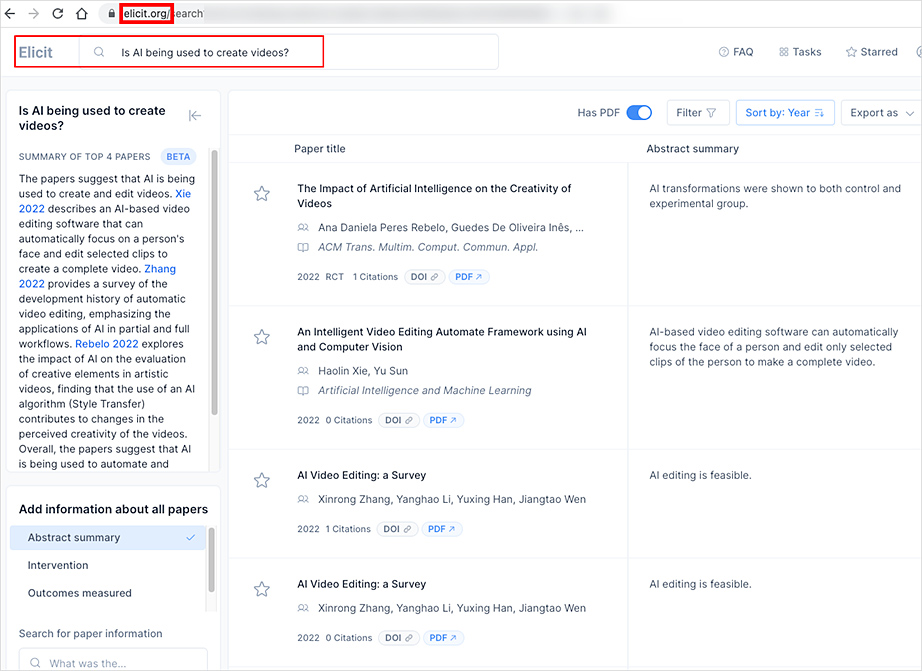
From DSC: It was interesting to see how people are using AI these days. The article mentioned things from planning Gluten Free (GF) meals to planning gardens, workouts, and more. Faculty members, staff, students, researchers and educators in general may findElicit, ScholarcyandSciteto be useful tools. I put in a question at Elicit and it looks interesting. I like their interface, which allows me to quickly resort things. .
There Is No A.I. — from newyorker.com by Jaron Lanier There are ways of controlling the new technology—but first we have to stop mythologizing it.
Excerpts:
If the new tech isn’t true artificial intelligence, then what is it? In my view, the most accurate way to understand what we are building today is as an innovative form of social collaboration.
…
The new programs mash up work done by human minds. What’s innovative is that the mashup process has become guided and constrained, so that the results are usable and often striking. This is a significant achievement and worth celebrating—but it can be thought of as illuminating previously hidden concordances between human creations, rather than as the invention of a new mind.
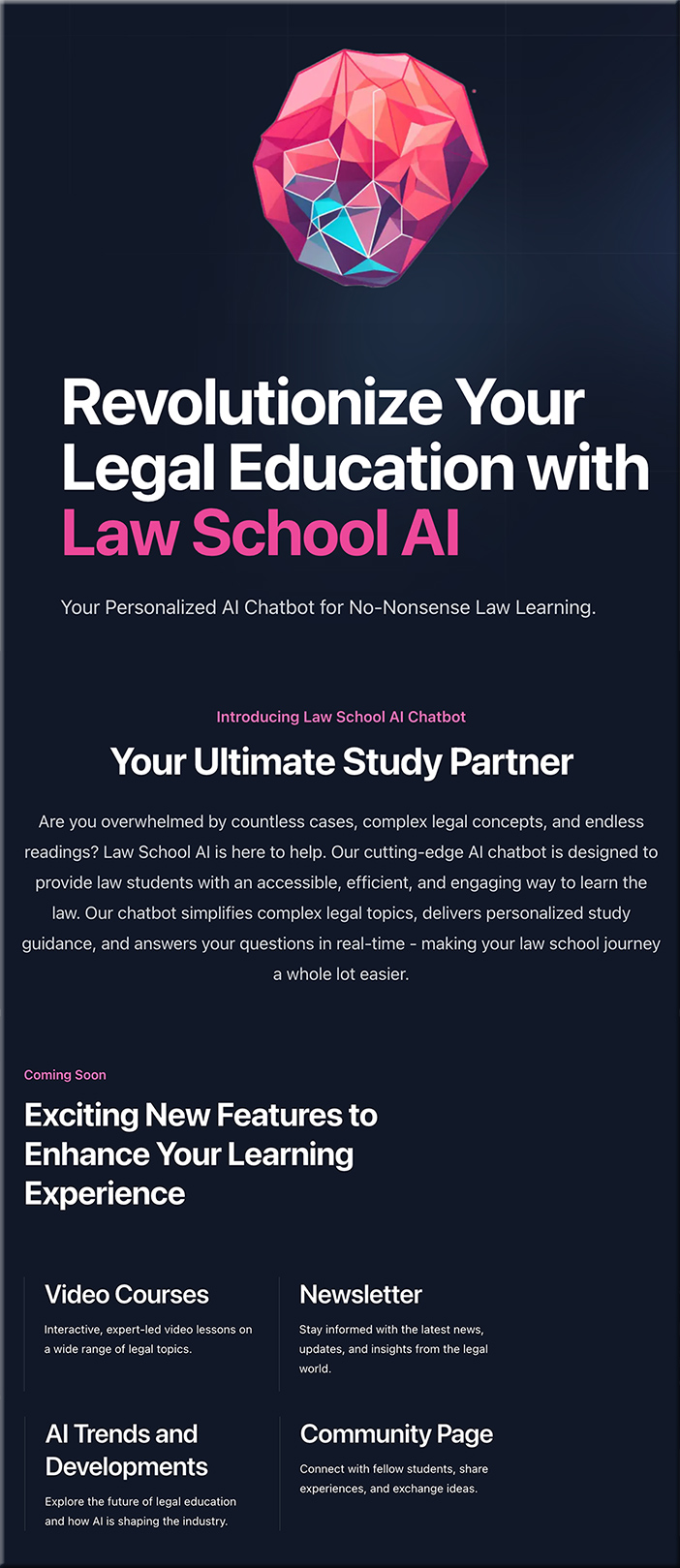
From DSC: I haven’t used this app or their website (which seems to have a lot of broken links!). But my question/reflection is…is this a piece of legal education’s future? Or even larger than that? I can easily see a LegalGPT type of service out there for ***society at large.***
What if you could create storyboards, change the color of a video, and generate relevant sound effects just by working with an AI Generator? It may be on the (generated sunset) horizon sooner rather than later: Adobe hopes to transform these processes through their AI product Firefly. As shared today at NAB Show 2023, Adobe looks to expand and innovate Firefly’s ability in the creative sphere, including font changes and effects, script analysis, color changes, generated music, storyboard edits, and more.
Some great examples of using augmented reality in immersive learning are:
Performance support: providing just in time text, video and/or conference calls where the information is overlayed over the physical world.
Language support: an AR app such as Google Translate can overlay translated text over the real text.
Visualizations: Overlaying virtual objects over physical ones such showing the inner working of a machine without opening it up.
Top 10 Tips for Creating a Successful Onboarding Experience — from learningguild.com by Tara Roberson-Moore Here are 10 things you can do to make your onboarding program a learner experience that will provide the anchor newbies need to stick around.
Excerpt:
In many instances, onboarding is expected to be handled by human resources. There is absolutely nothing wrong with that but unless they are also training experts, a lot of companies could be missing an opportunity to create something special. Letting training and development experts augment HR can result in an onboarding program that provides the experience new employees need to get comfy.
Here are 10 things you can do to make your onboarding program a learner experience that will provide the anchor newbies need to stick around.
Your L&D team can collaborate in creating a conversational template—a script to guide behavior. An employee might be aware of their problematic listening and welcome this type of scaffold, and even help create it. Once the template is set, the employee can use it to lead an internal meeting, a setting where structure matters. The template can be useful in helping other team members or employees in the organization improve their listening and communication skills as well.
Let’s break the initial template meeting into sections and create language that will help the employee practice new skills.