Educators need to work with vendors and tech developers to ensure artificial intelligence-driven innovations for schools go hand-in-hand with managing the technology’s risks, recommends guidance released July 8 by the U.S. Department of Education.
Also, on somewhat related notes see the following items:
I highly recommend the https://t.co/QE0Eze3qsr training for educators. It’s well-structured, engaging, and you learn a lot about prompting AI as you create your own custom bot for education. @shaanmasala has built something amazing. PlayLab is a nonprofit, the training is free,…
— Anna Mills, annamillsoer.bsky.social, she/her (@AnnaRMills) July 8, 2024
Meanwhile, a separate survey of faculty released Thursday by Ithaka S+R, a higher education consulting firm, showcased that faculty—while increasingly familiar with AI—often do not know how to use it in classrooms. Two out of five faculty members are familiar with AI, the Ithaka report found, but only 14 percent said they are confident in their ability to use AI in their teaching. Just slightly more (18 percent) said they understand the teaching implications of generative AI.
“Serious concerns about academic integrity, ethics, accessibility, and educational effectiveness are contributing to this uncertainty and hostility,” the Ithaka report said.
The diverging views about AI are causing friction. Nearly a third of students said they have been warned to not use generative AI by professors, and more than half (59 percent) are concerned they will be accused of cheating with generative AI, according to the Pearson report, which was conducted with Morning Consult and surveyed 800 students.
What teachers want from AI — from hechingerreport.org by Javeria Salman When teachers designed their own AI tools, they built math assistants, tools for improving student writing, and more
An AI chatbot that walks students through how to solve math problems. An AI instructional coach designed to help English teachers create lesson plans and project ideas. An AI tutor that helps middle and high schoolers become better writers.
These aren’t tools created by education technology companies. They were designed by teachers tasked with using AI to solve a problem their students were experiencing.
Over five weeks this spring, about 300 people – teachers, school and district leaders, higher ed faculty, education consultants and AI researchers – came together to learn how to use AI and develop their own basic AI tools and resources. The professional development opportunity was designed by technology nonprofit Playlab.ai and faculty at the Relay Graduate School of Education.
Next-Gen Classroom Observations, Powered by AI — from educationnext.org by Michael J. Petrilli The use of video recordings in classrooms to improve teacher performance is nothing new. But the advent of artificial intelligence could add a helpful evaluative tool for teachers, measuring instructional practice relative to common professional goals with chatbot feedback.
Multiple companies are pairing AI with inexpensive, ubiquitous video technology to provide feedback to educators through asynchronous, offsite observation. It’s an appealing idea, especially given the promise and popularity of instructional coaching, as well as the challenge of scaling it effectively (see “Taking Teacher Coaching To Scale,” research, Fall 2018).
…
Enter AI. Edthena is now offering an “AI Coach” chatbot that offers teachers specific prompts as they privately watch recordings of their lessons. The chatbot is designed to help teachers view their practice relative to common professional goals and to develop action plans to improve.
To be sure, an AI coach is no replacement for human coaching.
We need to shift our thinking about GenAI tutors serving only as personal learning tools. The above activities illustrate how these tools can be integrated into contemporary classroom instruction. The activities should not be seen as prescriptive but merely suggestive of how GenAI can be used to promote social learning. Although I specifically mention only one online activity (“Blended Learning”), all can be adapted to work well in online or blended classes to promote social interaction.
Stealth AI — from higherai.substack.com by Jason Gulya (a Professor of English at Berkeley College) talks to Zack Kinzler What happens when students use AI all the time, but aren’t allowed to talk about it?
In many ways, this comes back to one of my general rules: You cannot ban AI in the classroom. You can only issue a gag rule.
And if you do issue a gag rule, then it deprives students of the space they often need to make heads and tails of this technology.
We need to listen to actual students talking about actual uses, and reflecting on their actual feelings. No more abstraction.
In this conversation, Jason Gulya (a Professor of English at Berkeley College) talks to Zack Kinzler about what students are saying about Artificial Intelligence and education.
Welcome to our monthly update for Teams for Education and thank you so much for being part of our growing community! We’re thrilled to share over 20 updates and resources and show them in action next week at ISTELive 24 in Denver, Colorado, US.
… Copilot for Microsoft 365 – Educator features Guided Content Creation
Coming soon to Copilot for Microsoft 365 is a guided content generation experience to help educators get started with creating materials like assignments, lesson plans, lecture slides, and more. The content will be created based on the educator’s requirements with easy ways to customize the content to their exact needs. Standards alignment and creation Quiz generation through Copilot in Forms Suggested AI Feedback for Educators Teaching extension
To better support educators with their daily tasks, we’ll be launching a built-in Teaching extension to help guide them through relevant activities and provide contextual, educator-based support in Copilot. Education data integration
Copilot for Microsoft 365 – Student features Interactive practice experiences
Flashcards activity
Guided chat activity Learning extension in Copilot for Microsoft 365
…
New AI tools for Google Workspace for Education — from blog.google by Akshay Kirtikar and Brian Hendricks We’re bringing Gemini to teen students using their school accounts to help them learn responsibly and confidently in an AI-first future, and empowering educators with new tools to help create great learning experiences.
Not sure if you're behind or ahead in AI adoption? I created this guide to help you benchmark.
? ? ?
* many who think they're behind are actually on track, and some who think they're ahead are not ** these insights are my own opinion based on years of work with hundreds… pic.twitter.com/Wr28azOwDS
Then came ChatGPT, Open AI’s widely used artificial intelligence bot. For Fender, it was a no-brainer to query it for help developing deep opening questions.
The chatbot and other AI tools like it have found an eager audience among homeschoolers and microschoolers, with parents and teachers readily embracing it as a brainstorming and management tool, even as public schools take a more cautious approach, often banning it outright.
A few observers say AI may even make homeschooling more practical, opening it up to busy parents who might have balked previously.
“Not everyone is using it, but some are very excited about it,” said Amir Nathoo, co-founder of Outschool, an online education platform.
Frontier intelligence Claude 3.5 Sonnet sets new industry benchmarks for graduate-level reasoning (GPQA), undergraduate-level knowledge (MMLU), and coding proficiency (HumanEval). It shows marked improvement in grasping nuance, humor, and complex instructions and is exceptional at writing high-quality content with a natural, relatable tone.
2x speed
State-of-the-art vision
Introducing Artifacts—a new way to use Claude We’re also introducing Artifacts on claude.ai, a new feature that expands how you can interact with Claude. When you ask Claude to generate content like code snippets, text documents, or website designs, these Artifacts appear in a dedicated window alongside your conversation.This creates a dynamic workspace where you can see, edit, and build upon Claude’s creations in real-time, seamlessly integrating AI-generated content into your projects and workflows.
If you teach computer science, user interface design, or anything involving web development, you can have students prompt Claude to produce web pages’ source code, see this code produced on the right side, preview it after it has compiled, and iterate through code+preview combinations.
If you teach economics, financial analysis, or accounting, you can have students prompt Claude to create analyses of markets or businesses, including interactive infographics, charts, or reports via React. Since it shows its work with Artifacts, your students can see how different prompts result in different statistical analyses, different representations of this information, and more.
If you teach subjects that produce purely textual outputs without a code intermediary, like philosophy, creative writing, or journalism, your students can compare prompting techniques, easily review their work, note common issues, and iterate drafts by comparing versions.
I see this as the first serious step towards improving the otherwise terrible user interfaces of LLMs for broad use. It may turn out to be a small change in the grand scheme of things, but it sure feels like a big improvement — especially in the pedagogical context.
And speaking of training students on AI, also see:
Schools could enhance their curricula by incorporating debate, Model UN and mock government programs, business plan competitions, internships and apprenticeships, interdisciplinary and project-based learning initiatives, makerspaces and innovation labs, community service-learning projects, student-run businesses or non-profits, interdisciplinary problem-solving challenges, public speaking, and presentation skills courses, and design thinking workshop.
These programs foster essential skills such as recognizing and addressing complex challenges, collaboration, sound judgment, and decision-making. They also enhance students’ ability to communicate with clarity and precision, while nurturing creativity and critical thinking. By providing hands-on, real-world experiences, these initiatives bridge the gap between theoretical knowledge and practical application, preparing students more effectively for the multifaceted challenges they will face in their future academic and professional lives.
Our vision for Claude has always been to create AI systems that work alongside people and meaningfully enhance their workflows. As a step in this direction, Claude.ai Pro and Team users can now organize their chats into Projects, bringing together curated sets of knowledge and chat activity in one place—with the ability to make their best chats with Claude viewable by teammates. With this new functionality, Claude can enable idea generation, more strategic decision-making, and exceptional results.
Projects are available on Claude.ai for all Pro and Team customers, and can be powered by Claude 3.5 Sonnet, our latest release which outperforms its peers on a wide variety of benchmarks. Each project includes a 200K context window, the equivalent of a 500-page book, so users can add all of the relevant documents, code, and insights to enhance Claude’s effectiveness.
It further seems to me that there is increasingly a divide in the use of generative AI between larger firms and smaller firms. Some will jump on me for saying that, because there are clearly smaller firms that are leading the pack in their development and use of generative AI. (I’m looking at you, Siskind Susser.) By the same token, there are larger firms that have locked their doors to generative AI.
But of the firms that are most openly incorporating generative AI into their workflows, they seem mostly to be larger firms. There is good reason for this. Larger firms have innovation officers and KM professionals and others on staff who are leading the charge on generative AI. Thanks to them, those firms are better equipped to survey the AI landscape and test products under controlled and secure conditions.
Eighteen months ago, the first-of-its-kind Judicial Innovation Fellowship launched with the mission of embedding experienced technologists and designers within state, local, and tribal courts to develop technology-based solutions to improve the public’s access to justice. Housed within the Institute for Technology Law & Policy at Georgetown University Law Center, the program was designed to be a catalyst for innovation to enable courts to better serve the legal needs of the public.
The advances with generative AI tools open new career opportunities for lawyers, from legal tech consultants to junior lawyers supervising AI systems.
…
Institutions like Harvard Law School and Yale Law School are introducing courses that focus on AI’s implications in the legal field and such career oppotunities continue to arise.
…
Pursuing a career in Legal AI requires a unique blend of legal knowledge and technical skills. There are various educational pathways can equip aspiring professionals with these competencies.
We have to provide instructors the support they need to leverage educational technologies like generative AI effectively in the service of learning. Given the amount of benefit that could accrue to students if powerful tools like generative AI were used effectively by instructors, it seems unethical not to provide instructors with professional development that helps them better understand how learning occurs and what effective teaching looks like. Without more training and support for instructors, the amount of student learning higher education will collectively “leave on the table” will only increase as generative AI gets more and more capable. And that’s a problem.
From DSC: As is often the case, David put together a solid posting here. A few comments/reflections on it:
I agree that more training/professional development is needed, especially regarding generative AI. This would help achieve a far greater ROI and impact.
The pace of change makes it difficult to see where the sand is settling…and thus what to focus on
The Teaching & Learning Groups out there are also trying to learn and grow in their knowledge (so that they can train others)
The administrators out there are also trying to figure out what all of this generative AI stuff is all about; and so are the faculty members. It takes time for educational technologies’ impact to roll out and be integrated into how people teach.
As we’re talking about multiple disciplines here, I think we need more team-based content creation and delivery.
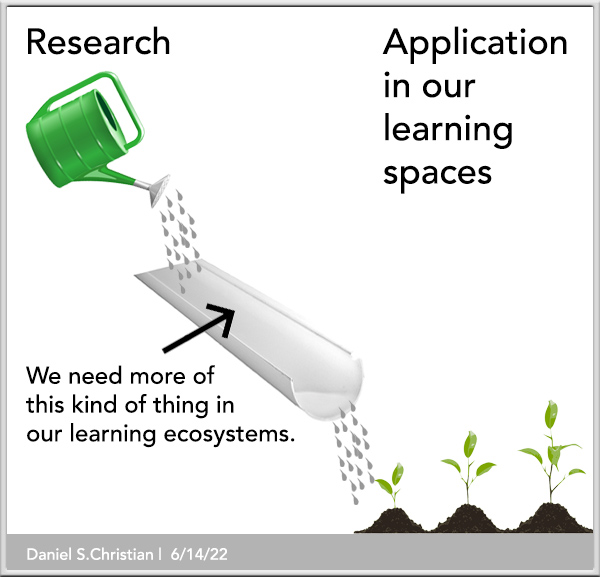
There needs to be more research on how best to use AI — again, it would be helpful if the sand settled a bit first, so as not to waste time and $$. But then that research needs to be piped into the classrooms far better. .
Introducing Gen-3 Alpha: Runway’s new base model for video generation.
Gen-3 Alpha can create highly detailed videos with complex scene changes, a wide range of cinematic choices, and detailed art directions.https://t.co/YQNE3eqoWf
Introducing GEN-3 Alpha – The first of a series of new models built by creatives for creatives. Video generated with @runwayml‘s new Text-2-Video model.
Learning personalisation. LinkedIn continues to be bullish on its video-based learning platform, and it appears to have found a strong current among users who need to skill up in AI. Cohen said that traffic for AI-related courses — which include modules on technical skills as well as non-technical ones such as basic introductions to generative AI — has increased by 160% over last year.
You can be sure that LinkedIn is pushing its search algorithms to tap into the interest, but it’s also boosting its content with AI in another way.
For Premium subscribers, it is piloting what it describes as “expert advice, powered by AI.” Tapping into expertise from well-known instructors such as Alicia Reece, Anil Gupta, Dr. Gemma Leigh Roberts and Lisa Gates, LinkedIn says its AI-powered coaches will deliver responses personalized to users, as a “starting point.”
These will, in turn, also appear as personalized coaches that a user can tap while watching a LinkedIn Learning course.
Personalized learning for everyone: Whether you’re looking to change or not, the skills required in the workplace are expected to change by 68% by 2030.
Expert advice, powered by AI: We’re beginning to pilot the ability to get personalized practical advice instantly from industry leading business leaders and coaches on LinkedIn Learning, all powered by AI. The responses you’ll receive are trained by experts and represent a blend of insights that are personalized to each learner’s unique needs. While human professional coaches remain invaluable, these tools provide a great starting point.
Personalized coaching, powered by AI, when watching a LinkedIn course: As learners —including all Premium subscribers — watch our new courses, they can now simply ask for summaries of content, clarify certain topics, or get examples and other real-time insights, e.g. “Can you simplify this concept?” or “How does this apply to me?”
From DSC: Last Thursday, I presented at the Educational Technology Organization of Michigan’s Spring 2024 Retreat. I wanted to pass along my slides to you all, in case they are helpful to you.
Apple announced “Apple Intelligence” at WWDC 2024, its name for a new suite of AI features for the iPhone, Mac, and more. Starting later this year, Apple is rolling out what it says is a more conversational Siri, custom, AI-generated “Genmoji,” and GPT-4o access that lets Siri turn to OpenAI’s chatbot when it can’t handle what you ask it for.
SAN FRANCISCO — Apple officially launched itself into the artificial intelligence arms race, announcing a deal with ChatGPT maker OpenAI to use the company’s technology in its products and showing off a slew of its own new AI features.
The announcements, made at the tech giant’s annual Worldwide Developers Conference on Monday in Cupertino, Calif., are aimed at helping the tech giant keep up with competitors such as Google and Microsoft, which have boasted in recent months that AI makes their phones, laptops and software better than Apple’s. In addition to Apple’s own homegrown AI tech, the company’s phones, computers and iPads will also have ChatGPT built in “later this year,” a huge validation of the importance of the highflying start-up’s tech.
The highly anticipated AI partnership is the first of its kind for Apple, which has been regarded by analysts as slower to adopt artificial intelligence than other technology companies such as Microsoft and Google.
The deal allows Apple’s millions of users to access technology from OpenAI, one of the highest-profile artificial intelligence companies of recent years. OpenAI has already established partnerships with a variety of technology and publishing companies, including a multibillion-dollar deal with Microsoft.
The real deal here is that Apple is literally putting AI into the hands of >1B people, most of whom will probably be using AI for the 1st time. And it’s delivering AI that’s actually useful (forget those Genmojis, we’re talking about implanting ChatGPT-4o’s brain into Apple devices).
It’s WWDC 2024 keynote time! Each year Apple kicks off its Worldwide Developers Conference with a few hours of just straight announcements, like the long-awaited Apple Intelligence and a makeover for smart AI assistant, Siri. We expected much of them to revolve around the company’s artificial intelligence ambitions (and here), and Apple didn’t disappoint. We also bring you news about Vision Pro and lots of feature refreshes.
Why Gamma is great for presentations — from Jeremy Caplan
Gamma has become one of my favorite new creativity tools. You can use it like Powerpoint or Google Slides, adding text and images to make impactful presentations. It lets you create vertical, square or horizontal slides. You can embed online content to make your deck stand out with videos, data or graphics. You can even use it to make quick websites.
Its best feature, though, is an easy-to-use application of AI. The AI will learn from any document you import, or you can use a text prompt to create a strong deck or site instantly. .
ChatGPT has 180.5 million users out of which 100 million users are active weekly.
In January 2024, ChatGPT got 2.3 billion website visits and 2 million developers are using its API.
The highest percentage of ChatGPT users belong to USA (46.75%), followed by India (5.47%). ChatGPT is banned in 7 countries including Russia and China.
OpenAI’s projected revenue from ChatGPT is $2billion in 2024.
Running ChatGPT costs OpenAI around $700,000 daily.
Sam Altman is seeking $7 trillion for a global AI chip project while Open AI is also listed as a major shareholder in Reddit.
ChatGPT offers a free version with GPT-3.5 and a Plus version with GPT-4, which is 40% more accurate and 82% safer costing $20 per month.
ChatGPT is being used for automation, education, coding, data-analysis, writing, etc.
43% of college students and 80% of the Fortune 500 companies are using ChatGPT.
A 2023 study found 25% of US companies surveyed saved $50K-$70K using ChatGPT, while 11% saved over $100K.
In an ever-evolving digital landscape, the fusion of technology and legal services has ushered in a new era of efficiency, accessibility, and innovation. The traditional image of legal professionals buried in stacks of paperwork and endless research has been transformed by cutting-edge technologies that promise to revolutionize how legal services are delivered, accessed, and executed. From artificial intelligence to blockchain, cloud computing to automation, the impact of technology on modern legal services is palpable and profound.
Technology Trends Shaping Legal Services The legal industry is experiencing a seismic shift driven by technology, with key trends reshaping legal services. Artificial Intelligence (AI) is revolutionizing legal research, document analysis, and predictive analytics, enabling legal professionals to streamline their workflow and deliver more accurate and timely insights to clients. Blockchain technology improves the safety and transparency of legal transactions, while cloud computing optimizes data storage and accessibility in the legal sector.
A new survey finds that clients care deeply about their attorney’s tech tools and tech skills. The numbers don’t lie: Legal tech matters. An efficient, integrated system is no longer “nice to have.” It’s table stakes, from case management to client communications to online filing and billing.
We are current and former employees at frontier AI companies, and we believe in the potential of AI technology to deliver unprecedented benefits to humanity.
We also understand the serious risks posed by these technologies. These risks range from the further entrenchment of existing inequalities, to manipulation and misinformation, to the loss of control of autonomous AI systems potentially resulting in human extinction. AI companies themselves have acknowledged these risks [1, 2, 3], as have governments across the world [4, 5, 6] and other AI experts [7, 8, 9].
We are hopeful that these risks can be adequately mitigated with sufficient guidance from the scientific community, policymakers, and the public. However, AI companies have strong financial incentives to avoid effective oversight, and we do not believe bespoke structures of corporate governance are sufficient to change this.
Every six months or so, I write a guide to doing stuff with AI. A lot has changed since the last guide, while a few important things have stayed the same. It is time for an update.
…
To learn to do serious stuff with AI, choose a Large Language Model and just use it to do serious stuff – get advice, summarize meetings, generate ideas, write, produce reports, fill out forms, discuss strategy – whatever you do at work, ask the AI to help. A lot of people I talk to seem to get the most benefit from engaging the AI in conversation, often because it gives good advice, but also because just talking through an issue yourself can be very helpful. I know this may not seem particularly profound, but “always invite AI to the table” is the principle in my book that people tell me had the biggest impact on them. You won’t know what AI can (and can’t) do for you until you try to use it for everything you do. And don’t sweat prompting too much, though here are some useful tips, just start a conversation with AI and see where it goes.
You do need to use one of the most advanced frontier models, however.
Stable Audio Open is an open source text-to-audio model for generating up to 47 seconds of samples and sound effects.
Users can create drum beats, instrument riffs, ambient sounds, foley and production elements.
The model enables audio variations and style transfer of audio samples.
Some comments from Rundown AI:
Why it matters: While the AI advances in text-to-image models have been the most visible (literally), both video and audio are about to take the same leap. Putting these tools in the hands of creatives will redefine traditional workflows — from musicians brainstorming new beats to directors crafting sound effects for film and TV.
Remember Microsoft’s shiny new AI tool, “Recall”? It’s like your personal time machine, answering questions about your browsing history and laptop activity by taking screenshots every 5 seconds. Sounds cool, right? Well, it gets problematic.
What’s going on here?
Security researchers have found a potential privacy nightmare lurking within this seemingly convenient tool.
What does this mean?
Recall stores all those screenshots in an unencrypted database on your laptop. This means anyone with access to your device could potentially see everything you’ve been doing. Cybersecurity experts are already comparing it to spyware, and one ethical hacker even built a tool called “TotalRecall” (yes, like the movie) that can pull all the information Recall saves. Yikes.