Leveraging EdTech: brilliant tools for student voice — from global-edtech.com by Cecilia Astolfi
Cecilia Astolfi provides three very useful tips for any teachers wishing to promote student voice in the classroom

There are three tools I recommend in order to enhance the ability of students to express their views in a constructive and valuable manner.

Best Microsoft PowerPoint Tips and Tricks for Teachers — from by Luke Edwards
You may be amazed to see how much you can get out of Microsoft PowerPoint as a teacher

Excerpt:

5. Create Instagram Stories in PowerPoint
Another social media app that has great traction with students is Instagram, specifically the Stories feature that allows you to share images or videos from the day, which are wiped for a fresh set each day.

Imagine doing this in class? Perhaps the students could carry on a story you were studying in class. Maybe they could tell the tale of a comet as it travels through space. The options are huge and it’s easy to do using this PowerPoint template as a starting point.

6 kids games that make math learning engaging and entertaining — from educatorstechnology.com

Excerpt:

BBC School Radio Maths is an excellent educational resource we learned from MakeUseOf‘ s list of 10 Cool Math Games for Kids. School Radio Maths offers a wide variety of educational games to help kids develop their math skills. Kids will get to grapple with various numeracy challenges that involves a higher degree of mental skills. The games are entertaining enough to keep pupils motivated and focused on the learning task at hand.

6 strategies to help you improve your math skills — from educatorstechnology.com

Excerpt:
As a child, did you love math back in the elementary? Now that you are an adult, do you feel awkward with your Mathematic’s skills? Let’s admit it – not everyone is great at Math. Some find it fun, brilliant, stimulating others find it too difficult to comprehend.

However, the stigma associated with math learning is not always true especially knowing that Math is omnipresent and is being used in almost every facet of our life. The purpose of this post is to share with you  some of the ways to help you  strengthen your Math skills.

This map lets you fly along the path of a drop of water from any place in the U.S. — from fastcompany.com by Adele Peters
Click on any spot or enter an address, and it will show where the water is likely to flow. Good for both learning how pollution and plastic spreads, but also for an aerial visual ride of the country’s waterways.
Also see: river-runner.samlearner.com/
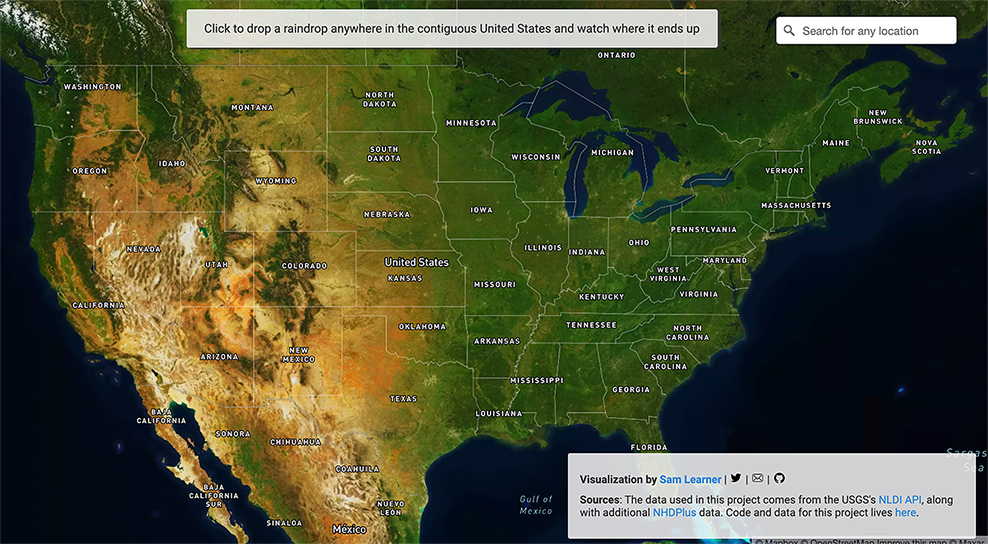
This image portrays a map of the United States.

Hands-On with the Lego Snapchat Augmented Reality Experience That Lets You Build With Friends Remotely — from next.reality.news by Adario Strange

Excerpt:

The world of Lego is timeless primarily because everyone, regardless of age or background, can build a wide variety of amazing things with the simple component blocks from the classic toymaker.

But now that Snapchat has brought that dynamic to augmented reality via the Rebuild the World Snapchat Lens the possibilities are truly endless.

Snap Spectacles Early Prototype, Volkswagen Drives into AR, Inside Lego Snapchat, & Instagram Updates AR — from next.reality.news by Tommy Palladino

Best Apps To Learn The Korean Language — from edtechreview.in by Saniya Khan

Excerpt:

Korean, one of the popular Asian languages for non-native speakers, is the official language of the Republic of Korea (South Korea) and the Democratic People’s Republic of Korea (North Korea).

This is an increasingly important language globally considering South Korea’s powerful economy, geopolitical importance, and growing presence in Asian pop culture; perhaps one reason for garnering a surprising amount of interest in people worldwide to learn the Korean language.

5 Places to Sell Your Artwork Online — from hongkiat.com

Excerpt:

Selling art online is making a comeback. Artists have been selling their work on the Internet but as of late, there’s an increase in online art sales. You can of course build your own website to share your art, run your own marketing and promotional exercise via social media and other channels but you will probably gain more exposure with the following websites . Time to get your beautiful art out there.

12 good edtech tools to use in your distance education — from educatorstechnology.com

Excerpt:

Looking for some educational websites to help you with the management of your online (and also face-to-face) classroom teaching? The list below has you covered. It features a collection of  some popular web tools you can use to perform a wide variety of educational tasks. These include: creating interactive video lessons, collect formative assessments and provide real-time feedback to students, enhance students learning through the use of digital games and flashcards, create online classes and share assignments and learning resources with students, organize students into appropriate learning groups and many more. Links to these websites are under the visual.


 

You’ll Soon be Able to Use Your Apple Watch Without Touching the Screen — from wsj.com by Katie Deighton
Companies like Apple and Spotify are making it easier for people with disabilities to use their products. Accessibility advocates hope more follow suit

AssistiveTouch, a new feature coming to the Apple Watch, will let users operate the device without having to touch the screen or controls.

AssistiveTouch, a new feature coming to the Apple Watch, will let users operate the device without having to touch the screen or controls. It was designed with people who have upper-body limb differences in mind.

PHOTO: APPLE INC.

Excerpt:

Later this year, Apple Inc. will introduce features that allow users to control an iPad with their eyes, and its smartwatch with gestures like a pinch or a fist clench.

The company announced the moves this week as part of Global Accessibility Awareness Day on May 20, an event established in 2011. Other big tech players revealed initiatives and commitments of their own, from automatic podcast transcriptions by Spotify Technology S.A to the updated design of a specific virtual block in Microsoft Corp.’s “Minecraft” to make it more visible to colorblind players.


7 good apps for learning spelling — from educatorstechnology.com

Excerpt:

We have curated for you this collection of carefully vetted apps to use with your kids, students and anyone else keen on learning and improving their spelling skills. The apps provide guided practice, interactive games, lessons, quizzes, puzzles, and several other materials to make learning spelling a fun and engaging task. We invite you to check them out and share with us if you have other suggestions to add to the list.

From DSC:
If you or someone you know is having significant issues with spelling, you/they may want to do some investigative work around:

Also, Microsoft’s Immersive Reader might come in handy.


Reimagining the Future of Accessible Education with AI (Part I) — from blogs.microsoft.com by Heather Dowdy

Reimagining the Future of Accessible Education with AI (Part 2) — from blogs.microsoft.com by Heather Dowdy
[During Feb 2021], the Microsoft AI for Accessibility program [called] for project proposals that advance AI-powered innovations in education that will empower people with disabilities. Through a two-part series, we are highlighting projects we are supporting.

And an excerpt from Brad Smith’s (4/28/21) posting:

That’s why today we’re announcing the next phase of our accessibility journey, a new technology-led five-year commitment to create and open doors to bigger opportunities for people with disabilities. This new initiative will bring together every corner of Microsoft’s business with a focus on three priorities: Spurring the development of more accessible technology across our industry and the economy; using this technology to create opportunities for more people with disabilities to enter the workforce; and building a workplace that is more inclusive for people with disabilities.


10 takeaways from Big Tech’s big earnings — from protocol.com by David Pierce
What Apple, Facebook, Alphabet, Microsoft and Amazon earnings say about the state of tech.


Doubling down on accessibility: Microsoft’s next steps to expand accessibility in technology, the workforce and workplace — from Brad Smith, President of Microsoft

Excerpt:

Accessibility by design
Today, we are announcing a variety of new “accessible by design” features and advances in Microsoft 365, enabling more than 200 million people to build, edit and share documents. Using artificial intelligence (AI) and other advanced technologies, we aim to make more content accessible and as simple and automatic as spell check is today. For example:

  • A new background accessibility checker will provide a prompt to fix accessibility issues in content across the core Office apps and Outlook will nudge users to correct accessibility issues.
  • AI in Microsoft Word will detect and convert to heading styles crucial for blind and low-vision readers.
  • A new Excel navigation pane designed for screen readers will help people easily discover and navigate objects in a spreadsheet.
  • We’re expanding Immersive Reader, used by 35 million people every month, to help with the comprehension of PowerPoint slides and notes.
  • In Teams, high-contrast mode can be used to access shared content using PowerPoint Live  which will reduce eye strain and accommodate light sensitivity with Dark Mode in Word.
  • New LinkedIn features that include auto-captioning for LinkedIn Live broadcasts, captions for enterprise content and dark mode later this year.

More than 1 billion people around the world live with a disability, and at some point, most of us likely will face some type of temporary, situational or permanent disability. The practical impacts are huge. 

Addendum on 5/6/21:


 7 Things You Didn’t Know PowerPoint Could Do That Will Make Your Next Presentation POP! — from Dr. Echo Rivera; posted 4/20/21

Excerpt:

I’m going to show you more than 7 Powerpoint features, but I’ve broken them down into 7 categories.

Here are those seven categories:

  1. Accessibility
  2. Photo Editing
  3. Interactivity
  4. Animations
  5. Custom Visuals
  6. Data Visualization
  7. Saving Time
 

Clicking this image will take you to the 2021 Tech Trends Report -- from the Future Today Institute

14th Annual Edition | 2021 Tech Trends Report — from the Future Today Institute

Our 2021 Tech Trends Report is designed to help you confront deep uncertainty, adapt and thrive. For this year’s edition, the magnitude of new signals required us to create 12 separate volumes, and each report focuses on a cluster of related trends. In total, we’ve analyzed  nearly 500 technology and science trends across multiple industry sectors. In each volume, we discuss the disruptive forces, opportunities and strategies that will drive your organization in the near future.

Now, more than ever, your organization should examine the potential near and long-term impact of tech trends. You must factor the trends in this report into your strategic thinking for the coming year, and adjust your planning, operations and business models accordingly. But we hope you will make time for creative exploration. From chaos, a new world will come.

Some example items noted in this report:

  • Natural language processing is an area experiencing high interest, investment, and growth.
  • + No-code or low-code systems are unlocking new use cases for businesses.
  • Amazon Web Services, Azure, and Google Cloud’s low-code and no-code offerings will trickle down to everyday people, allowing them to create their own artificial intelligence applications and deploy them as easily as they could a website.
  • The race is on to capture AI cloudshare—and to become the most trusted provider of AI on remote servers.
  • COVID-19 accelerated the use of AI in drug discovery last year. The first trial of an AI-discovered drug is underway in Japan.
 

The excerpt below is from The 7 best online whiteboards in 2021 — from zapier.com by Maria Myre

  • Miro for turning ideas into tasks
  • Stormboard for creating multiple whiteboards in a single brainstorming session
  • MURAL for remote, multi-member team meetings
  • Limnu for teaching students remotely
  • InVision Freehand for annotating design files with a team
  • Conceptboard for turning a brainstorming session into a formal presentation
  • Explain Everything for creating whiteboard videos

From DSC:
Other potentially-relevant tools/vendors here include:

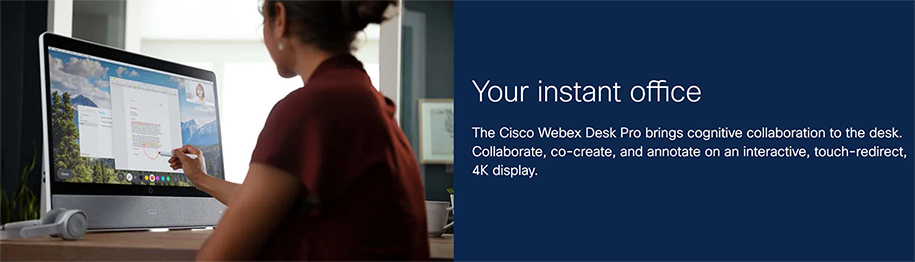
Woman using the Cisco Webex Desk Pro


Look at the choice and control possibilities mentioned in the following except from Immersive Reader in Canvas: Improve Reading Comprehension for All Students

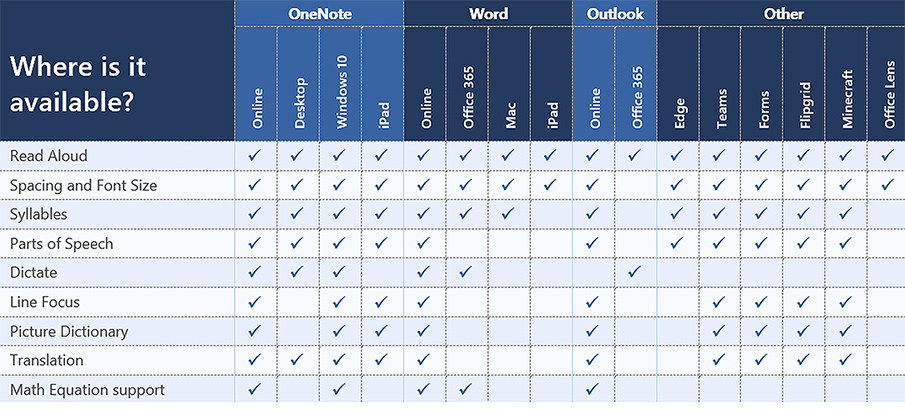
When building courses and creating course content in Canvas, Immersive Reader lets users:

  • Change font size, text spacing, and background color
  • Split up words into syllables
  • Highlight verbs, nouns, adjectives, and sub-clauses
  • Choose between two fonts optimised to help with reading
  • Read text aloud
  • Change the speed of reading
  • Highlight sets of one, three, or five lines for greater focus
  • Select a word to see a related picture and hear the word read aloud as many times as necessary

Also see:

All about the Immersive Reader — from education.microsoft.com

The Microsoft Immersive Reader is a free tool, built into Word, OneNote, Outlook, Office Lens, Microsoft Teams, Forms, Flipgrid, Minecraft Education Edition and the Edge browser, that implement proven techniques to improve reading and writing for people regardless of their age or ability.


Microsoft Education offers a free tutoring service to help students with their math problems — from educatorstechnology.com

Excerpt:

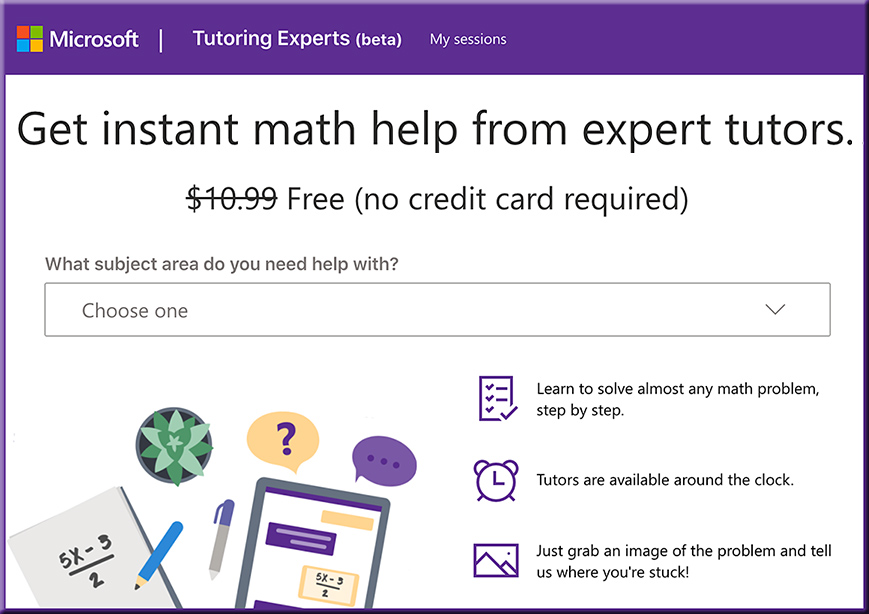
In today’s post I want to bring to your attention this interesting math resource from Microsoft Education called Tutoring Experts. As its name indicates, Tutoring Experts allows students to seek help with their math problems from tutors that are available 24/7.

Also see:

Get instant math help from expert tutors.

From DSC:
One wonders if there aren’t some opportunities here for more online-based tutoring services. Perhaps graduates from schools of education will move more towards this type of thing…

Perhaps the online-based materials in the future will have a question mark “?” icon that instantly connects to that service’s teachers, professors, trainers, pastors, and/or other SMEs. Or perhaps this type of thing is already there…I’m not sure.


DC: This is not right! When will there be justice?! We need to help Native American colleges, universities, & communities out!

The Digital Divide for Tribal College Students — COVID, CARES Act, and Critical Next Steps — from diverseeducation.com

Excerpt:

In this episode staff writer Sara Weissman shares a story that focuses on the digital divide for Native Americans by bringing in voices of tribal college leaders and their students during the COVID 19 pandemic.

Many don’t know but Native American colleges and universities have long struggled with the worst internet connectivity in the nation while ironically paying the highest rates for service. Hear first-hand how students from Diné College and other institutions are currently affected. Carrie Billie (Big Water Clan), President & CEO of the American Indian Higher Education Consortium (AIHEC) and Dr. Cynthia Lindquist (Star Horse Woman), President of Cankdeska Cikana Community College in North Dakota, break down the data and lay out critical next steps necessary to address the digital divide.

Many don’t know but Native American colleges and universities have long struggled with the worst internet connectivity in the nation while ironically paying the highest rates for service.

From DSC:
When will there be justice!? Let’s join in and make amends and provide the funding, concrete assistance, products, and services to Native American colleges, universities, and communities. Some potential ideas:

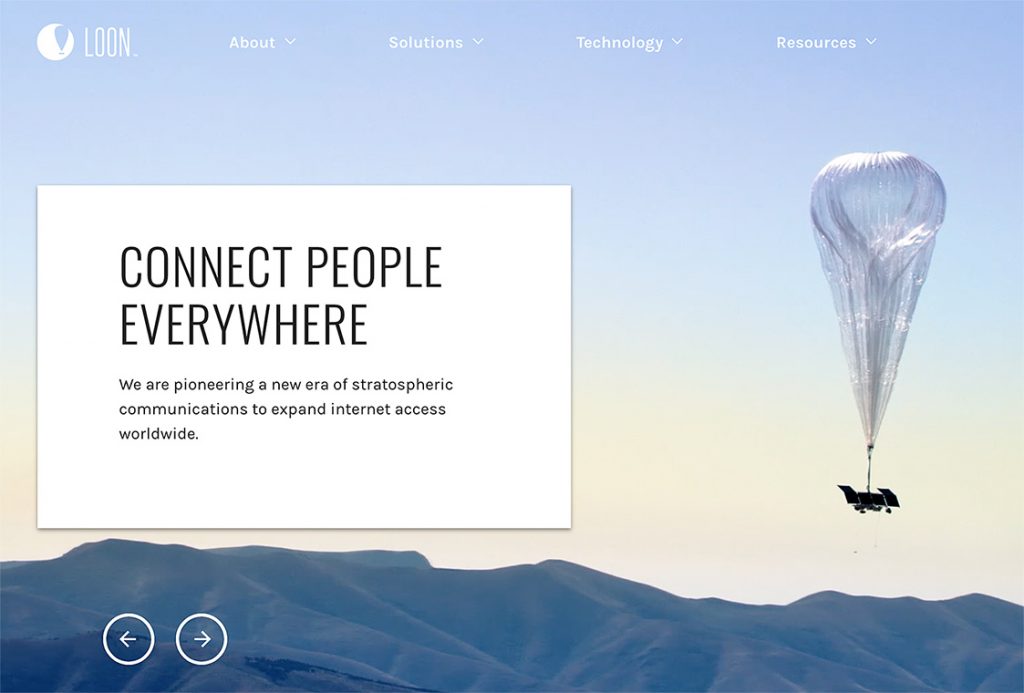
  • For the short term, could there be Loon balloons deployed immediately to provide free and stronger access to the Internet?

Could Project Loon assist Native American colleges, universities, and communities?

  • Could our Federal Government make amends and do the right thing here? (e-rate program, put Internet access in, make policy changes, offer more grants, other?)
  • Could Silicon Valley assist with hardware and software? For example:
    • Can Apple, HP, Microsoft, and others donate hardware and software?
    • Can Zoom, Adobe, Cisco Webex, Microsoft Teams, and others donate whatever these communities need to provide videoconferencing licenses?
  • Could telecom providers provide free internet access?
  • Could MOOCs offer more free courses?
  • Could furniture makers such as Steelcase, Herman Miller, and others donate furniture and help establish connected learning spaces?
  • How might faculty members and staff within higher education contribute?
  • How could churches, synagogues, and such get involved?
  • Could the rest of us locate and donate to charities that aim to provide concrete assistance to Native American schools, colleges, universities, and communities?

We need to do the right thing here. This is another area* where our nation can do much better.

* Here’s another example/area where we can do much better and make amends/changes.


Addendum on 12/7/20:


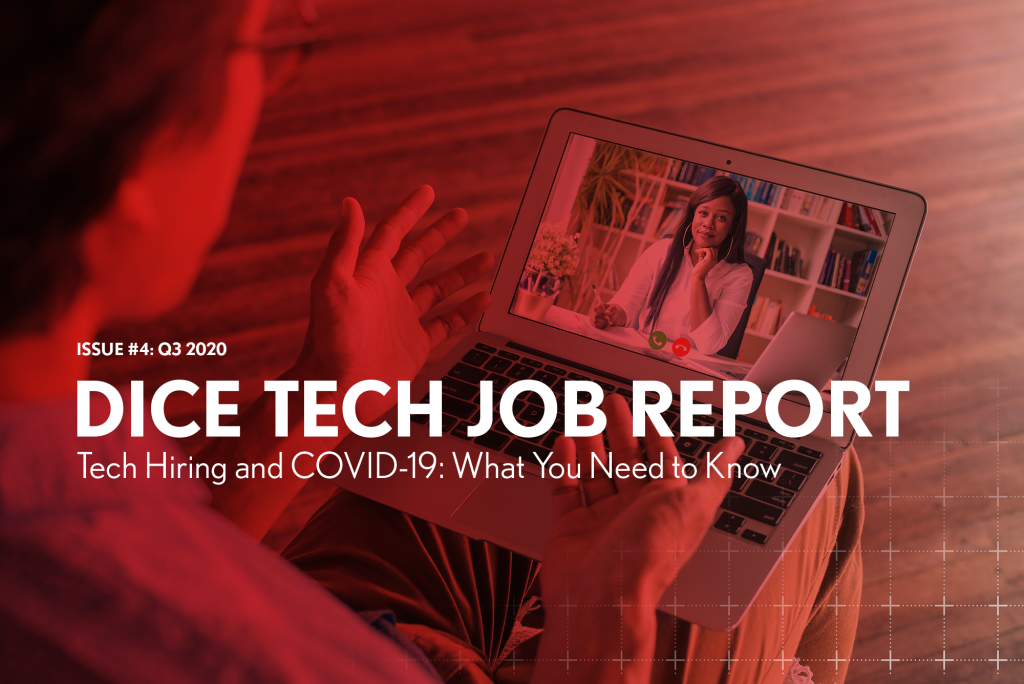
The Dice Q3 Tech Job Report Tech Hiring and COVID-19: What You Need to Know

The Dice Q3 Tech Job Report: Tech Hiring and COVID-19: What You Need to Know — from techhub.dice.com
The report, issued quarterly by Dice, provides exclusive statistics and analysis on the tech hiring landscape, including top cities and states, top employers and the most sought-after skills and occupations.

From DSC:
One can quickly see how valuable this information would be as a data feed into an AI-based, next-generation learning platform.

The platform would connect the marketable skills with the courses, websites, blogs, RSS feeds/streams of content, etc. that would help a learner quickly and affordably build such in-demand skills. Given the shortening half-lives of many kinds of information, such a service is needed desperately…especially now with the impact of the Coronavirus.

Also relevant: See how ISTE built its upcoming virtual event!


Expert Tips for Using PowerPoint Presenter View (2 screens, Windows) in Zoom or Teams — from thinkoutsidetheslide.com; with thanks to Tamara Kravits for this resource

Except:

In this article I want to share some of the expert tips for using the features of Presenter View. I will use the common scenario of Presenter View showing on one screen while the slides show on a second screen which is shared in the meeting platform. This allows easy access to all the Presenter View features.

If you need to add a second screen, check out the options in this article and if you want to learn more about using Presenter View in different setups, I have complete guides to using Presenter View in Zoom and in Teams.

From DSC:
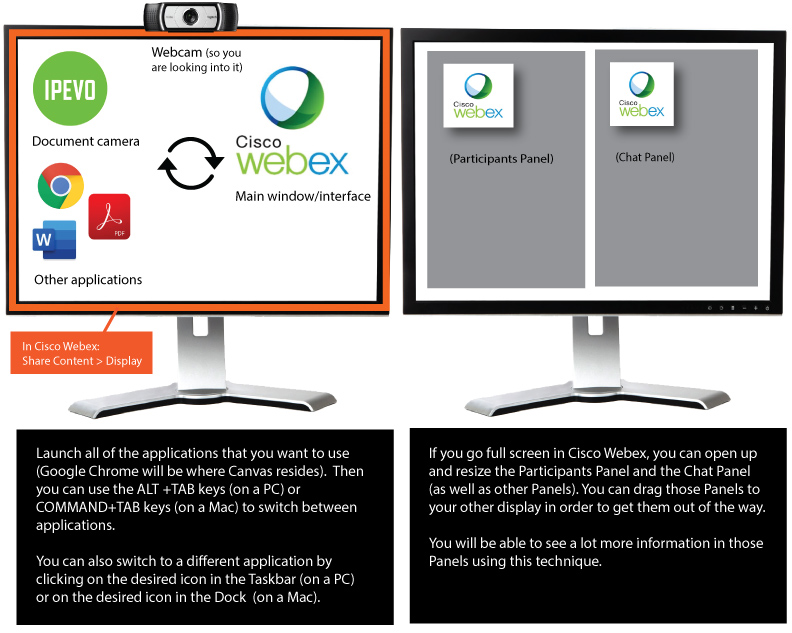
Along the lines of using two monitors with a videoconferencing application, below is a graphic I created for our faculty members at the WMU-Cooley Law School.

Ways to setup your two monitors and jump around different applications

Also relevant/see:

 
© 2025 | Daniel Christian