How to Mitigate Accessibility & Digital Inclusion Obstacles for the d/Deaf Community — from inclusionhub.com by Christina Claus
To mitigate accessibility and digital inclusion obstacles for the d/Deaf and hard of hearing, developers must conduct critical research to understand these ongoing hurdles. This guide outlines the many challenges facing this community, shares useful insights, and provides meaningful inclusion solutions.

Excerpt:

Several commonly accepted characterizations include:

  • Deaf: When using the capital D, the individual conveys they communicate with sign language and have either been deaf since birth or shortly after.
  • deaf: The lowercase d is often utilized by those who do not identify as part of Deaf culture and typically become deaf later in life.
  • Hard of Hearing (HoH): Individuals who don’t experience total hearing loss or deafness often identify as hard of hearing.
  • Late-Deafened: This indicates the individual became deaf later in life.
  • Deaf-Blind: In addition to being deaf or hard of hearing, this individual also has a degree of vision loss.

These diversities can impact the individual’s ability to experience digital and online services. To create an inclusive experience for the entire community, developers must understand the obstacles each faces.
 

What is it like to use a screen reader? — from knowbility.org by Anthony Vasquez

Excerpt:

In January, I, along with Texas State University computer science student Su Park, demonstrated screen reader interactions as part of Knowbility’s Screen Readers in the Wild webinar. Both Su and I are blind and have used screen readers since childhood. We weren’t able to answer all attendee questions during the webinar, so I’m continuing the discussion here. I hope that after reading this, you’ll better understand the roles that screen readers and accessible content play in the lives of blind people, and learn of a few easy ways you can improve the user experience. So, let’s jump right in!

If you missed Screen Readers in the Wild, you can still watch the demos!


If equity is a priority, UDL is a must — from cultofpedagogy.com by Katie Novak

Once you identify the firm goal, ask yourself, “Based on the variability in my class, what barriers may prevent learners from working toward that goal and how can I eliminate those barriers through design?”

Excerpt:

When we design the same learning pathways for all learners, we might tell ourselves we are being fair, but in fact, single pathways are exclusionary.  Beverly Daniel Tatum, author of the critically acclaimed book, Why Are All The Black Kids Sitting Together in the Cafeteria? And Other Conversations About Race, challenges us to focus on impact over intentions. It may not be our intent to exclude our learners, but the reality is that many students do not have opportunities to learn at high levels or to access curriculum and instruction that is accessible, engaging, culturally sustaining, and linguistically appropriate.

Luckily, there is a framework that rejects these one-size-fits-all solutions and empowers educators to proactively design learning experiences so all students can increase their brainpower and accelerate and own their learning. The framework is Universal Design for Learning (UDL).

UDL is a framework for designing learning experiences so students have options for how they learn, what materials they use, and how they demonstrate their learning. 

From DSC:
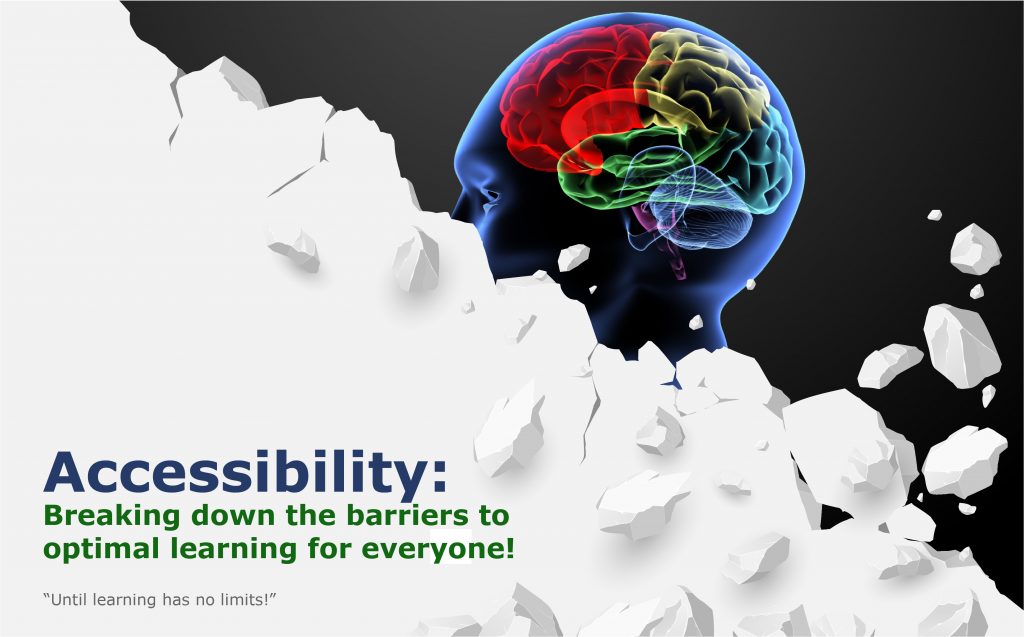
I put together this graphic as I’m working on a Module (for Canvas) to address the topic of accessibility:

An image of a barrier being torn down -- revealing a human mind behind it. This signifies the need to tear down any existing barriers that might hinder someone's learning experience.
By Daniel Christian March 2021
 

Two items from faculty focus.com by Jenae Cohn, PhD, and Courtney Plotts, PhD:

  1. How to Structure Your Online Class for Inclusion, Part 1 
  2. How to Structure Your Online Class for Inclusion: Two Principles for Fostering Engagement, Part 2 

Excerpt:

A strong sense of community begins with faculty designing and planning for the sense of community in the course. In order to build a strong sense of community within an online course, instructors should start by identifying the type of community they want to create. In other words, what is the common thread that runs through an online course: Inquiry, information giving, information gathering, and/or active listening?

Although not intuitive to all instructors, this question surrounding the idea of a sense of community is imperative for creating cohesion and a sense of belonging to a learning environment. Here are some ways that instructors might start to think about what community might mean for their class context:


Chrome now instantly captions audio and video on the web — from theverge.com by Ian Carlos Campbell
The accessibility feature was previously exclusive to some Pixel and Samsung Galaxy phones

Excerpt:

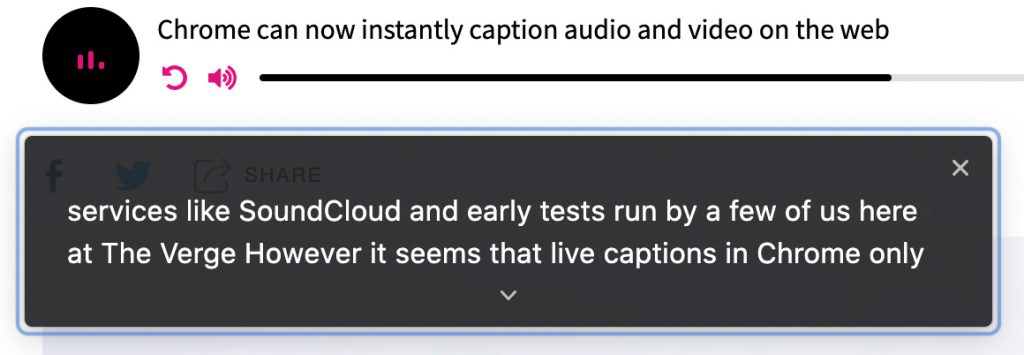
Google is expanding its real-time caption feature, Live Captions, from Pixel phones to anyone using a Chrome browser, as first spotted by XDA Developers. Live Captions uses machine learning to spontaneously create captions for videos or audio where none existed before, and making the web that much more accessible for anyone who’s deaf or hard of hearing.

Chrome’s Live Captions worked on YouTube videos, Twitch streams, podcast players, and even music streaming services like SoundCloud in early tests run by a few of us here at The Verge. Google also says Live Captions will work with audio and video files stored on your hard drive if they’re opened in Chrome. However, Live Captions in Chrome only work in English, which is also the case on mobile.


Chrome now instantly captions audio and video on the web -- this is a screen capture showing the words being said in a digital audio-based file


45 Hand-picked Disability Scholarships for 2021 — from hyetis.com by Hicham Benali
Regularly updated (listed by deadline) disability scholarships that you can apply for, to reduce your fees.


Video Captions Benefit Everyone — from ncbi.nlm.nih.gov by Morton Ann Gernsbacher

Excerpts:

Video captions, also known as same-language subtitles, benefit everyone who watches videos (children, adolescents, college students, and adults). More than 100 empirical studies document that captioning a video improves comprehension of, attention to, and memory for the video. Captions are particularly beneficial for persons watching videos in their non-native language, for children and adults learning to read, and for persons who are D/deaf or hard of hearing. However, despite U.S. laws, which require captioning in most workplace and educational contexts, many video audiences and video creators are naïve about the legal mandate to caption, much less the empirical benefit of captions.

More than 100 empirical studies, listed in the appendix, document the benefits of captions.

With so many studies documenting the benefits of captions, why does everyone not always turn on the captions every time they watch a video? Regrettably, the benefits of captions are not widely known. Some researchers are unaware of the wide-ranging benefits of captions because the empirical evidence is published across separate literatures (deaf education, second-language learning, adult literacy, and reading acquisition). Bringing together these separate literatures is the primary purpose of this article.


Navigating website ADA compliance: ‘If you have videos that are not captioned, you’re a sitting duck’ — from abajournal.com by Matt Reynolds

Excerpts:

“If you have videos that are not captioned, you’re a sitting duck,” Goren said. “If you’re not encoding your pictures so that the blind person using a screen reader can understand what the picture is describing, that is a problem.”

Drop-down boxes on websites are “horrible for accessibility,” the attorney added, and it can be difficult for people with disabilities to navigate CAPTCHA (Completely Automated Public Turing test) technology to verify they are human.

“Trying to get people with voice dictation or even screen readers to figure out how to certify that they’re not a robot can be very complicated,” Goren said.

Also see:

Relevant Laws

Information re: Lawsuits


Improving Accessibility for Students and Faculty with Disabilities — from edtechmagazine.com by Alexander Huls
Here’s a look at different approaches higher ed IT teams can take to improve accessibility.

Excerpt:

While it may not always be possible to achieve 100 percent accessibility, here are some approaches higher education IT teams can take — even with limited resources — to improve learning experiences for students with disabilities.


Effective and Accessible Alternatives to Website Carousels — from boia.org on February 11, 2021

Excerpt (emphasis DSC):

Real estate on a web page is precious. Every web designer or marketer at some point has felt that there simply isn’t enough space to show all the content they want to show. The carousel offered an apparent solution to that problem by cramming several content pieces into the same space, rotating to be individually visible either automatically or by the user’s control. The ability to show more content in less space in a way that looked cool made carousels attractive and they can now be seen all over the web. They’d be a great idea if it weren’t for two big problems: they don’t work and they aren’t accessible.

About 1% of people click on carousels.

Carousels are now associated with ads or junk content.


The Future of Higher Ed Viewed from Cape Town, South Africa — from eliterate.us by Michael Feldstein

Excerpt:

A while back, I had the pleasure of being interviewed by friends at the University of Cape Town about the future of higher education as part of a short video they were compiling for their senior leadership. Here’s what they came up with:

The University of Cape Town in South Africa


How to Remotely Support Students Who Learn Differently — from techlearning.com by Erik Ofgang
A new distance learning toolkit offers best practices and advice to support students who learn differently

Excerpt:

The National Center for Learning Disabilities recently partnered with Understood to release a  distance learning toolkit for educators to support students who learn differently during the pandemic.

The need for such a toolkit is clear. One in five students learn differently, and there is evidence that students who struggle academically or utilize individualized support in school are more likely to fall behind during distance learning.

The toolkit builds on the lessons of a 2019 report Forward Together: Helping Educators Unlock the Power of Students Who Learn Differently.


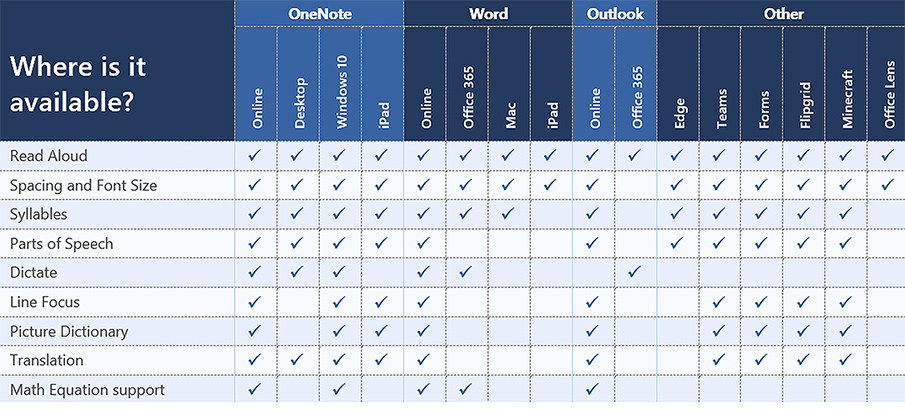
Look at the choice and control possibilities mentioned in the following except from Immersive Reader in Canvas: Improve Reading Comprehension for All Students

When building courses and creating course content in Canvas, Immersive Reader lets users:

  • Change font size, text spacing, and background color
  • Split up words into syllables
  • Highlight verbs, nouns, adjectives, and sub-clauses
  • Choose between two fonts optimised to help with reading
  • Read text aloud
  • Change the speed of reading
  • Highlight sets of one, three, or five lines for greater focus
  • Select a word to see a related picture and hear the word read aloud as many times as necessary

Also see:

All about the Immersive Reader — from education.microsoft.com

The Microsoft Immersive Reader is a free tool, built into Word, OneNote, Outlook, Office Lens, Microsoft Teams, Forms, Flipgrid, Minecraft Education Edition and the Edge browser, that implement proven techniques to improve reading and writing for people regardless of their age or ability.


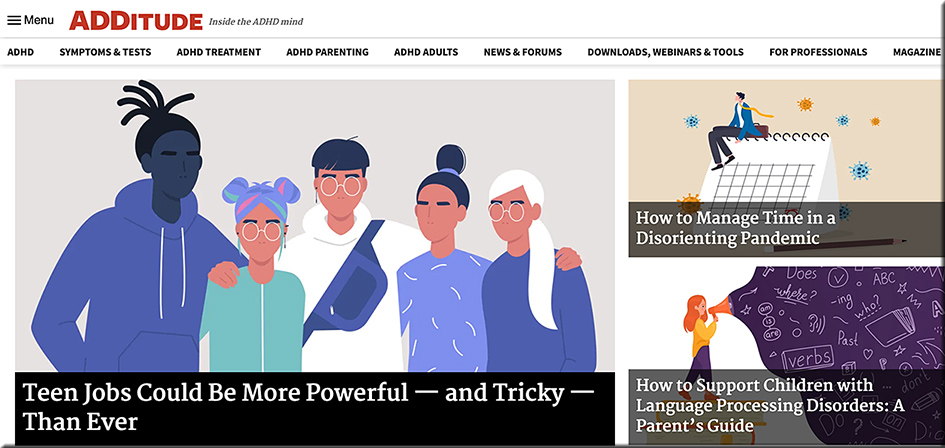
ADDitude: Resources for families touched by attention deficit disorder (ADD/ADHD).

ADDitude: Resources for families touched by attention deficit disorder (ADD/ADHD)

Example article:

“I’m a Teacher with Nonverbal Learning Disorder. And I’m Exactly Who I Needed As a Child.” — from additudemag.com by Brittany Kramer
“I strive to create a classroom environment where my students know they will be successful, no matter what. It’s the environment I would have felt safe in as a child; one that is encouraging, warm, and free of judgment or anger.”

Excerpt:

“They tried to bury me, but they didn’t know that I was a seed.”

As a special education teacher for students with learning disabilities and developmental disorders, and as a neurodivergent individual myself, this quote defines my life.

I was formally diagnosed with Nonverbal Learning Disorder (NVLD) at 23 years old. As a child and teen, I struggled in ways that most people cannot possibly comprehend.

When people think of learning disabilities, they picture a child with dyslexia or dysgraphia who cannot read or write very well. They do not envision an intelligent and articulate child for whom tying shoes or making a paper fit into a folder is arduous at best.


Here Is A Great Reading App for Students with Dyslexia — from educatorstechnology.com

Excerpt:

Omoguru is an excellent reading app for students with dyslexia. It offers a wide variety of tools ‘designed to make the text more readable’. Some of these features include: tools to adjust text appearance and enhance its readability (e.g., letter spacing, line height setting, contrast setting colours, text size and weight), syllable marking (the tool allows you to mark syllables in different colours enabling readers to easily identify and read multi-syllable words), speed reading, and many more.


© 2025 | Daniel Christian