Per Elnaz Sarraf (She/Her), Chief Evangelist at ROYBI Robot:
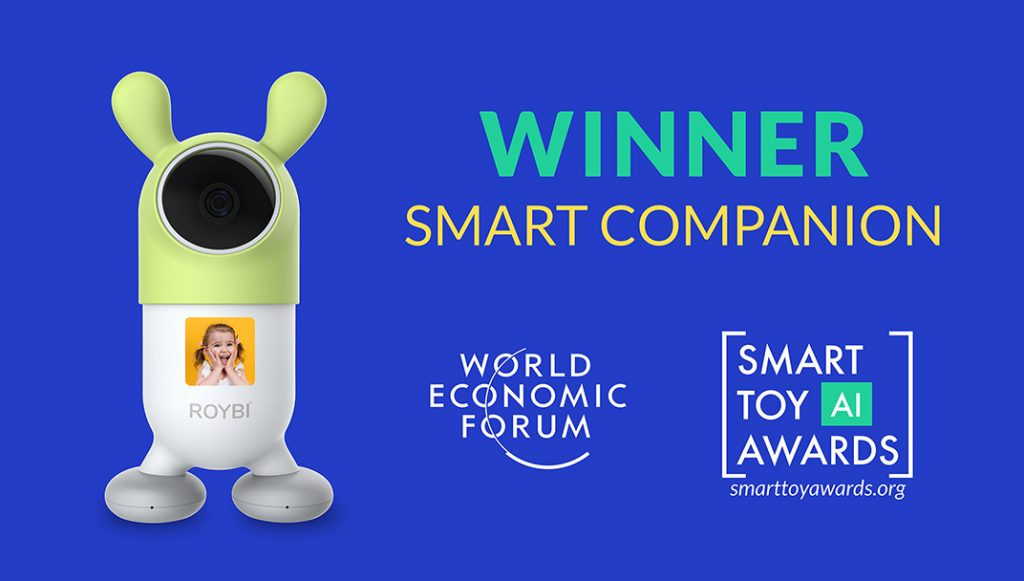
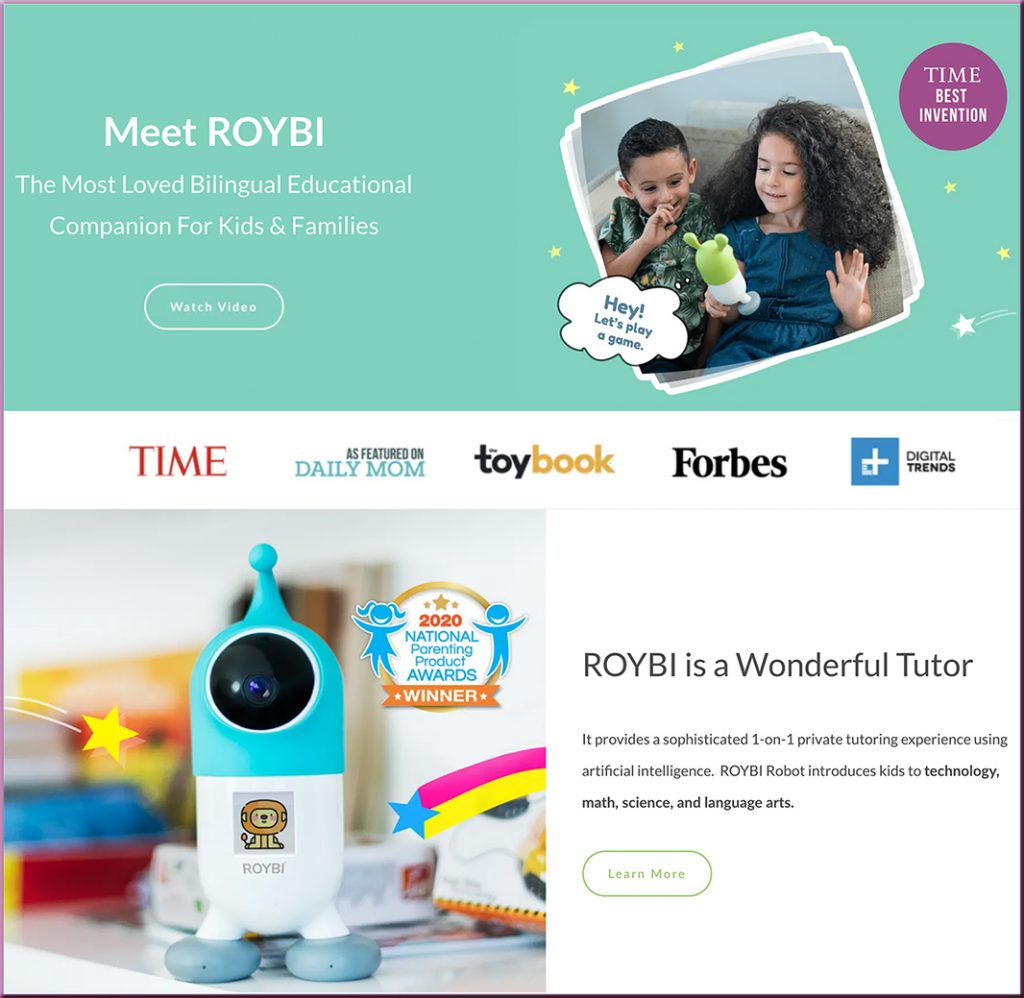
ROYBI INC, the creator of the award-winning ROYBI Robot, announced today that it was named the winner of the World Economic Forum Smart Toy Awards 2021 in the category of Smart Companion. This is a remarkable achievement!
The category winner had to meet four important criteria:
Data Privacy & Cybersecurity
Accessibility
Innovative Use of AI Transparency
Healthy Play in Childhood Development.
According to the World Economic Forum representative, Seth Bergeson, our ROYBI Robot met and exceeded these important criteria. ROYBI’s award acceptance ceremony can be watched here.
AssistiveTouch, a new feature coming to the Apple Watch, will let users operate the device without having to touch the screen or controls. It was designed with people who have upper-body limb differences in mind.
PHOTO: APPLE INC.
Excerpt:
Later this year, Apple Inc. will introduce features that allow users to control an iPad with their eyes, and its smartwatch with gestures like a pinch or a fist clench.
The company announced the moves this week as part of Global Accessibility Awareness Day on May 20, an event established in 2011. Other big tech players revealed initiatives and commitments of their own, from automatic podcast transcriptions by Spotify Technology S.A to the updated design of a specific virtual block in Microsoft Corp.’s “Minecraft” to make it more visible to colorblind players.
Global Accessibility Awareness Dayis today! Help us celebrate the tenth Global Accessibility Awareness Day (GAAD)! The purpose of GAAD is to get everyone talking, thinking and learning about digital access and inclusion, and the more than One Billion people with disabilities/impairments.
So what can institutions do to become more proactive in their approach to digital accessibility? A 2019 survey of Higher Education Quality Matters Coordinators conducted by Barbara Frey, D.Ed., Point Park University, and Rae Mancilla, Ed.D., the University of Pittsburgh, identified the need for more professional development on the topic. Now, in the final white paper from their three-part series on digital accessibility, Drs. Frey and Mancilla provide a summary and analysis of the survey data on digital accessibility professional development needs.
Highlights include:
The key training areas that course developers can focus on to help faculty
How administrators can address common barriers to participation in digital accessibility training
How faculty can contribute to a meaningful accessibility training curriculum
Global Accessibility Awareness Dayis this Thursday, May 20, 2021 Help us celebrate the tenth Global Accessibility Awareness Day (GAAD)! The purpose of GAAD is to get everyone talking, thinking and learning about digital access and inclusion, and the more than One Billion people with disabilities/impairments.
We have curated for you this collection of carefully vetted apps to use with your kids, students and anyone else keen on learning and improving their spelling skills. The apps provide guided practice, interactive games, lessons, quizzes, puzzles, and several other materials to make learning spelling a fun and engaging task. We invite you to check them out and share with us if you have other suggestions to add to the list.
From DSC: If you or someone you know is having significant issues with spelling, you/they may want to do some investigative work around:
Designing Accessible IoT Experiences — from inclusionhub.com by Be My Eyes While not every IoT product is designed with accessibility in mind, it has the potential to enable people with disabilities to communicate with and through technologies in ways that were previously unavailable
Excerpt:
As we have seen, the proliferation of both devices and tools to make devices smarter can have major benefits for people with disabilities. However, when these users are not considered during the creation of products and apps, these technologies can end up widening the accessibility gap, rather than closing it.
The key to providing accessible experiences for as wide a range of users as possible is to include a variety of stakeholders in the design and testing phases of any device. By inviting people with disabilities–including visual, hearing, cognitive and other–into the process, designers can ensure that their needs are met up front, rather than having to backfill or find work-around solutions post-launch.
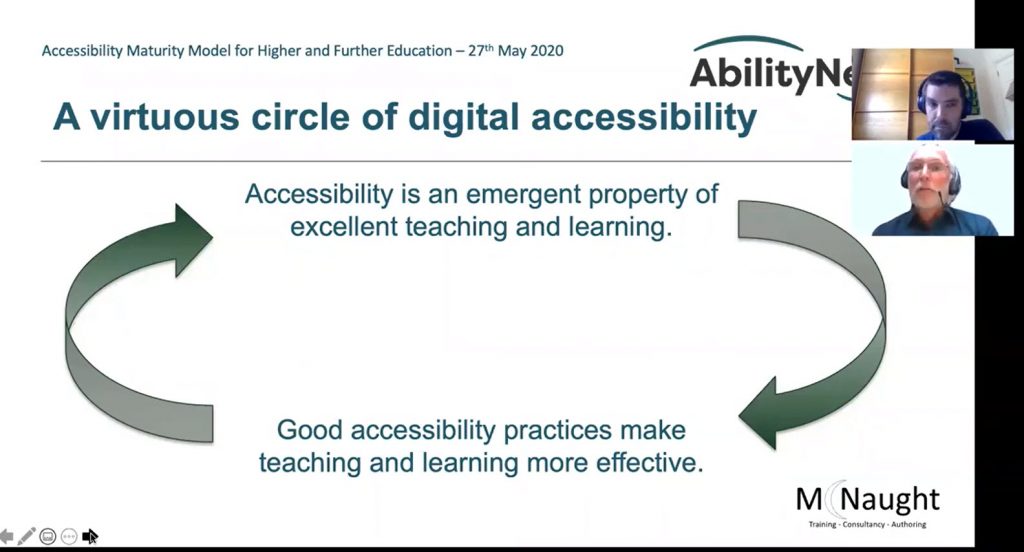
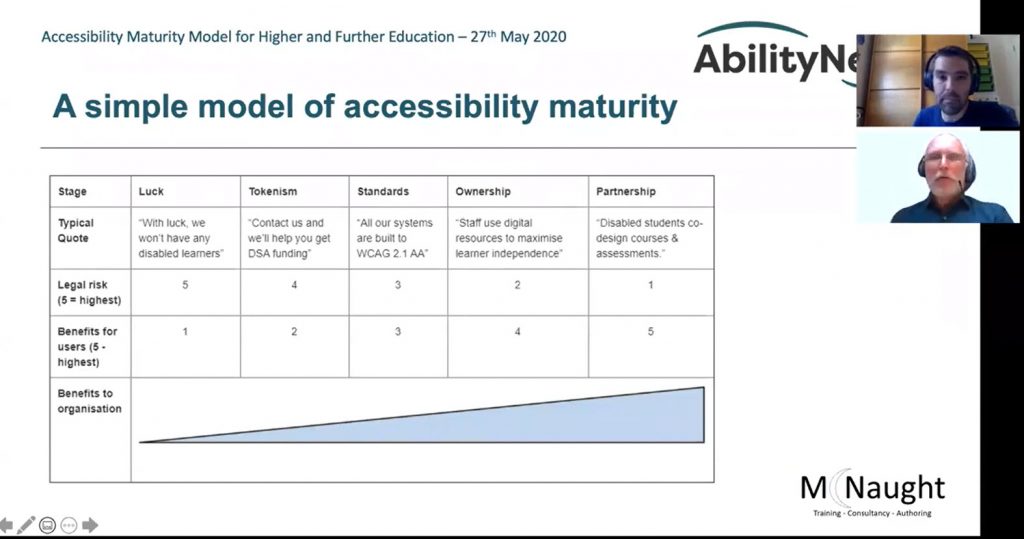
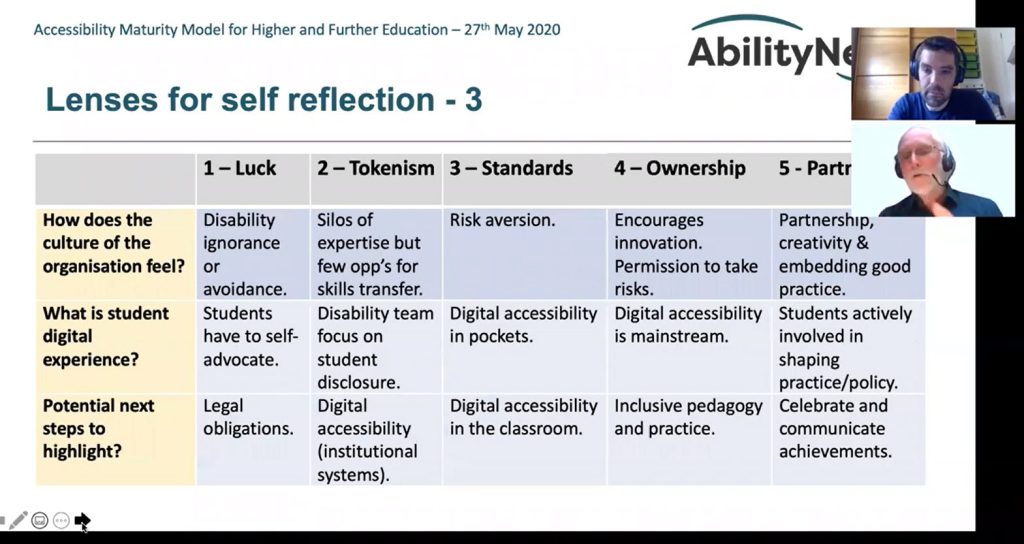
When you ask adults to recall their most memorable and enjoyable learning experiences it nearly always comes back to relationships – a fun teacher, an inspiring lecturer, a lively community. Such human interactions neatly illustrate the difference between maturity and compliance.
A “mature relationship” sounds a lot more attractive than a “compliant” one. Yet many institutions are offering compliance to disabled learners rather than mature relationships.
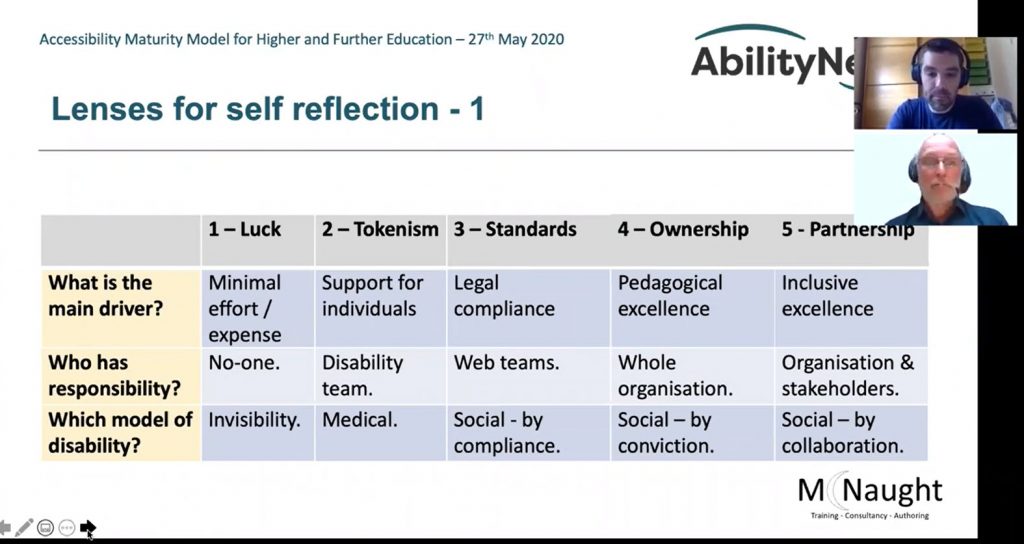
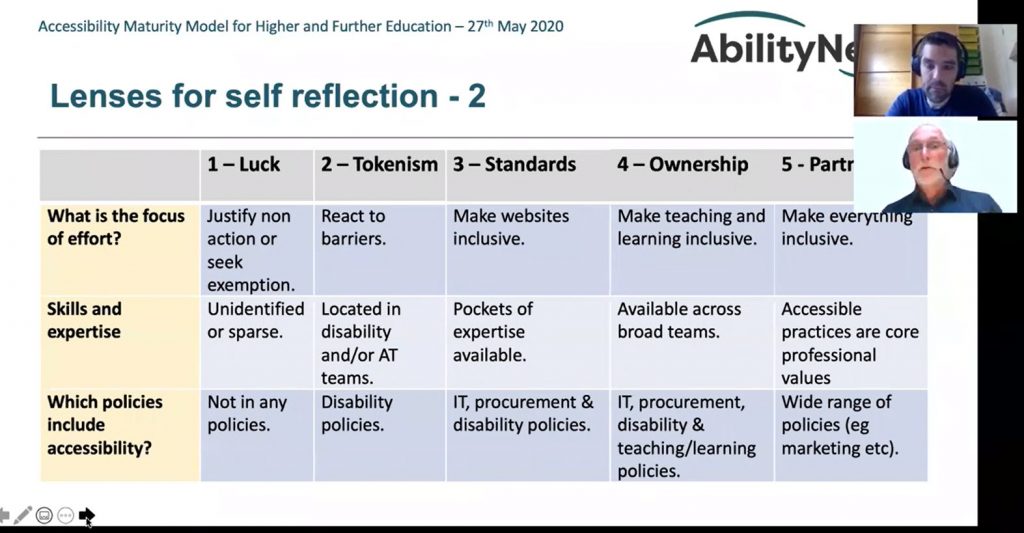
The lenses we use are:
Main driver – Where is energy being expended and what is measured as success?
Responsibility – Who are the actors. Do they have sufficient authority?
Model of disability – Is the perception “users with issues” or “systems and content with barriers”?
Focus of effort – Is accessibility a “task and finish” project or a long-term quality improvement?
Skills and expertise – What is the focus of training? Who gets it? Is it considered important?
Digital accessibility in policies – Digital accessibility is a vital equality issue. Is it visible in policies?
Culture – Is the focus on minimising risk? Or maximising user experience? Does accessibility straitjacket online learning? Or encourage innovation and experimentation?
User’s digital experience – How consistent is the user experience? How well designed?
In this article we explore the “Drivers” lens. What is driving your change? The need to be compliant and tick off the boxes? Or a desire to be digitally inclusive, ensuring every student can be as confident, independent and productive as possible?
At the upper levels of maturity, the confidence and competence of a wide body of staff will mean the organisation moves beyond micromanagement of accessibility. Accessibility may be mandatory but a wide range of templates will be available. Even better, many staff will have enough understanding to create their own accessible content and courses without needing a template. At this level, the following lines of evidence will be available:
A senior sponsor will be responsible for digital accessibility across the organisation.
Any cross-organisation steering group will be hosted by senior staff, meeting regularly and evidencing positive outcomes.
Digital accessibility will be a standing item in self-assessment reviews or quality assurance processes, and appropriate training will be in place to make this meaningful (see the later lens in the final blog coming soon in the series, on skills and expertise!).
Students will be actively involved in accessibility developments.
Part IV: Coming soon.
Learn about the Accessibility Maturity Model for Higher and Further Education that AbilityNet and McNaught Consultancy have developed based on Alistair McNaught’s existing model. See here and here.
What is WCAG?
WCAG is a set of specific standards designed to make the web more accessible to people with disabilities. It is on its third version, updated over the years to account for changes in web-based digital technology, assistive technology, design and development trends, and the growth of the mobile web. It is published by the World Wide Web Consortium (W3C) Web Accessibility Initiative (WAI) in collaboration with individuals and organizations within the global accessibility community according to the W3C Process.
That’s why today we’re announcing the next phase of our accessibility journey, a new technology-led five-year commitment to create and open doors to bigger opportunities for people with disabilities. This new initiative will bring together every corner of Microsoft’s business with a focus on three priorities: Spurring the development of more accessible technology across our industry and the economy; using this technology to create opportunities for more people with disabilities to enter the workforce; and building a workplace that is more inclusive for people with disabilities.
Challenges faced as a result of the condition can be physically and psychologically crippling. Let’s make a difference together this Tourette Syndrome Awareness Month, May 15 – June 15, as we create a more universal understanding of the condition, as well as to share successes to inspire our community and beyond. There are various ways you can get involved and make a lasting difference on a global scale.
But do you want to know a secret of what it really is?
It’s the determination from the 7-year-old to focus on an assignment at school even though his hand won’t stop ticcing.
It’s the bravery of the 16-year-old with a shoulder-shrugging tic who’s taking her driving test for the first time.
It’s the strength of a mother who is confused and scared as her child has just been diagnosed.
It’s the candor of a 45-year-old who has just been overlooked for his dream job, or worse – recently let go, because of TS.
But above all-it’s the perseverance of every child, teen, and adult who lives with TS on a daily basis.
So the next time Tourette Syndrome is used as a punchline, a quip, or a slur, please don’t laugh. Don’t share it. But instead, remember that there are real people behind the joke who may set them back. (source)
Accessibility by design Today, we are announcing a variety of new “accessible by design” features and advances in Microsoft 365, enabling more than 200 million people to build, edit and share documents. Using artificial intelligence (AI) and other advanced technologies, we aim to make more content accessible and as simple and automatic as spell check is today. For example:
A new background accessibility checker will provide a prompt to fix accessibility issues in content across the core Office apps and Outlook will nudge users to correct accessibility issues.
AI in Microsoft Word will detect and convert to heading styles crucial for blind and low-vision readers.
A new Excel navigation pane designed for screen readers will help people easily discover and navigate objects in a spreadsheet.
We’re expanding Immersive Reader, used by 35 million people every month, to help with the comprehension of PowerPoint slides and notes.
In Teams, high-contrast mode can be used to access shared content using PowerPoint Live which will reduce eye strain and accommodate light sensitivity with Dark Mode in Word.
New LinkedIn features that include auto-captioning for LinkedIn Live broadcasts, captions for enterprise content and dark mode later this year.
More than1 billionpeople around the world live with a disability, and at some point, most of us likely will face some type of temporary, situational or permanent disability. The practical impacts are huge.
When the pandemic hit last spring, schools across the country shifted out of sheer necessity to virtual meetings to discuss students’ Individual Education Plans (IEP). But the move has had some unanticipated benefits, with some educators and parents praising them for their convenience and for empowering family members to be more active participants in discussing their educational needs.
The virtual IEP meetings should stay—at least as an option—even after the pandemic abates.
Virtual IEP meetings can make scheduling and attendance easier for parents and teachers alike. One parent noted the benefits to her as a busy working mom:
“I think one thing [my family] is seeing is there’s a lot of things we could just do that didn’t require us to have to go in [the school building]. . . . I don’t mind coming in, but [virtual is] easier.”
Improving Digital Inclusion & Accessibility for Those With Learning Disabilities — from inclusionhub.com by Meredith Kreisa
Learning disabilities must be taken into account during the digital design process to ensure digital inclusion and accessibility for the community. This comprehensive guide outlines common learning disabilities, associated difficulties, accessibility barriers and best practices, and more.
“Learning shouldn’t be something only those without disabilities get to do,” explains Seren Davies, a full stack software engineer and accessibility advocate who is dyslexic. “It should be for everyone. By thinking about digital accessibility, we are making sure that everyone who wants to learn can.”
…
“Learning disability” is a broad term used to describe several specific diagnoses. Dyslexia, dyscalculia, dysgraphia, nonverbal learning disorder, and oral/written language disorder and specific reading comprehension deficit are among the most prevalent.
DC: Yet another reason for Universal Design for Learning’s multiple means of presentation/media:
Encourage faculty to presume students are under-connected. Asynchronous, low-bandwidth approaches help give students more flexibility in accessing course content in the face of connectivity challenges.