From DSC:
First of all, an article:

The four definitive use cases for AR and VR in retail — from forbes.com by Nikki Baird

AR in retail

Excerpt (emphasis DSC):

AR is the go-to engagement method of choice when it comes to product and category exploration. A label on a product on a shelf can only do so much to convey product and brand information, vs. AR, which can easily tap into a wealth of digital information online and bring it to life as an overlay on a product or on the label itself.


From DSC:
Applying this concept to the academic world…what might this mean for a student in a chemistry class who has a mobile device and/or a pair of smart goggles on and is working with an Erlenmeyer flask? A burette? A Bunsen burner?

Along these lines...what if all of those confused students — like *I* was struggling through chem lab — could see how an experiment was *supposed to be done!?*

That is, if there’s only 30 minutes of lab time left, the professor or TA could “flip a switch” to turn on the AR cloud within the laboratory space to allow those struggling students to see how to do their experiment.

I can’t tell you how many times I was just trying to get through the lab — not knowing what I was doing, and getting zero help from any professor or TA. I hardly learned a thing that stuck with me…except the names of a few devices and the abbreviations of a few chemicals. For the most part, it was a waste of money. How many students experience this as well and feel like I did?

Will the terms “blended learning” and/or “hybrid learning” take on whole new dimensions with the onset of AR, MR, and VR-related learning experiences?

#IntelligentTutoring #IntelligentSystems #LearningExperiences
#AR #VR #MR #XR #ARCloud #AssistiveTechnologies
#Chemistry #BlendedLearning #HybridLearning #DigitalLearning


Also see:


“It is conceivable that we’re going to be moving into a world without screens, a world where [glasses are] your screen. You don’t need any more form factor than [that].”

(AT&T CEO)


Introducing several new ideas to provide personalized, customized learning experiences for all kinds of learners! [Christian]

From DSC:
I have often reflected on differentiation or what some call personalized learning and/or customized learning. How does a busy teacher, instructor, professor, or trainer achieve this, realistically?

It’s very difficult and time-consuming to do for sure. But it also requires a team of specialists to achieve such a holy grail of learning — as one person can’t know it all. That is, one educator doesn’t have the necessary time, skills, or knowledge to address so many different learning needs and levels!

  • Think of different cognitive capabilities — from students that have special learning needs and challenges to gifted students
  • Or learners that have different physical capabilities or restrictions
  • Or learners that have different backgrounds and/or levels of prior knowledge
  • Etc., etc., etc.

Educators  and trainers have so many things on their plates that it’s very difficult to come up with _X_ lesson plans/agendas/personalized approaches, etc.  On the other side of the table, how do students from a vast array of backgrounds and cognitive skill levels get the main points of a chapter or piece of text? How can they self-select the level of difficulty and/or start at a “basics” level and work one’s way up to harder/more detailed levels if they can cognitively handle that level of detail/complexity? Conversely, how do I as a learner get the boiled down version of a piece of text?

Well… just as with the flipped classroom approach, I’d like to suggest that we flip things a bit and enlist teams of specialists at the publishers to fulfill this need. Move things to the content creation end — not so much at the delivery end of things. Publishers’ teams could play a significant, hugely helpful role in providing customized learning to learners.

Some of the ways that this could happen:

Use an HTML like language when writing a textbook, such as:

<MainPoint> The text for the main point here. </MainPoint>

<SubPoint1>The text for the subpoint 1 here.</SubPoint1>

<DetailsSubPoint1>More detailed information for subpoint 1 here.</DetailsSubPoint1>

<SubPoint2>The text for the subpoint 2 here.</SubPoint2>

<DetailsSubPoint2>More detailed information for subpoint 2 here.</DetailsSubPoint2>

<SubPoint3>The text for the subpoint 3 here.</SubPoint3>

<DetailsSubPoint3>More detailed information for subpoint 3 here.</DetailsSubPoint1>

<SummaryOfMainPoints>A list of the main points that a learner should walk away with.</SummaryOfMainPoints>

<BasicsOfMainPoints>Here is a listing of the main points, but put in alternative words and more basic ways of expressing those main points. </BasicsOfMainPoints>

<Conclusion> The text for the concluding comments here.</Conclusion>


<BasicsOfMainPoints> could be called <AlternativeExplanations>
Bottom line: This tag would be to put things forth using very straightforward terms.

Another tag would be to address how this topic/chapter is relevant:
<RealWorldApplication>This short paragraph should illustrate real world examples

of this particular topic. Why does this topic matter? How is it relevant?</RealWorldApplication>


On the students’ end, they could use an app that works with such tags to allow a learner to quickly see/review the different layers. That is:

  • Show me just the main points
  • Then add on the sub points
  • Then fill in the details
    OR
  • Just give me the basics via an alternative ways of expressing these things. I won’t remember all the details. Put things using easy-to-understand wording/ideas.


It’s like the layers of a Microsoft HoloLens app of the human anatomy:

 

Or it’s like different layers of a chapter of a “textbook” — so a learner could quickly collapse/expand the text as needed:
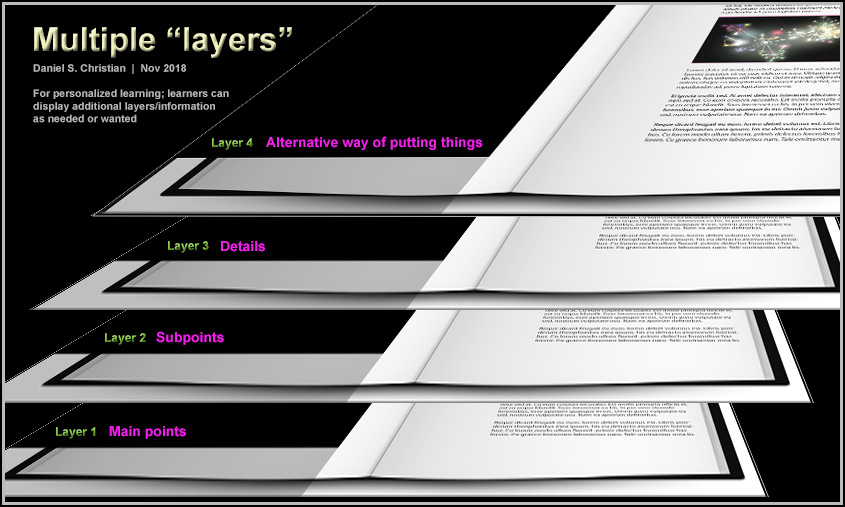
 

This approach could be helpful at all kinds of learning levels. For example, it could be very helpful for law school students to obtain outlines for cases or for chapters of information. Similarly, it could be helpful for dental or medical school students to get the main points as well as detailed information.

Also, as Artificial Intelligence (AI) grows, the system could check a learner’s cloud-based learner profile to see their reading level or prior knowledge, any IEP’s on file, their learning preferences (audio, video, animations, etc.), etc. to further provide a personalized/customized learning experience. 

To recap:

  • “Textbooks” continue to be created by teams of specialists, but add specialists with knowledge of students with special needs as well as for gifted students. For example, a team could have experts within the field of Special Education to help create one of the overlays/or filters/lenses — i.e., to reword things. If the text was talking about how to hit a backhand or a forehand, the alternative text layer could be summed up to say that tennis is a sport…and that a sport is something people play. On the other end of the spectrum, the text could dive deeply into the various grips a person could use to hit a forehand or backhand.
  • This puts the power of offering differentiation at the point of content creation/development (differentiation could also be provided for at the delivery end, but again, time and expertise are likely not going to be there)
  • Publishers create “overlays” or various layers that can be turned on or off by the learners
  • Can see whole chapters or can see main ideas, topic sentences, and/or details. Like HTML tags for web pages.
  • Can instantly collapse chapters to main ideas/outlines.


Affordable and at-scale — from insidehighered.com by Ray Schroeder
Affordable degrees at scale have arrived. The momentum behind this movement is undeniable, and its impact will be significant, Ray Schroeder writes.

Excerpt (emphasis DSC):

How many times have we been told that major change in our field is on the near horizon? Too many times, indeed.

The promises of technologies and practices have fallen short more often than not. Just seven years ago, I was part of the early MOOC movement and felt the pulsating potential of teaching thousands of students around the world in a single class. The “year of the MOOC” was declared in 2012. Three years later, skeptics declared that the MOOC had died an ignominious death with high “failure” rates and relatively little recognition by employers.

However, the skeptics were too impatient, misunderstood the nature of MOOCs and lacked the vision of those at Georgia Tech, the University of Illinois, Arizona State University, Coursera, edX and scores of other institutions that have persevered in building upon MOOCs’ premises to develop high-quality, affordable courses, certificates and now, degrees at scale.

No, these degrees are not free, but they are less than half the cost of on-campus versions. No, they are not massive in the hundreds of thousands, but they are certainly at large scale with many thousands enrolled. In computer science, the success is felt across the country.


Georgia Tech alone has enrolled 10,000 students over all in its online master’s program and is adding thousands of new students each semester in a top 10-ranked degree program costing less than $7,000. Georgia Tech broke the new ground through building collaborations among several partners. Yet, that was just the beginning, and many leading universities have followed.


Also see:

Trends for the future of education with Jeff Selingo — from steelcase.com
How the future of work and new technology will make place more important than ever.

Excerpt:

Selingo sees artificial intelligence and big data as game changers for higher education. He says AI can free up professors and advisors to spend more time with students by answering some more frequently-asked questions and handling some of the grading. He also says data can help us track and predict student performance to help them create better outcomes. “When they come in as a first-year student, we can say ‘People who came in like you that had similar high school grades and took similar classes ended up here. So, if you want to get out of here in four years and have a successful career, here are the different pathways you should follow.’”


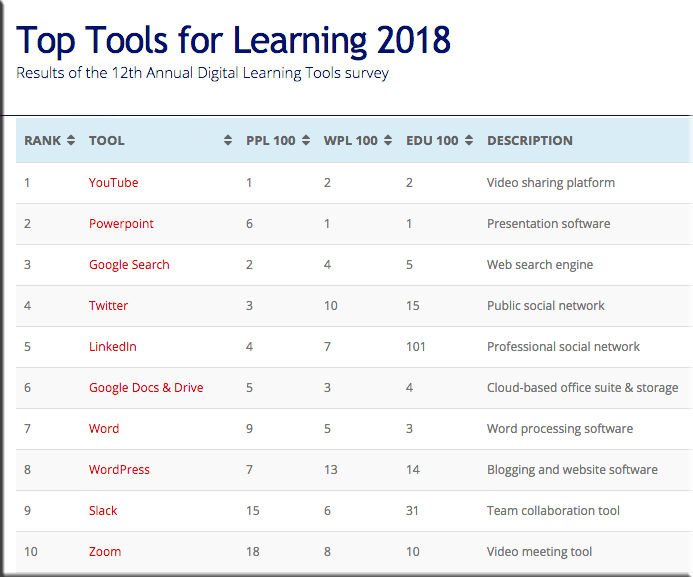
NEW: The Top Tools for Learning 2018 [Jane Hart]

The Top Tools for Learning 2018 from the 12th Annual Digital Learning Tools Survey -- by Jane Hart


The above was from Jane’s posting 10 Trends for Digital Learning in 2018 — from modernworkplacelearning.com by Jane Hart

Excerpt:

[On 9/24/18],  I released the Top Tools for Learning 2018 , which I compiled from the results of the 12th Annual Digital Learning Tools Survey.

I have also categorised the tools into 30 different areas, and produced 3 sub-lists that provide some context to how the tools are being used:

  • Top 100 Tools for Personal & Professional Learning 2018 (PPL100): the digital tools used by individuals for their own self-improvement, learning and development – both inside and outside the workplace.
  • Top 100 Tools for Workplace Learning (WPL100): the digital tools used to design, deliver, enable and/or support learning in the workplace.
  • Top 100 Tools for Education (EDU100): the digital tools used by educators and students in schools, colleges, universities, adult education etc.


3 – Web courses are increasing in popularity.
Although Coursera is still the most popular web course platform, there are, in fact, now 12 web course platforms on the list. New additions this year include Udacity and Highbrow (the latter provides daily micro-lessons). It is clear that people like these platforms because they can chose what they want to study as well as how they want to study, ie. they can dip in and out if they want to and no-one is going to tell them off – which is unlike most corporate online courses which have a prescribed path through them and their use is heavily monitored.


5 – Learning at work is becoming personal and continuous.
The most significant feature of the list this year is the huge leap up the list that Degreed has made – up 86 places to 47th place – the biggest increase by any tool this year. Degreed is a lifelong learning platform and provides the opportunity for individuals to own their expertise and development through a continuous learning approach. And, interestingly, Degreed appears both on the PPL100 (at  30) and WPL100 (at 52). This suggests that some organisations are beginning to see the importance of personal, continuous learning at work. Indeed, another platform that underpins this, has also moved up the list significantly this year, too. Anders Pink is a smart curation platform available for both individuals and teams which delivers daily curated resources on specified topics. Non-traditional learning platforms are therefore coming to the forefront, as the next point further shows.


From DSC:
Perhaps some foreshadowing of the presence of a powerful, online-based, next generation learning platform…?


Microsoft's conference room of the future


From DSC:
Microsoft’s conference room of the future “listens” to the conversations of the team and provides a transcript of the meeting. It also is using “artificial intelligence tools to then act on what meeting participants say. If someone says ‘I’ll follow up with you next week,’ then they’ll get a notification in Microsoft Teams, Microsoft’s Slack competitor, to actually act on that promise.”

This made me wonder about our learning spaces in the future. Will an #AI-based device/cloud-based software app — in real-time — be able to “listen” to the discussion in a classroom and present helpful resources in the smart classroom of the future (i.e., websites, online-based databases, journal articles, and more)?

Will this be a feature of a next generation learning platform as well (i.e., addressing the online-based learning realm)? Will this be a piece of an intelligent tutor or an intelligent system?

Hmmm…time will tell.


Also see this article out at Forbes.com entitled, “There’s Nothing Artificial About How AI Is Changing The Workplace.” 

Here is an excerpt:

The New Meeting Scribe: Artificial Intelligence

As I write this, AI has already begun to make video meetings even better. You no longer have to spend time entering codes or clicking buttons to launch a meeting. Instead, with voice-based AI, video conference users can start, join or end a meeting by simply speaking a command (think about how you interact with Alexa).

Voice-to-text transcription, another artificial intelligence feature offered by Otter Voice Meeting Notes (from AISense, a Zoom partner), Voicefox and others, can take notes during video meetings, leaving you and your team free to concentrate on what’s being said or shown. AI-based voice-to-text transcription can identify each speaker in the meeting and save you time by letting you skim the transcript, search and analyze it for certain meeting segments or words, then jump to those mentions in the script. Over 65% of respondents from the Zoom survey said they think AI will save them at least one hour a week of busy work, with many claiming it will save them one to five hours a week.


Assistive technology to help students with developmental delays succeed academically — from thetechedvocate.org by Matthew Lynch

Excerpt:

Developmental delays can affect almost every area of a child’s life. This broad issue can cover any possible milestone that a child doesn’t meet according to the expected timeline, including speech or movement. While children with developmental delays can still be successful, it will require some additional help from patient teachers. Educators would do well to research the available assistive technology that can help to bolster a child’s education and encourage academic success.

What tools are available to help students compensate for their developmental delays? Here are just a few of the top technologies that parents and teachers have found to be successful in the classroom.


Assistive technology to help students with articulation disorder succeed academically — from thetechedvocate.org by Matthew Lynch

Excerpt:

Some students encounter extraordinary challenges when it comes to forming the sounds of everyday communication. This may be due to a structural problem with the mouth or a motor-based issue. Collectively, these difficulties are considered to be articulation disorders. They can make classroom education extremely hard for both teachers and students. However, there are some ways that teachers can help students with articulation disorders still succeed academically.

If you want to help your student with articulation disorder succeed, you will need some of the best assistive technology available. You can see the recommendations for the top assistive technologies used with this disorder below.


From DSC:
Why aren’t we further along with lecture recording within K-12 classrooms?

That is, I as a parent — or much better yet, our kids themselves who are still in K-12 — should be able to go online and access whatever talks/lectures/presentations were given on a particular day. When our daughter is sick and misses several days, wouldn’t it be great for her to be able to go out and see what she missed? Even if we had the time and/or the energy to do so (which we don’t), my wife and I can’t present this content to her very well. We would likely explain things differently — and perhaps incorrectly — thus, potentially muddying the waters and causing more confusion for our daughter.

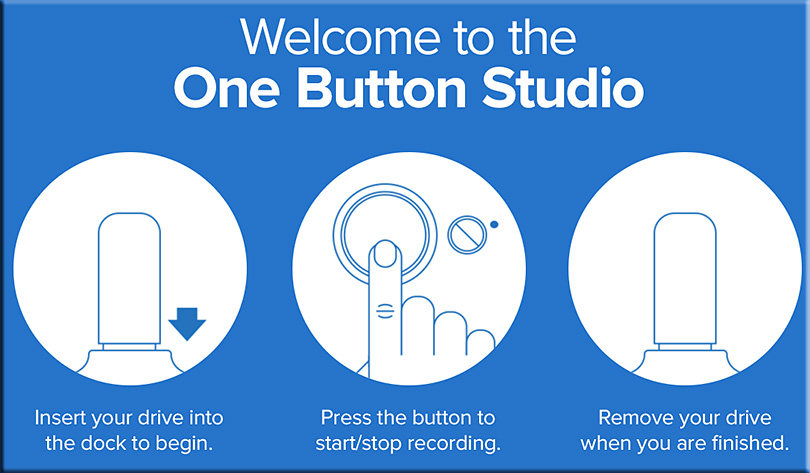
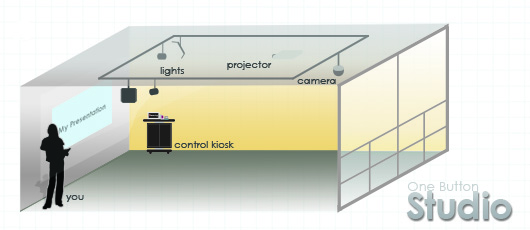
There should be entry level recording studios — such as the One Button Studio from Penn State University — in each K-12 school for teachers to record their presentations. At the end of each day, the teacher could put a checkbox next to what he/she was able to cover that day. (No rushing intended here — as education is enough of a run-away train often times!) That material would then be made visible/available on that day as links on an online-based calendar. Administrators should pay teachers extra money in the summer times to record these presentations.

Also, students could use these studios to practice their presentation and communication skills. The process is quick and easy:


I’d like to see an option — ideally via a brief voice-driven Q&A at the start of each session — that would ask the person where they wanted to put the recording when it was done: To a thumb drive, to a previously assigned storage area out on the cloud/Internet, or to both destinations?

Providing automatically generated close captioning would be a great feature here as well, especially for English as a Second Language (ESL) students.


From DSC:
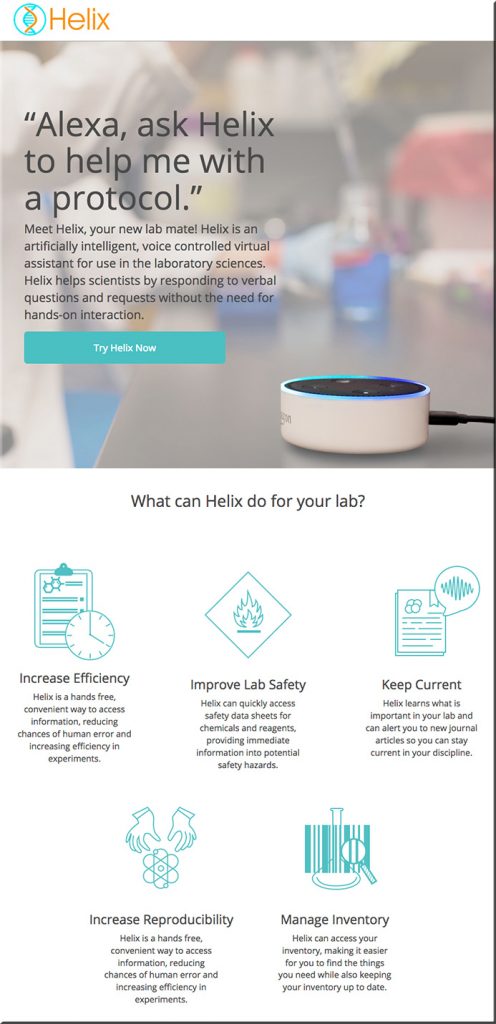
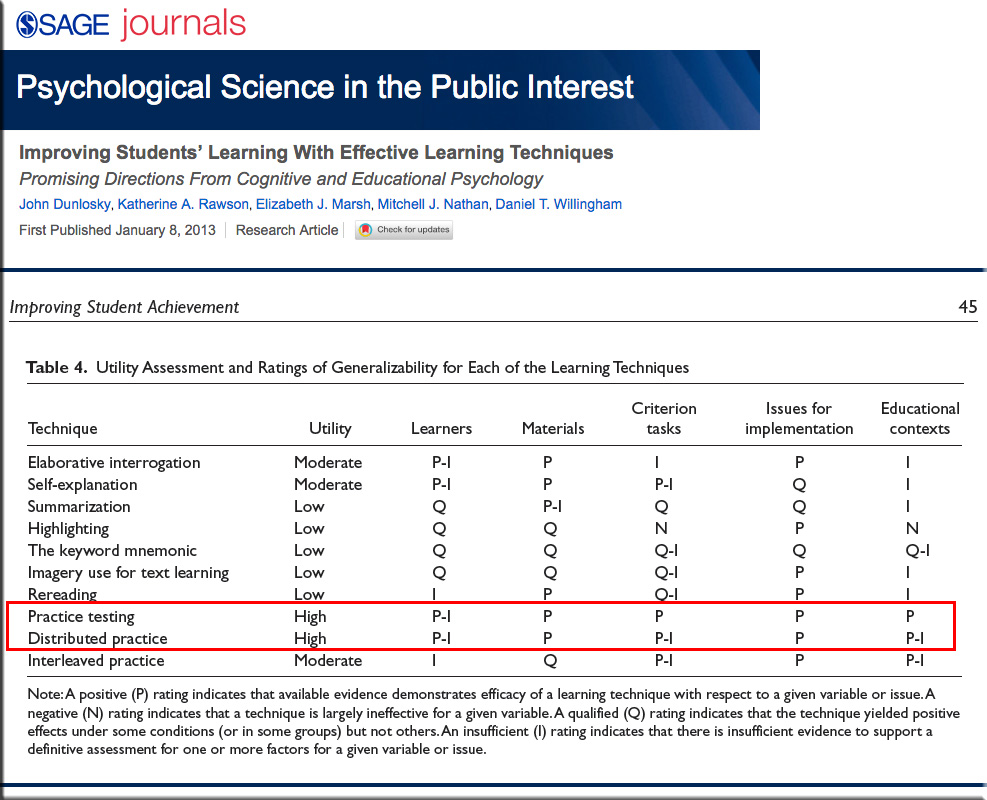
After seeing the article entitled, “Scientists Are Turning Alexa into an Automated Lab Helper,” I began to wonder…might Alexa be a tool to periodically schedule & provide practice tests & distributed practice on content? In the future, will there be “learning bots” that a learner can employ to do such self-testing and/or distributed practice?


From page 45 of the PDF available here:


Might Alexa be a tool to periodically schedule/provide practice tests & distributed practice on content?


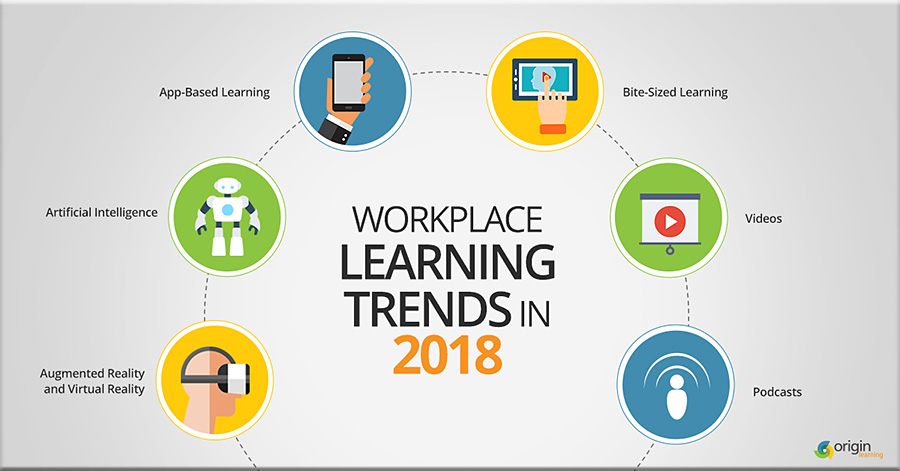
Workplace learning trends 2018 — from elearninglearning.com

Excerpt:

The beginning of a year is a great time to take stock of the year gone by and plan for the year ahead. In this blog post, we will have a quick glimpse of what we believe would be some of the key trends in workplace learning this year.


Also see:

Learning Experience Design Trends For 2018 — from elearninglearning.com. & theelearningcoach.com by
8 Ways Things are Changing for Practitioners

Here are the trends I’ve been seeing, reading and hearing about.

  1. Integrating Learning with Work
  2. From Instructional Designer to Learning Experience Designer
  3. ADDIE Who?
  4. Embracing Design Thinking
  5. Increased Awareness of Universal Design
  6. Working Out Loud Circles
  7. Seeing the Value in Metrics
  8. Openness to All Types of Learning Experiences


eLearning: Predictions for 2018 — from news.elearninginside.com by Cait Etherington

Excerpts:

The educational technology sector grew substantially in 2017 and all signs point to even greater growth in 2018. Over the past year, the sector was buoyed by several key factors, including a growing recognition that as big data restructures work at an unprecedented pace, there is an urgent need to rethink how education is delivered. In fact, there is now growing evidence that colleges and universities, especially if they continue to operate as they have in the past, will simply not be able to produce the workers needed to fill tomorrow’s jobs. Ed tech, with its capacity to make education more affordable, flexible, and relevant, is increasingly being embraced as the answer to the Fourth Industrial Revolution’s growing talent pipeline challenges.

…

  • K-12 virtual schools will become a preferred choice
  • Voice-activation will transform the Learning Management System (LMS) sector
  • Data will drive learning
  • Higher ed will increase online course and program offerings


12 tech trends that will define 2018 — from businessinsider.com by Chris Weller

Excerpts:

No one can predict how the future will shake out, but we can make some educated guesses.

Global design and strategy firm frog has shared with Business Insider its forecasts for the technologies that will define the upcoming year. Last year, the firm correctly predicted that buildings would harness the power of nature and that businesses would continue using artificially-intelligent bots to run efficiently.

Get ready to step into the future.

  • Artificial intelligence will inspire how products are designed
  • Other companies will join Google in the ‘Algorithm Hall of Fame’
  • Virtual and augmented reality will become communal experiences
  • Democracy will cozy up to the blockchain
  • Augmented reality will invite questions about intellectual property
  • Consumer tech will feel even friendlier
  • Tech will become inclusive for all
  • Anonymous data will make life smarter but still private
  • Ultra-tiny robots will replace medicine for certain patients
  • The way we get around will fundamentally transform
  • Businesses will use data and machine learning to cater to customers
  • Social media will take on more corporate responsibility


How AI-powered enterprise chatbot platforms are transforming the future of work — from chatbotsmagazine.com by Gina Shaw

Excerpts:

WHAT IS AN ENTERPRISE CHATBOT PLATFORM?
To sum it up in a few words, a chatbot platform is a toolset which is used to build and deploy chatbots. Every organization has its own set of unique challenges that can be overcome by convenient automation provided by chatbots. After establishing a clear-cut chatbot strategy, enterprises can use a bot builder platform to build, train and manage customized bots. Before the advent of chatbot platforms, building a bot was a strenuous task and required sophisticated toolsets and advanced coding knowledge. However with time, several bot building platforms flooded the chatbot market and led to the creation of safe AI bots which need minimum deployment time and almost zero coding knowledge. Enterprise chatbot platforms also allow IT departments to have complete control and access to monitoring bots.


From DSC:
It is with some hesitation that I post this article. Why? Because:

  1. I started out my career in a customer service related position at Baxter Healthcare, and it was one of the most important jobs that I’ve had because it taught me the value of a customer. Ever since then, I have treated everyone as my customer — whether they be internal or external to the organization that I was working for.
  2. Then, there’s the idea of calling a Voice Response Unit (VRU) — which sometimes works well and sometimes I can’t stand it. There are times when I/we simply want to speak to a fellow human being.

So it is with some hesitation that I post this article. But I do so because it is yet another example of:

  • The increased usage of algorithms, software, bots, personal assistants, AI, etc. to obtain answers and information
  • The changing skillset employees will need and job seekers may want to develop (if such things are interesting to them)
  • The massive changes heading our way


Want to learn a new language? With this AR app, just point & tap — from fastcodesign.com by Mark Wilson
A new demo shows how augmented reality could redefine apps as we know them.

Excerpt:

There’s a new app gold rush. After Facebook and Apple both released augmented reality development kits in recent months, developers are demonstrating just what they can do with these new technologies. It’s a race to invent the future first.

To get a taste of how quickly and dramatically our smartphone apps are about to change, just take a look at this little demo by front end engineer Frances Ng, featured on Prosthetic Knowledge. Just by aiming her iPhone at various objects and tapping, she can both identify items like lamps and laptops, and translate their names to a number of different languages. Bye bye, multilingual dictionaries and Google translate. Hello, “what the heck is the Korean word for that?”


Also see:

Apple ARKit & Machine Learning Come Together Making Smarter Augmented Reality — from next.reality.news by Jason Odom

Excerpt:

The world is a massive place, especially when you consider the field of view of your smartglasses or mobile device. To fulfill the potential promise of augmented reality, we must find a way to fill that view with useful and contextual information. Of course, the job of creating contextual, valuable information, to fill the massive space that is the planet earth, is a daunting task to take on. Machine learning seems to be one solution many are moving toward.

Tokyo, Japan based web developer, Frances Ng released a video on Twitter showing off her first experiments with Apple’s ARKit and CoreML, Apple’s machine learning system. As you can see in the gifs below, her mobile device is being used to recognize a few objects around her room, and then display the name of the identified objects.


Chatbot lawyer, which contested £7.2M in parking tickets, now offers legal help for 1,000+ topics — from arstechnica.co.uk by Sebastian Anthony
DoNotPay has expanded to cover the UK and all 50 US states. Free legal help for everyone!

Excerpt:

In total, DoNotPay now has over 1,000 separate chatbots that generate formal-sounding documents for a range of basic legal issues, such as seeking remuneration for a delayed flight or train, reporting discrimination, or asking for maternity leave. If you divide that by 51 (US and UK) you get a rough idea of how many different topics are covered. Each bot had to be hand-crafted by the British creator Joshua Browder, with the assistance of part-time and volunteer lawyers to ensure that the the documents are actually fit for purpose.


British student’s free robot lawyer can fight speeding tickets and rogue landlords — from telegraph.co.uk by Cara McGoogan

Excerpt:

A free “robot lawyer” that has overturned thousands of parking tickets in the UK can now fight rogue landlords, speeding tickets and harassment at work.

Joshua Browder, the 20-year-old British student who created the aide, has upgraded the robot’s abilities so it can fight legal disputes in 1,000 different areas. These include fighting landlords over security deposits and house repairs, and helping people report fraud to their credit card agency.
…
To get robot advice, users type their problem into the DoNotPay site and it directs them to a chat bot that can solve their particular legal issue. It can draft letters and offer advice on problems from credit card fraud to airline compensation.


Free robot lawyer helps low-income people tackle more than 1,000 legal issues — from mashable.com by Katie Dupere

Excerpt:

Shady businesses, you’re on notice. This robot lawyer is coming after you if you play dirty.

Noted legal aid chatbot DoNotPay just announced a massive expansion, which will help users tackle issues in 1,000 legal areas entirely for free. The new features, which launched on Wednesday, cover consumer and workplace rights, and will be available in all 50 states and the UK.

While the bot will still help drivers contest parking tickets and refugees apply for asylum, the service will now also help those who want to report harassment in the workplace or who simply want a refund on a busted toaster.


From DSC:
Whereas this type of bot is meant for external communications/assistance, we should also watch for Work Bots within an organization — dishing up real-time answers to questions that employees have about a variety of topics. I think that’s the next generation of technical communications, technical/help desk support, as well as training and development groups (at least some of the staff in those departments will likely be building these types of bots).


Addendum on 7/15/17:

LawGeex: Contract Review Automation

Excerpt (emphasis DSC):

The LawGeex Contract Review Automation enables anyone in your business to easily submit and receive approvals on contracts without waiting for the legal team. Our A.I. technology reads, reviews and understands your contracts, approving those that meet your legal team’s pre-defined criteria, and escalating those that don’t. Legal can maintain control and mitigate risk while giving other departments the freedom they need to get business moving.


What a future, powerful, global learning platform will look & act like [Christian]


Learning from the Living [Class] Room:
A vision for a global, powerful, next generation learning platform

By Daniel Christian

NOTE: Having recently lost my Senior Instructional Designer position due to a staff reduction program, I am looking to help build such a platform as this. So if you are working on such a platform or know of someone who is, please let me know: danielchristian55@gmail.com.

I want to help people reinvent themselves quickly, efficiently, and cost-effectively — while providing more choice, more control to lifelong learners. This will become critically important as artificial intelligence, robotics, algorithms, and automation continue to impact the workplace.


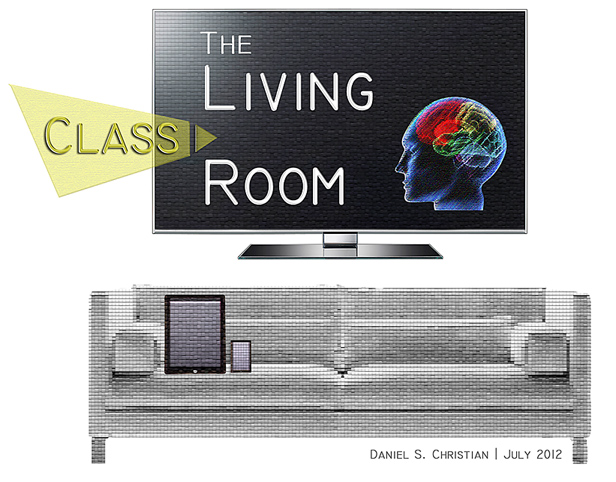
The Living [Class] Room -- by Daniel Christian -- July 2012 -- a second device used in conjunction with a Smart/Connected TV


Learning from the Living [Class] Room:
A global, powerful, next generation learning platform


What does the vision entail?

  • A new, global, collaborative learning platform that offers more choice, more control to learners of all ages – 24×7 – and could become the organization that futurist Thomas Frey discusses here with Business Insider:

“I’ve been predicting that by 2030 the largest company on the internet is going to be an education-based company that we haven’t heard of yet,” Frey, the senior futurist at the DaVinci Institute think tank, tells Business Insider.

  • A learner-centered platform that is enabled by – and reliant upon – human beings but is backed up by a powerful suite of technologies that work together in order to help people reinvent themselves quickly, conveniently, and extremely cost-effectively
  • An AI-backed system of analyzing employment trends and opportunities will highlight those courses and “streams of content” that will help someone obtain the most in-demand skills
  • A system that tracks learning and, via Blockchain-based technologies, feeds all completed learning modules/courses into learners’ web-based learner profiles
  • A learning platform that provides customized, personalized recommendation lists – based upon the learner’s goals
  • A platform that delivers customized, personalized learning within a self-directed course (meant for those content creators who want to deliver more sophisticated courses/modules while moving people through the relevant Zones of Proximal Development)
  • Notifications and/or inspirational quotes will be available upon request to help provide motivation, encouragement, and accountability – helping learners establish habits of continual, lifelong-based learning
  • (Potentially) An online-based marketplace, matching learners with teachers, professors, and other such Subject Matter Experts (SMEs)
  • (Potentially) Direct access to popular job search sites
  • (Potentially) Direct access to resources that describe what other companies do/provide and descriptions of any particular company’s culture (as described by current and former employees and freelancers)

Further details:
While basic courses will be accessible via mobile devices, the optimal learning experience will leverage two or more displays/devices. So while smaller smartphones, laptops, and/or desktop workstations will be used to communicate synchronously or asynchronously with other learners, the larger displays will deliver an excellent learning environment for times when there is:

  • A Subject Matter Expert (SME) giving a talk or making a presentation on any given topic
  • A need to display multiple things going on at once, such as:
  • The SME(s)
  • An application or multiple applications that the SME(s) are using
  • Content/resources that learners are submitting in real-time (think Bluescape, T1V, Prysm, other)
  • The ability to annotate on top of the application(s) and point to things w/in the app(s)
  • Media being used to support the presentation such as pictures, graphics, graphs, videos, simulations, animations, audio, links to other resources, GPS coordinates for an app such as Google Earth, other
  • Other attendees (think Google Hangouts, Skype, Polycom, or other videoconferencing tools)
  • An (optional) representation of the Personal Assistant (such as today’s Alexa, Siri, M, Google Assistant, etc.) that’s being employed via the use of Artificial Intelligence (AI)

This new learning platform will also feature:

  • Voice-based commands to drive the system (via Natural Language Processing (NLP))
  • Language translation (using techs similar to what’s being used in Translate One2One, an earpiece powered by IBM Watson)
  • Speech-to-text capabilities for use w/ chatbots, messaging, inserting discussion board postings
  • Text-to-speech capabilities as an assistive technology and also for everyone to be able to be mobile while listening to what’s been typed
  • Chatbots
    • For learning how to use the system
    • For asking questions of – and addressing any issues with – the organization owning the system (credentials, payments, obtaining technical support, etc.)
    • For asking questions within a course
  • As many profiles as needed per household
  • (Optional) Machine-to-machine-based communications to automatically launch the correct profile when the system is initiated (from one’s smartphone, laptop, workstation, and/or tablet to a receiver for the system)
  • (Optional) Voice recognition to efficiently launch the desired profile
  • (Optional) Facial recognition to efficiently launch the desired profile
  • (Optional) Upon system launch, to immediately return to where the learner previously left off
  • The capability of the webcam to recognize objects and bring up relevant resources for that object
  • A built in RSS feed aggregator – or a similar technology – to enable learners to tap into the relevant “streams of content” that are constantly flowing by them
  • Social media dashboards/portals – providing quick access to multiple sources of content and whereby learners can contribute their own “streams of content”

In the future, new forms of Human Computer Interaction (HCI) such as Augmented Reality (AR), Virtual Reality (VR), and Mixed Reality (MR) will be integrated into this new learning environment – providing entirely new means of collaborating with one another.

Likely players:

  • Amazon – personal assistance via Alexa
  • Apple – personal assistance via Siri
  • Google – personal assistance via Google Assistant; language translation
  • Facebook — personal assistance via M
  • Microsoft – personal assistance via Cortana; language translation
  • IBM Watson – cognitive computing; language translation
  • Polycom – videoconferencing
  • Blackboard – videoconferencing, application sharing, chat, interactive whiteboard
  • T1V, Prsym, and/or Bluescape – submitting content to a digital canvas/workspace
  • Samsung, Sharp, LCD, and others – for large displays with integrated microphones, speakers, webcams, etc.
  • Feedly – RSS aggregator
  • _________ – for providing backchannels
  • _________ – for tools to create videocasts and interactive videos
  • _________ – for blogs, wikis, podcasts, journals
  • _________ – for quizzes/assessments
  • _________ – for discussion boards/forums
  • _________ – for creating AR, MR, and/or VR-based content


Some applications of VR from vrxone.com

Education
Virtual Reality to teach the skills needed for the future by enabling learners to explore, play, work as a team, compete, and be rewarded for their achievements through interactive lessons.

  • Virtual Field Trips
  • Immersive VRXOne Lab
  • VR for Arts & Design
  • Safe Laboratory Practicals through VR
  • Game based Learning
  • Geography, Marine Life VR Exploration
  • Astronomy & Space Research through VR
  • Architecture & Interiors
  • VR for Sports & Games
  • VR to improve Public Speech

Corporate Training
Virtual reality (VR) enhances traditional training methods through a new, practical and interactive approach. Improve Knowledge Retention by doing things in an immersive Environment.

* VR based Induction/ Onboarding
* Improving Health & Safety through VR
* Increase Knowledge Retention
* Hands-on VR Training Simulations
* Customer interactivity through VR
* VR to improve Marketing Strategy
* Special purpose training in VR
* High Risk Environment VR Simulation
* Critical National Infrastructure brief on VR
* VR for Business Planning

Healthcare
Virtual Reality has proven great results with 34% of Physical Health and 47% of Mental Health Improvements through various applications and learning programs.

* 360° Live streaming of Surgical Procedure
* Medical & Nursing Simulation
* Emergency Drill Scenario
* VR for pain & anxiety relief
* Assistive Technology for Special Education.
* Interactive Anatomy Lessons
* Yoga, Meditation and Recreational Therapy
* Virtual Medical Consultation
* Motivational Therapy for Aged Citizens
* VR for Medical Tourism


© 2025 | Daniel Christian