Disabled Americans Reap Remote-Work Reward in Record Employment — from bloomberg.com by Molly Smith
Adults with disabilities have rarely been employed in such high numbers

Excerpt:

Anardi is part of the second-largest minority group in the US — adults with disabilities. The 42.5 million disabled Americans make up 13% of the civilian population, compared with the nearly 19% that is Hispanic and the almost 12% that’s African American, according to 2021 Census data released on Sept. 15. After suffering some of the worst job losses during the initial phase of the pandemic, people with disabilities are now benefiting from the remote-work trend it triggered. Advocates hope they will continue to reap such rewards, even as companies demand that employees return to the office.


4 Ways That Web Developers Can Learn More About Accessibility — from boia.org

Excerpt:

As a web developer, you know the importance of writing clean code — and limiting trouble tickets as much as possible, particularly in the first stages of product development.

An inclusive approach can help you meet those goals. When you consider the needs, preferences, and expectations of users with disabilities, you can serve your content to the broadest possible group of people. Accessible design can also reduce the time you spend on remediations and help you build components that work better for all users (including those who don’t live with disabilities).

By building your knowledge of digital accessibility, you can start enjoying the benefits. Here’s how to get started.


Instructional Audio: 4 Benefits to Improving It — from techlearning.com by Erik Ofgang
Ensuring every classroom has instructional audio capabilities helps all students hear what the teacher is saying.

Excerpt (emphasis DSC):

Sound is a key component of education. If students can’t hear their instructor well, they’re clearly not going to focus or learn as much. That’s why more and more schools are investing in instructional audio systems, which are high-tech public address systems designed with classrooms, teachers, and all students in mind.

Terri Meier is director of education technology for Rio Rancho Public Schools in New Mexico where all new classrooms are being built with voice amplification systems in place and many existing classrooms are being retrofitted with similar systems. These systems are key for schools in their accessibility efforts and in providing quality instruction overall, she says.

And speaking of accessibility-related postings/items, also see:


ADA Accessibility Lawsuit Tracker: Final Numbers for August 2022 — from info.usablenet.com

Also see:

Download our 2022 Mid-Year Report on Digital Accessibility Lawsuits — from info.usablenet.com
Our Digital Accessibility Report highlights the newest trends in digital accessibility lawsuits.


Four items regarding accessibility

DOJ Announces Title II Web Accessibility Regulations Are Coming: What’s It Mean? — from boia.org

Excerpt:

The Department of Justice (DOJ) announced at the end of July that it plans to amend Title II of the Americans with Disabilities Act (ADA) with new website accessibility regulations. The public may catch a glimpse into clarified standards in April 2023 if the DOJ publishes its Notice of Proposed Rulemaking (NPRM) according to the current timetable.

How does this impact entities covered by Title II and website accessibility more broadly? Let’s break it down.

After years of regulatory inaction — or more accurately, retraction from the previous administration — the calls for technical accessibility standards under the ADA may finally be answered for at least a subset of websites.

Why Do I Need Both Transcripts And Captions for Accessibility? — from boia.org

Excerpt:

You’re publishing a video, and you’ve already written a detailed transcript. Do you really need to add closed captions?

In short, yes. The goal of digital accessibility is to provide the best possible experience for as many users as possible — not to accommodate a single group of people with disabilities.

Best practices for structuring and designing accessible e-mails — from blog.usablenet.com

Excerpt:

We’ve heard that crafting the right e-mail means sending the right message to the right person at the right time, but what if the e-mail is inaccessible to the user? We have broken down the best accessibility practices into 2 categories, e-mail structure and e-mail design, to help you create emails that all users will enjoy.

Subheadings and Accessibility: What is a “Visual Heading?”  — from boia.org

Excerpt:

Accurate subheadings make your content much more useful for everyone — but when you’re creating your website, you’ll need to make sure that your headings are both visual and programmatically determinable.

Fortunately, that’s not as complicated as you might think. A visual heading is exactly what it sounds like: A subheading that can be identified through visual presentation alone. Subheadings are programmatically determinable when software (such as web browsers and screen readers) can identify them.

Below, we’ll discuss how to create subheadings that fulfill the requirements of the Web Content Accessibility Guidelines (WCAG), the international standards for digital accessibility.


In Fight Against Ableism, Disabled Students Build Centers of Their Own — from chronicle.com by Adrienne Lu

Excerpt:

Thanks to student advocates, including Sullivan and Lockwood, the university recently became the latest in a growing number with disability cultural centers, which aim to shine light on the perspectives and experiences of disabled people, foster a sense of community, and promote activism and disability justice. Altogether, at least 12 disability cultural centers now exist nationwide; in addition, students are working to create new centers on about a dozen other campuses.


7 Surprising Ways ADHD Shows Up in the Classroom — from additudemag.com by Mark Bertin, M.D., Beverley Holden Johns, Kathy Kuhl
ADHD in the classroom is easy to mistake for carelessness, defiance, laziness, or a learning difference. Here are the 7 ADD symptoms that educators seldom recognize at school — and solutions for each.

Excerpt:

ADHD sometimes manifests in obvious ways — like when a second grader blurts out an answer (again) or when a high school student forgets her completed assignment at home (again). Just as often, though, signs of ADHD in the classroom are more subtle and easily overlooked because they don’t align with stereotypes. Here are seven less-recognized ways ADHD symptoms show up at school, and productive ways to address each one.


Also relevant/see:


Optimizing Your Website for Screen Readers and Other Accessibility Tools — from hongkiat.com by Jori Hamilton

Excerpt:

But what is web accessibility, and how, exactly, can you prioritize this on your website?

In this article, we’ll take a closer look at what web accessibility means and tips for how to design a website that is more accessible to all users.


Best Sites and Apps for Digital Storytelling — from techlearning.com by Diana Restifo
Digital storytelling can help boost communication and presentation skills

Excerpt:

…storytelling is a great way for kids to learn to love reading and writing. But almost any school subject can be considered through a dramatic frame, from history to geography to science. Even math can be taught through narrative (word problems, anyone?). Most importantly, storytelling gives kids the opportunity to be inventive with language, graphics, and design, and to share their creations with others.

The following sites and apps for storytelling range from basic to advanced. Many are designed for educators or include guides for use in education. And while most are paid products, the prices are generally reasonable and nearly every platform offers a free trial or free basic account.

6 best classroom noise meters for teachers — from educatorstechnology.com by Med Kharbach

Excerpt:

One of the effective ways to monitor and reduce noise levels in classrooms is by making noise visible. Enabling students to visualize their noise raises awareness to their sound levels and makes them noise conscious. There are several noise meter tools and apps to use in your classroom to bring down students noise and therefore help in creating optimal learning experiences. Below is a collection of some of the best noise meters for classroom use.  They are simple, easy to use, and cost-effective.

Digital age classroom projects — from thetechedvocate.org by Matthew Lynch

Excerpt:

Classroom learning today has left the era of flipping through textbooks trying to be on the same page with the teacher, though not for every class lesson. Educators today are seizing the opportunities of digital devices and media to expand learning opportunities beyond pencil and paper homework. Also, assessment is not just a multiple-choice test.

Consider trying one of these projects:

The Education of Incarcerated Youth with Disabilities Ep.14 — from edcircuit.com

Excerpt:

The School Justice Project (SJP) champions an extremely vulnerable population: incarcerated youth with disabilities. The SJP’s mission is to ensure every learner, in or out of prison facilities, receives the education they were promised and deserve. Their current class action lawsuit against the DC prison system underscores the impact of their efforts. Featured guest, Claire Blumenson, pulls no punches as she forces us to look, and not to look away, in this pivotal moment.

We are educators, parents, siblings, and friends who aren’t satisfied with the quality of the content our students are exposed to. We know they deserve better, and are committed to bringing authentic, engaging, diverse and accessible content to all learners.
Business Leaders Say Computer Science Needs to Be A Core Subject — from edsurge.com by Daniel Mollenkamp

Excerpt:

[On July 12], a collection of more than 500 prominent business, education and nonprofit leaders called on states to update their K-12 curriculum to make computer science a core subject.

In a letter sent to governors from all fifty states, they write, “computer science provides an essential foundation—not only for careers in technology, but for every career in today’s world,” and call upon state leaders to update curriculum to ensure that all students have an opportunity to learn computer science in school.

What is Microsoft Sway and How Can it Be Used to Teach? Tips & Tricks — from techlearning.com by Luke Edwards
Microsoft Sway is a presentation tool that works really well for teaching

Excerpt:

Microsoft Sway is the company’s alternative to PowerPoint as a presentation tool that embraces collaborative working. As such, this is a powerful system for teachers and students to use in the classroom and beyond.

The idea behind Sway is to offer a super simple setup that allows anybody to create presentation slideshows. This makes it good for both younger students and teachers for in-class or online-based presenting.


For a somewhat related item, see:

Exploring some different instructional strategies and discovering how to incorporate them into the classroom process can rekindle a love affair with teaching. Finding the right instructional strategy to fit your classroom can make a world of difference to your students by allowing them to make meaningful connections with what they are learning. Take a look at a few different strategies, and see which one might suit your students this academic year.


GAO: Accommodations pose challenges to testing companies, test-takers — from k12dive.com by Kara Arundel
The pandemic made it more difficult to provide accommodations for higher ed admission tests, educational testing companies told the government agency.

Excerpt:

Individuals with disabilities and testing companies that administer assessments for higher education admission report challenges regarding testing accommodations, ranging from problems in providing documentation to concerns about maintaining test integrity, according to research by the Government Accountability Office.

Some individuals had difficulty providing adequate documentation to justify their accommodations, according to representatives from six disability advocacy organizations. Officials from five testing companies described hardships in reviewing and granting accommodation requests.


‘Accessibility is a journey’: A DEI expert on disability rights — from hrdive.com by Caroline Colvin
Employers can wait for a worker to request reasonable accommodation under the ADA, but Kelly Hermann asks: Why not be accommodating from the start?

Excerpt:

Often, employers jump to the obstacles that exist in physical spaces: nonexistent ramps for wheelchairs, manual doors that lack motion sensors, and the like. But the digital world presents challenges as well. Hermann and the U Phoenix accessibility team likes to “demystify” disability for campus members seeking their counsel, she said.

“Are you making those links descriptive and are you using keywords? Or are you just saying ‘click here’ and that’s your link?” Hermann asked. Like a sighted person, an individual with a disability can also scan a webpage for links with assistive technology, but this happens audibly, Hermann said, “They tell that tool to skip by link and this is what they hear: ‘Click here.’ ‘Click here.’ ‘Click here.’ ‘Click here.’ With four links on the page all hyperlinked with ‘click here,’ [they] don’t know where [they’re] going.”


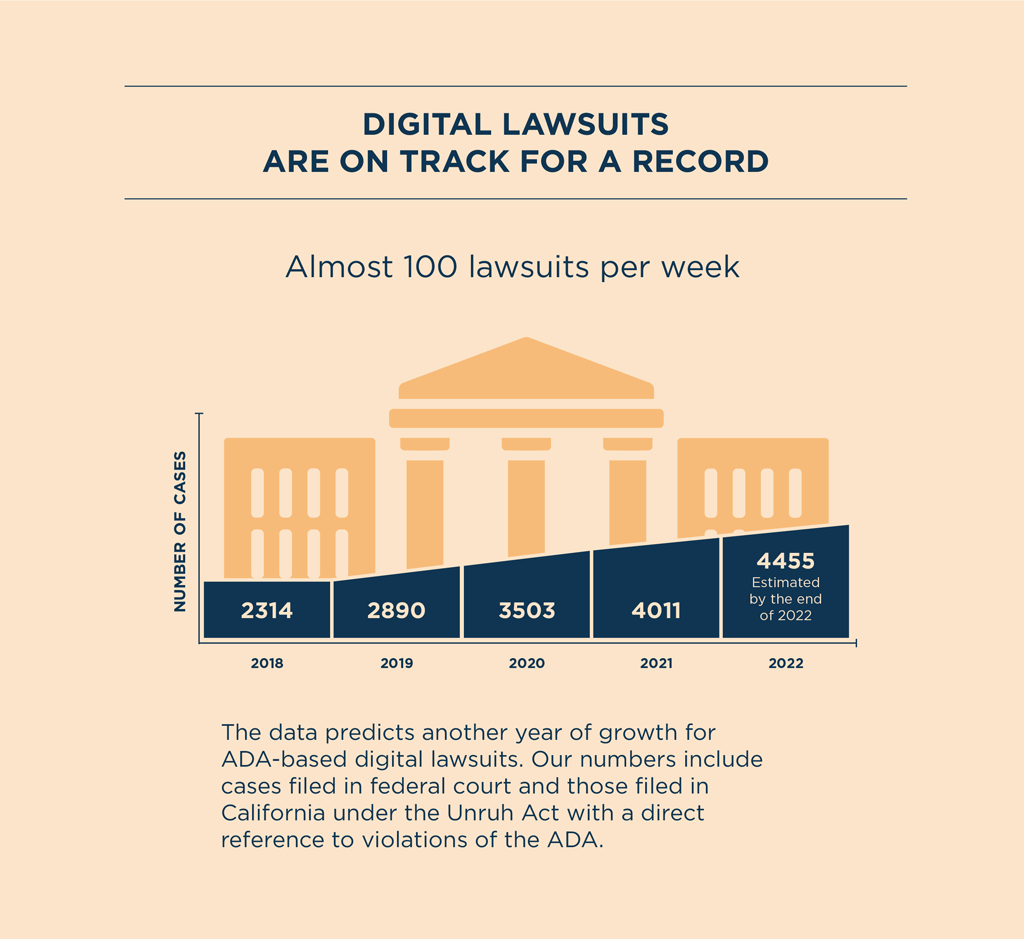
6 ADA accessibility trends revealed in our mid-year 2022 report — from blog.usablenet.com by Jason Taylor

Excerpt:

We just published our mid-year ADA web and App report created by the UsableNet research team reviewing all lawsuits filed in federal courts under the ADA and California state court under Unruh. We review the cases to identify where a digital property, including websites, mobile apps, and video, is the subject of the claim. Our bi-annual reports let UsableNet inform our clients and provide them with the most up-to-date advice for planning their digital accessibility initiatives.

Here is my main take on some key numbers based on what we have seen in 2022 and what’s driving those numbers. 


 WEB ACCESSIBILITY LAWSUIT NUMBERS ARE HIGH AND SET TO ONLY GET HIGHER.


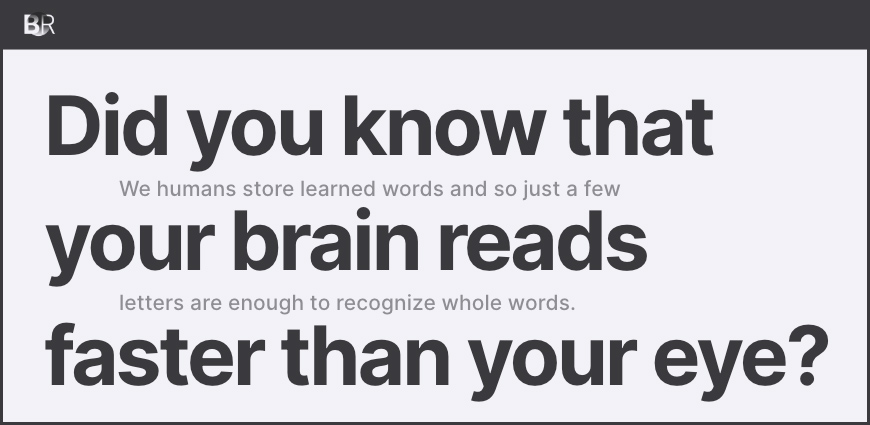
Bionic Reading

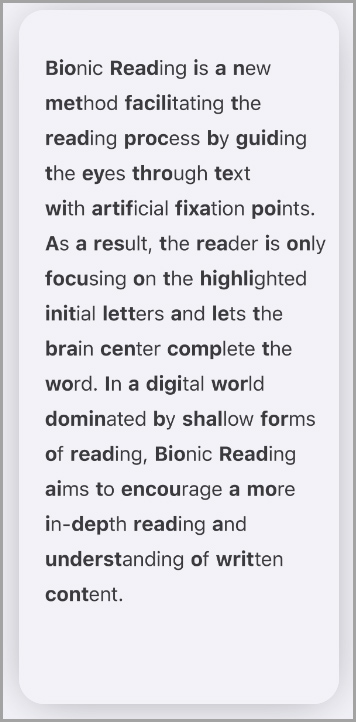
Bionic Reading


From DSC:
Thanks to my good friend Chris for this resource. By the way, this Chrome Extension, Converter, and API remind me a bit of Microsoft’s Immersive Reader.

Also related, see:


4 Trends to Watch in Education — from caitlintucker.com by Caitlin Tucker

Excerpt:

Last month, I delivered a keynote on the future of education. It’s a vast topic, so I focused on four trends likely to impact our work as educators.

  1. Continued growth in blended and online learning.
  2. Districts confront record-high teacher turnover.
  3. Students continue to struggle with trauma and learning loss.
  4. Increased concerns about equity and access.

As school leaders prepare for the 2022-2023 school year, these four trends can help them identify district priorities and create a strategic plan for the year ahead.

Also see:

What is “unschooling”? My Reflection Matters believes “it takes a village” — from ctpublic.org (Connecticut) by Katie Pellico and Luch Nalpathanchil

Excerpt:

Families are asked to log their “exit” from public school with the state agency. There were 550 exits reported in 2019, and that number rose to “around 3,500 in 2020.” By 2021, that number was at 2,300, though the Department of Education notes “students who have not returned to school by October 1 could still have returned to school any day after that for the remainder of the year.”

14 QUICK WAYS TO TECH-UP YOUR CLASSROOM — from thetechedvocate.org by Matthew Lynch

Excerpt:

With technology becoming a more significant part of the classroom, you might feel that incorporating tech-enabled tools into your classroom is a difficult job, but it doesn’t have to be. There are plenty of useful and fun apps out there that can help you bring technology into your classroom in a way that’s both entertaining and engaging.

Young learners are always surrounded by and exposed to technology, and it’s something that they have a natural affinity for. That’s why technology can be a useful educational tool to boost learner engagement and content retention.

Here are 14 easy ways that you can incorporate tech into your class…

5 Tips for Tackling Classroom Redesigns — from techlearning.com by Ellen Ullman
Creating learning spaces that are accessible for students with specific needs almost always leads to positive outcomes for all learners


Small Business Website Accessibility Tips — from boia.org

Excerpt:

Many small business owners think of digital accessibility as a series of technical, complicated rules. If you have limited resources for web design and development, accessibility can seem like an expensive extra — but fortunately, that’s not the case.

Website accessibility is achievable on any budget, and it’s a savvy investment regardless of the size of your business. Even if you can’t afford professional testing and remediation, you can take immediate steps to remove barriers that affect people with disabilities. Here are a few tips for getting started.

Also relevant from boia.org, see:

One last accessibility-related item from equalentry.com:

 
© 2025 | Daniel Christian