Agents, robots, and us: Skill partnerships in the age of AI — from mckinsey.com by Lareina Yee, Anu Madgavkar, Sven Smit, Alexis Krivkovich, Michael Chui, María Jesús Ramírez, and Diego Castresana
AI is expanding the productivity frontier. Realizing its benefits requires new skills and rethinking how people work together with intelligent machines.

At a glance

  • Work in the future will be a partnership between people, agents, and robots—all powered by AI. …
  • Most human skills will endure, though they will be applied differently. …
  • Our new Skill Change Index shows which skills will be most and least exposed to automation in the next five years….
  • Demand for AI fluency—the ability to use and manage AI tools—has grown sevenfold in two years…
  • By 2030, about $2.9 trillion of economic value could be unlocked in the United States…

Also related/see:


State of AI: December 2025 newsletter — from nathanbenaich.substack.com by Nathan Benaich
What you’ve got to know in AI from the last 4 weeks.

Welcome to the latest issue of the State of AI, an editorialized newsletter that covers the key developments in AI policy, research, industry, and start-ups over the last month.


4 Simple & Easy Ways to Use AI to Differentiate Instruction — from mindfulaiedu.substack.com (Mindful AI for Education) by Dani Kachorsky, PhD
Designing for All Learners with AI and Universal Design Learning

So this year, I’ve been exploring new ways that AI can help support students with disabilities—students on IEPs, learning plans, or 504s—and, honestly, it’s changing the way I think about differentiation in general.

As a quick note, a lot of what I’m finding applies just as well to English language learners or really to any students. One of the big ideas behind Universal Design for Learning (UDL) is that accommodations and strategies designed for students with disabilities are often just good teaching practices. When we plan instruction that’s accessible to the widest possible range of learners, everyone benefits. For example, UDL encourages explaining things in multiple modes—written, visual, auditory, kinesthetic—because people access information differently. I hear students say they’re “visual learners,” but I think everyone is a visual learner, and an auditory learner, and a kinesthetic learner. The more ways we present information, the more likely it is to stick.

So, with that in mind, here are four ways I’ve been using AI to differentiate instruction for students with disabilities (and, really, everyone else too):


The Periodic Table of AI Tools In Education To Try Today — from ictevangelist.com by Mark Anderson

What I’ve tried to do is bring together genuinely useful AI tools that I know are already making a difference.

For colleagues wanting to explore further, I’m sharing the list exactly as it appears in the table, including website links, grouped by category below. Please do check it out, as along with links to all of the resources, I’ve also written a brief summary explaining what each of the different tools do and how they can help.


Seven Hard-Won Lessons from Building AI Learning Tools — from linkedin.com by Louise Worgan

Last week, I wrapped up Dr Philippa Hardman’s intensive bootcamp on AI in learning design. Four conversations, countless iterations, and more than a few humbling moments later – here’s what I am left thinking about.


Finally Catching Up to the New Models — from michellekassorla.substack.com by Michelle Kassorla
There are some amazing things happening out there!

An aside: Google is working on a new vision for textbooks that can be easily differentiated based on the beautiful success for NotebookLM. You can get on the waiting list for that tool by going to LearnYourWay.withgoogle.com.

Nano Banana Pro
Sticking with the Google tools for now, Nano Banana Pro (which you can use for free on Google’s AI Studio), is doing something that everyone has been waiting a long time for: it adds correct text to images.


Introducing AI assistants with memory — from perplexity.ai

The simple act of remembering is the crux of how we navigate the world: it shapes our experiences, informs our decisions, and helps us anticipate what comes next. For AI agents like Comet Assistant, that continuity leads to a more powerful, personalized experience.

Today we are announcing new personalization features to remember your preferences, interests, and conversations. Perplexity now synthesizes them automatically like memory, for valuable context on relevant tasks. Answers are smarter, faster, and more personalized, no matter how you work.

From DSC :
This should be important as we look at learning-related applications for AI.


For the last three days, my Substack has been in the top “Rising in Education” list. I realize this is based on a hugely flawed metric, but it still feels good. ?

– Michael G Wagner

Read on Substack


I’m a Professor. A.I. Has Changed My Classroom, but Not for the Worse. — from nytimes.com by Carlo Rotella [this should be a gifted article]
My students’ easy access to chatbots forced me to make humanities instruction even more human.


“Whither Rivers Flow” by Photographer Ximeng Tu — from booooooom.com by Ximeng Tu


Zaha Hadid Architects completes waterfront stadium and sports centre in Guangzhou — from dezeen.com by Amy Peacock


Three Years from GPT-3 to Gemini 3 — from oneusefulthing.org by Ethan Mollick
From chatbots to agents

Three years ago, we were impressed that a machine could write a poem about otters. Less than 1,000 days later, I am debating statistical methodology with an agent that built its own research environment. The era of the chatbot is turning into the era of the digital coworker. To be very clear, Gemini 3 isn’t perfect, and it still needs a manager who can guide and check it. But it suggests that “human in the loop” is evolving from “human who fixes AI mistakes” to “human who directs AI work.” And that may be the biggest change since the release of ChatGPT.


Results May Vary — from aiedusimplified.substack.com by Lance Eaton, PhD
On Custom Instructions with GenAI Tools….

I’m sharing today about custom instructions and my use of them across several AI tools (paid versions of ChatGPT, Gemini, and Claude). I want to highlight what I’m doing, how it’s going, and solicit from readers to share in the comments some of their custom instructions that they find helpful.

I’ve been in a few conversations lately that remind me that not everyone knows about them, even some of the seasoned folks around GenAI and how you might set them up to better support your work. And, of course, they are, like all things GenAI, highly imperfect!

I’ll include and discuss each one below, but if you want to keep abreast of my custom instructions, I’ll be placing them here as I adjust and update them so folks can see the changes over time.


Free Music Discovery Tools — from wondertools.substack.com by Jeremy Caplan and Chris Dalla Riva
Travel through time and around the world with sound

I love apps like Metronaut and Tomplay, which let me carry a collection of classical (sheet) music on my phone. They also provide piano or orchestral accompaniment for any violin piece I want to play.

Today’s post shares 10 other recommended tools for music lovers from my fellow writer and friend, Chris Dalla Riva, who writes Can’t Get Much Higher, a popular Substack focused on the intersection of music and data. I invited Chris to share with you his favorite resources for discovering, learning, and creating music.

Sections include:

  • Learn about Music
  • Discover New Music
  • Learn an Instrument
  • Tools for Artists
 

ElevenLabs just launched a voice marketplace — from elevenlabs.io; via theaivalley.com

Via the AI Valley:

Why does it matter?
AI voice cloning has already flooded the internet with unauthorized imitations, blurring legal and ethical lines. By offering a dynamic, rights-secured platform, ElevenLabs aims to legitimize the booming AI voice industry and enable transparent, collaborative commercialization of iconic IP.
.

ElevenLabs just launched a voice marketplace

ElevenLabs just launched a voice marketplace


[GIFTED ARTICLE] How people really use ChatGPT, according to 47,000 conversations shared online — from by Gerrit De Vynck and Jeremy B. Merrill
What do people ask the popular chatbot? We analyzed thousands of chats to identify common topics discussed by users and patterns in ChatGPT’s responses.

.
Data released by OpenAI in September from an internal study of queries sent to ChatGPT showed that most are for personal use, not work.

Emotional conversations were also common in the conversations analyzed by The Post, and users often shared highly personal details about their lives. In some chats, the AI tool could be seen adapting to match a user’s viewpoint, creating a kind of personalized echo chamber in which ChatGPT endorsed falsehoods and conspiracy theories.

Lee Rainie, director of the Imagining the Digital Future Center at Elon University, said his own research has suggested ChatGPT’s design encourages people to form emotional attachments with the chatbot. “The optimization and incentives towards intimacy are very clear,” he said. “ChatGPT is trained to further or deepen the relationship.”


Per The Rundown: OpenAI just shared its view on AI progress, predicting systems will soon become smart enough to make discoveries and calling for global coordination on safety, oversight, and resilience as the technology nears superintelligent territory.

The details:

  • OpenAI said current AI systems already outperform top humans in complex intellectual tasks and are “80% of the way to an AI researcher.”
  • The company expects AI will make small scientific discoveries by 2026 and more significant breakthroughs by 2028, as intelligence costs fall 40x per year.
  • For superintelligent AI, OAI said work with governments and safety agencies will be essential to mitigate risks like bioterrorism or runaway self-improvement.
  • It also called for safety standards among top labs, a resilience ecosystem like cybersecurity, and ongoing tracking of AI’s real impact to inform public policy.

Why it matters: While the timeline remains unclear, OAI’s message shows that the world should start bracing for superintelligent AI with coordinated safety. The company is betting that collective safeguards will be the only way to manage risk from the next era of intelligence, which may diffuse in ways humanity has never seen before.

Which linked to:

  • AI progress and recommendations — from openai.com
    AI is unlocking new knowledge and capabilities. Our responsibility is to guide that power toward broad, lasting benefit.

From DSC:
I hate to say this, but it seems like there is growing concern amongst those who have pushed very hard to release as much AI as possible — they are NOW worried. They NOW step back and see that there are many reasons to worry about how these technologies can be negatively used.

Where was this level of concern before (while they were racing ahead at 180 mph)? Surely, numerous and knowledgeable people inside those organizations warned them about the destructive/downside of these technologies. But their warnings were pretty much blown off (at least from my limited perspective). 


The state of AI in 2025: Agents, innovation, and transformation — from mckinsey.com

Key findings

  1. Most organizations are still in the experimentation or piloting phase: Nearly two-thirds of respondents say their organizations have not yet begun scaling AI across the enterprise.
  2. High curiosity in AI agents: Sixty-two percent of survey respondents say their organizations are at least experimenting with AI agents.
  3. Positive leading indicators on impact of AI: Respondents report use-case-level cost and revenue benefits, and 64 percent say that AI is enabling their innovation. However, just 39 percent report EBIT impact at the enterprise level.
  4. High performers use AI to drive growth, innovation, and cost: Eighty percent of respondents say their companies set efficiency as an objective of their AI initiatives, but the companies seeing the most value from AI often set growth or innovation as additional objectives.
  5. Redesigning workflows is a key success factor: Half of those AI high performers intend to use AI to transform their businesses, and most are redesigning workflows.
  6. Differing perspectives on employment impact: Respondents vary in their expectations of AI’s impact on the overall workforce size of their organizations in the coming year: 32 percent expect decreases, 43 percent no change, and 13 percent increases.

Marble: A Multimodal World Model — from worldlabs.ai

Spatial intelligence is the next frontier in AI, demanding powerful world models to realize its full potential. World models should reconstruct, generate, and simulate 3D worlds; and allow both humans and agents to interact with them. Spatially intelligent world models will transform a wide variety of industries over the coming years.

Two months ago we shared a preview of Marble, our World Model that creates 3D worlds from image or text prompts. Since then, Marble has been available to an early set of beta users to create 3D worlds for themselves.

Today we are making Marble, a first-in-class generative multimodal world model, generally available for anyone to use. We have also drastically expanded Marble’s capabilities, and are excited to highlight them here:


Gen AI Is Going Mainstream: Here’s What’s Coming Next — from joshbersin.com by Josh Bersin

I just completed nearly 60,000 miles of travel across Europe, Asia, and the Middle East meeting with hundred of companies to discuss their AI strategies. While every company’s maturity is different, one thing is clear: AI as a business tool has arrived: it’s real and the use-cases are growing.

A new survey by Wharton shows that 46% of business leaders use Gen AI daily and 80% use it weekly. And among these users, 72% are measuring ROI and 74% report a positive return. HR, by the way, is the #3 department in use cases, only slightly behind IT and Finance.

What are companies getting out of all this? Productivity. The #1 use case, by far, is what we call “stage 1” usage – individual productivity. 

.


From DSC:
Josh writes: “Many of our large clients are now implementing AI-native learning systems and seeing 30-40% reduction in staff with vast improvements in workforce enablement.

While I get the appeal (and ROI) from management’s and shareholders’ perspective, this represents a growing concern for employment and people’s ability to earn a living. 

And while I highly respect Josh and his work through the years, I disagree that we’re over the problems with AI and how people are using it: 

Two years ago the NYT was trying to frighten us with stories of AI acting as a romance partner. Well those stories are over, and thanks to a $Trillion (literally) of capital investment in infrastructure, engineering, and power plants, this stuff is reasonably safe.

Those stories are just beginning…they’re not close to being over. 


“… imagine a world where there’s no separation between learning and assessment…” — from aiedusimplified.substack.com by Lance Eaton, Ph.D. and Tawnya Means
An interview with Tawnya Means

So let’s imagine a world where there’s no separation between learning and assessment: it’s ongoing. There’s always assessment, always learning, and they’re tied together. Then we can ask: what is the role of the human in that world? What is it that AI can’t do?

Imagine something like that in higher ed. There could be tutoring or skill-based work happening outside of class, and then relationship-based work happening inside of class, whether online, in person, or some hybrid mix.

The aspects of learning that don’t require relational context could be handled by AI, while the human parts remain intact. For example, I teach strategy and strategic management. I teach people how to talk with one another about the operation and function of a business. I can help students learn to be open to new ideas, recognize when someone pushes back out of fear of losing power, or draw from my own experience in leading a business and making future-oriented decisions.

But the technical parts such as the frameworks like SWOT analysis, the mechanics of comparing alternative viewpoints in a boardroom—those could be managed through simulations or reports that receive immediate feedback from AI. The relational aspects, the human mentoring, would still happen with me as their instructor.

Part 2 of their interview is here:


BIG unveils Suzhou Museum of Contemporary Art topped with ribbon-like roof — from dezeen.com by Christina Yao
.

Also from Dezeen:

MVRDV designs giant sphere for sports arena in Tirana — from dezeen.com by Starr Charles
.


…the above posting links to:

Higher Ed Is Sleepwalking Toward Obsolescence— And AI Won’t Be the Cause, Just the Accelerant — from substack.com by Steven Mintz
AI Has Exposed Higher Ed’s Hollow Core — The University Must Reinvent Itself or Fade

It begins with a basic reversal of mindset: Stop treating AI as a threat to be policed. Start treating it as the accelerant that finally forces us to build the education we should have created decades ago.

A serious institutional response would demand — at minimum — six structural commitments:

  • Make high-intensity human learning the norm.  …
  • Put active learning at the center, not the margins.  …
  • Replace content transmission with a focus on process.  …
  • Mainstream high-impact practices — stop hoarding them for honors students.  …
  • Redesign assessment to make learning undeniable.  …

And above all: Instructional design can no longer be a private hobby.


Teaching with AI: From Prohibition to Partnership for Critical Thinking — from facultyfocus.com by Michael Kiener, PhD, CRC

How to Integrate AI Developmentally into Your Courses

  • Lower-Level Courses: Focus on building foundational skills, which includes guided instruction on how to use AI responsibly. This moves the strategy beyond mere prohibition.
  • Mid-Level Courses: Use AI as a scaffold where faculty provide specific guidelines on when and how to use the tool, preparing students for greater independence.
  • Upper-Level/Graduate Courses: Empower students to evaluate AI’s role in their learning. This enables them to become self-regulated learners who make informed decisions about their tools.
  • Balanced Approach: Make decisions about AI use based on the content being learned and students’ developmental needs.

Now that you have a framework for how to conceptualize including AI into your courses here are a few ideas on scaffolding AI to allow students to practice using technology and develop cognitive skills.


80 per cent of young people in the UK are using AI for their schoolwork — from aipioneers.org by Graham Attwell

What was encouraging, though, is that students aren’t just passively accepting this new reality. They are actively asking for help. Almost half want their teachers to help them figure out what AI-generated content is trustworthy, and over half want clearer guidelines on when it’s appropriate to use AI in their work. This isn’t a story about students trying to cheat the system; it’s a story about a generation grappling with a powerful new technology and looking to their educators for guidance. It echoes a sentiment I heard at the recent AI Pioneers’ Conference – the issue of AI in education is fundamentally pedagogical and ethical, not just technological.


Custom AI Development: Evolving from Static AI Systems to Dynamic Learning Agents in 2025 — community.nasscom.in

This blog explores how custom AI development accelerates the evolution from static AI to dynamic learning agents and why this transformation is critical for driving innovation, efficiency, and competitive advantage.

Dynamic Learning Agents: The Next Generation
Dynamic learning agents, sometimes referred to as adaptive or agentic AI, represent a leap forward. They combine continuous learningautonomous action, and context-aware adaptability.

Custom AI development plays a crucial role here: it ensures that these agents are designed specifically for an enterprise’s unique needs rather than relying on generic, one-size-fits-all AI platforms. Tailored dynamic agents can:

  • Continuously learn from incoming data streams
  • Make autonomous, goal-directed decisions aligned with business objectives
  • Adapt behavior in real time based on context and feedback
  • Collaborate with other AI agents and human teams to solve complex challenges

The result is an AI ecosystem that evolves with the business, providing sustained competitive advantage.

Also from community.nasscom.in, see:

Building AI Agents with Multimodal Models: From Perception to Action

Perception: The Foundation of Intelligent Agents
Perception is the first step in building AI agents. It involves capturing and interpreting data from multiple modalities, including text, images, audio, and structured inputs. A multimodal AI agent relies on this comprehensive understanding to make informed decisions.

For example, in healthcare, an AI agent may process electronic health records (text), MRI scans (vision), and patient audio consultations (speech) to build a complete understanding of a patient’s condition. Similarly, in retail, AI agents can analyze purchase histories (structured data), product images (vision), and customer reviews (text) to inform recommendations and marketing strategies.

Effective perception ensures that AI agents have contextual awareness, which is essential for accurate reasoning and appropriate action.


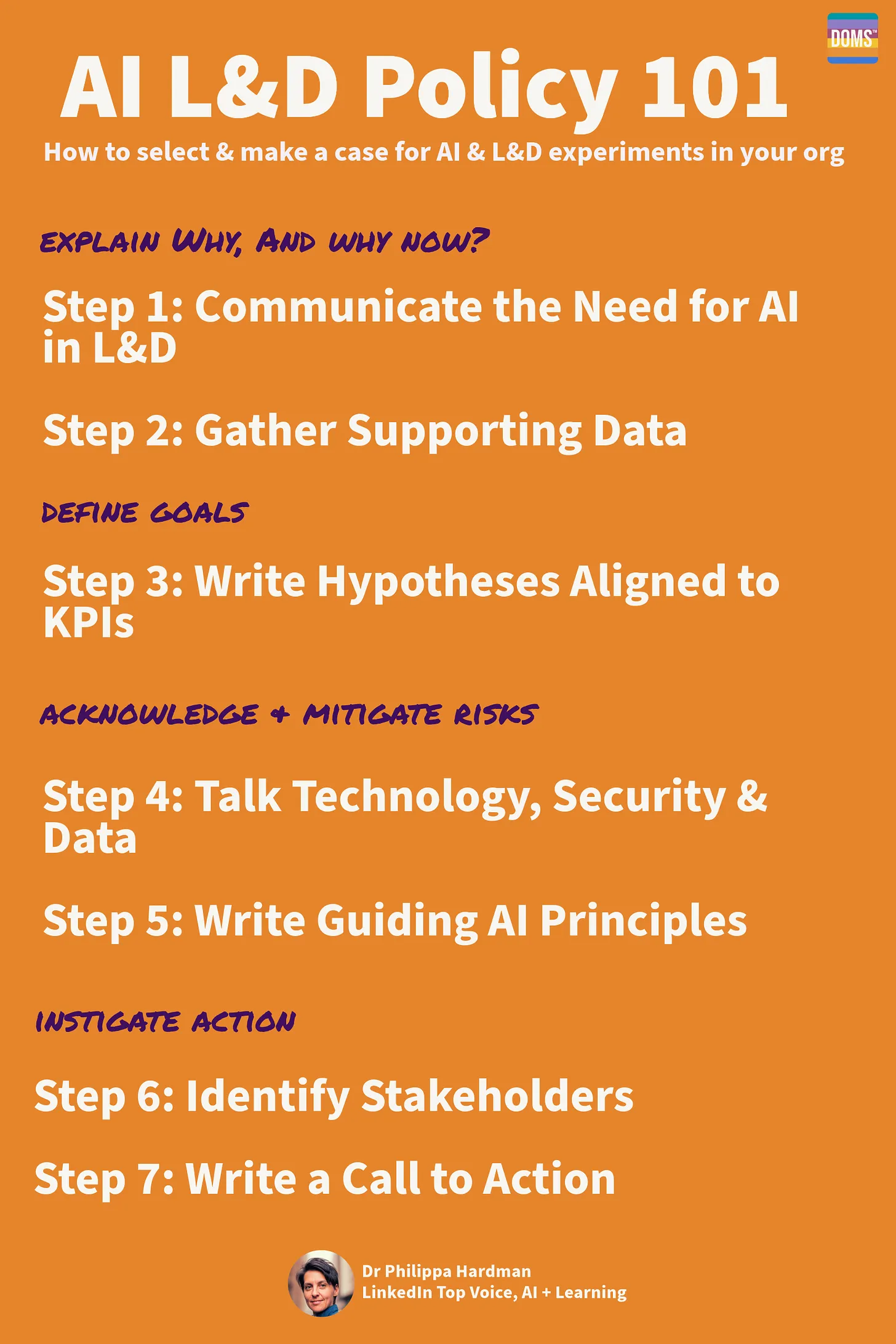
From 70-20-10 to 90-10: a new operating system for L&D in the age of AI? — from linkedin.com by Dr. Philippa Hardman

Also from Philippa, see:


Your New ChatGPT Guide — from wondertools.substack.com by Jeremy Caplan and The PyCoach
25 AI Tips & Tricks from a guest expert

  • ChatGPT can make you more productive or dumber. An MIT study found that while AI can significantly boost productivity, it may also weaken your critical thinking. Use it as an assistant, not a substitute for your brain.
  • If you’re a student, use study mode in ChatGPT, Gemini, or Claude. When this feature is enabled, the chatbots will guide you through problems rather than just giving full answers, so you’ll be doing the critical thinking.
  • ChatGPT and other chatbots can confidently make stuff up (aka AI hallucinations). If you suspect something isn’t right, double-check its answers.
  • NotebookLM hallucinates less than most AI tools, but it requires you to upload sources (PDFs, audio, video) and won’t answer questions beyond those materials. That said, it’s great for students and anyone with materials to upload.
  • Probably the most underrated AI feature is deep research. It automates web searching for you and returns a fully cited report with minimal hallucinations in five to 30 minutes. It’s available in ChatGPT, Perplexity, and Gemini, so give it a try.


Adobe Reinvents its Entire Creative Suite with AI Co-Pilots, Custom Models, and a New Open Platform — from theneuron.ai by Grant Harvey
Adobe just put an AI co-pilot in every one of its apps, letting you chat with Photoshop, train models on your own style, and generate entire videos with a single subscription that now includes top models from Google, Runway, and Pika.

Adobe came to play, y’all.

At Adobe MAX 2025 in Los Angeles, the company dropped an entire creative AI ecosystem that touches every single part of the creative workflow. In our opinion, all these new features aren’t about replacing creators; it’s about empowering them with superpowers they can actually control.

Adobe’s new plan is to put an AI co-pilot in every single app.

  • For professionals, the game-changer is Firefly Custom Models. Start training one now to create a consistent, on-brand look for all your assets.
  • For everyday creators, the AI Assistants in Photoshop and Express will drastically speed up your workflow.
  • The best place to start is the Photoshop AI Assistant (currently in private beta), which offers a powerful glimpse into the future of creative software—a future where you’re less of a button-pusher and more of a creative director.

Adobe MAX Day 2: The Storyteller Is Still King, But AI Is Their New Superpower — from theneuron.ai by Grant Harvey
Adobe’s Day 2 keynote showcased a suite of AI-powered creative tools designed to accelerate workflows, but the real message from creators like Mark Rober and James Gunn was clear: technology serves the story, not the other way around.

On the second day of its annual MAX conference, Adobe drove home a message that has been echoing through the creative industry for the past year: AI is not a replacement, but a partner. The keynote stage featured a powerful trio of modern storytellers—YouTube creator Brandon Baum, science educator and viral video wizard Mark Rober, and Hollywood director James Gunn—who each offered a unique perspective on a shared theme: technology is a powerful tool, but human instinct, hard work, and the timeless art of storytelling remain paramount.

From DSC:
As Grant mentioned, the demos dealt with ideation, image generation, video generation, audio generation, and editing.


Adobe Max 2025: all the latest creative tools and AI announcements — from theverge.com by Jess Weatherbed

The creative software giant is launching new generative AI tools that make digital voiceovers and custom soundtracks for videos, and adding AI assistants to Express and Photoshop for web that edit entire projects using descriptive prompts. And that’s just the start, because Adobe is planning to eventually bring AI assistants to all of its design apps.


Also see Adobe Delivers New AI Innovations, Assistants and Models Across Creative Cloud to Empower Creative Professionals plus other items from the News section from Adobe


“OpenAI’s Atlas: the End of Online Learning—or Just the Beginning?” [Hardman] + other items re: AI in our LE’s

OpenAI’s Atlas: the End of Online Learning—or Just the Beginning? — from drphilippahardman.substack.com by Dr. Philippa Hardman

My take is this: in all of the anxiety lies a crucial and long-overdue opportunity to deliver better learning experiences. Precisely because Atlas perceives the same context in the same moment as you, it can transform learning into a process aligned with core neuro-scientific principles—including active retrieval, guided attention, adaptive feedback and context-dependent memory formation.

Perhaps in Atlas we have a browser that for the first time isn’t just a portal to information, but one which can become a co-participant in active cognitive engagement—enabling iterative practice, reflective thinking, and real-time scaffolding as you move through challenges and ideas online.

With this in mind, I put together 10 use cases for Atlas for you to try for yourself.

6. Retrieval Practice
What:
Pulling information from memory drives retention better than re-reading.
Why: Practice testing delivers medium-to-large effects (Adesope et al., 2017).
Try: Open a document with your previous notes. Ask Atlas for a mixed activity set: “Quiz me on the Krebs cycle—give me a near-miss, high-stretch MCQ, then a fill-in-the-blank, then ask me to explain it to a teen.”
Atlas uses its browser memory to generate targeted questions from your actual study materials, supporting spaced, varied retrieval.


From DSC:
A quick comment. I appreciate these ideas and approaches from Katarzyna and Rita. I do think that someone is going to want to be sure that the AI models/platforms/tools are given up-to-date information and updated instructions — i.e., any new procedures, steps to take, etc. Perhaps I’m missing the boat here, but an internal AI platform is going to need to have access to up-to-date information and instructions.


There is no God Tier video model — from downes.ca by Stephen Downes

From DSC:
Stephen has some solid reflections and asks some excellent questions in this posting, including:

The question is: how do we optimize an AI to support learning? Will one model be enough? Or do we need different models for different learners in different scenarios?


A More Human University: The Role of AI in Learning — from er.educause.edu by Robert Placido
Far from heralding the collapse of higher education, artificial intelligence offers a transformative opportunity to scale meaningful, individualized learning experiences across diverse classrooms.

The narrative surrounding artificial intelligence (AI) in higher education is often grim. We hear dire predictions of an “impending collapse,” fueled by fears of rampant cheating, the erosion of critical thinking, and the obsolescence of the human educator.Footnote1 This dystopian view, however, is a failure of imagination. It mistakes the death rattle of an outdated pedagogical model for the death of learning itself. The truth is far more hopeful: AI is not an asteroid coming for higher education. It is a catalyst that can finally empower us to solve our oldest, most intractable problem: the inability to scale deep, engaged, and truly personalized learning.


Claude for Life Sciences — from anthropic.com

Increasing the rate of scientific progress is a core part of Anthropic’s public benefit mission.

We are focused on building the tools to allow researchers to make new discoveries – and eventually, to allow AI models to make these discoveries autonomously.

Until recently, scientists typically used Claude for individual tasks, like writing code for statistical analysis or summarizing papers. Pharmaceutical companies and others in industry also use it for tasks across the rest of their business, like sales, to fund new research. Now, our goal is to make Claude capable of supporting the entire process, from early discovery through to translation and commercialization.

To do this, we’re rolling out several improvements that aim to make Claude a better partner for those who work in the life sciences, including researchers, clinical coordinators, and regulatory affairs managers.


AI as an access tool for neurodiverse and international staff — from timeshighereducation.com by Vanessa Mar-Molinero
Used transparently and ethically, GenAI can level the playing field and lower the cognitive load of repetitive tasks for admin staff, student support and teachers

Where AI helps without cutting academic corners
When framed as accessibility and quality enhancement, AI can support staff to complete standard tasks with less friction. However, while it supports clarity, consistency and inclusion, generative AI (GenAI) does not replace disciplinary expertise, ethical judgement or the teacher–student relationship. These are ways it can be put to effective use:

  • Drafting and tone calibration:
  • Language scaffolding:
  • Structure and templates: ..
  • Summarise and prioritise:
  • Accessibility by default:
  • Idea generation for pedagogy:
  • Translation and cultural mediation:

Beyond learning design: supporting pedagogical innovation in response to AI — from timeshighereducation.com by Charlotte von Essen
To avoid an unwinnable game of catch-up with technology, universities must rethink pedagogical improvement that goes beyond scaling online learning


The Sleep of Liberal Arts Produces AI — from aiedusimplified.substack.com by Lance Eaton, Ph.D.
A keynote at the AI and the Liberal Arts Symposium Conference

This past weekend, I had the honor to be the keynote speaker at a really fantstistic conferece, AI and the Liberal Arts Symposium at Connecticut College. I had shared a bit about this before with my interview with Lori Looney. It was an incredible conference, thoughtfully composed with a lot of things to chew on and think about.

It was also an entirely brand new talk in a slightly different context from many of my other talks and workshops. It was something I had to build entirely from the ground up. It reminded me in some ways of last year’s “What If GenAI Is a Nothingburger”.

It was a real challenge and one I’ve been working on and off for months, trying to figure out the right balance. It’s a work I feel proud of because of the balancing act I try to navigate. So, as always, it’s here for others to read and engage with. And, of course, here is the slide deck as well (with CC license).


2. Concern and excitement about AI — from pewresearch.org by Jacob Poushter,Moira Faganand Manolo Corichi

Key findings

  • A median of 34% of adults across 25 countries are more concerned than excited about the increased use of artificial intelligence in daily life. A median of 42% are equally concerned and excited, and 16% are more excited than concerned.
  • Older adults, women, people with less education and those who use the internet less often are particularly likely to be more concerned than excited.

Also relevant here:


AI Video Wars include Veo 3.1, Sora 2, Ray3, Kling 2.5 + Wan 2.5 — from heatherbcooper.substack.com by Heather Cooper
House of David Season 2 is here!

In today’s edition:

  • Veo 3.1 brings richer audio and object-level editing to Google Flow
  • Sora 2 is here with Cameo self-insertion and collaborative Remix features
  • Ray3 brings world-first reasoning and HDR to video generation
  • Kling 2.5 Turbo delivers faster, cheaper, more consistent results
  • WAN 2.5 revolutionizes talking head creation with perfect audio sync
  • House of David Season 2 Trailer
  • HeyGen Agent, Hailuo Agent, Topaz Astra, and Lovable Cloud updates
  • Image & Video Prompts

From DSC:
By the way, the House of David (which Heather referred to) is very well done! I enjoyed watching Season 1. Like The Chosen, it brings the Bible to life in excellent, impactful ways! Both series convey the context and cultural tensions at the time. Both series are an answer to prayer for me and many others — as they are professionally-done. Both series match anything that comes out of Hollywood in terms of the acting, script writing, music, the sets, etc.  Both are very well done.
.


An item re: Sora:


Other items re: Open AI’s new Atlas browser:

Introducing ChatGPT Atlas — from openai.com
The browser with ChatGPT built in.

[On 10/21/25] we’re introducing ChatGPT Atlas, a new web browser built with ChatGPT at its core.

AI gives us a rare moment to rethink what it means to use the web. Last year, we added search in ChatGPT so you could instantly find timely information from across the internet—and it quickly became one of our most-used features. But your browser is where all of your work, tools, and context come together. A browser built with ChatGPT takes us closer to a true super-assistant that understands your world and helps you achieve your goals.

With Atlas, ChatGPT can come with you anywhere across the web—helping you in the window right where you are, understanding what you’re trying to do, and completing tasks for you, all without copying and pasting or leaving the page. Your ChatGPT memory is built in, so conversations can draw on past chats and details to help you get new things done.

ChatGPT Atlas: the AI browser test — from getsuperintel.com by Kim “Chubby” Isenberg
Chat GPT Atlas aims to transform web browsing into a conversational, AI-native experience, but early reviews are mixed

OpenAI’s new ChatGPT Atlas promises to merge web browsing, search, and automation into a single interface — an “AI-native browser” meant to make the web conversational. After testing it myself, though, I’m still trying to see the real breakthrough. It feels familiar: summaries, follow-ups, and even the Agent’s task handling all mirror what I already do inside ChatGPT.

OpenAI’s new Atlas browser remembers everything — from theneurondaily.com by Grant Harvey
PLUS: Our AIs are getting brain rot?!

Here’s how it works: Atlas can see what you’re looking at on any webpage and instantly help without you needing to copy/paste or switch tabs. Researching hotels? Ask ChatGPT to compare prices right there. Reading a dense article? Get a summary on the spot. The AI lives in the browser itself.

OpenAI’s new product — from bensbites.com

The latest entry in AI browsers is Atlas – A new browser from OpenAI. Atlas would feel similar to Dia or Comet if you’ve used them. It has an “Ask ChatGPT” sidebar that has the context of your page, and choose “Agent” to work on that tab. Right now, Agent is limited to a single tab, and it is way too slow to delegate anything for real to it. Click accuracy for Agent is alright on normal web pages, but it will definitely trip up if you ask it to use something like Google Sheets.

One ambient feature that I think many people will like is “select to rewrite” – You can select any text in Atlas, hover/click on the blue dot in the top right corner to rewrite it using AI.


Your AI Resume Hacks Probably Won’t Fool Hiring Algorithms — from builtin.com by Jeff Rumage
Recruiters say those viral hidden prompt for resumes don’t work — and might cost you interviews.

Summary: Job seekers are using “prompt hacking” — embedding hidden AI commands in white font on resumes — to try to trick applicant tracking systems. While some report success, recruiters warn the tactic could backfire and eliminate the candidate from consideration.


The Job Market Might Be a Mess, But Don’t Blame AI Just Yet — from builtin.com by Matthew Urwin
A new study by Yale University and the Brookings Institution says the panic around artificial intelligence stealing jobs is overblown. But that might not be the case for long.

Summary: A Yale and Brookings study finds generative AI has had little impact on U.S. jobs so far, with tariffs, immigration policies and the number of college grads potentially playing a larger role. Still, AI could disrupt the workforce in the not-so-distant future.


The above posting on LinkedIn then links to this document


Designing Microsoft 365 Copilot to empower educators, students, and staff — from microsoft.com by Deirdre Quarnstrom

While over 80% of respondents in the 2025 AI in Education Report have already used AI for school, we believe there are significant opportunities to design AI that can better serve each of their needs and broaden access to the latest innovation.1

That’s why today [10/15/25], we’re announcing AI-powered experiences built for teaching and learning at no additional cost, new integrations in Microsoft 365 apps and Learning Management Systems, and an academic offering for Microsoft 365 Copilot.

Introducing AI-powered teaching and learning
Empowering educators with Teach

We’re introducing Teach to help streamline class prep and adapt AI to support educators’ teaching expertise with intuitive and customizable features. In one place, educators can easily access AI-powered teaching tools to create lesson plans, draft materials like quizzes and rubrics, and quickly make modifications to language, reading level, length, difficulty, alignment to relevant standards, and more.


© 2025 | Daniel Christian