Online learning platform Coursera is taking a page straight out of TikTok’s playbook. The company has launched a new AI-powered feed designed to serve short-form educational content in a scrollable, personalized format, signaling a major shift in how digital learning platforms may try to keep users engaged.
The feature introduces bite-sized video lessons, clips, and explainers curated through artificial intelligence based on a user’s interests, learning habits, career goals, and previous course activity. Instead of committing to hour-long lectures or full certification programs upfront, users can now discover short educational snippets designed to make learning feel more casual, accessible, and addictive.
Users scroll through a feed of short educational videos and AI-curated learning moments covering topics ranging from coding and business to AI, productivity, data science, and personal development.
The Library as a Learning Campus
Many microschool founders are wrestling with the same core challenge: how do you provide students with enriching, hands-on experiences when you’re working with a small team and a lean budget? Erin’s answer is deceptively simple — walk through the library’s front door.
Modern public libraries are far more than book repositories. Most educators walk past an entire ecosystem of free resources without realizing what’s available. Need printing, computers, or digital tools? Libraries offer them at little or no cost. Looking for hands-on science programming? Many branches host makerspaces and science stations built for exactly that kind of exploration. Need a space to hold a small class, workshop, or seminar? Bookable collaboration rooms are often just a phone call away.
Beyond the physical infrastructure, libraries frequently offer life skills programming — resume writing, financial literacy, job readiness — that can support the families surrounding a microschool, not just its students. And in some branches, social workers are embedded on site, providing the kind of wraparound support that few microschools could ever access on their own.
Libraries are also deeply invested in expanding their community reach. A microschool brings exactly the kind of engaged, mission-driven partnership that many branches are actively seeking. The relationship benefits both sides from day one.
Around the same time, the concept of microschooling was gaining traction nationally. Microschools offer multiage learning environments that focus on personalized, often less-regulated instruction. Popularity grew during the pandemic when families sought learning alternatives in online, hybrid and pod options; an estimated 750,000 to 2 million students now attend the schools.
The schools are typically privately run, but Philhower saw a role for them in his small district. Last year, he won approval from the state’s charter school board to establish the Indiana Microschool Collaborative, which he says will incubate a network of microschools statewide. They will operate as charter schools, meaning they are public but have more flexibility in terms of curricula and other operations than traditional public schools.
So, You Want to Open a Microschool— from educationnext.org by Kerry McDonald For aspiring founders who have the will but lack the way to launch their schools, startup partners are there to help
In recent years, microschools—small, highly individualized, flexible learning models—have become a popular education option, now serving at least 750,000 U.S. schoolchildren. More than half of microschools nationwide operate as homeschooling centers, while 30 percent function as private schools, 5 percent are public charters, and the rest fit into unique, often overlapping categories, according to a 2025 sector analysis by the National Microschooling Center. While many founders achieve success on their own, joining an accelerator or network can offer the business coaching and community connection that make the inevitable challenges of entrepreneurship more manageable. Van Camp decided to join KaiPod Catalyst, a microschool accelerator program from KaiPod Learning.
I feature six of these microschool accelerators and networks in my new book, Joyful Learning: How to Find Freedom, Happiness, and Success Beyond Conventional Schooling. Some of them have been around for years, but they have attracted rising interest since 2020 as more parents and teachers consider starting schools. These programs vary widely in the startup services and supports they offer, but they share a commitment to building relationships among founders and facilitating the ongoing success of today’s creative schooling options.
High quality, personalized instruction in an intimate setting that focuses on the whole child is growing in popularity—and it looks very different from traditional models both past and present. What may seem like a throwback to the pioneers’ one-room schoolhouse actually speaks volumes about what we as a society have outgrown.
What began as a response to a global crisis has led to a watershed moment.
Yet to categorize microschools simply as “pandemic pods” or private schools with a low headcount largely misses the mark. They are perhaps best described as intentionally-designed small learning environments that are bucking two centuries of inertia and industrial-era constraints.
Microschools are providing educators with an entrepreneurial opportunity that was unthinkable just a couple of decades ago, in tandem with the ability to deliver high student and family satisfaction. And they’re doing it by prioritizing learner agency, personalization, and mastery over compliance and standardization.
However, for microschools to truly scale and impact equitable outcomes, the K-12 sector must address critical policy challenges related to access, accountability and regulatory restrictions.
The following key findings from deeply researched case studies and strategic guides published by the Getting Smart team are intended to provide a comprehensive overview on the microschool movement. Each section offers an opportunity to dive deeper into resources on specific, timely topics.
Speaking of education reform and alternatives, also see:
Today’s education ecosystem must meet the needs of today’s learners. This means learner-centered outcomes, pathways between education and careers, and policies and practices that support both degree and non-degree programs.
Jobs for the Future’s Education practice works to support systems change in the education ecosystem, influence policies that promote diverse pathways, and identify and apply data-informed, learner-centered solutions.
Here’s what’s shaped the AI-education landscape in the last month:
The AI Speed Trap is [still] here: AI adoption in L&D is basically won (87%)—but it’s being used to ship faster, not learn better (84% prioritising speed), scaling “more of the same” at pace.
AI tutors risk a “pedagogy of passivity”: emerging evidence suggests tutoring bots can reduce cognitive friction and pull learners down the ICAP spectrum—away from interactive/constructive learning toward efficient consumption.
Singapore + India are building what the West lacks: they’re treating AI as national learning infrastructure—for resilience (Singapore) and access + language inclusion (India)—while Western systems remain fragmented and reactive.
Agentic AI is the next pivot: early signs show a shift from AI as a content engine to AI as a learning partner—with UConn using agents to remove barriers so learners can participate more fully in shared learning.
Moodle’s AI stance sends two big signals: the traditional learning ecosystem in fragmenting, and the concept of “user sovereignty” over by AI is emerging.
For Cogniti to be taken seriously, it needs to be woven into the structure of your unit and its delivery, both in class and on Canvas, rather than left on the side. This article shares practical strategies for implementing Cogniti in your teaching so that students:
understand the context and purpose of the agent,
know how to interact with it effectively,
perceive its value as a learning tool over any other available AI chatbots, and
engage in reflection and feedback.
In this post, we discuss how to introduce and integrate Cogniti agents into the learning environment so students understand their context, interact effectively, and see their value as customised learning companions.
In this post, we share four strategies to help introduce and integrate Cogniti in your teaching so that students understand their context, interact effectively, and see their value as customised learning companions.
Collection: Teaching with Custom AI Chatbots — from teaching.virginia.edu; via Derek Bruff The default behaviors of popular AI chatbots don’t always align with our teaching goals. This collection explores approaches to designing AI chatbots for particular pedagogical purposes.
We’re excited to announce and share our new Parents Guide to Microschools, a clear and approachable introduction to one of the fastest growing learning models in the country. The guide unpacks what microschools are, how they work and why families are increasingly drawn to intimate, relationship centered environments. It highlights features like flexible schedules, small cohorts, personalized pathways and hands-on learning so parents can picture what these settings actually look and feel like.
It also equips families with practical tools to navigate the decision making process: key questions to ask during visits, indicators of strong culture and instruction, considerations around cost and accreditation and how to assess overall fit for each learner. Whether parents are simply curious or actively exploring new options, this guide offers clarity, confidence and a starting point for imagining what learning could look like next.
So this year, I’ve been exploring new ways that AI can help support students with disabilities—students on IEPs, learning plans, or 504s—and, honestly, it’s changing the way I think about differentiation in general.
As a quick note, a lot of what I’m finding applies just as well to English language learners or really to any students. One of the big ideas behind Universal Design for Learning (UDL) is that accommodations and strategies designed for students with disabilities are often just good teaching practices. When we plan instruction that’s accessible to the widest possible range of learners, everyone benefits. For example, UDL encourages explaining things in multiple modes—written, visual, auditory, kinesthetic—because people access information differently. I hear students say they’re “visual learners,” but I think everyone is a visual learner, and an auditory learner, and a kinesthetic learner. The more ways we present information, the more likely it is to stick.
So, with that in mind, here are four ways I’ve been using AI to differentiate instruction for students with disabilities (and, really, everyone else too):
What I’ve tried to do is bring together genuinely useful AI tools that I know are already making a difference.
For colleagues wanting to explore further, I’m sharing the list exactly as it appears in the table, including website links, grouped by category below. Please do check it out, as along with links to all of the resources, I’ve also written a brief summary explaining what each of the different tools do and how they can help.
Last week, I wrapped up Dr Philippa Hardman’s intensive bootcamp on AI in learning design. Four conversations, countless iterations, and more than a few humbling moments later – here’s what I am left thinking about.
An aside: Google is working on a new vision for textbooks that can be easily differentiated based on the beautiful success for NotebookLM. You can get on the waiting list for that tool by going to LearnYourWay.withgoogle.com.
… Nano Banana Pro
Sticking with the Google tools for now, Nano Banana Pro (which you can use for free on Google’s AI Studio), is doing something that everyone has been waiting a long time for: it adds correct text to images.
The simple act of remembering is the crux of how we navigate the world: it shapes our experiences, informs our decisions, and helps us anticipate what comes next. For AI agents like Comet Assistant, that continuity leads to a more powerful, personalized experience.
Today we are announcing new personalization features to remember your preferences, interests, and conversations. Perplexity now synthesizes them automatically like memory, for valuable context on relevant tasks. Answers are smarter, faster, and more personalized, no matter how you work.
From DSC : This should be important as we look at learning-related applications for AI.
For the last three days, my Substack has been in the top “Rising in Education” list. I realize this is based on a hugely flawed metric, but it still feels good. ?
Three years ago, we were impressed that a machine could write a poem about otters. Less than 1,000 days later, I am debating statistical methodology with an agent that built its own research environment. The era of the chatbot is turning into the era of the digital coworker. To be very clear, Gemini 3 isn’t perfect, and it still needs a manager who can guide and check it. But it suggests that “human in the loop” is evolving from “human who fixes AI mistakes” to “human who directs AI work.” And that may be the biggest change since the release of ChatGPT.
Results May Vary — from aiedusimplified.substack.com by Lance Eaton, PhD On Custom Instructions with GenAI Tools….
I’m sharing today about custom instructions and my use of them across several AI tools (paid versions of ChatGPT, Gemini, and Claude). I want to highlight what I’m doing, how it’s going, and solicit from readers to share in the comments some of their custom instructions that they find helpful.
I’ve been in a few conversations lately that remind me that not everyone knows about them, even some of the seasoned folks around GenAI and how you might set them up to better support your work. And, of course, they are, like all things GenAI, highly imperfect!
I’ll include and discuss each one below, but if you want to keep abreast of my custom instructions, I’ll be placing them here as I adjust and update them so folks can see the changes over time.
I just completed nearly 60,000 miles of travel across Europe, Asia, and the Middle East meeting with hundred of companies to discuss their AI strategies. While every company’s maturity is different, one thing is clear: AI as a business tool has arrived: it’s real and the use-cases are growing.
A new survey by Wharton shows that 46% of business leaders use Gen AI daily and 80% use it weekly. And among these users, 72% are measuring ROI and 74% report a positive return. HR, by the way, is the #3 department in use cases, only slightly behind IT and Finance.
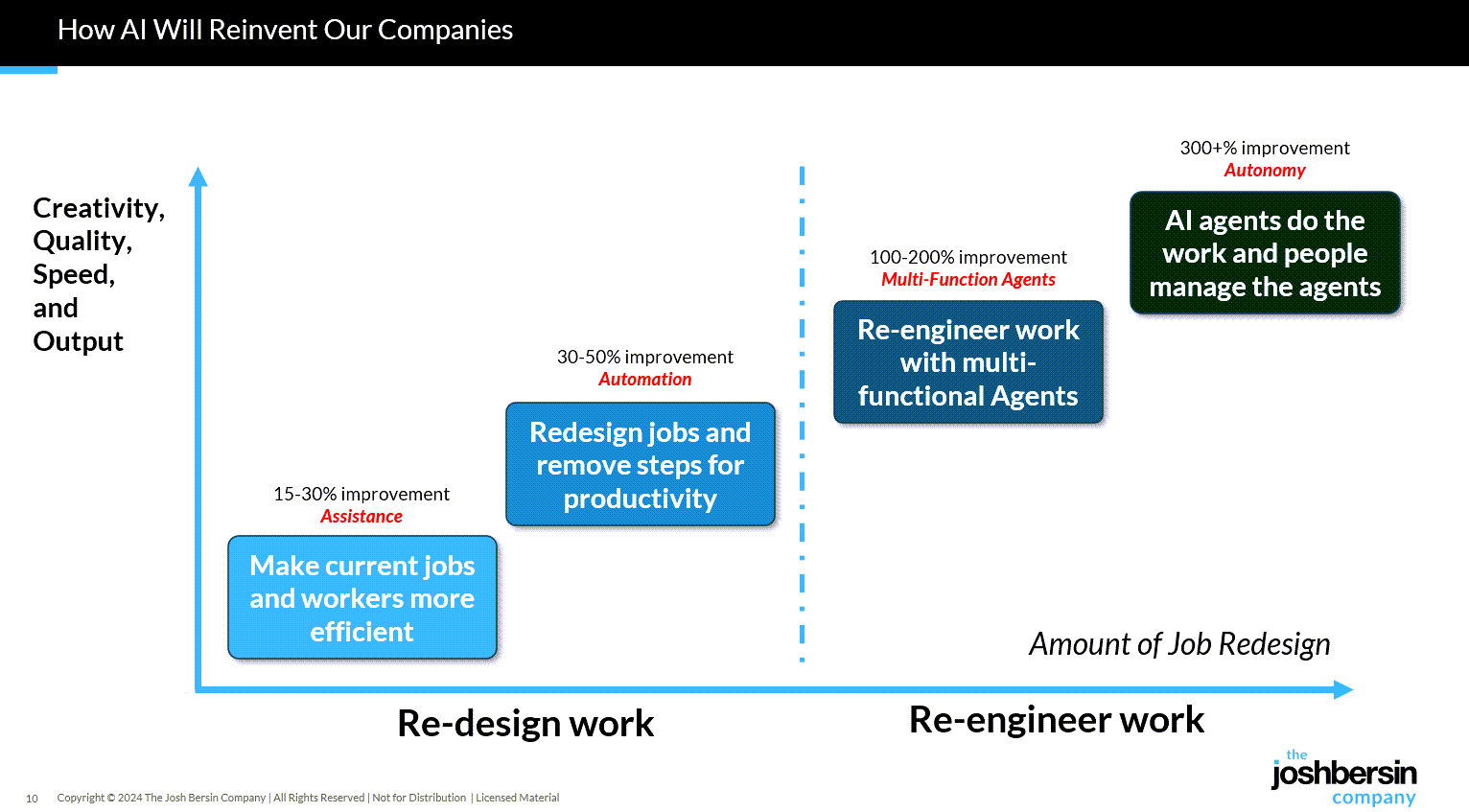
What are companies getting out of all this? Productivity. The #1 use case, by far, is what we call “stage 1” usage – individual productivity.
.
From DSC: Josh writes: “Many of our large clients are now implementing AI-native learning systems and seeing 30-40% reduction in staff with vast improvements in workforce enablement.”
While I get the appeal (and ROI) from management’s and shareholders’ perspective, this represents a growing concern for employment and people’s ability to earn a living.
And while I highly respect Josh and his work through the years, I disagree that we’re over the problems with AI and how people are using it:
Two years ago the NYT was trying to frighten us with stories of AI acting as a romance partner. Well those stories are over, and thanks to a $Trillion (literally) of capital investment in infrastructure, engineering, and power plants, this stuff is reasonably safe.
Those stories are just beginning…they’re not close to being over.
So let’s imagine a world where there’s no separation between learning and assessment: it’s ongoing. There’s always assessment, always learning, and they’re tied together. Then we can ask: what is the role of the human in that world? What is it that AI can’t do?
…
Imagine something like that in higher ed. There could be tutoring or skill-based work happening outside of class, and then relationship-based work happening inside of class, whether online, in person, or some hybrid mix.
The aspects of learning that don’t require relational context could be handled by AI, while the human parts remain intact. For example, I teach strategy and strategic management. I teach people how to talk with one another about the operation and function of a business. I can help students learn to be open to new ideas, recognize when someone pushes back out of fear of losing power, or draw from my own experience in leading a business and making future-oriented decisions.
But the technical parts such as the frameworks like SWOT analysis, the mechanics of comparing alternative viewpoints in a boardroom—those could be managed through simulations or reports that receive immediate feedback from AI. The relational aspects, the human mentoring, would still happen with me as their instructor.
What if your workspace helped you level up your career? Coworking spaces are becoming learning hubs where skills grow, ideas connect, and real-world education fits seamlessly into the workday.
Continuous learning has become a cornerstone of professional longevity, and flexible workspaces already encourage it through workshops, talks, and mentoring. Their true potential, however, may lie in becoming centers of industry-focused education that help professionals stay adaptable in a rapidly changing world of work. .
.
What if forward-thinking workspaces and coworking centers became hubs of lifelong learning, integrating job-relevant training with accessible, real-world education?
For coworking operators, this raises important questions: Which types of learning thrive best in these environments, and how much do the design and layout of a space influence how people learn?
By exploring these questions and combining innovative programs with cutting-edge technology aligned to the future workforce, could coworking spaces ultimately become the classrooms of tomorrow?
This blog explores how custom AI development accelerates the evolution from static AI to dynamic learning agents and why this transformation is critical for driving innovation, efficiency, and competitive advantage.
… Dynamic Learning Agents: The Next Generation Dynamic learning agents, sometimes referred to as adaptive or agentic AI, represent a leap forward. They combine continuous learning, autonomous action, and context-aware adaptability.
Custom AI development plays a crucial role here: it ensures that these agents are designed specifically for an enterprise’s unique needs rather than relying on generic, one-size-fits-all AI platforms. Tailored dynamic agents can:
Continuously learn from incoming data streams
Make autonomous, goal-directed decisions aligned with business objectives
Adapt behavior in real time based on context and feedback
Collaborate with other AI agents and human teams to solve complex challenges
The result is an AI ecosystem that evolves with the business, providing sustained competitive advantage.
Perception: The Foundation of Intelligent Agents Perception is the first step in building AI agents. It involves capturing and interpreting data from multiple modalities, including text, images, audio, and structured inputs. A multimodal AI agent relies on this comprehensive understanding to make informed decisions.
For example, in healthcare, an AI agent may process electronic health records (text), MRI scans (vision), and patient audio consultations (speech) to build a complete understanding of a patient’s condition. Similarly, in retail, AI agents can analyze purchase histories (structured data), product images (vision), and customer reviews (text) to inform recommendations and marketing strategies.
Effective perception ensures that AI agents have contextual awareness, which is essential for accurate reasoning and appropriate action.
Your New ChatGPT Guide— from wondertools.substack.com by Jeremy Caplan and The PyCoach 25 AI Tips & Tricks from a guest expert
ChatGPT can make you more productive or dumber. An MIT study found that while AI can significantly boost productivity, it may also weaken your critical thinking. Use it as an assistant, not a substitute for your brain.
If you’re a student, use study mode in ChatGPT, Gemini, or Claude. When this feature is enabled, the chatbots will guide you through problems rather than just giving full answers, so you’ll be doing the critical thinking.
ChatGPT and other chatbots can confidently make stuff up (aka AI hallucinations). If you suspect something isn’t right, double-check its answers.
NotebookLM hallucinates less than most AI tools, but it requires you to upload sources (PDFs, audio, video) and won’t answer questions beyond those materials. That said, it’s great for students and anyone with materials to upload.
Probably the most underrated AI feature is deep research. It automates web searching for you and returns a fully cited report with minimal hallucinations in five to 30 minutes. It’s available in ChatGPT, Perplexity, and Gemini, so give it a try.
My take is this: in all of the anxiety lies a crucial and long-overdue opportunity to deliver better learning experiences. Precisely because Atlas perceives the same context in the same moment as you, it can transform learning into a process aligned with core neuro-scientific principles—including active retrieval, guided attention, adaptive feedback and context-dependent memory formation.
Perhaps in Atlas we have a browser that for the first time isn’t just a portal to information, but one which can become a co-participant in active cognitive engagement—enabling iterative practice, reflective thinking, and real-time scaffolding as you move through challenges and ideas online.
With this in mind, I put together 10 use cases for Atlas for you to try for yourself.
…
6. Retrieval Practice
What: Pulling information from memory drives retention better than re-reading. Why: Practice testing delivers medium-to-large effects (Adesope et al., 2017). Try: Open a document with your previous notes. Ask Atlas for a mixed activity set: “Quiz me on the Krebs cycle—give me a near-miss, high-stretch MCQ, then a fill-in-the-blank, then ask me to explain it to a teen.” Atlas uses its browser memory to generate targeted questions from your actual study materials, supporting spaced, varied retrieval.
From DSC: A quick comment. I appreciate these ideas and approaches from Katarzyna and Rita. I do think that someone is going to want to be sure that the AI models/platforms/tools are given up-to-date information and updated instructions — i.e., any new procedures, steps to take, etc. Perhaps I’m missing the boat here, but an internal AI platform is going to need to have access to up-to-date information and instructions.
From DSC: Stephen has some solid reflections and asks some excellent questions in this posting, including:
The question is: how do we optimize an AI to support learning? Will one model be enough? Or do we need different models for different learners in different scenarios?
A More Human University: The Role of AI in Learning — from er.educause.edu by Robert Placido Far from heralding the collapse of higher education, artificial intelligence offers a transformative opportunity to scale meaningful, individualized learning experiences across diverse classrooms.
The narrative surrounding artificial intelligence (AI) in higher education is often grim. We hear dire predictions of an “impending collapse,” fueled by fears of rampant cheating, the erosion of critical thinking, and the obsolescence of the human educator.Footnote1 This dystopian view, however, is a failure of imagination. It mistakes the death rattle of an outdated pedagogical model for the death of learning itself. The truth is far more hopeful: AI is not an asteroid coming for higher education. It is a catalyst that can finally empower us to solve our oldest, most intractable problem: the inability to scale deep, engaged, and truly personalized learning.
Increasing the rate of scientific progress is a core part of Anthropic’s public benefit mission.
We are focused on building the tools to allow researchers to make new discoveries – and eventually, to allow AI models to make these discoveries autonomously.
Until recently, scientists typically used Claude for individual tasks, like writing code for statistical analysis or summarizing papers. Pharmaceutical companies and others in industry also use it for tasks across the rest of their business, like sales, to fund new research. Now, our goal is to make Claude capable of supporting the entire process, from early discovery through to translation and commercialization.
To do this, we’re rolling out several improvements that aim to make Claude a better partner for those who work in the life sciences, including researchers, clinical coordinators, and regulatory affairs managers.
AI as an access tool for neurodiverse and international staff— from timeshighereducation.com by Vanessa Mar-Molinero Used transparently and ethically, GenAI can level the playing field and lower the cognitive load of repetitive tasks for admin staff, student support and teachers
Where AI helps without cutting academic corners When framed as accessibility and quality enhancement, AI can support staff to complete standard tasks with less friction. However, while it supports clarity, consistency and inclusion, generative AI (GenAI) does not replace disciplinary expertise, ethical judgement or the teacher–student relationship. These are ways it can be put to effective use:
The Sleep of Liberal Arts Produces AI — from aiedusimplified.substack.com by Lance Eaton, Ph.D. A keynote at the AI and the Liberal Arts Symposium Conference
This past weekend, I had the honor to be the keynote speaker at a really fantstistic conferece, AI and the Liberal Arts Symposium at Connecticut College. I had shared a bit about this before with my interview with Lori Looney. It was an incredible conference, thoughtfully composed with a lot of things to chew on and think about.
It was also an entirely brand new talk in a slightly different context from many of my other talks and workshops. It was something I had to build entirely from the ground up. It reminded me in some ways of last year’s “What If GenAI Is a Nothingburger”.
It was a real challenge and one I’ve been working on and off for months, trying to figure out the right balance. It’s a work I feel proud of because of the balancing act I try to navigate. So, as always, it’s here for others to read and engage with. And, of course, here is the slide deck as well (with CC license).
While over 80% of respondents in the 2025 AI in Education Report have already used AI for school, we believe there are significant opportunities to design AI that can better serve each of their needs and broaden access to the latest innovation.1
That’s why today [10/15/25], we’re announcing AI-powered experiences built for teaching and learning at no additional cost, new integrations in Microsoft 365 apps and Learning Management Systems, and an academic offering for Microsoft 365 Copilot.
Introducing AI-powered teaching and learning Empowering educators with Teach
We’re introducing Teach to help streamline class prep and adapt AI to support educators’ teaching expertise with intuitive and customizable features. In one place, educators can easily access AI-powered teaching tools to create lesson plans, draft materials like quizzes and rubrics, and quickly make modifications to language, reading level, length, difficulty, alignment to relevant standards, and more.
Combining two strategies—spacing and retrieval practice—is key to success in learning, says Shana Carpenter.
On a somewhat related note (i.e., for Instructional Designers, teachers, faculty members, T&L staff members), also see:
Fresh Approaches to Instructional Design — from edutopia.org by Sara Furnival An educator with 20-plus years of experience on crafting creative and energizing lessons.