Also see:
The quest to build a better AI tutor — from hechingerreport.org by Jill Barshay
Researchers make progress with an older ed tech idea: personalized practice
One promising idea has less to do with how an AI tutor explains concepts and more with what it asks students to practice next.
A team at the University of Pennsylvania, which included some AI skeptics, recently tested this approach in a study of close to 800 Taiwanese high school students learning Python programming. All the students used the same AI tutor, which was designed not to give away answers.
But there was one key difference. Half the students were randomly assigned to a fixed sequence of practice problems, progressing from easy to hard. The other half received a personalized sequence with the AI tutor continuously adjusting the difficulty of each problem based on how the student was performing and interacting with the chatbot.
The idea is based on what educators call the “zone of proximal development.” When problems are too easy, students get bored. When they’re too hard, students get frustrated. The goal is to keep students in a sweet spot: challenged, but not overwhelmed.
The researchers found that students in the personalized group did better on a final exam than students in the fixed problem group. The difference was characterized as the equivalent of 6 to 9 months of additional schooling, an eye-catching claim for an after-school online course that lasted only five months.
…
To address this, Chung’s team combined a large language model with a separate machine-learning algorithm that analyzes how students interact with the online course platform — how they answer the practice questions, how many times they revise or edit their coding, and the quality of their conversations with the chatbot — and uses that information to decide which problem to serve up next.
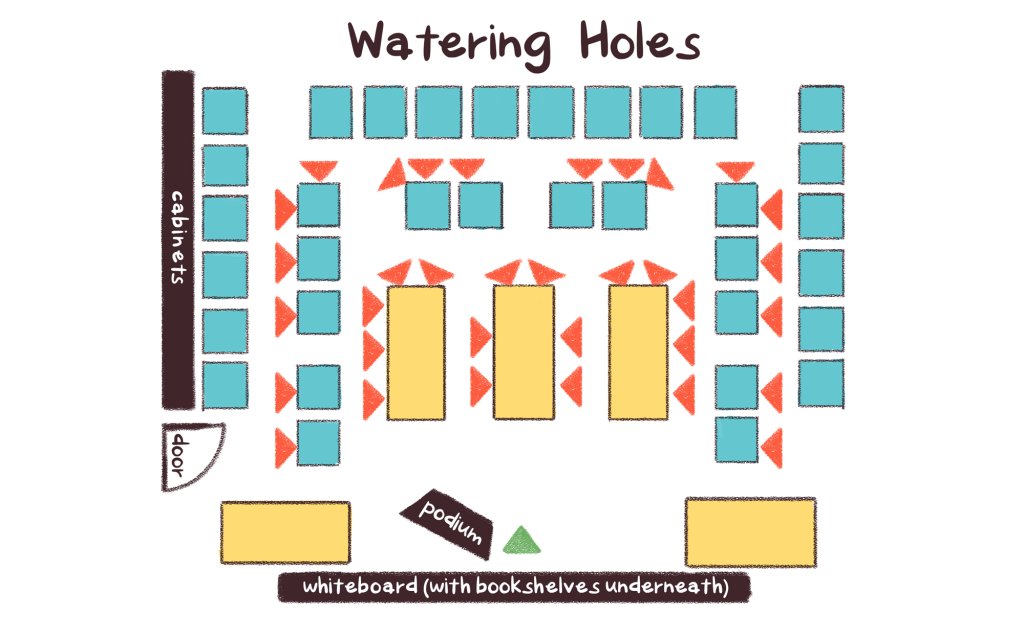
An Unconventional Seating Plan Designed to Benefit Focus and Learning — from edutopia.org by Tyler Rablin
After years of search and experimentation, this teacher finally hit on a room layout that allowed for efficient shifting between whole class, small group, and independent work.
I used to be an obsessive classroom rearranger—every six weeks or so I would find myself looking for a new desk arrangement that would improve some aspect of our work in the room. So when I finally found a desk arrangement that I didn’t want to change for the rest of the year, I knew I was on to something good.
The idea started developing when I stumbled across an article about an Australian classroom arrangement based on three “archetypal learning spaces”: campfires, caves, and watering holes. Essentially, the idea is that students need a physical space to work independently (a cave), spaces to gather informally (campfires), and a space to gather as a whole to learn from an expert (the watering hole).
Using Trauma-Informed Practices in Early Elementary Classrooms — from edutopia.org by Emily Barbour
Small changes in language and classroom routines can increase connection and improve learning for young students.
Trauma-informed practices invite a shift from reactive to proactive systems. To design classrooms that are grounded in safety and care, teachers need to embed predictability, co-regulation, and relationship-building into daily routines. Seemingly small changes like morning choice, intentional language, and shared commitments can transform the environmental conditions for students to properly regulate, feel connected, and fully access learning.
Replacing Morning Work With Morning Choice
The largest positive shift in my classroom culture occurred when I replaced traditional morning work with morning choice bins. When I began our day with worksheets, it felt like I started each day with an uphill battle. The mornings began with redirecting behavior instead of building meaningful relationships.
Reducing the Cognitive Load of Math Tasks With Strategy Cards — from edutopia.org by Katherine Efremkin
When students create a visual resource to scaffold problem-solving, they can approach independent work with more confidence and focused attention.
All three of these areas of the brain need to be activated and work together in order for a student to be successful with independent math work. To help ensure that students are able to successfully shift between their problem-solving ability, thinking, and actions to attack different parts of a problem, I teach students to create strategy cards.
These cards help reduce the cognitive load, enabling students not only to become more successful and independent within their arithmetic work, but also to dive deeper into the conceptual understanding of math concepts.
The Essential Retrieval Practice Handbook — from edutopia.org
Retrieval practice is one of the most effective ways to strengthen learning. Here’s a collection of our best resources to use in your classroom today.
January 29, 2026
Also see:
What is retrieval practice? — from retrievalpractice.org
When we think about learning, we typically focus on getting information into students’ heads. What if, instead, we focus on getting information out of students’ heads?
Global list of over 100 L&D conferences in 2026 — from donaldhtaylor.co.uk by Don Taylor
I’m a firm believer in conferences. This isn’t just because I have chaired the Learning Technologies Conference in London since 2000. It’s because they are invaluable in sustaining our community. So many in Learning and Development work alone or in small teams, that building and maintaining personal contacts is crucial.For a number of years, I have kept a personal list of the Learning and Development conferences running internationally. This year, I thought it would be helpful to share it.
AI Is Quietly Rewiring the ADDIE Model (In a Good Way) — from drphilippahardman.substack.com by Dr. Philippa Hardman
The traditional ADDIE workflow isn’t dead, but it is evolving
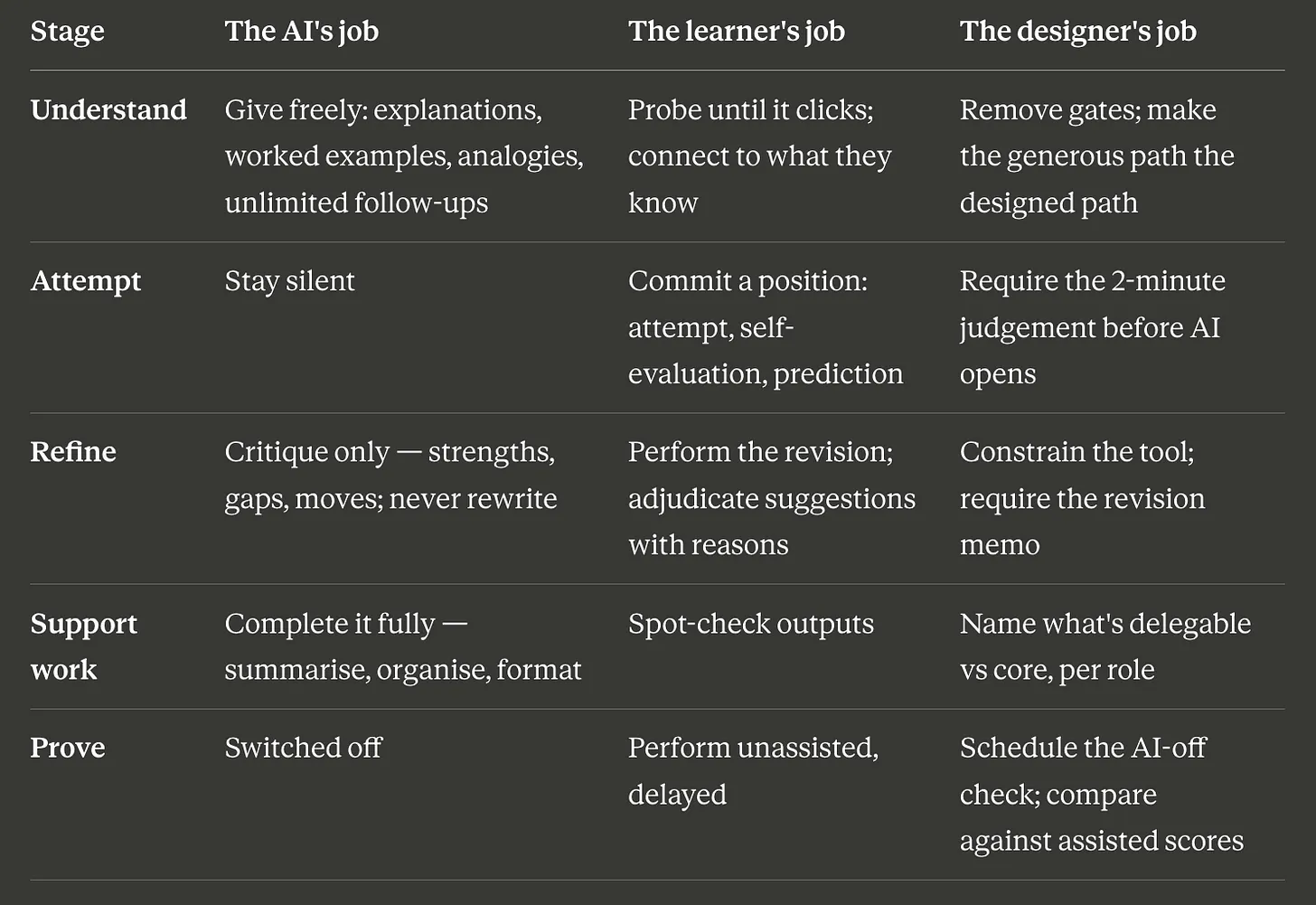
The real story isn’t what AI can produce — it’s how it changes the decisions we make at every stage of instructional design.
After working with thousands of instructional designers on my bootcamp, I’ve learned something counterintuitive: the best teams aren’t the ones with the fanciest AI tools — they’re the ones who know when to use which mode—and when to use none at all.
Once you recognise that, you start to see instructional design differently — not as a linear process, but as a series of decision loops where AI plays distinct roles.
In this post, I show you the 3 modes of AI that actually matter in instructional design — and map them across every phase of ADDIE so you know exactly when to let AI run, and when to slow down and think.
Also see:
Generative AI for Course Design: Writing Effective Prompts for Multiple Choice Question Development — from onlineteaching.umich.edu by Hedieh Najafi
In higher education, developing strong multiple-choice questions can be a time-intensive part of the course design process. Developing such items requires subject-matter expertise and assessment literacy, and for faculty and designers who are creating and producing online courses, it can be difficult to find the capacity to craft quality multiple-choice questions.
At the University of Michigan Center for Academic Innovation, learning experience designers are using generative artificial intelligence to streamline the multiple-choice question development process and help ameliorate this issue. In this article, I summarize one of our projects that explored effective prompting strategies to develop multiple-choice questions with ChatGPT for our open course portfolio. We examined how structured prompting can improve the quality of AI-generated assessments, producing relevant comprehension and recall items and options that include plausible distractors.
Achieving this goal enables us to develop several ungraded practice opportunities, preparing learners for their graded assessments while also freeing up more time for course instructors and designers.
Which AI Video Tool Is Most Powerful for L&D Teams? — from by Dr. Philippa Hardman
Evaluating four popular AI video generation platforms through a learning-science lens
Happy new year! One of the biggest L&D stories of 2025 was the rise to fame among L&D teams of AI video generator tools. As we head into 2026, platforms like Colossyan, Synthesia, HeyGen, and NotebookLM’s video creation feature are firmly embedded in most L&D tech stacks. These tools promise rapid production and multi-language output at significantly reduced costs —and they deliver on a lot of that.
But something has been playing on my mind: we rarely evaluate these tools on what matters most for learning design—whether they enable us to build instructional content that actually enables learning.
So, I spent some time over the holiday digging into this question: do the AI video tools we use most in L&D create content that supports substantive learning?
To answer it, I took two decades of learning science research and translated it into a scoring rubric. Then I scored the four most popular AI video generation platforms among L&D professionals against the rubric.
.

For an AI-based tool or two — as they regard higher ed — see:
5 new tools worth trying — from wondertools.substack.com by Jeremy Kaplan
YouTube to NotebookLM: Import a Whole Playlist or Channel in One Click
YouTube to NotebookLM is a remarkably useful new Chrome extension that lets you bulk-add any YouTube playlists, channels, or search results into NotebookLM. for AI-powered analysis.
…
What to try
Gen AI Is Going Mainstream: Here’s What’s Coming Next — from joshbersin.com by Josh Bersin
I just completed nearly 60,000 miles of travel across Europe, Asia, and the Middle East meeting with hundred of companies to discuss their AI strategies. While every company’s maturity is different, one thing is clear: AI as a business tool has arrived: it’s real and the use-cases are growing.
A new survey by Wharton shows that 46% of business leaders use Gen AI daily and 80% use it weekly. And among these users, 72% are measuring ROI and 74% report a positive return. HR, by the way, is the #3 department in use cases, only slightly behind IT and Finance.
What are companies getting out of all this? Productivity. The #1 use case, by far, is what we call “stage 1” usage – individual productivity.
From DSC:
Josh writes: “Many of our large clients are now implementing AI-native learning systems and seeing 30-40% reduction in staff with vast improvements in workforce enablement.”
While I get the appeal (and ROI) from management’s and shareholders’ perspective, this represents a growing concern for employment and people’s ability to earn a living.
And while I highly respect Josh and his work through the years, I disagree that we’re over the problems with AI and how people are using it:
Two years ago the NYT was trying to frighten us with stories of AI acting as a romance partner. Well those stories are over, and thanks to a $Trillion (literally) of capital investment in infrastructure, engineering, and power plants, this stuff is reasonably safe.
Those stories are just beginning…they’re not close to being over.
“… imagine a world where there’s no separation between learning and assessment…” — from aiedusimplified.substack.com by Lance Eaton, Ph.D. and Tawnya Means
An interview with Tawnya Means
So let’s imagine a world where there’s no separation between learning and assessment: it’s ongoing. There’s always assessment, always learning, and they’re tied together. Then we can ask: what is the role of the human in that world? What is it that AI can’t do?
…
Imagine something like that in higher ed. There could be tutoring or skill-based work happening outside of class, and then relationship-based work happening inside of class, whether online, in person, or some hybrid mix.
The aspects of learning that don’t require relational context could be handled by AI, while the human parts remain intact. For example, I teach strategy and strategic management. I teach people how to talk with one another about the operation and function of a business. I can help students learn to be open to new ideas, recognize when someone pushes back out of fear of losing power, or draw from my own experience in leading a business and making future-oriented decisions.
But the technical parts such as the frameworks like SWOT analysis, the mechanics of comparing alternative viewpoints in a boardroom—those could be managed through simulations or reports that receive immediate feedback from AI. The relational aspects, the human mentoring, would still happen with me as their instructor.
Part 2 of their interview is here:
OpenAI’s Atlas: the End of Online Learning—or Just the Beginning? — from drphilippahardman.substack.com by Dr. Philippa Hardman
My take is this: in all of the anxiety lies a crucial and long-overdue opportunity to deliver better learning experiences. Precisely because Atlas perceives the same context in the same moment as you, it can transform learning into a process aligned with core neuro-scientific principles—including active retrieval, guided attention, adaptive feedback and context-dependent memory formation.
Perhaps in Atlas we have a browser that for the first time isn’t just a portal to information, but one which can become a co-participant in active cognitive engagement—enabling iterative practice, reflective thinking, and real-time scaffolding as you move through challenges and ideas online.
With this in mind, I put together 10 use cases for Atlas for you to try for yourself.
…
6. Retrieval Practice
What: Pulling information from memory drives retention better than re-reading.
Why: Practice testing delivers medium-to-large effects (Adesope et al., 2017).
Try: Open a document with your previous notes. Ask Atlas for a mixed activity set: “Quiz me on the Krebs cycle—give me a near-miss, high-stretch MCQ, then a fill-in-the-blank, then ask me to explain it to a teen.”
Atlas uses its browser memory to generate targeted questions from your actual study materials, supporting spaced, varied retrieval.
From DSC:
A quick comment. I appreciate these ideas and approaches from Katarzyna and Rita. I do think that someone is going to want to be sure that the AI models/platforms/tools are given up-to-date information and updated instructions — i.e., any new procedures, steps to take, etc. Perhaps I’m missing the boat here, but an internal AI platform is going to need to have access to up-to-date information and instructions.
From DSC:
I love the graphic below of the Dunning-Kruger Effect:

— graphic via a teacher at one of our daughters’ schools
.
The Dunning-Kruger effect is a cognitive bias where people with low ability in a task tend to overestimate their own competence, while high-ability individuals often underestimate theirs. This happens because those with low competence lack the metacognitive skills to recognize their own shortcomings, leading them to believe they are performing better than they are. Examples include a new driver who thinks they are better than average, or a novice who is confident in their ability to diagnose a medical issue based on a quick online search.
Examples in different fields
10 Tips from Smart Teaching Stronger Learning — from Pooja K. Agarwal, Ph.D.
Per Dr. Pooja Agarwal:
Combining two strategies—spacing and retrieval practice—is key to success in learning, says Shana Carpenter.
On a somewhat related note (i.e., for Instructional Designers, teachers, faculty members, T&L staff members), also see:
Making Retrieval Practice a Classroom Routine — from edutopia.org
By regularly working in activities that get students to recall content they’ve learned in the past and apply it, teachers can ensure deeper understanding.
Also see:
ChatGPT: the world’s most influential teacher — from drphilippahardman.substack.com by Dr. Philippa Hardman; emphasis DSC
New research shows that millions of us are “learning with AI” every week: what does this mean for how (and how well) humans learn?
This week, an important piece of research landed that confirms the gravity of AI’s role in the learning process. The TLDR is that learning is now a mainstream use case for ChatGPT; around 10.2% of all ChatGPT messages (that’s ~2BN messages sent by over 7 million users per week) are requests for help with learning.
The research shows that about 10.2% of all messages are tutoring/teaching, and within the “Practical Guidance” category, tutoring is 36%. “Asking” interactions are growing faster than “Doing” and are rated higher quality by users. Younger people contribute a huge share of messages, and growth is fastest in low- and middle-income countries (How People Use ChatGPT, 2025).
If AI is already acting as a global tutor, the question isn’t “will people learn with AI?”—they already are. The real question we need to ask is: what does great learning actually look like, and how should AI evolve to support it? That’s where decades of learning science help us separate “feels like learning” from “actually gaining new knowledge and skills”.
Let’s dive in.
What does ‘age appropriate’ AI literacy look like in higher education? — from timeshighereducation.com by Fun Siong Lim
As AI literacy becomes an essential work skill, universities need to move beyond developing these competencies at ‘primary school’ level in their students. Here, Fun Siong Lim reflects on frameworks to support higher-order AI literacies
Like platforms developed at other universities, Project NALA offers a front-end interface (known as the builder) for faculty to create their own learning assistant. An idea we have is to open the builder up to students to allow them to create their own GenAI assistant as part of our AI literacy curriculum. As they design, configure and test their own assistant, they will learn firsthand how generative AI works. They get to test performance-enhancement approaches beyond prompt engineering, such as grounding the learning assistant with curated materials (retrieval-augmented generation) and advanced ideas such as incorporating knowledge graphs.
They should have the opportunity to analyse, evaluate and create responsible AI solutions. Offering students the opportunity to build their own AI assistants could be a way forward to develop these much-needed skills.
How to Use ChatGPT 4o’s Update to Turn Key Insights Into Clear Infographics (Prompts Included) — from evakeiffenheim.substack.com by Eva Keiffenheim
This 3-step workflow helps you break down books, reports, or slide-decks into professional visuals that accelerate understanding.
This article shows you how to find core ideas, prompt GPT-4o3 for a design brief, and generate clean, professional images that stick. These aren’t vague “creative visuals”—they’re structured for learning, memory, and action.
If you’re a lifelong learner, educator, creator, or just someone who wants to work smarter, this process is for you.
You’ll spend less time re-reading and more time understanding. And maybe—just maybe—you’ll build ideas that not only click in your brain, but also stick in someone else’s.
SchoolAI Secures $25 Million to Help Teachers and Schools Reach Every Student — from globenewswire.com
The Classroom Experience platform gives every teacher and student their own AI tools for personalized learning
SchoolAI’s Classroom Experience platform combines AI assistants for teachers that help with classroom preparation and other administrative work, and Spaces–personalized AI tutors, games, and lessons that can adapt to each student’s unique learning style and interests. Together, these tools give teachers actionable insights into how students are doing, and how the teacher can deliver targeted support when it matters most.
“Teachers and schools are navigating hard challenges with shrinking budgets, teacher shortages, growing class sizes, and ongoing recovery from pandemic-related learning gaps,” said Caleb Hicks, founder and CEO of SchoolAI. “It’s harder than ever to understand how every student is really doing. Teachers deserve powerful tools to help extend their impact, not add to their workload. This funding helps us double down on connecting the dots for teachers and students, and later this year, bringing school administrators and parents at home onto the platform as well.”
AI in Education, Part 3: Looking Ahead – The Future of AI in Learning — from rdene915.com by Dr. Rachelle Dené Poth
In the first and second parts of my AI series, I focused on where we see AI in classrooms. Benefits range from personalized learning and accessibility tools to AI-driven grading and support of a teaching assistant. In Part 2, I chose to focus on some of the important considerations related to ethics that must be part of the conversation. Schools need to focus on data privacy, bias, overreliance, and the equity divide. I wanted to focus on the future for this last part in the current AI series. Where do we go from here?
Anthropic Education Report: How University Students Use Claude — from anthropic.com
The key findings from our Education Report are:
From the Kuali Days 2025 Conference: A CEO’s View of Planning for AI — from campustechnology.com by Mary Grush
A Conversation with Joel Dehlin
How can a company serving higher education navigate the changes AI brings to the ed tech marketplace? What will customers expect in this dynamic? Here, CT talks with Kuali CEO Joel Dehlin, who shared his company’s AI strategies in a featured plenary session, “Sneak Peek of AI in Kuali Build,” at Kuali Days 2025 in Anaheim.
How students can use generative AI — from aliciabankhofer.substack.com by Alicia Bankhofer
Part 4 of 4 in my series on Teaching and Learning in the AI Age
This article is the culmination of a series exploring AI’s impact on education.
Part 1: What Educators Need outlined essential AI literacy skills for teachers, emphasizing the need to move beyond basic ChatGPT exploration to understand the full spectrum of AI tools available in education.
Part 2: What Students Need addressed how students require clear guidance to use AI safely, ethically, and responsibly, with emphasis on developing critical thinking skills alongside AI literacy.
Part 3: How Educators Can Use GenAI presented ten practical use cases for teachers, from creating differentiated resources to designing assessments, demonstrating how AI can reclaim 5-7 hours weekly for meaningful student interactions.
Part 4: How Students Can Use GenAI (this article) provides frameworks for guiding student AI use based on Joscha Falck’s dimensions: learning about, with, through, despite, and without AI.
Mapping a Multidimensional Framework for GenAI in Education — from er.educause.edu by Patricia Turner
Prompting careful dialogue through incisive questions can help chart a course through the ongoing storm of artificial intelligence.
The goal of this framework is to help faculty, educational developers, instructional designers, administrators, and others in higher education engage in productive discussions about the use of GenAI in teaching and learning. As others have noted, theoretical frameworks will need to be accompanied by research and teaching practice, each reinforcing and reshaping the others to create understandings that will inform the development of approaches to GenAI that are both ethical and maximally beneficial, while mitigating potential harms to those who engage with it.
Instructional Design Isn’t Dying — It’s Specialising — from drphilippahardman.substack.com by Dr. Philippa Hardman
Aka, how AI is impacting role & purpose of Instructional Design
Together, these developments have revealed something important: despite widespread anxiety, the instructional design role isn’t dying—it’s specialising.
What we’re witnessing isn’t the automation of instructional design and the death of the instructional designer, but rather the evolution of the ID role into multiple distinct professional pathways.
The generalist “full stack” instructional designer is slowly but decisively fracturing into specialised roles that reflect both the capabilities of generative AI and the strategic imperatives facing modern organisations.
In this week’s blog post, I’ll share what I’ve learned about how our field is transforming, and what it likely means for you and your career path.
Those instructional designers who cling to traditional generalist models risk being replaced, but those who embrace specialisation, data fluency, and AI collaboration will excel and lead the next evolution of the field. Similarly, those businesses that continue to view L&D as a cost centre and focus on automating content delivery will be outperformed, while those that invest in building agile, AI-enabled learning ecosystems will drive measurable performance gains and secure their competitive advantage.
Adding AI to Every Step in Your eLearning Design Workflow — from learningguild.com by George Hanshaw
We know that eLearning is a staple of training and development. The expectations of the learners are higher than ever: They expect a dynamic, interactive, and personalized learning experience. As instructional designers, we are tasked with meeting these expectations by creating engaging and effective learning solutions.
The integration of Artificial Intelligence (AI) into our eLearning design process is a game-changer that can significantly enhance the quality and efficiency of our work.
No matter if you use ADDIE or rapid prototyping, AI has a fit in every aspect of your workflow. By integrating AI, you can ensure a more efficient and effective design process that adapts to the unique needs of your learners. This not only saves time and resources but also significantly enhances the overall learning experience. We will explore the needs analysis and the general design process.
Do I Need a Degree in Instructional Design? It Depends. — from teamedforlearning.com
It’s a common question for those considering a career in instructional design: Do I need a degree to land a job? The answer? It depends.
Hiring managers aren’t just looking for a degree—they want proof that you have the knowledge, skills, and abilities to succeed. In fact, most employers focus on 3 key factors when assessing candidates. You typically need at least 2 of these to be considered:
The good news? You don’t have to spend years earning a degree to break into the field. If you’re resourceful, you can fast-track your way in through volunteer projects, contract work, and portfolio building.
Whether you’re a recent graduate, a career changer, or a working professional looking for your next opportunity, focusing on these key factors can help you stand out and get hired.