AI Is Quietly Rewiring the ADDIE Model (In a Good Way) — from drphilippahardman.substack.com by Dr. Philippa Hardman
The traditional ADDIE workflow isn’t dead, but it is evolving

The real story isn’t what AI can produce — it’s how it changes the decisions we make at every stage of instructional design.

After working with thousands of instructional designers on my bootcamp, I’ve learned something counterintuitive: the best teams aren’t the ones with the fanciest AI tools — they’re the ones who know when to use which mode—and when to use none at all.

Once you recognise that, you start to see instructional design differently — not as a linear process, but as a series of decision loops where AI plays distinct roles.

In this post, I show you the 3 modes of AI that actually matter in instructional design — and map them across every phase of ADDIE so you know exactly when to let AI run, and when to slow down and think.


Also see:

Generative AI for Course Design: Writing Effective Prompts for Multiple Choice Question Development — from onlineteaching.umich.edu by Hedieh Najafi

In higher education, developing strong multiple-choice questions can be a time-intensive part of the course design process. Developing such items requires subject-matter expertise and assessment literacy, and for faculty and designers who are creating and producing online courses, it can be difficult to find the capacity to craft quality multiple-choice questions.

At the University of Michigan Center for Academic Innovation, learning experience designers are using generative artificial intelligence to streamline the multiple-choice question development process and help ameliorate this issue. In this article, I summarize one of our projects that explored effective prompting strategies to develop multiple-choice questions with ChatGPT for our open course portfolio. We examined how structured prompting can improve the quality of AI-generated assessments, producing relevant comprehension and recall items and options that include plausible distractors.

Achieving this goal enables us to develop several ungraded practice opportunities, preparing learners for their graded assessments while also freeing up more time for course instructors and designers.

 

How Your Learners *Actually* Learn with AI — from drphilippahardman.substack.com by Dr. Philippa Hardman
What 37.5 million AI chats show us about how learners use AI at the end of 2025 — and what this means for how we design & deliver learning experiences in 2026

Last week, Microsoft released a similar analysis of a whopping 37.5 million Copilot conversations. These conversation took place on the platform from January to September 2025, providing us with a window into if and how AI use in general — and AI use among learners specifically – has evolved in 2025.

Microsoft’s mass behavioural data gives us a detailed, global glimpse into what learners are actually doing across devices, times of day and contexts. The picture that emerges is pretty clear and largely consistent with what OpenAI’s told us back in the summer:

AI isn’t functioning primarily as an “answers machine”: the majority of us use AI as a tool to personalise and differentiate generic learning experiences and – ultimately – to augment human learning.

Let’s dive in!

Learners don’t “decide” to use AI anymore. They assume it’s there, like search, like spellcheck, like calculators. The question has shifted from “should I use this?” to “how do I use this effectively?”


8 AI Agents Every HR Leader Needs To Know In 2026 — from forbes.com by Bernard Marr

So where do you start? There are many agentic tools and platforms for AI tasks on the market, and the most effective approach is to focus on practical, high-impact workflows. So here, I’ll look at some of the most compelling use cases, as well as provide an overview of the tools that can help you quickly deliver tangible wins.

Some of the strongest opportunities in HR include:

  • Workforce management, administering job satisfaction surveys, monitoring and tracking performance targets, scheduling interventions, and managing staff benefits, medical leave, and holiday entitlement.
  • Recruitment screening, automatically generating and posting job descriptions, filtering candidates, ranking applicants against defined criteria, identifying the strongest matches, and scheduling interviews.
  • Employee onboarding, issuing new hires with contracts and paperwork, guiding them to onboarding and training resources, tracking compliance and completion rates, answering routine enquiries, and escalating complex cases to human HR specialists.
  • Training and development, identifying skills gaps, providing self-service access to upskilling and reskilling opportunities, creating personalized learning pathways aligned with roles and career goals, and tracking progress toward completion.


AI working competency is now a graduation requirement at Purdue [Pacton] + other items re: AI in our learning ecosystems


AI Has Landed in Education: Now What? — from learningfuturesdigest.substack.com by Dr. Philippa Hardman

Here’s what’s shaped the AI-education landscape in the last month:

  • The AI Speed Trap is [still] here: AI adoption in L&D is basically won (87%)—but it’s being used to ship faster, not learn better (84% prioritising speed), scaling “more of the same” at pace.
  • AI tutors risk a “pedagogy of passivity”: emerging evidence suggests tutoring bots can reduce cognitive friction and pull learners down the ICAP spectrum—away from interactive/constructive learning toward efficient consumption.
  • Singapore + India are building what the West lacks: they’re treating AI as national learning infrastructure—for resilience (Singapore) and access + language inclusion (India)—while Western systems remain fragmented and reactive.
  • Agentic AI is the next pivot: early signs show a shift from AI as a content engine to AI as a learning partner—with UConn using agents to remove barriers so learners can participate more fully in shared learning.
  • Moodle’s AI stance sends two big signals: the traditional learning ecosystem in fragmenting, and the concept of “user sovereignty” over by AI is emerging.

Four strategies for implementing custom AIs that help students learn, not outsource — from educational-innovation.sydney.edu.au by Kria Coleman, Matthew Clemson, Laura Crocco and Samantha Clarke; via Derek Bruff

For Cogniti to be taken seriously, it needs to be woven into the structure of your unit and its delivery, both in class and on Canvas, rather than left on the side. This article shares practical strategies for implementing Cogniti in your teaching so that students:

  • understand the context and purpose of the agent,
  • know how to interact with it effectively,
  • perceive its value as a learning tool over any other available AI chatbots, and
  • engage in reflection and feedback.

In this post, we discuss how to introduce and integrate Cogniti agents into the learning environment so students understand their context, interact effectively, and see their value as customised learning companions.

In this post, we share four strategies to help introduce and integrate Cogniti in your teaching so that students understand their context, interact effectively, and see their value as customised learning companions.


Collection: Teaching with Custom AI Chatbots — from teaching.virginia.edu; via Derek Bruff
The default behaviors of popular AI chatbots don’t always align with our teaching goals. This collection explores approaches to designing AI chatbots for particular pedagogical purposes.

Example/excerpt:


Beyond Infographics: How to Use Nano Banana to *Actually* Support Learning — from drphilippahardman.substack.com by Dr Philippa Hardman
Six evidence-based use cases to try in Google’s latest image-generating AI tool

While it’s true that Nano Banana generates better infographics than other AI models, the conversation has so far massively under-sold what’s actually different and valuable about this tool for those of us who design learning experiences.

What this means for our workflow:

Instead of the traditional “commission ? wait ? tweak ? approve ? repeat” cycle, Nano Banana enables an iterative, rapid-cycle design process where you can:

  • Sketch an idea and see it refined in minutes.
  • Test multiple visual metaphors for the same concept without re-briefing a designer.
  • Build 10-image storyboards with perfect consistency by specifying the constraints once, not manually editing each frame.
  • Implement evidence-based strategies (contrasting cases, worked examples, observational learning) that are usually too labour-intensive to produce at scale.

This shift—from “image generation as decoration” to “image generation as instructional scaffolding”—is what makes Nano Banana uniquely useful for the 10 evidence-based strategies below.


4 Simple & Easy Ways to Use AI to Differentiate Instruction — from mindfulaiedu.substack.com (Mindful AI for Education) by Dani Kachorsky, PhD
Designing for All Learners with AI and Universal Design Learning

So this year, I’ve been exploring new ways that AI can help support students with disabilities—students on IEPs, learning plans, or 504s—and, honestly, it’s changing the way I think about differentiation in general.

As a quick note, a lot of what I’m finding applies just as well to English language learners or really to any students. One of the big ideas behind Universal Design for Learning (UDL) is that accommodations and strategies designed for students with disabilities are often just good teaching practices. When we plan instruction that’s accessible to the widest possible range of learners, everyone benefits. For example, UDL encourages explaining things in multiple modes—written, visual, auditory, kinesthetic—because people access information differently. I hear students say they’re “visual learners,” but I think everyone is a visual learner, and an auditory learner, and a kinesthetic learner. The more ways we present information, the more likely it is to stick.

So, with that in mind, here are four ways I’ve been using AI to differentiate instruction for students with disabilities (and, really, everyone else too):


The Periodic Table of AI Tools In Education To Try Today — from ictevangelist.com by Mark Anderson

What I’ve tried to do is bring together genuinely useful AI tools that I know are already making a difference.

For colleagues wanting to explore further, I’m sharing the list exactly as it appears in the table, including website links, grouped by category below. Please do check it out, as along with links to all of the resources, I’ve also written a brief summary explaining what each of the different tools do and how they can help.


Seven Hard-Won Lessons from Building AI Learning Tools — from linkedin.com by Louise Worgan

Last week, I wrapped up Dr Philippa Hardman’s intensive bootcamp on AI in learning design. Four conversations, countless iterations, and more than a few humbling moments later – here’s what I am left thinking about.


Finally Catching Up to the New Models — from michellekassorla.substack.com by Michelle Kassorla
There are some amazing things happening out there!

An aside: Google is working on a new vision for textbooks that can be easily differentiated based on the beautiful success for NotebookLM. You can get on the waiting list for that tool by going to LearnYourWay.withgoogle.com.

Nano Banana Pro
Sticking with the Google tools for now, Nano Banana Pro (which you can use for free on Google’s AI Studio), is doing something that everyone has been waiting a long time for: it adds correct text to images.


Introducing AI assistants with memory — from perplexity.ai

The simple act of remembering is the crux of how we navigate the world: it shapes our experiences, informs our decisions, and helps us anticipate what comes next. For AI agents like Comet Assistant, that continuity leads to a more powerful, personalized experience.

Today we are announcing new personalization features to remember your preferences, interests, and conversations. Perplexity now synthesizes them automatically like memory, for valuable context on relevant tasks. Answers are smarter, faster, and more personalized, no matter how you work.

From DSC :
This should be important as we look at learning-related applications for AI.


For the last three days, my Substack has been in the top “Rising in Education” list. I realize this is based on a hugely flawed metric, but it still feels good. ?

– Michael G Wagner

Read on Substack


I’m a Professor. A.I. Has Changed My Classroom, but Not for the Worse. — from nytimes.com by Carlo Rotella [this should be a gifted article]
My students’ easy access to chatbots forced me to make humanities instruction even more human.


Three Years from GPT-3 to Gemini 3 — from oneusefulthing.org by Ethan Mollick
From chatbots to agents

Three years ago, we were impressed that a machine could write a poem about otters. Less than 1,000 days later, I am debating statistical methodology with an agent that built its own research environment. The era of the chatbot is turning into the era of the digital coworker. To be very clear, Gemini 3 isn’t perfect, and it still needs a manager who can guide and check it. But it suggests that “human in the loop” is evolving from “human who fixes AI mistakes” to “human who directs AI work.” And that may be the biggest change since the release of ChatGPT.


Results May Vary — from aiedusimplified.substack.com by Lance Eaton, PhD
On Custom Instructions with GenAI Tools….

I’m sharing today about custom instructions and my use of them across several AI tools (paid versions of ChatGPT, Gemini, and Claude). I want to highlight what I’m doing, how it’s going, and solicit from readers to share in the comments some of their custom instructions that they find helpful.

I’ve been in a few conversations lately that remind me that not everyone knows about them, even some of the seasoned folks around GenAI and how you might set them up to better support your work. And, of course, they are, like all things GenAI, highly imperfect!

I’ll include and discuss each one below, but if you want to keep abreast of my custom instructions, I’ll be placing them here as I adjust and update them so folks can see the changes over time.


Gen AI Is Going Mainstream: Here’s What’s Coming Next — from joshbersin.com by Josh Bersin

I just completed nearly 60,000 miles of travel across Europe, Asia, and the Middle East meeting with hundred of companies to discuss their AI strategies. While every company’s maturity is different, one thing is clear: AI as a business tool has arrived: it’s real and the use-cases are growing.

A new survey by Wharton shows that 46% of business leaders use Gen AI daily and 80% use it weekly. And among these users, 72% are measuring ROI and 74% report a positive return. HR, by the way, is the #3 department in use cases, only slightly behind IT and Finance.

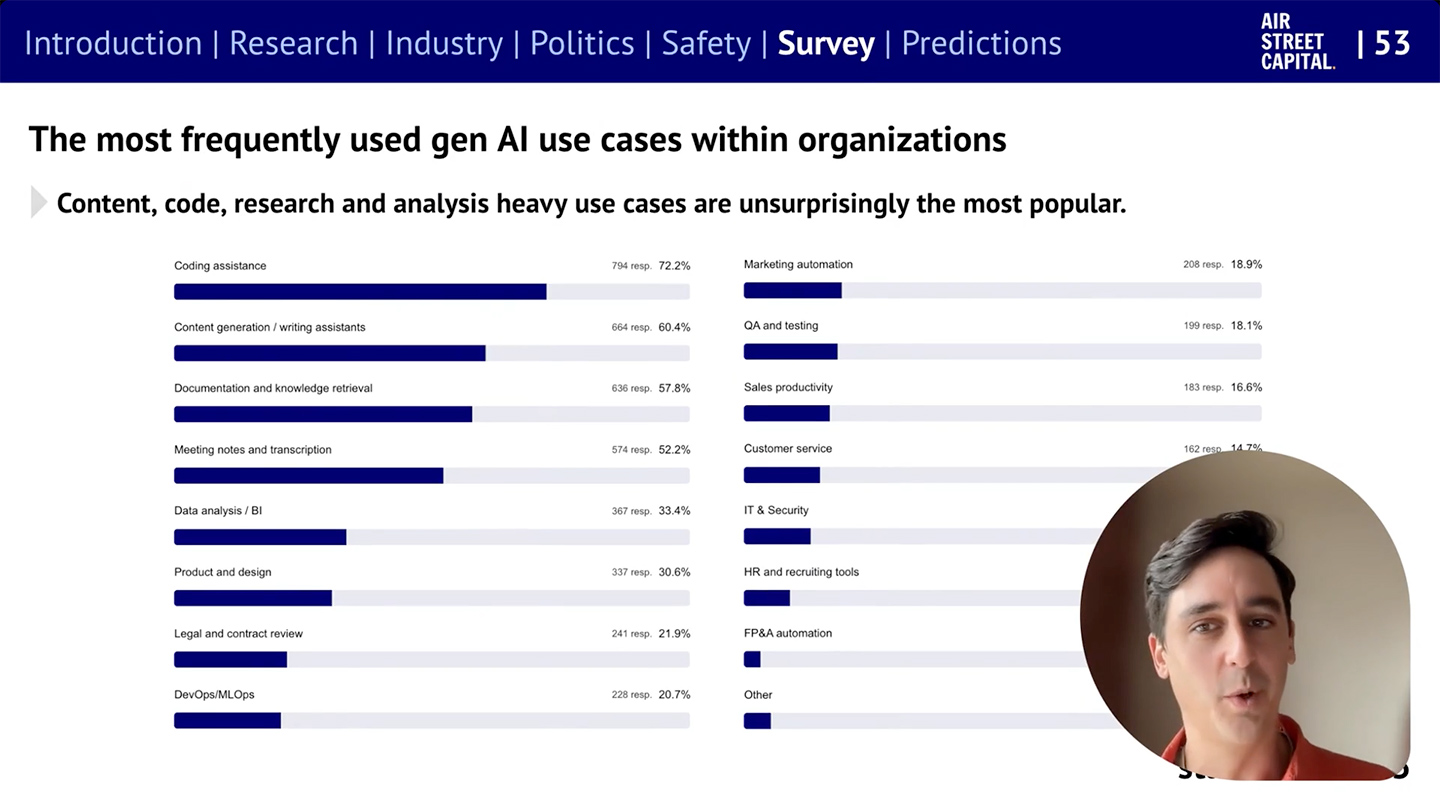
What are companies getting out of all this? Productivity. The #1 use case, by far, is what we call “stage 1” usage – individual productivity. 

.


From DSC:
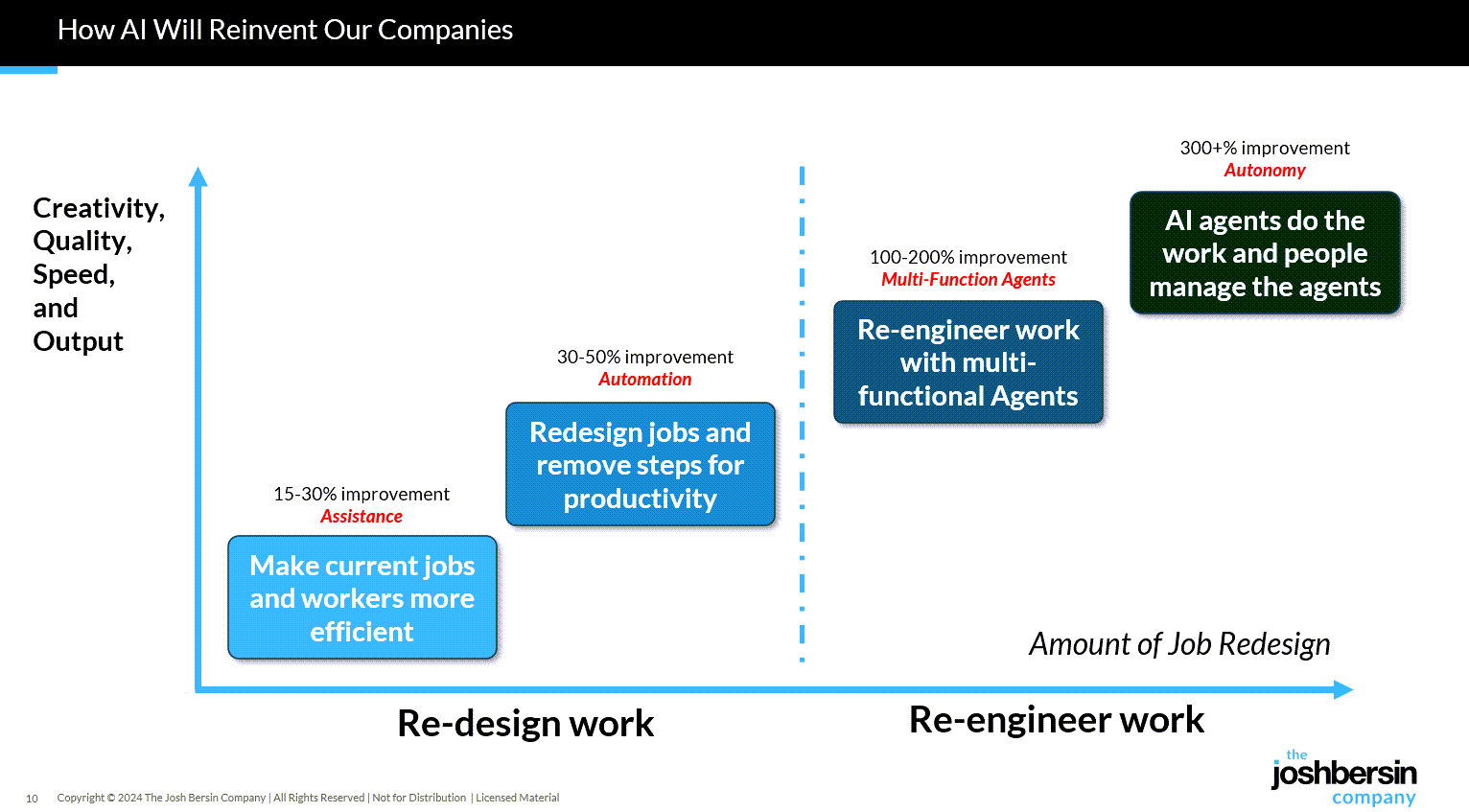
Josh writes: “Many of our large clients are now implementing AI-native learning systems and seeing 30-40% reduction in staff with vast improvements in workforce enablement.

While I get the appeal (and ROI) from management’s and shareholders’ perspective, this represents a growing concern for employment and people’s ability to earn a living. 

And while I highly respect Josh and his work through the years, I disagree that we’re over the problems with AI and how people are using it: 

Two years ago the NYT was trying to frighten us with stories of AI acting as a romance partner. Well those stories are over, and thanks to a $Trillion (literally) of capital investment in infrastructure, engineering, and power plants, this stuff is reasonably safe.

Those stories are just beginning…they’re not close to being over. 


“… imagine a world where there’s no separation between learning and assessment…” — from aiedusimplified.substack.com by Lance Eaton, Ph.D. and Tawnya Means
An interview with Tawnya Means

So let’s imagine a world where there’s no separation between learning and assessment: it’s ongoing. There’s always assessment, always learning, and they’re tied together. Then we can ask: what is the role of the human in that world? What is it that AI can’t do?

Imagine something like that in higher ed. There could be tutoring or skill-based work happening outside of class, and then relationship-based work happening inside of class, whether online, in person, or some hybrid mix.

The aspects of learning that don’t require relational context could be handled by AI, while the human parts remain intact. For example, I teach strategy and strategic management. I teach people how to talk with one another about the operation and function of a business. I can help students learn to be open to new ideas, recognize when someone pushes back out of fear of losing power, or draw from my own experience in leading a business and making future-oriented decisions.

But the technical parts such as the frameworks like SWOT analysis, the mechanics of comparing alternative viewpoints in a boardroom—those could be managed through simulations or reports that receive immediate feedback from AI. The relational aspects, the human mentoring, would still happen with me as their instructor.

Part 2 of their interview is here:


How Coworking Spaces Are Becoming The Learning Ecosystems Of The Future — from hrfuture.net

What if your workspace helped you level up your career? Coworking spaces are becoming learning hubs where skills grow, ideas connect, and real-world education fits seamlessly into the workday.

Continuous learning has become a cornerstone of professional longevity, and flexible workspaces already encourage it through workshops, talks, and mentoring. Their true potential, however, may lie in becoming centers of industry-focused education that help professionals stay adaptable in a rapidly changing world of work.
.


.

What if forward-thinking workspaces and coworking centers became hubs of lifelong learning, integrating job-relevant training with accessible, real-world education?

For coworking operators, this raises important questions: Which types of learning thrive best in these environments, and how much do the design and layout of a space influence how people learn?

By exploring these questions and combining innovative programs with cutting-edge technology aligned to the future workforce, could coworking spaces ultimately become the classrooms of tomorrow?


From DSC:
One of my sisters shared this piece with me. She is very concerned about our society’s use of technology — whether it relates to our youth’s use of social media or the relentless pressure to be first in all things AI. As she was a teacher (at the middle school level) for 37 years, I greatly appreciate her viewpoints. She keeps me grounded in some of the negatives of technology. It’s important for us to listen to each other.


“OpenAI’s Atlas: the End of Online Learning—or Just the Beginning?” [Hardman] + other items re: AI in our LE’s

OpenAI’s Atlas: the End of Online Learning—or Just the Beginning? — from drphilippahardman.substack.com by Dr. Philippa Hardman

My take is this: in all of the anxiety lies a crucial and long-overdue opportunity to deliver better learning experiences. Precisely because Atlas perceives the same context in the same moment as you, it can transform learning into a process aligned with core neuro-scientific principles—including active retrieval, guided attention, adaptive feedback and context-dependent memory formation.

Perhaps in Atlas we have a browser that for the first time isn’t just a portal to information, but one which can become a co-participant in active cognitive engagement—enabling iterative practice, reflective thinking, and real-time scaffolding as you move through challenges and ideas online.

With this in mind, I put together 10 use cases for Atlas for you to try for yourself.

6. Retrieval Practice
What:
Pulling information from memory drives retention better than re-reading.
Why: Practice testing delivers medium-to-large effects (Adesope et al., 2017).
Try: Open a document with your previous notes. Ask Atlas for a mixed activity set: “Quiz me on the Krebs cycle—give me a near-miss, high-stretch MCQ, then a fill-in-the-blank, then ask me to explain it to a teen.”
Atlas uses its browser memory to generate targeted questions from your actual study materials, supporting spaced, varied retrieval.


From DSC:
A quick comment. I appreciate these ideas and approaches from Katarzyna and Rita. I do think that someone is going to want to be sure that the AI models/platforms/tools are given up-to-date information and updated instructions — i.e., any new procedures, steps to take, etc. Perhaps I’m missing the boat here, but an internal AI platform is going to need to have access to up-to-date information and instructions.


There is no God Tier video model — from downes.ca by Stephen Downes

From DSC:
Stephen has some solid reflections and asks some excellent questions in this posting, including:

The question is: how do we optimize an AI to support learning? Will one model be enough? Or do we need different models for different learners in different scenarios?


A More Human University: The Role of AI in Learning — from er.educause.edu by Robert Placido
Far from heralding the collapse of higher education, artificial intelligence offers a transformative opportunity to scale meaningful, individualized learning experiences across diverse classrooms.

The narrative surrounding artificial intelligence (AI) in higher education is often grim. We hear dire predictions of an “impending collapse,” fueled by fears of rampant cheating, the erosion of critical thinking, and the obsolescence of the human educator.Footnote1 This dystopian view, however, is a failure of imagination. It mistakes the death rattle of an outdated pedagogical model for the death of learning itself. The truth is far more hopeful: AI is not an asteroid coming for higher education. It is a catalyst that can finally empower us to solve our oldest, most intractable problem: the inability to scale deep, engaged, and truly personalized learning.


Claude for Life Sciences — from anthropic.com

Increasing the rate of scientific progress is a core part of Anthropic’s public benefit mission.

We are focused on building the tools to allow researchers to make new discoveries – and eventually, to allow AI models to make these discoveries autonomously.

Until recently, scientists typically used Claude for individual tasks, like writing code for statistical analysis or summarizing papers. Pharmaceutical companies and others in industry also use it for tasks across the rest of their business, like sales, to fund new research. Now, our goal is to make Claude capable of supporting the entire process, from early discovery through to translation and commercialization.

To do this, we’re rolling out several improvements that aim to make Claude a better partner for those who work in the life sciences, including researchers, clinical coordinators, and regulatory affairs managers.


AI as an access tool for neurodiverse and international staff — from timeshighereducation.com by Vanessa Mar-Molinero
Used transparently and ethically, GenAI can level the playing field and lower the cognitive load of repetitive tasks for admin staff, student support and teachers

Where AI helps without cutting academic corners
When framed as accessibility and quality enhancement, AI can support staff to complete standard tasks with less friction. However, while it supports clarity, consistency and inclusion, generative AI (GenAI) does not replace disciplinary expertise, ethical judgement or the teacher–student relationship. These are ways it can be put to effective use:

  • Drafting and tone calibration:
  • Language scaffolding:
  • Structure and templates: ..
  • Summarise and prioritise:
  • Accessibility by default:
  • Idea generation for pedagogy:
  • Translation and cultural mediation:

Beyond learning design: supporting pedagogical innovation in response to AI — from timeshighereducation.com by Charlotte von Essen
To avoid an unwinnable game of catch-up with technology, universities must rethink pedagogical improvement that goes beyond scaling online learning


The Sleep of Liberal Arts Produces AI — from aiedusimplified.substack.com by Lance Eaton, Ph.D.
A keynote at the AI and the Liberal Arts Symposium Conference

This past weekend, I had the honor to be the keynote speaker at a really fantstistic conferece, AI and the Liberal Arts Symposium at Connecticut College. I had shared a bit about this before with my interview with Lori Looney. It was an incredible conference, thoughtfully composed with a lot of things to chew on and think about.

It was also an entirely brand new talk in a slightly different context from many of my other talks and workshops. It was something I had to build entirely from the ground up. It reminded me in some ways of last year’s “What If GenAI Is a Nothingburger”.

It was a real challenge and one I’ve been working on and off for months, trying to figure out the right balance. It’s a work I feel proud of because of the balancing act I try to navigate. So, as always, it’s here for others to read and engage with. And, of course, here is the slide deck as well (with CC license).


The Most Innovative Law Schools (2025) — from abovethelaw.com by Staci Zaretsky
Forget dusty casebooks — today’s leaders in legal education are using AI, design thinking, and real-world labs to reinvent how law is taught.

“[F]rom AI labs and interdisciplinary centers to data-driven reform and bold new approaches to design and client service,” according to National Jurist’s preLaw Magazine, these are the law schools that “exemplify innovation in action.”

  1. North Carolina Central University School of Law
  2. Suffolk University Law School
  3. UC Berkeley School of Law
  4. Nova Southeastern University Shepard Broad College of Law
  5. Northeastern University School of Law
  6. Maurice A. Deane School of Law at Hofstra University
  7. Seattle University School of Law
  8. Case Western Reserve University School of Law
  9. University of Miami School of Law
  10. Benjamin N. Cardozo School of Law at Yeshiva University
  11. Vanderbilt University Law School
  12. Southwestern Law School

Click here to read short summaries of why each school made this year’s list of top innovators.


Clio’s Metamorphosis: From Practice Management To A Comprehensive AI And Law Practice Provider — from abovethelaw.com by Stephen Embry
Clio is no longer a practice management company. It’s much more of a comprehensive provider of all needs of its customers big and small.

Newton delivered what may have been the most consequential keynote in the company’s history and one that signals a shift by Clio from a traditional practice management provider to a comprehensive platform that essentially does everything for the business and practice of law.

Clio also earlier this year acquired vLex, the heavy-duty AI legal research player. The acquisition is pending regulatory approval. It is the vLex acquisition that is powering the Clio transformation that Newton described in his keynote.

vLex has a huge amount of legal data in its wheelhouse to power sophisticated legal AI research. On top of this data, vLex developed Vincent, a powerful AI tool to work with this data and enable all sorts of actions and work.

This means a couple of things. First, by acquiring vLex, Clio can now offer its customers AI legal research tools. Clio customers will no longer have to go one place for its practice management needs and a second place for its substantive legal work, like research. It makes what Clio can provide much more comprehensive and all inclusive.


‘Adventures In Legal Tech’: How AI Is Changing Law Firms — from abovethelaw.com
Ernie the Attorney shares his legal tech takes.

Artificial intelligence will give solos and small firms “a huge advantage,” according to one legal tech consultant.

In this episode of “Adventures in Legal Tech,” host Jared Correia speaks with Ernie Svenson — aka “Ernie the Attorney” — about the psychology behind resistance to change, how law firms are positioning their AI use, the power of technology for business development, and more.


Legal software: how to look for and compare AI in legal technology — from legal.thomsonreuters.com by Chris O’Leary

Highlights

  • Legal ops experts can categorize legal AI platforms and software by the ability to streamline key tasks such as legal research, document processing or analysis, and drafting.
  • The trustworthiness and accuracy of AI hinge on the quality of its underlying data; solutions like CoCounsel Legal are grounded in authoritative, expert-verified content from Westlaw and Practical Law, unlike providers that may rely on siloed or less reliable databases.
  • When evaluating legal software, firms should use a framework that assesses critical factors such as integration with existing tech stacks, security, scalability, user adoption, and vendor reputation.

ASU Law appoints a director of AI and Legal Tech Studio, advancing its initiative to reimagine legal education — from law.asu.edu

The Sandra Day O’Connor College of Law at Arizona State University appointed Sean Harrington as director of the newly established AI and Legal Tech Studio, a key milestone in ASU Law’s bold initiative to reimagine legal education for the artificial intelligence era. ASU, ranked No. 1 in innovation for the 11th consecutive year, drives AI solutions that enhance teaching, enrich student training and facilitate digital transformation.


The American Legal Technology Awards Name 2025 Winners — from natlawreview.com by Tom Martin

The sixth annual American Legal Technology Awards were presented on Wednesday, October 15th, at Suffolk University Law School (Boston), recognizing winners across ten categories. There were 211 nominees who were evaluated by 27 judges.

The honorees on the night included:


The above posting on LinkedIn then links to this document


Designing Microsoft 365 Copilot to empower educators, students, and staff — from microsoft.com by Deirdre Quarnstrom

While over 80% of respondents in the 2025 AI in Education Report have already used AI for school, we believe there are significant opportunities to design AI that can better serve each of their needs and broaden access to the latest innovation.1

That’s why today [10/15/25], we’re announcing AI-powered experiences built for teaching and learning at no additional cost, new integrations in Microsoft 365 apps and Learning Management Systems, and an academic offering for Microsoft 365 Copilot.

Introducing AI-powered teaching and learning
Empowering educators with Teach

We’re introducing Teach to help streamline class prep and adapt AI to support educators’ teaching expertise with intuitive and customizable features. In one place, educators can easily access AI-powered teaching tools to create lesson plans, draft materials like quizzes and rubrics, and quickly make modifications to language, reading level, length, difficulty, alignment to relevant standards, and more.


The State of AI Report 2025 — from nathanbenaich.substack.com by Nathan Benaich

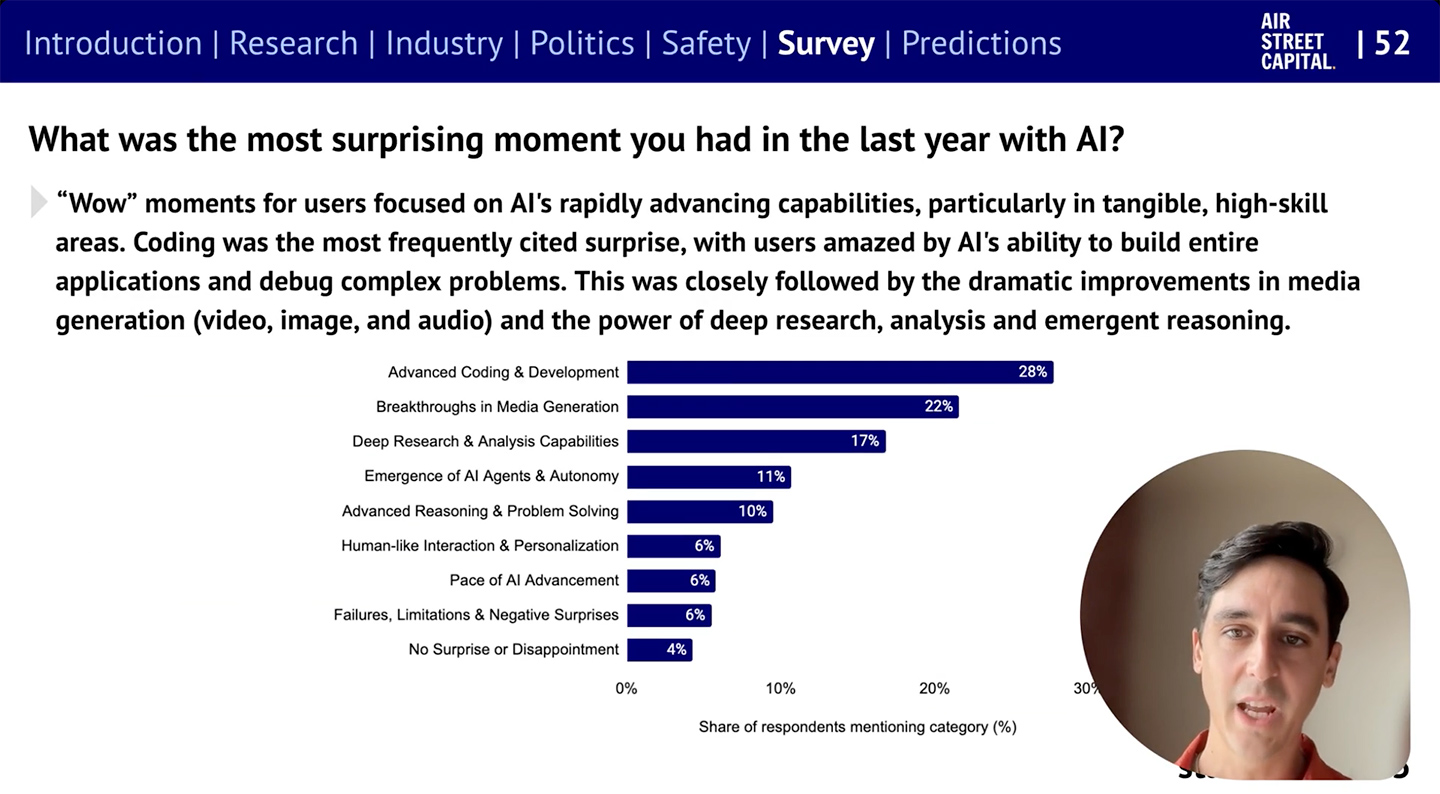
In short, it’s been a monumental 12 months for AI. Our eighth annual report is the most comprehensive it’s ever been, covering what you need to know about research, industry, politics, and safety – along with our first State of AI Usage Survey of 1,200 practitioners.

stateof.ai
.


10 Tips from Smart Teaching Stronger Learning — from Pooja K. Agarwal, Ph.D.

Per Dr. Pooja Agarwal:

Combining two strategies—spacing and retrieval practice—is key to success in learning, says Shana Carpenter.


On a somewhat related note (i.e., for Instructional Designers, teachers, faculty members, T&L staff members), also see:

 
© 2025 | Daniel Christian