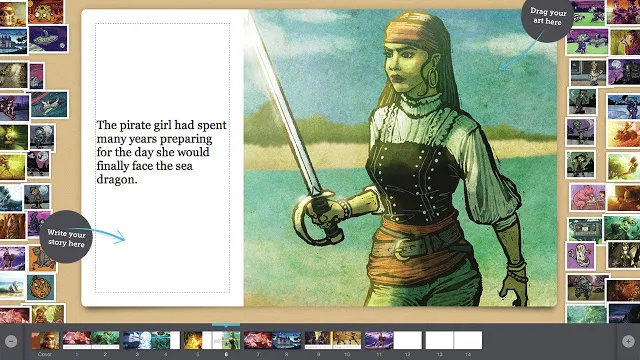
5 of the Best Tools To Teach Storytelling — from techlearning.com by Luke Edwards
Use these best tools to teach storytelling to help students progress towards mastery

The best tools to teach storytelling can also be some of the most ideal ways to engage students, both creatively and more generally with education. From sparking their imaginations to helping structure a creative toolset, these digital assistants can be powerful in the classroom and beyond.

Giving a student the ability to structure and tell a compelling story can help to empower them in terms of literacy, empathy, and critical thinking.

Students can be given the opportunity to explore historical perspectives, dive into personal narratives, build fictional worlds, and present research in a story form. All of which helps strengthen communication skills while learning at the same time.
.


Make Gatherings More Engaging — from wondertools.substack.com by Jeremy Caplan
Tested tools for quizzes, online discussions, & shareable docs

The hardest part of teaching — or leading meetings — is sparking engagement. Getting people to engage enthusiastically with something new can be tough. It’s especially challenging if people are overwhelmed, super busy, or just tired.

As we aim to stretch people’s thinking in a new direction, tools are just one part of the overall picture. But they can help. Last week I shared five tools for creating learning paths, interactive lessons, and new kinds of digital notebooks. Today’s follow-up recommendations focus on creative engagement.

You don’t have to be a teacher to find these resources for opening up participation useful. If you lead a team, run meetings, or collaborate with colleagues, you can benefit from these tools.

I’ve baked into this post multiple ways to engage.


How storytelling can turn international students into the most powerful voices in the room — from timeshighereducation.com by Natalie Cummins
Turning presentations into a visual storytelling task allows international students to demonstrate their learning through elements such as sound, visuals, silence and pacing rather than just language

Rather than changing the assessment, I shared a simple storytelling checklist that emphasised structure – a strong opening, a clear human dilemma at the centre and a purposeful ending – alongside explicit inspiration for communicating meaning through visuals, video, metaphor, sound and pacing rather than language alone.

On presentation day, the group told a moving story grounded in a global extractive firm where one student’s family worked. What stood out was not linguistic fluency but clarity of meaning. Their story allowed a complex organisational problem of unsafe work conditions to unfold, with non-verbal elements carrying the ethical and human weight of the case.

This group delivered one of the most compelling presentations I have ever seen. The room was transfixed.


Jim VandeHei’s note to his kids: Blunt AI talk — from axios.com by CEO Jim VandeHei
Axios CEO Jim VandeHei wrote this note to his wife, Autumn, and their three kids. She suggested sharing it more broadly since so many families are wrestling with how to think and talk about AI. So here it is …

Dear Family:
I want to put to words what I’m hearing, seeing, thinking and writing about AI.

  • Simply put, I’m now certain it will upend your work and life in ways more profound than the internet or possibly electricity. This will hit in months, not years.
  • The changes will be fast, wide, radical, disorienting and scary. No one will avoid its reach.

I’m not trying to frighten you. And I know your opinions range from wonderment to worry. That’s natural and OK. Our species isn’t wired for change of this speed or scale.

  • My conversations with the CEOs and builders of these LLMs, as well as my own deep experimentation with AI, have shaken and stirred me in ways I never imagined.

All of you must figure out how to master AI for any specific job or internship you hold or take. You’d be jeopardizing your future careers by not figuring out how to use AI to amplify and improve your work. You’d be wise to replace social media scrolling with LLM testing.

Be the very best at using AI for your gig.

more here.


Also see:


Also relevant/see:


From Rooms to Ecosystems: When Connection Becomes the Catalyst

Some gatherings change not just in size, but in meaning. What started as a small, intentional space to celebrate partners has grown into a moment that reflects how an entire ecosystem has matured. Each year, the room fills with more leaders, more relationships, and more shared language about what learning can look like when people are genuinely connected. It is less about an event on the calendar and more about what it represents: an education community that knows each other, trusts each other, and keeps showing up.

That kind of connection did not happen by accident. Through efforts like Get on the Bus, hosted by the Ewing Marion Kauffman Foundation, networking for education leaders has shifted from transactional to relational. Students lead. Stories anchor the work. Conversations happen across tables, sectors, and roles. System leaders, intermediaries, industry partners, and civic organizations are not passing business cards. They are building shared understanding and social capital that lasts long after the room clears.

This week’s newsletter carries that same energy. You will find examples of learning that travels beyond buildings, leadership conversations grounded in real tensions, and models that reflect what becomes possible when ecosystems are aligned. When people feel connected to one another and to a common purpose, the work gets clearer, stronger, and more human. That sense of belonging is not just powerful. It is foundational to what comes next.


Town Hall Recap: What’s Next in Learning 2026 — from gettingsmart.com by Tom Vander Ark, Nate McClennen, Shawnee Caruthers, Victoria Andrews

As we enter 2026, the Getting Smart team is diving deep into the convergence of human potential and technological opportunity. Our annual Town Hall isn’t just a forecast—it’s a roadmap for the year ahead. We will explore how human-centered AI is reshaping pedagogy, the power of participation, and the new realities of educational leadership. Join us as we define the new dispositions for future-ready educators and discover how to build meaningful, personalized pathways for every student.


Farewell to Traditional Universities | What AI Has in Store for Education

Premiered Jan 16, 2026

Description:

What if the biggest change in education isn’t a new app… but the end of the university monopoly on credibility?

Jensen Huang has framed AI as a platform shift—an industrial revolution that turns intelligence into infrastructure. And when intelligence becomes cheap, personal, and always available, education stops being a place you go… and becomes a system that follows you. The question isn’t whether universities will disappear. The question is whether the old model—high cost, slow updates, one-size-fits-all—can survive a world where every student can have a private tutor, a lab partner, and a curriculum designer on demand.

This video explores what AI has in store for education—and why traditional universities may need to reinvent themselves fast.

In this video you’ll discover:

  • How AI tutors could deliver personalized learning at scale
  • Why credentials may shift from “degrees” to proof-of-skill portfolios
  • What happens when the “middle” of studying becomes automated
  • How universities could evolve: research hubs, networks, and high-trust credentialing
  • The risks: cheating, dependency, bias, and widening inequality
  • The 3 skills that become priceless when information is everywhere: judgment, curiosity, and responsibility

From DSC:
There appears to be another, similar video, but with a different date and length of the video. So I’m including this other recording as well here:


The End of Universities as We Know Them: What AI Is Bringing

Premiered Jan 27, 2026

What if universities don’t “disappear”… but lose their monopoly on learning, credentials, and opportunity?

AI is turning education into something radically different: personal, instant, adaptive, and always available. When every student can have a 24/7 tutor, a writing coach, a coding partner, and a study plan designed specifically for them, the old model—one professor, one curriculum, one pace for everyone—starts to look outdated. And the biggest disruption isn’t the classroom. It’s the credential. Because in an AI world, proof of skill can become more valuable than a piece of paper.

This video explores the end of universities as we know them: what AI is bringing, what will break, what will survive, and what replaces the traditional path.

In this video you’ll discover:

  • Why AI tutoring could outperform one-size-fits-all lectures
  • How “degrees” may shift into skill proof: portfolios, projects, and verified competency
  • What happens when the “middle” of studying becomes automated
  • How universities may evolve: research hubs, networks, high-trust credentialing
  • The dark side: cheating, dependency, inequality, and biased evaluation
  • The new advantage: judgment, creativity, and responsibility in a world of instant answers
 

The Learning and Employment Records (LER) Report for 2026: Building the infrastructure between learning and work — from smartresume.com; with thanks to Paul Fain for this resource

Executive Summary (excerpt)

This report documents a clear transition now underway: LERs are moving from small experiments to systems people and organizations expect to rely on. Adoption remains early and uneven, but the forces reshaping the ecosystem are no longer speculative. Federal policy signals, state planning cycles, standards maturation, and employer behavior are aligning in ways that suggest 2026 will mark a shift from exploration to execution.

Across interviews with federal leaders, state CIOs, standards bodies, and ecosystem builders, a consistent theme emerged: the traditional model—where institutions control learning and employment records—no longer fits how people move through education and work. In its place, a new model is being actively designed—one in which individuals hold portable, verifiable records that systems can trust without centralizing control.

Most states are not yet operating this way. But planning timelines, RFP language, and federal signals indicate that many will begin building toward this model in early 2026.

As the ecosystem matures, another insight becomes unavoidable: records alone are not enough. Value emerges only when trusted records can be interpreted through shared skill languages, reused across contexts, and embedded into the systems and marketplaces where decisions are made.

Learning and Employment Records are not a product category. They are a data layer—one that reshapes how learning, work, and opportunity connect over time.

This report is written for anyone seeking to understand how LERs are beginning to move from concept to practice. Whether readers are new to the space or actively exploring implementation, the report focuses on observable signals, emerging patterns, and the practical conditions required to move from experimentation toward durable infrastructure.


“The building blocks for a global, interoperable skills ecosystem are already in place. As education and workforce alignment accelerates, the path toward trusted, machine-readable credentials is clear. The next phase depends on credentials that carry value across institutions, industries, states, and borders; credentials that move with learners wherever their education and careers take them. The question now isn’t whether to act, but how quickly we move.”

– Curtiss Barnes, Chief Executive Officer, 1EdTech


The above item was from Paul Fain’s recent posting, which includes the following excerpt:

SmartResume just published a guide for making sense of this rapidly expanding landscape. The LER Ecosystem Report was produced in partnership with AACRAO, Credential Engine, 1EdTech, HR Open Standards, and the U.S. Chamber of Commerce Foundation. It was based on interviews and feedback gathered over three years from 100+ leaders across education, workforce, government, standards bodies, and tech providers.

The tools are available now to create the sort of interoperable ecosystem that can make talent marketplaces a reality, the report argues. Meanwhile, federal policy moves and bipartisan attention to LERs are accelerating action at the state level.

“For state leaders, this creates a practical inflection point,” says the report. “LERs are shifting from an innovation discussion to an infrastructure planning conversation.”


Global list of over 100 L&D conferences in 2026 — from donaldhtaylor.co.uk by Don Taylor

I’m a firm believer in conferences. This isn’t just because I have chaired the Learning Technologies Conference in London since 2000. It’s because they are invaluable in sustaining our community. So many in Learning and Development work alone or in small teams, that building and maintaining personal contacts is crucial.For a number of years, I have kept a personal list of the Learning and Development conferences running internationally. This year, I thought it would be helpful to  share it.


AI and the Work of Centers for Teaching and Learning — from derekbruff.org by Derek Bruff

  • Penelope Adams Moon suggested that instead [of] framing a workshop around “How can we integrate AI into the work of teaching?” we should ask “Given what we know about learning, how might AI be useful?” I love that reframing, and I think it connects to the students’ requests for more AI knowhow. Students have a lot of options for learning: working with their instructor, collaborating with peers, surfing YouTube for explainer videos, university-provided social annotation platforms, and, yes, using AI as a kind of tutor. I think our job (collectively) isn’t just to teach students how to use AI (as they’re requesting) but also to help them figure out when and how AI is helpful for their learning. That’s highly dependent on the student and the learning task! I wrote about this kind of metacognition on my blog.

In the same way, when I approach any kind of educational technology, I’m looking for tools that can be responsive to my pedagogical aims. The pedagogy should drive the technology use, not the other way around.


Planning Your L&D Hiring for Next Year? Start With Skills, Salary Ranges, and Realistic Expectations — from teamedforlearning.com

Salary transparency laws across many states now require organizations to publish compensation ranges. While this can feel like a burden, the truth is: transparency can dramatically speed up hiring. Candidates self-select, mismatches decrease, and teams save time.

But transparency only works when the salary range itself is grounded in reality. And that’s where many organizations struggle.

Posting a salary range is the easy part.
Determining a fair, defensible range is where the work happens.

Also from Teamed for Learning, see:

Hiring Trends For 2026 
The learning industry shifts fast, and this year is no exception. Here’s what’s shaping the hiring landscape right now:

  • AI is now a core skill, not a bonus
  • Project management is showing up in every job description
  • Generalists with business awareness are beating tool-heavy candidates
  • Universities and edtech companies are speeding up content refresh cycles
  • Hiring budgets are tight – but expectations aren’t easing up


From Stephanie T.’s posting out on LinkedIn

The lesson isn’t to make school reports more like Spotify Wrapped.

It’s to design reports that are accessible, timely, and readable — without losing the humanity that makes teacher insight meaningful.

If a report is too difficult to access, or arrives too late to matter, who is it really for?

 
© 2025 | Daniel Christian