From DSC:
This is where the quizzing features/tools within a Learning Management System such as Canvas, Moodle, Blackboard Learn, etc. are so valuable. They provide students with opportunities for low-stakes (or no-stakes) practice in retrieving information and to see if they are understanding things or not. Doing such formative assessments along the way can point out areas where they need further practice, as well as areas where the students are understanding things well (and only need an occasional question or two on that item in order to reduce the effects of the forgetting curve).


The information below is from Heather Campbell at Chegg
(emphasis DSC)


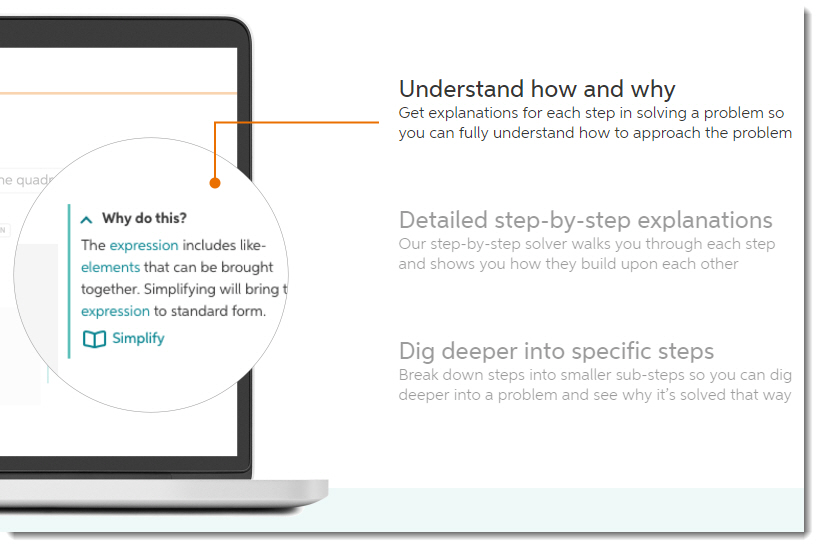
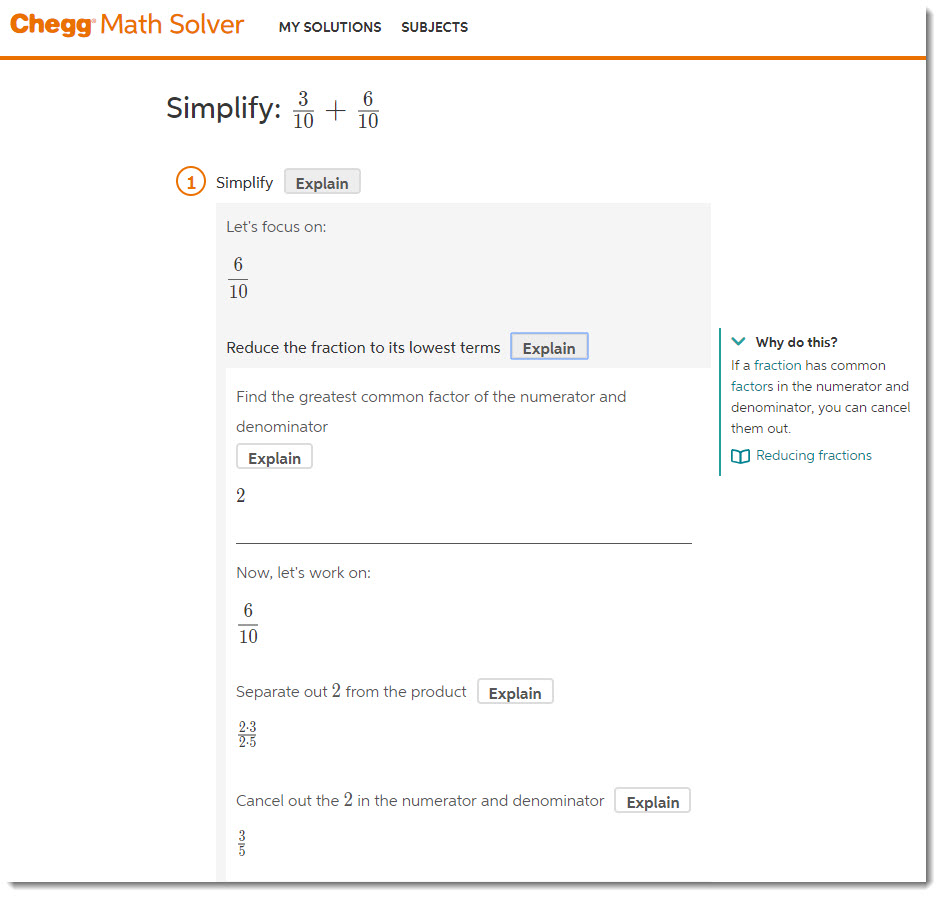
Chegg Math Solver is an AI-driven tool to help the student understand math. It is more than just a calculator – it explains the approach to solving the problem. So, students won’t just copy the answer but understand and can solve similar problems at the same time. Most importantly,students can dig deeper into a problem and see why it’s solved that way. Chegg Math Solver.

In every subject, there are many key concepts and terms that are crucial for students to know and understand. Often it can be hard to determine what the most important concepts and terms are for a given subject, and even once you’ve identified them you still need to understand what they mean. To help you learn and understand these terms and concepts, we’ve provided thousands of definitions, written and compiled by Chegg experts. Chegg Definition.


From DSC:
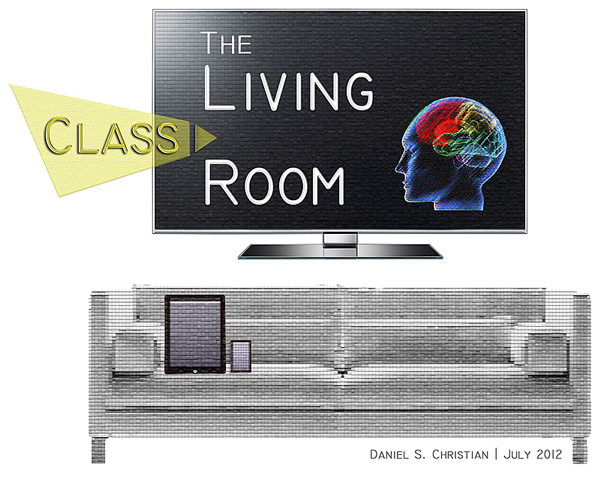
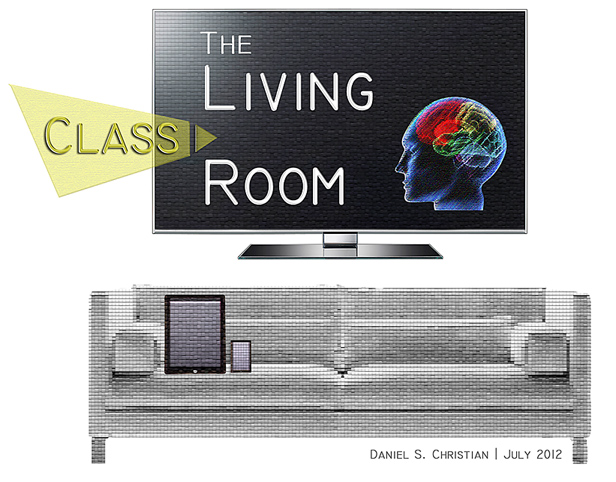
I see this type of functionality as a piece of a next generation learning platform — a piece of the Living from the Living [Class] Room type of vision. Great work here by Chegg!

Likely, students will also be able to take pictures of their homework, submit it online, and have that image/problem analyzed for correctness and/or where things went wrong with it.


Alexa, get me the articles (voice interfaces in academia) — from blog.libux.co by Kelly Dagan

Excerpt:

Credit to Jill O’Neill, who has written an engaging consideration of applications, discussions, and potentials for voice-user interfaces in the scholarly realm. She details a few use case scenarios: finding recent, authoritative biographies of Jane Austen; finding if your closest library has an item on the shelf now (and whether it’s worth the drive based on traffic).

Coming from an undergraduate-focused (and library) perspective, I can think of a few more:

  • asking if there are any group study rooms available at 7 pm and making a booking
  • finding out if [X] is open now (Archives, the Cafe, the Library, etc.)
  • finding three books on the Red Brigades, seeing if they are available, and saving the locations
  • grabbing five research articles on stereotype threat, to read later


Also see:


Creating an Immersive, Global Experience for Business Education — from campustechnology.com by Meg Lloyd
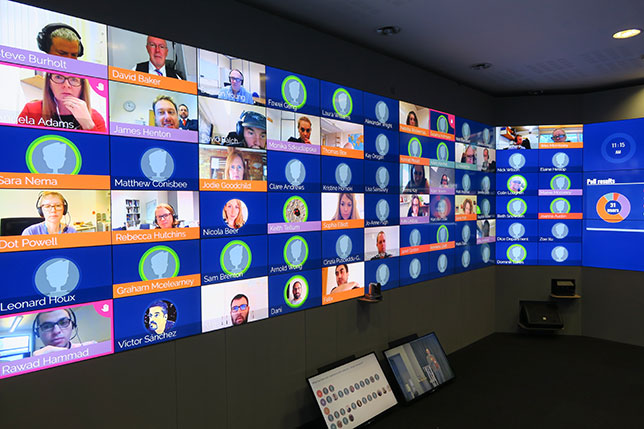
The University of Oxford’s Saïd Business School is using cutting-edge videoconferencing technology to connect students and academic scholars in a truly global classroom.


New Virtual 3D Microscope Lab Program Offered for Online Students by Oregon State University — from virtuallyinspired.org
OSU solves degree completion issue for online biology students

Excerpt:

“We had to create an alternative that gives students the foundational experience of being in a lab where they can maneuver a microscope’s settings and adjust the images just as they would in a face-to-face environment,” said Shannon Riggs, the Ecampus director of course development and training.

Multimedia developers mounted a camera on top of an actual microscope and took pictures of what was on the slides. Using 3D modeling software, the photos were interweaved to create 3D animation. Using game development software enabled students to adjust lighting, zoom and manipulate the images, just like in a traditional laboratory. The images were programmed to create a virtual simulation.

The final product is “an interactive web application that utilizes a custom 3D microscope and incorporates animation and real-life slide photos,” according to Victor Yee, an Ecampus assistant director of course development and training.


Also see:

  • YouTube to Invest $20 Million in Educational Content — from campustechnology.com by Dian Schaffhauser
    Excerpt:
    YouTube, a Google company, has announced plans to invest $20 million in YouTube Learning, an initiative hinted at during the summer. The goal: “to support education-focused creators and expert organizations that create and curate high-quality learning content on the video site.” Funding will be spent on supporting video creators who want to produce education series and wooing other education video providers to the site.


From DSC:
Ever notice how effective Ted Talks begin? They seek to instantly grab your attention with a zinger question, a somewhat shocking statement, an interesting story, a joke, an important problem or an issue, a personal anecdote or experience, a powerful image/photo/graphic, a brief demonstration, and the like.

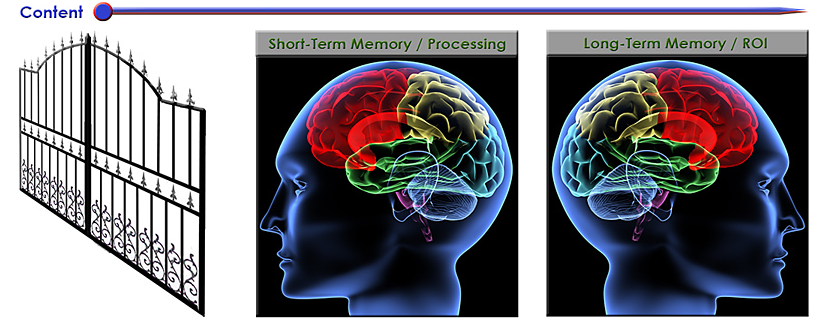
Grabbing someone’s attention is a key first step in getting a piece of information into someone’s short-term memory — what I call getting through “the gate.” If we can’t get through the gate into someone’s short-term memory, we have zero (0) chance of having them actually process that information and to think about and engage with that piece of content. If we can’t make it into someone’s short-term memory, we can’t get that piece of information into their long-term memory for later retrieval/recall. There won’t be any return on investment (ROI) in that case.


So why not try starting up one of your classes this week with a zinger question, a powerful image/photo/video, or a story from your own work experience? I’ll bet you’ll grab your students’ attentions instantly! Then you can move on into the material for a greater ROI. From there, offering frequent, low-stakes quizzes will hopefully help your students slow down their forgetting curves and help them practice recalling/retrieving that information. By the way, that’s why stories are quite powerful. We often remember them better. So if you can weave an illustrative story into your next class, your students might really benefit from it come final test time!

Also relevant/see:

Ready, set, speak: 5 strong ways to start your next presentation — from abovethelaw.com by Olga Mack, with thanks to Mr. Otto Stockmeyer for this resource
No matter which of these five ways you decide to launch your presentation, ensure that you make it count, and make it memorable.

Excerpts:

  1. Tell a captivating story
  2. Ask thought-provoking questions to the audience
  3. State a shocking headline or statistic
  4. Use a powerful quote
  5. Use silence
    When delivering a speech, a pause of about three or even as many as 10 seconds will allow your audience to sit and quiet down. Because most people always expect the speaker to start immediately, this silence will thus catch the attention of the audience. They will be instinctively more interested in what you had to say, and why you took your time to say it. This time will also help you gather your nerves and prepare to speak.


Reflections on “Inside Amazon’s artificial intelligence flywheel” [Levy]

Inside Amazon’s artificial intelligence flywheel — from wired.com by Steven Levy
How deep learning came to power Alexa, Amazon Web Services, and nearly every other division of the company.

Excerpt (emphasis DSC):

Amazon loves to use the word flywheel to describe how various parts of its massive business work as a single perpetual motion machine. It now has a powerful AI flywheel, where machine-learning innovations in one part of the company fuel the efforts of other teams, who in turn can build products or offer services to affect other groups, or even the company at large. Offering its machine-learning platforms to outsiders as a paid service makes the effort itself profitable—and in certain cases scoops up yet more data to level up the technology even more.

It took a lot of six-pagers to transform Amazon from a deep-learning wannabe into a formidable power. The results of this transformation can be seen throughout the company—including in a recommendations system that now runs on a totally new machine-learning infrastructure. Amazon is smarter in suggesting what you should read next, what items you should add to your shopping list, and what movie you might want to watch tonight. And this year Thirumalai started a new job, heading Amazon search, where he intends to use deep learning in every aspect of the service.

“If you asked me seven or eight years ago how big a force Amazon was in AI, I would have said, ‘They aren’t,’” says Pedro Domingos, a top computer science professor at the University of Washington. “But they have really come on aggressively. Now they are becoming a force.”

Maybe the force.


From DSC:
When will we begin to see more mainstream recommendation engines for learning-based materials? With the demand for people to reinvent themselves, such a next generation learning platform can’t come soon enough!

  • Turning over control to learners to create/enhance their own web-based learner profiles; and allowing people to say who can access their learning profiles.
  • AI-based recommendation engines to help people identify curated, effective digital playlists for what they want to learn about.
  • Voice-driven interfaces.
  • Matching employees to employers.
  • Matching one’s learning preferences (not styles) with the content being presented as one piece of a personalized learning experience.
  • From cradle to grave. Lifelong learning.
  • Multimedia-based, interactive content.
  • Asynchronously and synchronously connecting with others learning about the same content.
  • Online-based tutoring/assistance; remote assistance.
  • Reinvent. Staying relevant. Surviving.
  • Competency-based learning.


The Living [Class] Room -- by Daniel Christian -- July 2012 -- a second device used in conjunction with a Smart/Connected TV


We’re about to embark on a period in American history where career reinvention will be critical, perhaps more so than it’s ever been before. In the next decade, as many as 50 million American workers—a third of the total—will need to change careers, according to McKinsey Global Institute. Automation, in the form of AI (artificial intelligence) and RPA (robotic process automation), is the primary driver. McKinsey observes: “There are few precedents in which societies have successfully retrained such large numbers of people.”

Bill Triant and Ryan Craig


Also relevant/see:

Online education’s expansion continues in higher ed with a focus on tech skills — from educationdive.com by James Paterson

Dive Brief:

  • Online learning continues to expand in higher ed with the addition of several online master’s degrees and a new for-profit college that offers a hybrid of vocational training and liberal arts curriculum online.
  • Inside Higher Ed reported the nonprofit learning provider edX is offering nine master’s degrees through five U.S. universities — the Georgia Institute of Technology, the University of Texas at Austin, Indiana University, Arizona State University and the University of California, San Diego. The programs include cybersecurity, data science, analytics, computer science and marketing, and they cost from around $10,000 to $22,000. Most offer stackable certificates, helping students who change their educational trajectory.
  • Former Harvard University Dean of Social Science Stephen Kosslyn, meanwhile, will open Foundry College in January. The for-profit, two-year program targets adult learners who want to upskill, and it includes training in soft skills such as critical thinking and problem solving. Students will pay about $1,000 per course, though the college is waiving tuition for its first cohort.


NEW: The Top Tools for Learning 2018 [Jane Hart]

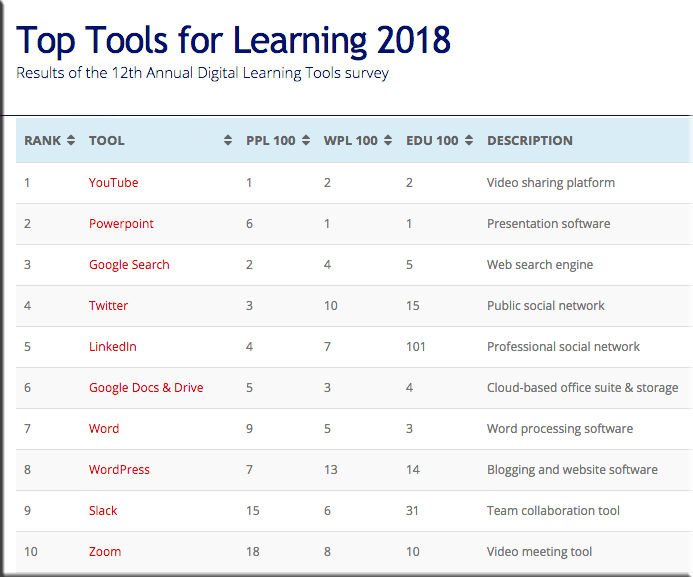
The Top Tools for Learning 2018 from the 12th Annual Digital Learning Tools Survey -- by Jane Hart


The above was from Jane’s posting 10 Trends for Digital Learning in 2018 — from modernworkplacelearning.com by Jane Hart

Excerpt:

[On 9/24/18],  I released the Top Tools for Learning 2018 , which I compiled from the results of the 12th Annual Digital Learning Tools Survey.

I have also categorised the tools into 30 different areas, and produced 3 sub-lists that provide some context to how the tools are being used:

  • Top 100 Tools for Personal & Professional Learning 2018 (PPL100): the digital tools used by individuals for their own self-improvement, learning and development – both inside and outside the workplace.
  • Top 100 Tools for Workplace Learning (WPL100): the digital tools used to design, deliver, enable and/or support learning in the workplace.
  • Top 100 Tools for Education (EDU100): the digital tools used by educators and students in schools, colleges, universities, adult education etc.


3 – Web courses are increasing in popularity.
Although Coursera is still the most popular web course platform, there are, in fact, now 12 web course platforms on the list. New additions this year include Udacity and Highbrow (the latter provides daily micro-lessons). It is clear that people like these platforms because they can chose what they want to study as well as how they want to study, ie. they can dip in and out if they want to and no-one is going to tell them off – which is unlike most corporate online courses which have a prescribed path through them and their use is heavily monitored.


5 – Learning at work is becoming personal and continuous.
The most significant feature of the list this year is the huge leap up the list that Degreed has made – up 86 places to 47th place – the biggest increase by any tool this year. Degreed is a lifelong learning platform and provides the opportunity for individuals to own their expertise and development through a continuous learning approach. And, interestingly, Degreed appears both on the PPL100 (at  30) and WPL100 (at 52). This suggests that some organisations are beginning to see the importance of personal, continuous learning at work. Indeed, another platform that underpins this, has also moved up the list significantly this year, too. Anders Pink is a smart curation platform available for both individuals and teams which delivers daily curated resources on specified topics. Non-traditional learning platforms are therefore coming to the forefront, as the next point further shows.


From DSC:
Perhaps some foreshadowing of the presence of a powerful, online-based, next generation learning platform…?


From DSC to teachers and professors:
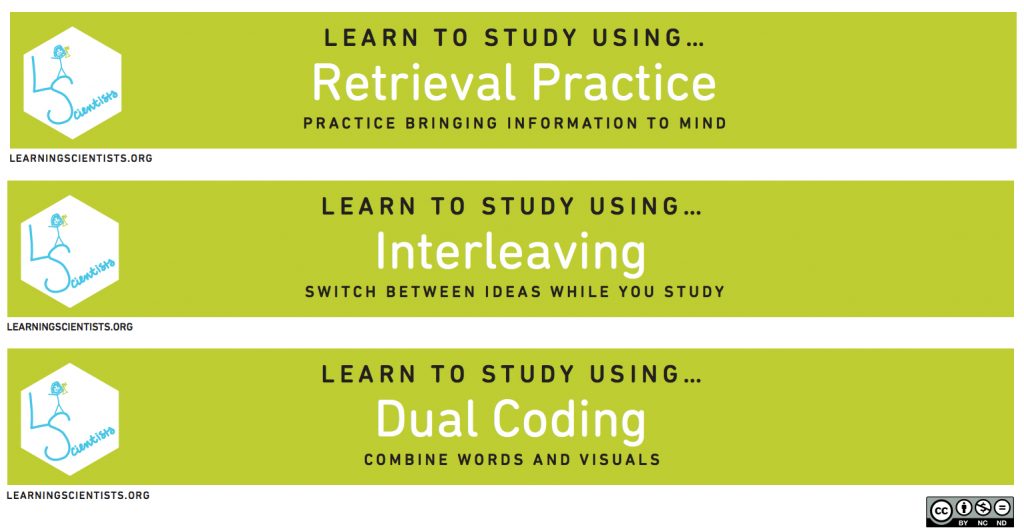
Should these posters be in your classroom? The posters each have a different practice such as:

  • Spaced practice
  • Retrieval practice
  • Elaboration
  • Interleaving
  • Concrete examples
  • Dual coding

That said, I could see how all of that information could/would be overwhelming to some students and/or the more technical terms could bore them or fly over their heads. So perhaps you could boil down the information to feature excerpts from the top sections only that put the concepts into easier to digest words such as:

  • Practice bringing information to mind
  • Switch between ideas while you study
  • Combine words and visuals
  • Etc. 


Learn how to study using these practices


Production Values for Audio Podcasts, Part I — from learningsolutionsmag.com by Jeff D’Anza

Excerpts:

There are a number of production values that narrative podcasters find effective for grabbing listener attention and keeping their audiences engaged in the story; you could think of these as technical elements of professional audio quality. They range from techniques for improving content when applied to script writing to methods applied to audio recording and editing. The most successful professional podcasters use these elements to create immersion in the audio environment and to eliminate audio distraction. The result is the creation of a kind of audio theater. Here are four basic practices to embrace while creating your narrative podcasts.

  1. Set the scene first
  2. Hook the audience
  3. Vary character voices
  4. Talk like real people


Production Values for Audio Podcasts, Part II — from learningsolutionsmag.com by Jeff D’Anza

Excerpts:

In this article, I will continue with more production tricks that can substantially increase the quality of your narrative podcasts.

Use music to reset scenes
It’s not revolutionary to suggest that learners tend to have short attention spans, and the case is no different when it comes to narrative podcasts. Every so often you need to reset your learners’ brains in order to keep their attention level high.

One excellent way to accomplish this is through the use of musical breaks. Music breaks can function as a type of auditory palate cleanser, allowing the brain a few moments to stop focusing on information that is being presented and prepare the learner to be ready for the next section of content.

Also:

  • Host/producer structure
  • Get out of the studio
  • Don’t fear insignificant details


From DSC:

Seems to me there’s some wisdom here for instructional designers as well as professors, teachers, and trainers who are creating learning/training related content and/or who are flipping their classrooms.


Aligning the business model of college with student needs: How WGU is disrupting higher education — from christenseninstitute.org by Alana Dunagan

Excerpt:

Since its inception, Western Governors University (WGU) has aimed to serve learners otherwise shut out of the traditional system. Now, the groundbreaking institution has both graduated 100,000 students and has over 100,000 students currently enrolled. These milestones demonstrate WGU’s ability to scale its high-quality, low-cost model, signaling a momentous shift in the higher education landscape.

In the mid-1990s, governors of 19 states across the western United States were concerned about bringing accessible college education to rural populations, especially working adults.These governors, led by Utah Governor Mike Leavitt, decided to explore building a new university to address the challenge. As the memorandum of understanding between those governors that officially marked the founding of WGU stated, “The strength and well-being of our states and the nation depend increasingly on a strong higher education system that helps individuals adapt to our rapidly changing economy and society. States must look to telecommunications and information technologies to provide greater access and choice to a population that increasingly must have affordable education and training opportunities and the certification of competency throughout their lives.”


Now in its third decade, WGU has students in every U.S. state and has over 100,000 enrolled students—a 230% increase since 2011. 


Excerpts from their paper:

The potential of competency-based education
Competency-based education is an approach to learning that allows students to determine the pace of their learning and move ahead once they demonstrate mastery in a concept. As described by Clayton Christensen and Michelle Weise:

Competency-based programs have no time-based unit. Learning is fixed, and time is variable; pacing is flexible. Students cannot move on until they have demonstrated proficiency and mastery of each competency but are encouraged to try as many times as necessary to demonstrate their proficiency. Although skeptics may question the “rigor” behind an experience that allows students to keep trying until they have mastered a competency, this model is actually far more rigorous than the traditional model, as students are not able to flunk or get away with a merely average understanding of the material; they must demonstrate mastery—and therefore dedicated work toward gaining mastery—in any competency.

Competency-based education first took hold in the K-12 education system, but it is also growing in higher education. As of fall 2015, roughly 600 institutions were using or exploring competency-based programs in higher education.13 However, only a handful of institutions are using competency-based education exclusively and have designed their business models around it.

…

WGU offers programs across four industry areas: education, business, information technology, and healthcare. All of these programs are offered online; unlike most higher education institutions, WGU has no physical campus. Instead, it has invested heavily in a technology platform that allows it to deliver curriculum asynchronously, to wherever students are. In addition to its online platform, another unique aspect of WGU’s resources is its approach to faculty. In traditional institutions, faculty are responsible for academic research, course development, teaching, assessment, and advising students. Alternatively, WGU’s model unbundles the faculty role into component parts, with specialists in each role.


Courses in VR and AR will now be available thanks to Amazon Sumerian partnership — from vrfocus.com by Rebecca Hills-Duty
The Royal Melbourne Institute of Technology (RMIT) have announced a partnership with Amazon Web Services.

Excerpt:

Last year Amazon announced a new feature for its Amazon Web Services called Amazon Sumerian, a platform that would allow anyone to create full-featured virtual reality experiences. The Royal Melbourne Institute of Technology (RMIT) have now announced that it will be offering short courses in artificial intelligence (AI), augmented reality (AR) and VR thanks to a partnership with Amazon Web Services.

The new partnership between RMIT and Amazon Web Services was announced at the AWS Public Sector Summit and Canberra, Australia on Wednesday. The new courses will be using the Amazon Sumerian platform.

The newly launched courses includes Developing AI Strategy, Developing AR and VR Strategy and Developing AR and VR Applications. All of these have been adapted from the AWS Educate program, which was created to react to the changing nature of the workplace, and how immersive technology is increasingly relevant.


My team’s mission is to build a community of lifelong learners, successfully navigating the world of work … yes, sometimes your degree is the right solution education wise for a person, but throughout our lives, certainly I know in my digital career, constantly we need to be updating our skills and understand the new, emerging technology and talk with experts.”


Why demand originality from students in online discussion forums? — from facultyfocus.com by Ronald Jones

Excerpt:

Tell me in your own words
Why demand originality? In relating to a traditional classroom discussion, do students respond to the professor’s question by opening up the textbook or searching for the answer on the Internet and then reading off the answer? Some might try, but by asking questions the professor is looking to see if the students grasp the discussed concept, not if they know how and where to find the answer.

Online students have the advantage of reflection time, along with having the textbook and Internet search engine open when responding to discussion questions. With a few simple clicks, virtually any question can be answered by searching the Internet. Once again, why demand originality? Classroom learning takes place when students are required to think; that’s a few steps beyond clicking copy and paste. As instructors, we should encourage our students to be resourceful and to learn the skills of locating and incorporating scholarly literature into their work. But we also must instill the learning value of synthesizing sources in such a manner that produces evidence of gained knowledge.


From DSC:
I like the idea of asking students to put it into their own words. Not just to get by the issue of copying/pasting or trying to stem plagiarism, but because it’s more along the line of journaling about our learning. We need to actually engage with some content in order to put that content into our own words. Not outsourcing our learning to others. Journaling can help us clarify what we’re understanding and where we still have questions and/or concerns.


Encouraging participation of all in the course: Moving from intact classes to individuals students — from scholarlyteacher.com by Todd Zakrajsek, University of North Carolina, Chapel Hill

Excerpts:

During every class session, read the room by watching individuals. Are students taking notes, nodding along as others speak, or even advancing the discussion by building on the comments of classmates? Are verbal responses merely defining terminology, or do they make connections between the text and real-world examples? Analyze the extent to which certain examples or content areas are received by individual students. Take note when student responses are merely noise to fill the void when you are not talking. Overall, look for individual characteristics that emerge within your course as a community of learning is being established.
…

Keep in mind that it is often less threatening to one’s ego to claim a lack of preparation for class than it is to admit that one is finding it difficult to understand the material. For those who need a bit of motivation to come prepared, a quiz at the beginning of class will help students to come to class ready to discuss the material for that day.

…
As all students are pressed for time these days, a quiz might be the added motivation that most students need. These quizzes do not need to be extremely challenging, but they should be challenging enough to ensure the required preparation is done. That is, one should not be able to get responses correct simply by guessing. For students who do not understand the material, quizzes will not prepare them to engage in class discussions or to answer your questions during a discussion lecture. For those students, failed quizzes might add additional pressure and cause less engagement with the material. Struggling students who are not prepared for class need assistance to understand the material. Carefully structured small group projects and discussions might be the best way to get their voices into the class. Ask increasingly difficult questions as part of the discussion, and when you know you have struggling students reserve some of the easier questions for those students.


Gen Zers look to teachers first, YouTube second for instruction — from campustechnology.com by Dian Schaffhauser

Excerpt:

Students in Generation Z would rather learn from YouTube videos than from nearly any other form of instruction. YouTube was designated as the preferred mode of learning by 59 percent of Gen Zers in a survey on the topic, compared to in-person group activities with classmates (mentioned by 57 percent), learning applications or games (47 percent) and printed books (also 47 percent). A majority (55 percent) believe that YouTube has “contributed to their education.” In fact, nearly half of survey participants (47 percent) reported spending three or more hours every day on YouTube.

The only method of instruction that beat out YouTube? Teachers. Almost four in five Gen Zers (78 percent) reported that their instructors “are very important to learning and development.” That’s nearly 20 percentage points higher than the YouTube option.

While Millennials also value teachers above all else for learning (chosen by 80 percent), that’s followed by printed books (60 percent), YouTube (55 percent), group activities (47 percent) and apps or games (41 percent).


Also, see the work from Pooja K. Agarwal | @PoojaAgarwal
Assistant Professor, Cognitive Scientist, & Former K-12 Teacher. Follow  and subscribe for teaching strategies at .

An example posting:

Retrieve, Space, Elaborate, and Transfer with Connection Notebooks — from retrievalpractice.org

Excerpts:

How can we encourage students to retrieve, elaborate, and connect with course content? Here’s a strategy called Connection Notebooks by James M. Lang, Professor at Assumption College. Connection Notebooks include retrieval practice, spacing, elaboration, and transfer – all in five minutes or less!

Ask students to dedicate a specific notebook as their Connection Notebook at the beginning of the semester (or provide one for them) and have them to bring it to class every day. Approximately once a week, ask students to take out their Connection Notebook and write a one-paragraph response to a “connection prompt” at the end of class. For example:

  • How does what you learned today connect to something you’ve learned in another class?
  • Have you ever encountered something you learned today in a TV show, movie, song, or book?
  • Have you ever experienced something you learned today in your life outside of school?

…
Connection Notebooks are effective for a few reasons:


Also, see the work from Learning Scientists | @AceThatTest | learningscientists.org

An example posting:

 

In this digest, we put together 5 blog posts by teachers that focus on implementing spaced practice in one specific subject at a time. For more of an overview of spaced practice, see this guest post by Jonathan Firth (@JW_Firth).
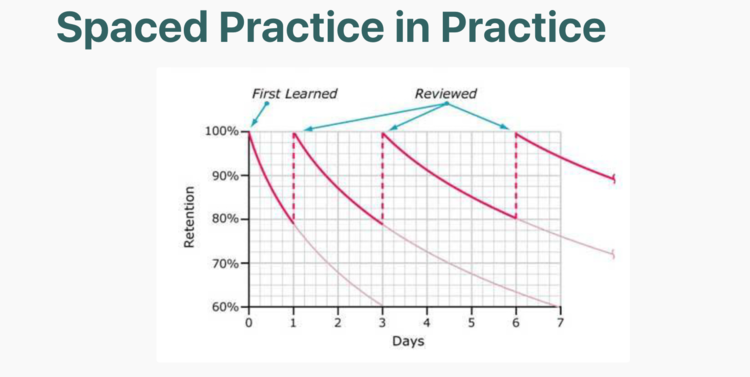
 

sapced practice in practice


Skype launches call recording across desktop, iOS, and Android — from windowscentral.com by Dan Thorp-Lancaster
Recording your Skype calls will now be much, much easier.


Microsoft's Skype now allows you to record your sessions


Excerpt:

Skype has been testing integrated call recording with preview users for some time, but it looks like the feature is now ready for primetime.  The Skype team announced today that call recording is now rolling out across its Android, iOS, and desktop apps, allowing you to capture your calls with a tap. “Call recording is completely cloud-based and is now available on the latest version of Skype and on most platforms, except Windows 10,” Microsoft says. “Call recording is coming to Windows 10 with the latest version of Skype releasing in the coming weeks.”


Also see:


You’re already harnessing the science of learning (you just don’t know it) — from edsurge.com by Pooja Agarwal

Excerpt (emphasis DSC):

Now, a decade later, I see the same clicker-like trend: tools like Kahoot, Quizlet, Quizizz and Plickers are wildly popular due to the increased student engagement and motivation they can provide. Meanwhile, these tech tools continue to incorporate powerful strategies for learning, which are discussed less often. Consider, for example, four of the most robust research-based strategies from the science of learning:

  1. Retrieval practice
  2. Spaced practice
  3. Interleaving
  4. Feedback

Sound familiar? It’s because approaches that encourage students to use what they know, revisit it over time, mix it up and learn about their own learning are core elements in many current edtech tools. Kahoot and Quizlet, for example, provide numerous retrieval formats, reminders, shuffle options and instant feedback. A century of scientific researchdemonstrates that these features don’t simply increase engagement—they also improve learning, higher order thinking and transfer of knowledge.


From DSC:
Pastors should ask this type of question as well: “What did we talk about the last time we met?” — then give the congregation a minute to write down what they can remember.


Also from Pooja Agarwal and RetrievalPractice.org

For teachers, here’s what we share in a minute or less about retrieval practice:

And when it comes to students, the first thing we share are Retrieval Warm Ups. These quick, fun questions engage students in class discussion and start a conversation about how retrieval is something we do every day. Try one of these with a teacher to start a conversation about retrieval practice, too!


© 2025 | Daniel Christian