Midoo AI Launches the World’s First AI Language Learning Agent, Redefining How People Learn Languages — from morningstar.com

SINGAPORE Sept. 3, 2025  /PRNewswire/ — Today, Midoo AI proudly announces the launch of the world’s first AI language learning agent, a groundbreaking innovation set to transform language education forever.

For decades, language learning has pursued one ultimate goal: true personalization. Traditional tools offered smart recommendations, gamified challenges, and pre-written role-play scripts—but real personalization remained out of reach. Midoo AI changes that. Here is the >launch video of Midoo AI.

Imagine a learning experience that evolves with you in real time. A system that doesn’t rely on static courses or scripts but creates a dynamic, one-of-a-kind language world tailored entirely to your needs. This is the power of Midoo’s Dynamic Generation technology.

“Midoo is not just a language-learning tool,” said Yvonne, co-founder of Midoo AI. “It’s a living agent that senses your needs, adapts instantly, and shapes an experience that’s warm, personal, and alive. Learning is no longer one-size-fits-all—now, it’s yours and yours alone.”


Midoo AI Review: Meet the First AI Language Learning Agent — from autogpt.net

Language learning apps have traditionally focused on exercises, quizzes, and progress tracking. Midoo AI introduces a different approach. Instead of presenting itself as a course provider, it acts as an intelligent learning agent that builds, adapts, and sustains a learner’s journey.

This review examines how Midoo AI operates, its feature set, and what makes it distinct from other AI-powered tutors.

Midoo AI in Context: Purpose and Position
Midoo AI is not structured around distributing lessons or modules. Its core purpose is to provide an agent-like partner that adapts in real time. Where many platforms ask learners to select a “level” or “topic,”

Midoo instead begins by analyzing goals, usage context, and error patterns. The result is less about consuming predesigned units and more about co-constructing a pathway.


AI Isn’t Replacing Teachers — It’s Helping Us Teach Better — from rdene915.com by guest author Matthew Mawn

Turning Time Saved Into Better Learning
AI can save teachers time, but what can that time be used for (besides taking a breath)? For most of us, it means redirecting energy into the parts of teaching that made us want to pursue this profession in the first place: connecting with our students and helping them grow academically.

Differentiation
Every classroom has students with different readiness levels, language needs, and learning preferences. AI tools like Diffit or MagicSchool can instantly create multiple versions of a passage or assignment, differentiated by grade level, complexity, or language. This allows every student to engage with the same core concept, moving together as one cohesive class. Instead of spending an evening retyping and rephrasing, teachers can review and tweak AI drafts in minutes, ready for the next lesson.


Mass Intelligence — from oneusefulthing.org by Ethan Mollick
From GPT-5 to nano banana: everyone is getting access to powerful AI

When a billion people have access to advanced AI, we’ve entered what we might call the era of Mass Intelligence. Every institution we have — schools, hospitals, courts, companies, governments — was built for a world where intelligence was scarce and expensive. Now every profession, every institution, every community has to figure out how to thrive with Mass Intelligence. How do we harness a billion people using AI while managing the chaos that comes with it? How do we rebuild trust when anyone can fabricate anything? How do we preserve what’s valuable about human expertise while democratizing access to knowledge?


AI Is the Cognitive Layer. Schools Still Think It’s a Study Tool. — from stefanbauschard.substack.com by Stefan Bauschard

By the time today’s 9th graders and college freshman enter the workforce, the most disruptive waves of AGI and robotics may already be embedded into part society.

What replaces the old system will not simply be a more digital version of the same thing. Structurally, schools may move away from rigid age-groupings, fixed schedules, and subject silos. Instead, learning could become more fluid, personalized, and interdisciplinary—organized around problems, projects, and human development rather than discrete facts or standardized assessments.

AI tutors and mentors will allow for pacing that adapts to each student, freeing teachers to focus more on guidance, relationships, and high-level facilitation. Classrooms may feel less like miniature factories and more like collaborative studios, labs, or even homes—spaces for exploring meaning and building capacity, not just delivering content.

If students are no longer the default source of action, then we need to teach them to:

    • Design agents,
    • Collaborate with agents,
    • Align agentic systems with human values,
    • And most of all, retain moral and civic agency in a world where machines act on our behalf.

We are no longer educating students to be just doers.
We must now educate them to be judgesdesigners, and stewards of agency.


Meet Your New AI Tutor — from wondertools.substack.com by Jeremy Caplan
Try new learning modes in ChatGPT, Claude, and Gemini

AI assistants are now more than simple answer machines. ChatGPT’s new Study Mode, Claude’s Learning Mode, and Gemini’s Guided Learning represent a significant shift. Instead of just providing answers, these free tools act as adaptive, 24/7 personal tutors.


AI Tools for Instructional Design (September, 2025) — from drphilh.gumroad.com by Dr Philippa Hardman

That’s why, in preparation for my next bootcamp which kicks off September 8th 2025, I’ve just completed a full refresh of my list of the most powerful & popular AI tools for Instructional Designers, complete with tips on how to get the most from each tool.

The list has been created using my own experience + the experience of hundreds of Instructional Designers who I work with every week.

It contains the 50 most powerful AI tools for instructional design available right now, along with tips on how to optimise their benefits while mitigating their risks.


Addendums on 9/4/25:


AI Companies Roll Out Educational Tools — from insidehighered.com by Ray Schroeder
This fall, Google, Anthropic and OpenAI are rolling out powerful new AI tools for students and educators, each taking a different path to shape the future of learning.


Rethinking My List of Essential Job Skills in the Age of AI — from michellekassorla.substack.com by Michelle Kassorla

So here’s the new list of essential skills I think my students will need when they are employed to work with AI five years from now:

  1. They can follow directions, analyze outcomes, and adapt to change when needed.
  2. They can write or edit AI to capture a unique voice and appropriate tone in sync with an audience’s needs
  3. They have a deep understanding of one or more content areas of a particular profession, business, or industry, so they can easily identify factual errors.
  4. They have a strong commitment to exploration, a flexible mindset, and a broad understanding of AI literacy.
  5. They are resilient and critical thinkers, ready to question results and demand better answers.
  6. They are problem solvers.

And, of course, here is a new rubric built on those skills:



Introducing the 2025 State of the L&D Industry Report — from community.elearningacademy.io

What’s changing is not the foundation—it’s the ecosystem. Teams are looking to create more flexible, scalable, and diverse learning experiences that meet people where they are.

What Did We Explore?
Everyone seems to have a take on what’s happening in L&D these days. From bold claims about six-figure roles to debates over whether portfolios or degrees matter more, everyone seems to have a take. So, we wanted to get to the heart of it by exploring five of the biggest, most debated areas shaping our work today:

  • Salaries: Are compensation trends really keeping pace with the value we deliver?
  • Hiring: What skills are managers actually looking for—and are those ATS horror stories true?
  • Portfolios: Are portfolios helping candidates stand out, and what are hiring managers actually looking for?
  • Tools & Modalities: What types of training are teams building, and what tools are they using to build it?
  • Artificial Intelligence: Who’s using it, how, and what concerns still exist?

These five areas are shaping the future of instructional design—not just for job seekers, but for team leaders, hiring managers, and the entire ecosystem of L&D professionals.

The takeaway? A portfolio is more than a collection of projects—it’s a storytelling tool. The ones that stand out highlight process, decision-making, and results—not just pretty screens.


Anthropic Education Report: How educators use Claude — from anthropic.com

We find that:

Educators use AI in and out of the classroom
Educators’ uses range from developing course materials and writing grant proposals to academic advising and managing administrative tasks like admissions and financial planning.

Educators aren’t just using chatbots; they’re building their own custom tools with AI
Faculty are using Claude Artifacts to create interactive educational materials, such as chemistry simulations, automated grading rubrics, and data visualization dashboards.

Educators tend to automate the drudgery while staying in the loop for everything else
Tasks requiring significant context, creativity, or direct student interaction—like designing lessons, advising students, and writing grant proposals—are where educators are more likely to use AI as an enhancement. In contrast, routine administrative work such as financial management and record-keeping are more automation-heavy.

Some educators are automating grading; others are deeply opposed
In our Claude.ai data, faculty used AI for grading and evaluation less frequently than other uses, but when they did, 48.9% of the time they used it in an automation-heavy way (where the AI directly performs the task). That’s despite educator concerns about automating assessment tasks, as well as our surveyed faculty rating it as the area where they felt AI was least effective.


Introducing Gemini 2.5 Flash Image, our state-of-the-art image model — from developers.googleblog.com

Today [8/26/25], we’re excited to introduce Gemini 2.5 Flash Image (aka nano-banana), our state-of-the-art image generation and editing model. This update enables you to blend multiple images into a single image, maintain character consistency for rich storytelling, make targeted transformations using natural language, and use Gemini’s world knowledge to generate and edit images.

When we first launched native image generation in Gemini 2.0 Flash earlier this year, you told us you loved its low latency, cost-effectiveness, and ease of use. But you also gave us feedback that you needed higher-quality images and more powerful creative control.


Google’s new image model is BANANAS… — from theneurondaily.com by Grant Harvey

Here’s what makes nano-banana special:

  • Character consistency that actually works: Google built a template app showing how you can keep characters looking identical across scenes.
  • Edit photos (or drawings) with just words: Their photo editing demo lets you remove people, blur backgrounds, or colorize photos using natural language…and this co-drawing demo lets you draw and ask AI to fix it.
  • Actual world knowledge: Unlike other image models, this one knows stuff—like how the co-drawing demo turns doodles into learning experiences.
  • Multi-image fusion: You can now merge multiple images; fx, you can drag and drop objects between images seamlessly with their home canvas template.


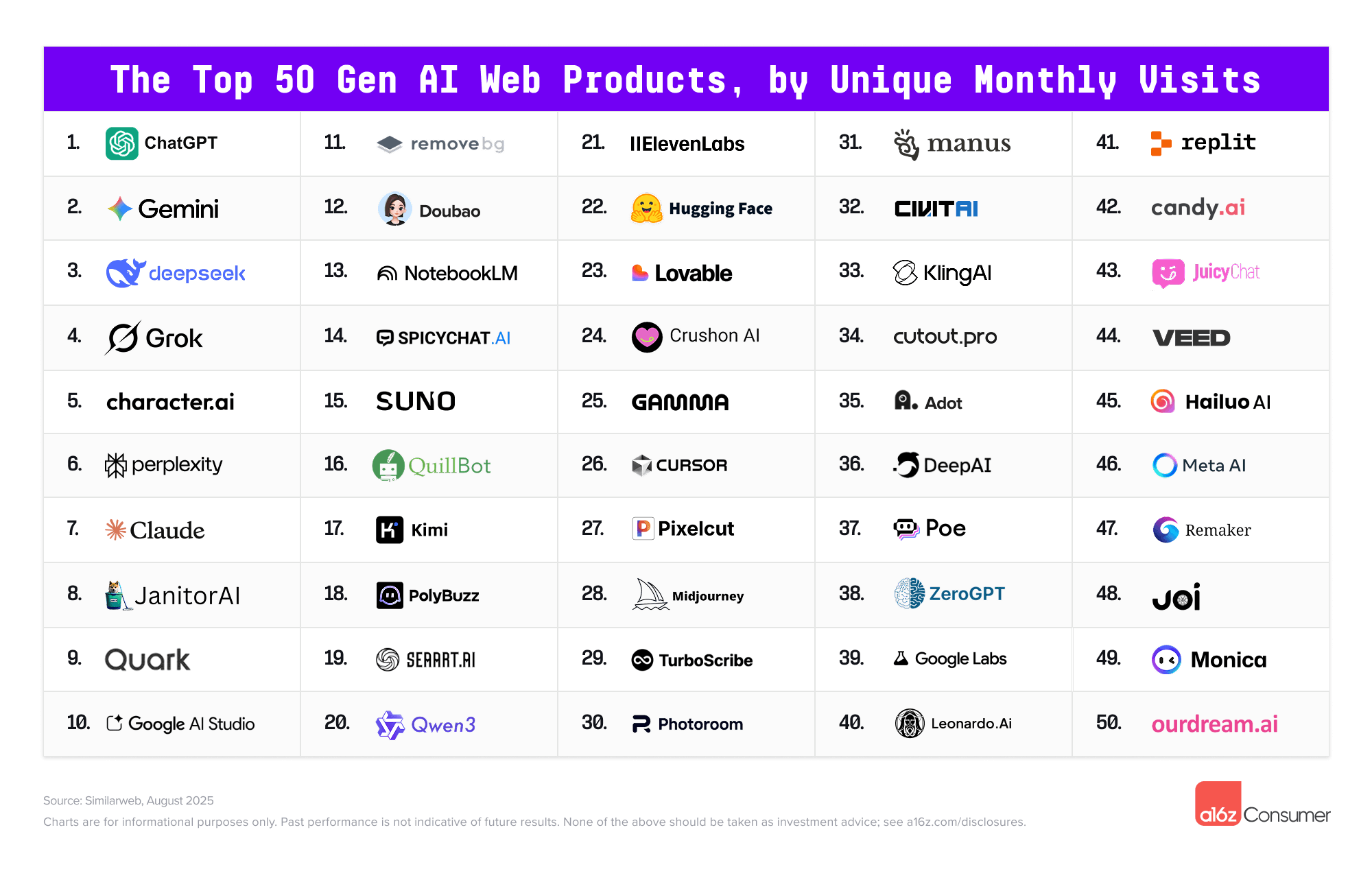
The Top 100 [Gen AI] Consumer Apps 5th edition — from a16z.com


And in an interesting move by Microsoft and Samsung:

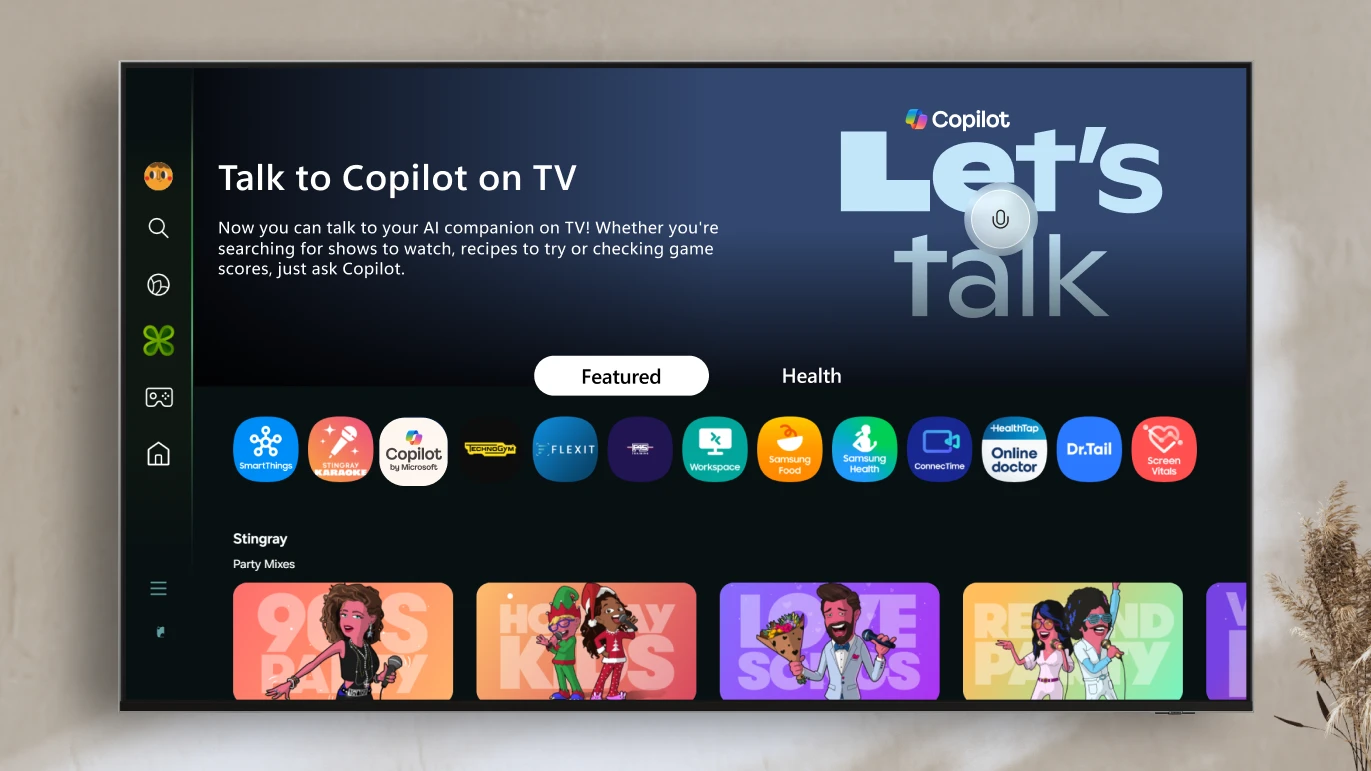
A smarter way to talk to your TV: Microsoft Copilot launches on Samsung TVs and monitors — from microsoft.com

Voice-powered AI meets a visual companion for entertainment, everyday help, and everything in between. 

Redmond, Wash., August 27—Today, we’re announcing the launch of Copilot on select Samsung TVs and monitors, transforming the biggest screen in your home into your most personal and helpful companion—and it’s free to use.

Copilot makes your TV easier and more fun to use with its voice-powered interface, friendly on-screen character, and simple visual cards. Now you can quickly find what you’re looking for and discover new favorites right from your living room.

Because it lives on the biggest screen in the home, Copilot is a social experience—something you can use together with family and friends to spark conversations, help groups decide what to watch, and turn the TV into a shared space for curiosity and connection.


Collaborative innovation — from marketoonist.com

Disney alum Paul Williams once shared the brainstorming method developed by Walt Disney. Disney used to separate the act of coming up with and executing ideas into three distinct steps (and associated mindsets): The Dreamer, The Realist, and The Spoiler.

As Paul wrote:

“By compartmentalizing the stages, Walt didn’t let reality get in the way of the dream step. The realist was allowed to work without the harsh filter of a spoiler. And, the spoiler spends time examining a well-thought idea… something with a bit more structure.

“When we brainstorm alone and in groups – too often – we tend to fill the room with a dreamer or two, a few realists, and a bunch of spoilers. In these conditions, dream ideas don’t stand a chance.”

The Dreamer mentality specializes in blue sky thinking without constraints, the Realist mentality puts practical structure to the ideas, and the Spoiler asks the hard questions and kicks the tires. We need all three mindsets. But we need those mindsets at the right time and in the right way.


From DSC:
How true this is! I’m the Dreamer in the room…and have been shut down more times than I can count. For all of you Visionaries and Dreamers out there, keep trying! And consider establishing something like Walt Disney did.


These ChatGPT Prompts Will Fast-Track Your Job Search — from builtin.com by Jeff Rumage
Used correctly, ChatGPT could help you land your dream job — but used incorrectly, it can cost you the offer. Here’s how you can make ChatGPT your secret weapon for research help, resume writing, interview prep and more.

Example prompt: Here are several bullet points from my resume: [paste bullets]. Rewrite them so each one begins with a strong action verb, clearly states what I did, and quantifies results or outcomes wherever possible. If metrics are missing, suggest realistic ways they could be added.

Example prompt: Here is my resume [paste resume]. Here’s the job description of a job I’m applying for [paste job description]. Highlight the most important skills and qualifications for this job. Without making up information, revise my resume to match these requirements. Include action verbs for each accomplishment on the resume, and highlight which accomplishments could be quantified.

Example prompt: What are the current trends impacting companies in the [industry]? How would [company name] be affected by these trends, and what might it do to adjust to/capitalize on these trends?

Example prompt: I’m a [current role] but want to become a [dream role]. Create a detailed career development plan outlining:

      • Skills I should develop
      • Relevant experiences I need to gain
      • Educational or certification needs
      • Recommended resources or programs
      • A realistic timeline with milestones for the next 1-3 years.
 

Here are my favorite back-to-school activities to strengthen learning — from retrievalpractice.org by Pooja K. Agarwal, Ph.D.

Welcome back to school! For most of us (myself included), the whirlwind of lesson prep, meetings, professional development—and of course, teaching—is here. Keep reading for my favorite back-to-school activities to engage students with retrieval practice during the first week of class.

It may (or may not) surprise you to know that my first day of class is full of retrieval practice. Even if you haven’t introduced content yet, use retrieval practice the first day or week of class. Here’s how, with quick activities you can adapt for K–12 students, higher ed courses, and all content areas:


How to Teach a Good First Day of Class — by James Lang; via Dr. Pooja Agarwal’s posting above

What you can expect to find here:

  • I’ll start, as we academics so love to do, with a little bit of theory — specifically, four core principles that can help shape your planning for the first day of your course.
  • Next, I’ll cover the logistics of a successful first day, including managing the space and technology as well as getting to know your students.
  • To show you how to put the principles and the logistics into practice, I will provide examples of what a good set of first-day activities might look like in four disciplines.
  • I’ll finish with some suggestions for how to support the good work you have done on the first day with some follow-up activities.

7 Pieces of Advice for New Teachers — from edutopia.org by Brienne May
Focus on relationships with students and colleagues to make a good start to the year—and remember to ask for what you need.

Too often, teacher preparation programs are rich in theory but light on practical guidance. After working hard through my undergraduate classes, completing student teaching, and spending countless hours laminating and cutting, I still found myself on the first day of school, standing in front of a room full of expectant faces with eager eyes, and realized I had no idea what to do next. I didn’t know what to say to students in that moment, let alone how to survive the following 180 days. Twelve years later, I have collected a trove of advice I wish I could have shared with that fresh-faced teacher.


The Transient Information Effect: Why Great Explanations Don’t Always Stick — from scienceoflearning.substack.com by Nidhi Sachdeva and Jim Hewitt
In this post, Dr. John Sweller describes how the Transient Information Effect can overload student working memory and what teachers can do about it.

Highlights:

  • The Transient Information Effect happens when important information disappears before learners can process and remember it.
  • Dr. John Sweller, who first studied the Transient Information Effect, answers our questions about this overlooked learning challenge.
  • Turning transient information into something students can revisit (like writing key steps on the board) can help explanations stick.

41 Elementary Classroom Jobs to Build Shared Responsibility and Community — from edutopia.org by Donna Paul
Classroom jobs help students feel seen, trusted, and excited to contribute to their classroom community.

Each fall, one of the first routines I introduce is our classroom job board. It’s more than a list of tasks—it helps students feel that they belong and have real roles in our shared space. Over the years, I’ve expanded beyond classic jobs like Line Leader and Pencil Sharpener to include creative roles with quirky titles that engage and resonate with students.

Here are the jobs that have helped my students feel seen, trusted, and excited to contribute.


Guiding Students to Overcome Learned Helplessness — from edutopia.org by Michelle Singh
New teachers can create an environment where students feel supported and understand that mistakes are part of the learning process.


Creating a Kid-Led Hall of Fame for Books — from edutopia.org by Eric Hall
Allowing elementary students to nominate and vote for their favorite books of the year can create a culture of celebration in the classroom.

When I started teaching, I remembered that conversation with my elementary school librarian. I thought, “Why should adults have all the fun?” I wanted my students to experience the excitement of recognizing books they thought were the best. And just like that, the Hallbery Awards were born and continued twice a year for over 15 years. (Why Hallbery? Because my last name is Hall.)


Understanding Diagnostic, Formative, and Summative Assessments — from edmentum.com

Today, we’re taking a look at the three primary forms of assessments—diagnostic, formative, and summative—with the goal of not only differentiating between them but also better understanding the purpose and potential power of each.

At their core, each of the three primary assessment types serves a distinct purpose. Diagnostic assessments are used before instruction to help identify where students are in their comprehension of academic content. Formative assessments are used while content is being taught to understand what students are picking up, to guide their learning, and to help teachers determine what to focus on moving forward. Summative assessments are used after instruction to evaluate the outcomes of student learning: what, or how much, they ultimately learned.


How one state revamped high school to reflect reality: Not everyone goes to college — from hechingerreport.org by Kavitha Cardoza
Indiana’s initial plan for revised graduation requirements was criticized for prioritizing workforce skills over academic preparedness. The state has tried to find a balance between the two

This story is part of Hechinger’s ongoing coverage about rethinking high school. Read about high school apprenticeships in Indiana, a new diploma in Alabama that trades chemistry for carpentry, and “career education for all” in Kentucky.

The “New Indiana Diploma” — which was signed into law in April and goes into effect for all incoming first-year students this academic year — gives students the option to earn different “seals” in addition to a basic diploma, depending on whether they plan to attend college, go straight to work or serve in the military. Jenner describes it as an effort to tailor the diploma to students’ interests, expose students to careers and recognize different forms of student achievement.


How Teachers in This District Pushed to Have Students Spend Less Time Testing — from edweek.org by Elizabeth Heubeck

Students in one Arizona district will take fewer standardized tests this school year, the result of an educator-led push to devote less time to testing.

The Tucson Education Association, backed by the school board and several parents, reached an agreement with the Tucson Unified school system in May to reduce the number of district-mandated standardized assessments students take annually starting in the 2025-26 academic year.

Just 25 percent of educators agreed that state-mandated tests provide useful information for the teachers in their school, according to a 2023 EdWeek Research Center survey of teachers, principals, and district leaders. 


30 Ways to Bring Calm to a Noisy High School Classroom — from edutopia.org by Anne Noyes Saini
From ‘finding the lull’ to the magic of a dramatic whisper, these teacher-tested strategies quickly get high school students focused and back on track.


Approaching Experiential Learning as a Continuum — from edutopia.org by Bill Manchester
Teachers can consider 12 characteristics of experiential learning to make lessons more or less active for students.


Bringing the best of AI to college students for free — from blog.google by Sundar Pichai

Millions of college students around the world are getting ready to start classes. To help make the school year even better, we’re making our most advanced AI tools available to them for free, including our new Guided Learning mode. We’re also providing $1 billion to support AI education and job training programs and research in the U.S. This includes making our AI and career training free for every college student in America through our AI for Education Accelerator — over 100 colleges and universities have already signed up.

Guided Learning: from answers to understanding
AI can broaden knowledge and expand access to it in powerful ways, helping anyone, anywhere learn anything in the way that works best for them. It’s not about just getting an answer, but deepening understanding and building critical thinking skills along the way. That opportunity is why we built Guided Learning, a new mode in Gemini that acts as a learning companion guiding you with questions and step-by-step support instead of just giving you the answer. We worked closely with students, educators, researchers and learning experts to make sure it’s helpful for understanding new concepts and is backed by learning science.


BREAKING: Google introduces Guided Learning — from aieducation.substack.com by Claire Zau
Some thoughts on what could make Google’s AI tutor stand out

Another major AI lab just launched “education mode.”

Google introduced Guided Learning in Gemini, transforming it into a personalized learning companion designed to help you move from quick answers to real understanding.

Instead of immediately spitting out solutions, it:

  • Asks probing, open-ended questions
  • Walks learners through step-by-step reasoning
  • Adapts explanations to the learner’s level
  • Uses visuals, videos, diagrams, and quizzes to reinforce concepts

This Socratic style tutor rollout follows closely behind similar announcements like OpenAI’s Study Mode (last week) and Anthropic’s Claude for Education (April 2025).


How Sci-Fi Taught Me to Embrace AI in My Classroom — from edsurge.com by Dan Clark

I’m not too naive to understand that, no matter how we present it, some students will always be tempted by “the dark side” of AI. What I also believe is that the future of AI in education is not decided. It will be decided by how we, as educators, embrace or demonize it in our classrooms.

My argument is that setting guidelines and talking to our students honestly about the pitfalls and amazing benefits that AI offers us as researchers and learners will define it for the coming generations.

Can AI be the next calculator? Something that, yes, changes the way we teach and learn, but not necessarily for the worse? If we want it to be, yes.

How it is used, and more importantly, how AI is perceived by our students, can be influenced by educators. We have to first learn how AI can be used as a force for good. If we continue to let the dominant voice be that AI is the Terminator of education and critical thinking, then that will be the fate we have made for ourselves.


AI Tools for Strategy and Research – GT #32 — from goodtools.substack.com by Robin Good
Getting expert advice, how to do deep research with AI, prompt strategy, comparing different AIs side-by-side, creating mini-apps and an AI Agent that can critically analyze any social media channel

In this issue, discover AI tools for:

  • Getting Expert Advice
  • Doing Deep Research with AI
  • Improving Your AI Prompt Strategy
  • Comparing Results from Different AIs
  • Creating an AI Agent for Social Media Analysis
  • Summarizing YouTube Videos
  • Creating Mini-Apps with AI
  • Tasting an Award-Winning AI Short Film

GPT-Building, Agentic Workflow Design & Intelligent Content Curation — from drphilippahardman.substack.com by Dr. Philippa Hardman
What 3 recent job ads reveal about the changing nature of Instructional Design

In this week’s blog post, I’ll share my take on how the instructional design role is evolving and discuss what this means for our day-to-day work and the key skills it requires.

With this in mind, I’ve been keeping a close eye on open instructional design roles and, in the last 3 months, have noticed the emergence of a new flavour of instructional designer: the so-called “Generative AI Instructional Designer.”

Let’s deep dive into three explicitly AI-focused instructional design positions that have popped up in the last quarter. Each one illuminates a different aspect of how the role is changing—and together, they paint a picture of where our profession is likely heading.

Designers who evolve into prompt engineers, agent builders, and strategic AI advisors will capture the new premium. Those who cling to traditional tool-centric roles may find themselves increasingly sidelined—or automated out of relevance.


Google to Spend $1B on AI Training in Higher Ed — from insidehighered.com by Katherine Knott

Google’s parent company announced Wednesday (8/6/25) that it’s planning to spend $1 billion over the next three years to help colleges teach and train students about artificial intelligence.

Google is joining other AI companies, including OpenAI and Anthropic, in investing in AI training in higher education. All three companies have rolled out new tools aimed at supporting “deeper learning” among students and made their AI platforms available to certain students for free.


5 Predictions for How AI Will Impact Community Colleges — from pistis4edu.substack.com by Feng Hou

Based on current technology capabilities, adoption patterns, and the mission of community colleges, here are five well-supported predictions for AI’s impact in the coming years.

  1. Universal AI Tutor Access
  2. AI as Active Teacher
  3. Personalized Learning Pathways
  4. Interactive Multimodal Learning
  5. Value-Centric Education in an AI-Abundant World


One-size-fits-all learning is about to become completely obsolete. — from linkedin.com by Allie Miller


AI in the University: From Generative Assistant to Autonomous Agent This Fall — from insidehighered.com by
This fall we are moving into the agentic generation of artificial intelligence.

“Where generative AI creates, agentic AI acts.” That’s how my trusted assistant, Gemini 2.5 Pro deep research, describes the difference.

Agents, unlike generative tools, create and perform multistep goals with minimal human supervision. The essential difference is found in its proactive nature. Rather than waiting for a specific, step-by-step command, agentic systems take a high-level objective and independently create and execute a plan to achieve that goal. This triggers a continuous, iterative workflow that is much like a cognitive loop. The typical agentic process involves six key steps, as described by Nvidia:


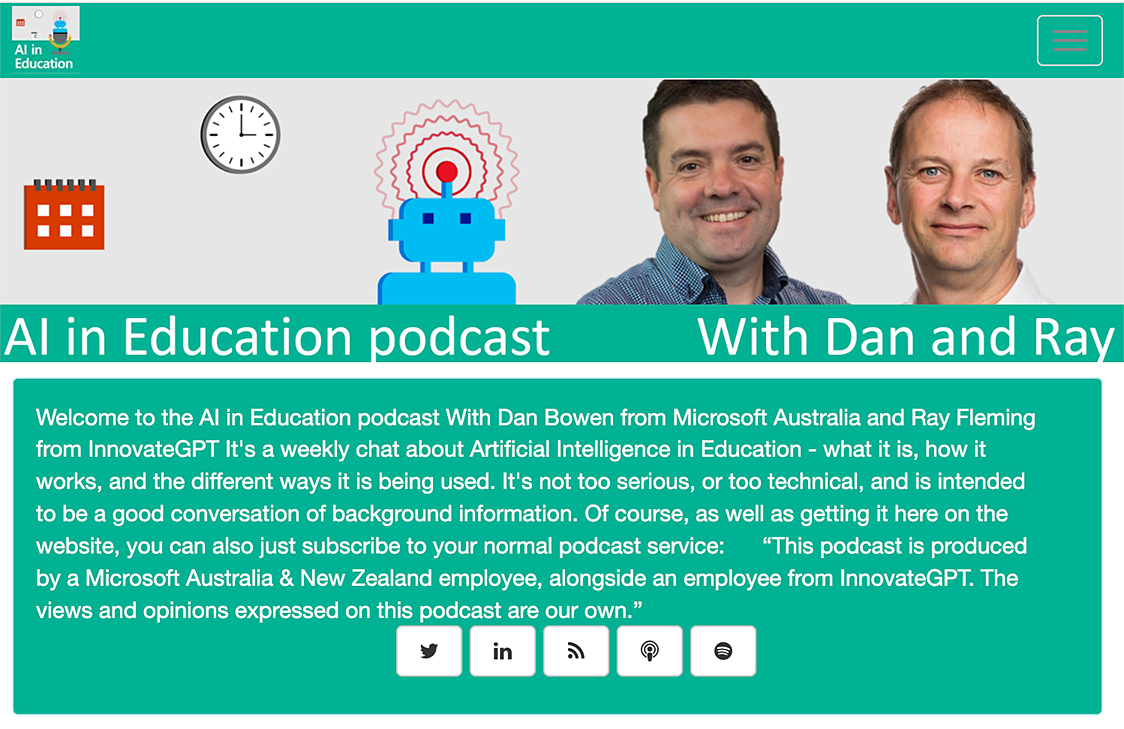
AI in Education Podcast — from aipodcast.education by Dan Bowen and Ray Fleming


The State of AI in Education 2025 Key Findings from a National Survey — from Carnegie Learning

Our 2025 national survey of over 650 respondents across 49 states and Puerto Rico reveals both encouraging trends and important challenges. While AI adoption and optimism are growing, concerns about cheating, privacy, and the need for training persist.

Despite these challenges, I’m inspired by the resilience and adaptability of educators. You are the true game-changers in your students’ growth, and we’re honored to support this vital work.

This report reflects both where we are today and where we’re headed with AI. More importantly, it reflects your experiences, insights, and leadership in shaping the future of education.


Instructure and OpenAI Announce Global Partnership to Embed AI Learning Experiences within Canvas — from instructure.com

This groundbreaking collaboration represents a transformative step forward in education technology and will begin with, but is not limited to, an effort between Instructure and OpenAI to enhance the Canvas experience by embedding OpenAI’s next-generation AI technology into the platform.

IgniteAI announced earlier today, establishes Instructure’s future-ready, open ecosystem with agentic support as the AI landscape continues to evolve. This partnership with OpenAI exemplifies this bold vision for AI in education. Instructure’s strategic approach to AI emphasizes the enhancement of connections within an educational ecosystem comprising over 1,100 edtech partners and leading LLM providers.

“We’re committed to delivering next-generation LMS technologies designed with an open ecosystem that empowers educators and learners to adapt and thrive in a rapidly changing world,” said Steve Daly, CEO of Instructure. “This collaboration with OpenAI showcases our ambitious vision: creating a future-ready ecosystem that fosters meaningful learning and achievement at every stage of education. This is a significant step forward for the education community as we continuously amplify the learning experience and improve student outcomes.”


Faculty Latest Targets of Big Tech’s AI-ification of Higher Ed — from insidehighered.com by Kathryn Palmer
A new partnership between OpenAI and Instructure will embed generative AI in Canvas. It may make grading easier, but faculty are skeptical it will enhance teaching and learning.

The two companies, which have not disclosed the value of the deal, are also working together to embed large language models into Canvas through a feature called IgniteAI. It will work with an institution’s existing enterprise subscription to LLMs such as Anthropic’s Claude or OpenAI’s ChatGPT, allowing instructors to create custom LLM-enabled assignments. They’ll be able to tell the model how to interact with students—and even evaluate those interactions—and what it should look for to assess student learning. According to Instructure, any student information submitted through Canvas will remain private and won’t be shared with OpenAI.

Faculty Unsurprised, Skeptical
Few faculty were surprised by the Canvas-OpenAI partnership announcement, though many are reserving judgment until they see how the first year of using it works in practice.


These 40 Jobs May Be Replaced by AI. These 40 Probably Won’t — from inc.com by Bruce Crumley
A new Microsoft report ranks 80 professions by their risk of being replaced by AI tools.

A new study measuring the use of generative artificial intelligence in different professions has just gone public, and its main message to people working in some fields is harsh. It suggests translators, historians, text writers, sales representatives, and customer service agents might want to consider new careers as pile driver or dredge operators, railroad track layers, hardwood floor sanders, or maids — if, that is, they want to lower the threat of AI apps pushing them out of their current jobs.

From DSC:
Unfortunately, this is where the hyperscalers are going to get their ROI from all of the capital expenditures that they are making. Companies are going to use their services in order to reduce headcount at their organizations. CEOs are even beginning to brag about the savings that are realized by the use of AI-based technologies: (or so they claim.)

“As a CEO myself, I can tell you, I’m extremely excited about it. I’ve laid off employees myself because of AI. AI doesn’t go on strike. It doesn’t ask for a pay raise. These things that you don’t have to deal with as a CEO.”

My first position out of college was being a Customer Service Representative at Baxter Healthcare. It was my most impactful job, as it taught me the value of a customer. From then on, whoever I was trying to assist was my customer — whether they were internal or external to the organization that I was working for. Those kinds of jobs are so important. If they evaporate, what then? How will young people/graduates get their start? 

Also related/see:


Microsoft’s Edge Over the Web, OpenAI Goes Back to School, and Google Goes Deep — from thesignal.substack.com by Alex Banks

Alex’s take: We’re seeing browsers fundamentally transition from search engines ? answer engines ? action engines. Gone are the days of having to trawl through pages of search results. Commands are the future. They are the direct input to arrive at the outcomes we sought in the first place, such as booking a hotel or ordering food. I’m interested in watching Microsoft’s bet develop as browsers become collaborative (and proactive) assistants.


Everyone’s an (AI) TV showrunner now… — from theneurondaily.com by Grant Harvey

Amazon just invested in an AI that can create full TV episodes—and it wants you to star in them.

Remember when everyone lost their minds over AI generating a few seconds of video? Well, Amazon just invested in a company called Fable Studio whose system called Showrunner can generates entire 22-minute TV episodes.

Where does this go from here? Imagine asking AI to rewrite the ending of Game of Thrones, or creating a sitcom where you and your friends are the main characters. This type of tech could create personalized entertainment experiences just like that.

Our take: Without question, we’re moving toward a world where every piece of media can be customized to you personally. Your Netflix could soon generate episodes where you’re the protagonist, with storylines tailored to your interests and sense of humor.

And if this technology scales, the entire entertainment industry could flip upside down. The pitch goes: why watch someone else’s story when you can generate your own? 


The End of Work as We Know It — from gizmodo.com by Luc Olinga
CEOs call it a revolution in efficiency. The workers powering it call it a “new era in forced labor.” I spoke to the people on the front lines of the AI takeover.

Yet, even in this vision of a more pleasant workplace, the specter of displacement looms large. Miscovich acknowledges that companies are planning for a future where headcount could be “reduced by 40%.” And Clark is even more direct. “A lot of CEOs are saying that, knowing that they’re going to come up in the next six months to a year and start laying people off,” he says. “They’re looking for ways to save money at every single company that exists.”

But we do not have much time. As Clark told me bluntly: “I am hired by CEOs to figure out how to use AI to cut jobs. Not in ten years. Right now.”


AI Is Coming for the Consultants. Inside McKinsey, ‘This Is Existential.’ — from wsj.com by Chip Cutter; behind a paywall
If AI can analyze information, crunch data and deliver a slick PowerPoint deck within seconds, how does the biggest name in consulting stay relevant?


ChatGPT users shocked to learn their chats were in Google search results — from arstechnica.com by Ashley Belanger
OpenAI scrambles to remove personal ChatGPT conversations from Google results

Faced with mounting backlash, OpenAI removed a controversial ChatGPT feature that caused some users to unintentionally allow their private—and highly personal—chats to appear in search results.

Fast Company exposed the privacy issue on Wednesday, reporting that thousands of ChatGPT conversations were found in Google search results and likely only represented a sample of chats “visible to millions.” While the indexing did not include identifying information about the ChatGPT users, some of their chats did share personal details—like highly specific descriptions of interpersonal relationships with friends and family members—perhaps making it possible to identify them, Fast Company found.


Character.AI Launches World’s First AI-Native Social Feed — from blog.character.ai

Today, we’re dropping the world’s first AI-native social feed.

Feed from Character.AI is a dynamic, scrollable content platform that connects users with the latest Characters, Scenes, Streams, and creator-driven videos in one place.

This is a milestone in the evolution of online entertainment.

For the last 10 years, social platforms have been all about passive consumption. The Character.AI Feed breaks that paradigm and turns content into a creative playground. Every post is an invitation to interact, remix, and build on what others have made. Want to rewrite a storyline? Make yourself the main character? Take a Character you just met in someone else’s Scene and pop it into a roast battle or a debate? Now it’s easy. Every story can have a billion endings, and every piece of content can change and evolve with one tap.


5 Ways to Spark Critical Thinking About AI in the Art Room — from theartofeducation.edu by Paige Wilde

Here are five AI activities to explore this summer to help you and your students navigate artificial intelligence with an ethical, responsible, and creative approach.

1. Use Google’s Quick, Draw! to have fun and get curious about AI.
We all have a desire to doodle–even students and adults who say, “I can’t even draw a stick figure!” Bring lots of light-hearted energy into your art room with Google’s Quick Draw! tool. This platform allows you to draw simple prompts, such as a bike, a cat, or a cup, in 20 seconds. While you’re drawing, AI attempts to recognize the subject.

This tool works with any skill level and is a space to draw freely without overthinking. Beyond quick sketching, this activity demonstrates that human input builds machine learning, and it’s only as “smart” as the information (or in this case, drawings) we feed it. It’s a fun way to explore the evolving role of AI in our visual world!

No tech? No problem! Use paper to run the same activity. You can even use the Thumbnail Sketches template in FLEX Curriculum. Students sketch quick prompts in groups and then guess the drawings to spark conversation about how AI “learns.”


AI and Higher Ed: An Impending Collapse — from insidehighered.com by Robert Niebuhr; via George Siemens; I also think George’s excerpt (see below) gets right to the point.
Universities’ rush to embrace AI will lead to an untenable outcome, Robert Niebuhr writes.

Herein lies the trap. If students learn how to use AI to complete assignments and faculty use AI to design courses, assignments, and grade student work, then what is the value of higher education? How long until people dismiss the degree as an absurdly overpriced piece of paper? How long until that trickles down and influences our economic and cultural output? Simply put, can we afford a scenario where students pretend to learn and we pretend to teach them?


This next report doesn’t look too good for traditional institutions of higher education either:


No Country for Young Grads — from burningglassinstitute.org

For the first time in modern history, a bachelor’s degree is no longer a reliable path to professional employment. Recent graduates face rising unemployment and widespread underemployment as structural—not cyclical—forces reshape entry?level work. This new report identifies four interlocking drivers: an AI?powered “Expertise Upheaval” eliminating many junior tasks, a post?pandemic shift to lean staffing and risk?averse hiring, AI acting as an accelerant to these changes, and a growing graduate glut. As a result, young degree holders are uniquely seeing their prospects deteriorate – even as the rest of the economy remain robust. Read the full report to explore the data behind these trends.

The above article was via Brandon Busteed on LinkedIn:


BREAKING: OpenAI Releases Study Mode — from aieducation.substack.com by Claire Zau
What’s New, What Works, and What’s Still Missing

What is Study Mode?
Study Mode is OpenAI’s take on a smarter study partner – a version of the ChatGPT experience designed to guide users through problems with Socratic prompts, scaffolded reasoning, and adaptive feedback (instead of just handing over the answer).

Built with input from learning scientists, pedagogy experts, and educators, it was also shaped by direct feedback from college students. While Study Mode is designed with college students in mind, it’s meant for anyone who wants a more learning-focused, hands-on experience across a wide range of subjects and skill levels.

Who can access it? And how?
Starting July 29, Study Mode is available to users on Free, Plus, Pro, and Team plans. It will roll out to ChatGPT Edu users in the coming weeks.


ChatGPT became your tutor — from theneurondaily.com by Grant Harvey
PLUS: NotebookLM has video now & GPT 4o-level AI runs on laptop

Here’s how it works: instead of asking “What’s 2+2?” and getting “4,” study mode asks questions like “What do you think happens when you add these numbers?” and “Can you walk me through your thinking?” It’s like having a patient tutor who won’t let you off the hook that easily.

The key features include:

  • Socratic questioning: It guides you with hints and follow-up questions rather than direct answers.
  • Scaffolded responses: Information broken into digestible chunks that build on each other.
  • Personalized support: Adjusts difficulty based on your skill level and previous conversations.
  • Knowledge checks: Built-in quizzes and feedback to make sure concepts actually stick.
  • Toggle flexibility: Switch study mode on and off mid-conversation depending on your goals.

Try study mode yourself by selecting “Study and learn” from tools in ChatGPT and asking a question.


Introducing study mode — from openai.com
A new way to learn in ChatGPT that offers step by step guidance instead of quick answers.

[On 7/29/25, we introduced] study mode in ChatGPT—a learning experience that helps you work through problems step by step instead of just getting an answer. Starting today, it’s available to logged in users on Free, Plus, Pro, Team, with availability in ChatGPT Edu coming in the next few weeks.

ChatGPT is becoming one of the most widely used learning tools in the world. Students turn to it to work through challenging homework problems, prepare for exams, and explore new concepts. But its use in education has also raised an important question: how do we ensure it is used to support real learning, and doesn’t just offer solutions without helping students make sense of them?

We’ve built study mode to help answer this question. When students engage with study mode, they’re met with guiding questions that calibrate responses to their objective and skill level to help them build deeper understanding. Study mode is designed to be engaging and interactive, and to help students learn something—not just finish something.


© 2025 | Daniel Christian