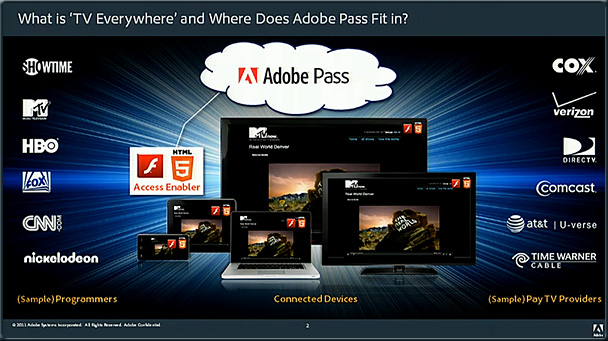
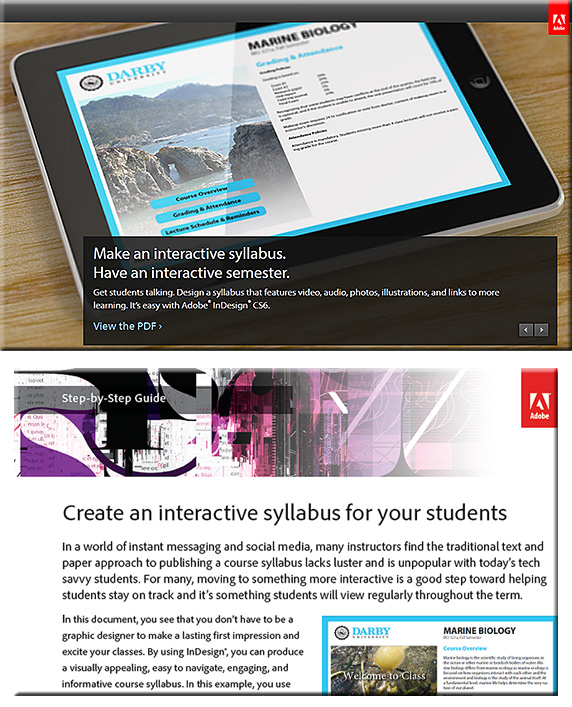
5 new tools from Adobe you should know about — from Edudemic.com by Jeff Dunn
On 12/10/2012,
in Adobe, multimedia, productivity / tips and tricks, professional development, tools,
by Daniel Christian
On 11/16/2012,
in Adobe, career development, creativity, professional development, workplace,
by Daniel Christian
Also see:
- Inspiring the next generation of thinkers — from edudemic.com (added this link on 11/19/12)
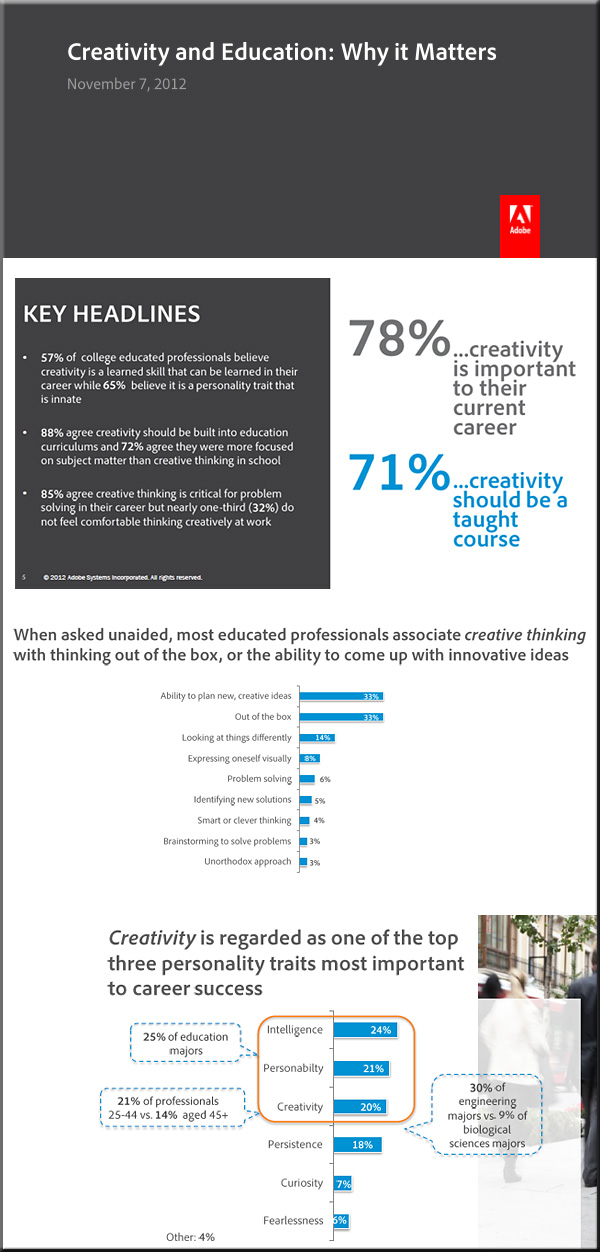
- Creativity should be taught like Math or Science — from Adobe by Jon Perera, Vice President, Adobe Education
.

Excerpt:
Around the world, educators are fostering creative thinking with their students. We see this every day across both K-12 and higher education in compelling, engaging ways. I remembera 4th grade reading class that I attended where the teacher read aloud to students while sitting around a “virtual campfire” she’d created with iMovie – the students loved it. At the same time, we hear a lot about a growing emphasis on, “teaching to the test” that can sometimes result in a decreased focus on creativity – we think this is a huge problem for our students and for the global economy. College-educated professionals agree. I wanted to share newly-released results of what more than 1000 college graduates say about the importance of creativity in education.
On 09/25/2012,
in Adobe, web design and production,
by Daniel Christian
Adobe’s new ‘Edge’ app suite doubles down on HTML — from webmonkey.com by Scott Gilbertson
.

Excerpt:
Now Adobe is launching a new suite of apps for web developers working with the latest web standards.
The new Adobe Edge suite of HTML5 development tools includes Edge Animate 1.0, a tool to create HTML, CSS and JavaScript-based animations, and Edge Inspect (formerly known as Adobe Shadow), a handy tool for testing your sites on multiple devices at once. There’s also Edge Code, a fork of the Brackets code editor that’s now included in Adobe’s Creative Cloud suite.
As part of the announcement at Adobe’s Create the Web conference in San Francisco the company also showed off a demo of the still-in-development Edge Reflow, a new tool for working with responsive design layouts.
Also see:
Adobe announces next generation of Digital Publishing Suite
Over 25 Million Digital Issues Delivered to Date, 120,000 Downloads Every Day; Meredith Corporation Selects DPS
Excerpt:
NEW YORK — May 15, 2012 — At Adobe’s annual Digital Publishing Summit, Adobe Systems Incorporated (Nasdaq:ADBE) today announced a series of groundbreaking new features for Adobe® Digital Publishing Suite (DPS) that will allow media companies and corporate publishers to deliver unparalleled reach and monetize their unique content in new ways. Among the new features are Content Viewer for iPhone, social sharing, expanded font licensing and enhanced integration with Adobe Creative Suite® 6, a milestone release, creating an unbeatable combination for media and corporate organizations. Adobe is live blogging from the Summit at blogs.adobe.com/dpsnyc2012.
Addendum on 5/17/12:
- Adobe’s updated Digital Publishing Suite means more magazines for the iPhone — from techcrunch.com by Chris Velazco
On 04/24/2012,
in Adobe, animation, cloud-based computing / apps / other cloud-related, content development, aggregation, repositories, creativity, design, digital audio, digital learning, digital photography, digital storytelling, digital textbooks, digital video, e-publishing related items (EPUB and more), education technology, elearning, graphics, interactivity, multimedia, productivity / tips and tricks, tools, vendors,
by Daniel Christian

.

.Also see:
- The Global Creativity Gap — an infographic from Adobe
.
. -

Pantone unveils 336 new colors — from PSFK.com by Kyana Gordon
-
Education system stifles creativity, survey finds — from The Journal by David Nagel
Is the American education system stifling creativity? That’s the attitude held by a majority of Americans, according to a new worldwide survey focused on attitudes toward creativity in schools, the workplace, and the home.
From DSC:
- This last piece from David Nagel addresses my fears and concerns with our current emphasis on standardized tests, common core standards, etc. The emphasis is on STEM and can lead to a one-size-fits-all type of education that doesn’t allow each student to identify and pursue their own passions enough.
Addendum on 5/2/12:
- Adobe Dreamweaver CS6 — reviewed at PCMag.com
.
The future for Flash — from the Upside Learning blog by Abhijit Kadle
From DSC:
Thanks Abhijit for the posting. I appreciate your last few sentences that summarize where we are as of February 2012:
Without a stable and feature-rich HTML5 development environment that matches the depth of Flash, eLearning developers are faced with a dual development approach – develop with full media rich functionality (easily) using Flash for desktop delivery, and a more technically intensive HTML5 approach for devices. Who knows, in the future maybe workplace learning will ONLY be driven by mobile devices, with desktop based elearning turning into an archaic remnant of a bygone age.
On 11/18/2011,
in Adobe, education technology, elearning, learning ecosystem, learning theories, memory, multimedia, online learning, online media, pedagogy, strategy, teaching & learning, tools,
by Daniel Christian
A list of Allen Partridge’s on-demand/online-based seminars (free, requires free ID at Adobe):
1: Making Effective Adobe Captivate eLearning Modules
… a foundation in multimedia design concepts for eLearning, and help you understand the reasons / rationale behind many of the eLearning strategies you see implemented today.
2: Balancing cognitive load in eLearning content with Adobe Captivate 5
…session focuses on the Multimedia eLearning Design Principle known as Personalization, which suggests that people learn more effectively when conversational styles and or learning agents are used to enhance the social aspects of the experience.
3: Applying Personalization to eLearning with Adobe Captivate 5
…session focuses on the Multimedia eLearning Design Principle known as Personalization, which suggests that people learn more effectively when conversational styles and or learning agents are used to enhance the social aspects of the experience.
4: Creating effective eLearning Multimedia with Adobe Captivate 5
…session will center on the Multimedia Principle (the importance of combining images & text) of eLearning Design.
5: Making Effective Adobe Captivate eLearning Modules Part 5: Contiguity
…the Contiguity Principle, which indicates that the spatial relationship (proximity) of symbols (like text) to analogous images (things that look like the subject of the learning) is significant, and plays a key role in how effectively we learn.
6: Making Effective Adobe Captivate eLearning Modules Part 6: Redundancy
…focuses on the Multimedia eLearning Design Principle known as Redundancy, which suggests that presenting symbols via both text and aural channels is less effective than presenting via only one.
7: Making Effective Adobe Captivate eLearning Modules Part 7 : Coherence
…focuses on the Multimedia eLearning Design Principle known as Coherence, which suggests that off topic ancillary material can distract from learning. This theory stands in opposition to arousal theory, providing research based evidence that when stimulating animation or any form of non-relevant information is provided, it can actually decrease the efficacy of the instruction.
8: Making Effective Adobe Captivate eLearning Modules Part 8: Segmenting
...the Multimedia eLearning Design Principle known as the Segmenting Principle, which suggests that authors of eLearning content should break content up into small pieces or chunks in order to help avoid cognitive overload for the learners.
9: Making Effective Adobe Captivate eLearning Modules Part 9: Pre-Training
The session focuses on the Multimedia eLearning Design Principle known as pre-training, which suggests that elearning content authors should first build up basic information about essential elements which are pre-requisites to understanding the larger concepts.
10: Making Effective Adobe Captivate eLearning Modules Part 10: Individual Differences
…the Individual Differences Principle, which suggests that design effects are stronger for low-knowledge learners than for high knowledge learners, and for high-spatial learners rather than for low-spatial learners.
More resources re: Adobe Captivate
Using Twitter? @AdobeElearning OR HASHTAG: #AdobeCaptivate
Using YouTube? http://www.youtube.com/adobeElearning/
On Adobe TV: http://tv.adobe.com/channel/e-learning/
Captivate Blog: http://blogs.adobe.com/captivate/
Also see:
On 11/09/2011,
in Adobe, digital audio, digital video, mobile learning, mobile technologies, multimedia, strategy,
by Daniel Christian
Adobe moving towards HTML 5 for mobile computing-related apps
Some relevant articles on this announcement:
- Adobe to Outline Growth Strategy at Financial Analyst Meeting
- Some FAQs about Adobe’s announcements yesterday
- Tech stocks pounded, led by Adobe, CSC — from marketwatch.com
- Adobe Falls as Strategy Shift Raises Concerns
Excerpt:
Instead of Flash, Adobe is focusing on tools that can generate code in the newer HTML5 language… - Adobe moving towards HTML 5 for mobile computing-related apps
- Adobe Reaffirms Fourth Quarter FY2011 Revenue Target, Restructures to Align Business around Digital Media, Digital Marketing — from Adobe.com
Excerpt:
This will result in the elimination of approximately 750 full-time positions primarily in North America and Europe. - Adobe Stops Development of Mobile Browser Flash [REPORT] — from Mashable.com
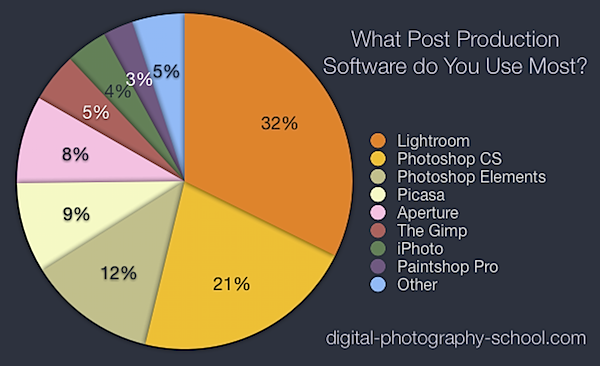
The most popular post production software [poll results] — from digital-photography-school.com by Darren Rowse
On 10/28/2011,
in Adobe, cloud-based computing / apps / other cloud-related, digital photography, higher education,
by Daniel Christian
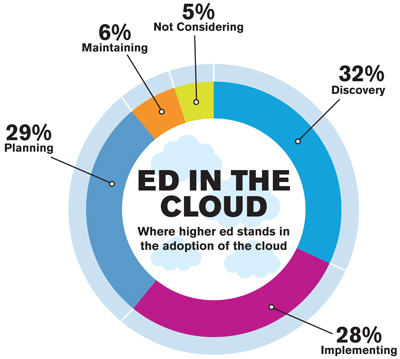
Higher Ed’s Ultimate Guide To Cloud Computing — from edudemic.com
Topics include:
- What is cloud computing?
- Why use it?
- The challenges of using cloud computing
- What it means to higher ed
- Educause’s 7 things you should know about cloud computing
- Legal considerations
- …and more
Also see:
- Adobe’s incredible new cloud photo storage system now online — from edudemic.com
Addendum on 11/2/11:
-
Diving Into the Cloud — from campustechnology.com by Rama Ramaswami, Dian Schaffhauser
In a two-part series, CT provides IT administrators with an easy-to-understand primer to help them educate campus constituents about the cloud and what it can do for their institutions.


…and others from Terry White’s Adobe Creative Announcements at MAX 2011!
- Adobe Creative Cloud
- Adobe Photoshop Touch <-Photoshop on your tablet!
- Adobe Touch Apps (see videos of the Adobe Touch Apps in action here)
- Adobe Digital Publishing Suite SINGLE EDITION <-what so many of you have been asking for!
- Adobe Acquires TypeKit
- Woodwing moves their solution over to the Adobe Publishing Suite!
- Adobe to acquire Nitobi, creator of PhoneGap
On 09/09/2011,
in Adobe, cloud-based computing / apps / other cloud-related, convergence, mirroring and/or multiple devices, technologies for your home, television,
by Daniel Christian