Looking at the %’s for browsers overall support of HTML 5, it’s just not there yet…but it’s making progress. I’ll try to pulse-check this from time to time.
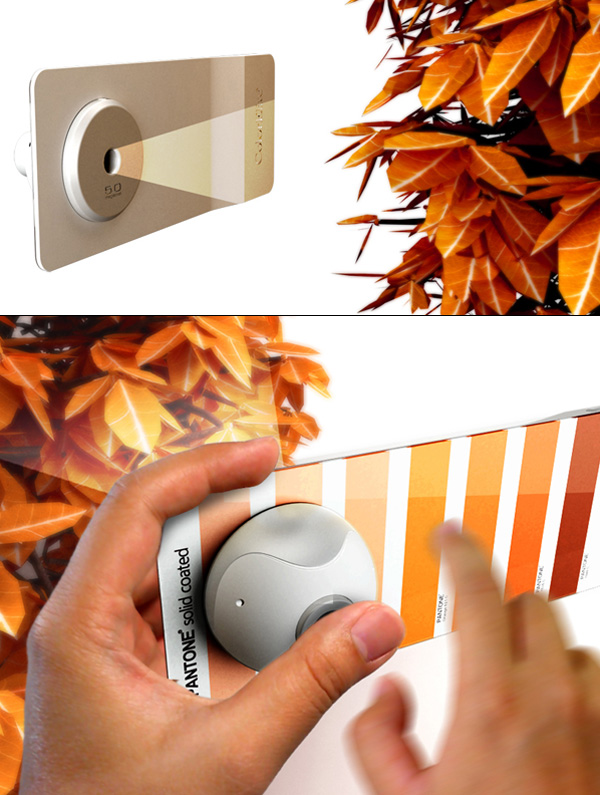
The Right Shade of Autumn –– from Yanko Design
Advisor: Wen-Chih Chang | Designer: Liao-Hsun Chen
Excerpt:
Color Elite is…[a] combination of e-paper technology, a camera and the Internet. Together they combine to provide you the exact shade or colors you are looking for, and even help reduce the use of paper.
.
Defending the Generalists in the Web Design Industry — from Smashing Magazine by Paul Boag
Excerpt:
In recent years there has been a move away from generalist Web designers to specialists such as content strategists, user experience architects and front-end coders. Where once there was a single job, there are now many, with ever-narrower spheres of responsibility.
While my peers are becoming more specialized, I have stoically refused to do so, remaining a generalist. If anything, my interests have broadened, encompassing subjects such as marketing, psychology and business strategy.
This has drawn criticism from some who view generalists negatively, which is in line with some of what I am reading in the blogosphere.
Where has this negativity come from, and is it justified?
From DSC:
This is a great writeup of the pro’s and con’s, benefits and drawbacks of being a generalist in the web design industry. My experience with web design and production is that it has been extremely difficult to keep up over this last decade — especially when one can not focus solely on web design and production in one’s daily tasks. For example, I’ve had to redirect my resources/energies into other areas, tools, pedagogies, learning theories, trends, systems-related projects, management, etc. — leaving little time to try to keep up with advances and changes within the arenas of front-end design and back-end development. I’ve been forced to be a generalist as well — but a few levels up. 🙂
Report: The most common web browsers and browser versions today — from royal.pingdom.com
Excerpt from this 6/16/11 posting:
The web browser market is an ever-changing landscape. It can sometimes be rocky ground for web designers and web developers trying to make their websites and services work for all the various browser versions available out there. It’s challenging work, to say the least.
That’s why it pays to be aware of what the web browser market looks like, and stay up to date. How many are using the various browsers out there? How many are using the latest versions? Which versions are the most common? How big an audience may you be annoying if your site isn’t perfect in a specific browser version?
Those are all questions you’ll want to answer, and here is what the situation looks like right now, in June 2011, based on the traffic to more than three million websites and billions of page views.
Useful HTML-, CSS- and JavaScript Tools and Libraries –from SmashingMagazine.com
Excerpt:
Front-end development is a tricky beast. It’s not difficult to learn, but it’s quite difficult to master. There are just too many things that need to be considered; too many tweaks that might be necessary here and there; too many details to make everything just right. Luckily, developers and designers out there keep releasing useful tools and resources for all of us to learn, improve our skills and just get better at what we do. Such tools are valuable and helpful because they save our time, automate mundane tasks and hence help us focus on more important things.
Here at Smashing Magazine, we’re continuously searching for time-saving, useful HTML-, CSS- and JavaScript-resources for our readers, to make the search of these ever-growing tools easier. We hope that these tools will help you improve your skills as well as your professional workflow. A sincere thanks to all designers and developers who are featured in this round-up. We respect and appreciate your contributions to the design community.
33 essential resources for developers & designers — from Mashable.com by Brian Anthony Hernandez
For months now, web developers and designers have flocked to Mashable to learn from and share our how-to guides, analyses, videos, lists, videos and galleries. Below, we’ve assembled 33 of our favorite resources since January and separated them into three easily digestible lists: inspiration, design and development. To keep up to date with news and resources about the topics listed below, feel free to follow Mashable‘s dev & design channel on Twitter…
How HTML5 is influencing web app development — from Mashable.com by Christina Warren
Designing for the future web — from SmashingMagazine.com by James Gardner
Design tips — from blog.99designs.com
- What Separates Good From Great? – http://bit.ly/fLztMk
- 100 Principles for Designing Logos and Building Brands – http://bit.ly/ewI24G
- The Difference Between Pixel and Vector-Based Graphics – http://bit.ly/f16Ne7
- Web Design Tips & Advice from A to Z – http://bit.ly/fbOhyI
- Why whitespace matters – http://bit.ly/g1ILJf
- A Simpler and Faster Alternative to Wireframes – http://bit.ly/hPpLou
- 35 Websites with Outstanding Use of Textures – http://bit.ly/fIV3xu
- Top 10 Dos and Don’ts of Web Typography – http://bit.ly/hKlcb0
- The 100 Best Fonts – http://bit.ly/gRc4e3
- How to Create Brochure Mockups in Photoshop – http://bit.ly/ebGVWy
- How Nationality Reflects In Artworks – http://bit.ly/ihVzOa
An overview of HTML5 — from Integrated Learning Services
Also see:
- How’s Your HTML5? App Skills in Demand — from the Wall Street Journal
Originally saw this item at iLearnTechnology.com
Excerpt:
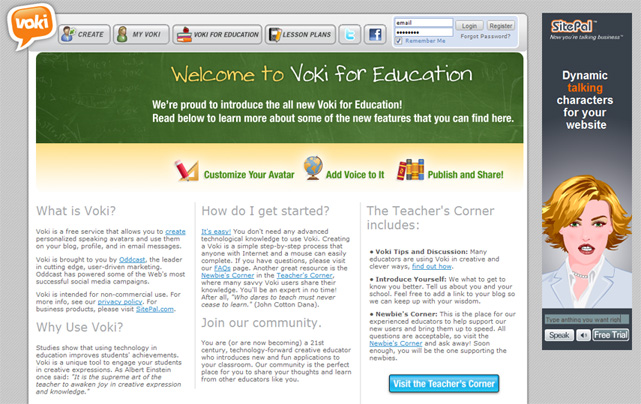
Voki is a free web tool that let’s students create personalized speaking avatars that can be used in a variety of online formats (blogs, email, direct link, social network profiles, etc.). Now, Voki has released an exclusive education edition of their service. Voki Education has some additional features that make it even more useful for the classroom. Sharing is now easier than ever. Students and teachers can embed their finished Voki in webpages, email, and social network profiling, they can also share using a “Voki link” which will allow students to share a simple URL to a Voki page. Students no longer need access to a website or blog to share their Voki scene! Voki also provides custom links for educational partners like SymbalooEdu, very handy. A new lesson plan database provides teachers with a searchable database of lesson plans that utilize Voki for learning. Teachers are encouraged to share their Voki enhanced lesson plans. In the new Teacher’s Corner, teachers and “expert” users can discuss anything related to Voki. There is even a Newbies corner with a series of discussions in Q&A format. Voki is now ad-free, this makes it an even sweeter deal for the classroom!