Clicking this image will take you to the 2021 Tech Trends Report -- from the Future Today Institute

14th Annual Edition | 2021 Tech Trends Report — from the Future Today Institute

Our 2021 Tech Trends Report is designed to help you confront deep uncertainty, adapt and thrive. For this year’s edition, the magnitude of new signals required us to create 12 separate volumes, and each report focuses on a cluster of related trends. In total, we’ve analyzed  nearly 500 technology and science trends across multiple industry sectors. In each volume, we discuss the disruptive forces, opportunities and strategies that will drive your organization in the near future.

Now, more than ever, your organization should examine the potential near and long-term impact of tech trends. You must factor the trends in this report into your strategic thinking for the coming year, and adjust your planning, operations and business models accordingly. But we hope you will make time for creative exploration. From chaos, a new world will come.

Some example items noted in this report:

  • Natural language processing is an area experiencing high interest, investment, and growth.
  • + No-code or low-code systems are unlocking new use cases for businesses.
  • Amazon Web Services, Azure, and Google Cloud’s low-code and no-code offerings will trickle down to everyday people, allowing them to create their own artificial intelligence applications and deploy them as easily as they could a website.
  • The race is on to capture AI cloudshare—and to become the most trusted provider of AI on remote servers.
  • COVID-19 accelerated the use of AI in drug discovery last year. The first trial of an AI-discovered drug is underway in Japan.

 

Navigating website ADA compliance: ‘If you have videos that are not captioned, you’re a sitting duck’ — from abajournal.com by Matt Reynolds

Excerpts:

“If you have videos that are not captioned, you’re a sitting duck,” Goren said. “If you’re not encoding your pictures so that the blind person using a screen reader can understand what the picture is describing, that is a problem.”

Drop-down boxes on websites are “horrible for accessibility,” the attorney added, and it can be difficult for people with disabilities to navigate CAPTCHA (Completely Automated Public Turing test) technology to verify they are human.

“Trying to get people with voice dictation or even screen readers to figure out how to certify that they’re not a robot can be very complicated,” Goren said.

Also see:

Relevant Laws

Information re: Lawsuits


GPT-3: We’re at the very beginning of a new app ecosystem — from venturebeat.com by Dattaraj Rao

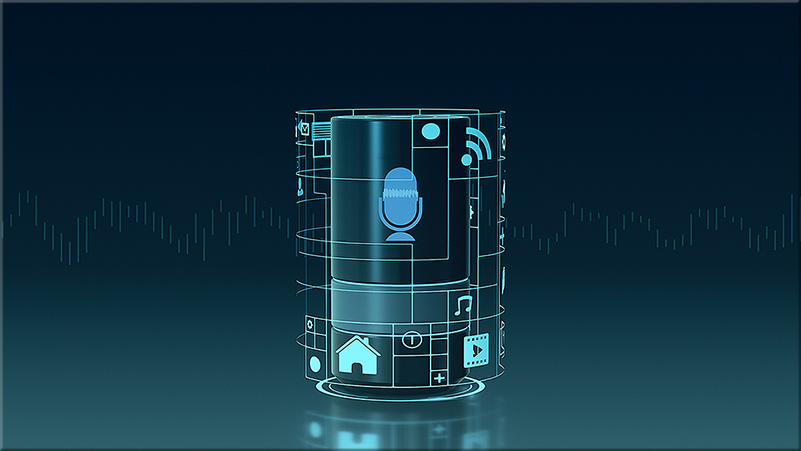
From DSC: NLP=Natural Language Processing (i.e., think voice-driven interfaces/interactivity).

Excerpt:

Despite the hype, questions persist as to whether GPT-3 will be the bedrock upon which an NLP application ecosystem will rest or if newer, stronger NLP models with knock it off its throne. As enterprises begin to imagine and engineer NLP applications, here’s what they should know about GPT-3 and its potential ecosystem.


The Top 5 Technologies for Innovation Leaders in Electronics and IT
Digital biomarkers, edge computing, and AI-enabled sensors are among the top technologies transforming the electronics landscape, according to Lux Research

BOSTON, MA, MARCH 4, 2021?– Digital transformation is one of the hottest topics in every industry, and as consumers are eagerly adopting increasing amounts of digital tech, electronics, and IT players have a unique opportunity to impact more industries than ever before. To help guide innovation in this booming space, Lux Research released its annual report, “Foresight 2021: Top Emerging Technologies to Watch.”

Lux’s annual report analyzes the digital transformation space, reviewing what topics emerged and which technologies gained traction during 2020. Its expert analysis of the hottest innovation topics and best tech startups found that the top five technologies electronics and IT innovation leaders should look to in the next decade are:

  1. AI-Enabled Sensors – Merging hardware and software to collect and validate critical data will be a major part of use cases from consumer wearables to medical devices to industrial IoT.
  2. Digital Biomarkers – Using data analytics to detect disease through changes in streams of data analytics is a potent path for electronics companies to grab a piece of the healthcare pie.
  3. Natural Language Processing – Natural language processing (NLP) allows electronics and IT players to extend into new services and industry segments, either by using it to leverage their own data or by providing it as a service.
  4. Edge Computing – Limitations in bandwidth and latency are pushing critical computation away from the cloud and out to the edge, with rapidly improving hardware and software enablers.
  5. Synthetic Data – AI needs vast amounts of training data, and when real data is scarce, synthetic data can be a solution. It also boosts data diversity and privacy.

From DSC:
Some things to keep on your radar…


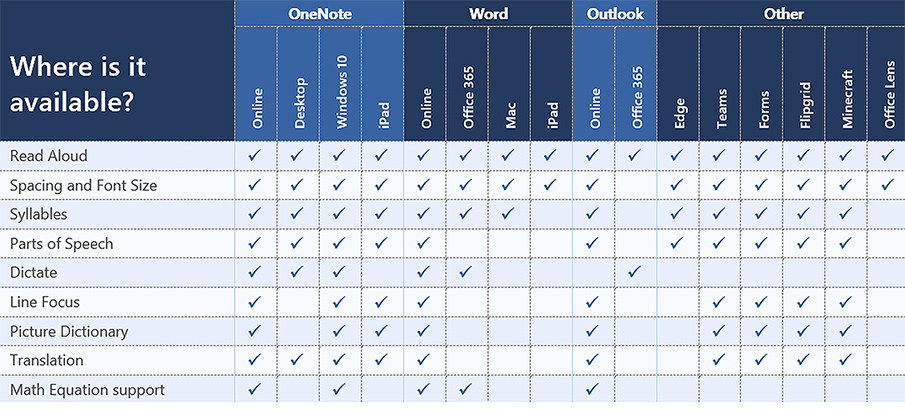
Look at the choice and control possibilities mentioned in the following except from Immersive Reader in Canvas: Improve Reading Comprehension for All Students

When building courses and creating course content in Canvas, Immersive Reader lets users:

  • Change font size, text spacing, and background color
  • Split up words into syllables
  • Highlight verbs, nouns, adjectives, and sub-clauses
  • Choose between two fonts optimised to help with reading
  • Read text aloud
  • Change the speed of reading
  • Highlight sets of one, three, or five lines for greater focus
  • Select a word to see a related picture and hear the word read aloud as many times as necessary

Also see:

All about the Immersive Reader — from education.microsoft.com

The Microsoft Immersive Reader is a free tool, built into Word, OneNote, Outlook, Office Lens, Microsoft Teams, Forms, Flipgrid, Minecraft Education Edition and the Edge browser, that implement proven techniques to improve reading and writing for people regardless of their age or ability.


When the Animated Bunny in the TV Show Listens for Kids’ Answers — and Answers Back — from edsurge.com by Rebecca Koenig

Excerpt:

Yet when this rabbit asks the audience, say, how to make a substance in a bottle less goopy, she’s actually listening for their answers. Or rather, an artificially intelligent tool is listening. And based on what it hears from a viewer, it tailors how the rabbit replies.

“Elinor can understand the child’s response and then make a contingent response to that,” says Mark Warschauer, professor of education at the University of California at Irvine and director of its Digital Learning Lab.

AI is coming to early childhood education. Researchers like Warschauer are studying whether and how conversational agent technology—the kind that powers smart speakers such as Alexa and Siri—can enhance the learning benefits young kids receive from hearing stories read aloud and from watching videos.

From DSC:
Looking at the above excerpt…what does this mean for elearning developers, learning engineers, learning experience designers, instructional designers, trainers, and more? It seems that, for such folks, learning how to use several new tools is showing up on the horizon.


From DSC:
Videoconferencing vendors out there:

  • Have you done any focus group tests — especially within education — with audio-based or digital video-based versions of emoticons?
    .
  • So instead of clicking on an emoticon as feedback, one could also have some sound effects or movie clips to choose from as well!
    .

To the videoconferencing vendors out there -- could you give us what DJ's have access to?

I’m thinking here of things like DJ’s might have at their disposal. For example, someone tells a bad joke and you hear the drummer in the background:

Or a team loses the spelling-bee word, and hears:

Or a professor wants to get the classes attention as they start their 6pm class:

I realize this could backfire big time…so it would have to be an optional feature that a teacher, professor, trainer, pastor, or a presenter could turn on and off. (Could be fun for podcasters too!)

It seems to me that this could take
engagement to a whole new level!


From DSC:
For me the Socratic method is still a question mark, in terms of effectiveness. (I suppose it depends on who is yielding the tool and how it’s being utilized/implemented.)

But you have one student — often standing up and/or in the spotlight — who is being drilled on something. That student could be calm and collected, and their cognitive processing could actually get a boost from the adrenaline.

But there are other students who dread being called upon in such a public — sometimes competitive — setting. Their cognitive processing could shut down or become greatly diminished.

Also, the professor is working with one student at a time — hopefully the other students are trying to address each subsequent question, but some students may tune out once they know it’s not their turn in the spotlight.

So I was wondering…could the Socratic method be used with each student at the same time? Could a polling-like tool be used in real-time to guide the discussion?

For example, a professor could start out with a pre-created poll and ask the question of all students. Then they could glance through the responses and even scan for some keywords (using their voice to drive the system and/or using a Ctrl+F / Command+F type of thing).

Then in real-time / on-the-fly, could the professor use their voice to create another poll/question — again for each student to answer — based on one of the responses? Again, each student must answer the follow up question(s).

Are there any vendors out there working on something like this? Or have you tested the effectiveness of something like this?

Vendors: Can you help us create a voice-driven interface to offer the Socratic method to everyone to see if and how it would work? (Like a Mentimeter type of product on steroids…er, rather, using an AI-driven backend.)

Teachers, trainers, pastors, presenters could also benefit from something like this — as it could engage numerous people at once.

#Participation #Engagement #Assessment #Reasoning #CriticalThinking #CommunicationSkills #ThinkingOnOnesFeet #OnlineLearning #Face-to-Face #BlendedLearning #HybridLearning

Could such a method be used in language-related classes as well? In online-based tutoring?


Could AI-based techs be used to develop a “table of contents” for the key points within lectures, lessons, training sessions, sermons, & podcasts? [Christian]

From DSC:
As we move into 2021, the blistering pace of emerging technologies will likely continue. Technologies such as:

  • Artificial Intelligence (AI) — including technologies related to voice recognition
  • Blockchain
  • Augment Reality (AR)/Mixed Reality (MR)/Virtual Reality (VR) and/or other forms of Extended Reality (XR)
  • Robotics
  • Machine-to-Machine Communications (M2M) / The Internet of Things (IoT)
  • Drones
  • …and other things will likely make their way into how we do many things (for better or for worse).

Along the positive lines of this topic, I’ve been reflecting upon how we might be able to use AI in our learning experiences.

For example, when teaching in face-to-face-based classrooms — and when a lecture recording app like Panopto is being used — could teachers/professors/trainers audibly “insert” main points along the way? Similar to something like we do with Siri, Alexa, and other personal assistants (“Heh Siri, _____ or “Alexa, _____).

Like an audible version of HTML -- using the spoken word to insert the main points of a presentation or lecture

(Image purchased from iStockphoto)

.

Pretend a lecture, lesson, or a training session is moving right along. Then the professor, teacher, or trainer says:

  • “Heh Smart Classroom, Begin Main Point.”
  • Then speaks one of the main points.
  • Then says, “Heh Smart Classroom, End Main Point.”

Like a verbal version of an HTML tag.

After the recording is done, the AI could locate and call out those “main points” — and create a table of contents for that lecture, lesson, training session, or presentation.

(Alternatively, one could insert a chime/bell/some other sound that the AI scans through later to build the table of contents.)

In the digital realm — say when recording something via Zoom, Cisco Webex, Teams, or another application — the same thing could apply. 

Wouldn’t this be great for quickly scanning podcasts for the main points? Or for quickly scanning presentations and webinars for the main points?

Anyway, interesting times lie ahead!


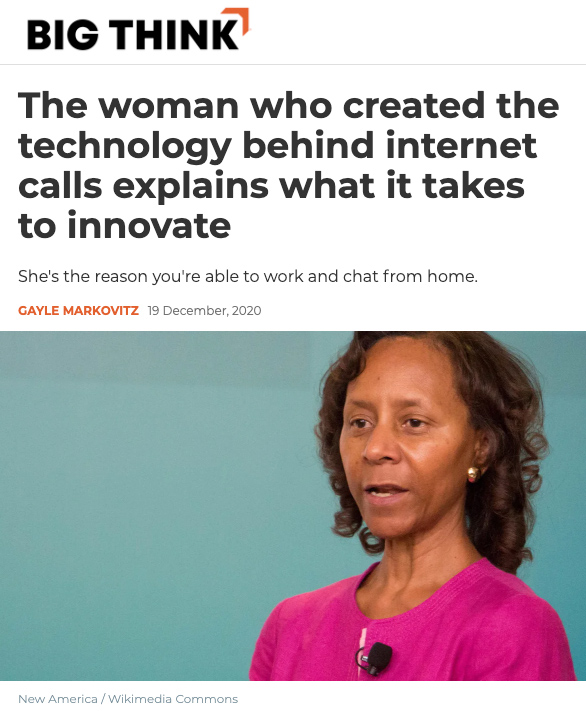
Marian Croak, the inventor of VOIP, explains what it takes to innovate

The woman who created the technology behind internet calls explains what it takes to innovate — from bigthink.com by Gayle Markovitz
She’s the reason you’re able to work and chat from home.

Excerpt (emphasis DSC):

If you’ve ever wondered how a Zoom call works, you might want to ask Marian Croak, Vice-President of Engineering at Google.

This is the woman who invented “Voice over Internet Protocol”: the technology that has enabled entire workforces to continue to communicate and families and friends to remain in touch throughout 2020’s lockdowns – and inevitably beyond.

What can kids teach tech innovators?
Wonder and naivete are powerful tools. Croak argues that children have rich imaginations – which is the fuel of invention. “You need to be childlike. A little naïve and not inhibited by what’s possible.”

Matlali’s work with disadvantaged teenagers brings her directly into this world, where she sees that “children are passionate but hopeful for the future. For them, everything is possible. You want kids to have the imagination and passion for them to achieve their dreams.”

Croak said her motivation for 2021 was to keep her own childlike curiosity going, forgetting about her personal circumstances and focusing on the “painpoints”.

Also see:

Marian’s entry out at Wikipedia.org where it says:

She joined AT&T at Bell Labs in 1982.[4] She advocated for switching from wired phone technology to internet protocol.[2][5][6] She holds over two hundred patents, including over one hundred in relation to Voice over IP.[7] She pioneered the use of phone network services to make it easy for the public to donate to crisis appeals.[8][9] When AT&T partnered with American Idol to use a text message voting system, 22% of viewers learned to text to take part in the show.[10][11] She filed the patent for text-based donations to charity in 2005.[10] This capability revolutionised how people can donate money to charitable organisations:[12] for example, after the 2010 Haiti earthquake at least $22 million was pledged in this fashion.[13] She led the Domain 2.0 Architecture and managed over 2,000 engineers.[14][15]


From DSC:
An interesting, more positive use of AI here:

Deepdub uses AI to dub movies in the voice of famous actors — from protocol.com by Janko Roettgers
Fresh out of stealth, the startup is using artificial intelligence to automate the localization process for global streaming.

Excerpt:

Tel Aviv-based startup Deepdub wants to help streaming services accelerate this kind of international rollout by using artificial intelligence for their localization needs. Deepdub, which came out of stealth on Wednesday, has built technology that can translate a voice track to a different language, all while staying true to the voice of the talent. This makes it possible to have someone like Morgan Freeman narrate a movie in French, Italian or Russian without losing what makes Freeman’s voice special and recognizable.

From DSC:
A much more negative use of AI here:

A much more negative use of AI here...


Teaching with Amazon Alexa — from Sylvia Martinez

Excerpt:

Alexa is a voice-activated, cloud-based virtual assistant, similar to Siri on Apple devices, or Google Assistant. Alexa is an umbrella name for the cloud-based functionality that responds to verbal commands. Alexa uses artificial intelligence to answer questions or control smart devices, and has a range of “skills” — small programs that you can add to increase Alexa’s capabilities.

Many teachers are experimenting with using smart devices like Alexa in the classroom. Like most other Amazon features and products, Alexa is primarily designed for home use, anticipating that users will be household members. So in thinking about Alexa in a classroom, keeping this in mind will help determine the best educational uses.

Alexa is most often accessed in three ways…


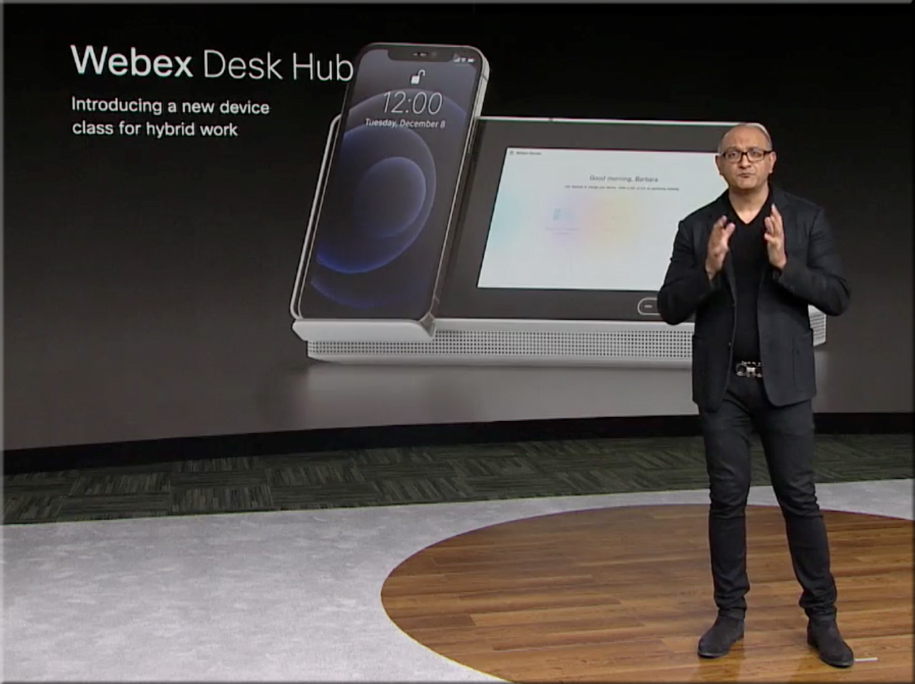
A new category of devices from Cisco -- the Webex Desk Hub

From DSC:
In yesterday’s webexone presentations, Cisco mentioned a new device category, calling it the Webex Desk Hub. It gets at the idea of walking into a facility and grabbing any desk, and making that desk you own — at least for that day and time. Cisco is banking on the idea that sometimes people will be working remotely, and sometimes they will be “going into the office.” But the facilities will likely be fewer and smaller — so one might not have their own office.

In that case, you can plug in your smart device, and things are set up the way they would be if you did have that space as a permanent office.

Applying this concept to the smart classrooms of the future, what might that concept look like for classrooms? A faculty member or a teacher could walk into any room that supports such a setup, put in their personal smart device, and the room conditions are instantly implemented:

  • The LMS comes on
  • The correct class — based on which day it is and then on the particular time of day it is — is launched
  • The lights are dimmed to 50%
  • The electric window treatments darken the room
  • The projector comes on and/or the displays turn on
  • Etc.
 

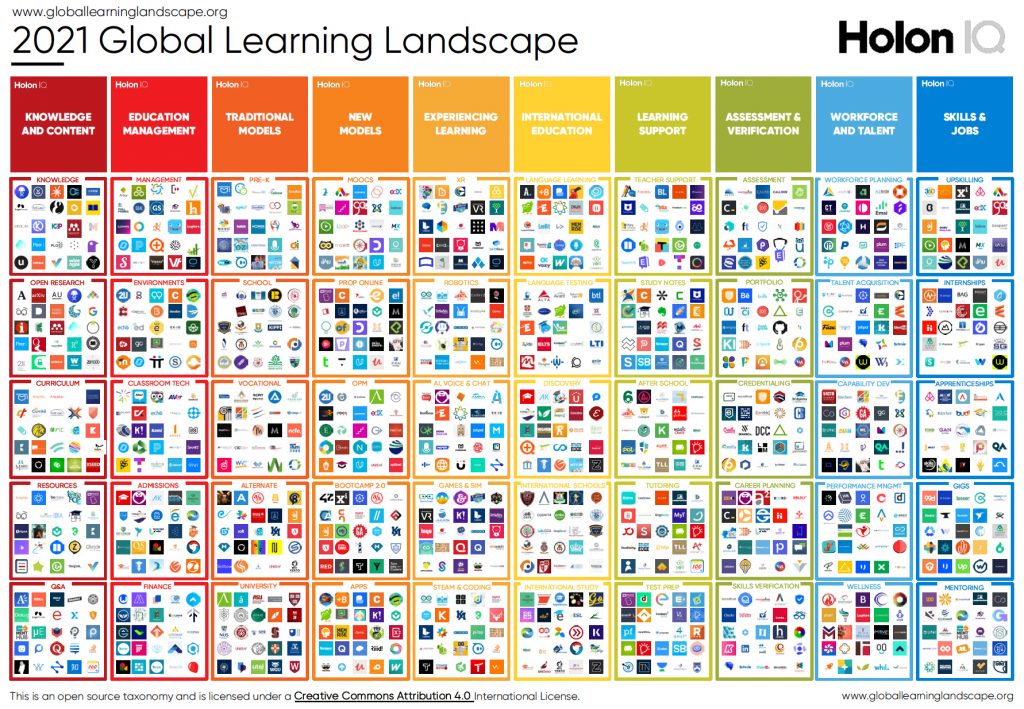
DC: You want to talk about learning ecosystems?!!? Check out the scopes included in this landscape from HolonIQ!

You want to talk about learning ecosystems?!!? Check this landscape out from HolonIQ!

Also see:

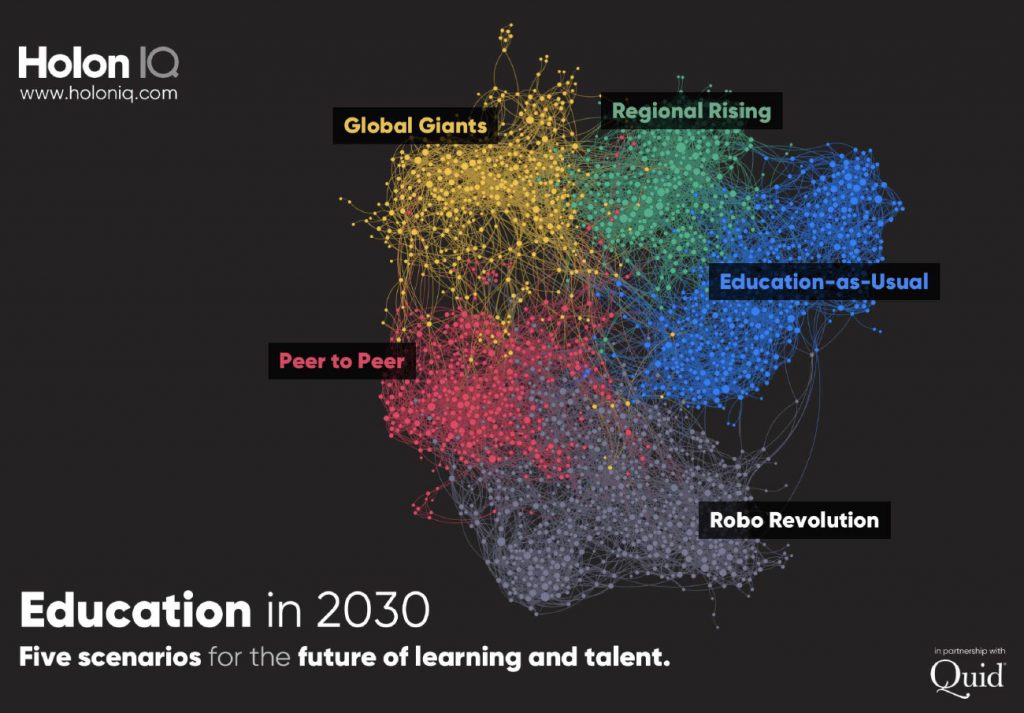
Education in 2030 -- a $10T market -- from HolonIQ.com

From DSC:
If this isn’t mind-blowing, I don’t know what is! Some serious morphing lies ahead of us!


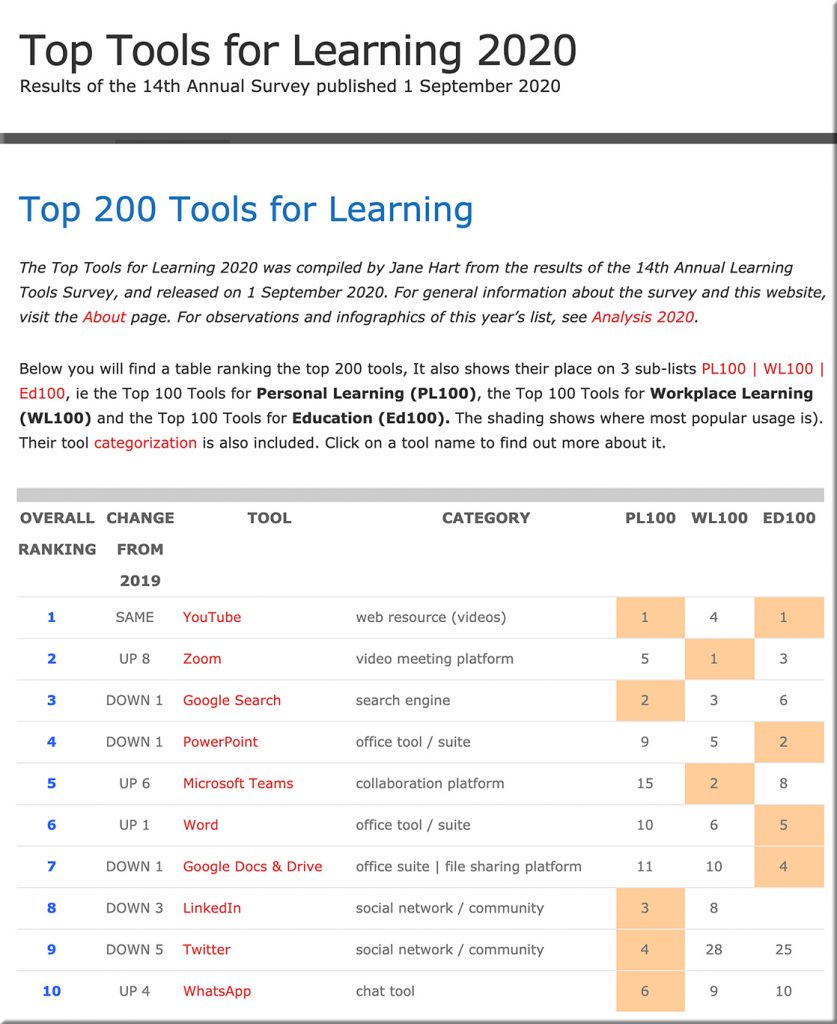
Just released today! Jane Hart’s Top 200 Tools for Learning

Jane Hart's Top 200 Tools for Learning -- released on 9-1-20

Top 200 Tools for Learning — from toptools4learning.com by Jane Hart

Excerpt:

The Top Tools for Learning 2020 was compiled by Jane Hart from the results of the 14th Annual Learning Tools Survey, and released on 1 September 2020. For general information about the survey and this website, visit the About page. For observations and infographics of this year’s list, see Analysis 2020.


© 2025 | Daniel Christian