2019 study of undergraduate students & information technology — from library.educause.edu

Excerpts:

Drawing on survey data from more than 40,000 students across 118 US institutions, this report highlights a number of important findings related to students’ technology preferences, supports, and experiences, with the goal of aiding technology and higher education professionals in improving student learning experiences and success.

But they want to be more than in-class spectators:

  • “I want my professors to stop reading PowerPoint slides word-for-word off of a screen, and to start using the technology at hand to create a different kind of lecture that will engage their students in the learning process.”
  • “I’d love for there to be more interactive polling and questions during class. Even though I don’t like the idea of being in lecture every day, that would keep me more engaged if the instructors were more dynamic with their tech use.”
  • “Integrate [technology] more into lectures. It’s very difficult to sit and watch you talk. Technology can be so beneficial to learning if used in the right ways to enhance and complement lectures. Use collaborative quizzes (Kahoot, etc.), let us research in class, etc.”
  • “Provide more online learning tools such as interactive lectures where people on laptops or tablets can also engage with the material being presented.”
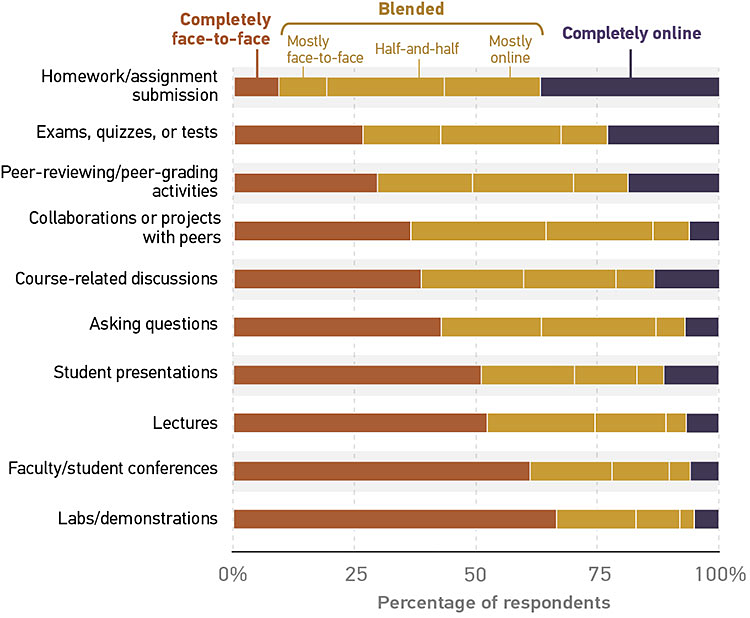
 

Figure 2. Student learning environment preferences for specific course-related activities and assignments

Recommendations

  • Leverage analytics to gain a greater understanding of the student demographics that influence learning environment preferences.
  • Continue to promote online success tools and provide training to students on their use through orientations and advisement sessions.
  • Expand efforts to improve Wi-Fi reliability in campus housing and outdoor spaces.
  • Allow students to use the devices that are most important to their academic success in the classroom.
  • Establish a campus community to address accessibility issues and give “accessibility evangelists” a seat at the table.


From DSC:
Well students…you might find that you have a major surprise ahead of you — as a significant amount of your future learning/training will take place completely online. Go ask some folks who have graduated about their onboarding experiences. Then go ask people who have been in the workplace for over a decade. You’ll see what I mean.



The importance of presence offline & online in higher education — from forbes.com by Martin Krislov

Excerpt:

But how can we maintain [human interaction] in the era of online instruction?

That question, it turns out, is a pressing one for distance-education professionals. And the answer, they say, is what the digital world calls “presence.”

Presence means, essentially, being there. It’s something that happens naturally in physical classrooms. But in online education, instructors have to work to create it. Poorly constructed online courses can feel cold and impersonal; online faculty can feel distant. But in a well-designed course, where faculty work to be present, students can thrive. Studies have shown that creating strong presence and engagement in an online class—mimicking that personal connection Gabelli and I so value—improves academic outcomes and student experience.


Instructional Design Basics — from facultyfocus.com by Kristin Ziska Strange

Excerpt:

Instructional designers can help with many different course-based problems and challenges, including helping you figure out where and how to start with your course design. When a course is new or needs a little design love, knowing where to start can be difficult. By starting with your main goals and then moving to assessments and content, it is easier for your course to stay in alignment with your goals than working from topics and assessments to objectives. Starting is as easy as asking yourself one simple question.

Start with a Question
In any course design, whether it is a brand-new course or a redesign, the best place to start is to write down what you hope your students will carry with them several years down the road. What do you want your students to be able to do, and what content is crucial for them to remember? It doesn’t have to be the formalized language of objectives and goals that you put into your syllabus but just a straightforward list.

We do this for a few reasons.


Conscious onboarding: 10 ways to support new online instructors — from evolllution.com by Rebecca Cooney
In the scramble of expanding online programs, colleges often neglect to establish a formal onboarding process to address the unique challenges of online instruction—putting faculty confidence and retention at risk.

Excerpt:

#1: Establish an Online Community of Practice Devoted to Faculty Teaching Online Courses

When executed well, a culture of community establishes a set of shared values and expectations that influence how a group interacts, functions, and collaborates. By developing a specific online community of practice for your instructors teaching online courses, you provide them with a real-time information hub they can refer to for topics and materials that directly impact the work they are doing every day. An online community of practice includes announcements and discussions, a shared files system, FAQs and how-to’s, templates, databanks for approved-to-use lecture slides, recorded lectures, tutorials, standard syllabus language, approved digital assets and rubrics.

Learn more and download a report about exploratory research in the value of developing online communities of practice. (Office of Educational Technology, n.d.)


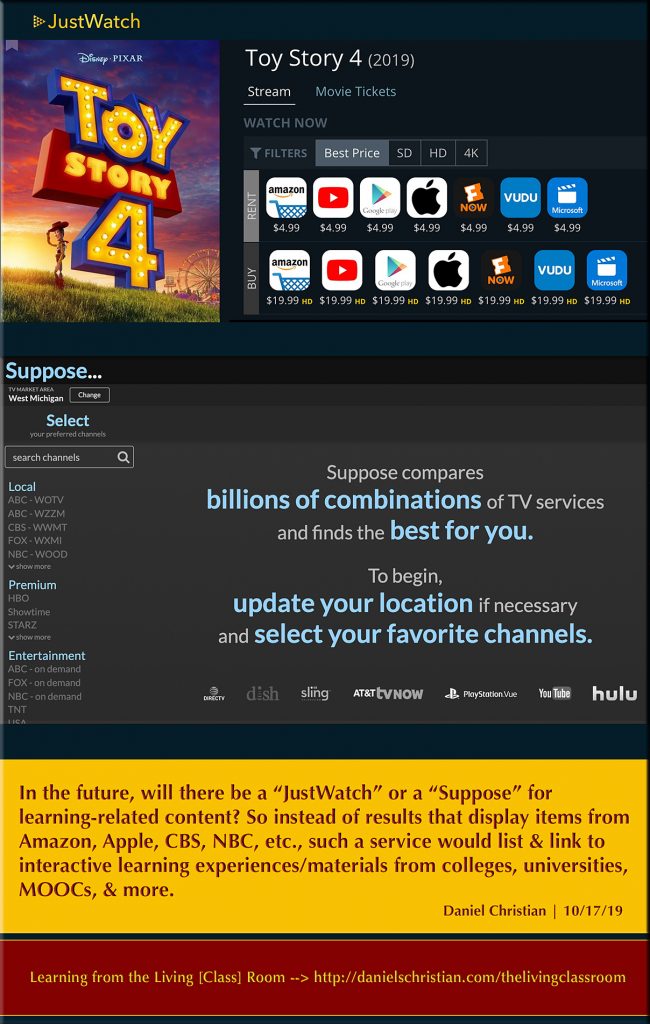
DC: In the future…will there be a “JustWatch” or a “Suppose” for learning-related content?

DC: In the future...will there be a JustWatch or a Suppose for learning-related content?


5 good tools to create whiteboard animations — from educatorstechnology.com

Excerpt:

In short, whiteboard animation (also called video scribing or animated doodling) is a video clip in which the recorder records the process of drawing on a whiteboard while using audio comment. The final result is a beautiful synchronization of the drawings and the audio feedback. In education, whiteboard animation videos  are used in language teaching/learning, in professional development sessions, to create educational tutorials and presentations and many more. In today’s post, we are sharing with you some good web tools you can use to create whiteboard animation videos.


Preparing faculty for high-quality online programs — from campustechnology.com by Anne Frankel, Laurie Friedman, Jamie Mansell, Jennifer Ibrahim
Temple University’s College of Public Health is a diverse school experiencing significant growth online. Here’s how the institution is supporting the development and maintenance of high-quality online faculty.

Excerpt:

We recognized that faculty may be at different levels of preparedness and self-efficacy to start teaching in an online space — and we realized the challenges of organizing faculty in a single location at a given time. Therefore, we chose to deliver the training in a fully asynchronous environment, allowing faculty the time and space needed to digest the materials and practice with the content to build their confidence. Faculty are enrolled in the training during the semester prior to their assigned online class, and are asked to complete the training at least four weeks before the start of their online course to provide sufficient time for feedback to the faculty with lead time for changes to the course before launching, if needed.

We wanted the training to take the faculty member through the design of an entire online course, from syllabus creation, to choices in delivery style, to assessment techniques and more. Each of the nine modules included both pedagogical and technological pieces, encompassing everything from creating alignment (Module 3), to setting up your Canvas site (Module 4), to designing and delivering synchronous sessions (Module 8).

Within each module, there is an organized infrastructure to ensure a consistent experience for the faculty. The structure starts with a clear set of learning objectives, designed both to model best practices and to ensure alignment with activities and assessments. Following the objectives, there are diverse resources, including videos, instructional guides with screenshots, web links, journal articles and examples from our online classes. After the content, each module contains “assignments” for the faculty to complete. These assignments allow the faculty to demonstrate that they can incorporate both technological and pedagogical best practices within their own online course.


My Favorite Book about Teaching and Learning is…33 Books to Inspire You! — from linkedin.com by Barbi Honeycutt

Excerpt:

…I recently posted this fill-in-the-blank question to all of my social media pages:

My favorite book about teaching and learning is ______________.

The response has been fantastic! Professors, instructors, teachers, educators, and faculty development professionals from a variety of disciplines from around the world responded with their favorite book about teaching and learning.

I’ve compiled the list and here are the 33 books recommended by colleagues throughout my network (many books were recommended more than once).


From DSC:
The two postings below show the need for more collaboration and the use of teams:


The future of law and computational technologies: Two sides of the same coin — from legaltechlever.com by Daniel Linna Jr.

Excerpt (emphasis DSC):

An increasing number of lawyers today work with allied professionals to improve processes, better manage projects, embrace data-driven methods, and leverage technology to improve legal services and systems. Legal-services and lawyer regulations are evolving. And basic technologies and AI are slowly making their way into the legal industry, from legal aid organizations and courts to large law firms, corporate legal departments, and governments.

If we are to realize the potential to improve society with computational technologies, law, regulation, and ethical principles must be front and center at every stage, from problem definition, design, data collection, and data cleaning to training, deployment, and monitoring and maintenance of products and systems. To achieve this, technologists and lawyers must collaborate and share a common vocabulary. Lawyers must learn about technology, and technologists must learn about law. Multidisciplinary teams with a shared commitment to law, regulation, and ethics can proactively address today’s AI challenges, and advance our collaborative problem-solving capabilities to address tomorrow’s increasingly complex problems. Lawyers and technologists must work together to create a better future for everyone.


From DSC:
As with higher education in general, we need more team-based efforts in the legal realm as well as more TrimTab Groups.


Excerpts:

Why does this distinction matter? Because law—like so many industries—is undergoing a tectonic shift. It is morphing from a lawyer dominated, practice-centric, labor-intensive guild to a tech-enabled, process and data-driven, multi-disciplinary global industry. The career paths, skills, and expectations of lawyers are changing. So too are how, when, and on what financial terms they are engaged; with whom and from what delivery models they work; their performance metrics, and the resources—human and machine—they collaborate with.  Legal practice is shrinking and the business of delivering legal services is expanding rapidly.

Law is no longer the exclusive province of lawyers. Legal knowledge is not the sole element of legal delivery—business and technological competencies are equally important. It’s a new ballgame—one that most lawyers are unprepared for.

How did we get here and are legal careers  for most a dead end? Spoiler alert: there’s tremendous opportunity in the legal industry. The caveat: all lawyers must have basic business and technological competency whether they pursue practice careers or leverage their legal knowledge as a skill in legal delivery and/or allied professional careers.

Upskilling the legal profession is already a key issue, a requisite for career success. Lawyers must learn new skills like project management, data analytics, deployment of technology, and process design to leverage their legal knowledge. Simply knowing the law will not cut it anymore.


From DSC:
I really appreciate the work of the above two men whose articles I’m highlighting here. I continue to learn a lot from them and am grateful for their work.

That said, just like it’s a lot to expect a faculty member (in higher ed) who teaches online to not only be a subject matter expert, but also to be skilled in teaching, web design, graphic design, navigation design, information design, audio design, video editing, etc…it’s a lot to expect for a lawyer to be a skilled lawyer, business person, and technician. I realize that Mark was only saying a basic level of competency…but even that can be difficult to achieve at times. Why? Because people have different skillsets, passions, and interests. One might be a good lawyer, but not a solid technician…or vice versa. One might be a solid professor, but isn’t very good with graphic design. 


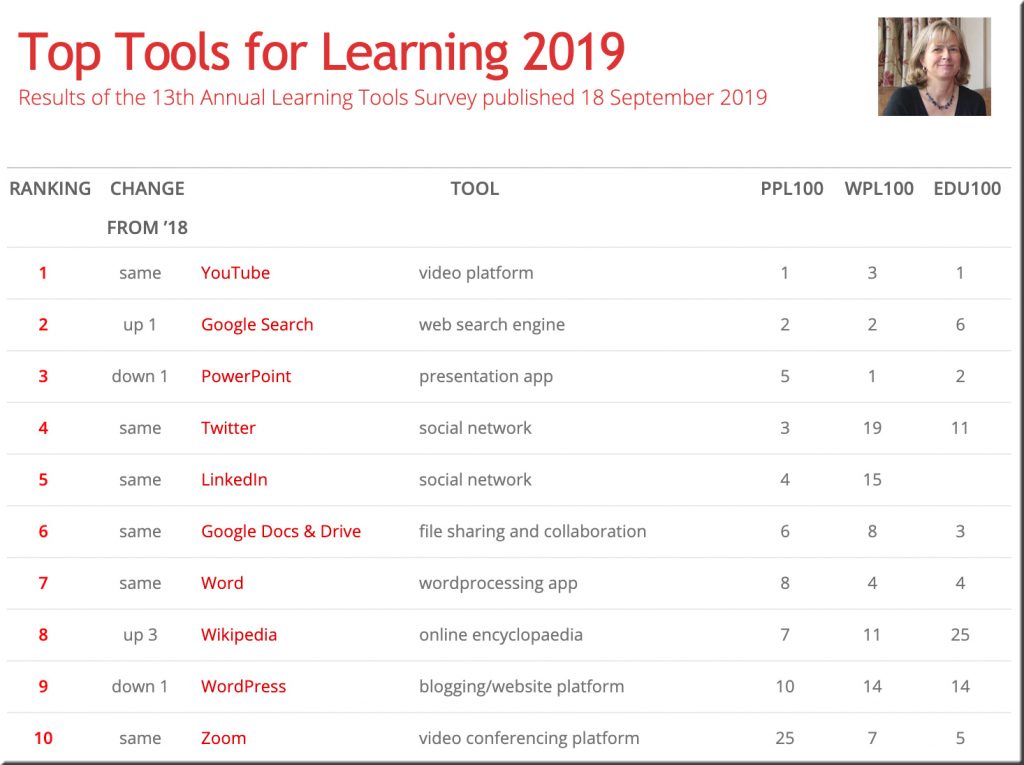
Per Jane Hart on LinkedIn:

Top 200 Tools for Learning 2019 is now published, together with:

PLUS analysis of how these tools are being used in different context, new graphics, and updated comments on the tools’ pages that show how people are using the tools.


The Global Landscape of Online Program Companies — from by Doug Lederman
New trove of data suggests a bigger, more complex, more varied ecosystem of companies that work with colleges to take their academic programs online.

Excerpt:

A new dataset promises to give college leaders, company officials and others involved in the online learning landscape much more information about who offers what programs, how they manage them and where the money is flowing, among other factors.

And the company behind the new data, Holon IQ, published a report today that gives a new name to the large and diversifying category of providers that are working with colleges to take their programs online: OPX, instead of OPM, for online program management companies. (More on that later.)

Also see:

Also see:

  • Multi-Faculty Collaboration to Design Online General Studies Courses — from facultyfocus.com by B. Jean Mandernach
    Excerpt:
    While this type of autonomy in course design makes sense for the face-to-face classroom, it may be less practical–and less effective–in the context of online education. Simply put, development of a high-quality online course takes considerable time and advanced knowledge of online pedagogy. If multiple faculty members are teaching the same course online (as is often the case with general studies or other high-demand courses), it is not an efficient use of departmental time, resources, or budget to have multiple faculty developing their own online classroom for different sections of the same course.
 

Lessons in learning — from news.harvard.edu by Peter Reuell; with thanks to Jason Findley for this resource out on Twitter
Study shows students in ‘active learning’ classrooms learn more than they think

Excerpts:

The question of whether students’ perceptions of their learning matches with how well they’re actually learning is particularly important, Deslauriers said, because while students eventually see the value of active learning, initially it can feel frustrating.

“Deep learning is hard work. The effort involved in active learning can be misinterpreted as a sign of poor learning,” he said. “On the other hand, a superstar lecturer can explain things in such a way as to make students feel like they are learning more than they actually are.”

When the results were tallied, the authors found that students felt as if they learned more from the lectures, but in fact scored higher on tests following the active learning sessions. “Actual learning and feeling of learning were strongly anticorrelated,” Deslauriers said, “as shown through the robust statistical analysis by co-author Kelly Miller, who is an expert in educational statistics and active learning.”


A quick tip from RetrievalPractice.org’s e-newsletter today:

#1: Remember your lesson plan with a 1-minute reflection
Can’t remember how a lesson from last semester or last year went? On the bottom or back of a lesson plan, include two questions:
What went well? What should I do differently next time? 
As soon as you’re done with the lesson, take just one minute to write down a note to your future self. Stuff all your lesson plans/reflections into a folder. The next time you teach the lesson, future-you will be glad that past-you retrieved!


Online programs fueling boot camp sector’s growth in 2019 — from educationdive.com by Hallie Busta

Dive Brief (emphasis DSC):

  • Growth in online programs is expected to drive gains in the boot camp sector this year, according to an annual survey from Course Report about the market for non-college boot camps.
  • More than 23,000 graduates across 110 boot camp providers are expected for 2019, a figure that is up 50% year-over-year. Online programs are expected to grow at more than three times that pace to reach 5,519 graduates in 2019 across 14 providers. Course Report counts only full-time, synchronous programs toward its online tally.
  • Boot camps are increasingly looking to companies and colleges as partners, with the latter often including credit-bearing options, Liz Eggleston, co-founder of Course Report, told Education Dive in an interview.
 
© 2025 | Daniel Christian