Two items from faculty focus.com by Jenae Cohn, PhD, and Courtney Plotts, PhD:

  1. How to Structure Your Online Class for Inclusion, Part 1 
  2. How to Structure Your Online Class for Inclusion: Two Principles for Fostering Engagement, Part 2 

Excerpt:

A strong sense of community begins with faculty designing and planning for the sense of community in the course. In order to build a strong sense of community within an online course, instructors should start by identifying the type of community they want to create. In other words, what is the common thread that runs through an online course: Inquiry, information giving, information gathering, and/or active listening?

Although not intuitive to all instructors, this question surrounding the idea of a sense of community is imperative for creating cohesion and a sense of belonging to a learning environment. Here are some ways that instructors might start to think about what community might mean for their class context:
 

Chrome now instantly captions audio and video on the web — from theverge.com by Ian Carlos Campbell
The accessibility feature was previously exclusive to some Pixel and Samsung Galaxy phones

Excerpt:

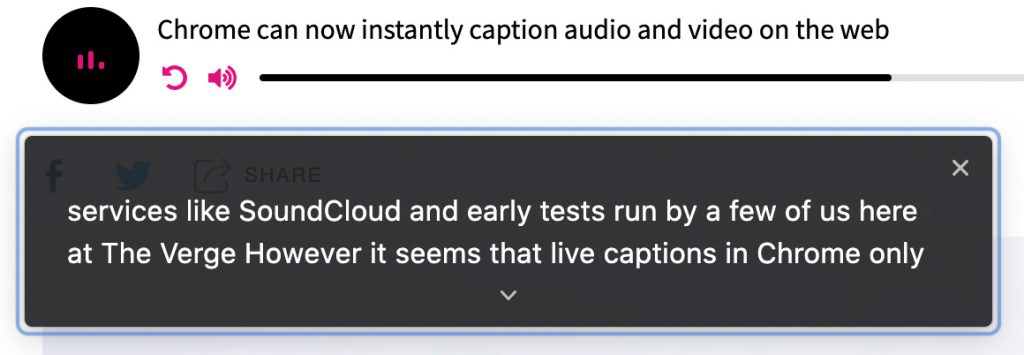
Google is expanding its real-time caption feature, Live Captions, from Pixel phones to anyone using a Chrome browser, as first spotted by XDA Developers. Live Captions uses machine learning to spontaneously create captions for videos or audio where none existed before, and making the web that much more accessible for anyone who’s deaf or hard of hearing.
…
Chrome’s Live Captions worked on YouTube videos, Twitch streams, podcast players, and even music streaming services like SoundCloud in early tests run by a few of us here at The Verge. Google also says Live Captions will work with audio and video files stored on your hard drive if they’re opened in Chrome. However, Live Captions in Chrome only work in English, which is also the case on mobile.


Chrome now instantly captions audio and video on the web -- this is a screen capture showing the words being said in a digital audio-based file


ARHT Media Inc.
Access The Power Of HoloPresence | Hologram Technology | Holographic Displays | Hologram Events

Excerpt:

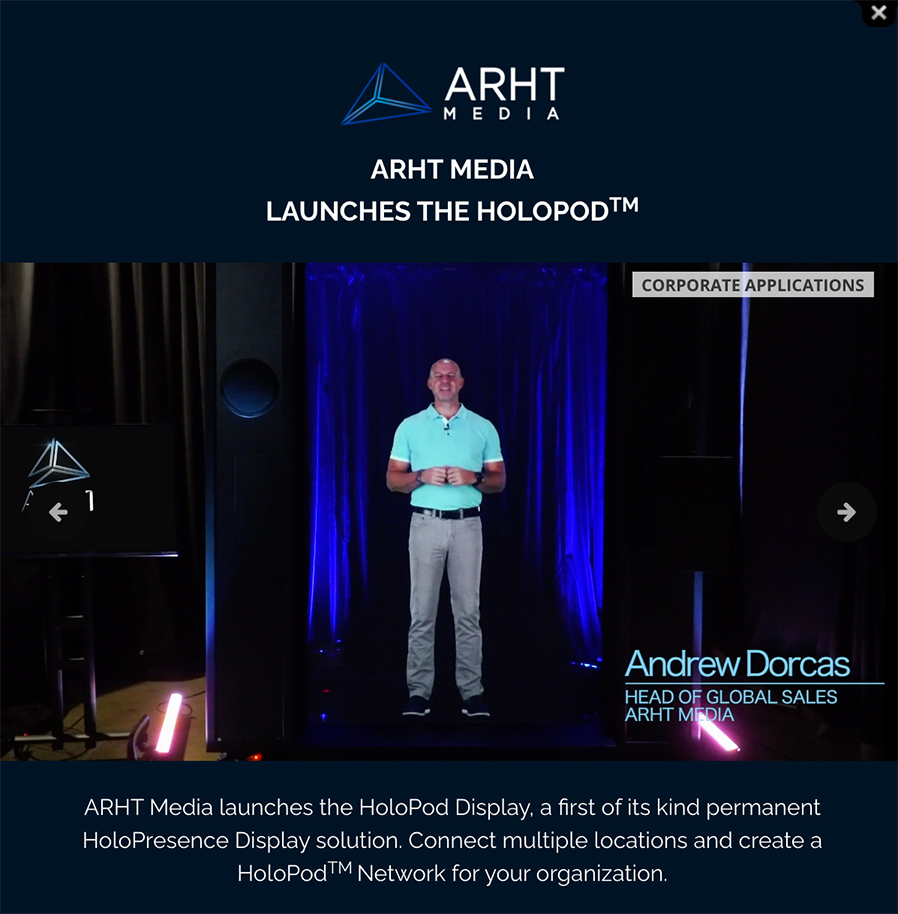
ARHT Media mounted a holographic display at the event in Vancouver and had Sunlife’s executive captured and transmitted live as a hologram to the event from our Toronto studio. He was able to see the audience and interact with them in realtime as if he was attending the event and present in the room.

ARHT Media Inc. launches the Holopod | A holograph of the head of global sales appears on stage. Access The Power Of HoloPresence | Hologram Technology | Holographic Displays | Hologram Events

From DSC:

  • Will holographic displays change what we mean by web-based collaboration?
  • Will this be a part of the future learning ecosystems inside of higher education? Inside of the corporate training world? Inside the world of events and webinars?
  • How will this type of emerging technology impact our communications? Levels of engagement?
  • Will this type of thing impact telehealth? Telelegal?
  • How will this impact storytelling? Media? Drama/acting? Games?
  • Will the price come down to where online and blended learning will use this type of thing?
  • Will streams of content be offered by holographic displays?


Telemedicine likely to change how we receive health care post-pandemic — from mlive.com by Justin Hicks

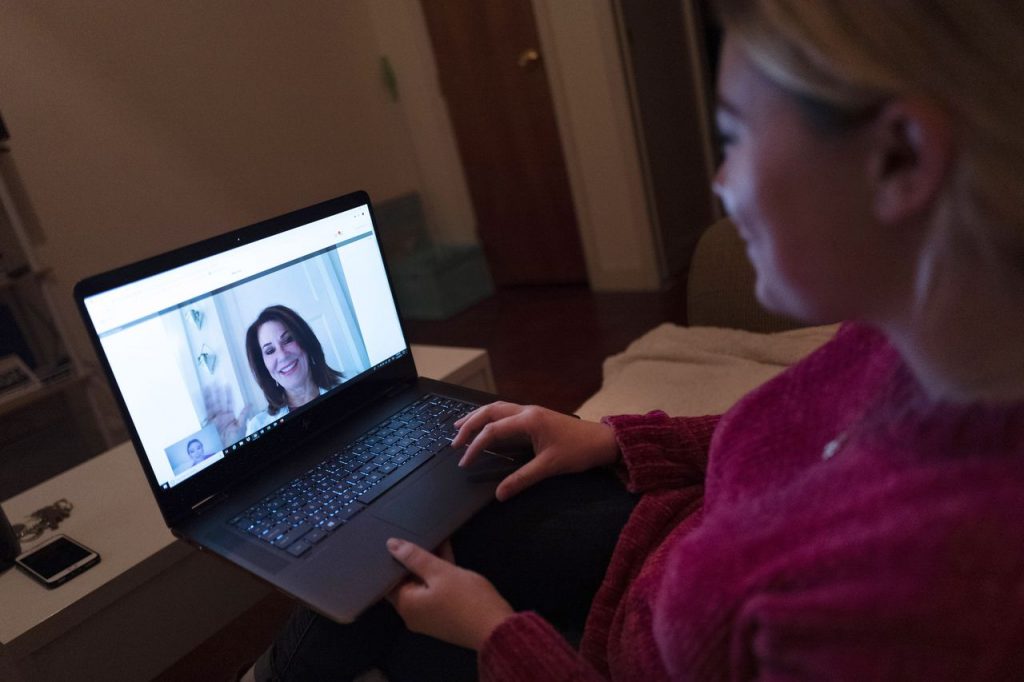
A patient sits in the living room of her apartment in New York City during a telemedicine video conference with a doctor. (Mark Lennihan/AP)AP

A patient sits in the living room of her apartment in New York City during a telemedicine video conference with a doctor. (Mark Lennihan/AP)AP

Excerpt:

As we look to the post-pandemic future, medical experts believe telemedicine will be here to stay as another option to increase access to care, reduce costs, and free up doctors to spend more time with patients who need in-person care.

“When I think about the pandemic, one thing that didn’t change about our lifestyles is people are busy,” Lopez said. “I think we’ll still see growth in overall visits because of the fact that people want access to care and when you lower the cost, it should go up.”

From DSC:
A friend of mine said that he is doing most of his practice now via the telehealth route (and has been for many months now). Then, recently, when I was at the lab, the knowledgeable woman who assisted me said that she thought virtual health was definitely going to stick. Many doctors and nurses will be using virtual means vs. physical visits she said.

Expectations get involved here — for education, for the legal field, and for other arenas.


The excerpt below is from The 7 best online whiteboards in 2021 — from zapier.com by Maria Myre

  • Miro for turning ideas into tasks
  • Stormboard for creating multiple whiteboards in a single brainstorming session
  • MURAL for remote, multi-member team meetings
  • Limnu for teaching students remotely
  • InVision Freehand for annotating design files with a team
  • Conceptboard for turning a brainstorming session into a formal presentation
  • Explain Everything for creating whiteboard videos

From DSC:
Other potentially-relevant tools/vendors here include:

Woman using the Cisco Webex Desk Pro


Navigating website ADA compliance: ‘If you have videos that are not captioned, you’re a sitting duck’ — from abajournal.com by Matt Reynolds

Excerpts:

“If you have videos that are not captioned, you’re a sitting duck,” Goren said. “If you’re not encoding your pictures so that the blind person using a screen reader can understand what the picture is describing, that is a problem.”

Drop-down boxes on websites are “horrible for accessibility,” the attorney added, and it can be difficult for people with disabilities to navigate CAPTCHA (Completely Automated Public Turing test) technology to verify they are human.

“Trying to get people with voice dictation or even screen readers to figure out how to certify that they’re not a robot can be very complicated,” Goren said.

Also see:

Relevant Laws

Information re: Lawsuits


4 Tips for Offering Online Exams — from techlearning.com by Erik Ofgang
The University of New England, Australia has given more than 40,000 online exams over the past year, here’s what they’ve learned

Excerpt (emphasis DSC):

UNE administrators are considering doing away with an exam period because it initially was created for logistical purposes. “We needed to have all the exam venues booked, and the desks and chairs moved in, and the supervisors ready in the papers there,” Day says. “Now we are able to hold exams, anywhere, anytime, any day. So why do we need an exam period? It’s allowing structural changes to the academic calendar, it gives us a few weeks per teaching period back for teaching, perhaps.”

Day says you can also incorporate elements of video and website exploration into your exam, opening up both the type of questions you ask and the type of answers students can provide.

Rethink the Exam Structure  
Switching from paper to online exams is an opportunity for instructors to reexamine the exams themselves, Day says. “It requires you to question why you hold exams, why you hold exams when you do, and how you hold exams.” 


Asynchronous Video Conversations: 11 Tips and Best Practices — from er.educause.edu by Rob Gibson

Excerpt (first 4 of 11):

1. Closely align video conversations with the stated module, course, and/or program learning objectives. Clearly indicate those alignments in the course outline.

2. Use the syllabus, an introductory course video, or a sample student video recording to prepare students in advance for this type of activity. Since many students will use their smartphones to record, provide information about best practices for creating quality video using a phone.

3. Some students are uncomfortable recording themselves. Depending on the product, consider offering alternatives such as an audio/mic-only mode, a text-only mode, or using a proxy image or avatar in the video.

4. Consider using threaded video conversations for course introductions to build a sense of humanizing the course. Michelle Pacansky-Brock supports the use of video conversations as an alternative to text. In her book How to Humanize Your Online Class with VoiceThread, she indicates that video tools maximize presence, a dimension of online connectivity to fellow students, the faculty, and the content. Research in her own courses found an increase from 25 percent to 75 percent in voluntary voice-video comments.Footnote5 This also helps form common goals and dispositions among students—dispositions are affective learning dimensions, such as motivation, attitude, persistence, empathy, and problem solving.Footnote6


Putting Your Best Self Forward: 6 Keys For Filming Quality Videos — from er.educause.edu by Jered Borup
The difference between a video that students watch and one that is ignored often comes down to a few, easily addressed factors.

Excerpt:

  • Key #1: Convey Your Voice—Is the audio clear, or is there background noise or reverberations in the room that distract from your message?
  • Key #2: Find the Light—Are you well lit with a light source in front of you, or are you backlit and/or have shadows on your face?
  • Key #3: Frame and Maintain Eye Contact—Are you about at arm’s length and eye level with the camera, or are you looking down or up at the camera?
  • Key #4: Stage—Do you have personal and/or interesting things in the background, or are you recording in front of a blank wall?
  • Key #5: Be Prepared and Natural—Are you speaking naturally in a way that conveys your interest in the topic, or do you sound somewhat robotic and/or scattered?
  • Key #6: Keep it Short—Is the video under six minutes?

This article is part of a series about incorporating asynchronous video into educational activities:


Never Going Back: What Online Teaching in the Times of COVID Can Add to Our Teaching Toolkits – Elisabeth Sandberg — from cft.vanderbilt.edu with thanks to Beckie Supiano at the Chronicle for this resource

Excerpt:

Teaching online has not been all challenges for Sandberg. From this period of teaching, she has gathered a set of experiences that, she expects, will benefit her in an in-person setting, too. For one thing, Sandberg has explored new ways of optimizing the element of time in students’ learning. Realizing that even the most entertaining presenters become soon-to-bore lecturers in online settings, she became more attentive to keeping her prerecorded video lectures brief and dividing them into pieces interwoven with online activities. The Explain Everything app (a collaborative virtual whiteboard platform with multi-media features) has been helpful for annotating these short pieces of recorded lectures. Sandberg’s renewed attention to student attention has also made her more mindful of things she assigns out of class, and what these might represent in terms of student efforts. “I learned over the summer,” she said, referring to the CFT’s Online Course Design Institute, “how to be more cognizant of how much time the things that I consider easy work really take the students. And that was really a revealing piece that I will carry with me when we return to in person.”


From DSC:
I agree…the teaching toolboxes have expanded. In the future, teachers, professors, trainers, (and now parents) will have a wider selection of options/tools/pedagogies to select from.

Whats in your teaching toolbox?


Teacher, Are You There? Being “Present” in Online Learning — from er.educause.edu by Richard West

Excerpt:

Video technologies are part of that shift in helping online learners feel connected to teachers and peers. This connection comes from people developing the sense that they are “present” in the class, even if they are not physically in the same room. How is it possible to be present when you are physically separated?


Here Is A Great Reading App for Students with Dyslexia — from educatorstechnology.com

Excerpt:

Omoguru is an excellent reading app for students with dyslexia. It offers a wide variety of tools ‘designed to make the text more readable’. Some of these features include: tools to adjust text appearance and enhance its readability (e.g., letter spacing, line height setting, contrast setting colours, text size and weight), syllable marking (the tool allows you to mark syllables in different colours enabling readers to easily identify and read multi-syllable words), speed reading, and many more.


Excerpt from The Dialogic Learning Weekly #204 — by Tom Barrett • Issue #204

What, So What, Now What?
Three simple questions that pack a punch when explored together. Use this method when reflecting on a shared experience.

The precise split between what is observed and why it might be meaningful is powerful. It helps participants not get lost in the swamp of interpretation, too soon at least!

The outline of the steps below is from Liberating Structures.

  • If needed, describe the sequence of steps and show the Ladder of Inference (see below). If the group is 10–12 people or smaller, conduct the debrief with the whole group. Otherwise, break the group into small groups.
  • First stage: WHAT? Individuals work 1 min. alone on “What happened? What did you notice, what facts or observations stood out?” then 2–7 min. in small group. 3–8 min. total.
  • Salient facts from small groups are shared with the whole group and collected. 2–3 min.
  • Second stage: SO WHAT? People work 1 min alone on “Why is that important? What patterns or conclusions are emerging? What hypotheses can I/we make?” then 2–7 min. in small group. 3–8 min. total.
  • Salient patterns, hypotheses, and conclusions from small groups are shared with the whole group and collected. 2–5 min.
  • Third stage: NOW WHAT? Participants work 1 min. alone on “Now what? What actions make sense?” then 2–7 min. in small group. 3–8 min. total.
  • Actions are shared with the whole group, discussed, and collected. Additional insights are invited. 2–10 min.


Teaching: Why the Term ‘Hybrid Class’ Continues to Confuse — from chronicle.com by Beth McMurtrie

Excerpt:

Hybrid Confusion
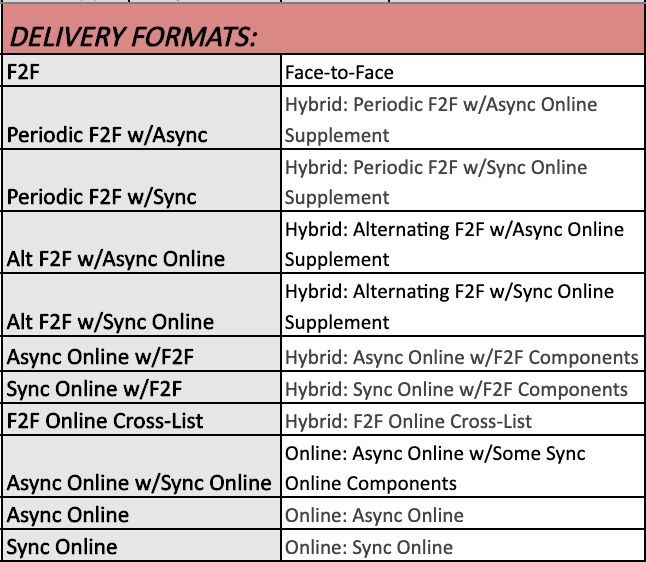
Why is it so hard to define a hybrid class? Or, rather, why is it so hard for colleges to describe it in a course catalog? That was the question that popped into my mind after seeing this chart, tweeted out recently by Kevin McClure, an associate professor of higher education at the University of North Carolina at Wilmington.

A slew of different delivery formats...whew!

But is it really helping anyone to define every possible permutation of “hybrid”? More to the point, what should colleges take into account when trying to balance specificity with clarity in course descriptions?

 
© 2025 | Daniel Christian