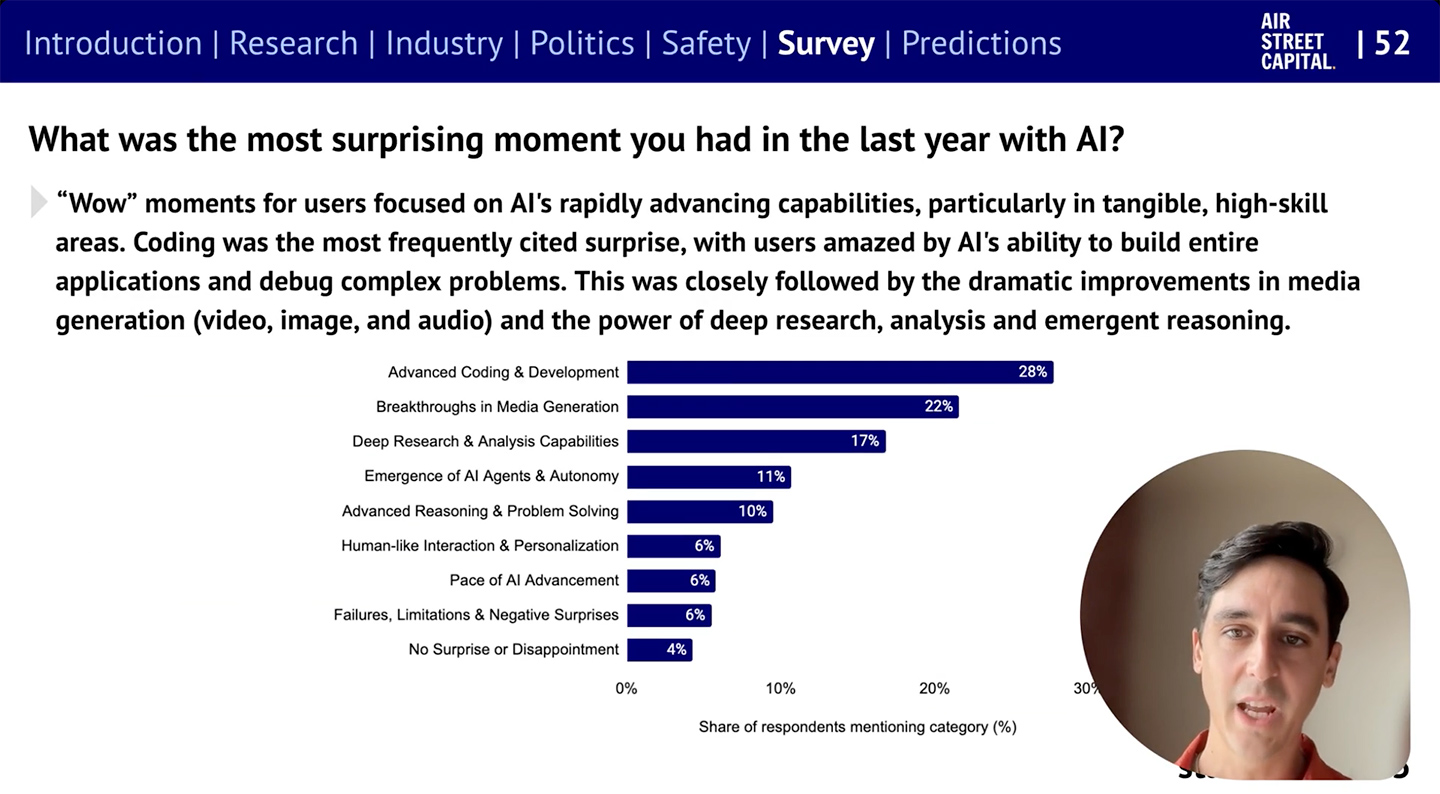
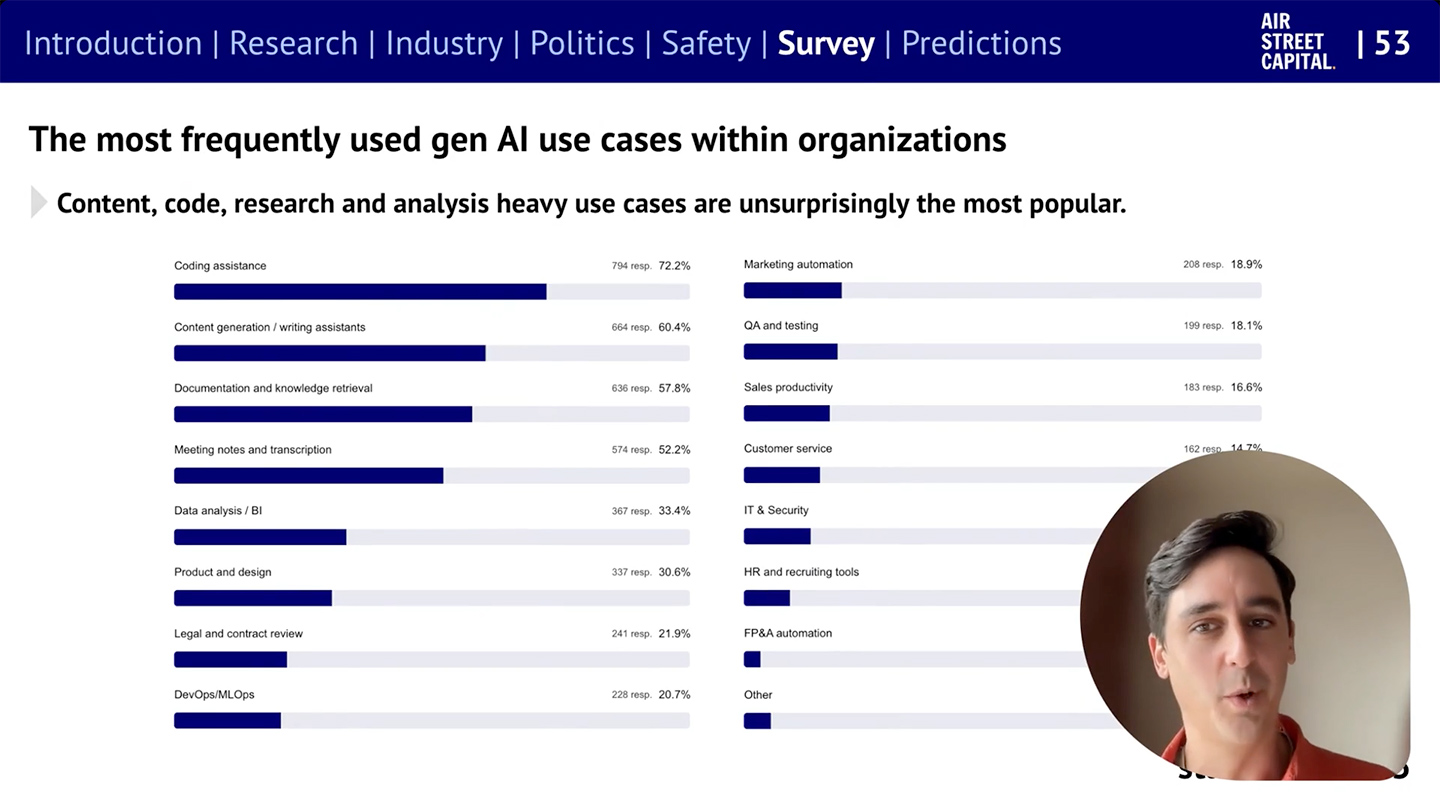
In short, it’s been a monumental 12 months for AI. Our eighth annual report is the most comprehensive it’s ever been, covering what you need to know about research, industry, politics, and safety – along with our first State of AI Usage Survey of 1,200 practitioners.
The 4 Rs framework Salesforce has developed what Holt Ware calls the “4 Rs for AI agent success.” They are:
Redesign by combining AI and human capabilities. This requires treating agents like new hires that need proper onboarding and management.
Reskilling should focus on learning future skills. “We think we know what they are,” Holt Ware notes, “but they will continue to change.”
Redeploy highly skilled people to determine how roles will change. When Salesforce launched an AI coding assistant, Holt Ware recalls, “We woke up the next day and said, ‘What do we do with these people now that they have more capacity?’ ” Their answer was to create an entirely new role: Forward-Deployed Engineers. This role has since played a growing part in driving customer success.
Rebalance workforce planning. Holt Ware references a CHRO who “famously said that this will be the last year we ever do workforce planning and it’s only people; next year, every team will be supplemented with agents.”
Our latest video generation model is more physically accurate, realistic, and more controllable than prior systems. It also features synchronized dialogue and sound effects. Create with it in the new Sora app.
The Rundown: OpenAI just released Sora 2, its latest video model that now includes synchronized audio and dialogue, alongside a new social app where users can create, remix, and insert themselves into AI videos through a “Cameos” feature.
… Why it matters: Model-wise, Sora 2 looks incredible — pushing us even further into the uncanny valley and creating tons of new storytelling capabilities. Cameos feels like a new viral memetic tool, but time will tell whether the AI social app can overcome the slop-factor and have staying power past the initial novelty.
OpenAI Just Dropped Sora 2 (And a Whole New Social App) — from heneuron.ai by Grant Harvey OpenAI launched Sora 2 with a new iOS app that lets you insert yourself into AI-generated videos with realistic physics and sound, betting that giving users algorithm control and turning everyone into active creators will build a better social network than today’s addictive scroll machines.
What Sora 2 can do
Generate Olympic-level gymnastics routines, backflips on paddleboards (with accurate buoyancy!), and triple axels.
Follow intricate multi-shot instructions while maintaining world state across scenes.
Create realistic background soundscapes, dialogue, and sound effects automatically.
Insert YOU into any video after a quick one-time recording (they call this “cameos”).
The best video to show what it can do is probably this one, from OpenAI researcher Gabriel Peters, that depicts the behind the scenes of Sora 2 launch day…
Sora 2: AI Video Goes Social — from getsuperintel.com by Kim “Chubby” Isenberg OpenAI’s latest AI video model is now an iOS app, letting users generate, remix, and even insert themselves into cinematic clips
Technically, Sora 2 is a major leap. It syncs audio with visuals, respects physics (a basketball bounces instead of teleporting), and follows multi-shot instructions with consistency. That makes outputs both more controllable and more believable. But the app format changes the game: it transforms world simulation from a research milestone into a social, co-creative experience where entertainment, creativity, and community intersect.
Also along the lines of creating digital video, see:
What used to take hours in After Effects now takes just one text prompt. Tools like Google’s Nano Banana, Seedream 4, Runway’s Aleph, and others are pioneering instruction-based editing, a breakthrough that collapses complex, multi-step VFX workflows into a single, implicit direction.
The history of VFX is filled with innovations that removed friction, but collapsing an entire multi-step workflow into a single prompt represents a new kind of leap.
For creators, this means the skill ceiling is no longer defined by technical know-how, it’s defined by imagination. If you can describe it, you can create it. For the industry, it points toward a near future where small teams and solo creators compete with the scale and polish of large studios.
Something big shifted this week. OpenAI just turned ChatGPT into a platform – not just a product.With apps now running inside ChatGPT and a no-code Agent Builder for creating full AI workflows, the line between “using AI” and “building with AI” is fading fast. Developers suddenly have a new playground, and for the first time, anyone can assemble their own intelligent system without touching code. The question isn’t what AI can do anymore – it’s what you’ll make it do.
In this episode, we explore why digital accessibility can be so important to the student experience. My guest is Amy Lomellini, director of accessibility at Anthology, the company that makes the learning management system Blackboard. Amy teaches educational technology as an adjunct at Boise State University, and she facilitates courses on digital accessibility for the Online Learning Consortium. In our conversation, we talk about the importance of digital accessibility to students, moving away from the traditional disclosure-accommodation paradigm, AI as an assistive technology, and lots more.
GRAND RAPIDS, MI — A new course at Grand Rapids Community College aims to help students learn about artificial intelligence by using the technology to solve real-world business problems.
…
In a release, the college said its grant application was supported by 20 local businesses, including Gentex, TwistThink and the Grand Rapids Public Museum. The businesses have pledged to work with students who will use business data to develop an AI project such as a chatbot that interacts with customers, or a program that automates social media posts or summarizes customer data.
“This rapidly emerging technology can transform the way businesses process data and information,” Kristi Haik, dean of GRCC’s School of Science, Technology, Engineering and Mathematics, said in a statement. “We want to help our local business partners understand and apply the technology. We also want to create real experiences for our students so they enter the workforce with demonstrated competence in AI applications.”
As Patrick Bailey said on LinkedIn about this article:
Nice to see a pedagogy that’s setting a forward movement rather than focusing on what could go wrong with AI in a curriculum.
As a 30 year observer and participant, it seems to me that previous technology platform shifts like SaaS and mobile did not fundamentally change the LMS. AI is different. We’re standing at the precipice of LMS 2.0, where the branding change from Course Management System to Learning Management System will finally live up to its name. Unlike SaaS or mobile, AI represents a technology platform shift that will transform the way participants interact with learning systems – and with it, the nature of the LMS itself.
Given the transformational potential of AI, it is useful to set the context and think about how we got here, especially on this 30th anniversary of the LMS.
Where AI is disruptive is in its ability to introduce a whole new set of capabilities that are best described as personalized learning services. AI offers a new value proposition to the LMS, roughly the set of capabilities currently being developed in the AI Tutor / agentic TA segment. These new capabilities are so valuable given their impact on learning that I predict they will become the services with greatest engagement within a school or university’s “enterprise” instructional platform.
In this way, by LMS paradigm shift, I specifically mean a shift from buyers valuing the product on its course-centric and course management capabilities, to valuing it on its learner-centric and personalized learning capabilities.
This anthology reveals how the integration of AI in education poses profound philosophical, pedagogical, ethical and political questions. As this global AI ecosystem evolves and becomes increasingly ubiquitous, UNESCO and its partners have a shared responsibility to lead the global discourse towards an equity- and justice-centred agenda. The volume highlights three areas in which UNESCO will continue to convene and lead a global commons for dialog and action particularly in areas on AI futures, policy and practice innovation, and experimentation.
As guardian of ethical, equitable human-centred AI in education.
As thought leader in reimagining curriculum and pedagogy
As a platform for engaging pluralistic and contested dialogues
AI, copyright and the classroom: what higher education needs to know — from timeshighereducation.com by Cayce Myers As artificial intelligence reshapes teaching and research, one legal principle remains at the heart of our work: copyright. Understanding its implications isn’t just about compliance – it’s about protecting academic integrity, intellectual property and the future of knowledge creation. Cayce Myers explains
Why It Matters A decade from now, we won’t say “AI changed schools.” We’ll say: this was the year schools began to change what it means to be human, augmented by AI.
This transformation isn’t about efficiency alone. It’s about dignity, creativity, and discovery, and connecting education more directly to human flourishing. The industrial age gave us schools to produce cookie-cutter workers. The digital age gave us knowledge anywhere, anytime. The AI age—beginning now—gives us back what matters most: the chance for every learner to become infinitely capable.
This fall may look like any other—bells ringing, rows of desks—but beneath the surface, education has begun its greatest transformation since the one-room schoolhouse.
Transactional and transformational leaderships’ combined impact on AI and trust Given the volatile times we live in, a leader may find themselves in a situation where they know how they will use AI, but they are not entirely clear on the goals and journey. In a teaching context, students can be given scenarios where they must lead a team, including autonomous AI agents, to achieve goals. They can then analyse the situations and decide what leadership styles to apply and how to build trust in their human team members. Educators can illustrate this decision-making process using a table (see above).
They may need to combine transactional leadership with transformational leadership, for example. Transactional leadership focuses on planning, communicating tasks clearly and an exchange of value. This works well with both humans and automated AI agents.
Today [8/26/25], we’re excited to introduce Gemini 2.5 Flash Image (aka nano-banana), our state-of-the-art image generation and editing model. This update enables you to blend multiple images into a single image, maintain character consistency for rich storytelling, make targeted transformations using natural language, and use Gemini’s world knowledge to generate and edit images.
When we first launched native image generation in Gemini 2.0 Flash earlier this year, you told us you loved its low latency, cost-effectiveness, and ease of use. But you also gave us feedback that you needed higher-quality images and more powerful creative control.
Character consistency that actually works: Google built a template app showing how you can keep characters looking identical across scenes.
Edit photos (or drawings) with just words: Their photo editing demo lets you remove people, blur backgrounds, or colorize photos using natural language…and this co-drawing demo lets you draw and ask AI to fix it.
Actual world knowledge: Unlike other image models, this one knows stuff—like how the co-drawing demo turns doodles into learning experiences.
Multi-image fusion: You can now merge multiple images; fx, you can drag and drop objects between images seamlessly with their home canvas template.
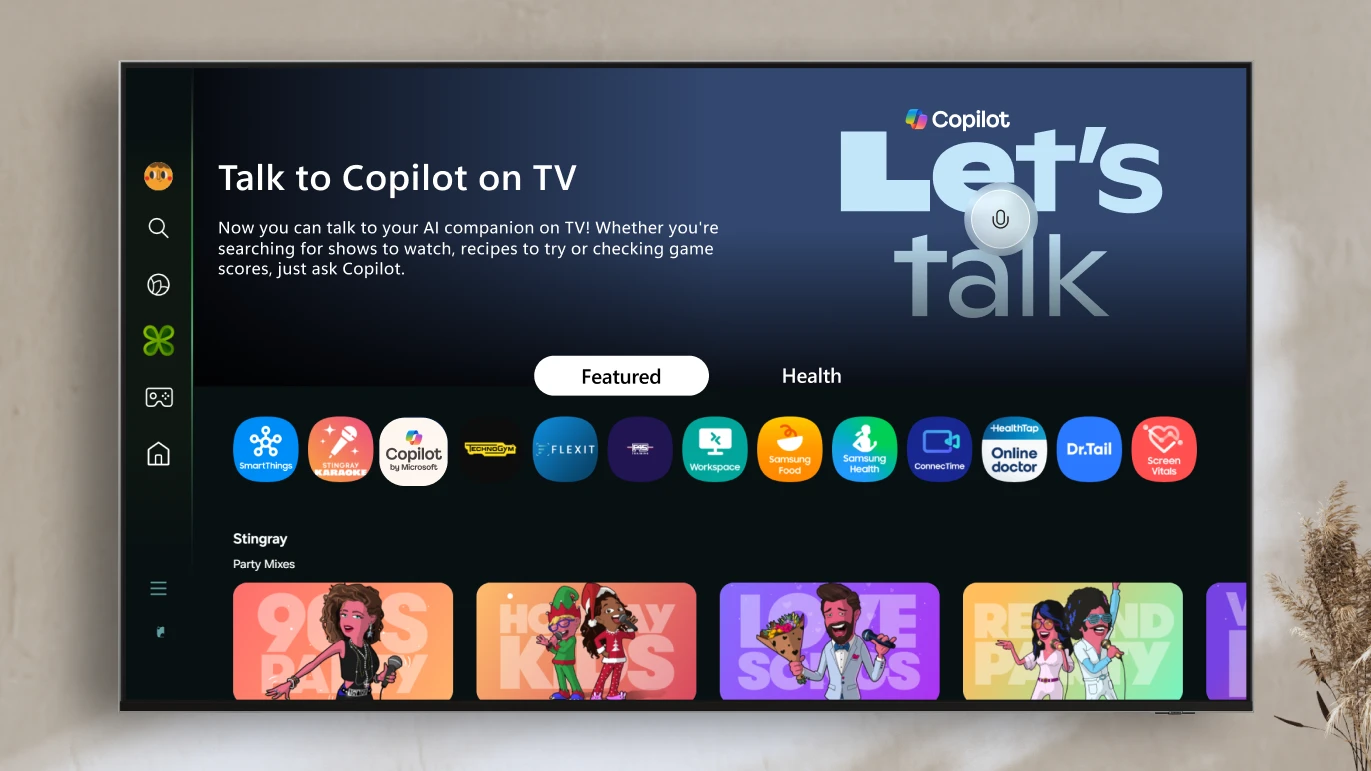
Voice-powered AI meets a visual companion for entertainment, everyday help, and everything in between.
Redmond, Wash., August 27—Today, we’re announcing the launch ofCopilot on select Samsung TVs and monitors, transforming the biggest screen in your home into your most personal and helpful companion—and it’s free to use.
Copilot makes your TV easier and more fun to use with its voice-powered interface, friendly on-screen character, and simple visual cards. Now you can quickly find what you’re looking for and discover new favorites right from your living room.
Because it lives on the biggest screen in the home, Copilot is a social experience—something you can use together with family and friends to spark conversations, help groups decide what to watch, and turn the TV into a shared space for curiosity and connection.
The vocational education sector is incredibly diverse, covering everything from trades like building and construction, electrical, plumbing and automotive through to allied health, childcare, education, the creative arts and the technology industry. In Canberra, we heard from people representing every corner of the industry, including education, retail, tourism, finance and digital technologies. Every one of these industries is being impacted by the current AI boom.
…
A theme of the day was that whilst the vocational education sector is seen as a slow-moving beast with its own peculiar red tape, it is still possible to respond to emerging technologies like artificial intelligence, and there’s an imperative to do so.
Coming back to GenAI for small business owners, a qualified plumber running their own business, either as a solo operator or as manager of a team, probably doesn’t have many opportunities to keep up to date with the rapid developments of digital technologies. They’re far too busy doing their job.
So vocational education and training can be an initial space to develop some skills and understanding of the technology in a way which can be beneficial for managing that day-to-day job.
And speaking of the trade schools/vocational world…
Social media opens a window to traditional trades for young workers — from washingtonpost.com by Taylor Telford; this is a gifted article Worker influencers are showing what life is like in fields such as construction, plumbing and manufacturing. Trade schools are trying to make the most of it.
Social media is increasingly becoming a destination for a new generation to learn about skilled trades — at a time when many have grown skeptical about the cost of college and the promise of white-collar jobs. These posts offer authentic insight as workers talk openly about everything from their favorite workwear to safety and payday routines.
The exposure is also changing the game for trade schools and employers in such industries as manufacturing and construction, which have long struggled to attract workers. Now, some are evolving their recruiting tactics by wading into content creation after decades of relying largely on word of mouth.
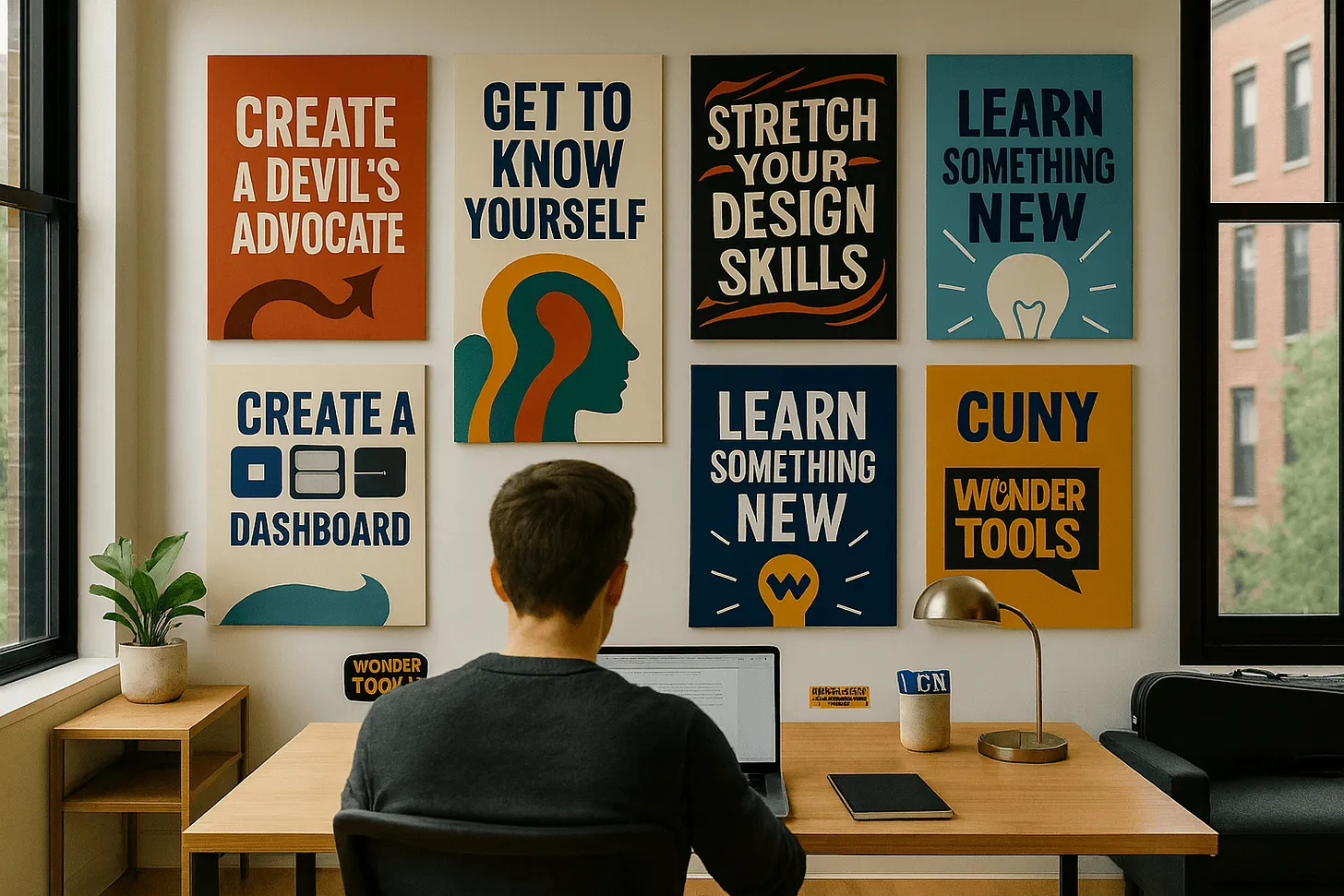
Learn something new. Map out a personalized curriculum
Try this: Give an AI assistant context about what you want to learn, why, and how.
Detail your rationale and motivation, which may impact your approach.
Note your current knowledge or skill level, ideally with examples.
Summarize your learning preferences
Note whether you prefer to read, listen to, or watch learning materials.
Mention if you like quizzes, drills, or exercises you can do while commuting or during a break at work.
If you appreciate learning games, task your AI assistant with generating one for you, using its coding capabilities detailed below.
Ask for specific book, textbook, article, or learning path recommendations using the Web search or Deep Research capabilities of Perplexity, ChatGPT, Gemini or Claude. They can also summarize research literature about effective learning tactics.
If you need a human learning partner, ask for guidance on finding one or language you can use in reaching out.
GPT-5 for Instructional Designers — from drphilippahardman.substack.com by Dr Philippa Hardman 10 Hacks to Work Smarter & Safer with OpenAI’s Latest Model
The TLDR is that as Instructional Designers, we can’t afford to miss some of the very real benefits of GPT-5’s potential, but we also can’t ensure our professional standards or learner outcomes if we blindly accept its outputs without due testing and validation.
For this reason, I decided to synthesise the latest GPT-5 research—from OpenAI’s technical documentation to independent security audits to real-world user testing—into 10 essential reality checks for using GPT-5 as an Instructional Designer.
These aren’t theoretical exercises; they’re practical tests designed to help you safely unlock GPT-5’s benefits while identifying and mitigating its most well-documented limitations.
While I regularly use tools like ChatGPT, Grammarly, Microsoft Copilot, and even YouTube Premium (I would cancel Netflix before this), Perplexity has earned a top spot in my toolkit. It blends AI and real-time web search into one seamless, research-driven platform that saves time and improves the quality of information I rely on every day.
Millions of college students around the world are getting ready to start classes. To help make the school year even better, we’re making our most advanced AI tools available to them for free, including our new Guided Learning mode. We’re also providing $1 billion to support AI education and job training programs and research in the U.S. This includes making our AI and career training free for every college student in America through our AI for Education Accelerator — over 100 colleges and universities have already signed up.
… Guided Learning: from answers to understanding
AI can broaden knowledge and expand access to it in powerful ways, helping anyone, anywhere learn anything in the way that works best for them. It’s not about just getting an answer, but deepening understanding and building critical thinking skills along the way. That opportunity is why we built Guided Learning, a new mode in Gemini that acts as a learning companion guiding you with questions and step-by-step support instead of just giving you the answer. We worked closely with students, educators, researchers and learning experts to make sure it’s helpful for understanding new concepts and is backed by learning science.
A new study measuring the use of generative artificial intelligence in different professions has just gone public, and its main message to people working in some fields is harsh. It suggests translators, historians, text writers, sales representatives, and customer service agents might want to consider new careers as pile driver or dredge operators, railroad track layers, hardwood floor sanders, or maids — if, that is, they want to lower the threat of AI apps pushing them out of their current jobs.
From DSC: Unfortunately, this is where the hyperscalers are going to get their ROI from all of the capital expenditures that they are making. Companies are going to use their services in order to reduce headcount at their organizations. CEOs are even beginning to brag about the savings that are realized by the use of AI-based technologies: (or so they claim.)
“As a CEO myself, I can tell you, I’m extremely excited about it. I’ve laid off employees myself because of AI. AI doesn’t go on strike. It doesn’t ask for a pay raise. These things that you don’t have to deal with as a CEO.”
My first position out of college was being a Customer Service Representative at Baxter Healthcare. It was my most impactful job, as it taught me the value of a customer. From then on, whoever I was trying to assist was my customer — whether they were internal or external to the organization that I was working for. Those kinds of jobs are so important. If they evaporate, what then? How will young people/graduates get their start?
Alex’s take: We’re seeing browsers fundamentally transition from search engines ? answer engines ? action engines. Gone are the days of having to trawl through pages of search results. Commands are the future. They are the direct input to arrive at the outcomes we sought in the first place, such as booking a hotel or ordering food. I’m interested in watching Microsoft’s bet develop as browsers become collaborative (and proactive) assistants.
Amazon just invested in an AI that can create full TV episodes—and it wants you to star in them.
Remember when everyone lost their minds over AI generating a few seconds of video? Well, Amazon just invested in a company called Fable Studio whose system called Showrunner can generates entire 22-minute TV episodes.
… Where does this go from here? Imagine asking AI to rewrite the ending of Game of Thrones, or creating a sitcom where you and your friends are the main characters. This type of tech could create personalized entertainment experiences just like that.
Our take: Without question, we’re moving toward a world where every piece of media can be customized to you personally. Your Netflix could soon generate episodes where you’re the protagonist, with storylines tailored to your interests and sense of humor.
And if this technology scales, the entire entertainment industry could flip upside down. The pitch goes: why watch someone else’s story when you can generate your own?
The End of Work as We Know It — from gizmodo.com by Luc Olinga CEOs call it a revolution in efficiency. The workers powering it call it a “new era in forced labor.” I spoke to the people on the front lines of the AI takeover.
Yet, even in this vision of a more pleasant workplace, the specter of displacement looms large. Miscovich acknowledges that companies are planning for a future where headcount could be “reduced by 40%.” And Clark is even more direct. “A lot of CEOs are saying that, knowing that they’re going to come up in the next six months to a year and start laying people off,” he says. “They’re looking for ways to save money at every single company that exists.”
But we do not have much time. As Clark told me bluntly: “I am hired by CEOs to figure out how to use AI to cut jobs. Not in ten years. Right now.”
Faced with mounting backlash, OpenAI removed a controversial ChatGPT feature that caused some users to unintentionally allow their private—and highly personal—chats to appear in search results.
Fast Company exposed the privacy issue on Wednesday, reporting that thousands of ChatGPT conversations were found in Google search results and likely only represented a sample of chats “visible to millions.” While the indexing did not include identifying information about the ChatGPT users, some of their chats did share personal details—like highly specific descriptions of interpersonal relationships with friends and family members—perhaps making it possible to identify them, Fast Company found.
Today, we’re dropping the world’s first AI-native social feed.
Feed from Character.AI is a dynamic, scrollable content platform that connects users with the latest Characters, Scenes, Streams, and creator-driven videos in one place.
This is a milestone in the evolution of online entertainment.
For the last 10 years, social platforms have been all about passive consumption. The Character.AI Feed breaks that paradigm and turns content into a creative playground. Every post is an invitation to interact, remix, and build on what others have made. Want to rewrite a storyline? Make yourself the main character? Take a Character you just met in someone else’s Scene and pop it into a roast battle or a debate? Now it’s easy. Every story can have a billion endings, and every piece of content can change and evolve with one tap.
Here are five AI activities to explore this summer to help you and your students navigate artificial intelligence with an ethical, responsible, and creative approach.
… 1. Use Google’s Quick, Draw! to have fun and get curious about AI. We all have a desire to doodle–even students and adults who say, “I can’t even draw a stick figure!” Bring lots of light-hearted energy into your art room with Google’s Quick Draw! tool. This platform allows you to draw simple prompts, such as a bike, a cat, or a cup, in 20 seconds. While you’re drawing, AI attempts to recognize the subject.
This tool works with any skill level and is a space to draw freely without overthinking. Beyond quick sketching, this activity demonstrates that human input builds machine learning, and it’s only as “smart” as the information (or in this case, drawings) we feed it. It’s a fun way to explore the evolving role of AI in our visual world!
No tech? No problem! Use paper to run the same activity. You can even use the Thumbnail Sketches template in FLEX Curriculum. Students sketch quick prompts in groups and then guess the drawings to spark conversation about how AI “learns.”
Today, we’re introducing powerful enhancements to our Firefly Video Model, including improved motion fidelity and advanced video controls that will accelerate your workflows and provide the precision and style you need to elevate your storytelling. We are also adding new generative AI partner models within Generate Video on Firefly, giving you the power to choose which model works best for your creative needs across image, video and sound.
Plus, our new workflow tools put you in control of your video’s composition and style. You can now layer in custom-generated sound effects right inside the Firefly web app — and start experimenting with AI-powered avatar-led videos.
… Generate Sound Effects (beta)
Sound is a powerful storytelling tool that adds emotion and depth to your videos. Generate Sound Effects (beta) makes it easy to create custom sounds, like a lion’s roar or ambient nature sounds, that enhance your visuals. And like our other Firefly generative AI models, Generate Sound Effects (beta) is commercially safe, so you can create with confidence.
Just type a simple text prompt to generate the sound effect you need. Want even more control? Use your voice to guide the timing and intensity of the sound. Firefly listens to the energy and rhythm of your voice to place sound effects precisely where they belong — matching the action in your video with cinematic timing.
Getting (and Keeping) Early Learners’ Attention — from edutopia.org by Heather Sanderell These ideas for lesson hooks—like using songs, video clips, and picture walks—can motivate young students to focus on learning.
How do you grasp and maintain the attention of a room full of wide-eyed students with varying interests and abilities? Do you use visuals and games or interactive activities? Do you use art and sports and music or sounds? The answer is yes, to all!
When trying to keep the attention of your learners, it’s important to stimulate their senses and pique their diverse interests. Educational theorist and researcher Robert Gagné devised his nine events of instructional design, which include grabbing learners’ attention with a lesson hook. This is done first to set the tone for the remainder of the lesson.
3 Ways to Help Students Overcome the Forgetting Curve — from edutopia.org by Cathleen Beachboard Our brains are wired to forget things unless we take active steps to remember. Here’s how you can help students hold on to what they learn.
You teach a lesson that lights up the room. Students are nodding and hands are flying up, and afterward you walk out thinking, “They got it. They really got it.”
And then, the next week, you ask a simple review question—and the room falls silent.
If that situation has ever made you question your ability to teach, take heart: You’re not failing, you’re simply facing the forgetting curve. Understanding why students forget—and how we can help them remember—can transform not just our lessons but our students’ futures.
The good news? You don’t have to overhaul your curriculum to beat the forgetting curve. You just need three small, powerful shifts in how you teach.
7 Nature Experiments to Spark Student Curiosity — from edutopia.org by Donna Phillips Encourage your students to ask questions about and explore the world around them with these hands-on lessons.
Children are natural scientists—they ask big questions, notice tiny details, and learn best through hands-on exploration. That’s why nature experiments are a classroom staple for me. From growing seeds to using the sun’s energy, students don’t just learn science, they experience it. Here are my favorite go-to nature experiments that spark curiosity.
Intellectual rigor comes from the journey: the dead ends, the uncertainty, and the internal debate. Skip that, and you might still get the insight–but you’ll have lost the infrastructure for meaningful understanding. Learning by reading LLM output is cheap. Real exercise for your mind comes from building the output yourself.
The irony is that I now know more than I ever would have before AI. But I feel slightly dumber. A bit more dull. LLMs give me finished thoughts, polished and convincing, but none of the intellectual growth that comes from developing them myself.
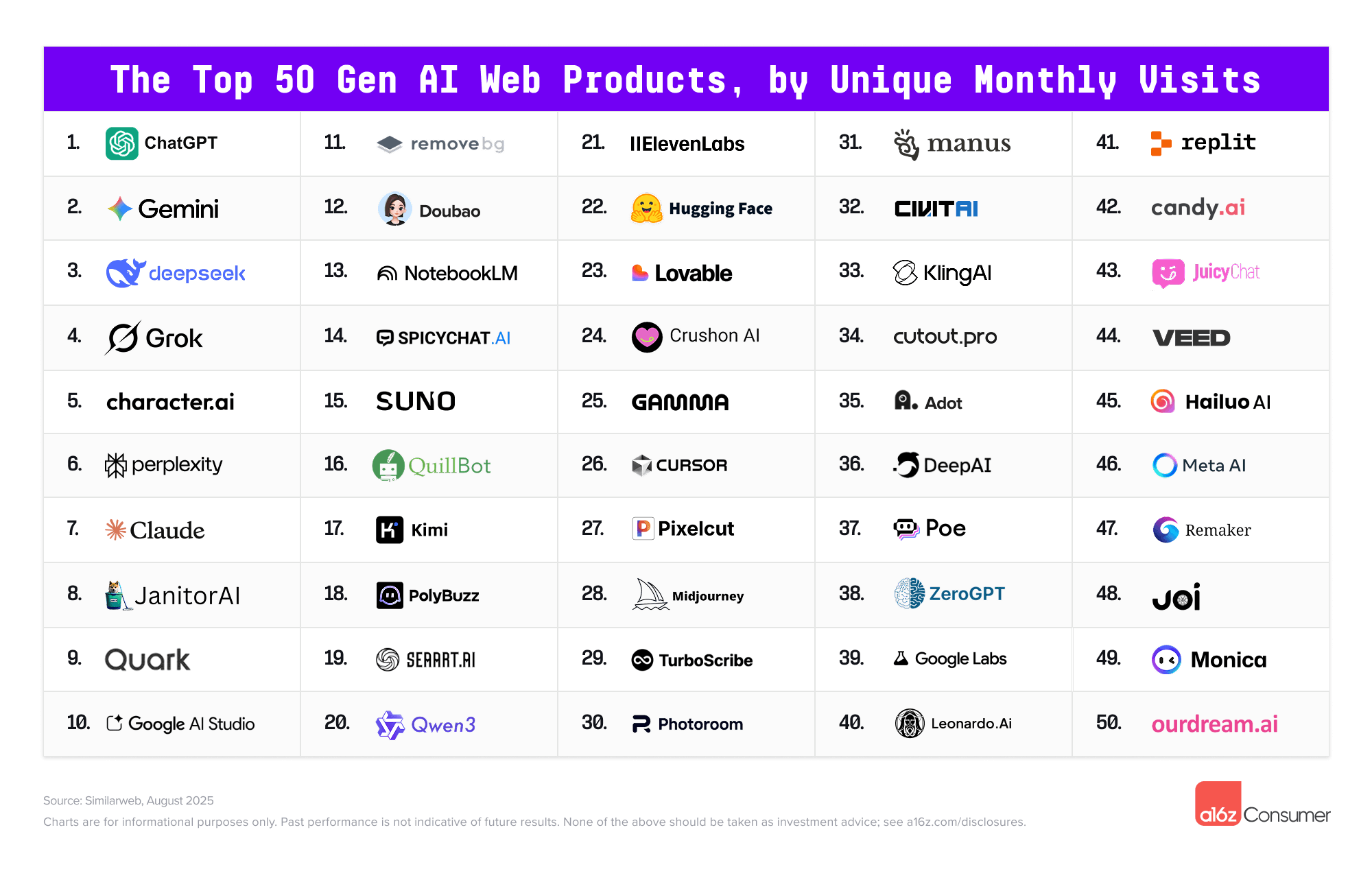
Every few months I put together a guide on which AI system to use. Since I last wrote my guide, however, there has been a subtle but important shift in how the major AI products work. Increasingly, it isn’t about the best model, it is about the best overall system for most people. The good news is that picking an AI is easier than ever and you have three excellent choices. The challenge is that these systems are getting really complex to understand. I am going to try and help a bit with both.
First, the easy stuff.
Which AI to Use For most people who want to use AI seriously, you should pick one of three systems: Claude from Anthropic, Google’s Gemini, and OpenAI’s ChatGPT.
This summer, I tried something new in my fully online, asynchronous college writing course. These classes have no Zoom sessions. No in-person check-ins. Just students, Canvas, and a lot of thoughtful design behind the scenes.
One activity I created was called QuoteWeaver—a PlayLab bot that helps students do more than just insert a quote into their writing.
It’s a structured, reflective activity that mimics something closer to an in-person 1:1 conference or a small group quote workshop—but in an asynchronous format, available anytime. In other words, it’s using AI not to speed students up, but to slow them down.
…
The bot begins with a single quote that the student has found through their own research. From there, it acts like a patient writing coach, asking open-ended, Socratic questions such as:
What made this quote stand out to you?
How would you explain it in your own words?
What assumptions or values does the author seem to hold?
How does this quote deepen your understanding of your topic?
It doesn’t move on too quickly. In fact, it often rephrases and repeats, nudging the student to go a layer deeper.
On [6/13/25], UNESCO published a piece I co-authored with Victoria Livingstone at Johns Hopkins University Press. It’s called The Disappearance of the Unclear Question, and it’s part of the ongoing UNESCO Education Futures series – an initiative I appreciate for its thoughtfulness and depth on questions of generative AI and the future of learning.
Our piece raises a small but important red flag. Generative AI is changing how students approach academic questions, and one unexpected side effect is that unclear questions – for centuries a trademark of deep thinking – may be beginning to disappear. Not because they lack value, but because they don’t always work well with generative AI. Quietly and unintentionally, students (and teachers) may find themselves gradually avoiding them altogether.
Of course, that would be a mistake.
We’re not arguing against using generative AI in education. Quite the opposite. But we do propose that higher education needs a two-phase mindset when working with this technology: one that recognizes what AI is good at, and one that insists on preserving the ambiguity and friction that learning actually requires to be successful.
By leveraging generative artificial intelligence to convert lengthy instructional videos into micro-lectures, educators can enhance efficiency while delivering more engaging and personalized learning experiences.
Researchers at Massachusetts Institute of Technology (MIT) have now devised a way for LLMs to keep improving by tweaking their own parameters in response to useful new information.
The work is a step toward building artificial intelligence models that learn continually—a long-standing goal of the field and something that will be crucial if machines are to ever more faithfully mimic human intelligence. In the meantime, it could give us chatbots and other AI tools that are better able to incorporate new information including a user’s interests and preferences.
The MIT scheme, called Self Adapting Language Models (SEAL), involves having an LLM learn to generate its own synthetic training data and update procedure based on the input it receives.
Edu-Snippets — from scienceoflearning.substack.com by Nidhi Sachdeva and Jim Hewitt Why knowledge matters in the age of AI; What happens to learners’ neural activity with prolonged use of LLMs for writing
Highlights:
Offloading knowledge to Artificial Intelligence (AI) weakens memory, disrupts memory formation, and erodes the deep thinking our brains need to learn.
Prolonged use of ChatGPT in writing lowers neural engagement, impairs memory recall, and accumulates cognitive debt that isn’t easily reversed.