As the healthcare world progresses from one focused on diagnostics to prognostics, the rise of agentic artificial intelligence (AI) is transforming medical technology into learning systems, a Google Cloud executive has said.
…
In a blog post, Shweta Maniar, Google Cloud’s global director of healthcare & life sciences, stated that the advancement of AI technology and healthcare ecosystems is drawing down on operational complexity for device companies and helping specialised expertise to reach more patients.
By embedding technology into medical devices, they are becoming more like pre-emptive learning systems, Shweta said.
“Looking forward, implants with monitoring capabilities will be able to track how your body reacts, how you heal, and when it’s safe to return to activities like running or surfing,” she explained.
“More importantly, they will gather data that improves the next version of that device for every future patient.”
The 4 Rs framework Salesforce has developed what Holt Ware calls the “4 Rs for AI agent success.” They are:
Redesign by combining AI and human capabilities. This requires treating agents like new hires that need proper onboarding and management.
Reskilling should focus on learning future skills. “We think we know what they are,” Holt Ware notes, “but they will continue to change.”
Redeploy highly skilled people to determine how roles will change. When Salesforce launched an AI coding assistant, Holt Ware recalls, “We woke up the next day and said, ‘What do we do with these people now that they have more capacity?’ ” Their answer was to create an entirely new role: Forward-Deployed Engineers. This role has since played a growing part in driving customer success.
Rebalance workforce planning. Holt Ware references a CHRO who “famously said that this will be the last year we ever do workforce planning and it’s only people; next year, every team will be supplemented with agents.”
Our latest video generation model is more physically accurate, realistic, and more controllable than prior systems. It also features synchronized dialogue and sound effects. Create with it in the new Sora app.
The Rundown: OpenAI just released Sora 2, its latest video model that now includes synchronized audio and dialogue, alongside a new social app where users can create, remix, and insert themselves into AI videos through a “Cameos” feature.
… Why it matters: Model-wise, Sora 2 looks incredible — pushing us even further into the uncanny valley and creating tons of new storytelling capabilities. Cameos feels like a new viral memetic tool, but time will tell whether the AI social app can overcome the slop-factor and have staying power past the initial novelty.
OpenAI Just Dropped Sora 2 (And a Whole New Social App) — from heneuron.ai by Grant Harvey OpenAI launched Sora 2 with a new iOS app that lets you insert yourself into AI-generated videos with realistic physics and sound, betting that giving users algorithm control and turning everyone into active creators will build a better social network than today’s addictive scroll machines.
What Sora 2 can do
Generate Olympic-level gymnastics routines, backflips on paddleboards (with accurate buoyancy!), and triple axels.
Follow intricate multi-shot instructions while maintaining world state across scenes.
Create realistic background soundscapes, dialogue, and sound effects automatically.
Insert YOU into any video after a quick one-time recording (they call this “cameos”).
The best video to show what it can do is probably this one, from OpenAI researcher Gabriel Peters, that depicts the behind the scenes of Sora 2 launch day…
Sora 2: AI Video Goes Social — from getsuperintel.com by Kim “Chubby” Isenberg OpenAI’s latest AI video model is now an iOS app, letting users generate, remix, and even insert themselves into cinematic clips
Technically, Sora 2 is a major leap. It syncs audio with visuals, respects physics (a basketball bounces instead of teleporting), and follows multi-shot instructions with consistency. That makes outputs both more controllable and more believable. But the app format changes the game: it transforms world simulation from a research milestone into a social, co-creative experience where entertainment, creativity, and community intersect.
Also along the lines of creating digital video, see:
What used to take hours in After Effects now takes just one text prompt. Tools like Google’s Nano Banana, Seedream 4, Runway’s Aleph, and others are pioneering instruction-based editing, a breakthrough that collapses complex, multi-step VFX workflows into a single, implicit direction.
The history of VFX is filled with innovations that removed friction, but collapsing an entire multi-step workflow into a single prompt represents a new kind of leap.
For creators, this means the skill ceiling is no longer defined by technical know-how, it’s defined by imagination. If you can describe it, you can create it. For the industry, it points toward a near future where small teams and solo creators compete with the scale and polish of large studios.
Something big shifted this week. OpenAI just turned ChatGPT into a platform – not just a product.With apps now running inside ChatGPT and a no-code Agent Builder for creating full AI workflows, the line between “using AI” and “building with AI” is fading fast. Developers suddenly have a new playground, and for the first time, anyone can assemble their own intelligent system without touching code. The question isn’t what AI can do anymore – it’s what you’ll make it do.
A growing number of U.S. law schools are now requiring students to train in artificial intelligence, marking a shift from optional electives to essential curriculum components. What was once treated as a “nice-to-have” skill is fast becoming integral as the legal profession adapts to the realities of AI tools.
From Experimentation to Obligation
Until recently, most law schools relegated AI instruction to upper-level electives or let individual professors decide whether to incorporate generative AI into their teaching. Now, however, at least eight law schools require incoming students—especially in their first year—to undergo training in AI, either during orientation, in legal research and writing classes, or via mandatory standalone courses.
Some of the institutions pioneering the shift include Fordham University, Arizona State University, Stetson University, Suffolk University, Washington University in St. Louis, Case Western, and the University of San Francisco.
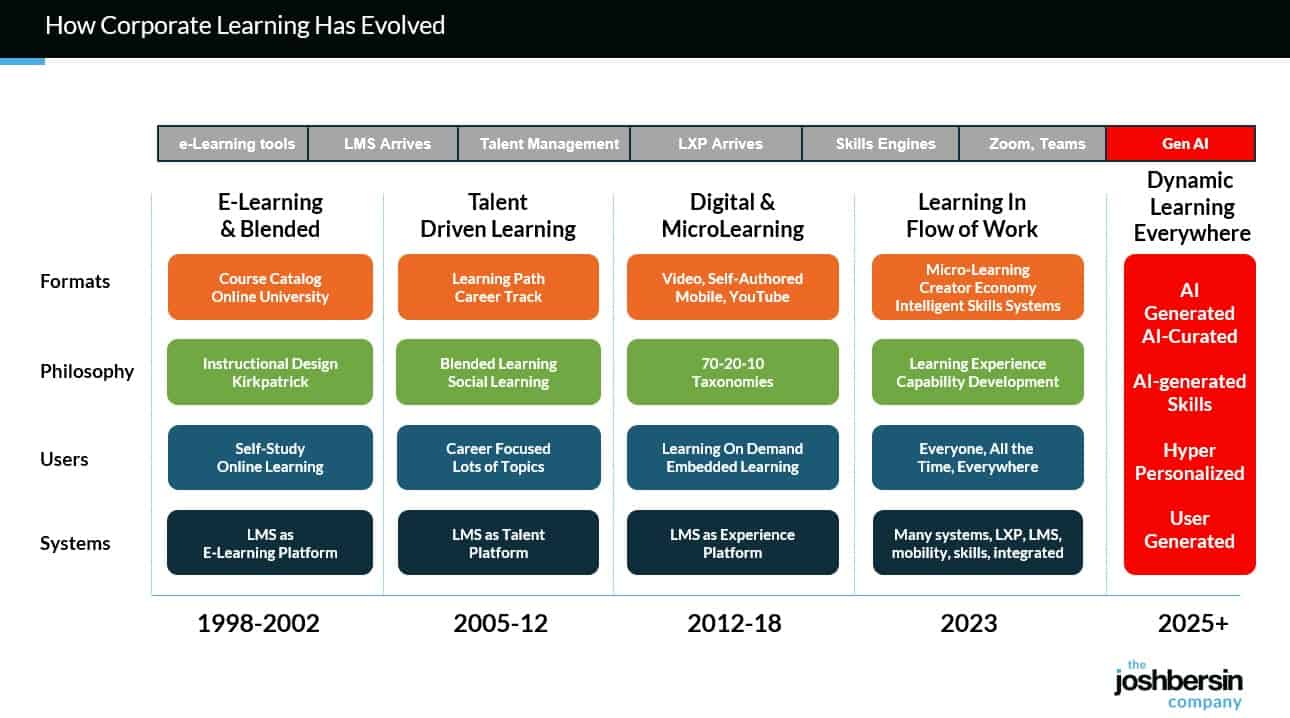
There’s a vision that’s been teased Learning & Development for decades: a vision of closing the gap between learning and doing—of moving beyond stopping work to take a course, and instead bringing support directly into the workflow. This concept of “learning in the flow of work” has been imagined, explored, discussed for decades —but never realised. Until now…?
This week, an article published Harvard Business Review provided some some compelling evidence that a long-awaited shift from “courses to coaches” might not just be possible, but also powerful.
…
The two settings were a) traditional in-classroom workshops, led by an expert facilitator and b) AI-coaching, delivered in the flow of work.The results were compelling….
TLDR: The evidence suggests that “learning in the flow of work” is not only feasible as a result of gen AI—it also show potential to be more scalable, more equitable and more efficient than traditional classroom/LMS-centred models.
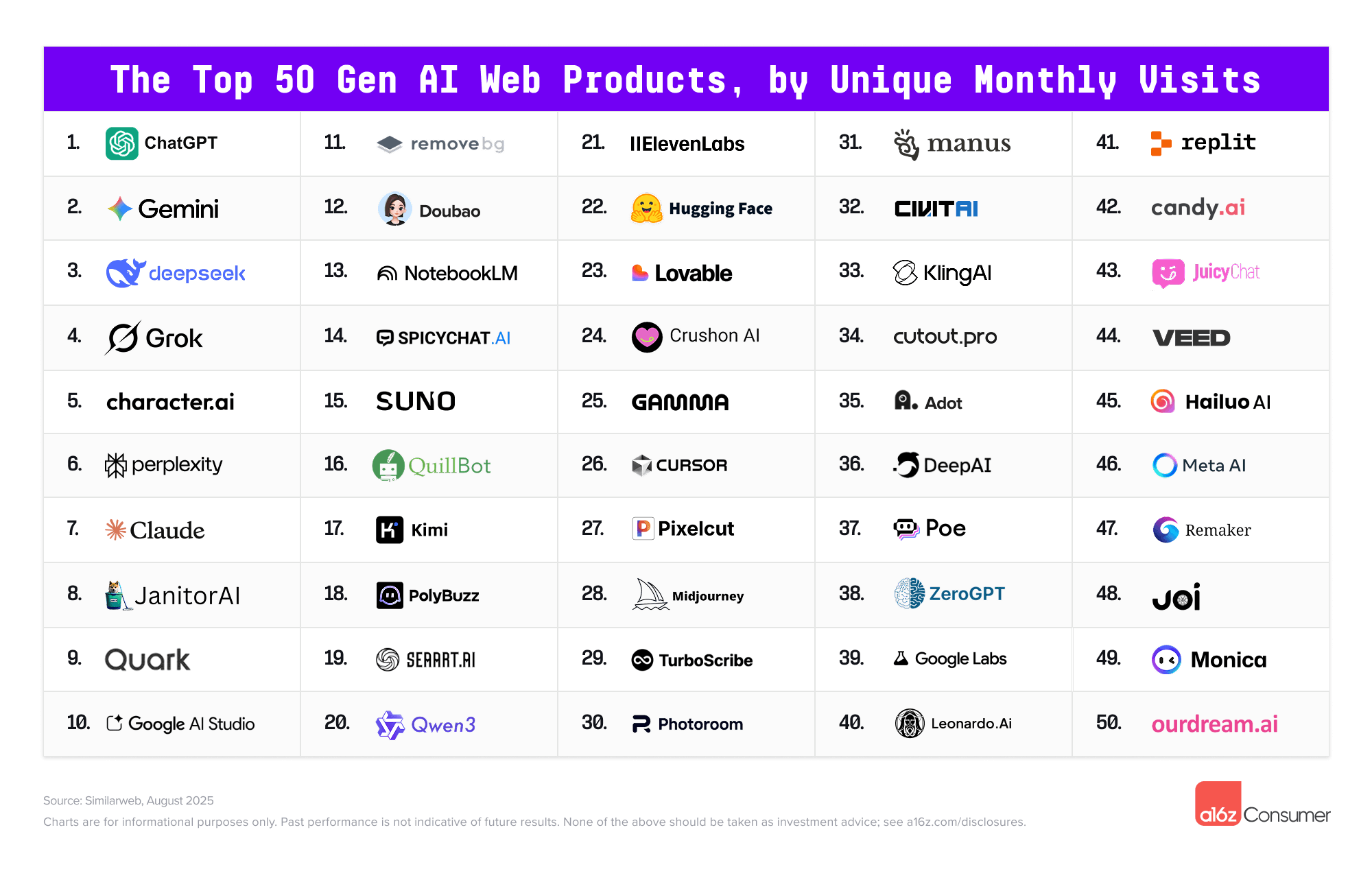
The 10 Most Popular AI Chatbots For Educators — from techlearning.com by Erik Ofgang Educators don’t need to use each of these chatbots, but it pays to be generally aware of the most popular AI tools
I’ve spent time testing many of these AI chatbots for potential uses and abuses in my own classes, so here’s a quick look at each of the top 10 most popular AI chatbots, and what educators should know about each. If you’re looking for more detail on a specific chatbot, click the link, as either I or other Tech & Learning writers have done deeper dives on all these tools.
Generative artificial intelligence isn’t just a new tool—it’s a catalyst forcing the higher education profession to reimagine its purpose, values, and future.
…
As experts in educational technology, digital literacy, and organizational change, we argue that higher education must seize this moment to rethink not just how we use AI, but how we structure and deliver learning altogether.
Over the past decade, microschools — experimental small schools that often have mixed-age classrooms — have expanded.
…
Some superintendents have touted the promise of microschools as a means for public schools to better serve their communities’ needs while still keeping children enrolled in the district. But under a federal administration that’s trying to dismantle public education and boost homeschool options, others have critiqued poor oversight and a lack of information for assessing these models.
Microschools offer a potential avenue to bring innovative, modern experiences to rural areas, argues Keith Parker, superintendent of Elizabeth City-Pasquotank Public Schools.
Imagining Teaching with AI Agents… — from michellekassorla.substack.com by Michelle Kassorla Teaching with AI is only one step toward educational change, what’s next?
More than two years ago I started teaching with AI in my classes. At first I taught against AI, then I taught with AI, and now I am moving into unknown territory: agents. I played with Manus and n8n and some other agents, but I really never got excited about them. They seemed more trouble than they were worth. It seemed they were no more than an AI taskbot overseeing some other AI bots, and that they weren’t truly collaborating. Now, I’m looking at Perplexity’s Comet browser and their AI agent and I’m starting to get ideas for what the future of education might hold.
I have written several times about the dangers of AI agents and how they fundamentally challenge our systems, especially online education. I know there is no way that we can effectively stop them–maybe slow them a little, but definitely not stop them. I am already seeing calls to block and ban agents–just like I saw (and still see) calls to block and ban AI–but the truth is they are the future of work and, therefore, the future of education.
So, yes! This is my next challenge: teaching with AI agents. I want to explore this idea, and as I started thinking about it, I got more and more excited. But let me back up a bit. What is an agent and how is it different than Generative AI or a bot?
Strategic partnership enables OpenAI to build and deploy at least 10 gigawatts of AI datacenters with NVIDIA systems representing millions of GPUs for OpenAI’s next-generation AI infrastructure.
To support the partnership, NVIDIA intends to invest up to $100 billion in OpenAI progressively as each gigawatt is deployed.
The first gigawatt of NVIDIA systems will be deployed in the second half of 2026 on NVIDIA’s Vera Rubin platform.
Why this matters: The partnership kicks off in the second half of 2026 with NVIDIA’s new Vera Rubin platform. OpenAI will use this massive compute power to train models beyond what we’ve seen with GPT-5 and likely also power what’s called inference (when you ask a question to chatGPT, and it gives you an answer). And NVIDIA gets a guaranteed customer for their most advanced chips. Infinite money glitch go brrr am I right? Though to be fair, this kinda deal is as old as the AI industry itself.
This isn’t just about bigger models, mind you: it’s about infrastructure for what both companies see as the future economy. As Sam Altman put it, “Compute infrastructure will be the basis for the economy of the future.”
… Our take: We think this news is actually super interesting when you pair it with the other big headline from today: Commonwealth Fusion Systems signed a commercial deal worth more than $1B with Italian energy company Eni to purchase fusion power from their 400 MW ARC plant in Virginia. Here’s what that means for AI…
AI filmmaker Dinda Prasetyo just released “Skyland,” a fantasy short film about a guy named Aeryn and his “loyal flying fish”, and honestly, the action sequences look like they belong in an actual film…
SKYLAND | AI Short Film Fantasy
Skyland is an AI-powered fantasy short film that takes you on a breathtaking journey with Aeryn Solveth and his loyal flying fish. From soaring above the futuristic city of Cybryne to returning to his homeland of Eryndor, Aeryn’s adventure is… https://t.co/Lz6UUxQvExpic.twitter.com/cYXs9nwTX3
What’s wild is that Dinda used a cocktail of AI tools (Adobe Firefly, MidJourney, the newly launched Luma Ray 3, and ElevenLabs) to create something that would’ve required a full production crew just two years ago.
The Era of Prompts Is Over. Here’s What Comes Next. — from builtin.com by Ankush Rastogi If you’re still prompting your AI, you’re behind the curve. Here’s how to prepare for the coming wave of AI agents.
Summary: Autonomous AI agents are emerging as systems that handle goals, break down tasks and integrate with tools without constant prompting. Early uses include call centers, healthcare, fraud detection and research, but concerns remain over errors, compliance risks and unchecked decisions.
The next shift is already peeking around the corner, and it’s going to make prompts look primitive. Before long, we won’t be typing carefully crafted requests at all. We’ll be leaning on autonomous AI agents, systems that don’t just spit out answers but actually chase goals, make choices and do the boring middle steps without us guiding them. And honestly, this jump might end up dwarfing the so-called “prompt revolution.”
A new way to get things done with your AI browsing assistant Imagine you’re a student researching a topic for a paper, and you have dozens of tabs open. Instead of spending hours jumping between sources and trying to connect the dots, your new AI browsing assistant — Gemini in Chrome1 — can do it for you. Gemini can answer questions about articles, find references within YouTube videos, and will soon be able to help you find pages you’ve visited so you can pick up exactly where you left off.
Rolling out to Mac and Windows users in the U.S. with their language set to English, Gemini in Chrome can understand the context of what you’re doing across multiple tabs, answer questions and integrate with other popular Google services, like Google Docs and Calendar. And it’ll be available on both Android and iOS soon, letting you ask questions and summarize pages while you’re on the go.
We’re also developing more advanced agentic capabilities for Gemini in Chrome that can perform multi-step tasks for you from start to finish, like ordering groceries. You’ll remain in control as Chrome handles the tedious work, turning 30-minute chores into 3-click user journeys.
Well now, as the corporate learning market shifts to AI, (read the details in our study “The Revolution in Corporate Learning” ), Workday can jump ahead. This is because the $400 billion corporate training market is moving quickly to an AI-Native dynamic content approach (witness OpenAI’s launch of in-line learning in its chatbot). We’re just finishing a year-long study of this space and our detailed report and maturity model will be out in Q4. .
.
With Sana, and a few other AI-native vendors (Uplimit, Arist, Disperz, Docebo), companies can upload audios, videos, documents, and even interviews with experts and the system build learning programs in minutes. We use Sana for Galileo Learn (our AI-powered learning academy for Leadership and HR), and we now have 750+ courses and can build new programs in days instead of months.
And there’s more; this type of system gives every employee a personalized, chat-based experience to learn.
A day in the life: The next 25 years A learner wakes up. Their AI-powered learning coach welcomes them, drawing their attention to their progress and helping them structure their approach to the day. A notification reminds them of an upcoming interview and suggests reflections to add to their learning portfolio.
Rather than a static gradebook, their portfolio is a dynamic, living record, curated by the student, validated by mentors in both industry and education, and enriched through co-creation with maturing modes of AI. It tells a story through essays, code, music, prototypes, journal reflections, and team collaborations. These artifacts are not “submitted”, they are published, shared, and linked to verifiable learning outcomes.
And when it’s time to move, to a new institution, a new job, or a new goal, their data goes with them, immutable, portable, verifiable, and meaningful.
From DSC: And I would add to that last solid sentence that the learner/student/employee will be able to control who can access this information. Anyway, some solid reflections here from Lev.
I know a lot of readers will disagree with this, and the timeline feels aggressive (the future always arrives more slowly than pundits expect) but I think the overall premise is sound: “The concept of a tipping point in education – where AI surpasses traditional schools as the dominant learning medium – is increasingly plausible based on current trends, technological advancements, and expert analyses.”
The Rundown: In this tutorial, you will learn how to combine NotebookLM with ChatGPT to master any subject faster, turning dense PDFs into interactive study materials with summaries, quizzes, and video explanations.
Step-by-step:
Go to notebooklm.google.com, click the “+” button, and upload your PDF study material (works best with textbooks or technical documents)
Choose your output mode: Summary for a quick overview, Mind Map for visual connections, or Video Overview for a podcast-style explainer with visuals
Generate a Study Guide under Reports — get Q&A sets, short-answer questions, essay prompts, and glossaries of key terms automatically
Take your PDF to ChatGPT and prompt: “Read this chapter by chapter and highlight confusing parts” or “Quiz me on the most important concepts”
Combine both tools: Use NotebookLM for quick context and interactive guides, then ChatGPT to clarify tricky parts and go deeperPro Tip: If your source is in EPUB or audiobook, convert it to PDF before uploading. Both NotebookLM and ChatGPT handle PDFs best.
Claude can now create and edit Excel spreadsheets, documents, PowerPoint slide decks, and PDFs directly in Claude.ai and the desktop app. This transforms how you work with Claude—instead of only receiving text responses or in-app artifacts, you can describe what you need, upload relevant data, and get ready-to-use files in return.
Also see:
Microsoft to lessen reliance on OpenAI by buying AI from rival Anthropic — from techcrunch.com byRebecca Bellan
Microsoft will pay to use Anthropic’s AI in Office 365 apps, The Information reports, citing two sources. The move means that Anthropic’s tech will help power new features in Word, Excel, Outlook, and PowerPoint alongside OpenAI’s, marking the end of Microsoft’s previous reliance solely on the ChatGPT maker for its productivity suite. Microsoft’s move to diversify its AI partnerships comes amid a growing rift with OpenAI, which has pursued its own infrastructure projects as well as a potential LinkedIn competitor.
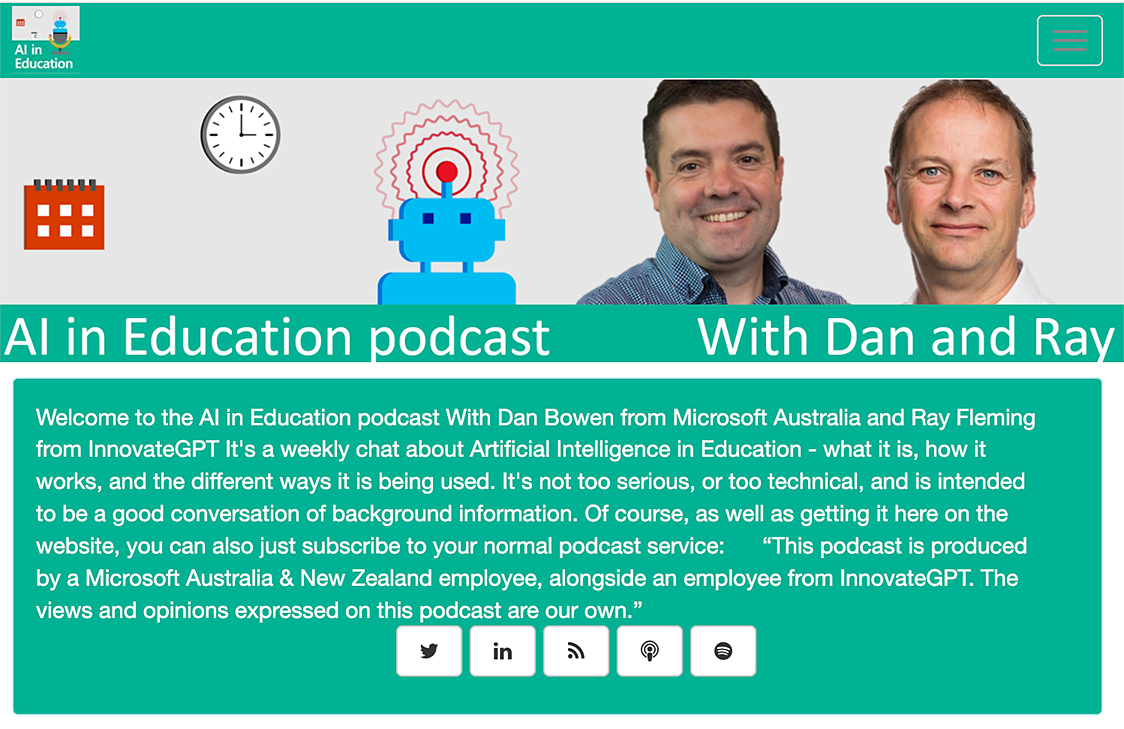
In this episode of Unfixed, we talk with Ray Schroeder—Senior Fellow at UPCEA and Professor Emeritus at the University of Illinois Springfield—about Artificial General Intelligence (AGI) and what it means for the future of higher education. While most of academia is still grappling with ChatGPT and basic AI tools, Schroeder is thinking ahead to AI agents, human displacement, and AGI’s existential implications for teaching, learning, and the university itself. We explore why AGI is so controversial, what institutions should be doing now to prepare, and how we can respond responsibly—even while we’re already overwhelmed.
Data from the State of AI and Instructional Design Report revealed that 95.3% of the instructional designers interviewed use AI in their daily work [1]. And over 85% of this AI use occurs during the design and development process.
These figures showcase the immense impact AI is already having on the instructional design world.
If you’re an L&D professional still on the fence about adding AI to your workflow or an AI convert looking for the next best tools, keep reading.
This guide breaks down 5 of the top AI tools for instructional designers in 2025, so you can streamline your development processes and build better training faster.
But before we dive into the tools of the trade, let’s address the elephant in the room:
Today [8/26/25], we’re excited to introduce Gemini 2.5 Flash Image (aka nano-banana), our state-of-the-art image generation and editing model. This update enables you to blend multiple images into a single image, maintain character consistency for rich storytelling, make targeted transformations using natural language, and use Gemini’s world knowledge to generate and edit images.
When we first launched native image generation in Gemini 2.0 Flash earlier this year, you told us you loved its low latency, cost-effectiveness, and ease of use. But you also gave us feedback that you needed higher-quality images and more powerful creative control.
Character consistency that actually works: Google built a template app showing how you can keep characters looking identical across scenes.
Edit photos (or drawings) with just words: Their photo editing demo lets you remove people, blur backgrounds, or colorize photos using natural language…and this co-drawing demo lets you draw and ask AI to fix it.
Actual world knowledge: Unlike other image models, this one knows stuff—like how the co-drawing demo turns doodles into learning experiences.
Multi-image fusion: You can now merge multiple images; fx, you can drag and drop objects between images seamlessly with their home canvas template.
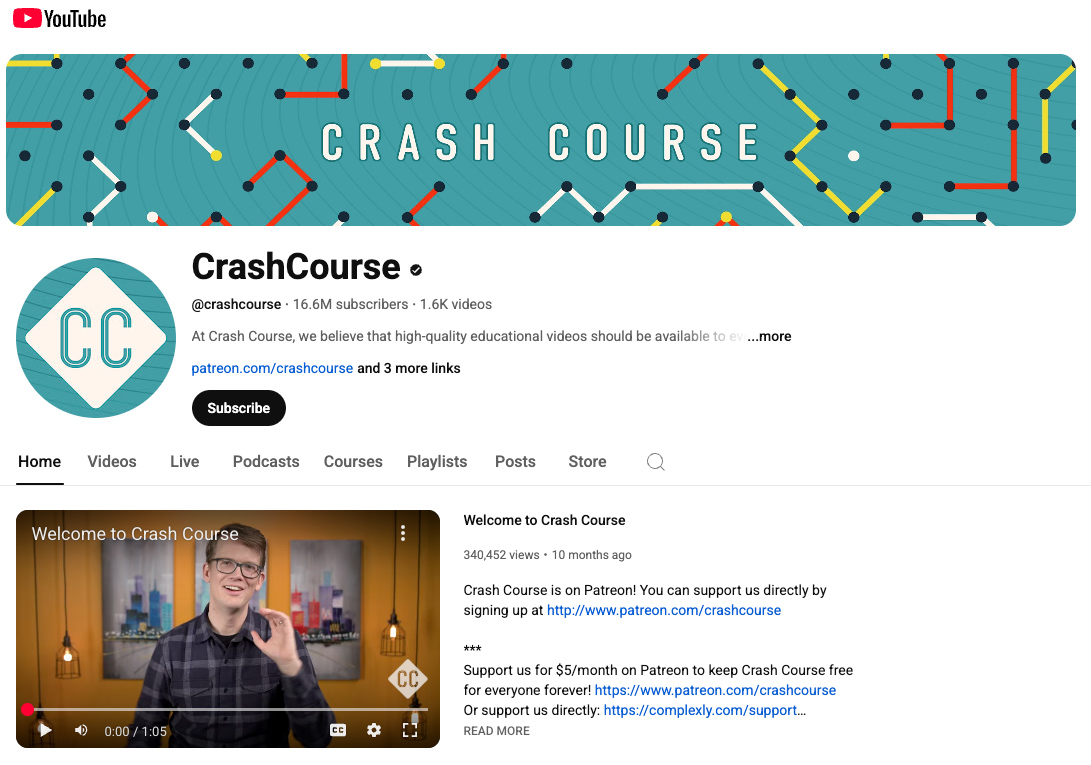
Description: At Crash Course, we believe that high-quality educational videos should be available to everyone for free! Subscribe for weekly videos from our current courses! The Crash Course team has produced more than 50 courses on a wide variety of subjects, ranging from the humanities to sciences and so much more! We also recently teamed up with Arizona State University to bring you more courses on the Study Hall channel.
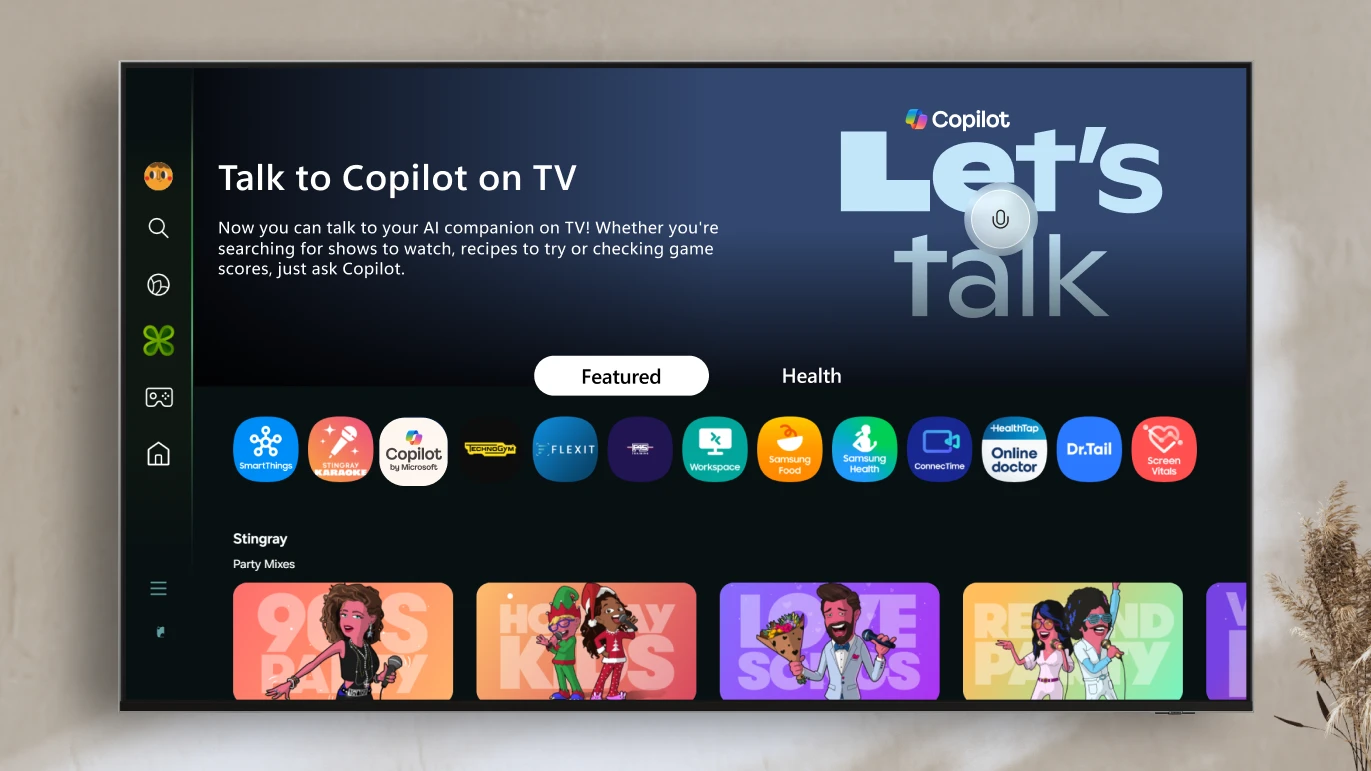
Voice-powered AI meets a visual companion for entertainment, everyday help, and everything in between.
Redmond, Wash., August 27—Today, we’re announcing the launch ofCopilot on select Samsung TVs and monitors, transforming the biggest screen in your home into your most personal and helpful companion—and it’s free to use.
Copilot makes your TV easier and more fun to use with its voice-powered interface, friendly on-screen character, and simple visual cards. Now you can quickly find what you’re looking for and discover new favorites right from your living room.
Because it lives on the biggest screen in the home, Copilot is a social experience—something you can use together with family and friends to spark conversations, help groups decide what to watch, and turn the TV into a shared space for curiosity and connection.
Millions of college students around the world are getting ready to start classes. To help make the school year even better, we’re making our most advanced AI tools available to them for free, including our new Guided Learning mode. We’re also providing $1 billion to support AI education and job training programs and research in the U.S. This includes making our AI and career training free for every college student in America through our AI for Education Accelerator — over 100 colleges and universities have already signed up.
… Guided Learning: from answers to understanding
AI can broaden knowledge and expand access to it in powerful ways, helping anyone, anywhere learn anything in the way that works best for them. It’s not about just getting an answer, but deepening understanding and building critical thinking skills along the way. That opportunity is why we built Guided Learning, a new mode in Gemini that acts as a learning companion guiding you with questions and step-by-step support instead of just giving you the answer. We worked closely with students, educators, researchers and learning experts to make sure it’s helpful for understanding new concepts and is backed by learning science.
Another major AI lab just launched “education mode.”
Google introduced Guided Learningin Gemini, transforming it into a personalized learning companion designed to help you move from quick answers to real understanding.
Instead of immediately spitting out solutions, it:
Asks probing, open-ended questions
Walks learners through step-by-step reasoning
Adapts explanations to the learner’s level
Uses visuals, videos, diagrams, and quizzes to reinforce concepts
I’m not too naive to understand that, no matter how we present it, some students will always be tempted by “the dark side” of AI. What I also believe is that the future of AI in education is not decided. It will be decided by how we, as educators, embrace or demonize it in our classrooms.
My argument is that setting guidelines and talking to our students honestly about the pitfalls and amazing benefits that AI offers us as researchers and learners will define it for the coming generations.
Can AI be the next calculator? Something that, yes, changes the way we teach and learn, but not necessarily for the worse? If we want it to be, yes.
How it is used, and more importantly, how AI is perceived by our students, can be influenced by educators. We have to first learn how AI can be used as a force for good. If we continue to let the dominant voice be that AI is the Terminator of education and critical thinking, then that will be the fate we have made for ourselves.
AI Tools for Strategy and Research – GT #32 — from goodtools.substack.com by Robin Good Getting expert advice, how to do deep research with AI, prompt strategy, comparing different AIs side-by-side, creating mini-apps and an AI Agent that can critically analyze any social media channel
In this week’s blog post, I’ll share my take on how the instructional design role is evolving and discuss what this means for our day-to-day work and the key skills it requires.
…
With this in mind, I’ve been keeping a close eye on open instructional design roles and, in the last 3 months, have noticed the emergence of a new flavour of instructional designer: the so-called “Generative AI Instructional Designer.”
Let’s deep dive into three explicitly AI-focused instructional design positions that have popped up in the last quarter. Each one illuminates a different aspect of how the role is changing—and together, they paint a picture of where our profession is likely heading.
Designers who evolve into prompt engineers, agent builders, and strategic AI advisors will capture the new premium. Those who cling to traditional tool-centric roles may find themselves increasingly sidelined—or automated out of relevance.
Google’s parent company announced Wednesday (8/6/25) that it’s planning to spend $1 billion over the next three years to help colleges teach and train students about artificial intelligence.
Google is joining other AI companies, including OpenAI and Anthropic, in investing in AI training in higher education. All three companies have rolled out new tools aimed at supporting “deeper learning” among students and made their AI platforms available to certain students for free.
Based on current technology capabilities, adoption patterns, and the mission of community colleges, here are five well-supported predictions for AI’s impact in the coming years.
“Where generative AI creates, agentic AI acts.” That’s how my trusted assistant, Gemini 2.5 Pro deep research, describes the difference.
…
Agents, unlike generative tools, create and perform multistep goals with minimal human supervision. The essential difference is found in its proactive nature. Rather than waiting for a specific, step-by-step command, agentic systems take a high-level objective and independently create and execute a plan to achieve that goal. This triggers a continuous, iterative workflow that is much like a cognitive loop. The typical agentic process involves six key steps, as described by Nvidia:
Our 2025 national survey of over 650 respondents across 49 states and Puerto Rico reveals both encouraging trends and important challenges. While AI adoption and optimism are growing, concerns about cheating, privacy, and the need for training persist.
Despite these challenges, I’m inspired by the resilience and adaptability of educators. You are the true game-changers in your students’ growth, and we’re honored to support this vital work.
This report reflects both where we are today and where we’re headed with AI. More importantly, it reflects your experiences, insights, and leadership in shaping the future of education.
This groundbreaking collaboration represents a transformative step forward in education technology and will begin with, but is not limited to, an effort between Instructure and OpenAI to enhance the Canvas experience by embedding OpenAI’s next-generation AI technology into the platform.
IgniteAI announced earlier today, establishes Instructure’s future-ready, open ecosystem with agentic support as the AI landscape continues to evolve. This partnership with OpenAI exemplifies this bold vision for AI in education. Instructure’s strategic approach to AI emphasizes the enhancement of connections within an educational ecosystem comprising over 1,100 edtech partners and leading LLM providers.
“We’re committed to delivering next-generation LMS technologies designed with an open ecosystem that empowers educators and learners to adapt and thrive in a rapidly changing world,” said Steve Daly, CEO of Instructure. “This collaboration with OpenAI showcases our ambitious vision: creating a future-ready ecosystem that fosters meaningful learning and achievement at every stage of education. This is a significant step forward for the education community as we continuously amplify the learning experience and improve student outcomes.”
Faculty Latest Targets of Big Tech’s AI-ification of Higher Ed— from insidehighered.com by Kathryn Palmer A new partnership between OpenAI and Instructure will embed generative AI in Canvas. It may make grading easier, but faculty are skeptical it will enhance teaching and learning.
The two companies, which have not disclosed the value of the deal, are also working together to embed large language models into Canvas through a feature called IgniteAI. It will work with an institution’s existing enterprise subscription to LLMs such as Anthropic’s Claude or OpenAI’s ChatGPT, allowing instructors to create custom LLM-enabled assignments. They’ll be able to tell the model how to interact with students—and even evaluate those interactions—and what it should look for to assess student learning. According to Instructure, any student information submitted through Canvas will remain private and won’t be shared with OpenAI.
… Faculty Unsurprised, Skeptical
Few faculty were surprised by the Canvas-OpenAI partnership announcement, though many are reserving judgment until they see how the first year of using it works in practice.
Here are five AI activities to explore this summer to help you and your students navigate artificial intelligence with an ethical, responsible, and creative approach.
… 1. Use Google’s Quick, Draw! to have fun and get curious about AI. We all have a desire to doodle–even students and adults who say, “I can’t even draw a stick figure!” Bring lots of light-hearted energy into your art room with Google’s Quick Draw! tool. This platform allows you to draw simple prompts, such as a bike, a cat, or a cup, in 20 seconds. While you’re drawing, AI attempts to recognize the subject.
This tool works with any skill level and is a space to draw freely without overthinking. Beyond quick sketching, this activity demonstrates that human input builds machine learning, and it’s only as “smart” as the information (or in this case, drawings) we feed it. It’s a fun way to explore the evolving role of AI in our visual world!
No tech? No problem! Use paper to run the same activity. You can even use the Thumbnail Sketches template in FLEX Curriculum. Students sketch quick prompts in groups and then guess the drawings to spark conversation about how AI “learns.”