6 Ed Tech Tools to Try in 2026 — from cultofpedagogy.com by Jennifer Gonzalez

It’s that time again ~ the annual round-up of tech tools we think are worth a look this year. This year I really feel like there’s something for everyone: history teachers, math and science teachers, people who run makerspaces, teachers interested in music or podcasting, writing teachers, special ed teachers, and anyone whose course content could be made clearer through graphic organizers.


Also somewhat relevant here, see:


At CES 2026, Everything Is AI. What Matters Is How You Use It — from wired.com by Boone Ashworth
Integrated chatbots and built-in machine intelligence are no longer standout features in consumer tech. If companies want to win in the AI era, they’ve got to hone the user experience.

Beyond Wearables
Right now, AI is on your face and arms—smart glasses and smart watches—but this year will see it proliferate further into products like earbuds, headphones, and smart clothing.

Health tech will see an influx of AI features too, as companies aim to use AI to monitor biometric data from wearables like rings and wristbands. Heath sensors will also continue to show up in newer places like toilets, bath mats, and brassieres.

The smart home will continue to be bolstered by machine intelligence, with more products that can listen, see, and understand what’s happening in your living space. Familiar candidates for AI-powered upgrades like smart vacuums and security cameras will be joined by surprising AI bedfellows like refrigerators and garage door openers.


Along these lines, see
live updates from CNET here.


ChatGPT is overrated. Here’s what to use instead. — from washingtonpost.com by Geoffrey A. Fowler
When I want help from AI, ChatGPT is no longer my default first stop.

I can tell you which AI tools are worth using — and which to avoid — because I’ve been running a chatbot fight club.

I conducted dozens of bot challenges based on real things people do with AI, including writing breakup texts and work emailsdecoding legal contracts and scientific researchanswering tricky research questions, and editing photos and making “art.” Human experts including best-selling authors, reference librarians, a renowned scientist and even a Pulitzer Prize-winning photographer judged the results.

After a year of bot battles, one thing stands out: There is no single best AI. The smartest way to use chatbots today is to pick different tools for different jobs — and not assume one bot can do it all.


How Collaborative AI Agents Are Shaping the Future of Autonomous IT — from aijourn.com by Michael Nappi

Some enterprise platforms now support cross-agent communication and integration with ecosystems maintained by companies like Microsoft, NVIDIA, Google, and Oracle. These cross-platform data fabrics break down silos and turn isolated AI pilots into enterprise-wide services. The result is an IT backbone that not only automates but also collaborates for continuous learning, diagnostics, and system optimization in real time.


Nvidia dominated the headlines in 2025 — these were its 15 biggest events of the year — from finance.yahoo.com by Daniel Howley

It’s difficult to think of any single company that had a bigger impact on Wall Street and the AI trade in 2025 than Nvidia (NVDA).

Nvidia’s revenue soared in 2025, bringing in $187.1 billion, and its market capitalization continued to climb, briefly eclipsing the $5 trillion mark before settling back in the $4 trillion range.

There were plenty of major highs and deep lows throughout the year, but these 15 were among the biggest moments of Nvidia’s 2025.


How Your Learners *Actually* Learn with AI — from drphilippahardman.substack.com by Dr. Philippa Hardman
What 37.5 million AI chats show us about how learners use AI at the end of 2025 — and what this means for how we design & deliver learning experiences in 2026

Last week, Microsoft released a similar analysis of a whopping 37.5 million Copilot conversations. These conversation took place on the platform from January to September 2025, providing us with a window into if and how AI use in general — and AI use among learners specifically – has evolved in 2025.

Microsoft’s mass behavioural data gives us a detailed, global glimpse into what learners are actually doing across devices, times of day and contexts. The picture that emerges is pretty clear and largely consistent with what OpenAI’s told us back in the summer:

AI isn’t functioning primarily as an “answers machine”: the majority of us use AI as a tool to personalise and differentiate generic learning experiences and – ultimately – to augment human learning.

Let’s dive in!

Learners don’t “decide” to use AI anymore. They assume it’s there, like search, like spellcheck, like calculators. The question has shifted from “should I use this?” to “how do I use this effectively?”


8 AI Agents Every HR Leader Needs To Know In 2026 — from forbes.com by Bernard Marr

So where do you start? There are many agentic tools and platforms for AI tasks on the market, and the most effective approach is to focus on practical, high-impact workflows. So here, I’ll look at some of the most compelling use cases, as well as provide an overview of the tools that can help you quickly deliver tangible wins.

Some of the strongest opportunities in HR include:

  • Workforce management, administering job satisfaction surveys, monitoring and tracking performance targets, scheduling interventions, and managing staff benefits, medical leave, and holiday entitlement.
  • Recruitment screening, automatically generating and posting job descriptions, filtering candidates, ranking applicants against defined criteria, identifying the strongest matches, and scheduling interviews.
  • Employee onboarding, issuing new hires with contracts and paperwork, guiding them to onboarding and training resources, tracking compliance and completion rates, answering routine enquiries, and escalating complex cases to human HR specialists.
  • Training and development, identifying skills gaps, providing self-service access to upskilling and reskilling opportunities, creating personalized learning pathways aligned with roles and career goals, and tracking progress toward completion.


AI working competency is now a graduation requirement at Purdue [Pacton] + other items re: AI in our learning ecosystems


AI Has Landed in Education: Now What? — from learningfuturesdigest.substack.com by Dr. Philippa Hardman

Here’s what’s shaped the AI-education landscape in the last month:

  • The AI Speed Trap is [still] here: AI adoption in L&D is basically won (87%)—but it’s being used to ship faster, not learn better (84% prioritising speed), scaling “more of the same” at pace.
  • AI tutors risk a “pedagogy of passivity”: emerging evidence suggests tutoring bots can reduce cognitive friction and pull learners down the ICAP spectrum—away from interactive/constructive learning toward efficient consumption.
  • Singapore + India are building what the West lacks: they’re treating AI as national learning infrastructure—for resilience (Singapore) and access + language inclusion (India)—while Western systems remain fragmented and reactive.
  • Agentic AI is the next pivot: early signs show a shift from AI as a content engine to AI as a learning partner—with UConn using agents to remove barriers so learners can participate more fully in shared learning.
  • Moodle’s AI stance sends two big signals: the traditional learning ecosystem in fragmenting, and the concept of “user sovereignty” over by AI is emerging.

Four strategies for implementing custom AIs that help students learn, not outsource — from educational-innovation.sydney.edu.au by Kria Coleman, Matthew Clemson, Laura Crocco and Samantha Clarke; via Derek Bruff

For Cogniti to be taken seriously, it needs to be woven into the structure of your unit and its delivery, both in class and on Canvas, rather than left on the side. This article shares practical strategies for implementing Cogniti in your teaching so that students:

  • understand the context and purpose of the agent,
  • know how to interact with it effectively,
  • perceive its value as a learning tool over any other available AI chatbots, and
  • engage in reflection and feedback.

In this post, we discuss how to introduce and integrate Cogniti agents into the learning environment so students understand their context, interact effectively, and see their value as customised learning companions.

In this post, we share four strategies to help introduce and integrate Cogniti in your teaching so that students understand their context, interact effectively, and see their value as customised learning companions.


Collection: Teaching with Custom AI Chatbots — from teaching.virginia.edu; via Derek Bruff
The default behaviors of popular AI chatbots don’t always align with our teaching goals. This collection explores approaches to designing AI chatbots for particular pedagogical purposes.

Example/excerpt:


Beyond Infographics: How to Use Nano Banana to *Actually* Support Learning — from drphilippahardman.substack.com by Dr Philippa Hardman
Six evidence-based use cases to try in Google’s latest image-generating AI tool

While it’s true that Nano Banana generates better infographics than other AI models, the conversation has so far massively under-sold what’s actually different and valuable about this tool for those of us who design learning experiences.

What this means for our workflow:

Instead of the traditional “commission ? wait ? tweak ? approve ? repeat” cycle, Nano Banana enables an iterative, rapid-cycle design process where you can:

  • Sketch an idea and see it refined in minutes.
  • Test multiple visual metaphors for the same concept without re-briefing a designer.
  • Build 10-image storyboards with perfect consistency by specifying the constraints once, not manually editing each frame.
  • Implement evidence-based strategies (contrasting cases, worked examples, observational learning) that are usually too labour-intensive to produce at scale.

This shift—from “image generation as decoration” to “image generation as instructional scaffolding”—is what makes Nano Banana uniquely useful for the 10 evidence-based strategies below.


Agents, robots, and us: Skill partnerships in the age of AI — from mckinsey.com by Lareina Yee, Anu Madgavkar, Sven Smit, Alexis Krivkovich, Michael Chui, María Jesús Ramírez, and Diego Castresana
AI is expanding the productivity frontier. Realizing its benefits requires new skills and rethinking how people work together with intelligent machines.

At a glance

  • Work in the future will be a partnership between people, agents, and robots—all powered by AI. …
  • Most human skills will endure, though they will be applied differently. …
  • Our new Skill Change Index shows which skills will be most and least exposed to automation in the next five years….
  • Demand for AI fluency—the ability to use and manage AI tools—has grown sevenfold in two years…
  • By 2030, about $2.9 trillion of economic value could be unlocked in the United States…

Also related/see:


State of AI: December 2025 newsletter — from nathanbenaich.substack.com by Nathan Benaich
What you’ve got to know in AI from the last 4 weeks.

Welcome to the latest issue of the State of AI, an editorialized newsletter that covers the key developments in AI policy, research, industry, and start-ups over the last month.


4 Simple & Easy Ways to Use AI to Differentiate Instruction — from mindfulaiedu.substack.com (Mindful AI for Education) by Dani Kachorsky, PhD
Designing for All Learners with AI and Universal Design Learning

So this year, I’ve been exploring new ways that AI can help support students with disabilities—students on IEPs, learning plans, or 504s—and, honestly, it’s changing the way I think about differentiation in general.

As a quick note, a lot of what I’m finding applies just as well to English language learners or really to any students. One of the big ideas behind Universal Design for Learning (UDL) is that accommodations and strategies designed for students with disabilities are often just good teaching practices. When we plan instruction that’s accessible to the widest possible range of learners, everyone benefits. For example, UDL encourages explaining things in multiple modes—written, visual, auditory, kinesthetic—because people access information differently. I hear students say they’re “visual learners,” but I think everyone is a visual learner, and an auditory learner, and a kinesthetic learner. The more ways we present information, the more likely it is to stick.

So, with that in mind, here are four ways I’ve been using AI to differentiate instruction for students with disabilities (and, really, everyone else too):


The Periodic Table of AI Tools In Education To Try Today — from ictevangelist.com by Mark Anderson

What I’ve tried to do is bring together genuinely useful AI tools that I know are already making a difference.

For colleagues wanting to explore further, I’m sharing the list exactly as it appears in the table, including website links, grouped by category below. Please do check it out, as along with links to all of the resources, I’ve also written a brief summary explaining what each of the different tools do and how they can help.


Seven Hard-Won Lessons from Building AI Learning Tools — from linkedin.com by Louise Worgan

Last week, I wrapped up Dr Philippa Hardman’s intensive bootcamp on AI in learning design. Four conversations, countless iterations, and more than a few humbling moments later – here’s what I am left thinking about.


Finally Catching Up to the New Models — from michellekassorla.substack.com by Michelle Kassorla
There are some amazing things happening out there!

An aside: Google is working on a new vision for textbooks that can be easily differentiated based on the beautiful success for NotebookLM. You can get on the waiting list for that tool by going to LearnYourWay.withgoogle.com.

Nano Banana Pro
Sticking with the Google tools for now, Nano Banana Pro (which you can use for free on Google’s AI Studio), is doing something that everyone has been waiting a long time for: it adds correct text to images.


Introducing AI assistants with memory — from perplexity.ai

The simple act of remembering is the crux of how we navigate the world: it shapes our experiences, informs our decisions, and helps us anticipate what comes next. For AI agents like Comet Assistant, that continuity leads to a more powerful, personalized experience.

Today we are announcing new personalization features to remember your preferences, interests, and conversations. Perplexity now synthesizes them automatically like memory, for valuable context on relevant tasks. Answers are smarter, faster, and more personalized, no matter how you work.

From DSC :
This should be important as we look at learning-related applications for AI.


For the last three days, my Substack has been in the top “Rising in Education” list. I realize this is based on a hugely flawed metric, but it still feels good. ?

– Michael G Wagner

Read on Substack


I’m a Professor. A.I. Has Changed My Classroom, but Not for the Worse. — from nytimes.com by Carlo Rotella [this should be a gifted article]
My students’ easy access to chatbots forced me to make humanities instruction even more human.


Law Firm 2.0: A Trillion-Dollar Market Begins To Move — from abovethelaw.com by Ken Crutchfield
The test cases for Law Firm 2.0 are arriving faster than many expected.

A move to separate legal advice from other legal services that don’t require advice is a big shift that would ripple through established firms and also test regulatory boundaries.

The LegalTech Fund (TLTF) sees a $1 trillion opportunity to reinvent legal services through the convergence of technology, regulatory changes, and innovation. TLTF calls this movement Law Firm 2.0, and the fund believes a reinvention will pave the way for entirely new, tech-enabled models of legal service delivery.


From Paper to Platform: How LegalTech Is Revolutionizing the Practice of Law — from markets.financialcontent.com by AB Newswire

For decades, practicing law has been a business about paper — contracts, case files, court documents, and floor-to-ceiling piles of precedent. But as technology transforms all aspects of modern-day business, law firms and in-house legal teams are transforming along with it. The development of LegalTech has revolutionized what was previously a paper-driven, manpower-intensive profession into a data-driven digital web of collaboration and automation.

Conclusion: Building the Future of Law
The practice of law has always been about accuracy, precedent, and human beings. Technology doesn’t alter that — it magnifies it. The shift to the platform from paper is about liberating lawyers from back-office tasks so they can concentrate on strategy, advocacy, and creativity.

By coupling intelligent automation with moral obligation, today’s firms are positioning the legal profession for a more intelligent, responsive industry. LegalTech isn’t about automation, it’s about empowering attorneys to practice at the speed of today’s business.


What Legal Can Learn from Other Industries’ AI Transformations — from jdsupra.com

Artificial intelligence has already redefined how industries like finance, healthcare, and supply chain operate — transforming once-manual processes into predictive, data-driven engines of efficiency.

Yet the legal industry, while increasingly open to innovation, still lags behind its peers in adopting automation at scale. As corporate legal departments face mounting pressure to do more with less, they have an opportunity to learn from how other sectors successfully integrated AI into their operations.

The message is clear: AI transformation doesn’t just change workflows — it changes what’s possible.


7 Legal Tech Trends To Watch In 2026 — from lexology.com


Small Language Models Are Changing Legal Tech: What That Means for Lawyers and Law Firms — from community.nasscom.in

The legal profession is at a turning point. Artificial intelligence tools are moving from novelty to everyday utility, and small language models, or SLMs, are a major reason why. For law firms and in-house legal teams that are balancing client confidentiality, tight budgets, and the need to move faster, SLMs offer a practical, high impact way to bring legal AI into routine practice. This article explains what SLMs are, why they matter to lawyers, where they fit in legal workflows, and how to adopt them responsibly.


Legal AI startup draws new $50 million Blackstone investment, opens law firm — from reuters.com by Sara Merken

NEW YORK, Nov 20 (Reuters) – Asset manager Blackstone (BX.N), opens new tab has invested $50 million in Norm Ai, a legal and compliance technology startup that also said on Thursday that it is launching an independent law firm that will offer “AI-native legal services.”

Lawyers at the new New York-based firm, Norm Law LLP, will use Norm Ai’s artificial intelligence technology to do legal work for Blackstone and other financial services clients, said Norm Ai founder and CEO John Nay.


Law School Toolbox Podcast Episode 531: What Law Students Should Know About New Legal Tech (w/Gabe Teninbaum) — from jdsupra.com

Today, Alison and Gabe Teninbaum — law professor and creator of SpacedRepetition.com — discuss how technology is rapidly transforming the legal profession, emphasizing the importance for law students and lawyers to develop technological competence and adapt to new tools and roles in the legal profession.  


New York is the San Francisco of legal tech — from businessinsider.com by Melia Russell

  • Legal tech ?? NYC.
  • To win the market, startups say they need to be where the law firms and corporate legal chiefs are.
  • Legora and Harvey are expanding their footprints in New York, as Clio hunts for office space.

Legal Tech Startups Expand in New York to Access Law Firms — from indexbox.io

Several legal technology startups are expanding their physical presence in New York City, according to a report from Legal tech NYC. The companies state that to win market share, they need to be located where major law firms and corporate legal departments are based.


Linklaters unveils 20-strong ‘AI lawyer’ team — from legalcheek.com by Legal Cheek

Magic Circle giant Linklaters has launched a team of 20 ‘AI Lawyers’ (yes, that is their actual job title) as it ramps up its commitment to artificial intelligence across its global offices.

The new cohort is a mix of external tech specialists and Linklaters lawyers who have decided to boost their legal expertise with advanced AI know-how. They will be placed into practice groups around the world to help build prompts, workflows and other tech driven processes that the firm hopes will sharpen client delivery.


I went to a closed-door retreat for top lawyers. The message was clear: Don’t fear AI — use it. — from businessinsider.com by Melia Russell

  • AI is making its mark on law firms and corporate legal teams.
  • Clients expect measurable savings, and firms are spending real money to deliver them.
  • At TLTF Summit, Big Law leaders and legal-tech builders explored the future of the industry.

From Cost Center to Command Center: The Future of Litigation is Being Built In-House — from law.stanford.edu by Adam Rouse,  Tamra Moore, Renee Meisel, Kassi Burns, & Olga Mack

Litigation isn’t going away, but who leads, drafts, and drives it is rapidly changing. Empirical research shows corporate legal departments have steadily expanded litigation management functions over the past decade. (Annual Litigation Trends Survey, Norton Rose Fulbright (2025)).

For decades, litigation lived squarely in the law firm domain. (Wald, Eli, Getting in and Out of the House: Career Trajectories of In-House Lawyers, Fordham Law Review, Vol. 88, No. 1765, 2020 (June 22, 2020)). Corporate legal departments played a responsive role: approving strategies, reviewing documents, and paying hourly rates. But through dozens of recent conversations with in-house legal leaders, legal operations professionals, and litigation specialists, a new reality is emerging. One in which in-house counsel increasingly owns the first draft, systematizes their litigation approach, and reshapes how outside counsel fits into the picture.

AI, analytics, exemplar libraries, playbooks, and modular document builders are not simply tools. They are catalysts for a structural shift. Litigation is becoming modular, data-informed, and orchestrated by in-house teams who increasingly want more than cost control. They want consistency, clarity, and leverage. This piece outlines five major trends from our qualitative research, predictions on their impact to the practice of law, and research questions that are worth considering to further understand these trends. A model is then introduced for understanding how litigation workflows and outside counsel relationships will evolve in the coming years.


Could Your Next Side Hustle Be Training AI? — from builtin.com by Jeff Rumage
As automation continues to reshape the labor market, some white-collar professionals are cashing in by teaching AI models to do their jobs.

Summary: Artificial intelligence may be replacing jobs, but it’s also creating some new ones. Professionals in fields like medicine, law and engineering can earn big money training AI models, teaching them human skills and expertise that may one day make those same jobs obsolete.


DEEP DIVE: The AI user interface of the future = Voice — from theneurondaily.com by Grant Harvey
PLUS: Gemini 3.0 and Microsoft’s new voice features

Here’s the thing: voice is finally good enough to replace typing now. And I mean actually good enough, not “Siri, play Despacito” good enough.

To Paraphrase Andrej Karpathy’s famous quote, “the hottest new programming language is English”, in this case, the hottest new user interface is talking.

The Great Convergence: Why Voice Is Having Its Moment
Three massive shifts just collided to make voice interfaces inevitable.

    1. First, speech recognition stopped being terrible. …
    2. Second, our devices got ears everywhere. …
    3. Third, and most importantly: LLMs made voice assistants smart enough to be worth talking to. …

Introducing group chats in ChatGPT — from openai.com
Collaborate with others, and ChatGPT, in the same conversation.

Update on November 20, 2025: Early feedback from the pilot has been positive, so we’re expanding group chats to all logged-in users on ChatGPT Free, Go, Plus and Pro plans globally over the coming days. We will continue refining the experience as more people start using it.

Today, we’re beginning to pilot a new experience in a few regions that makes it easy for people to collaborate with each other—and with ChatGPT—in the same conversation. With group chats, you can bring friends, family, or coworkers into a shared space to plan, make decisions, or work through ideas together.

Whether you’re organizing a group dinner or drafting an outline with coworkers, ChatGPT can help. Group chats are separate from your private conversations, and your personal ChatGPT memory is never shared with anyone in the chat.


Three Years from GPT-3 to Gemini 3 — from oneusefulthing.org by Ethan Mollick
From chatbots to agents

Three years ago, we were impressed that a machine could write a poem about otters. Less than 1,000 days later, I am debating statistical methodology with an agent that built its own research environment. The era of the chatbot is turning into the era of the digital coworker. To be very clear, Gemini 3 isn’t perfect, and it still needs a manager who can guide and check it. But it suggests that “human in the loop” is evolving from “human who fixes AI mistakes” to “human who directs AI work.” And that may be the biggest change since the release of ChatGPT.


Results May Vary — from aiedusimplified.substack.com by Lance Eaton, PhD
On Custom Instructions with GenAI Tools….

I’m sharing today about custom instructions and my use of them across several AI tools (paid versions of ChatGPT, Gemini, and Claude). I want to highlight what I’m doing, how it’s going, and solicit from readers to share in the comments some of their custom instructions that they find helpful.

I’ve been in a few conversations lately that remind me that not everyone knows about them, even some of the seasoned folks around GenAI and how you might set them up to better support your work. And, of course, they are, like all things GenAI, highly imperfect!

I’ll include and discuss each one below, but if you want to keep abreast of my custom instructions, I’ll be placing them here as I adjust and update them so folks can see the changes over time.


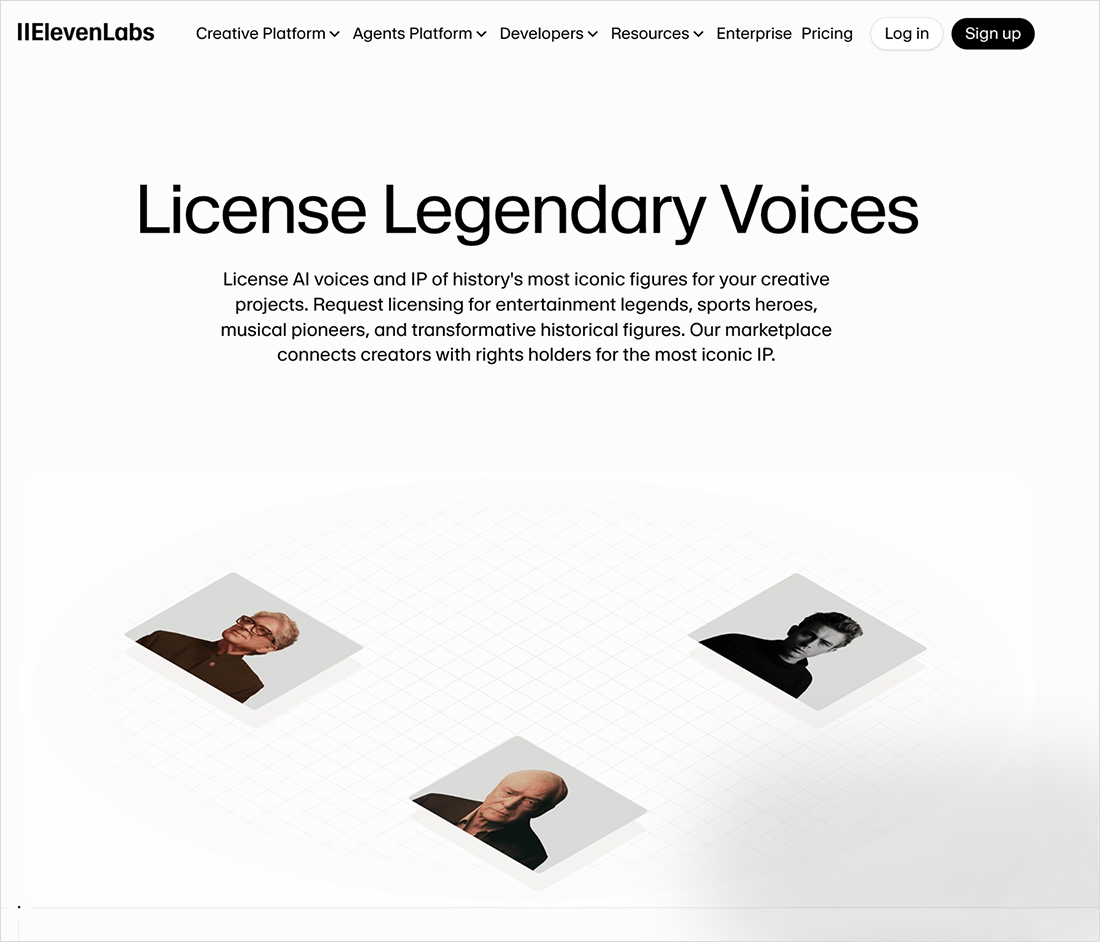
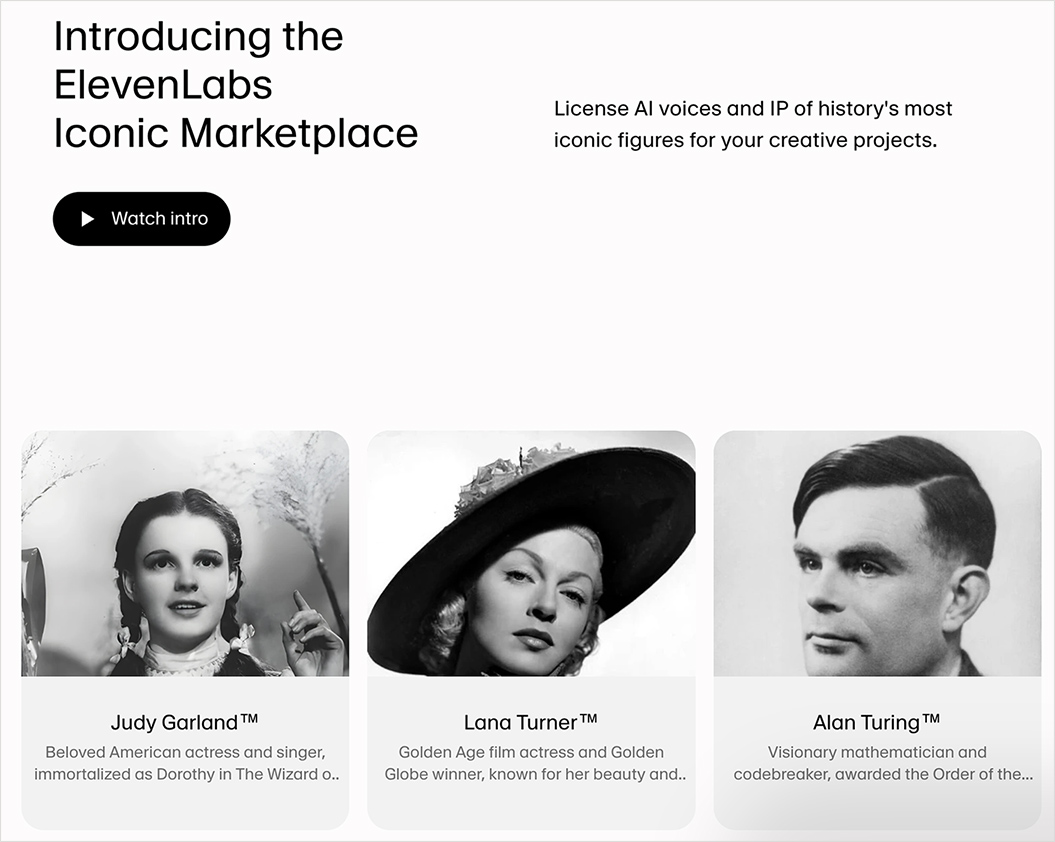
ElevenLabs just launched a voice marketplace — from elevenlabs.io; via theaivalley.com

Via the AI Valley:

Why does it matter?
AI voice cloning has already flooded the internet with unauthorized imitations, blurring legal and ethical lines. By offering a dynamic, rights-secured platform, ElevenLabs aims to legitimize the booming AI voice industry and enable transparent, collaborative commercialization of iconic IP.
.

ElevenLabs just launched a voice marketplace

ElevenLabs just launched a voice marketplace


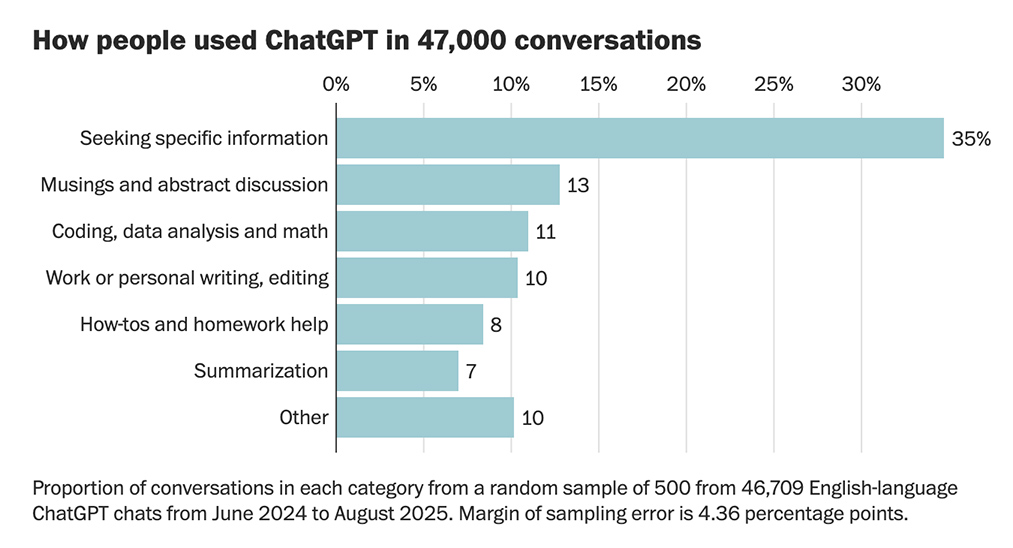
[GIFTED ARTICLE] How people really use ChatGPT, according to 47,000 conversations shared online — from by Gerrit De Vynck and Jeremy B. Merrill
What do people ask the popular chatbot? We analyzed thousands of chats to identify common topics discussed by users and patterns in ChatGPT’s responses.

.
Data released by OpenAI in September from an internal study of queries sent to ChatGPT showed that most are for personal use, not work.

Emotional conversations were also common in the conversations analyzed by The Post, and users often shared highly personal details about their lives. In some chats, the AI tool could be seen adapting to match a user’s viewpoint, creating a kind of personalized echo chamber in which ChatGPT endorsed falsehoods and conspiracy theories.

Lee Rainie, director of the Imagining the Digital Future Center at Elon University, said his own research has suggested ChatGPT’s design encourages people to form emotional attachments with the chatbot. “The optimization and incentives towards intimacy are very clear,” he said. “ChatGPT is trained to further or deepen the relationship.”


Per The Rundown: OpenAI just shared its view on AI progress, predicting systems will soon become smart enough to make discoveries and calling for global coordination on safety, oversight, and resilience as the technology nears superintelligent territory.

The details:

  • OpenAI said current AI systems already outperform top humans in complex intellectual tasks and are “80% of the way to an AI researcher.”
  • The company expects AI will make small scientific discoveries by 2026 and more significant breakthroughs by 2028, as intelligence costs fall 40x per year.
  • For superintelligent AI, OAI said work with governments and safety agencies will be essential to mitigate risks like bioterrorism or runaway self-improvement.
  • It also called for safety standards among top labs, a resilience ecosystem like cybersecurity, and ongoing tracking of AI’s real impact to inform public policy.

Why it matters: While the timeline remains unclear, OAI’s message shows that the world should start bracing for superintelligent AI with coordinated safety. The company is betting that collective safeguards will be the only way to manage risk from the next era of intelligence, which may diffuse in ways humanity has never seen before.

Which linked to:

  • AI progress and recommendations — from openai.com
    AI is unlocking new knowledge and capabilities. Our responsibility is to guide that power toward broad, lasting benefit.

From DSC:
I hate to say this, but it seems like there is growing concern amongst those who have pushed very hard to release as much AI as possible — they are NOW worried. They NOW step back and see that there are many reasons to worry about how these technologies can be negatively used.

Where was this level of concern before (while they were racing ahead at 180 mph)? Surely, numerous and knowledgeable people inside those organizations warned them about the destructive/downside of these technologies. But their warnings were pretty much blown off (at least from my limited perspective). 


The state of AI in 2025: Agents, innovation, and transformation — from mckinsey.com

Key findings

  1. Most organizations are still in the experimentation or piloting phase: Nearly two-thirds of respondents say their organizations have not yet begun scaling AI across the enterprise.
  2. High curiosity in AI agents: Sixty-two percent of survey respondents say their organizations are at least experimenting with AI agents.
  3. Positive leading indicators on impact of AI: Respondents report use-case-level cost and revenue benefits, and 64 percent say that AI is enabling their innovation. However, just 39 percent report EBIT impact at the enterprise level.
  4. High performers use AI to drive growth, innovation, and cost: Eighty percent of respondents say their companies set efficiency as an objective of their AI initiatives, but the companies seeing the most value from AI often set growth or innovation as additional objectives.
  5. Redesigning workflows is a key success factor: Half of those AI high performers intend to use AI to transform their businesses, and most are redesigning workflows.
  6. Differing perspectives on employment impact: Respondents vary in their expectations of AI’s impact on the overall workforce size of their organizations in the coming year: 32 percent expect decreases, 43 percent no change, and 13 percent increases.

Marble: A Multimodal World Model — from worldlabs.ai

Spatial intelligence is the next frontier in AI, demanding powerful world models to realize its full potential. World models should reconstruct, generate, and simulate 3D worlds; and allow both humans and agents to interact with them. Spatially intelligent world models will transform a wide variety of industries over the coming years.

Two months ago we shared a preview of Marble, our World Model that creates 3D worlds from image or text prompts. Since then, Marble has been available to an early set of beta users to create 3D worlds for themselves.

Today we are making Marble, a first-in-class generative multimodal world model, generally available for anyone to use. We have also drastically expanded Marble’s capabilities, and are excited to highlight them here:


KPMG wants junior consultants to ditch the grunt work and hand it over to teams of AI agents — from businessinsider.com by Polly Thompson

The Big Four consulting and accounting firm is training its junior consultants to manage teams of AI agents — digital assistants capable of completing tasks without human input.

“We want juniors to become managers of agents,” Niale Cleobury, KPMG’s global AI workforce lead, told Business Insider in an interview.

KPMG plans to give new consulting recruits access to a catalog of AI agents capable of creating presentation slides, analyzing data, and conducting in-depth research, Cleobury said.

The goal is for these agents to perform much of the analytical and administrative work once assigned to junior consultants, allowing them to become more involved in strategic decisions.


From DSC:
For a junior staff member to provide quality assurance in working with agents, an employee must know what they’re talking about in the first place. They must have expertise and relevant knowledge. Otherwise, how will they spot the hallucinations?

So the question is, how can businesses build such expertise in junior staff members while they are delegating things to an army of agents? This question applies to the next posting below as well. Having agents report to you is all well and good — IF you know when the agents are producing helpful/accurate information and when they got things all wrong.


This Is the Next Vital Job Skill in the AI Economy — from builtin.com by Saurabh Sharma
The future of tech work belongs to AI managers.

Summary: A fundamental shift is making knowledge workers “AI managers.” The most valuable employees will direct intelligent AI agents, which requires new competencies: delegation, quality assurance and workflow orchestration across multiple agents. Companies must bridge the training gap to enable this move from simple software use to strategic collaboration with intelligent, yet imperfect, systems.

The shift is happening subtly, but it’s happening. Workers are learning to prompt agents, navigate AI capabilities, understand failure modes and hand off complex tasks to AI. And if they haven’t started yet, they probably will: A new study from IDC and Salesforce found that 72 percent of CEOs think most employees will have an AI agent reporting to them within five years. This isn’t about using a new kind of software tool — it’s about directing intelligent systems that can reason, search, analyze and create.

Soon, the most valuable employees won’t just know how to use AI; they’ll know how to manage it. And that requires a fundamentally different skill set than anything we’ve taught in the workplace before.


AI agents failed 97% of freelance tasks; here’s why… — from theneurondaily.com by Grant Harvey

AI Agents Can’t Actually Do Your Job (Yet)—New Benchmark Reveals The Gap

DEEP DIVE: AI can make you faster at your job, but can only do 2-3% of jobs by itself.

The hype: AI agents will automate entire workflows! Replace freelancers! Handle complex tasks end-to-end!

The reality: a measly 2-3% completion rate.

See, Scale AI and CAIS just released the Remote Labor Index (paper), a benchmark where AI agents attempted real freelance tasks. The best-performing model earned just $1,810 out of $143,991 in available work, and yes, finishing only 2-3% of jobs.


Custom AI Development: Evolving from Static AI Systems to Dynamic Learning Agents in 2025 — community.nasscom.in

This blog explores how custom AI development accelerates the evolution from static AI to dynamic learning agents and why this transformation is critical for driving innovation, efficiency, and competitive advantage.

Dynamic Learning Agents: The Next Generation
Dynamic learning agents, sometimes referred to as adaptive or agentic AI, represent a leap forward. They combine continuous learningautonomous action, and context-aware adaptability.

Custom AI development plays a crucial role here: it ensures that these agents are designed specifically for an enterprise’s unique needs rather than relying on generic, one-size-fits-all AI platforms. Tailored dynamic agents can:

  • Continuously learn from incoming data streams
  • Make autonomous, goal-directed decisions aligned with business objectives
  • Adapt behavior in real time based on context and feedback
  • Collaborate with other AI agents and human teams to solve complex challenges

The result is an AI ecosystem that evolves with the business, providing sustained competitive advantage.

Also from community.nasscom.in, see:

Building AI Agents with Multimodal Models: From Perception to Action

Perception: The Foundation of Intelligent Agents
Perception is the first step in building AI agents. It involves capturing and interpreting data from multiple modalities, including text, images, audio, and structured inputs. A multimodal AI agent relies on this comprehensive understanding to make informed decisions.

For example, in healthcare, an AI agent may process electronic health records (text), MRI scans (vision), and patient audio consultations (speech) to build a complete understanding of a patient’s condition. Similarly, in retail, AI agents can analyze purchase histories (structured data), product images (vision), and customer reviews (text) to inform recommendations and marketing strategies.

Effective perception ensures that AI agents have contextual awareness, which is essential for accurate reasoning and appropriate action.


From 70-20-10 to 90-10: a new operating system for L&D in the age of AI? — from linkedin.com by Dr. Philippa Hardman

Also from Philippa, see:


Your New ChatGPT Guide — from wondertools.substack.com by Jeremy Caplan and The PyCoach
25 AI Tips & Tricks from a guest expert

  • ChatGPT can make you more productive or dumber. An MIT study found that while AI can significantly boost productivity, it may also weaken your critical thinking. Use it as an assistant, not a substitute for your brain.
  • If you’re a student, use study mode in ChatGPT, Gemini, or Claude. When this feature is enabled, the chatbots will guide you through problems rather than just giving full answers, so you’ll be doing the critical thinking.
  • ChatGPT and other chatbots can confidently make stuff up (aka AI hallucinations). If you suspect something isn’t right, double-check its answers.
  • NotebookLM hallucinates less than most AI tools, but it requires you to upload sources (PDFs, audio, video) and won’t answer questions beyond those materials. That said, it’s great for students and anyone with materials to upload.
  • Probably the most underrated AI feature is deep research. It automates web searching for you and returns a fully cited report with minimal hallucinations in five to 30 minutes. It’s available in ChatGPT, Perplexity, and Gemini, so give it a try.


Adobe Reinvents its Entire Creative Suite with AI Co-Pilots, Custom Models, and a New Open Platform — from theneuron.ai by Grant Harvey
Adobe just put an AI co-pilot in every one of its apps, letting you chat with Photoshop, train models on your own style, and generate entire videos with a single subscription that now includes top models from Google, Runway, and Pika.

Adobe came to play, y’all.

At Adobe MAX 2025 in Los Angeles, the company dropped an entire creative AI ecosystem that touches every single part of the creative workflow. In our opinion, all these new features aren’t about replacing creators; it’s about empowering them with superpowers they can actually control.

Adobe’s new plan is to put an AI co-pilot in every single app.

  • For professionals, the game-changer is Firefly Custom Models. Start training one now to create a consistent, on-brand look for all your assets.
  • For everyday creators, the AI Assistants in Photoshop and Express will drastically speed up your workflow.
  • The best place to start is the Photoshop AI Assistant (currently in private beta), which offers a powerful glimpse into the future of creative software—a future where you’re less of a button-pusher and more of a creative director.

Adobe MAX Day 2: The Storyteller Is Still King, But AI Is Their New Superpower — from theneuron.ai by Grant Harvey
Adobe’s Day 2 keynote showcased a suite of AI-powered creative tools designed to accelerate workflows, but the real message from creators like Mark Rober and James Gunn was clear: technology serves the story, not the other way around.

On the second day of its annual MAX conference, Adobe drove home a message that has been echoing through the creative industry for the past year: AI is not a replacement, but a partner. The keynote stage featured a powerful trio of modern storytellers—YouTube creator Brandon Baum, science educator and viral video wizard Mark Rober, and Hollywood director James Gunn—who each offered a unique perspective on a shared theme: technology is a powerful tool, but human instinct, hard work, and the timeless art of storytelling remain paramount.

From DSC:
As Grant mentioned, the demos dealt with ideation, image generation, video generation, audio generation, and editing.


Adobe Max 2025: all the latest creative tools and AI announcements — from theverge.com by Jess Weatherbed

The creative software giant is launching new generative AI tools that make digital voiceovers and custom soundtracks for videos, and adding AI assistants to Express and Photoshop for web that edit entire projects using descriptive prompts. And that’s just the start, because Adobe is planning to eventually bring AI assistants to all of its design apps.


Also see Adobe Delivers New AI Innovations, Assistants and Models Across Creative Cloud to Empower Creative Professionals plus other items from the News section from Adobe


“OpenAI’s Atlas: the End of Online Learning—or Just the Beginning?” [Hardman] + other items re: AI in our LE’s

OpenAI’s Atlas: the End of Online Learning—or Just the Beginning? — from drphilippahardman.substack.com by Dr. Philippa Hardman

My take is this: in all of the anxiety lies a crucial and long-overdue opportunity to deliver better learning experiences. Precisely because Atlas perceives the same context in the same moment as you, it can transform learning into a process aligned with core neuro-scientific principles—including active retrieval, guided attention, adaptive feedback and context-dependent memory formation.

Perhaps in Atlas we have a browser that for the first time isn’t just a portal to information, but one which can become a co-participant in active cognitive engagement—enabling iterative practice, reflective thinking, and real-time scaffolding as you move through challenges and ideas online.

With this in mind, I put together 10 use cases for Atlas for you to try for yourself.

6. Retrieval Practice
What:
Pulling information from memory drives retention better than re-reading.
Why: Practice testing delivers medium-to-large effects (Adesope et al., 2017).
Try: Open a document with your previous notes. Ask Atlas for a mixed activity set: “Quiz me on the Krebs cycle—give me a near-miss, high-stretch MCQ, then a fill-in-the-blank, then ask me to explain it to a teen.”
Atlas uses its browser memory to generate targeted questions from your actual study materials, supporting spaced, varied retrieval.


From DSC:
A quick comment. I appreciate these ideas and approaches from Katarzyna and Rita. I do think that someone is going to want to be sure that the AI models/platforms/tools are given up-to-date information and updated instructions — i.e., any new procedures, steps to take, etc. Perhaps I’m missing the boat here, but an internal AI platform is going to need to have access to up-to-date information and instructions.


© 2025 | Daniel Christian