6 Ed Tech Tools to Try in 2026 — from cultofpedagogy.com by Jennifer Gonzalez

It’s that time again ~ the annual round-up of tech tools we think are worth a look this year. This year I really feel like there’s something for everyone: history teachers, math and science teachers, people who run makerspaces, teachers interested in music or podcasting, writing teachers, special ed teachers, and anyone whose course content could be made clearer through graphic organizers.


Also somewhat relevant here, see:


BIG unveils Suzhou Museum of Contemporary Art topped with ribbon-like roof — from dezeen.com by Christina Yao
.

Also from Dezeen:

MVRDV designs giant sphere for sports arena in Tirana — from dezeen.com by Starr Charles
.


Adobe Reinvents its Entire Creative Suite with AI Co-Pilots, Custom Models, and a New Open Platform — from theneuron.ai by Grant Harvey
Adobe just put an AI co-pilot in every one of its apps, letting you chat with Photoshop, train models on your own style, and generate entire videos with a single subscription that now includes top models from Google, Runway, and Pika.

Adobe came to play, y’all.

At Adobe MAX 2025 in Los Angeles, the company dropped an entire creative AI ecosystem that touches every single part of the creative workflow. In our opinion, all these new features aren’t about replacing creators; it’s about empowering them with superpowers they can actually control.

Adobe’s new plan is to put an AI co-pilot in every single app.

  • For professionals, the game-changer is Firefly Custom Models. Start training one now to create a consistent, on-brand look for all your assets.
  • For everyday creators, the AI Assistants in Photoshop and Express will drastically speed up your workflow.
  • The best place to start is the Photoshop AI Assistant (currently in private beta), which offers a powerful glimpse into the future of creative software—a future where you’re less of a button-pusher and more of a creative director.

Adobe MAX Day 2: The Storyteller Is Still King, But AI Is Their New Superpower — from theneuron.ai by Grant Harvey
Adobe’s Day 2 keynote showcased a suite of AI-powered creative tools designed to accelerate workflows, but the real message from creators like Mark Rober and James Gunn was clear: technology serves the story, not the other way around.

On the second day of its annual MAX conference, Adobe drove home a message that has been echoing through the creative industry for the past year: AI is not a replacement, but a partner. The keynote stage featured a powerful trio of modern storytellers—YouTube creator Brandon Baum, science educator and viral video wizard Mark Rober, and Hollywood director James Gunn—who each offered a unique perspective on a shared theme: technology is a powerful tool, but human instinct, hard work, and the timeless art of storytelling remain paramount.

From DSC:
As Grant mentioned, the demos dealt with ideation, image generation, video generation, audio generation, and editing.


Adobe Max 2025: all the latest creative tools and AI announcements — from theverge.com by Jess Weatherbed

The creative software giant is launching new generative AI tools that make digital voiceovers and custom soundtracks for videos, and adding AI assistants to Express and Photoshop for web that edit entire projects using descriptive prompts. And that’s just the start, because Adobe is planning to eventually bring AI assistants to all of its design apps.


Also see Adobe Delivers New AI Innovations, Assistants and Models Across Creative Cloud to Empower Creative Professionals plus other items from the News section from Adobe


Introducing Gemini 2.5 Flash Image, our state-of-the-art image model — from developers.googleblog.com

Today [8/26/25], we’re excited to introduce Gemini 2.5 Flash Image (aka nano-banana), our state-of-the-art image generation and editing model. This update enables you to blend multiple images into a single image, maintain character consistency for rich storytelling, make targeted transformations using natural language, and use Gemini’s world knowledge to generate and edit images.

When we first launched native image generation in Gemini 2.0 Flash earlier this year, you told us you loved its low latency, cost-effectiveness, and ease of use. But you also gave us feedback that you needed higher-quality images and more powerful creative control.


Google’s new image model is BANANAS… — from theneurondaily.com by Grant Harvey

Here’s what makes nano-banana special:

  • Character consistency that actually works: Google built a template app showing how you can keep characters looking identical across scenes.
  • Edit photos (or drawings) with just words: Their photo editing demo lets you remove people, blur backgrounds, or colorize photos using natural language…and this co-drawing demo lets you draw and ask AI to fix it.
  • Actual world knowledge: Unlike other image models, this one knows stuff—like how the co-drawing demo turns doodles into learning experiences.
  • Multi-image fusion: You can now merge multiple images; fx, you can drag and drop objects between images seamlessly with their home canvas template.


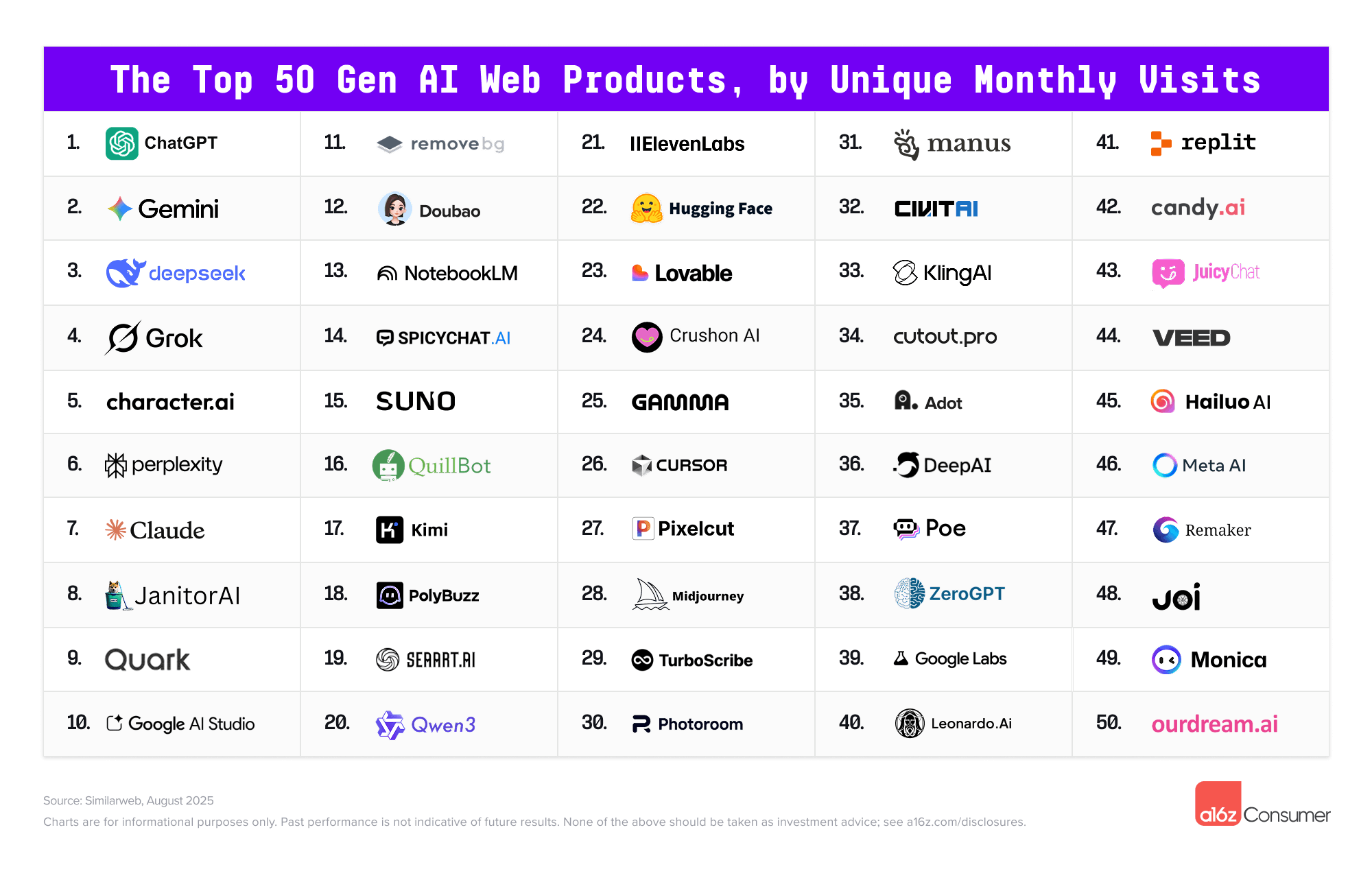
The Top 100 [Gen AI] Consumer Apps 5th edition — from a16z.com


And in an interesting move by Microsoft and Samsung:

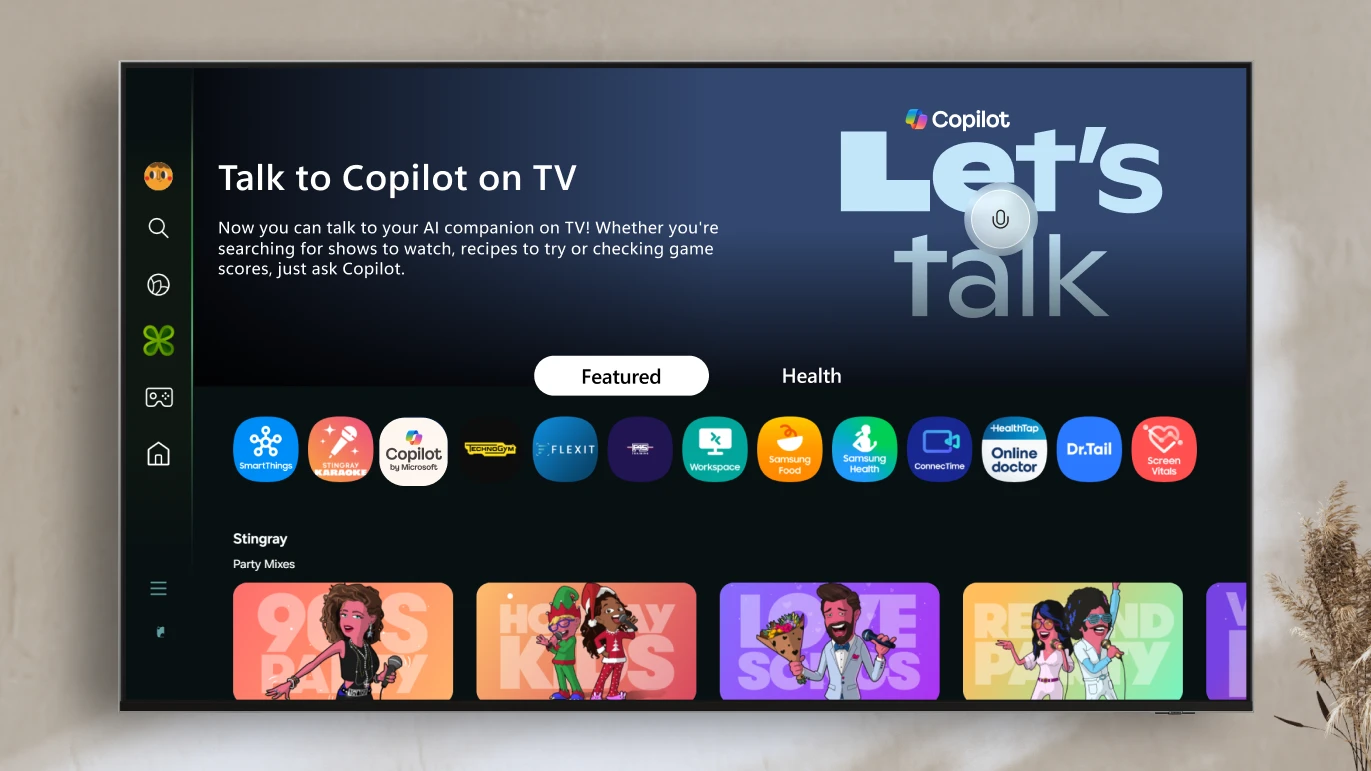
A smarter way to talk to your TV: Microsoft Copilot launches on Samsung TVs and monitors — from microsoft.com

Voice-powered AI meets a visual companion for entertainment, everyday help, and everything in between. 

Redmond, Wash., August 27—Today, we’re announcing the launch of Copilot on select Samsung TVs and monitors, transforming the biggest screen in your home into your most personal and helpful companion—and it’s free to use.

Copilot makes your TV easier and more fun to use with its voice-powered interface, friendly on-screen character, and simple visual cards. Now you can quickly find what you’re looking for and discover new favorites right from your living room.

Because it lives on the biggest screen in the home, Copilot is a social experience—something you can use together with family and friends to spark conversations, help groups decide what to watch, and turn the TV into a shared space for curiosity and connection.


Artificial Intelligence in Vocational Education — from leonfurze.com by Leon Furze

The vocational education sector is incredibly diverse, covering everything from trades like building and construction, electrical, plumbing and automotive through to allied health, childcare, education, the creative arts and the technology industry. In Canberra, we heard from people representing every corner of the industry, including education, retail, tourism, finance and digital technologies. Every one of these industries is being impacted by the current AI boom.

A theme of the day was that whilst the vocational education sector is seen as a slow-moving beast with its own peculiar red tape, it is still possible to respond to emerging technologies like artificial intelligence, and there’s an imperative to do so.

Coming back to GenAI for small business owners, a qualified plumber running their own business, either as a solo operator or as manager of a team, probably doesn’t have many opportunities to keep up to date with the rapid developments of digital technologies. They’re far too busy doing their job.

So vocational education and training can be an initial space to develop some skills and understanding of the technology in a way which can be beneficial for managing that day-to-day job.


And speaking of the trade schools/vocational world…

Social media opens a window to traditional trades for young workers — from washingtonpost.com by Taylor Telford; this is a gifted article
Worker influencers are showing what life is like in fields such as construction, plumbing and manufacturing. Trade schools are trying to make the most of it.

Social media is increasingly becoming a destination for a new generation to learn about skilled trades — at a time when many have grown skeptical about the cost of college and the promise of white-collar jobs. These posts offer authentic insight as workers talk openly about everything from their favorite workwear to safety and payday routines.

The exposure is also changing the game for trade schools and employers in such industries as manufacturing and construction, which have long struggled to attract workers. Now, some are evolving their recruiting tactics by wading into content creation after decades of relying largely on word of mouth.


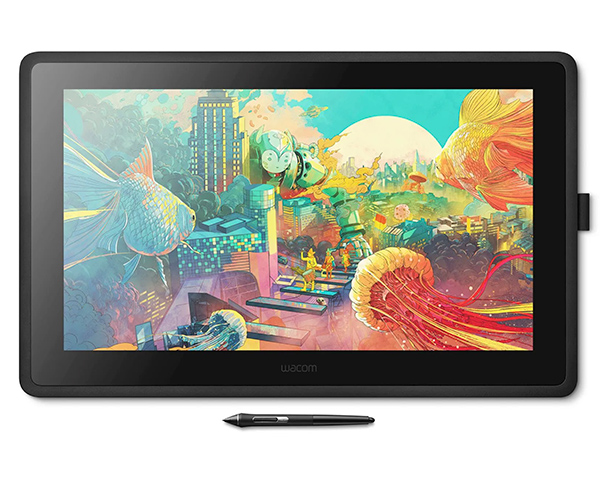
The No Bulls**t Guide To Drawing Tablets — from booooooom.com

SO WHICH DEVICE SHOULD YOU BUY?

If you’re anything like me, the answer is an iPad AND a drawing display. I heavily rely on both my desktop apps and Procreate, so limiting myself to only one device doesn’t cut it for my creative workflow.

However, it all comes down to personal preference and understanding which apps you rely on, whether portability is essential, how vital ergonomics are, and ultimately what you can afford. Once you answer those questions, everything falls into place.


Get Up Close to Frank Lloyd Wright’s Unrealized Buildings with David Romero’s Digital Models — from thisiscolossal.com by Kate Mothes and David Romero
.


.


“The AI-enhanced learning ecosystem” [Jennings] + other items re: AI in our learning ecosystems

The AI-enhanced learning ecosystem: A case study in collaborative innovation — from chieflearningofficer.com by Kevin Jennings
How artificial intelligence can serve as a tool and collaborative partner in reimagining content development and management.

Learning and development professionals face unprecedented challenges in today’s rapidly evolving business landscape. According to LinkedIn’s 2025 Workplace Learning Report, 67 percent of L&D professionals report being “maxed out” on capacity, while 66 percent have experienced budget reductions in the past year.

Despite these constraints, 87 percent agree their organizations need to develop employees faster to keep pace with business demands. These statistics paint a clear picture of the pressure L&D teams face: do more, with less, faster.

This article explores how one L&D leader’s strategic partnership with artificial intelligence transformed these persistent challenges into opportunities, creating a responsive learning ecosystem that addresses the modern demands of rapid product evolution and diverse audience needs. With 71 percent of L&D professionals now identifying AI as a high or very high priority for their learning strategy, this case study demonstrates how AI can serve not merely as a tool but as a collaborative partner in reimagining content development and management.
.


How we use GenAI and AR to improve students’ design skills — from timeshighereducation.com by Antonio Juarez, Lesly Pliego and Jordi Rábago who are professors of architecture at Monterrey Institute of Technology in Mexico; Tomas Pachajoa is a professor of architecture at the El Bosque University in Colombia; & Carlos Hinrichsen and Marietta Castro are educators at San Sebastián University in Chile.
Guidance on using generative AI and augmented reality to enhance student creativity, spatial awareness and interdisciplinary collaboration

Blend traditional skills development with AI use
For subjects that require students to develop drawing and modelling skills, have students create initial design sketches or models manually to ensure they practise these skills. Then, introduce GenAI tools such as Midjourney, Leonardo AI and ChatGPT to help students explore new ideas based on their original concepts. Using AI at this stage broadens their creative horizons and introduces innovative perspectives, which are crucial in a rapidly evolving creative industry.

Provide step-by-step tutorials, including both written guides and video demonstrations, to illustrate how initial sketches can be effectively translated into AI-generated concepts. Offer example prompts to demonstrate diverse design possibilities and help students build confidence using GenAI.

Integrating generative AI and AR consistently enhanced student engagement, creativity and spatial understanding on our course. 


How Texas is Preparing Higher Education for AI — from the74million.org by Kate McGee
TX colleges are thinking about how to prepare students for a changing workforce and an already overburdened faculty for new challenges in classrooms.

“It doesn’t matter if you enter the health industry, banking, oil and gas, or national security enterprises like we have here in San Antonio,” Eighmy told The Texas Tribune. “Everybody’s asking for competency around AI.”

It’s one of the reasons the public university, which serves 34,000 students, announced earlier this year that it is creating a new college dedicated to AI, cyber security, computing and data science. The new college, which is still in the planning phase, would be one of the first of its kind in the country. UTSA wants to launch the new college by fall 2025.

But many state higher education leaders are thinking beyond that. As AI becomes a part of everyday life in new, unpredictable ways, universities across Texas and the country are also starting to consider how to ensure faculty are keeping up with the new technology and students are ready to use it when they enter the workforce.


In the Room Where It Happens: Generative AI Policy Creation in Higher Education — from er.educause.edu by Esther Brandon, Lance Eaton, Dana Gavin, and Allison Papini

To develop a robust policy for generative artificial intelligence use in higher education, institutional leaders must first create “a room” where diverse perspectives are welcome and included in the process.


Q&A: Artificial Intelligence in Education and What Lies Ahead — from usnews.com by Sarah Wood
Research indicates that AI is becoming an essential skill to learn for students to succeed in the workplace.

Q: How do you expect to see AI embraced more in the future in college and the workplace?
I do believe it’s going to become a permanent fixture for multiple reasons. I think the national security imperative associated with AI as a result of competing against other nations is going to drive a lot of energy and support for AI education. We also see shifts across every field and discipline regarding the usage of AI beyond college. We see this in a broad array of fields, including health care and the field of law. I think it’s here to stay and I think that means we’re going to see AI literacy being taught at most colleges and universities, and more faculty leveraging AI to help improve the quality of their instruction. I feel like we’re just at the beginning of a transition. In fact, I often describe our current moment as the ‘Ask Jeeves’ phase of the growth of AI. There’s a lot of change still ahead of us. AI, for better or worse, it’s here to stay.


AI-Generated Podcasts Outperform Textbooks in Landmark Education Study — form linkedin.com by David Borish

A new study from Drexel University and Google has demonstrated that AI-generated educational podcasts can significantly enhance both student engagement and learning outcomes compared to traditional textbooks. The research, involving 180 college students across the United States, represents one of the first systematic investigations into how artificial intelligence can transform educational content delivery in real-time.


What can we do about generative AI in our teaching?  — from linkedin.com by Kristina Peterson

So what can we do?

  • Interrogate the Process: We can ask ourselves if we I built in enough checkpoints. Steps that can’t be faked. Things like quick writes, question floods, in-person feedback, revision logs.
  • Reframe AI: We can let students use AI as a partner. We can show them how to prompt better, revise harder, and build from it rather than submit it. Show them the difference between using a tool and being used by one.
  • Design Assignments for Curiosity, Not Compliance: Even the best of our assignments need to adapt. Mine needs more checkpoints, more reflective questions along the way, more explanation of why my students made the choices they did.

Teachers Are Not OK — from 404media.co by Jason Koebler

The response from teachers and university professors was overwhelming. In my entire career, I’ve rarely gotten so many email responses to a single article, and I have never gotten so many thoughtful and comprehensive responses.

One thing is clear: teachers are not OK.

In addition, universities are contracting with companies like Microsoft, Adobe, and Google for digital services, and those companies are constantly pushing their AI tools. So a student might hear “don’t use generative AI” from a prof but then log on to the university’s Microsoft suite, which then suggests using Copilot to sum up readings or help draft writing. It’s inconsistent and confusing.

I am sick to my stomach as I write this because I’ve spent 20 years developing a pedagogy that’s about wrestling with big ideas through writing and discussion, and that whole project has been evaporated by for-profit corporations who built their systems on stolen work. It’s demoralizing.


How to Use AI and Universal Design to Empower Diverse Thinkers with Susan Tanner — from legaltalknetwork.com by Zack Glaser, Stephanie Everett, and Susan Tanner

What if the key to better legal work isn’t just smarter tools but more inclusive ones? Susan Tanner, Associate Professor at the University of Louisville Brandeis School of Law, joins Zack Glaser to explore how AI and universal design can improve legal education and law firm operations. Susan shares how tools like generative AI can support neurodiverse thinkers, enhance client communication, and reduce anxiety for students and professionals alike. They also discuss the importance of inclusive design in legal tech and how law firms can better support their teams by embracing different ways of thinking to build a more accessible, future-ready practice. The conversation emphasizes the need for educators and legal professionals to adapt to the evolving landscape of AI, ensuring that they leverage its capabilities to better serve their clients and students.


Maximizing Microsoft Copilot in Your Legal Practice — from legaltalknetwork.com by Tom Mighell, Dennis Kennedy, and Ben Schorr

Copilot is a powerful tool for lawyers, but are you making the most of it within your Microsoft apps? Tom Mighell is flying solo at ABA TECHSHOW 2025 and welcomes Microsoft’s own Ben Schorr to the podcast. Ben shares expert insights into how lawyers can implement Copilot’s AI-assistance to work smarter, not harder. From drafting documents to analyzing spreadsheets to streamlining communication, Copilot can handle the tedious tasks so you can focus on what really matters. Ben shares numerous use-cases and capabilities for attorneys and later gives a sneak peek at Copilot’s coming enhancements.


What does ‘age appropriate’ AI literacy look like in higher education? — from timeshighereducation.com by Fun Siong Lim
As AI literacy becomes an essential work skill, universities need to move beyond developing these competencies at ‘primary school’ level in their students. Here, Fun Siong Lim reflects on frameworks to support higher-order AI literacies

Like platforms developed at other universities, Project NALA offers a front-end interface (known as the builder) for faculty to create their own learning assistant. An idea we have is to open the builder up to students to allow them to create their own GenAI assistant as part of our AI literacy curriculum. As they design, configure and test their own assistant, they will learn firsthand how generative AI works. They get to test performance-enhancement approaches beyond prompt engineering, such as grounding the learning assistant with curated materials (retrieval-augmented generation) and advanced ideas such as incorporating knowledge graphs.

They should have the opportunity to analyse, evaluate and create responsible AI solutions. Offering students the opportunity to build their own AI assistants could be a way forward to develop these much-needed skills.


How to Use ChatGPT 4o’s Update to Turn Key Insights Into Clear Infographics (Prompts Included) — from evakeiffenheim.substack.com by Eva Keiffenheim
This 3-step workflow helps you break down books, reports, or slide-decks into professional visuals that accelerate understanding.

This article shows you how to find core ideas, prompt GPT-4o3 for a design brief, and generate clean, professional images that stick. These aren’t vague “creative visuals”—they’re structured for learning, memory, and action.

If you’re a lifelong learner, educator, creator, or just someone who wants to work smarter, this process is for you.

You’ll spend less time re-reading and more time understanding. And maybe—just maybe—you’ll build ideas that not only click in your brain, but also stick in someone else’s.


SchoolAI Secures $25 Million to Help Teachers and Schools Reach Every Student — from globenewswire.com
 The Classroom Experience platform gives every teacher and student their own AI tools for personalized learning

SchoolAI’s Classroom Experience platform combines AI assistants for teachers that help with classroom preparation and other administrative work, and Spaces–personalized AI tutors, games, and lessons that can adapt to each student’s unique learning style and interests. Together, these tools give teachers actionable insights into how students are doing, and how the teacher can deliver targeted support when it matters most.

“Teachers and schools are navigating hard challenges with shrinking budgets, teacher shortages, growing class sizes, and ongoing recovery from pandemic-related learning gaps,” said Caleb Hicks, founder and CEO of SchoolAI. “It’s harder than ever to understand how every student is really doing. Teachers deserve powerful tools to help extend their impact, not add to their workload. This funding helps us double down on connecting the dots for teachers and students, and later this year, bringing school administrators and parents at home onto the platform as well.”


AI in Education, Part 3: Looking Ahead – The Future of AI in Learning — from rdene915.com by Dr. Rachelle Dené Poth

In the first and second parts of my AI series, I focused on where we see AI in classrooms. Benefits range from personalized learning and accessibility tools to AI-driven grading and support of a teaching assistant. In Part 2, I chose to focus on some of the important considerations related to ethics that must be part of the conversation. Schools need to focus on data privacy, bias, overreliance, and the equity divide. I wanted to focus on the future for this last part in the current AI series. Where do we go from here?


Anthropic Education Report: How University Students Use Claude — from anthropic.com

The key findings from our Education Report are:

  • STEM students are early adopters of AI tools like Claude, with Computer Science students particularly overrepresented (accounting for 36.8% of students’ conversations while comprising only 5.4% of U.S. degrees). In contrast, Business, Health, and Humanities students show lower adoption rates relative to their enrollment numbers.
  • We identified four patterns by which students interact with AI, each of which were present in our data at approximately equal rates (each 23-29% of conversations): Direct Problem Solving, Direct Output Creation, Collaborative Problem Solving, and Collaborative Output Creation.
  • Students primarily use AI systems for creating (using information to learn something new) and analyzing (taking apart the known and identifying relationships), such as creating coding projects or analyzing law concepts. This aligns with higher-order cognitive functions on Bloom’s Taxonomy. This raises questions about ensuring students don’t offload critical cognitive tasks to AI systems.

From the Kuali Days 2025 Conference: A CEO’s View of Planning for AI — from campustechnology.com by Mary Grush
A Conversation with Joel Dehlin

How can a company serving higher education navigate the changes AI brings to the ed tech marketplace? What will customers expect in this dynamic? Here, CT talks with Kuali CEO Joel Dehlin, who shared his company’s AI strategies in a featured plenary session, “Sneak Peek of AI in Kuali Build,” at Kuali Days 2025 in Anaheim.


How students can use generative AI — from aliciabankhofer.substack.com by Alicia Bankhofer
Part 4 of 4 in my series on Teaching and Learning in the AI Age

This article is the culmination of a series exploring AI’s impact on education.

Part 1: What Educators Need outlined essential AI literacy skills for teachers, emphasizing the need to move beyond basic ChatGPT exploration to understand the full spectrum of AI tools available in education.

Part 2: What Students Need addressed how students require clear guidance to use AI safely, ethically, and responsibly, with emphasis on developing critical thinking skills alongside AI literacy.

Part 3: How Educators Can Use GenAI presented ten practical use cases for teachers, from creating differentiated resources to designing assessments, demonstrating how AI can reclaim 5-7 hours weekly for meaningful student interactions.

Part 4: How Students Can Use GenAI (this article) provides frameworks for guiding student AI use based on Joscha Falck’s dimensions: learning about, with, through, despite, and without AI.


Mapping a Multidimensional Framework for GenAI in Education — from er.educause.edu by Patricia Turner
Prompting careful dialogue through incisive questions can help chart a course through the ongoing storm of artificial intelligence.

The goal of this framework is to help faculty, educational developers, instructional designers, administrators, and others in higher education engage in productive discussions about the use of GenAI in teaching and learning. As others have noted, theoretical frameworks will need to be accompanied by research and teaching practice, each reinforcing and reshaping the others to create understandings that will inform the development of approaches to GenAI that are both ethical and maximally beneficial, while mitigating potential harms to those who engage with it.


Instructional Design Isn’t Dying — It’s Specialising — from drphilippahardman.substack.com by Dr. Philippa Hardman
Aka, how AI is impacting role & purpose of Instructional Design

Together, these developments have revealed something important: despite widespread anxiety, the instructional design role isn’t dying—it’s specialising.

What we’re witnessing isn’t the automation of instructional design and the death of the instructional designer, but rather the evolution of the ID role into multiple distinct professional pathways.

The generalist “full stack” instructional designer is slowly but decisively fracturing into specialised roles that reflect both the capabilities of generative AI and the strategic imperatives facing modern organisations.

In this week’s blog post, I’ll share what I’ve learned about how our field is transforming, and what it likely means for you and your career path.

Those instructional designers who cling to traditional generalist models risk being replaced, but those who embrace specialisation, data fluency, and AI collaboration will excel and lead the next evolution of the field. Similarly, those businesses that continue to view L&D as a cost centre and focus on automating content delivery will be outperformed, while those that invest in building agile, AI-enabled learning ecosystems will drive measurable performance gains and secure their competitive advantage.


Adding AI to Every Step in Your eLearning Design Workflow — from learningguild.com by George Hanshaw

We know that eLearning is a staple of training and development. The expectations of the learners are higher than ever: They expect a dynamic, interactive, and personalized learning experience. As instructional designers, we are tasked with meeting these expectations by creating engaging and effective learning solutions.

The integration of Artificial Intelligence (AI) into our eLearning design process is a game-changer that can significantly enhance the quality and efficiency of our work.

No matter if you use ADDIE or rapid prototyping, AI has a fit in every aspect of your workflow. By integrating AI, you can ensure a more efficient and effective design process that adapts to the unique needs of your learners. This not only saves time and resources but also significantly enhances the overall learning experience. We will explore the needs analysis and the general design process.


Uplimit raises stakes in corporate learning with suite of AI agents that can train thousands of employees simultaneously — from venturebeat.com by Michael Nuñez|

Uplimit unveiled a suite of AI-powered learning agents today designed to help companies rapidly upskill employees while dramatically reducing administrative burdens traditionally associated with corporate training.

The San Francisco-based company announced three sets of purpose-built AI agents that promise to change how enterprises approach learning and development: skill-building agents, program management agents, and teaching assistant agents. The technology aims to address the growing skills gap as AI advances faster than most workforces can adapt.

“There is an unprecedented need for continuous learning—at a scale and speed traditional systems were never built to handle,” said Julia Stiglitz, CEO and co-founder of Uplimit, in an interview with VentureBeat. “The companies best positioned to thrive aren’t choosing between AI and their people—they’re investing in both.”


Introducing Claude for Education — from anthropic.com

Today we’re launching Claude for Education, a specialized version of Claude tailored for higher education institutions. This initiative equips universities to develop and implement AI-enabled approaches across teaching, learning, and administration—ensuring educators and students play a key role in actively shaping AI’s role in society.

As part of announcing Claude for Education, we’re introducing:

  1. Learning mode: A new Claude experience that guides students’ reasoning process rather than providing answers, helping develop critical thinking skills
  2. University-wide Claude availability: Full campus access agreements with Northeastern University, London School of Economics and Political Science (LSE), and Champlain College, making Claude available to all students
  3. Academic partnerships: Joining Internet2 and working with Instructure to embed AI into teaching & learning with Canvas LMS
  4. Student programs: A new Claude Campus Ambassadors program along with an initiative offering API credits for student projects

A comment on this from The Rundown AI:

Why it matters: Education continues to grapple with AI, but Anthropic is flipping the script by making the tech a partner in developing critical thinking rather than an answer engine. While the controversy over its use likely isn’t going away, this generation of students will have access to the most personalized, high-quality learning tools ever.


Should College Graduates Be AI Literate? — from chronicle.com by Beth McMurtrie (behind a paywall)
More institutions are saying yes. Persuading professors is only the first barrier they face.

Last fall one of Jacqueline Fajardo’s students came to her office, eager to tell her about an AI tool that was helping him learn general chemistry. Had she heard of Google NotebookLM? He had been using it for half a semester in her honors course. He confidently showed her how he could type in the learning outcomes she posted for each class and the tool would produce explanations and study guides. It even created a podcast based on an academic paper he had uploaded. He did not feel it was important to take detailed notes in class because the AI tool was able to summarize the key points of her lectures.


Showing Up for the Future: Why Educators Can’t Sit Out the AI Conversation — from marcwatkins.substack.com with a guest post from Lew Ludwig

The Risk of Disengagement
Let’s be honest: most of us aren’t jumping headfirst into AI. At many of our institutions, it’s not a gold rush—it’s a quiet standoff. But the group I worry most about isn’t the early adopters. It’s the faculty who’ve decided to opt out altogether.

That choice often comes from a place of care. Concerns about data privacy, climate impact, exploitative labor, and the ethics of using large language models are real—and important. But choosing not to engage at all, even on ethical grounds, doesn’t remove us from the system. It just removes our voices from the conversation.

And without those voices, we risk letting others—those with very different priorities—make the decisions that shape what AI looks like in our classrooms, on our campuses, and in our broader culture of learning.


Turbocharge Your Professional Development with AI — from learningguild.com by Dr. RK Prasad

You’ve just mastered a few new eLearning authoring tools, and now AI is knocking on the door, offering to do your job faster, smarter, and without needing coffee breaks. Should you be worried? Or excited?

If you’re a Learning and Development (L&D) professional today, AI is more than just a buzzword—it’s transforming the way we design, deliver, and measure corporate training. But here’s the good news: AI isn’t here to replace you. It’s here to make you better at what you do.

The challenge is to harness its potential to build digital-ready talent, not just within your organization but within yourself.

Let’s explore how AI is reshaping L&D strategies and how you can leverage it for professional development.


5 Recent AI Notables — from automatedteach.com by Graham Clay

1. OpenAI’s New Image Generator
What Happened: OpenAI integrated a much more powerful image generator directly into GPT-4o, making it the default image creator in ChatGPT. Unlike previous image models, this one excels at accurately rendering text in images, precise visualization of diagrams/charts, and multi-turn image refinement through conversation.

Why It’s Big: For educators, this represents a significant advancement in creating educational visuals, infographics, diagrams, and other instructional materials with unprecedented accuracy and control. It’s not perfect, but you can now quickly generate custom illustrations that accurately display mathematical equations, chemical formulas, or process workflows — previously a significant hurdle in digital content creation — without requiring graphic design expertise or expensive software. This capability dramatically reduces the time between conceptualizing a visual aid and implementing it in course materials.
.


The 4 AI modes that will supercharge your workflow — from aiwithallie.beehiiv.com by Allie K. Miller
The framework most people and companies won’t discover until 2026


© 2025 | Daniel Christian