What AI-Generated Voice Technology Means For Creators And Brands — from bitrebels.com by Ryan Mitchell

Voice has become one of the most influential elements in how digital content is experienced. From podcasts and videos to apps, ads, and interactive platforms, spoken audio shapes how messages are understood and remembered. In recent years, the rise of the ai voice generator has changed how creators and brands approach audio production, lowering barriers while expanding creative possibilities.

Rather than relying exclusively on traditional voice recording, many teams now use AI-generated voices as part of their content and brand strategies. This shift is not simply about efficiency; it reflects broader changes in how digital experiences are produced, scaled, and personalised.

The Future Role Of AI-Generated Voice
As AI voice technology continues to improve, its role in creative and brand workflows will likely expand. Future developments may include more adaptive voices that respond to context, audience behaviour, or emotional cues in real time. Rather than replacing traditional voice work, AI-generated voice is becoming another option in a broader creative toolkit, one that offers speed, flexibility, and accessibility.


Nvidia, Eli Lilly announce $1 billion investment in AI drug discovery lab — from finance.yahoo.com by Laura Bratton

AI chipmaker Nvidia (NVDA) and pharmaceutical giant Eli Lilly (LLY) on Monday announced that the two companies would jointly invest $1 billion to create a lab in San Francisco focused on using AI to accelerate drug discovery.

The $1 billion investment will be spent over five years on infrastructure, compute, and talent for the lab. Nvidia’s engineers will work alongside Lilly’s experts in biology, science, and medicine to generate large-scale data and build AI models to advance medicine development. The lab’s work will begin early this year, the companies said.


Shoppers will soon be able to make purchases directly through Google’s Gemini app and browser.


Google and Walmart Join Forces to Shape the Future of Retail — from adweek.com by Lauren Johnson
At NRF, Sundar Pichai and John Furner revealed how AI and drones will shape shopping in 2026 and beyond

One of the biggest reveals is that shoppers will be able to purchase Walmart and Sam’s Club products through Google’s AI chatbot Gemini.


The Hard Part of Legal AI Isn’t the Technology — from linkedin.com by Colin S. Levy

Selecting AI tools for legal teams is no longer about novelty or experimentation. It is about aligning technology with judgment, workflows, and risk tolerance. Teams that approach AI with specificity, skepticism, and operational discipline place themselves in a far stronger position to capture real value and avoid unwelcome surprises once the demo environment disappears.


Addendum on 1/8/26:


Reflecting on Education in 2025 — from by Dr. Rachelle Dené Poth

Educators have become more discerning about initiatives to invest in, tools to explore, and expectations to set. The question “Can we do this?” shifted to “Should we do this? And “Why?” Which then led to the “How” part.

This shift showed up in conversations around curriculum, assessment, technology use, and student well-being. Schools began reducing or being more selective rather than layering, which helped educators to adjust better to change. Leaders focused more on coherence instead of compliance. And in some conversations I had or articles I read, I noticed respectful pushback on practices that added complexity without improving learning.

I think this is why the recalibration mattered.

AI has become less about “cheating” and more about helping students and others learn how to think, evaluate, and create responsibly in an AI-infused world.

Educators have become more discerning about initiatives to invest in, tools to explore, and expectations to set. The question “Can we do this?” shifted to “Should we do this? And “Why?” Which then led to the “How” part.


At CES 2026, Everything Is AI. What Matters Is How You Use It — from wired.com by Boone Ashworth
Integrated chatbots and built-in machine intelligence are no longer standout features in consumer tech. If companies want to win in the AI era, they’ve got to hone the user experience.

Beyond Wearables
Right now, AI is on your face and arms—smart glasses and smart watches—but this year will see it proliferate further into products like earbuds, headphones, and smart clothing.

Health tech will see an influx of AI features too, as companies aim to use AI to monitor biometric data from wearables like rings and wristbands. Heath sensors will also continue to show up in newer places like toilets, bath mats, and brassieres.

The smart home will continue to be bolstered by machine intelligence, with more products that can listen, see, and understand what’s happening in your living space. Familiar candidates for AI-powered upgrades like smart vacuums and security cameras will be joined by surprising AI bedfellows like refrigerators and garage door openers.


Along these lines, see
live updates from CNET here.


ChatGPT is overrated. Here’s what to use instead. — from washingtonpost.com by Geoffrey A. Fowler
When I want help from AI, ChatGPT is no longer my default first stop.

I can tell you which AI tools are worth using — and which to avoid — because I’ve been running a chatbot fight club.

I conducted dozens of bot challenges based on real things people do with AI, including writing breakup texts and work emailsdecoding legal contracts and scientific researchanswering tricky research questions, and editing photos and making “art.” Human experts including best-selling authors, reference librarians, a renowned scientist and even a Pulitzer Prize-winning photographer judged the results.

After a year of bot battles, one thing stands out: There is no single best AI. The smartest way to use chatbots today is to pick different tools for different jobs — and not assume one bot can do it all.


How Collaborative AI Agents Are Shaping the Future of Autonomous IT — from aijourn.com by Michael Nappi

Some enterprise platforms now support cross-agent communication and integration with ecosystems maintained by companies like Microsoft, NVIDIA, Google, and Oracle. These cross-platform data fabrics break down silos and turn isolated AI pilots into enterprise-wide services. The result is an IT backbone that not only automates but also collaborates for continuous learning, diagnostics, and system optimization in real time.


Nvidia dominated the headlines in 2025 — these were its 15 biggest events of the year — from finance.yahoo.com by Daniel Howley

It’s difficult to think of any single company that had a bigger impact on Wall Street and the AI trade in 2025 than Nvidia (NVDA).

Nvidia’s revenue soared in 2025, bringing in $187.1 billion, and its market capitalization continued to climb, briefly eclipsing the $5 trillion mark before settling back in the $4 trillion range.

There were plenty of major highs and deep lows throughout the year, but these 15 were among the biggest moments of Nvidia’s 2025.


How Your Learners *Actually* Learn with AI — from drphilippahardman.substack.com by Dr. Philippa Hardman
What 37.5 million AI chats show us about how learners use AI at the end of 2025 — and what this means for how we design & deliver learning experiences in 2026

Last week, Microsoft released a similar analysis of a whopping 37.5 million Copilot conversations. These conversation took place on the platform from January to September 2025, providing us with a window into if and how AI use in general — and AI use among learners specifically – has evolved in 2025.

Microsoft’s mass behavioural data gives us a detailed, global glimpse into what learners are actually doing across devices, times of day and contexts. The picture that emerges is pretty clear and largely consistent with what OpenAI’s told us back in the summer:

AI isn’t functioning primarily as an “answers machine”: the majority of us use AI as a tool to personalise and differentiate generic learning experiences and – ultimately – to augment human learning.

Let’s dive in!

Learners don’t “decide” to use AI anymore. They assume it’s there, like search, like spellcheck, like calculators. The question has shifted from “should I use this?” to “how do I use this effectively?”


8 AI Agents Every HR Leader Needs To Know In 2026 — from forbes.com by Bernard Marr

So where do you start? There are many agentic tools and platforms for AI tasks on the market, and the most effective approach is to focus on practical, high-impact workflows. So here, I’ll look at some of the most compelling use cases, as well as provide an overview of the tools that can help you quickly deliver tangible wins.

Some of the strongest opportunities in HR include:

  • Workforce management, administering job satisfaction surveys, monitoring and tracking performance targets, scheduling interventions, and managing staff benefits, medical leave, and holiday entitlement.
  • Recruitment screening, automatically generating and posting job descriptions, filtering candidates, ranking applicants against defined criteria, identifying the strongest matches, and scheduling interviews.
  • Employee onboarding, issuing new hires with contracts and paperwork, guiding them to onboarding and training resources, tracking compliance and completion rates, answering routine enquiries, and escalating complex cases to human HR specialists.
  • Training and development, identifying skills gaps, providing self-service access to upskilling and reskilling opportunities, creating personalized learning pathways aligned with roles and career goals, and tracking progress toward completion.


25 Big Ideas that will define 2026 — from linkedin.com by LinkedIn News
This year’s predictions capture a world in flux, where technology and humanity will press closer than ever, fueling new opportunities and tensions.

Blockchain: Blockchain technology will create new ways for creators to keep more of their revenue by enabling them to host their own content, bypassing traditional social media platforms that take a cut of their earnings.

3.AI: Artificial intelligence will enhance creators’ ability to scale their personal brands exponentially — producing more content, creating virtual influencers and expanding reach in ways we’ve never seen.

Laws around artificial intelligence in mental health care are set to change dramatically in 2026, in the wake of lawsuits alleging harm or “psychosis” linked to AI tools. After years of rapid adoption — and little oversight — regulators will move to treat therapy chatbots more like medical devices than lifestyle apps.

Small businesses — which make up 90% of companies globally — will be the top destination for young jobseekers in 2026.

Generative engine optimization (GEO) is set to replace search engine optimization (SEO) as the way brands get discovered in the year ahead. As consumers turn to AI chatbots, agentic workflows and answer engines, appearing prominently in generative outputs will matter more than ranking in search engines.


Coursera to Combine with Udemy to Empower the Global Workforce with Skills for the AI Era — from investor.coursera.com

Highly Complementary Capabilities Will Create a Leading Technology Platform, Redefining Skills Discovery, Development, and Mastery for Learners and Organizations at Scale

Unites Udemy’s Dynamic AI-Powered Skills Development Marketplace with World-Class University and Industry Brands Under the Coursera Ecosystem, Expanding Value, Impact, and Choice Globally

Strengthens Combined Company’s Financial Profile with Pro Forma Annual Revenue of More Than $1.5 Billion and Anticipated Annual Run-Rate Cost Synergies of $115 Million Within 24 Months

“We’re at a pivotal moment in which AI is rapidly redefining the skills required for every job across every industry. Organizations and individuals around the world need a platform that is as agile as the new and emerging skills learners must master,” said Greg Hart, CEO of Coursera. “By combining the highly complementary strengths of Coursera and Udemy, we will be in an even stronger position to address the global talent transformation opportunity, unlock a faster pace of innovation, and deliver valuable experiences and outcomes for our learners and customers. Together, we will ensure our millions of learners, thousands of enterprise, university, and government customers, and expert instructors have a platform to keep pace with technology acceleration.”


AI working competency is now a graduation requirement at Purdue [Pacton] + other items re: AI in our learning ecosystems


AI Has Landed in Education: Now What? — from learningfuturesdigest.substack.com by Dr. Philippa Hardman

Here’s what’s shaped the AI-education landscape in the last month:

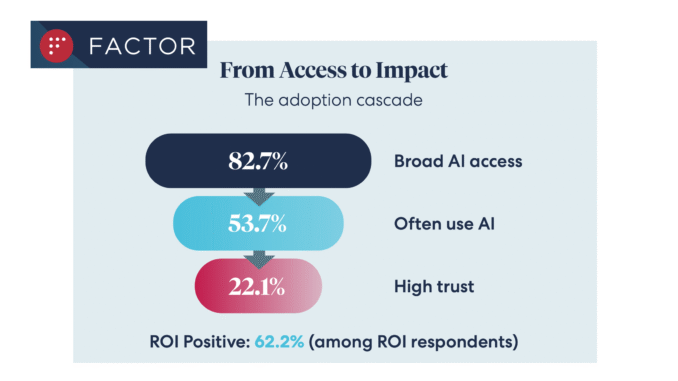
  • The AI Speed Trap is [still] here: AI adoption in L&D is basically won (87%)—but it’s being used to ship faster, not learn better (84% prioritising speed), scaling “more of the same” at pace.
  • AI tutors risk a “pedagogy of passivity”: emerging evidence suggests tutoring bots can reduce cognitive friction and pull learners down the ICAP spectrum—away from interactive/constructive learning toward efficient consumption.
  • Singapore + India are building what the West lacks: they’re treating AI as national learning infrastructure—for resilience (Singapore) and access + language inclusion (India)—while Western systems remain fragmented and reactive.
  • Agentic AI is the next pivot: early signs show a shift from AI as a content engine to AI as a learning partner—with UConn using agents to remove barriers so learners can participate more fully in shared learning.
  • Moodle’s AI stance sends two big signals: the traditional learning ecosystem in fragmenting, and the concept of “user sovereignty” over by AI is emerging.

Four strategies for implementing custom AIs that help students learn, not outsource — from educational-innovation.sydney.edu.au by Kria Coleman, Matthew Clemson, Laura Crocco and Samantha Clarke; via Derek Bruff

For Cogniti to be taken seriously, it needs to be woven into the structure of your unit and its delivery, both in class and on Canvas, rather than left on the side. This article shares practical strategies for implementing Cogniti in your teaching so that students:

  • understand the context and purpose of the agent,
  • know how to interact with it effectively,
  • perceive its value as a learning tool over any other available AI chatbots, and
  • engage in reflection and feedback.

In this post, we discuss how to introduce and integrate Cogniti agents into the learning environment so students understand their context, interact effectively, and see their value as customised learning companions.

In this post, we share four strategies to help introduce and integrate Cogniti in your teaching so that students understand their context, interact effectively, and see their value as customised learning companions.


Collection: Teaching with Custom AI Chatbots — from teaching.virginia.edu; via Derek Bruff
The default behaviors of popular AI chatbots don’t always align with our teaching goals. This collection explores approaches to designing AI chatbots for particular pedagogical purposes.

Example/excerpt:


7 Legal Tech Trends That Will Reshape Every Business In 2026 — from forbes.com by Bernard Marr

Here are the trends that will matter most.

  1. AI Agents As Legal Assistants
  2. AI As A Driver Of Business Strategy
  3. Automation In Judicial Administration
  4. Always-On Compliance Monitoring
  5. Cybersecurity As An Essential Survival Tool
  6. Predictive Litigation
  7. Compliance As Part Of The Everyday Automation Fabric

According to the Thomson Reuters Future Of Professionals report, most experts already expect AI to transform their work within five years, with many viewing it as a positive force. The challenge now is clear: legal and compliance leaders must understand the tools reshaping their field and prepare their teams for a very different way of working in 2026.


Addendum on 12/17/25:


Beyond Infographics: How to Use Nano Banana to *Actually* Support Learning — from drphilippahardman.substack.com by Dr Philippa Hardman
Six evidence-based use cases to try in Google’s latest image-generating AI tool

While it’s true that Nano Banana generates better infographics than other AI models, the conversation has so far massively under-sold what’s actually different and valuable about this tool for those of us who design learning experiences.

What this means for our workflow:

Instead of the traditional “commission ? wait ? tweak ? approve ? repeat” cycle, Nano Banana enables an iterative, rapid-cycle design process where you can:

  • Sketch an idea and see it refined in minutes.
  • Test multiple visual metaphors for the same concept without re-briefing a designer.
  • Build 10-image storyboards with perfect consistency by specifying the constraints once, not manually editing each frame.
  • Implement evidence-based strategies (contrasting cases, worked examples, observational learning) that are usually too labour-intensive to produce at scale.

This shift—from “image generation as decoration” to “image generation as instructional scaffolding”—is what makes Nano Banana uniquely useful for the 10 evidence-based strategies below.


© 2025 | Daniel Christian