4 Simple & Easy Ways to Use AI to Differentiate Instruction — from mindfulaiedu.substack.com (Mindful AI for Education) by Dani Kachorsky, PhD
Designing for All Learners with AI and Universal Design Learning

So this year, I’ve been exploring new ways that AI can help support students with disabilities—students on IEPs, learning plans, or 504s—and, honestly, it’s changing the way I think about differentiation in general.

As a quick note, a lot of what I’m finding applies just as well to English language learners or really to any students. One of the big ideas behind Universal Design for Learning (UDL) is that accommodations and strategies designed for students with disabilities are often just good teaching practices. When we plan instruction that’s accessible to the widest possible range of learners, everyone benefits. For example, UDL encourages explaining things in multiple modes—written, visual, auditory, kinesthetic—because people access information differently. I hear students say they’re “visual learners,” but I think everyone is a visual learner, and an auditory learner, and a kinesthetic learner. The more ways we present information, the more likely it is to stick.

So, with that in mind, here are four ways I’ve been using AI to differentiate instruction for students with disabilities (and, really, everyone else too):


The Periodic Table of AI Tools In Education To Try Today — from ictevangelist.com by Mark Anderson

What I’ve tried to do is bring together genuinely useful AI tools that I know are already making a difference.

For colleagues wanting to explore further, I’m sharing the list exactly as it appears in the table, including website links, grouped by category below. Please do check it out, as along with links to all of the resources, I’ve also written a brief summary explaining what each of the different tools do and how they can help.


Seven Hard-Won Lessons from Building AI Learning Tools — from linkedin.com by Louise Worgan

Last week, I wrapped up Dr Philippa Hardman’s intensive bootcamp on AI in learning design. Four conversations, countless iterations, and more than a few humbling moments later – here’s what I am left thinking about.


Finally Catching Up to the New Models — from michellekassorla.substack.com by Michelle Kassorla
There are some amazing things happening out there!

An aside: Google is working on a new vision for textbooks that can be easily differentiated based on the beautiful success for NotebookLM. You can get on the waiting list for that tool by going to LearnYourWay.withgoogle.com.

Nano Banana Pro
Sticking with the Google tools for now, Nano Banana Pro (which you can use for free on Google’s AI Studio), is doing something that everyone has been waiting a long time for: it adds correct text to images.


Introducing AI assistants with memory — from perplexity.ai

The simple act of remembering is the crux of how we navigate the world: it shapes our experiences, informs our decisions, and helps us anticipate what comes next. For AI agents like Comet Assistant, that continuity leads to a more powerful, personalized experience.

Today we are announcing new personalization features to remember your preferences, interests, and conversations. Perplexity now synthesizes them automatically like memory, for valuable context on relevant tasks. Answers are smarter, faster, and more personalized, no matter how you work.

From DSC :
This should be important as we look at learning-related applications for AI.


For the last three days, my Substack has been in the top “Rising in Education” list. I realize this is based on a hugely flawed metric, but it still feels good. ?

– Michael G Wagner

Read on Substack


I’m a Professor. A.I. Has Changed My Classroom, but Not for the Worse. — from nytimes.com by Carlo Rotella [this should be a gifted article]
My students’ easy access to chatbots forced me to make humanities instruction even more human.


The Other Regulatory Time Bomb — from onedtech.philhillaa.com by Phil Hill
Higher ed in the US is not prepared for what’s about to hit in April for new accessibility rules

Most higher-ed leaders have at least heard that new federal accessibility rules are coming in 2026 under Title II of the ADA, but it is apparent from conversations at the WCET and Educause annual conferences that very few understand what that actually means for digital learning and broad institutional risk. The rule isn’t some abstract compliance update: it requires every public institution to ensure that all web and media content meets WCAG 2.1 AA, including the use of audio descriptions for prerecorded video. Accessible PDF documents and video captions alone will no longer be enough. Yet on most campuses, the conversation has been understood only as a buzzword, delegated to accessibility coordinators and media specialists who lack the budget or authority to make systemic changes.

And no, relying on faculty to add audio descriptions en masse is not going to happen.

The result is a looming institutional risk that few presidents, CFOs, or CIOs have even quantified.


There is no God Tier video model — from downes.ca by Stephen Downes

From DSC:
Stephen has some solid reflections and asks some excellent questions in this posting, including:

The question is: how do we optimize an AI to support learning? Will one model be enough? Or do we need different models for different learners in different scenarios?


A More Human University: The Role of AI in Learning — from er.educause.edu by Robert Placido
Far from heralding the collapse of higher education, artificial intelligence offers a transformative opportunity to scale meaningful, individualized learning experiences across diverse classrooms.

The narrative surrounding artificial intelligence (AI) in higher education is often grim. We hear dire predictions of an “impending collapse,” fueled by fears of rampant cheating, the erosion of critical thinking, and the obsolescence of the human educator.Footnote1 This dystopian view, however, is a failure of imagination. It mistakes the death rattle of an outdated pedagogical model for the death of learning itself. The truth is far more hopeful: AI is not an asteroid coming for higher education. It is a catalyst that can finally empower us to solve our oldest, most intractable problem: the inability to scale deep, engaged, and truly personalized learning.


Claude for Life Sciences — from anthropic.com

Increasing the rate of scientific progress is a core part of Anthropic’s public benefit mission.

We are focused on building the tools to allow researchers to make new discoveries – and eventually, to allow AI models to make these discoveries autonomously.

Until recently, scientists typically used Claude for individual tasks, like writing code for statistical analysis or summarizing papers. Pharmaceutical companies and others in industry also use it for tasks across the rest of their business, like sales, to fund new research. Now, our goal is to make Claude capable of supporting the entire process, from early discovery through to translation and commercialization.

To do this, we’re rolling out several improvements that aim to make Claude a better partner for those who work in the life sciences, including researchers, clinical coordinators, and regulatory affairs managers.


AI as an access tool for neurodiverse and international staff — from timeshighereducation.com by Vanessa Mar-Molinero
Used transparently and ethically, GenAI can level the playing field and lower the cognitive load of repetitive tasks for admin staff, student support and teachers

Where AI helps without cutting academic corners
When framed as accessibility and quality enhancement, AI can support staff to complete standard tasks with less friction. However, while it supports clarity, consistency and inclusion, generative AI (GenAI) does not replace disciplinary expertise, ethical judgement or the teacher–student relationship. These are ways it can be put to effective use:

  • Drafting and tone calibration:
  • Language scaffolding:
  • Structure and templates: ..
  • Summarise and prioritise:
  • Accessibility by default:
  • Idea generation for pedagogy:
  • Translation and cultural mediation:

Beyond learning design: supporting pedagogical innovation in response to AI — from timeshighereducation.com by Charlotte von Essen
To avoid an unwinnable game of catch-up with technology, universities must rethink pedagogical improvement that goes beyond scaling online learning


The Sleep of Liberal Arts Produces AI — from aiedusimplified.substack.com by Lance Eaton, Ph.D.
A keynote at the AI and the Liberal Arts Symposium Conference

This past weekend, I had the honor to be the keynote speaker at a really fantstistic conferece, AI and the Liberal Arts Symposium at Connecticut College. I had shared a bit about this before with my interview with Lori Looney. It was an incredible conference, thoughtfully composed with a lot of things to chew on and think about.

It was also an entirely brand new talk in a slightly different context from many of my other talks and workshops. It was something I had to build entirely from the ground up. It reminded me in some ways of last year’s “What If GenAI Is a Nothingburger”.

It was a real challenge and one I’ve been working on and off for months, trying to figure out the right balance. It’s a work I feel proud of because of the balancing act I try to navigate. So, as always, it’s here for others to read and engage with. And, of course, here is the slide deck as well (with CC license).


Digital Accessibility with Amy Lomellini — from intentionalteaching.buzzsprout.com by Derek Bruff

In this episode, we explore why digital accessibility can be so important to the student experience. My guest is Amy Lomellini, director of accessibility at Anthology, the company that makes the learning management system Blackboard. Amy teaches educational technology as an adjunct at Boise State University, and she facilitates courses on digital accessibility for the Online Learning Consortium. In our conversation, we talk about the importance of digital accessibility to students, moving away from the traditional disclosure-accommodation paradigm, AI as an assistive technology, and lots more.


Digital Accessibility in 2025: A Screen Reader User’s Honest Take — from blog.usablenet.com by Michael Taylor

In this post, part of the UsableNet 25th anniversary series, I’m taking a look at where things stand in 2025. I’ll discuss the areas that have improved—such as online shopping, banking, and social media—and the ones that still make it challenging to perform basic tasks, including travel, healthcare, and mobile apps. I hope that by sharing what works and what doesn’t, I can help paint a clearer picture of the digital world as it stands today.


Why EAA Compliance and Legal Trends Are Shaping Accessibility in 2025 — from blog.usablenet.com by Jason Taylor

On June 28, 2025, the European Accessibility Act (EAA) officially became enforceable across the European Union. This law requires digital products and services—including websites, mobile apps, e-commerce platforms, and software to meet the defined accessibility standards outlined in EN 301 549, which aligns with the WCAG 2.1 Level AA.

Companies that serve EU consumers must be able to demonstrate that accessibility is built into the design, development, testing, and maintenance of their digital products and services.

This milestone also arrives as UsableNet celebrates 25 years of accessibility leadership—a moment to reflect on how far we’ve come and what digital teams must do next.


Transform Public Speaking with Yoodli: Your AI Coach — from rdene915.com by Paula Johnson

Yoodli is an AI tool designed to help users improve their public speaking skills. It analyzes your speech in real-time or after a recording and gives you feedback on things like:

    • Filler words (“um,” “like,” “you know”)
    • Pacing (Are you sprinting or sedating your audience?)
    • Word choice and sentence complexity
    • Eye contact and body language (with video)
    • And yes, even your “uhhh” to actual word ratio

Yoodli gives you a transcript and a confidence score, plus suggestions that range from helpful to brutally honest. It’s basically Simon Cowell with AI ethics and a smiley face interface.


[What’s] going on with AI and education? — from theneuron.ai by Grant Harvey
With students and teachers alike using AI, schools are facing an “assessment crisis” where the line between tool and cheating has blurred, forcing a shift away from a broken knowledge economy toward a new focus on building human judgment through strategic struggle.

What to do about it: The future belongs to the “judgment economy,” where knowledge is commoditized but taste, agency, and learning velocity become the new human moats. Use the “Struggle-First” principle: wrestle with problems for 20-30 minutes before turning to AI, then use AI as a sparring partner (not a ghostwriter) to deepen understanding. The goal isn’t to avoid AI, but to strategically choose when to embrace “desirable difficulties” that build genuine expertise versus when to leverage AI for efficiency.

The Alpha-School Program in brief:

    • Students complete core academics in just 2 hours using AI tutors, freeing up 4+ hours for life skills, passion projects, and real-world experiences.
    • The school claims students learn at least 2x faster than their peers in traditional school.
    • The top 20% of students show 6.5x growth. Classes score in the top 1-2% nationally across the board.
    • Claims are based on NWEA’s Measures of Academic Progress (MAP) assessments… with data only available to the school. Hmm…

Austen Allred shared a story about the school, which put it on our radar.


Featured Report:  Teaching for Tomorrow: Unlocking Six Weeks a Year With AI — from gallup.com
.

.
In the latest installment of Gallup and the Walton Family Foundation’s research on education, K-12 teachers reveal how AI tools are transforming their workloads, instructional quality and classroom optimism. The report finds that 60% of teachers used an AI tool during the 2024–25 school year. Weekly AI users report reclaiming nearly six hours per week — equivalent to six weeks per year — which they reinvest in more personalized instruction, deeper student feedback and better parent communication.

Despite this emerging “AI dividend,” adoption is uneven: 40% of teachers aren’t using AI at all, and only 19% report their school has a formal AI policy. Teachers with access to policies and support save significantly more time.

Educators also say AI improves their work. Most report higher-quality lesson plans, assessments and student feedback. And teachers who regularly use AI are more optimistic about its benefits for student engagement and accessibility — mirroring themes from the Voices of Gen Z: How American Youth View and Use Artificial Intelligence report, which found students hesitant but curious about AI’s classroom role. As AI tools grow more embedded in education, both teachers and students will need the training and support to use them effectively.

Also see:

  • 2-Hour Learning
    • What if children could crush academics in 2 hours, 2x faster? 
    • What if children could get back their most valuable resource, which is time?
    • What if children could pursue the things they want during their afternoons and develop life skills?

Amira Learning: Teaching With The AI-Powered Reading Tool — from techlearning.com by Erik Ofgang
Amira Learning is a research-backed AI reading tutor that incorporates the science of reading into its features.

What Is Amira Learning?
Amira Learning’s system is built upon research led by Jack Mostow, a professor at Carnegie Mellon who helped pioneer AI literacy education. Amira uses Claude AI to power its AI features, but these features are different than many other AI tools on the market. Instead of focusing on chat and generative response, Amira’s key feature is its advanced speech recognition and natural language processing capabilities, which allow the app to “hear” when a student is struggling and tailor suggestions to that student’s particular mistakes.

Though it’s not meant to replace a teacher, Amira provides real-time feedback and also helps teachers pinpoint where a student is struggling. For these reasons, Amira Learning is a favorite of education scientists and advocates for science of reading-based literacy instruction. The tool currently is used by more than 4 million students worldwide and across the U.S.


2025 EDUCAUSE Horizon Report | Teaching and Learning Edition — from library.educause.edu

Higher education is in a period of massive transformation and uncertainty. Not only are current events impacting how institutions operate, but technological advancement—particularly in AI and virtual reality—are reshaping how students engage with content, how cognition is understood, and how learning itself is documented and valued.

Our newly released 2025 EDUCAUSE Horizon Report | Teaching and Learning Edition captures the spirit of this transformation and how you can respond with confidence through the lens of emerging trends, key technologies and practices, and scenario-based foresight.

#teachingandlearning #highereducation #learningecosystems #learning #futurism #foresight #trends #emergingtechnologies #AI #VR #gamechangingenvironment #colleges #universities #communitycolleges #faculty #staff #IT


How to Use AI and Universal Design to Empower Diverse Thinkers with Susan Tanner — from legaltalknetwork.com by Zack Glaser, Stephanie Everett, and Susan Tanner

What if the key to better legal work isn’t just smarter tools but more inclusive ones? Susan Tanner, Associate Professor at the University of Louisville Brandeis School of Law, joins Zack Glaser to explore how AI and universal design can improve legal education and law firm operations. Susan shares how tools like generative AI can support neurodiverse thinkers, enhance client communication, and reduce anxiety for students and professionals alike. They also discuss the importance of inclusive design in legal tech and how law firms can better support their teams by embracing different ways of thinking to build a more accessible, future-ready practice. The conversation emphasizes the need for educators and legal professionals to adapt to the evolving landscape of AI, ensuring that they leverage its capabilities to better serve their clients and students.


Maximizing Microsoft Copilot in Your Legal Practice — from legaltalknetwork.com by Tom Mighell, Dennis Kennedy, and Ben Schorr

Copilot is a powerful tool for lawyers, but are you making the most of it within your Microsoft apps? Tom Mighell is flying solo at ABA TECHSHOW 2025 and welcomes Microsoft’s own Ben Schorr to the podcast. Ben shares expert insights into how lawyers can implement Copilot’s AI-assistance to work smarter, not harder. From drafting documents to analyzing spreadsheets to streamlining communication, Copilot can handle the tedious tasks so you can focus on what really matters. Ben shares numerous use-cases and capabilities for attorneys and later gives a sneak peek at Copilot’s coming enhancements.


.

2025 EDUCAUSE Students and Technology Report: Shaping the Future of Higher Education Through Technology, Flexibility, and Well-Being — from library.educause.edu

The student experience in higher education is continually evolving, influenced by technological advancements, shifting student needs and expectations, evolving workforce demands, and broadening sociocultural forces. In this year’s report, we examine six critical aspects of student experiences in higher education, providing insights into how institutions can adapt to meet student needs and enhance their learning experience and preparation for the workforce:

  • Satisfaction with Technology-Related Services and Supports
  • Modality Preferences
  • Hybrid Learning Experiences
  • Generative AI in the Classroom
  • Workforce Preparation
  • Accessibility and Mental Health

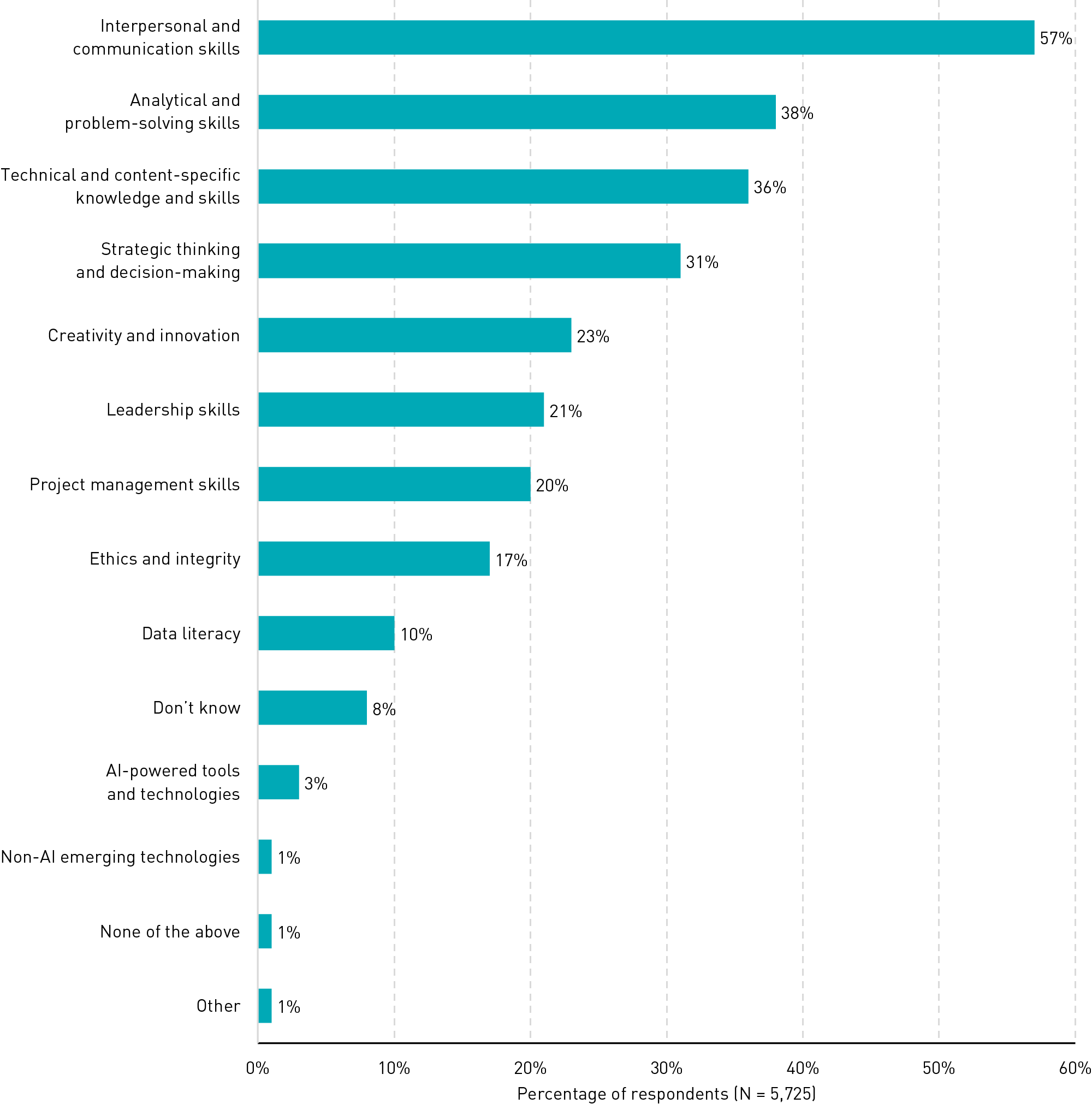
DSC: Shame on higher ed for not preparing students for the workplace (see below). You’re doing your students wrong…again. Not only do you continue to heap a load of debt on their backs, but you’re also continuing to not get them ready for the workplace. So don’t be surprised if eventually you’re replaced by a variety of alternatives that students will flock towards.
.


DSC: And students don’t have a clue as to what awaits them in the workplace — they see AI-powered tools and technologies at an incredibly low score of only 3%. Yeh, right. You’ll find out. Here’s but one example from one discipline/field of work –> Thomson Reuters Survey: Over 95% of Legal Professionals Expect Gen AI to Become Central to Workflow Within Five Years

.

Figure 15. Competency Areas Expected to Be Important for Career


Is collaboration the key to digital accessibility? — from timeshighereducation.com by Sal Jarvis and George Rhodes
Digital accessibility is ethically important, and a legal requirement, but it’s also a lot of work. Here’s how universities can collaborate and pool their expertise to make higher education accessible for all

How easy do you find it to navigate your way around your university’s virtual estate – its websites, virtual learning environment and other digital aspects? If the answer is “not very”, we suspect you may not be alone. And for those of us who might access it differently – without a mouse, for example, or through a screen reader or keyboard emulator – the challenge is multiplied. Digital accessibility is the wide-ranging work to make these challenges a thing of the past for everyone. It is a legal requirement and a moral imperative.

Make Things Accessible is the outcome of a collaboration, initially between the University of Westminster and UCL, but now incorporating many other universities. It is a community of practice, a website and an archive of resources. It aims to make things accessible for all.


Assistive tech in your classroom: A practical guide — from understood.org by Andrew M.I. Lee, JD
Assistive technology (AT) are tools that let people with differences work around challenges. They make tasks and activities accessible at school, work, and home. Learn how AT apps and software can help with reading, writing, math, and more.

People who learn and think differently can use technology to help work around their challenges. This is called assistive technology (AT). AT helps people with disabilities learn, communicate, or function better. It can be as high-tech as a computer, or as low-tech as a pencil grip. It’s a type of accommodation that involves tools.

Assistive technology has two parts: devices (the actual tools people use) and services (the support to choose and use the tools).

Students who struggle with learning can use AT to help with subjects like reading, writing, and math. AT can also help kids and adults with the tasks of daily life. And many adults use these tools on the job, too.
.


Book Review: Designing Accessible Learning Content — from learningguild.com by Jane Bozarth

What a great treat to receive a review copy of Susi Miller’s new book! This updated edition of her wonderful Designing Accessible Learning Content: A Practical Guide to Applying Best Practice Accessibility Standards to L&D Resources (2nd edition) is a must-have for anyone trying to make sense of accessibility standards. Updates in this new version include a deep dive into the revised WCAG 2.2 standards, affordances of and concerns about the evolution of AI, and information about the new European Accessibility Act, which puts pressure on commercial endeavors as well as public sector entities to ensure good accessibility practices.


How AI is transforming learning for dyslexic students — from eschoolnews.com by Samay Bhojwani, University of Nebraska–Lincoln
As schools continue to adopt AI-driven tools, educators can close the accessibility gap and help dyslexic students thrive

Many traditional methods lack customization and don’t empower students to fully engage with content on their terms. Every dyslexic student experiences challenges differently, so a more personalized approach is essential for fostering comprehension, engagement, and academic growth.

Artificial intelligence is increasingly recognized for its potential to transform educational accessibility. By analyzing individual learning patterns, AI-powered tools can tailor content to meet each student’s specific needs. For dyslexic students, this can mean summarizing complex texts, providing auditory support, or even visually structuring information in ways that aid comprehension.


NotebookLM How-to Guide 2024 — from ai-supremacy.com by Michael Spencer and Alex McFarland
With Audio Version | A popular guide reloaded.

In this guide, I’ll show you:

  1. How to use the new advanced audio customization features
  2. Two specific workflows for synthesizing information (research papers and YouTube videos)
  3. Pro tips for maximizing results with any type of content
  4. Common pitfalls to avoid (learned these the hard way)

The State of Instructional Design 2024: A Field on the Brink of Disruption? — from drphilippahardman.substack.com by Dr. Philippa Hardman
My hot takes from a global survey I ran with Synthesia

As I mentioned on LinkedIn, earlier this week Synthesia published the results of a global survey that we ran together the state of instructional design in 2024.


Boundless Socratic Learning: Google DeepMind’s Vision for AI That Learns Without Limits — from by Giorgio Fazio

Google DeepMind researchers have unveiled a groundbreaking framework called Boundless Socratic Learning (BSL), a paradigm shift in artificial intelligence aimed at enabling systems to self-improve through structured language-based interactions. This approach could mark a pivotal step toward the elusive goal of artificial superintelligence (ASI), where AI systems drive their own development with minimal human input.

The promise of Boundless Socratic Learning lies in its ability to catalyze a shift from human-supervised AI to systems that evolve and improve autonomously. While significant challenges remain, the introduction of this framework represents a step toward the long-term goal of open-ended intelligence, where AI is not just a tool but a partner in discovery.


5 courses to take when starting out a career in Agentic AI — from techloy.com by David Adubiina
This will help you join the early train of experts who are using AI agents to solve real world problems.

This surge in demand is creating new opportunities for professionals equipped with the right skills. If you’re considering a career in this innovative field, the following five courses will provide a solid foundation when starting a career in Agentic AI.


Three items re: accessibility from boia.org


How Important Are Fonts for Digital Accessibility?

With that said, simple sans-serif fonts are generally easier to read and understand. That includes popular fonts like:

    • Times New Roman
    • Arial
    • Tahoma
    • Helvetica
    • Calibri
    • Verdana

If you decide to use serif fonts, use them sparingly. For most body text, you should use a sans serif font with appropriate spacing and weight.

Follow these tips:


Why Web Accessibility Frustrates Developers (And How to Fix It) 

When developers view accessibility as an integral part of their work, the process of building inclusive websites becomes less of a chore and more of a rewarding challenge. By embracing tools like semantic HTML and incorporating user feedback from people with disabilities, developers can create solutions that enhance real user experiences while conforming with WCAG.

Starting with accessibility in mind from day one streamlines workflows, reduces the need for extensive remediation later on, and ultimately leads to more robust and inclusive digital products. To learn more, download our free eBook: Developing the Accessibility Mindset.


How to Respond to an ADA Web Accessibility Demand Letter

An excerpt from the “Learn the basics of digital accessibility” section:

We realize that we just threw a bunch of information at you — but we promise, the principles of WCAG aren’t too complicated. Here are some resources to help you learn the basics:

As you learn about digital accessibility, you’ll feel more comfortable reviewing your own content for potential barriers. The W3C’s Understanding WCAG 2.2 documents are an extremely useful resource for learning about specific barriers (and techniques for fixing them).

 
© 2025 | Daniel Christian